r/anycubic • u/ContributionBoth8910 • 9m ago
Problem When trying to print from app i get this. Any ideeas

1
Upvotes
r/anycubic • u/ContributionBoth8910 • 9m ago
r/anycubic • u/Optimal_Soil9632 • 4h ago

r/anycubic • u/DavenHundreds • 7h ago

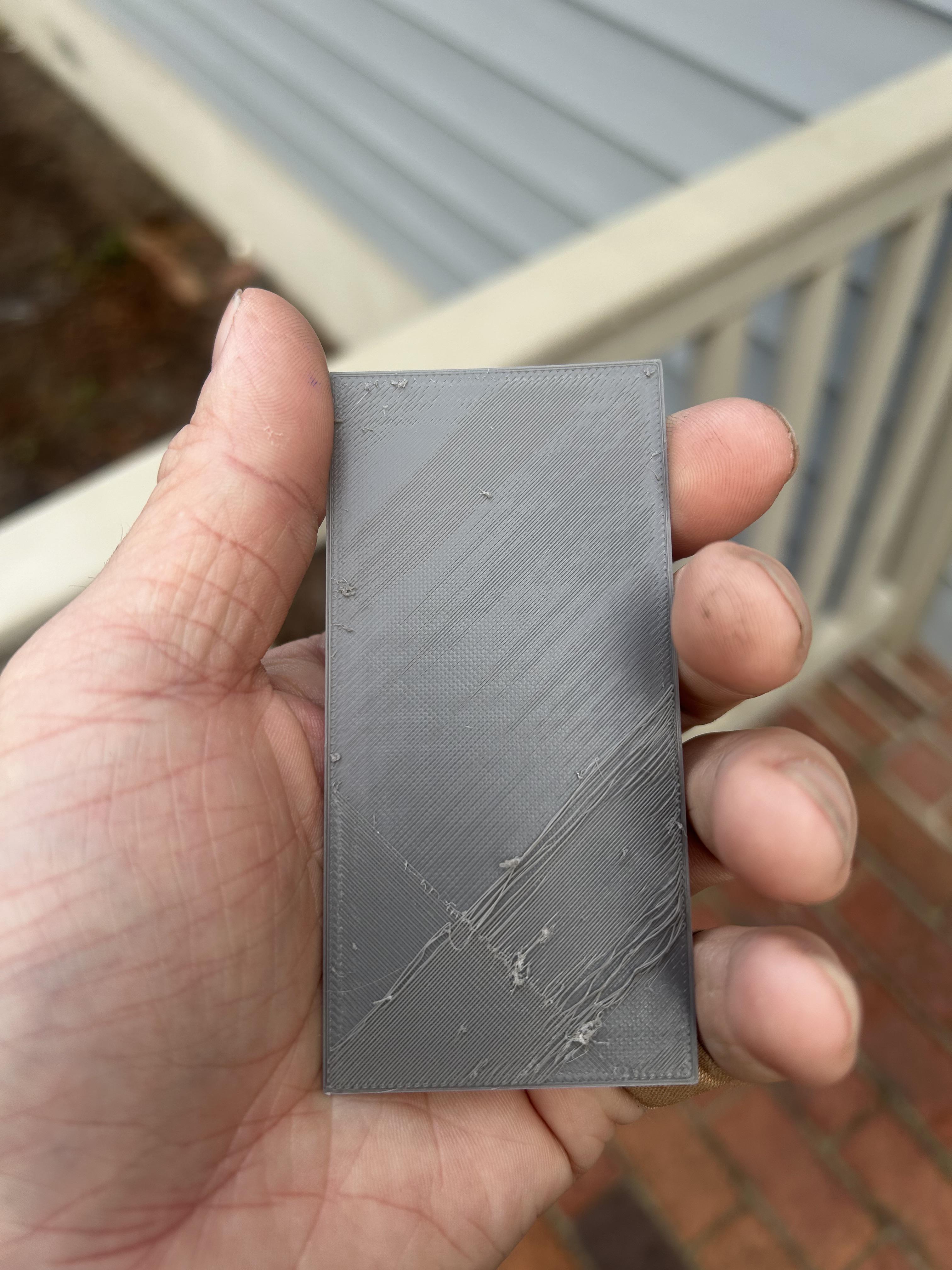
Yesterday my Kobra Max 2 printed this absolute beauty of a piece with black PLA. I’m making another part of my project with this brown one, and for some reason I am getting this stringing issue, and when I perform the auto calibration, mid process the hot end will just extrude filament like in picture #2.
I completely reset the printer, performed all the calibration steps, ensured the belts are tightened, and played with the Z-Offset, yet it seems like nothing is working. Looking through the manual I’m not finding a fix (maybe I’m looking in the wrong spot). Any help is appreciated.
r/anycubic • u/OkJunk1912 • 19h ago
Hey all,
I’ve had a Kobra3 for a couple years now and up until last week. It has been working perfectly and I use the base settings in the slicer for most of my prints. .
I noticed recently after printing a model, layers started to not print, and it would consistently jam. It started off not printing the first layer all the way, then after new filament and calibration changed to a few layers going through and then failure to print successive ones. I’ve replaced the entire module that attaches to the gantry, cleared any clogs, greased everything, changed multiple spools of filament, cleaned the plates, and even checked the files and printed off of a USB versus Wi-Fi, but it isn’t consistent and doesn’t actually print all the way. Extruding tests go fine. I don’t feel any loose play and everything looks to be level.
Attached is a photo of the most recent print with the failing of it being a little tiny strings and it did not complete.
thank you all for your help.
Edit: fixed it by smashing it with a hammer and throwing it in the trash. thanks for the input!
r/anycubic • u/Lost-Photograph7222 • 1d ago

AnyCubic Kobra 4, has 105 hours of PLA on the factory build plate. Just removed some silk PLA and all PEI coating completely delaminated. Also including pic of my A1 combo with 1117 hours on the OEM PEI plate.
Is this normal for stock AnyCubic plates? The machine is only a couple months old.
PLA only on this machine, no glue stick, no anything. Just washed with warm water and dawn between prints.
Should I just get an aftermarket?
Thanks for the input.
r/anycubic • u/Unfair-Bid7755 • 23h ago

Print design is being pushed forward / Y-axis
r/anycubic • u/Unfair-Bid7755 • 1d ago
Mostly in the Y-axis, during quick move, its rattling. Video 0.5
Print design is being pushed forward, also Y-axis.
r/anycubic • u/dog123cats • 1d ago
I can still print through the PC app, and the screen acts normally. The only problem is it wont respond to touch anymore.
r/anycubic • u/MiniaturePrintingPro • 1d ago
r/anycubic • u/gh692 • 1d ago
Hi all,
I've published a few docs I've made for myself to an open repo for the Kobra 3 Max, based on firmware 2.5.2.8: https://github.com/jpb-github/kobra-3-max-gcode
Full G-code and macro guide with many quirks and missing or buggy features. It has 28 chapters covering every command family (bed mesh, LeviQ3, heaters, fans, input shaper, pause/resume and more). Each command gets its steps, parameters, examples and cautions. It also documents which lines of a print file the firmware silently skips. It is based on AI reverse engineering the firmware binary, not on the outdated public source.
Orca Slicer start/end G-code. The stock code is little more than heat, home, level and print. Mine adds:
- LeviQ3 Z offset with temperature compensation
- a working adaptive bed mesh
- pressure advance from the filament profile
- console progress messages for Rinkhals Mainsail console
3. Bed Leveling Planner (Excel). It reads the bed mesh from the printer and shows it as a heat map. It then calculates the screw shims and Kapton tape strips to flatten the bed. It can run an averaged mesh test and rate the measurement quality (read the doc before using it)
Caveats: most of it comes from firmware analysis, and some unverified points are marked "(to verify)". Calibrate flow and pressure advance for your own filament. Use at your own risk. I'm back to printing stuff with a nice level bed, don't expect a lot of updates to this repo.
Enjoy!
r/anycubic • u/ElephantExpress9396 • 2d ago
r/anycubic • u/Professional-Owl2256 • 2d ago
I recently got my Anycubic Kobra X and wanted to install Anycubic Slicer Next on my Ubuntu 26.04 machine.
Unfortunately, Anycubic's official installer immediately rejected my operating system, claiming that only Ubuntu 24.04 is supported.
So I downloaded their installation script to see what was going on.
Turns out, the installer literally contains this:
check_os_version() { local os_version=$(lsb_release -sc 2>/dev/null) if [ "$os_version" != "noble" ]; then echo "$1" exit 1 fi }
That's it. It checks whether your Ubuntu codename is noble (24.04) and refuses to continue otherwise.
The actual installer simply adds an APT repository and installs the package.
The good news: I bypassed the installer and successfully installed Anycubic Slicer Next 2.0.0.6 on Ubuntu 26.04. It launches and works without any modifications to the application itself!
How to install it
Step 1: Add Anycubic's official APT repository
Open a terminal and run:
echo "deb [trusted=yes] https://cdn-universe-slicer.anycubic.com/prod noble main" | sudo tee /etc/apt/sources.list.d/acnext.list
We're deliberately using noble instead of the actual Ubuntu codename.
Step 2: Update your package lists
sudo apt update
You might receive warnings about a conflicting distribution or missing i386 packages. I received both, but they didn't prevent installation.
Step 3: Check dependencies before installing
sudo apt install --assume-no anycubicslicernext
Make sure APT doesn't propose removing or downgrading important system packages.
On my machine, the result was:
Upgrading: 0 Installing: 8 Removing: 0
Step 4: Install the slicer
sudo apt install anycubicslicernext
That's it! Launch Anycubic Slicer Next from your application menu.
Optional: Disable the repository afterward
Anycubic's installer uses [trusted=yes], which bypasses normal APT repository signature verification.
If you don't want to leave this repository enabled permanently, run:
sudo mv /etc/apt/sources.list.d/acnext.list /etc/apt/sources.list.d/acnext.list.disabled sudo apt update
You can re-enable it later to check for updates.
What about Linux Mint?
This method may also work on Ubuntu-based Linux Mint distributions, particularly Mint 22.x, which uses Ubuntu 24.04 as its base.
The important part is specifying noble in the repository configuration.
I have only personally tested Ubuntu 26.04, so I can't guarantee compatibility with Mint or other distributions. Check the dependency simulation before installing.
My results
OS: Ubuntu 26.04
Slicer: Anycubic Slicer Next 2.0.0.6
Package source: Official Anycubic APT repository
Dependency issues: None reported
Existing packages removed: None
Application launches: Yes
Initial functionality: Working
I haven't tested every feature, so this isn't a guarantee of complete compatibility.
A small message to Anycubic
Please stop treating "not officially tested" as "incompatible."
Your slicer works on my Ubuntu 26.04 installation without modifying the application at all. The only obstacle was the operating-system check in your installation script.
Instead of blocking newer Ubuntu versions entirely, why not display a warning that they haven't been officially tested and let users proceed at their own risk?
Hopefully this saves some fellow Linux users from unnecessarily downgrading their operating systems.
If anyone tries this on Linux Mint or another Ubuntu version, please share your results in the comments!
r/anycubic • u/ShapeTraditional5564 • 2d ago

my newly bought kobra s1 started printing like this after 200 hours of print time, i already lubed the the tube rails and screws but it won't get better, is there something im missing? even after running a complete calibration nothing changes.
r/anycubic • u/McLoven01 • 2d ago
Hi everyone!
I'm experiencing a frustrating and unusual issue with my Anycubic Kobra 3 Max V2, and I'm hoping someone here has experienced something similar or can help me figure out what's causing it.
The printer is brand new — I purchased it just two days ago.
The Problem
The printer initially works perfectly. It can complete smaller prints without any noticeable issues.
However, during longer prints (usually over 3 hours), the extruder suddenly stops feeding filament.
Here's what happens:
- The printer starts normally, with good first-layer adhesion and extrusion.
- At some point during the print, filament stops coming out of the nozzle.
- The print head continues moving along the correct toolpath, as if everything is printing normally.
- I can hear the extruder motor running, but it doesn't seem to pull filament from the spool.
- After a while, the printer displays Error 11518 – "Filament clogging detected."
The strange part is that if I stop the failed print and manually select Extrude at 220°C, the extruder pulls filament and extrudes PLA normally, without any issues.
Troubleshooting I've Already Done
I've tried quite a few things to rule out common causes:
Completely disassembled and thoroughly cleaned the entire print head.
Cleaned and inspected the nozzle, hotend, and extruder mechanism.
Checked the PTFE tube and confirmed that it's clear, with no obstructions.
Cleaned the filament path using a cleaning needle.
Tested different PLA filaments.
Tested both with the ACE 2 Pro and without it, feeding filament directly from an external spool.
Performed a full factory reset.
Tested the original preloaded 3DBenchy file, without using any custom slicer profiles.
Confirmed that the nozzle temperature remains around 210°C during printing.
Tested manual extrusion, which works normally even immediately after a failed print.
Unfortunately, none of these steps has permanently resolved the issue.
Important Observation: The Problem Seems Related to Longer Prints
Here's the timeline of what happened:
Day 1 – Initial setup
I unboxed the printer and started printing several small objects. Everything worked perfectly.
I then attempted to print a larger figurine. Partway through the print, extrusion suddenly stopped, and the printer eventually displayed Error 11518.
After troubleshooting
I completely disassembled and cleaned the print head, checked the filament path, and performed the troubleshooting steps listed above.
After reassembling everything, the printer successfully completed 2–3 smaller prints without any issues.
I thought the problem was fixed.
The problem returned
I started printing another figurine consisting of three separate parts.
- The first two parts printed successfully.
- When I started the third and largest part, the exact same extrusion failure happened again.
This makes me suspect that the problem may be related to extended printing time, heat buildup, or an intermittent extruder issue, rather than a permanent nozzle blockage.
I haven't confirmed the cause, though.
Printer Details
- Printer: Anycubic Kobra 3 Max V2
- Firmware: 1.0.5.2
- Nozzle: 0.4 mm
- Material: PLA
- Filament feeding: ACE 2 Pro and direct external spool (tested both)
- Nozzle temperature: Approximately 210°C
- Error code: 11518 – Filament clogging detected
- Printer age: 2 days
Has Anyone Experienced Something Similar?
What confuses me most is that:
- The printer works normally for smaller prints.
- The issue seems to occur during longer printing sessions.
- The extruder motor can be heard operating, but filament stops feeding.
- Manual extrusion works perfectly immediately afterward.
- The problem happens both with and without the ACE 2 Pro.
- The printer is practically brand new.
Could this be caused by heat creep, an extruder gear slipping when hot, a failing extruder motor, an intermittent electrical connection, or a filament detection issue?
Has anyone with a Kobra 3 Max V2 encountered this behavior, particularly during prints lasting several hours?
I'd really appreciate any suggestions for diagnosing the actual cause before replacing parts or requesting a warranty replacement.
Thanks in advance for any help!
r/anycubic • u/Skeetre • 2d ago
Hey.. I want to sell my ACE Pro and was wondering if this would be a good place to post it, or if there's a better place on reddit to sell Anycubic accessories? I replaced it with an ACE 2 Pro, and just want to recoup some of the cost.
Thanks!
r/anycubic • u/Beginning_Jury_2757 • 2d ago
Ola a todos, estou tendo este problema com a minha K3M... este barulho ocorre sempre quando ela termina a impressão ou as vezes faz a troca de filamento quando faz a purga. Também as vezes ela não consegue retornar a estrusora no pondo de origem dos eixos.
Fora isso, ela imprime normalmente.
r/anycubic • u/liamwullfin • 2d ago
r/anycubic • u/Vast_Medicine_2358 • 3d ago
Hallo zusammen,
Folgendes Problem.
Fehler 11518 wurde angezeigt. Ich habe den Druckkopf auseinander genommen und das Hotend getauscht.
Daraufhin konnte ich wieder drucken.
Als Test das PLA Benchy gedruckt. Alles super. Bis zum Ende fehlerlos gedruckt.
Dachte das Problem wäre behoben, aber beim nächsten Druckobjekt mit dem gleichen PLA und den gleichen Einstellungen bricht er direkt an dem Punkt ab wo er losdrücken sollte erneut mit Fehler 11518 .
Ich habe alles versucht und auseinandergenommen. Ich finde einfach das Problem nicht.
Wer kann helfen?
r/anycubic • u/Leather_Meringue_637 • 3d ago
I have the Photon S, and had an issue with the vat and lost it a few months ago. I have been looking for a replacement, but every link I find on reddit is dead, does anyone know of a compatible vat? It's incredibly hard to find parts and accessories due to their naming system! Thank you
r/anycubic • u/ArtillerySarge • 3d ago
I wanted to change my nozzle on my Kobra 2 to a smaller .2 just to experiment and see what the difference is.
I know how to switch out the nozzle and I'm comfortable doing that but I'm just curious what other steps I need to take within the slicing software or anything else. I use anycubic's slicer and it is updated to the latest version.
Do I just change the profile or should I mess with the speed settings and things like that? Just need some tips on what to look for. Thanks in advance!
r/anycubic • u/SofiePlus • 3d ago
Which profile would you recommend for Anycubic Kobra 2 Pro and Prusa Slicer 3 (alpha)?
I do not find any profiles any more on Anycubic's web page. The configuration wizard from Prusa Slicer 2 does not show any Anycubic Kobra any more. And the Prusa Slicer 3 does not have a configuration assistant yet.
I'd like to give the alpha version of this Prusa Slicer a try, but I don't know whether the old profile.ini are still suitable - and I'd like to get some proper fresh profiles.