r/v100 • • 8d ago

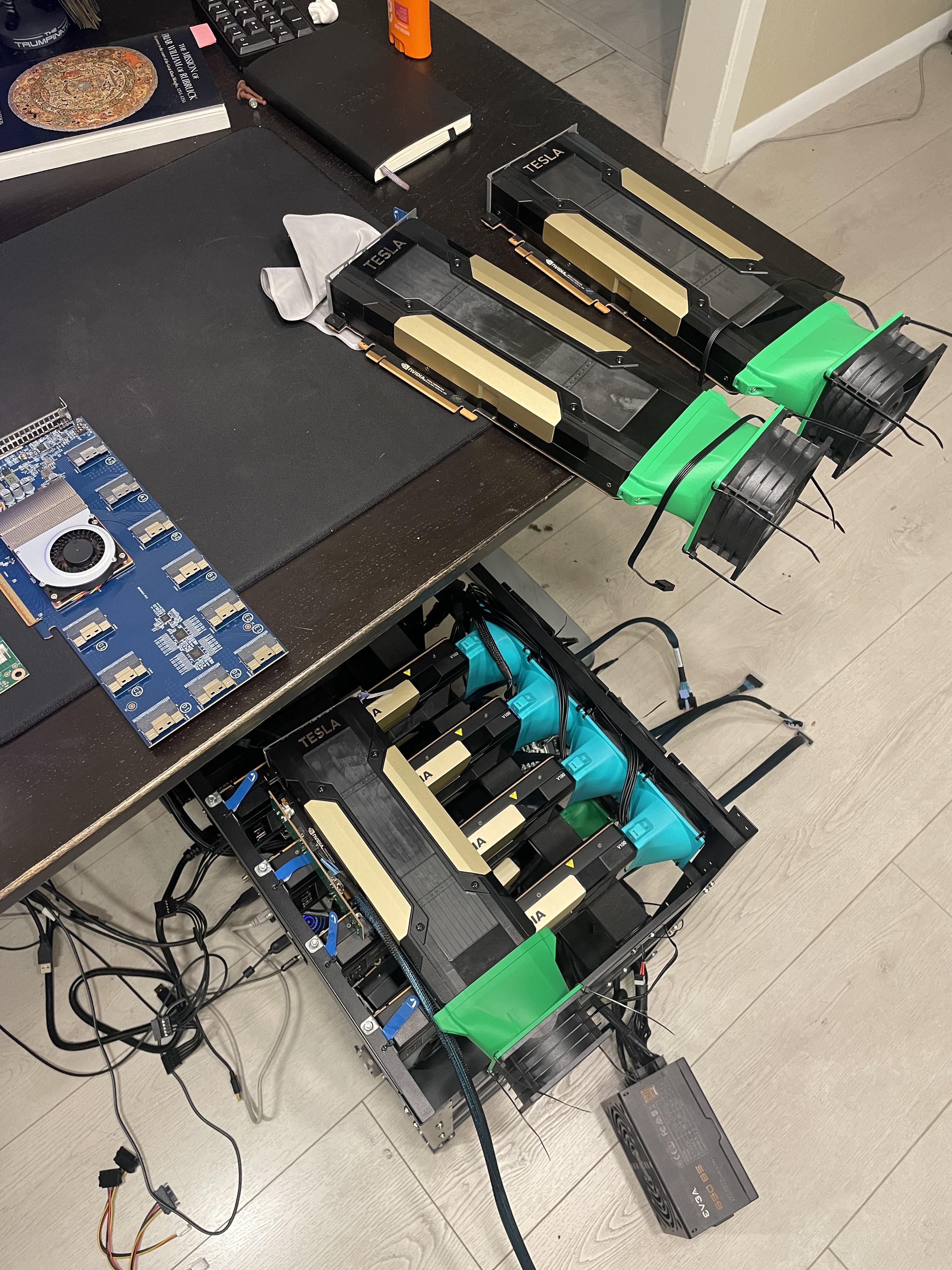
HELP WITH THERMALS

0 Upvotes

UPDATEEEEE_______ thanks for all the comments guys appreciate it ..... my case was tight and perforated at the front perforations wasnt enough ... ended up using a riser and have the fan outside the case ... not getting any throttling with air on ..... still ALOT of blowback with the 120mm shroud ... will think about swapping to 80mm or 93mm blower int he future ... thanks again

OK i redid paste and heatpads ... even put somne heatpads on the inductors the card i got had nothing .... and i get this

___________________________________________________________________________________________________________________________________________________________________________________________________________________
What I claimed was: since the die is at 79 °C (well under its 83 °C limit) yet slowdown still fires, something other than the die is hot — SOC/VRM/memory-side thermal trip — so only airflow fixes it.

What the sweep actually disproves is "the clock doesn't matter":

locked clock tok/s thermal events

1050 614.53 0

1125 665.22 0

1150 673.05 8

1200 676.56 40

1380 657.33 37

Thermal events go zero → visible between 1125 and 1150. So it is heat/clock driven with a threshold just above 1125, not something airflow or "ambient" switches off. My "thermal-neutral" phrasing was also sloppy: at 1125 you get 38 % less time throttled than unlocked density (a real gain), but "zero" only held for the ~94 s 64k sweep, not the 540 s 200k run.

What survived: the die reading never reached 83 °C, so the trip is a board-level sensor (SOC/VRM/memory), not the die — fan curve on die temp can't see it directly, and only airflow/case-venting would actually fix it. So "not the clock" was wrong; "not just the clock, and a die-temp fan curve can't help" is right.

___________________________________________________________________________________________________________________________________________________________________________________________________________________

any ideas on how i can help with the cooling so i don't throttle?

im using a 120mm fan shroud and a 4000rpm 200CFM fan ezdiy fab


r/v100 • • Oct 22 '26

V100 AIO setup renders

Post image
12 Upvotes

Hi there!

I am in the middle of sourcing components, and together with non-local AI, I am experimenting with blender, and slowly putting the components together.

The frame is sourced from an old Ender5, and I will print/buy any additional components.

Has anyone got good experience with AIO for quad solutions? Is it doable, or should I stick to air-cooling?


r/v100 • • 20d ago

Results from Qwen 3.8 27B

Thumbnail
gallery
9 Upvotes

I spend most of my time training and occasionally use Qwen for inference when I know Qwen 3.8 is fully capable of the requests so I limit my dependency on Claude Ultra. I’m not sure if these results are good or not, but I have been happy with the result. I also don’t understand why the Token/s are broken into smaller chunks on a single request. Hopefully this is useful to others in some way.

I am seeing now what u/Trademarkd was talking about with PP being about as fast for inference over PCIe as with NVlink. I saw NVLink speeds under 10GBps and mostly around 7-8GBps or less. This is right in line with PCIe 3.0 one way speeds.

The task was reading 30 supplied text documents I had prepared (less than 40MB) total), processing a request to evaluate what the documents held against known standards and a detailed report on deviations and a recommended implementation plan with a high level of detail.

First run, Qwen left out a few required details and was asked to try again. The entire process took less than 90s and produced a well rounded implementation document with everything I asked for.


r/v100 • • 6d ago

whats the best inference for inkling 2 mini ????????

6 Upvotes

r/v100 • • Aug 31 '26

Reliability of Tesla V100 SXM2 32GB on active cooled PCIe adapters

Thumbnail reddit.com
1 Upvotes

r/v100 • • Sep 24 '26

Qwen3.8 Flash Next performance?

2 Upvotes

I have 128GB of DDR3 1866 memory on a X99 board with a Xeon E5 2696v4 and 4x V100 16GB (64GB VRAM) and was able to run it in Q4 with llamacpp (a fork called llamacpp-4xV100), q8_0 KV cache, with n-cpu-moe set to 24 and split-mode tensor.

Might be the fork I'm using but I'm not able to fit nearly as many layers in VRAM with layer split mode, for some reason (would have expected the opposite).

Best performance I was able to observe so far was ~14 t/s generation for maybe the first 300 tokens, then an immediate dip to 4 t/s. PP is in the double digits, never getting much higher than 30-40 t/s.

I was wondering if anyone had managed to achieve better results with a similar setup?


r/v100 • • 3d ago

Is this listing legit? What if I get scammed?

2 Upvotes

Hello, I've been looking at used V100s on eBay for some time and came across this listing.

https://ebay.io/m/ph3dSU

The seller seems legit to ME, but I am not confident in it, what do you think? The price seems decent. I am however wondering what happens if I get scammed (the card does not arrive at all, is broken, or sth else arrives). What do I have to do to get my money back, and how reliable is eBay in this regard?

Also I am in the Czech Republic, so I expect to be charged +21% VAT by customs, but I've heard that you can get charged extra fees - how high can those go? Can you get hit by a random 200$ extra fee by customs? I am worried about that.

Thank you for any help!


r/v100 • • Oct 19 '26

Be careful selecting coolers for pcie V100 (or P100)

Thumbnail
gallery
11 Upvotes

URGENT: if you don’t read anything else, be very careful with some or the blower shroud designs as they can DAMAGE your card / cables. Look at the last 3 pics for one particular design which is common. It places significant stress on the power connector. It flexes the connector / causes the cables to have an extreme bend / and transmits a ton of vibration to that connector and the card. The sample I have if I tightened it down would have probably popped my connector off the board. When you tighten it down it doesn’t feel like you are putting much force on the connector but it is significant with this design.

You can see they are trying to have this design work for multiple cards. The spot where he power connector would go has a groove that is obviously for the latching clip of the connector. However on v100/p100 cards that latch is on the other side of the connector as oriented on the card. These shrouds are advertised as fitting other cards like P40, K80, etc and they might fit those but they should not be used on V100/P100 cards.

Lastly this design forces you to attach the shroud to the card first then use an extremely tight friction fit to install the fan into the shroud. The force necessary to do this can be significant and you run the risk of damaging your card, fan, or both. Just avoid this specific blower design at all costs imho. (Note, there are other straight through blower designs I have not tested, and many people use without issue, above problems).

———

Rest of my notes so far on various shrouds and cooling performance. I have a dual pcie v100 setup:

I’ve attached pictures of various compact cooling options for v100 and similar cards (P100 is what I have).

The pcie cards can be challenging to cool since they need both high airflow and pressure. Outside of a server chassis regular PC cases can have issues with suitable cooling.

If you search eBay, amazon, and various 3d file sites you will find a variety of shrouds. I have tried several meant for 40mm fans and 97x33mm blowers.

Let’s start with the 40mm shrouds. If you get a shroud that only uses a single fan you will have to greatly reduce the power of your card and it will still throttle under load. Using artic 15k high pressure fans will have the card on edge with memory causing throttling pretty fast. In my workloads the HBM runs 5-15 degrees hotter than the compute on the card.

Also, I highly recommend not getting any shroud that attaches to multiple cards. The issues here are removing / servicing your cards once they are installed. If your motherboard has pcie locks that auto lock after inserting the card, you will need a special tool or make your own shim to get the bottom card unlocked. It’s not easy and you run the risk of damaging your card / board or both. Some motherboards have better ways to unlock the cards, in that case it may be ok.

The dual 40mm black design in pic 2 and 3 is such a design. The white shroud in pic one and bottom left of 2 and 3 is a single card 40mm design. Just avoid these as they are just not worth it.

The 40mm design that does work is the dual 40mm fans per card. When paired with the artic 15k fans it keeps the v100 memory at 70 deg and good power limits. No throttling at all. That is in pic 4 (pic from listing as I didn’t uninstall it).

Next up the two blower designs. I highlighted the severe issues with the one design in the first paragraph. The second design is the curved design.

This design also suffers from vibration issues. This is especially the case if your cards are mounted horizontally on a vertical motherboard. It’s not as bad when the cards are vertical / case on its side. The shroud bend amplifies the vibration at various speeds since it flexes. I can feel / hear the vibration through the whole card and even case. To help mitigate / dampen this I have an adjustable GPU bracket that I have supported the shroud which reduces vibration significantly.

More importantly this design severely hampers the performance of the blower fan with that sharp bend. The fan I am using has more than triple the pressure and double the airflow of the two artic 40mm fans combined but it can barely keep the memory under 80 degrees under load.

I advise against using this shroud design unless there are no other options.

So… what am I going to settle on using? I am going to use a second dual 40mm shroud to cool my second card. A straight through blower does absolutely cool the best, but is extremely tight for my case and the noise seems to be worse (will be posting noise measurements soon to my GitHub below and here).

In the long term / in retrospect, I would probably go down the SXM2 route to get both nvlink and less expensive water cooling options. There are blocks for the pcie cards but they are hard to find and fairly expensive (~$200).

All my work on my v100 setup is here:

https://github.com/bradrlaw/ai-server


r/v100 • • 26d ago

Not sure where to start but need guidance

3 Upvotes

Hello everyone I hope you’re doing well today, not too long ago I had the fortune to encounter someone selling two Quadro GV100s for a steal so I bought them.

I also have a Dell OEM 3090. I’m unsure what models to run on my GV100 and 3090. Any suggestions?

On a side note am to configure the GV100s so that they run faster on certain models?

I hosted some Qwen models split between the two GPUs it wasn’t the smartest model but it worked. I’m looking forward to optimizing and using it for coding and some content creation.

1x 3090
2x Quadro GV100s
2x48gb sticks or 96gb of DDR5 ram 6000mhz.
Ryzen 7 7700x
1200w psu


r/v100 • • Oct 24 '26

Setup Suggestions

4 Upvotes

Hey all,

I am currently running a single 3090ti with Swift Qwen 3.8 27B Q4_K_M with llama.cpp, getting ~45 then/sec with 113k context using Hermes.

I am mulling over the idea of grabbing a 32gb V100 pcie, selling my 3090ti, then grabbing a second 32gb V100 with proceeds from that. I was debating going with 4 16gb sxm cards but somehow it seems that doing 2 pcie cards ends up being a little cheaper.

Am I making a stupid decision? I'm not running anything crazy at the moment, just kind of playing with local LLMs and seeing what they can do.


r/v100 • • 14d ago

Wiki

15 Upvotes

I have added some content to the wiki, do be advised this is ai generated from my own development and notes/posts. So while there is human work behind it, the wiki will probably be mostly ai generated. Of particular note is the optimization menu where I'm working to compile generalized tuning specific to the V100 from every engine/repository the community is aware of and my internal repo.

v100 wiki

or directly to the optimizations menu: https://www.reddit.com/r/v100/wiki/optimizations-menu/


r/v100 • • 9d ago

I messed up... Bought SMX3 for a SMX2 carrier board

5 Upvotes

Like the title says. I just bought and imported a quad-carrier board, case, power supply only to realize the V100 32GB modules I have are SMX3. I feel like an idiot. I stated in the Alibaba conversation that I had SMX3 modules and that's what I was buying the carrier board for, at no point was I corrected or told it was incompatible. My fault, I should have done more research.

Question is, what do I do now? At this point I'm feeling very defeated and I just want to sell it all off. Any path to redemption that you can see? Thanks for any suggestions.


r/v100 • • 3d ago

Sloptimized: my catalog of agent-driven benchmarks and optimizations across (now) 6x v100s

Thumbnail
gallery
17 Upvotes

https://sloptimized.ccb.gg/

If this is the kind of slop our beloved admin dislikes, so be it! But perhaps the interesting part is not the "got +x tok/s after asking for faster!" (which is more or less what the table is, multiplied by every model that has caught my attention), but the system that drives it: I've automated most of new model discovery, initial benchmarks, tuning/optimizations per model-backend, and serving, such that tuned models are immediately available to my `agent` metaharness, which wraps claude, codex, and pi for locally hosted models. Agents keep track of optimization techniques that work in a generic catalog (see link on the landing page) so that subsequent configs that can't inherit existing improvements directly can be quickly adapted to a new model or backend. I have yet to make regular use of local models for most of software projects (the closed models are just so much better it's been hard to want to spend the time optimizing), but it's fun to keep up and see what's possible, and now that I have 192GB I expect that may change. I discovered recently I can cut closed model token spend in half by using a closed model to plan a task and then a handful of qwen3.8 27bs to implement (back-tested on some historical tickets from the lab; doubles completion time). And I'm sure local AI will only get more exciting from here! Happy to have found fellow v100 havers!

For anyone who is interested in the mess behind the catalog, there is a sanitized copy of the source on the landing page, which includes nix configs for various backends, notes on experiments, and enough context to be useful as a bootstrapping resource (for other agents..).

v100 hosts are all poweredge r720-ish: one is a compellent sc8000, which was basically an r720-turned-external-drive-controller; flashing the BIOS turned it back into an r720 minus internal disks, so it boots from the network but still hosts two v100s.


r/v100 • • Oct 15 '26

V100 setup for $700?

6 Upvotes

Hey, I am looking at buying a V100(s) with a budget of $700 USD.

I have 128gb DDR4 2400 in a quad-channel on an X99 system, so of course I will be trying strata with flash next. I am undecided between running Qwen3.8-27b, and flash next, I want to be able to run both at a decent speed, and run 27b with a concurrency of 4 (subagents) without much slow-down. Hoping around 100t/s decode if possible.

I am thinking buying two 16gb SXM2, and getting a two-way NVLINK PCIe card, that way I get 32gb total, and better performance by using TP.

Does anybody run this config?
What speeds can you reach?
How does it compare to dual 16gb PCIe cards?
How does it compare to a single 32gb card?

So TLDR; I want at least 100t/s on Qwen 3.8 27b with a concurrency of4, and have USD$700 to spend. Is that doable? What’s the best option?


r/v100 • • Oct 24 '26

Problems and solutions setting up a 4x32gb nvlink base board on a z790 system

7 Upvotes

I recently got a quad base board with 4x32gb v100s. Eventually I'm going to get a xeon system, but for now I just have to use my regular desktop because I can't afford the upgrade. That turned out to come with some problems. It took me all day to figure out and I am writing it down in here case it helps someone else in a similar situation.

Problem 1 - memory mapping I have an asus z790 mobo. The UEFI only provides a 256gb MMIO window, which does not utilize the total theoretically addressable space. Even so, it would seem like four 32gb v100s and a 24gb 3090 should fit. They don't, because reasons. Unfortunately, my firmware deals with that by refusing to post. So that's at the firmware level, which is pretty specific to my machine. Maybe other manufacturers do better.

In addition, apparently the 7.x kernel sizes the PLX switch's windows in a way that also would not fit all four v100s in the addressable region even if all of it were accessible. So that's at the kernel level, which isn't specific to my machine at all.

I needed to do three things:

  • Not try to have the firmware address the v100s, because otherwise the computer won't start. This means not turning on the base board before or during boot, but having it hooked up.

  • Add to the top of the MMIO window to make enough room. This is doable with an ACPI table override during Linux's boot.

  • Roll back to the 6.17 kernel, which sizes the windows differently than 7.x.

Now that there's enough room and once linux is up, I turn the baseboard on. Then, I remove the root port above the PLX switch from the device tree to free its windows (which will have gotten very little allocated since nothing was plugged in at boot), and rescan so Linux maps the whole branch again.

After that all four v100s and my rtx 3090 are working. Also, I've wondered if there could be a way to turn the base board off remotely when I'm not using it, without it taking my vm with it. The power consumption at idle is kind of high. Now I can use the same remove/rescan script to turn the baseboard on and off smoothly, so that's nice.

Problem 2 - power rails I have a 1000w PSU on the base board, which I thought would be enough if I limited the v100s to 150w. It didn't work. I could load a model with -sm layer but not -sm tensor. If I tried to do that, the base board would lose power. Best guess is that this is because even though I was under the overall power capacity, it still exceeded the per-rail capacity. A single-rail (or jumpable) PSU is needed to power the baseboard. Or at least fewer rails, maybe, who knows? So, FYI that matters, if it seems like something you're dealing with.


r/v100 • • 18d ago

Legion - a new LLM engine targeting SM70

Thumbnail
gallery
25 Upvotes

Hi folks,

I've been working on a new inference engine written from scratch with coding agents, my inference engine targets V100 and has custom sm70 kernels, it is able to load both GGUF and some safetensors models, speculative token generation MTP and Dflash are supported as well.

The main objective of Legion is to be MoE-first engine and specialize in unified/shared memory systems, where existing engines have been lacking in my opinion.

Legion has been tested with the IBM AC922, a system where the POWER9 CPUs are NVLinked to the V100 SXM2 GPUs with coherent memory access up to 150 GB/s.

https://github.com/eelgaev/Legion

Where it differs from cat-vllm? Legion allows obscure cpu architectures like ppc64le to run, unlike vllm with it's hundred of dependencies.


r/v100 • • Oct 17 '26

PSA: Kernel Parameters (iommu and acs redir)

9 Upvotes

For linux users:

iommu prevents peer to peer for working between nvidia cards over pcie ... I actually would like to see some numbers from someone with two pcie v100s

PCIE switches like PEX/PLX apparently need to have ACS disabled to allow peer to peer communication?

GRUB_CMDLINE_LINUX_DEFAULT="quiet intel_iommu=off pci=disable_acs_redir=<list pcie devices>"

I just did this and tested using 1cat's low latency algorithm for communication/all-reduce on a TP2 and got results nearly identical to using nvlink.

It's worth noting in this case I am also using a pcie switch (PEX) and both of these cards are connected to the same switch card even though they are not on the same nvlink island.

There might be problems with my testing which is why im looking for others to help confirm the results.


r/v100 • • 19d ago

I keep hearing about price being an issue.

10 Upvotes

I understand things are going up in price, but is there still value in ~$2,500 for 128GB (4x32GB) or ~$8,000 for a 256GB (8x32GB Inspur/Gigabyte) with Volta? The price is higher than it used to be, but is there a better value with something else? The next step up feels like ~$23,000+ for a 160GB Redstone A100 setup,


r/v100 • • Oct 13 '26

Best Qwen 3.8 Flash Next Runtime - 4 x 32GB NVLinked V100s, X99 Dual Xeon E5-2696 V3, 64GB RAM

12 Upvotes

Open question:

What is the best Qwen 3.8 Flash Next Runtime - 4 x 32GB NVLinked V100s, X99 Dual Xeon E5-2696 V3, 64GB RAM

I'm going to give the 1CatvLLM route a go, but claude tells me the PLE tables are going to need 48GB of RAM.

My system splits the RAM, 32GB for each NUMA CPU.

I've got some more RAM on order, but you know.. impatient.

----

So what's the recipe?

Use the Strata-V100 port for "Low RAM" (cough) systems like mine.
It works well with the correct environment and launch parameters.

Model:

IQ3_S GGUF from ISTA-DASLab

Performance with MTP spec 6, min-p 0.7:

105–110 decode
1240 prefill at 4K
3170 prefill at 32K

But... if you can get 64GB per NUMA CPU, use the Cat1 vLLM port.
You can run higher quants and decode about 2 x faster (measured at 200+ TPS).
The decode speed is due to NVLink Tensor Parallelism.

There's a long Opus generated summary in the comments.
That was about 12 hours of vibing and fluffing around.


r/v100 • • 12d ago

1Cat-vLLM vs Strata

Thumbnail reddit.com
13 Upvotes

r/v100 • • Oct 13 '26

My 3xV100 rig

Thumbnail
gallery
13 Upvotes

2sxm2, one pcie


r/v100 • • Oct 03 '26

3× V100 32GB + Qwen3.8-Flash-Next Q4: 262k context, 68–97 t/s. Is that decent?

18 Upvotes

Update (Oct 7): I did try the new Strata V100 fork from the P.S., and went a bit further than planned. The fork just landed its Q6_K expert kernels (they're opt-in at build time), so I grabbed Unsloth's UD-Q6_K_XL, a 169 GB 6-bit file. The kernels are new, so I ran the fork's GPU parity tests before trusting them: the Q6_K paths came back bit-exact on sm_70, so at least I wasn't debugging a black box.

Same rig, same 200 W caps, split across the three cards, MTP on, int8 KV. The prefill difference is the headline: about 28 seconds for 60k tokens, 35 seconds for 131k, 97 seconds for 258k, against the 87, 109 and 206 seconds I was getting on the Q4 setup. Decode is around 52 t/s at 60k, 50 at 131k and 49 at 258k. That's about 25-30% below my Q4 numbers, but it's a 6-bit quant on a different engine, so I'm okay with the trade. Recalls passed at all three depths again.

I stretched the context to 512k with YaRN x2 (the model is trained at 262k) and the needle recall still passes with 513k tokens in, decode holding around 42 t/s, and a cold read of that 513k prompt taking about 202 seconds (~2600t/s). Images work too. The fork spins up a vision encoder on demand, about 6 seconds for the first image and half a second per image after that.

So on this rig the Q4 llama.cpp path is still the decode king, but for long-context work the Strata fork on Q6 does prefill roughly 3x faster at 60-131k (about 2x at 258k), stays usable all the way to 512k, and gets me vision as a bonus. If anyone has prefill numbers for Flash-Next or similar MoEs on V100s, I'd love to compare, and I'm curious whether others have pushed a 6-bit quant this far on this hardware.

(AI was used to help with the tests and the formatting of this update, same as the original post.)

Original Post:

AI was used to help with tests and post translation and formatting.

I have a home-built AI rig with 3× Tesla V100 32GB cards, and I’m wondering if my performance is where it should be for this hardware/software. I see plenty of benchmarks for 3090/4090 setups, but fewer for V100s, especially with such long context windows. So, here are my numbers; let me know if I’m leaving any performance on the table.

The machine: three PCIe V100 32GB cards (sm_70) on a Huananzhi X99-F8D Plus motherboard with dual Xeon E5-2640 v4 CPUs (dual-socket, 10 cores each, 40 threads total) and 128 GB of DDR4 ECC RAM (8 × 16 GB sticks). The cards aren't all connected to the same CPU: the first is on CPU 0 (NUMA node 0) and the other two are on CPU 1 (NUMA node 1), so when the first card communicates with its neighbors, the data travels across the inter-socket link. I’m running a fork of llama.cpp with MTP support for speculative decoding (built with CUDA 12.8) using the Qwen3.8-Flash-Next 125B-A6B model (6B active parameters). It’s a ~114 GB UD-Q4_K_XL quantization, including the MTP head I added manually. Layers are split across the three cards, with a 262,144 context window and q8_0 KV cache. I’m running a single slot at a time, since MTP forces me to use `--parallel 1`.

Before settling on this config, I tried quite a few things, starting with the quantizations: first IQ3_XXS, then IQ4_XS, and now Q4_K_XL. Then I tested other engines using the same client: mainline llama.cpp, ik_llama.cpp (which suffered significant performance drops beyond 60k), and Strata (faster at prefill but slower at decoding). I also experimented with various settings: ubatch size (it crashes above ~1024 if I keep the 262k context), offloading experts to the CPU (which was significantly worse), pinning to a single NUMA node (no measurable difference), and MTP depth.

After all this back and forth between quants and engines, I wanted some quietness (I was running open case with a riser, because my 3 GPUs wouldn't fit side by side in the 3 PCIe x16 slots) so I tried to fit them in slots, not using the best maximal PCIe lanes config. I went from x16, x16, x16 to x16, x8, x8. Performance? <0,5% lost.  I was quite pleased at that point.  I then decided to run it at a lower power capacity. I went from 250W to 200W: no decode speed cost. Now everything runs quiet (for a 8k RPM fan) and cool (max 65 degrees C under 12+hr 100% load).

In terms of numbers, decoding speed is now around 97 t/s for short prompts, holding steady between 68 and 71 t/s across the 60k to 258k context range, a pretty flat performance curve. Prefill speed hovers around 685 t/s, resulting in processing times of approximately 87 seconds for 60k tokens, 109 seconds for 131k, and 206 seconds for 258k. I also ran recall tests (needle test) by embedding a specific piece of information in the middle of the context; the model retrieved it correctly at 60k, 131k, and 258k. VRAM usage is maxed out at about 30–31 GB per card.

I’m wondering: is this decent performance for V100s? The prefill speed seems average, though I’m not sure what the benchmark should be. If you have figures for Flash-Next or other MoEs of this size running on V100s (or equivalent hardware), I’d love to see them. Also, I’d appreciate any tips!

P.S. I will try the new Strata v100 fork from last night as well.

r/v100 • • 8d ago

PCIE V100 water cooled by AIO

Thumbnail
gallery
22 Upvotes

So i have 2x V100 PCIE version, but cooling those by air is too loud + too hot. The cards often overheat when i compact long context ( I use QFN with over 500k context size) or video generation.

So I went to xianyu and buy two adapter bracket designed to adapt V100 PCIE to AM4 cooler. The xianyu link i bought from expired but you can find it by the name of seller titan2000 . He has a tutorial video here

https://www.bilibili.com/zh-Hans/video/BV1kgb46HEhn/?spm_id_from=333.337.search-card.all.click

I don't have xianyu account. I ordered from a local shipping agent in Vietnam. You need to tell the seller titan2000 that you are buying for PCIE V100 version.

The adapter is about $20 each. I bought 2 adapters.

Then I buy 2x AIO Snowman KS360 from taobao. I don't have taobao link here because my shipping agent handled it but here is an alibaba link

https://www.alibaba.com/product-detail/SNOWMAN-KS360-AIO-Liquid-Water-Cooler_1601322231676.html

Remember to buy this exact KS360 or KS240 cooler. It's the one featured in the video tutorial. The bracket and the V100 chip have specific sizes so buying other cooler we might end up with clearance issue, I also can't find any AIO this cheap locally anyway.

When the AIO arrive we need to take the AM4 brackets included in the box, and remove the spring screws on there. I used a dremel to cut it out. Then we can bolt it on V100 exactly like what's shown on the video.

The result works great. Under long compaction and heavy Qwen 27B use the temperature stays under 60C, HBM memory temp is under 70C. I did not change the fan curve control or anything just plug the pump + fans to my motherboard port. I think i can get lower temp by change the stock RGB fans to more powerful 12cm server fans later but i'm happy for now.

My total cost for 2x adapters + 2x AIO + shipping: about 100 USD

Things to remember:

- Be extra careful when remove the V100 heatsink, if you tear up any of those thermal pads it will be a headache to measure and order replacement pads

- Be careful not to screw the AIO too tight otherwise you will broke the chip. the screw included in the adapter have no spring - no protection from over-tighten.

- V100 with this AIO on now take 3.5 - 4 slot that is why i can only have one card installed on my PC. I'm ordering a pcie riser for the second card

- We still need good airflow to cool the VRM on the card. The leftover heatsink on the card covered all the VRM needed but you need to blow air to it

- Wear eye protection + face mask when using the dremel. You can try to buy AM4 bracket online without the spring screw I think it's common size


r/v100 • • 4d ago

Finally switched to VLLM

Post image
23 Upvotes

After 2 months with llama.cpp I finally made the decision of trying VLLM for my production environment. 2xV100 32GB PCIe with a Threadripper 3960x and 96GB of DRR4.

I'm really happy with this. I did not expect such a speed nor ease of use.


r/v100 • • 16d ago

Do we have a discord?

Post image
62 Upvotes

As i’ve worked over the last few weeks to get myself up and running with 8x 32gb cards i find it increasingly necessary to coordinate with others on similar hardware. I’ve seen some other hardware specific discords around but I wonder if there is one for v100 specifically? i started one myself but there’s only a few people in it so i wanted to see what’s out there

also enjoy the pic of me installing a new switch - gotten me to 220/3300 single stream on 3.8FN which is more than i would’ve hoped for.