r/v100 • • 3d ago

Sharing my Abomination

Thumbnail
gallery
153 Upvotes

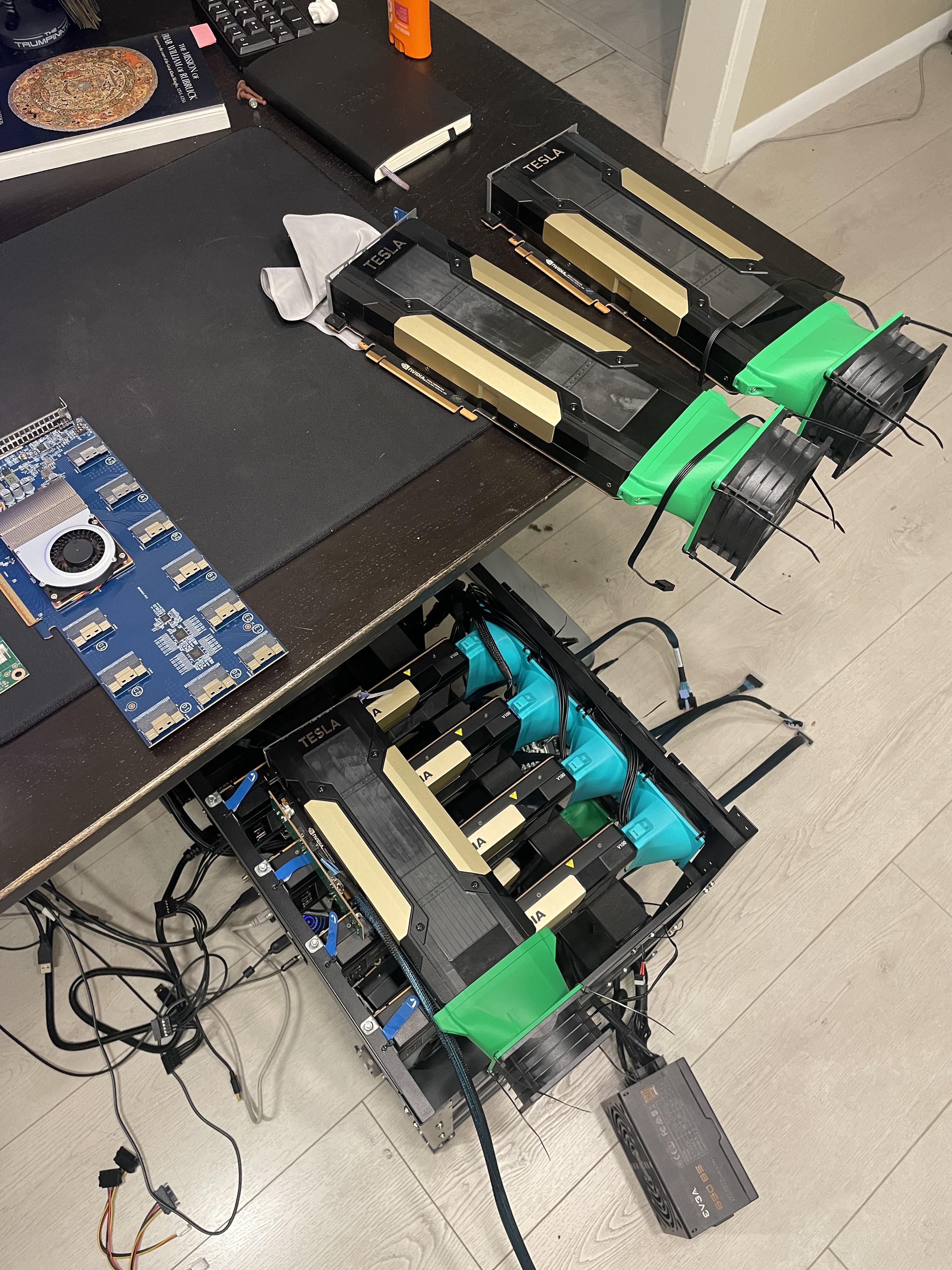
Since everyone's been sharing their abomination, this is mine.

Specs; SuperMicro H12SSL-CT, Epyc 7452, 256Gb Samsung @ 3200

Power; HP1200w Flex PSU with a ZSX-Amp breakout

I'm stripping it down to install 2x 360x65 push/pull rads and water blocks but the A100 SXM4 heatsinks looked super cool and I'll miss them. Hoping I can solve the CRC errors I've been having on a couple of the nvlink channels.

The downside of the A100 heatsinks is that you cannot pull the modules without pulling the heatsinks first, which sucks when the paste and pads used were expensive.


r/v100 • • 6d ago

Wish me luck

Post image
132 Upvotes

After looking at the prices for four SXM2 boards one more time, I’ve decided to go for it and order a custom-made PCB. This is either going to be a huge win or a spectacular failure. Wish me luck! 🤞

upd, faq:

Q: OpenSouce?
A: After I verify that it works.

Q: price?
A: jlcpcb quote is ~120$ per board, 5 mrq. That does not include SXM2 connectors.


r/v100 • • 13d ago

8 x v100 setup. Ask me anything.

Post image
123 Upvotes

Seeing a lot of questions on quad v100 boards lately. So figured I’d give people a place to ask them.

Specs

  • GPUs: 8x Tesla V100-SXM2-32GB (256 GB VRAM total)

  • GPU boards: 2x 4-GPU SXM2 NVLink baseboards (this model)

  • NVLink: two 4-way islands (full mesh inside each board), not one 8-way

  • Board-to-board: Gen4 PEX88096 PCIe switch card (this model), two x8 Gen3 cables per board

  • CPU: AMD Threadripper PRO 3975WX (32 cores)

  • Motherboard: ASRock Rack WRX80D8-2T

  • RAM: 256 GB DDR4

  • PSUs: 2x 1500 W (one per GPU board) + 1x 1000 W (host)

  • Power: dedicated 120 V / 20 A circuit; GPUs capped at 150-300 W each depending on the run

  • Cooling: custom water loop, mixed GPU blocks

  • Network: 10GbE

  • Engine: 1Cat-vLLM (Volta-focused vLLM fork) https://github.com/1CatAI/1Cat-vLLM

Benchmarks / how many tok/s?

My runs are on the Launch80 directory; search the page for trailfeatures. Launch80 deletes pages after 5 days, so older links in the comments may be dead. I republish the main ones, which gives them new links.

ModelSetupDecodePrefill (64K prompt)
Flash-Next (Swift-1.5 NVFP4)4 GPUs, 300 W~140 tok/s~4,500 tok/s
DeepSeek V4.1 Flash, 2-bit experts8 GPUs, 150 W~131 tok/s~2,200 tok/s
DeepSeek V4.1 Flash, 2-bit experts4 GPUs + expert offload, 150 W~91 tok/s~2,100 tok/s
  • One request at a time (batch 1), 256K context window. Decode uses speculative decoding (MTP on Flash-Next, a draft model on DeepSeek), so it depends on how often the draft is accepted.

  • No concurrency/aggregate numbers or decode p25/p95 yet. Time to first token (p50) is about 0.2-0.65 s depending on the row.

  • The 8-GPU run adds an extra pipeline-parallel patch series on top of 1Cat-vLLM (named on the page).

  • Not tested yet: Flash-Next across both boards. Higher DeepSeek quants are planned.

How good is the 2-bit DeepSeek quant vs the full model?

79.9% average across 7 standard evals (math, instruction following, coding, tool calling), thinking off, and 20/20 long-context needle checks at 32K and 128K. The 4-GPU setup scores the same. I haven't run the full-precision weights as a reference, so there's no direct delta yet. Per-task scores are on the Launch80 page.

How do the two boards talk to each other?

  • Each board runs two x8 PCIe Gen3 cables from its onboard switch into the Gen4 switch card in the host, so the boards talk to each other without going through the CPU.

  • Experimenting with ConnectX-3 cards in the boards' spare x8 slots for extra board-to-board links.

  • Over PCIe you can tune all-reduce to beat the default P2P numbers, but it will never match NVLink.

Do the quad boards work with only 1-3 cards? Can I buy cards over time?

Two cards works; I've run a board that way. I haven't tried one or three. Buying the board first and adding cards later is fine. Tensor parallel wants power-of-two GPU counts, so with 3 cards you'd run 2 together and use the third for something else.

Where did you buy it / where are you?

Baseboard and switch card: the models linked above. Several sellers list them, so shop around. GPUs: bought used, a few at a time. I'm in North America (the 120 V gave it away), so my shipping and import experience won't help much in Europe.

Power

  • The PSUs are sized for headroom: at the 150 W cap, eight GPUs is about 1.2 kW, plus the boards and host.

  • 150 W cap: after tuning it costs ~5-10% depending on the task.

  • Power bill: fine as long as I'm sensible. Solar helps, and at peak rates or on cloudy days the DeepSeek API can be cheaper. If you run local LLMs, know your tokens per kWh so you can tune for it and decide when an API makes more sense (if privacy doesn't matter).

Cooling

  • Radiator and pump setup: super convoluted, video here.

  • Water blocks: whatever was available as I pieced it together. Mostly the same design, some with MOSFET coolers. The top-port block is a drill press, a tap, and the audacity of a mediocre man. (Testing straight-down flow onto the fins made no difference.)

  • Waste heat: in summer it's vented outside. In winter I can shut off that radiator and send the heat into the house through backup radiators. Heating water with it isn't worth it for us, but a bigger household close to its water heater could pre-heat the cold feed and come out ahead.

Quick ones

  • Can I rent API time? Sorry, no. I keep it pretty busy (Furry Fanfic).

  • Can I have it? No.


r/v100 • • 9d ago

2 X V100 PCIe in an old desktop chassis

Thumbnail
gallery
113 Upvotes

I see all your fancy, 3D printed shrouds, and I raise you with a single fan + 3 wires /s

I decided to reuse an old desktop machine with MSI Z370 + i7-8700K as I had 32GB RAM laying around.

Please note that the whole airflow is reversed, and flows back to front.

Running Strata-V100 with Unsloth Qwen3.8 FN IQ4_XS (256k context) and getting up to 130 t/sec decode and 1500 t/sec prefill, even on 8x PCIe slots.


r/v100 • • 15d ago

Sorry they're not in a heap (3xV100 32GB)

Post image
95 Upvotes

384 Altmans of Ram. Running an SM70 rig is feeling more and more like racing without a seat belt.


r/v100 • • 22d ago

"The Pile" - A 6x 16GB V100 setup

Thumbnail
gallery
92 Upvotes

Here she is! I posted the first picture on r/LocalLLaMA which gathered some "interest" so figured I'd share.

It started off as 2x V100 (16GB) and 4x P100, the P100's were swapped for more V100's giving 6 total. The "pile" method worked well initially, running Qwen 3.8 27B for a few weeks while I organised a case for it.

Yes, the roll of masking tape wedged against the machine next to it was necessary to stop it collapsing. It did require occasional "maintenance".

I 3D-printed some adapters for Delta blower fans. The fans snap into place without fixings (it's quite satisfying). I was able to fit a fan adapter to the pile each day or so as the 3D printer generated them.

I designed a control PCB for the 6 fans based on Arduino, with a system daemon that pulls temperatures from the GPUs for fan control.

My original motherboard's PCH failed quite spectacularly, I wasn't able to find the cause, but I've now retired the multi-PSU setup and am waiting for an isolated USB hub before I reinstate the fan controller. I also have a power meter (which communicates over Modbus->USB) and vibe-coded a plugin for Opencode to provide real-time cost-per prompt, as well as a "dashboard" which gives power, cost, and cooling information.

Right now I'm running two 27B Q6_K agents in TP3, with llama.cpp, around 30t/s at 256k context. My current motherboard (ASUS Z10PE-D8 WS) has 7 slots, split 4/3 across the CPU's, so I could use a TP4 arrangement with 1cat, but I've struggled with OOM issues running 27B with 256k context, and I didn't notice a huge improvement at >200k (around 35t/s). Not sure if I'm doing anything wrong, I'm not so familiar with it.

The last few GB of each TP3 GPU shares a second model Qwen3-VL-8B Q4_K_M, which is used as a vision helper agent by 27B. There's approx 300-500mb left on each V100, and it doesn't seem unhappy about that yet.

The rest of the hardware is, EVGA 1600T2 PSU, 2x E5 V4 CPUs (I think 2690's), 128GB of RAM. Loads of 3D printed brackets to mount the various parts, welded steel chassis.

I originally ran a load of other VMs on the same machine, but due to the idle power draw of the V100's, I moved my "always on" VM's to a separate machine so I can power this one down when it's not needed.

Still to do - reinstate fan controller and power meter, add side panels to the case, 3D print a back panel


r/v100 • • Oct 13 '26

This V100 thing is coming together.

Thumbnail
gallery
78 Upvotes

More work than it seems on the surface to get this NVLink setup going. Should be another day or so. They say this is an EEB layout but only 40% actually lines up on the EEB standards. I designed a tray that matches all the mounts and has support for the GPU stand-offs.


r/v100 • • 16d ago

Do we have a discord?

Post image
62 Upvotes

As i’ve worked over the last few weeks to get myself up and running with 8x 32gb cards i find it increasingly necessary to coordinate with others on similar hardware. I’ve seen some other hardware specific discords around but I wonder if there is one for v100 specifically? i started one myself but there’s only a few people in it so i wanted to see what’s out there

also enjoy the pic of me installing a new switch - gotten me to 220/3300 single stream on 3.8FN which is more than i would’ve hoped for.


r/v100 • • 21d ago

Adding on to the jank pile of builds, with mine! 4x V100S 32gb PCIe

Thumbnail
gallery
60 Upvotes

Epyc Rome 7452, 144gb 2400 MHz DDR4, running Proxmox to be my big node, running Qwen Flash Next UD-Q4_K_XL at 200-250 tk/s decode and 3,800 prefill on sFNX, or Deepseek V4.1 Flash IQ2_M 80-110 tok/s decode and 2,700 tok/s prefill with an optimized version of Maya, will PR later

rip to the account on the guy that was selling V100S 32gbs for $725 on r/homelabsales, they made this possible, they got banned unfortunately 😭

(native precision is 4 bit for Deepseek, so 2 bits doesn't hurt deepseek as much as it does for 16 bit native models which collapses when on Q2)


r/v100 • • 10d ago

In honor of being given the label "fire hazard" by a mod, here's the local rig

Thumbnail
gallery
58 Upvotes

2x v100 32gb SXM2 Nvlink

2tb SSD, 4 2TB SAS drives can be seen in a parity RAID array in the background.

Picture 2: a 32gb pcie v100, 128gb ddr4, xeon e5 2697v4, and a rx 580 8gb for good measure. I have to keep the SAS controller cool so that's the extra case fan that's propped on a book

everything holds under load!


r/v100 • • 5d ago

Your Tesla V100 is not dead: volta-forever runs unmodified CUDA 13 programs on Volta

55 Upvotes

Happy to introduce you volta-forever.

NVIDIA dropped Volta from CUDA 13, so we brought it back.

volta-forever lets you run unmodified CUDA 13 programs on your V100: stock PyTorch, vLLM, SGLang and llama.cpp, with support for BF16, FP8 and NVFP4.

No driver mods and no engine patches. You just prefix your command with `vf`. Under the hood, a proxy libcuda rewrites PTX, translates SASS to sm_70 and emulates the newer tensor-core instructions.

https://github.com/nbald/volta-forever

Still a young project, so happy to get your feedback.


r/v100 • • Oct 16 '26

Slop

52 Upvotes

I just wanted to make a post about this so the communication is clear and I hope the majority of people who come here agree:

I will be very liberal in removing posts that look like slop.

I do not want this to turn into localllama where every post you see is just another person's bot telling you how it made X tok/s on VeryLargeModel by just quantizing to 0.0001 bits.

I'm not making it personal, nobody is banned, but this isn't the place ai psychosis. This sub is for human discussion. So, how can you avoid having your post removed?

Type your own post. Despite what you might think people that have been dealing with ai models for years can see it in the text almost immediately because of the use of cliches, snowclones, whatever you want to call them. Certain grammar patterns and phrasal templates are very obvious. It is possible to mask some of this and a lot of people try ... that might make it difficult to tell the difference between a non native speaker and someone using ai to write for them.

Understand the technical details of what you're sharing. There is a lot of people asking ai to do things for them that already exists and is likely way more refined. If you don't know, then make a post and ask someone to explain it to you. ai is very bad at having broad context of whats out there and what's going on without filling its cache up with a ton of tokens, humans are still better at this.

You can even figure a lot of this out with ai if you know how to ask the right questions.

I am sorry if you're caught in the crossfire but I hope to keep this sub relatively high value in its post content.

If I remove your post, I'm 1 person with the goal of keeping the post quality content high in order to continue to attract high quality people that will aid with the development of sm70/v100 arch for all. Read the sidebar, send me a message via mod mail. I'm not trying to offend anyone and no action I take is personal; even if you were to attack me personally, I don't think that's grounds for community action. I am more than happy to reverse a decision following a conversation. Be reasonable, talk to me.


r/v100 • • 13d ago

4x V100s, 10 free API keys, and ReVolta 0.2.0rc10

51 Upvotes

Two weeks ago, I gave out 10 free API keys, each with a billion-token allowance, for people to try Qwen3.8-Flash-Next running on my four V100 32GB GPUs. That test has now wrapped up, so I wanted to share how it went and what we’ve been working on.

Eight of the ten keys were used, with around 35,000 metered calls and 4.27 billion input and output tokens in total. Most of that volume came from cached context being reused across long conversations, with about 9.12 million output tokens generated. Several testers used almost their entire billion-token allowance, and I added another billion for two of them.

People connected it to OpenCode, VS Code Continue, and their own agent setups for coding, homelab troubleshooting, scripting, and system administration. Some ran agents for hours at a time. One tester used an orchestrator to assign tasks, separate agents to execute them, and another agent to review the results. They reported completing eight administration tasks and catching a real defect during a code review. Seeing people use the service for their own work has been more rewarding than getting a nice throughput number.
During the test, we also released ReVolta 0.2.0rc10. ReVolta is the V100 inference engine I maintain, based on 1Cat-vLLM. This release focuses on making long contexts and ongoing agent sessions more practical.

The biggest addition is Host KV, which stores the main KV history in system RAM while keeping hot data on the GPU. With FP8 KV, 64 GiB of RAM allocated to the main KV and its index provides capacity for roughly five million tokens of history. That puts a server’s system memory to work alongside its GPUs and makes it easier to keep multiple long conversations available for reuse.

We also improved SSD caching. Instead of immediately writing everything that enters the memory cache to disk, delayed writes let us skip data that has already been superseded. In a controlled replay, the final number of pages written to disk fell by about 24.4%, while the amount of cached context reused stayed the same. Persisted conversation caches can also be reused after restarting the service.

rc10 adds a built-in browser dashboard, updates DFlash2, and fixes several issues involving tool-call parsing, cache restoration, and streaming output. I’ve also started receiving screenshots from people running rc10 on their own machines with multiple coding agents. Going from sharing access to my server to seeing others deploy it themselves feels like a meaningful step.
Thanks to everyone who tried it, reported problems, and shared their workflows. If you’re running V100s for long-context inference or coding agents, I’d love to hear how you’re using them.

GitHub: Leonccaa/ReVolta
Release: ReVolta 0.2.0rc10


r/v100 • • 6d ago

Performance improvements to v100-ninfer fork on a single Tesla V100

50 Upvotes

I've been running Qwen3.8-27B NVFP4 on a 32 GB Tesla V100 with V100 port of NInfer, and spent a while reworking the Volta kernels trying to make it utilize it's hardware resources better 😄 The result is a fork that is faster in every case I measured, with the biggest gains at long context and with several concurrent requests.

Repo: https://github.com/ddominet/ninfer-v100-fast

What changed

  • New tensor-core attention kernels for decode that read the INT8 KV cache directly, so decode slows down far less as the context grows (a round goes from 30 to 41 ms between 60 and 172K tokens, versus 34 to 71 ms before).

  • Linear layers: one width policy for 1–64 token rounds, activations staged once per round, and no more per-layer weight dequantisation on mid-size rounds. This is where the concurrency gain comes from.

  • Prefill: a fused attention kernel over the paged cache, and short prompts routed to the decode kernels instead of the big GEMM path.

  • A 262,144-token context with speculative decoding (up to K=5) and CUDA graphs fits on the 32 GB card. Configurations that don't fit are refused at start-up with the byte counts.

Results (same card, same published model file, both builds run back to back through the HTTP server, natural-text prompts, greedy, 256 output tokens):

WorkloadUpstream portThis forkGain
Decode, 1.1K-token prompt, MTP K=367.5 tok/s72.9 tok/s1.08×
Decode, 24K-token prompt, MTP K=357.2 tok/s70.0 tok/s1.22×
Decode, 89K-token prompt, MTP K=341.4 tok/s57.9 tok/s1.40×
Decode, 172K-token prompt, MTP K=331.9 tok/s53.5 tok/s1.68×
Decode, 172K-token prompt, no speculation14.1 tok/s24.2 tok/s1.72×
8 concurrent streams, MTP K=1155.7 tok/s243.3 tok/s1.56×
Prefill, ~60-token prompt154 tok/s339 tok/s2.21×
Prefill, 172K-token prompt455 tok/s (380 s)625 tok/s (276 s)1.37×

Enjoy, and let me know if it works for you.

Kind Regards


r/v100 • • Oct 12 '26

Vrooom :) my V100 setup

Post image
50 Upvotes

Built this thing in march with Dual P100 PCIe 16GB cards but in the last month upgraded to Dual 32GB V100s

CPU: Ryzen 7 5700G (For the iGPU) @ 4.7GHz
GPU: Dual Nvidia Tesla PCIe V100 32GB
RAM: 96GB DDR4 @ 3000MHz
Mobo: Gigabyte B550 Gaming X v2
OS: Linux Mint 22.3
Case: Fractal Design Focus 2 (Glass Side Panel)

Various Storage, 256/512GB NVMEs, 512GB SATA SSD, 2TB SATA HDD

Love this thing!!


r/v100 • • 5d ago

A bit late to the party, but here’s my setup for 2xV100 colocated in a Polish DC 😁

Thumbnail
gallery
45 Upvotes

Hi everyone,

Took a liberty to share my setup, which have been mostly a hardware from a couple of old donor builds :D

AM4 5950X (AIO watercooled)
64G DDR4 3000Mhz
4TB Nvme ssd
1x 8TB HDD
2x 4TB HDD
2x Nvidia v100 pcie 32G
1x Nvidia T10 16G
Old 3U Rack case

Software:
Ubuntu 22.04 LTS
NVAIE software stack (NFR as nvidia partner)
Nvidia Run:AI with microk8s
2x pod with my fork of Ninfer
Separate pods for: LiteLLM, Opencode2, Crawl4ai, Qdrant, SearXNG, ASR, STT, TTS, Image generation with Qwen Image 2.1

V100s are used exclusively for Qwen3.8 27B 8 agents each and T10 for STT, TTS, Image Generation

All colocated within a DC in Poland 🇵🇱

Cheers!


r/v100 • • 26d ago

24h report: 4× V100 serving Qwen3.8 Flash-Next to 10 testers

44 Upvotes

Quick update on the free test keys from my last post. Here's what the server did over the last 24 hours, minus the nightly maintenance window, so about 17 hours of actual service.
Traffic
7 testers active, almost all running coding agents
12,917 requests
1.29B input tokens, 3.4M output tokens
Median prompt: 90K tokens. Largest: 230K
One tester already went through their whole 1B token quota in under two days 😅
Speed and latency
Time to first token: 92% under 2.5 s, 98% under 5 s, 99% under 10 s

Best single minute: ~11,900 tokens ÷ 60 s ≈ 198 tok/s, plain wall clock

Average while generating: about 120 tok/s across all running requests
(It's the 3.45M output tokens divided by the ~8 hours the GPUs were actually decoding (idle time excluded), which works out to about 120 tok/s.)

Whole window, idle time included: 3,445,504 ÷ ~60,700 s ≈ 57 tok/s

Peak concurrency: 7 requests running at once, 2 queued. Most of the time it was 1–3.
Zero preemptions
Prefix cache
This is what makes agent workloads work on old hardware. 97.8% of all prompt tokens came from cache. Only 2.2% had to be computed. About 1% was reloaded from CPU RAM or SSD instead of recomputed.
Power (GPUs only)
5.7 kWh for the 17 hours, about 340 W average for all four cards
Peak 695 W, under the 800 W cap (4× 200 W)
Idle with the model loaded: about 180 W
Errors
29 out of about 12,950. 27 were requests hitting the server while I took it down a few minutes early for maintenance, 1 was a single dropped request during the day, and 1 was a client sending a reasoning_effort value the model doesn't support.
Live stats: https://flash-status.19b.net
If you've been testing, I'd love to hear how it went in the comments: what you ran, what broke, how it felt compared to what you normally use. And if this is useful to you, a ⭐ on GitHub helps a lot: https://github.com/Leonccaa/ReVolta


r/v100 • • 2d ago

My 4 x v100 Rig

Thumbnail
gallery
43 Upvotes

I used a x10 Motherboard because these cards are PCIe 3 anyway. I used a dual card blower with a high flow fan but only running 40%. Cards capped at 250W


r/v100 • • 14d ago

Which quad V100 SXM2 carrier would you buy today?

Thumbnail
gallery
43 Upvotes

I'm putting together my first build with 4 × Tesla V100 SXM2 16gb. I'm considering an AM4 or AM5 motherboard to start with, and I might move to a single-socket EPYC board like the H12ssl if I add a second quad later, but I’m open to other host platforms.

My main goal is direct NVLink between all 4 GPUs. For the host connection, I'd like to get at least 31.5 GB/s of theoretical PCIe bandwidth per direction across the four cards, if practical.

These are the four boards I found, in gallery order:

  1. Black board, four SlimSAS ports, no onboard switch. It looks like one Gen3 ×8 link per GPU. Has anyone tried it with two passive ×8/×8 adapters or a Gen4 ×16 switch card?

  2. Black board with an onboard switch. One owner reported a PEX8748. What host link speed and width do you get with both cables connected?

  3. Green board, four cable ports and two large chips. Does anyone know if it can use two independent Gen3 ×16 host links at the same time?

  4. Green Suqiao board, one fan and two extra full-length PCIe slots . It's listed with a PEX8796. Has anyone confirmed that the two cables give it a Gen3 ×16 host link?

Which board and host adapter would you go with? If you've used one of these, I would be thankful to hear what worked for you.

One bonus question. Has anyone found a standalone quad carrier that gives all four V100s Gen3 ×16 each and still has NVLink between every pair? I know Dell did it in the C4140 configuration M. I'm curious if there's a DIY option.

Thanks!


r/v100 • • 15d ago

Meet the V100 Noctunator

Thumbnail
gallery
40 Upvotes

Who said you can't cool a V100 using only Noctua fans and sleep like a baby next to your GPU while qwen3.8 27b turns you into a billionaire? (Or the daisy-chained fans cause a short circuit and burn the house down. 50/50.)

The goal

Local AI in my bedroom, running 24/7, and I refused to accept anything under a 27b model.

Attempt 1: push harder

I've seen people cut open the top of their V100 to mount a blower fan, but I didn't want to butcher the heatsink. So I got a 120mm fan adapter and strapped two NF-A12x25 G2s to it (yes the black ones, they were cheaper here). Anyways, why two you may ask? Because everything I read says these cards need static pressure, not just airflow. I got the Sx2-PP dual pack, since the ~100 RPM offset between the fans keeps them from humming at the same frequency.

Long M4 screws, spacers between the fans so the second one has room to breathe (more would probably be better), and tape around the gap so the first fan doesn't just blow air around the second one's inlet.

Result: still not enough pressure. The card throttled down to 110–120 W, not even half its max, at 80°C core and 85°C VRAM (the VRAM was the limiting factor). At 8-bit quant, generation dropped from 34 tok/s to 22. Unacceptable!

Attempt 2: push AND pull

Luckily I'd also bought a dual 40mm shroud, which came with two 12k RPM server fans. Those two alone would do the job, probably better than everything else here combined, but heck, they're loud asf. So they got replaced with two NF-A4x20s.

I already suspected the mini fans would do better than the 120s, since more RPM means more pressure. But on their own they just don't move enough air. So I combined both: the 120mm stack pushes from one end, and the shroud with the mini fans sits on the opposite end as pullers.

Honestly? All four fans together move a decent amount of air. It feels comparable to a blower fan I had lying around, and that blower kept the card happy at around 200 W.

Noise

Definitely quieter than the blower, but still about as loud as a desk fan. The two A12x25s struggle to push air through the shroud, and the mini fans aren't loud but have that annoying high pitch mini fans always have. Still, imo you can defo sleep next to it.

What's next

Hooking it all up to my eGPU and mini PC. I'll update you guys soon with real temps. Gotta find a good place for it now cause it's 50ish cm long...

TL;DR

Wanted a quiet V100 in my bedroom without cutting it open. Two NF-A12x25 G2s pushing through a 120mm adapter weren't enough (throttled to ~115 W, 34 => 22 tok/s). Two NF-A4x20s alone didn't move enough air either. Both together in push-pull feels about as strong as a blower that handled ~200 W, at desk fan noise levels. The 12k RPM server fans would cool better but are way too loud. Real temps coming soon. Card's like 50cm long

Update 1: Temps and Speed

Well, it throttles to around 140W, ran Qwen3.8 27b Q4_K_M at around 35tok/s gen speed with MTP turned on. VRAM sadly hits its 85°C throttle temp there... Good enough for me, I personally limited it to 130W for now. Might check if I can get a huge but quiet blower fan somewhere to get faster generation.

Update 2: Higher gen speed

Thanks to u/notalentwasted who advised me to use a Ninfer, I got a steady gen speed of 51tok/s now. If I remove the wattage cap I can get short bursts of 60-70tok/s even but get throtteled after a minute-ish. The limiting factor is still VRAM hitting its 85°C limit while my core is "chilling" at around 73°C.


r/v100 • • Oct 10 '26

Built a 4x V100 SXM2 rig (128GB VRAM) for local LLMs — months of pain, one fix I never saw coming.

40 Upvotes

Since spring I've been building a 4x NVIDIA V100 SXM2 32GB rig on an SXM2 carrier board with NVLink, to run language models fully locally. 128GB of VRAM in total. It finally all works, and the journey was... something.

Sourcing
- Modules 4x NVIDIA V100 SXM2 32GB: eBay — one pair from Israel, one pair from China.
- Carrier board TNS-4SXM2-4P54 / YMZX-4GPU-Q1 + closed-loop liquid cooling kit: from China, with long waits due to component shortages.
- Host connection: C-Payne SlimSAS PCIe gen3 Host Adapter cards and cables, splitting x16 slots into x8/x8 to feed the carrier board.

Lots and lots of waiting.

Hard-won lessons
- Isopropyl alcohol for cleaning old thermal paste off the modules.
- Buy good, hardened screws. You'll tighten and loosen them many times, and soft heads strip. I had to cut one off with side cutters.
- Do NOT use a click-type torque driver on these modules. Even the lowest setting (~1 Nm) was too much, and the click jolt loosened a glued standoff on the carrier board. Hand feel is safer.
- Power: ~300W per module, so 1.2kW for the GPUs alone plus board overhead. I'm running a 1350W ATX supply. Mind the connectors — the board wants a lot of them, of different types, so make sure your PSU ships with the full cable set.
- Cooling: cold aluminum plates, two radiators, pump, and seven fans plugged straight into the carrier board's fan headers.

The fault that nearly broke me
One position on the carrier board kept flipping to a red LED and dropping off PCIe under load — even with different modules in it. A fresh replacement module worked fine in another slot. It looked like a dead slot or a dead carrier board, and I was close to ordering a new one.

Actual cause: uneven spacer washers under the module screws at that position — none under one screw, two under another — causing uneven clamping pressure. I evened them out, and it's been green ever since, including under load.

On SXM2, even mating pressure is everything. Check your washers.

Current state

All four modules running on a Supermicro H12 server motherboard with AMD EPYC CPU with correct x8x8 bifurbication on two 16x PCIe slots

Running Qwen3.8 Flash-Next-NVFP4 via a Volta-optimized vLLM https://github.com/1CatAI/1Cat-vLLM

Fast and surprisingly precise. I know NVFP4 isn't native on Volta, but it's what the project recommends and it works well.

Also tried their AWQ quantizations — worked, but with some tool-call issues. NVFP4 is the best so far.
Permanent home will be a Supermicro H12 DDR4 EPYC board with 256GB RAM — just waiting on its liquid cooling.

Video?
Would you be interested in a full build video walking through all of this — sourcing, assembly, the mishaps, and the diagnosis? Happy to go deep on any part. Let me know what you'd want covered.

Note: I used an LLM to help edit this post, mainly because English isn't my first language. The build, the story, and the mistakes are all mine.


r/v100 • • 19d ago

My 4x16GB V100 Setup

36 Upvotes

Rig

  • Ryzen 9 3900X, B550 board, 32 GB RAM, Ubuntu 26.04 (kernel 7.0), NVIDIA 580.178.

  • 4x V100 SXM2 16GB on a carrier TNS-4SXM2-4P54 capped to 200W each in SW

  • PLX PEX 8748 PCIe card with SFF-8654 8i cables (x8 each). Connected to x4 slot so it loads slow initially. I haven't moved the card to x16 slot yet but I imagine it will improve cold start (see below).

  • Carrier on its own 1500 W PSU

  • 2x 360x29mm radiators and 780L/hr pump

Software

1Cat-vLLM v1.5.2 wheel, CUDA 12.8.1 toolkit, gcc-14, Python 3.12, torch 2.10+cu128.

  • Target: QUASAR-QAT/Qwen3.8-27B-QUASAR-NVFP4 (20 GB)

  • Draft: incoai/Qwen3.8-27B-DFlash2, 7 speculative tokens

  • TP4, FP16 compute, fp8_e4m3 KV cache, prefix caching on

serve_qwen38_27b_nvfp4_v100.sh /models/Qwen3.8-27B-QUASAR-NVFP4 \
  --draft /models/Qwen3.8-27B-DFlash2 \
  --max-model-len 131072 --max-num-seqs 4 --gpu-memory-utilization 0.85

The release profile defaults to 256K context and 8 sequences, which is meant for the 32GB cards. On 16GB: weights are 6.76 GiB per GPU and the KV cache gets 4.4 GiB per GPU, about 384K tokens total. Cold start is 100-200s.

Results (200W/GPU)

TestResult
4 concurrent requests, 512 tokens each~524 tok/s aggregate
Prefill, 109K-token prompt~2,580 tok/s (~42 s to first token)
Single request decode~85-310 tok/s, depends a lot on how predictable the text is (speculative decoding)

This is my first test with llm after getting it all running. Seating the GPUs took forever to get the links stable between cards, in the end I only got 22/24 links. I probably need to break it down and reseat the problem cards.

Plan is to use this for personal agents and for some while-im-asleep software projects.


r/v100 • • Oct 19 '26

V100 NVlink Dashboard

Post image
35 Upvotes

I wanted visibility on the links and the GPUs. If this looks useful I could make it public.

Update: public repo is up. Link in comments.


r/v100 • • 1d ago

tesla v100 amazing

Post image
32 Upvotes

Mini PC um790 pro 32gb ram and now connected with DEG1 oculink (internal extension) to tesla v100 pcie. Its amazing super performant and no errors. I switched it against the rtx 3080ti 12gb. here my settings:

Hardware

GPU

Tesla V100-PCIE-32GB (GV100GL, PG500, rev a1)

PCI address

01:00.0 · Gen3 x4 via OCuLink

Dock

Minisforum DEG1 (open-air OCuLink eGPU dock)

Power cable

RM850X CPU 8-pin (EPS) → V100 aux connector

VRAM

32 768 MiB HBM2 · BAR1 = 32 768 MiB (confirmed full)

Architecture

Volta · SM 7.0 · 5120 CUDA cores · 640 Tensor Cores

Driver & Software

Manjaro driver

video-nvidia-580xx (mhwd) ·active

NVIDIA driver

580.196.07 (LTSB for Volta — last branch with SM70 support)

CUDA version

13.0 (reported by driver) · cuda_v12 runner used by Ollama for SM70

Kernel

7.3.4-3-MANJARO

Ollama

0.34.4 · uses cuda_v12 runner (cuda_v13 skips SM70)

Display GPU

AMD Radeon 780M (iGPU, Phoenix1) — V100 is compute-only

Applied Settings

ECC Mode

Disabled(pre-configured — confirmed clean, ECC errors: 0)

Persistence Mode

Enabledvia nvidia-persistenced + nvidia-clocks.service

Power Limit

250 W —Confirmed optimal(150 W tested: clocks throttled to 952 MHz, not suitable)

Clock Lock

AppliedMEM 877 MHz · SM 1380 MHz — 2026-11-27

Compute Mode

Default (multi-process) —SkippedNo benefit for single-Ollama setup; blocks second CUDA process

Flash Attention

SkippedSM70 support not guaranteed; 32 GB sufficient for current workloads

UMA Framebuffer

Reduced to minimum in BIOS → 30 GB system RAM available

Backlog

B1

tandem.cpp — MoE offload for models larger than VRAM

llama.cpp patch (ewhacc/tandem.cpp) that caches most-used MoE experts in VRAM and offloads the rest to CPU/RAM/SSD. OpenAI-compatible llama-server (not Ollama). No value for current dense models (qwen2.5-coder:32b fits in 32 GB). Useful if running DeepSeek-V4.1-Flash or Qwen3-235B-A22B. Blockers: SM70 (Volta) untested in README (only sm_89/sm_120); Gen3 x4 PCIe bandwidth (~3.9 GB/s) limits expert-reload speed. Revisit when a MoE model is needed.

github.com/ewhacc/tandem.cpp

B2

volta-forever — CUDA 13 shim for SM70

User-space layer (LD_AUDIT + LD_LIBRARY_PATH) that retargets CUDA 13 PTX → SM70 and swaps in CUDA 12 cuBLAS. Lets current PyTorch 2.15 / vLLM wheels (which dropped SM70) run on the V100 without building from source. Requires driver 580 (confirmed). Blockers: AI-agent-written (343 commits in 3 days); 2 silent wrong-result bugs already found (Triton fp32, PyTorch VF_CAPABILITY); only Ubuntu/Debian tested (Manjaro untested); no decode speedup over native llama.cpp cuda_v12. Trigger: only needed if switching from Ollama to current vLLM or PyTorch wheels.

github.com/nbald/volta-forever


r/v100 • • 17d ago

4× V100 32gb on an HPE ML350 Gen9: water-cooled, BAR space fits exactly - Barely

32 Upvotes

The server is an HPE ML350 Gen9 with two Xeon E5-2667 v4 CPUs and 512 GB of DDR4-2400 memory. I added four Tesla V100 cards on a Chinese AliExpress carrier board (“v2.0”) with a PLX switch. The carrier board is not inside the server. It sits in its own rack-mounted case, directly below the ML350, and connects to the server with SlimSAS PCIe 4.0 cables.

Almost finished: https://imgur.com/a/ZzhVmVa

The hardest part was not the hardware. It was the PCIe address space. My Xeons can only map 128 GB for this. Each V100 needs a large 32 GB BAR (memory window), so four cards need exactly 128 GB. The cards had to be on CPU2, because CPU1 already uses part of its space for things like the USB controllers and network cards. With one more card, or a bigger BAR, it would not work. Keep this in mind if you build on an old HPE Gen9 server. To make the system assign the BARs correctly, I needed a custom kernel. I built it with a lot of AI help (vibe coding).

All four cards are water-cooled. I tightened the cold plates to 0.3 Nm, which is close to the value in the HPE manual. I used the same torque wrench that I use to set the belt tension on my e-bike’s Brose motor. I was lucky that my hobbies overlap. For the tubing, I used John Guest push-fit fittings. These are the same fittings that breweries use for beer and water lines. They are cheap, easy to find, and you do not need special tools. At work, I use them every day at 4 bar of pressure and with boiling water for sanitation. They work very well, as long as you do not use an acid that is not compatible with them.

Torque wrench I used: https://imgur.com/a/oO6a6zh

I run the models with the 1Cat fork of vLLM. With the ThinkingCap model, I get about 80 tokens per second for one request, and about 240 tokens per second in total with four requests at the same time. Prompt reading is about 4,900 tokens per second, and the power stays under 500 W. I also tuned a faster 27B model, with 7 draft tokens, 16 requests at the same time and 250 W per card. The GPUs never went above 43 °C, even when the whole system used more than 900 W, so my double-radiator build seems to remove the heat well. Another poster with a quad V100 board warned against the cheap water blocks that come with it. In my experience so far, they work fine.

Next, I want to test 70B-class models. Questions and suggestions are welcome. I am looking forward to having such a capable tool in my homelab.

Early Grafana dashboard: https://imgur.com/a/NWcou0Q

Edit: Bar error (boots, but requires kernel patch) https://imgur.com/35Lw70T Rack with grafana kiosk https://imgur.com/XujPVXA