r/learnwithcodelivly • • Oct 15 '26

Linux Commands Cheat Sheet for Cloud & DevOps Beginners

Post image
701 Upvotes

Linux is one of those skills that comes up everywhere, whether you're working with cloud infrastructure, DevOps, system administration, or cybersecurity.

I put together this cheat sheet covering useful Linux commands for everyday tasks, server management, and troubleshooting.

What's covered:

  • File management: ls, cd, mkdir, cp, mv, rm

  • Remote access: ssh

  • Networking: ping, dig, wget

  • System monitoring: uptime, df -h, free -h, uname

  • Searching: grep, locate

  • Process management: ps, kill, bg, fg

  • Permissions and archiving: chmod, tar, gzip

  • Useful terminal shortcuts

Memorizing commands is one thing. Understanding their output and knowing how to use them safely when troubleshooting real systems is what makes the difference.

For those taking Linux further into cybersecurity, here's another resource worth exploring:

The Pentester's Linux Library Playbook: Advanced Privilege Escalation

https://resources.codelivly.com/product/the-pentesters-linux-library-playbook-advanced-privesc/

And if you're looking to develop practical skills in ethical hacking and penetration testing, check out the training program here:

Ethical Hacking & Penetration Testing Training
https://training.codelivly.com/programs/ethical-hacking-and-penetration-testing

What Linux command or privilege escalation technique took you the longest to understand?


r/learnwithcodelivly • • Sep 13 '26 Heartwarming

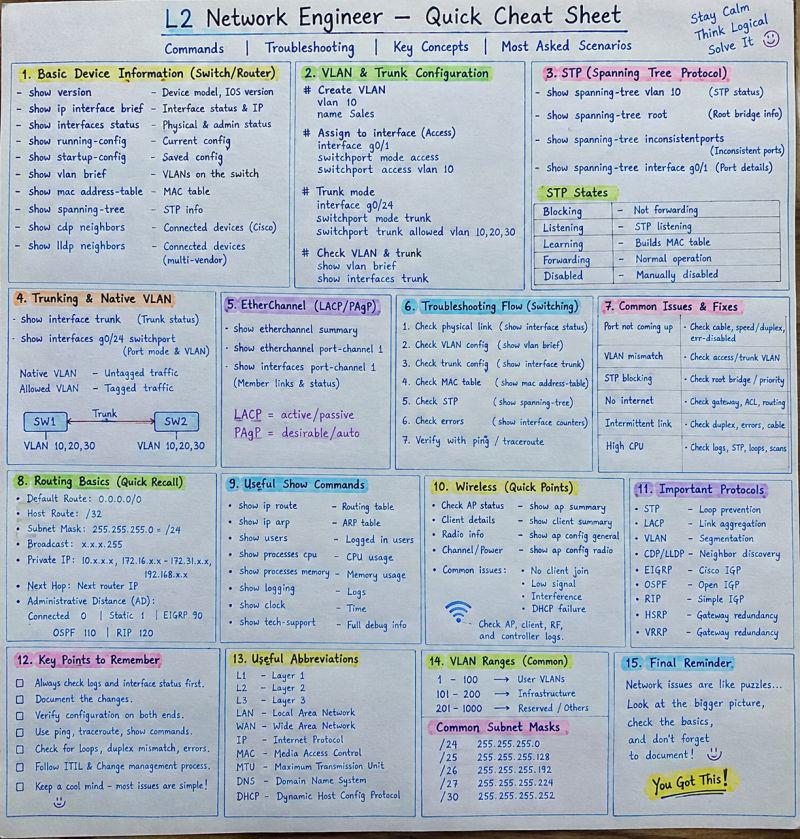
L2 Network Engineer cheat sheet I wish I had earlier

Post image
522 Upvotes

If you're working toward an L2 Network Engineer role, having a basic troubleshooting flow and knowing what to check first can save a lot of time.

I put together a quick cheat sheet covering:

  • Basic switch & router commands

  • VLANs and trunking

  • STP and root bridge

  • Native vs allowed VLANs

  • EtherChannel (LACP/PAgP)

  • Switching troubleshooting

  • Common network issues and fixes

  • Routing basics

  • Useful show commands

  • Wireless troubleshooting

  • Important networking protocols

  • Subnet masks and VLAN ranges

  • ITIL and change management reminders

The main troubleshooting flow is pretty simple:

Check → Verify → Isolate → Fix → Test → Document

The biggest thing I've learned is that knowing the command isn't enough. You need to understand what the output is actually telling you.

If you're learning networking or already working in L1/L2 support, hope this helps.

Also, if anyone wants to discuss networking, labs, troubleshooting or career stuff, we have a Discord community here:

https://discord.gg/RTZyZXATE


r/learnwithcodelivly • • Oct 26 '26 Bravo

Cisco CCNA IOS Command Cheat Sheet (10 Pages)

Thumbnail
gallery
440 Upvotes

I put together a 10-page Cisco CCNA IOS command cheat sheet covering commands you'll use when configuring and troubleshooting networks.

It covers:

  • CLI basics and device management

  • Interfaces, switching, and VLANs

  • STP and EtherChannel

  • IPv4, IPv6, and static routing

  • OSPF configuration

  • ACLs and network security

  • DHCP, NAT/PAT, and network services

  • Troubleshooting and verification commands

It's handy to keep alongside your Packet Tracer labs, CCNA study sessions, or whenever you need a quick reminder of a command.

If you're working toward a career in networking or cybersecurity, you can also explore Codelivly's free career paths here: https://codelivly.com/career-paths

Start your journey for free!

What's the one Cisco IOS command you use most often? Mine would be show ip interface brief because it's a quick way to check interface status and IP addresses.

What commands would you add to this cheat sheet?


r/learnwithcodelivly • • 29d ago Mindblown Bravo

What are you using to actually learn networking beyond YouTube?

Post image
365 Upvotes

A lot of people start learning networking through YouTube, but eventually you want something more structured to work through.

I’m building Codelivly, and we have two networking resources available for people working toward CCNA or a network engineering role:

1. Network Engineer Complete Bundle (L1–L3)
From networking fundamentals to advanced network architecture:
https://resources.codelivly.com/product/network-engineer-complete-bundle-l1-l2-l3-foundations-to-advanced-architecture/

2. CCNA Practical — The Hands-On Network Engineer Guide
For learners who want to build their networking knowledge through practical study:
https://resources.codelivly.com/product/ccna-practical-the-hands-on-network-engineer-guide/

Also, we're running a Halloween sale: 30% off all Codelivly resources with code HALLOWEEN30**.**

Browse everything here: https://resources.codelivly.com

Full disclosure: these are our own products, so this is a promotion. If you're studying networking right now, I'd genuinely like to know what you're finding hardest: subnetting, routing and switching, or getting hands-on lab practice?


r/learnwithcodelivly • • Oct 07 '26 Bravo

I made a simple Nmap Cheatsheet (+ free room and video for practice)

Post image
332 Upvotes

Hey everyone,

I made a simple Nmap cheatsheet for anyone learning host discovery, port scanning, service detection, NSE scripts, output options, and common commands. I wanted to keep it clear, practical, and easy to use without unnecessary fluff.

If you want to go beyond the cheatsheet, I’m also sharing these free Nmap learning resources:

Free Room:
https://codelivly.com/rooms/nmap-fundamentals

Free Video:
https://www.youtube.com/watch?v=IMzRT_A60r4

This is useful if you’re a:

  • beginner in cybersecurity

  • student learning networking or pentesting

  • someone revising Nmap basics

  • lab/CTF learner who wants a quick reference

If you want, I can also post more simple cybersecurity cheatsheets like:

  • Linux basics

  • Burp Suite

  • Web app testing

  • Enumeration

  • Privilege escalation

Would love your feedback.


r/learnwithcodelivly • • Oct 18 '26 Bravo

9 useful websites for network engineers (plus a couple of resources for learning)

Post image
325 Upvotes

If you're studying for CCNA, learning routing and switching, or working toward a network engineering role, these websites are worth bookmarking.

1. PacketLife
https://packetlife.net/

Networking cheat sheets for quick reference, especially for Cisco commands, routing, and switching.

  • Printable cheat sheets

  • Cisco command references

  • Routing and switching concepts

2. Practical Networking
https://www.practicalnetworking.net/

Great for understanding what's actually happening when packets move through a network.

  • ARP, VLANs, and routing

  • Visual explanations of packet flow

  • Networking fundamentals

3. CIDR.xyz
https://cidr.xyz/

A handy visual tool for working with IP addresses and subnets.

  • Explore CIDR ranges

  • Understand subnet boundaries

  • Practice IPv4 addressing

4. Globalping
https://globalping.io/

Run network tests from different locations around the world.

  • Ping tests

  • Traceroutes

  • Connectivity troubleshooting

5. Wireshark
https://www.wireshark.org/

Essential for anyone who wants to understand network traffic beyond what command-line tools show.

  • Capture and inspect packets

  • Analyze TCP conversations

  • Troubleshoot DNS and protocol issues

6. BGP.tools
https://bgp.tools/

Explore internet routing, autonomous systems, and advertised network prefixes.

  • Look up AS numbers

  • Investigate IP prefixes

  • Explore BGP routing information

7. GNS3
https://www.gns3.com/

Build virtual network topologies and practice without buying a rack of physical equipment.

  • Create virtual labs

  • Practice routing and switching

  • Test configurations

8. NetBox
https://netboxlabs.com/

Useful for network documentation, IP address management, and infrastructure inventory.

  • Track IP addresses and prefixes

  • Manage device inventory

  • Document network connections

9. Dynamips
https://github.com/GNS3/dynamips

A Cisco router emulator used in compatible virtual lab environments, particularly older networking setups.

  • Explore router emulation

  • Practice with compatible labs

  • Understand legacy lab environments

Bonus: Networking books and learning resources

Websites and tools are great, but sometimes you need a structured resource to work through the concepts.

📘 CCNA Practical: The Hands-On Network Engineer Guide

For learners who want to strengthen their CCNA knowledge and build practical networking skills.

https://resources.codelivly.com/product/ccna-practical-the-hands-on-network-engineer-guide/

📚 Network Engineer Complete Bundle (L1, L2, L3)

A broader collection covering networking foundations through advanced network architecture.

https://resources.codelivly.com/product/network-engineer-complete-bundle-l1-l2-l3-foundations-to-advanced-architecture/

Both are available through Codelivly Resources for anyone looking to take their networking studies further.

What would you add? I'm particularly interested in lesser-known tools for network troubleshooting, automation, and CCNA/CCNP lab practice. Drop your favorites below!


r/learnwithcodelivly • • Oct 14 '26 Bravo Heartwarming

CCNA Hands-On Guide and Complete Network Engineer Bundle

Thumbnail
gallery
296 Upvotes

Learning networking takes more than just memorising theory. You need to practise configurations, understand how networks work, and build your skills step by step.

I’ve put together two resources for anyone studying networking or working towards a network engineering career:

📘 CCNA Practical: The Hands-On Network Engineer Guide
https://resources.codelivly.com/product/ccna-practical-the-hands-on-network-engineer-guide/

🌐 Complete Network Engineer Bundle (L1, L2 & L3)
https://resources.codelivly.com/product/network-engineer-complete-bundle-l1-l2-l3-foundations-to-advanced-architecture/

The first is focused on hands-on CCNA learning, while the bundle covers networking from foundational concepts to more advanced topics.

If you're learning CCNA or planning to become a network engineer, check them out.


r/learnwithcodelivly • • 16d ago Bravo

Studying for CCNA? Here are 50 questions you should know

Thumbnail
gallery
270 Upvotes

Preparing for CCNA or trying to get better at networking?

I put together a resource covering 50 important CCNA questions and answers, from networking fundamentals to more advanced concepts.

If you're studying for your CCNA, preparing for networking interviews, or trying to build a foundation for a Network Engineer role, this is a good place to test your knowledge.

Looking for more than just theory?

📘 CCNA Practical – The Hands-On Network Engineer Guide

https://resources.codelivly.com/product/ccna-practical-the-hands-on-network-engineer-guide/

🚀 Network Engineer Complete Bundle – L1, L2 & L3

https://resources.codelivly.com/product/network-engineer-complete-bundle-l1-l2-l3-foundations-to-advanced-architecture/

The goal is simple: understand networking, get comfortable with configurations, and build practical skills instead of just memorizing answers.

Check them out if you're working towards a networking career.


r/learnwithcodelivly • • 6d ago

How many of these Linux interview questions could you answer without looking them up?

Thumbnail
gallery
248 Upvotes

Sharing these for anyone brushing up on Linux or preparing for an interview. Try answering them first, then open a terminal and practise anything you’re unsure about.

I run Codelivly. If you want a guide to work through alongside your practice, our Linux PDF guides and workbook take you from the basics into Bash scripting, advanced Linux security and privilege escalation, with exercises to follow along.

The paid bundle includes Linux Playbook for Hackers, the Advanced Edition and RootCraft, plus a shell scripting bonus.

Get the Linux PDF guides and workbook

You can also learn through our free Linux Fundamentals path, covering commands, files, permissions, processes and networking. There are hands-on labs and CTF challenges on Codelivly too all free.

Start learning Linux for free

What Linux question caught you off guard in an interview?


r/learnwithcodelivly • • 19d ago

We made a one-page networking ports cheat sheet. What would you add?

Post image
212 Upvotes

We put this together at Codelivly for anyone learning networking or working through labs: 24 common services, their default ports, TCP/UDP labels, and a short explanation of what each does.

Feel free to save the image.

A few details we included because a port number alone doesn’t tell the whole story:

  • DNS uses both TCP and UDP on port 53.

  • HTTPS can use UDP 443 with HTTP/3.

  • FTP uses 21 for control and 20 for active-mode data. Passive FTP negotiates its data ports.

  • ICMP doesn’t have a TCP/UDP port.

These are common defaults. A service can be configured to use a different port.

We also publish the paid guides below if you’re looking for more practice:

📘 Network Engineer Complete Bundle (L1–L3 + Casebook)
Currently £59.99, reduced from £84.99. Covers networking foundations, enterprise networking, and advanced architecture, plus a casebook with 40 troubleshooting investigations.

💻 CCNA Practical Guide
Includes 41 labs and projects, subnetting exercises, Cisco IOS commands, and troubleshooting practice.

What’s missing from the sheet that you actually use at work or in your labs? Syslog, RADIUS, BGP—or something else?


r/learnwithcodelivly • • Sep 28 '26

Started Learning Digital Forensics — Here’s What I’m Covering

Post image
185 Upvotes

I’ve started going through the basics of Digital Forensics, and honestly, it’s one of those areas of cybersecurity that makes you look at incidents differently.

It’s not just about finding a suspicious file.

You’re trying to figure out what happened, when it happened, what was involved, and whether the evidence can actually be trusted.

So far, I’m focusing on:

• Evidence collection and preservation
• Chain of custody
• Disk and memory artifacts
• Browser and email artifacts
• File metadata
• Deleted file recovery
• Hashing and evidence integrity
• Timeline analysis
• Basic forensic tools like Autopsy, FTK Imager, Volatility, Wireshark and Plaso

I’m also following a Digital Forensics career path that puts these topics into a more structured learning order.

If anyone else is learning DF or planning to get into it, these might be useful:

Digital Forensics Playbook:
https://resources.codelivly.com/product/digital-forensics-playbook/

Free Digital Forensics Career Path:
https://codelivly.com/career-paths/digital-forensics

Codelivly Discord:
https://discord.gg/kY88n2X2re

Still learning, but figured I’d share it for anyone else getting started with digital forensics.


r/learnwithcodelivly • • Sep 22 '26 Bravo

Built a DHCP Server to Automatically Configure Wired & Wireless Devices

184 Upvotes

Every device you connect gets an IP address without you typing anything. Ever wondered how?

That's DHCP, and I just built it.

The goal: set up a DHCP server so both wired and wireless devices receive their network settings automatically, with zero manual configuration on any client.

Network Configuration
DHCP Server IP: 192. 168. 1. 10
Default Gateway: 192. 168. 1. 1
DHCP Pool Starts At: 192. 168. 1. 50
Wired + Wireless Clients: DHCP


r/learnwithcodelivly • • 26d ago

I put together 100 CCNA interview questions with short answers. Free PDF, no signup

Thumbnail
gallery
180 Upvotes

I kept seeing people here ask what actually comes up in junior network engineer interviews, so I wrote out the 100 questions I'd expect. It's split into 5 parts: fundamentals, switching, IP addressing, routing, and security/management.

Every answer is one or two lines. It's meant for a quick review the night before, not as a replacement for studying.

A few examples.

- Collision domain vs broadcast domain?

- What actually happens in a duplex mismatch?

- LACP vs PAgP?

- Which command do you type first when troubleshooting? (show ip interface brief)

If you want to go deeper, I also made two paid guides. The CCNA Practical one is all hands-on configs and labs. The L1–L3 bundle goes from foundations up to design and architecture.

CCNA Practical: https://resources.codelivly.com/product/ccna-practical-the-hands-on-network-engineer-guide/

Network Engineer L1–L3 Bundle: https://resources.codelivly.com/product/network-engineer-complete-bundle-l1-l2-l3-foundations-to-advanced-architecture/

Happy to answer questions in the comments, and tell me if I got anything wrong.


r/learnwithcodelivly • • Aug 26 '26

I made a beginner friendly Network Engineer L1 book because networking shouldn't feel like memorizing random commands

Thumbnail
gallery
176 Upvotes

I’ve been putting together networking resources for beginners, and I just finished Network Engineer L1.

It’s aimed at people starting from the ground up and covers the stuff you actually need to get comfortable with networking:

• Networking fundamentals
• IP addressing and subnetting
• VLANs and switching
• Routing basics
• Network troubleshooting
• Cisco CLI fundamentals
• Hands on labs
• Interview questions

The goal wasn't to make another giant book full of textbook definitions. I wanted something you can actually work through and use while learning.

If you're currently learning networking, studying for CCNA, or trying to move toward a Network Engineer role, I'd appreciate any feedback.

Book: https://resources.codelivly.com/product/network-engineer-l1/

Not trying to sell you a miracle career in 30 days. 😅 Just trying to make the first step into networking a little less painful.


r/learnwithcodelivly • • Sep 22 '26

You need to learn networking, because it gets way more fun when you actually play with it.

170 Upvotes

r/learnwithcodelivly • • 29d ago

Practical Networking Resources for Anyone Learning CCNA and Network Engineering

Thumbnail
gallery
166 Upvotes

If you're learning networking and want something practical to work through, I’ve put together two resources from Codelivly.

1. Network Engineer Complete Bundle (L1–L3)
Covers networking from foundational concepts to advanced network architecture.

https://resources.codelivly.com/product/network-engineer-complete-bundle-l1-l2-l3-foundations-to-advanced-architecture/

2. CCNA Practical: The Hands-On Network Engineer Guide
For learners who want to strengthen their networking knowledge through practical configurations and hands-on learning.

https://resources.codelivly.com/product/ccna-practical-the-hands-on-network-engineer-guide/

These are worth checking out if you're preparing for CCNA, studying computer networks, or working toward a network engineering role.

If you're interested in networking and cybersecurity, you're also welcome to join the Codelivly community on Discord:

https://discord.gg/CeTw2nEw9e

Hope these help someone who's working on their networking skills!


r/learnwithcodelivly • • Sep 15 '26 Bravo

Made a simple Nmap cheat sheet for anyone learning network scanning

Post image
160 Upvotes

Put together this Nmap cheat sheet as a quick reference for common scanning commands.

Nothing fancy, just the commands I find useful when practicing Nmap and working through labs.

Sharing it here in case it helps someone else. Save it for later if you're learning network scanning.


r/learnwithcodelivly • • Oct 22 '26

Linux security commands I wish I had in one place

Thumbnail
gallery
131 Upvotes

When auditing a Linux system, I often find myself checking file permissions, users and groups, running processes, open ports, services, and sudo privileges.

Knowing the commands is useful. Understanding what their output means is even more important.

I’m sharing a Linux Security Command Cheat Sheet for people learning Linux security and penetration testing.

If you're working on Linux privilege escalation in authorized labs or learning how to audit system configurations, you may also find this useful:

The Pentester’s Linux Library: Advanced Privilege Escalation Playbook
https://resources.codelivly.com/product/the-pentesters-linux-library-playbook-advanced-privesc/

It's a paid Codelivly resource for readers who want to study Linux privilege escalation in greater depth.

Question for Linux users: Which command do you find yourself using most during a security audit, and why? I’m curious what belongs on everyone's essential command list.

Disclosure: The linked playbook is a Codelivly product.


r/learnwithcodelivly • • Sep 20 '26 Bravo

What Actually Happens When You Send “Hello” Over a Network?

124 Upvotes

You type “Hello”, hit send, and it looks instant.

But behind that one message, the data goes through several layers before it reaches the other device.

This is encapsulation:

Data → Segment → Packet → Frame → Bits

At the sender:

  • Layer 7 – Application: The app creates the data.

  • Layer 6 – Presentation: Data can be formatted, compressed, or encrypted.

  • Layer 5 – Session: The communication session is managed.

  • Layer 4 – Transport: TCP/UDP and port information are added.

  • Layer 3 – Network: Source and destination IP addresses are added.

  • Layer 2 – Data Link: MAC addresses and frame information are added.

  • Layer 1 – Physical: Everything becomes bits/signals traveling through the network.

At the other end, the process happens in reverse:

Bits → Frame → Packet → Segment → Data

That's decapsulation.

Once you understand this, troubleshooting becomes much easier. Instead of thinking “the network isn't working”, you can start asking:

Is it the application?
The port?
The IP/routing?
The MAC/VLAN?
Or the physical connection?

I put together this diagram as a quick reference while studying networking. Thought it might be useful for anyone working through CCNA, Network+ or general networking fundamentals.

And if you're currently learning networking, having something more structured than random tutorials helped me a lot. These are a few resources worth keeping around depending on where you're at:

📘 Complete L1 → L2 → L3 Network Engineer bundle — useful if you want everything in one place:
Network Engineer Complete Bundle L1–L3

📗 Computer Networking All-in-One — a broader reference for networking fundamentals:
Computer Networking All-in-One for Dummies

📕 CCNA Practical — more focused on the hands-on side of networking and Cisco concepts:
CCNA Practical: The Hands-On Network Engineer Guide

Honestly, I'd rather have one solid reference open while doing labs than keep jumping between 15 browser tabs. 😅

What part of the OSI model took you the longest to understand?


r/learnwithcodelivly • • Aug 30 '26

SOC Analyst Roadmap I put together

Thumbnail
gallery
116 Upvotes

If you're starting out in SOC / blue team and don't know what to learn first, I put together a roadmap covering the main areas you should work through:

Networking → Windows/Linux → Security fundamentals → SIEM → EDR → Threat Intelligence → Detection Engineering → Incident Response → Cloud → Automation → Labs → Interviews.

I also made a SOC Analyst Complete Learning & Tools Handbook covering the tools, commands, concepts, and practical areas you'll run into while learning SOC operations.

It's aimed at taking you from beginner to job-ready, then into more advanced blue-team topics.

SOC Analyst L1 + L2 + L3 Bundle:
https://resources.codelivly.com/product/soc-analyst-the-complete-l1-l2-l3/

Network Engineer L1 + L2 + L3 Bundle:
https://resources.codelivly.com/product/network-engineer-complete-bundle-l1-l2-l3-foundations-to-advanced-architecture/

Sharing the roadmap in case it's useful to someone here.


r/learnwithcodelivly • • 10d ago

Trying to get into ethical hacking? I put together two resource bundles to make the learning process easier

Thumbnail
gallery
107 Upvotes

Getting started with cybersecurity can be confusing. There are so many tools, tutorials, books, and topics that it's easy to jump between resources without having a clear learning direction.

We put together two collections at Codelivly for people who want to build practical cybersecurity skills without spending hours searching for individual resources.

1. Codelivly Hacker Starter Pack

For beginners who want to build a solid foundation in ethical hacking.

Includes 13 resources covering:

• Linux and command-line fundamentals
• Networking and Nmap
• HTTP and web technologies
• Python for ethical hacking
• Penetration testing fundamentals
• Bug bounty basics
• Web server security

Have a look: https://resources.codelivly.com/product/codelivly-hacker-starter-pack/

2. The Ultimate Bug Bounty Starter Pack

For those more interested in web security research and bug bounty hunting.

Includes 15 resources covering:

• Reconnaissance and OSINT
• Recon automation
• XSS and SQL injection
• Web hacking techniques and payloads
• Burp Suite and Metasploit references
• Linux and Python
• Vulnerability research and reporting

Have a look: https://resources.codelivly.com/product/the-ultimate-bug-bounty-starter-pack/

Both are digital collections, so you can access the resources after purchase and work through them at your own pace.

If you're just starting out, I'd suggest the Hacker Starter Pack. If you already have some fundamentals and want to focus on web application security, the Bug Bounty pack is probably the better fit.

We're building Codelivly to make cybersecurity education more accessible, and feedback from the community genuinely helps us improve these resources.

Feel free to check them out and let me know what you think!


r/learnwithcodelivly • • Sep 06 '26

The Ethical Hacker’s Field Manual: What You Actually Need to Know to Hack Like a Professional

Thumbnail
gallery
106 Upvotes

One thing that took me a while to understand about ethical hacking:

Knowing a bunch of tools doesn't automatically make you good at penetration testing.

The real skill is knowing how to approach a target.

You start with reconnaissance.
Then enumeration.
Then you figure out what is actually exposed.
From there, you look for weaknesses, test your assumptions, build an attack path, and see how far you can legitimately go.

A solid ethical hacking workflow usually looks something like:

• Reconnaissance and information gathering
• Network and service enumeration
• Web application testing
• Vulnerability identification
• Exploitation
• Privilege escalation
• Post-exploitation
• Credential and access analysis
• Lateral movement in controlled environments
• Maintaining a clear record of what you discovered
• Writing a proper penetration testing report

The important part is connecting these stages.

Finding an open port isn't the goal.

Finding out what that port tells you about the target is.

Finding a vulnerability isn't the goal either.

Understanding whether it can actually be exploited and what impact it has is where the real work starts.

If you're learning ethical hacking, I'd recommend spending less time trying to memorize tool commands and more time building labs, attacking intentionally vulnerable machines, taking notes, and learning to explain why you took each step.

That's where hacking starts feeling less like running commands and more like solving a problem.


r/learnwithcodelivly • • Sep 27 '26 Bravo

Free malware analysis, reverse engineering and exploit development resources

Post image
98 Upvotes

Free malware analysis, reverse engineering and exploit development resources

If you're learning malware analysis, reverse engineering, or exploit development, there are a lot of genuinely good free resources available.

Here’s a list worth bookmarking:

🔴 Malware & Reverse Engineering

• Exploit Reversing — 700+ pages of malware analysis and exploit research
https://exploitreversing.com

• Malware Unicorn — RE101, RE102, macOS reverse engineering and PE injection
https://malwareunicorn.org

• Malware Research / University Course — Full malware analysis course
https://class.malware.re

• Azeria Labs — ARM assembly, shellcode and heap exploitation
https://azeria-labs.com

• revers.engineering — Applied reverse engineering and hypervisor development
https://revers.engineering

🔴 Binary & Kernel Exploitation

• pwn.college — From buffer overflows to kernel exploitation
https://pwn.college

• P.Ost2 — 30+ courses covering WinDbg, IDA, Ghidra, UEFI and kernel exploitation
https://p.ost2.fyi

• Corelan — Exploit development tutorials covering years of research
https://corelan.be

• Windows Internals — Windows internals, secure kernel, VBS, KDP and dynamic analysis
https://windows-internals.com

For beginners

If you're completely new to malware analysis, I also put together a beginner-focused book covering the fundamentals, lab setup, static/dynamic analysis and practical concepts:

📘 Malware Analysis for Beginners
https://resources.codelivly.com/product/malware-analysis-for-beginners/

And for a more structured learning path:

https://codelivly.com/career-paths/malware-analyst

Save these somewhere. There’s enough material here to keep you busy for a long time.

What other free malware/reversing resources would you add to this list?


r/learnwithcodelivly • • Sep 29 '26

What are you actually studying for SOC Analyst interviews?

Post image
94 Upvotes

I’ve been going through SOC Analyst interview prep recently, and I’m realizing that knowing definitions isn’t really enough.

You can memorize what a SIEM is, what an IOC means, or what the incident response lifecycle looks like. But when someone gives you an actual alert and asks “What would you do next?”, you need to be able to think through it.

The areas I’m focusing on:

  • SOC fundamentals and analyst responsibilities

  • SIEM and security monitoring

  • Windows and Linux log analysis

  • Common attacks and suspicious activity

  • Incident response

  • Basic malware analysis

  • Networking fundamentals

  • MITRE ATT&CK, IOCs, TTPs and hashing

  • Scenario-based questions

One scenario I’m practicing:

You notice multiple failed login attempts coming from a foreign IP. What do you do?

I’d want to explain how I would validate the alert, check the source IP, identify the targeted account, look for a successful login afterward, correlate other logs, determine the scope, and decide whether it needs escalation or containment.

That seems much more useful than simply saying “it could be a brute-force attack.”

A lot of current SOC interview prep also emphasizes explaining your investigation process and reasoning, rather than just recalling terminology.

For anyone else preparing for SOC roles, what questions or scenarios are you practicing?

Learn → Practice → Investigate → Improve

Free Learning : https://www.codleilvy.com


r/learnwithcodelivly • • Sep 29 '26

When you’re thinking about starting a CCNA career… 😂

Post image
93 Upvotes

Everyone starts somewhere.

You don’t need to know everything about networking on day one. Start with the fundamentals: OSI model, TCP/IP, IP addressing, subnetting, VLANs, routing, switching, DHCP, DNS, NAT, ACLs, and then actually practice what you learn.

If you’re serious about getting into network engineering, CCNA is a solid place to build that foundation.

Learn the concepts.
Build the labs.
Break things.
Troubleshoot them.
Repeat.

If you’re looking for a structured way to get started, here are two resources:

📘 CCNA Practical: The Hands-On Network Engineer Guide
https://resources.codelivly.com/product/ccna-practical-the-hands-on-network-engineer-guide/

🌐Free Network Engineer Career Path
https://codelivly.com/career-paths/network-engineer

No need to rush it. Start with the basics, practice consistently, and build your way up.

Future Network Engineer loading… 👶🌐