r/ROCm • • 22d ago

Linux ...one RX9700 16gb now can do MiniMax H3 at 786p localy....

245 Upvotes

THE CARD IS RX9070 16gb ... MY MISTAKE WHEN I TYPED THE TITLE......

with help of ROCM ... fine tuned on linux catchyos enviroment for RX9070 16gb to make music,pictures and video ..... Its about 9-10 minutes (1344 × 768) 5s... card set to 170W ( about 275w for whole pc with monitor pull from wall while rendering the video)...

2-3 minutes (736 × 416) for 5s... ( so its about 1 minute up when you rise the mp..... 0.3 - 1.0 mp) .........

My goal is to make this UI to work with music,pictures and video..easy to use...to make video klips from generated music...completely free.... locally..... like an editable music and video studio ..... My UI .....

I updated it for new version... added qwen3.8 27b, more minimax versions pika,turbo.... more choices....more speed... auto generate..from one picture the character sheet ...upscale to 4k.... and many more new functions.....


r/ROCm • • Jul 27 '25

The disappointing state of ROCm on RDNA4

217 Upvotes

I've been trying out ROCM sporadically ever since the 9070 XT got official support, and to be honest I'm extremely disappointed.

I have always been told that ROCm is actually pretty nice if you can get it to work, but my experience has been the opposite: Getting it to work is easy, what isn't easy is getting it to work well.

When it comes to training, PyTorch works fine, but performance is very bad. I get 4 times better performance on a L4 GPU, which is advertised to have a maximum theoretical throughput of 242 TFLOPs on FP16/BF16. The 9070 XT is advertised to have a maximum theoretical throughput of 195 TFLOPs on FP16/BF16.

If you plan on training anything on RDNA4, stick to PyTorch... For inexplicable reasons, enabling mixed precision training on TensorFlow or JAX actually causes performance to drop dramatically (10x worse):

https://github.com/tensorflow/tensorflow/issues/97645

https://github.com/ROCm/tensorflow-upstream/issues/3054

https://github.com/ROCm/tensorflow-upstream/issues/3067

https://github.com/ROCm/rocm-jax/issues/82

https://github.com/ROCm/rocm-jax/issues/84

https://github.com/jax-ml/jax/issues/30548

https://github.com/keras-team/keras/issues/21520

On PyTorch, torch.autocast seems to work fine and it gives you the expected speedup (although it's still pretty slow either way).

When it comes to inference, MIGraphX takes an enormous amount of time to optimise and compile relatively simple models (~40 minutes to do what Nvidia's TensorRT does in a few seconds):

https://github.com/ROCm/AMDMIGraphX/issues/4029

https://github.com/ROCm/AMDMIGraphX/issues/4164

You'd think that spending this much time optimising the model would result in stellar inference performance, but no, it's still either considerably slower or just as good as what you can get out of DirectML:

https://github.com/ROCm/AMDMIGraphX/issues/4170

What do we make out of this? We're months after launch now, and it looks like we're still missing some key kernels that could help with all of those performance issues:

https://github.com/ROCm/MIOpen/issues/3750

https://github.com/ROCm/ROCm/issues/4846

I'm writing this entirely out of frustration and disappointment. I understand Radeon GPUs aren't a priority, and that they have Instinct GPUs to worry about.


r/ROCm • • Jun 07 '26 Bravo

I just proved NVIDIA Omniverse has mostly AMD support and exposed their artificial lock.

160 Upvotes

I have been working on a project called GHOST to run Isaac Sim on my RX 7800 XT. Everyone told me to just buy NVIDIA because the software is locked down to CUDA. I decided to reverse engineer the renderer DLL in Binary Ninja and what I found is actually hilarious.

NVIDIA engineers left native AMD code paths inside their own plugin. I found explicit imports for AMD specific profiling extensions like vkCmdWriteBufferMarker2AMD. This means the renderer is already compatible with RDNA hardware because it follows the Khronos Vulkan standard. The only thing stopping it is a tiny piece of logic in the foundation layer that checks your Vendor ID.

Here is the physical proof from the binary dump of carb.graphics-vulkan.plugin.dll for anyone who wants to verify.

Offset 180084ae8: VK_KHR_acceleration_structure Offset 180084b08: VK_KHR_ray_tracing_pipeline Offset 180084b58: VK_KHR_deferred_host_operations Offset 180086f98: vkCmdWriteBufferMarker2AMD

(Anf many more directly above and under these offsets)

The presence of these Khronos standards proves the engine is vendor agnostic. I built Vulkan layer to test what I call a two faced identity. When the DRM asks who I am I lie and say I have an RTX 2080 Ti. But when the actual renderer asks I tell the truth and say I have an AMD card.

Check out these contradictory logs from the exact same run.

My Tracer Log: VK vkCreateInstance intercepted VK vkCreateInstance via chain succeeded VK vkCreateDevice intercepted filtering extensions VK vkCreateDevice SUCCEEDED!

Engine Log: Warning gpu.foundation.plugin: Skipping unsupported non NVIDIA GPU AMD Radeon RX 7800 XT Error gpu.foundation.plugin: No device could be created even tho the renderer gladly starts up the rendering pipeline as shown above

This is the first ever Schrodinger GPU. It is simultaneously an NVIDIA card and an AMD card depending on who is asking. The fact that vkCreateDevice succeeded proves the 7800 XT is 100 percent capable of running the engine. The incompatibility is completely artificial.

I am moving toward a proxy DLL to automate this so anyone can run it. Math does not require a permission slip from a monopoly. I will keep you guys updated.


r/ROCm • • Apr 03 '26

Run any NVIDIA/CUDA only software on AMD CARDS (currently supported are iGPU and 5000-9000 series)

Post image
153 Upvotes

The Software you are trying to run must have ROCm/ HIP Paths see GitHub readme for more info

NVIDIA-only software blocking my AMD hardware, so I built a universal environment wrapper called Ghost API. It effectively tricks CUDA-centric apps (like PyTorch, Ollama, and ComfyUI) into thinking your AMD card is a high-end RTX equivalent.

Quick Summary:

What it does: It injects hardware identity masks (HSA Overrides and GL Renderers) at the environment level.

Compatibility: Covers RDNA 1 through RDNA 4. It spoofs everything from an RTX 2080 Ti (for RX 5000) up to an RTX 5090 (for the RX 9000 series).

Easy Use: No global system changes. Just prefix any command: ghost python3 app.py.

Reliability: Confirmed to trigger "CUDA Available: True" in PyTorch on unsupported cards.

GitHub Link:

https://github.com/ChrisGamer5013/AMD-Ghost-Enviroment

It's open-source under GPL v3. Let me know if it helps you!


r/ROCm • • Oct 17 '26

My little ROCm workstation

Thumbnail
gallery
144 Upvotes

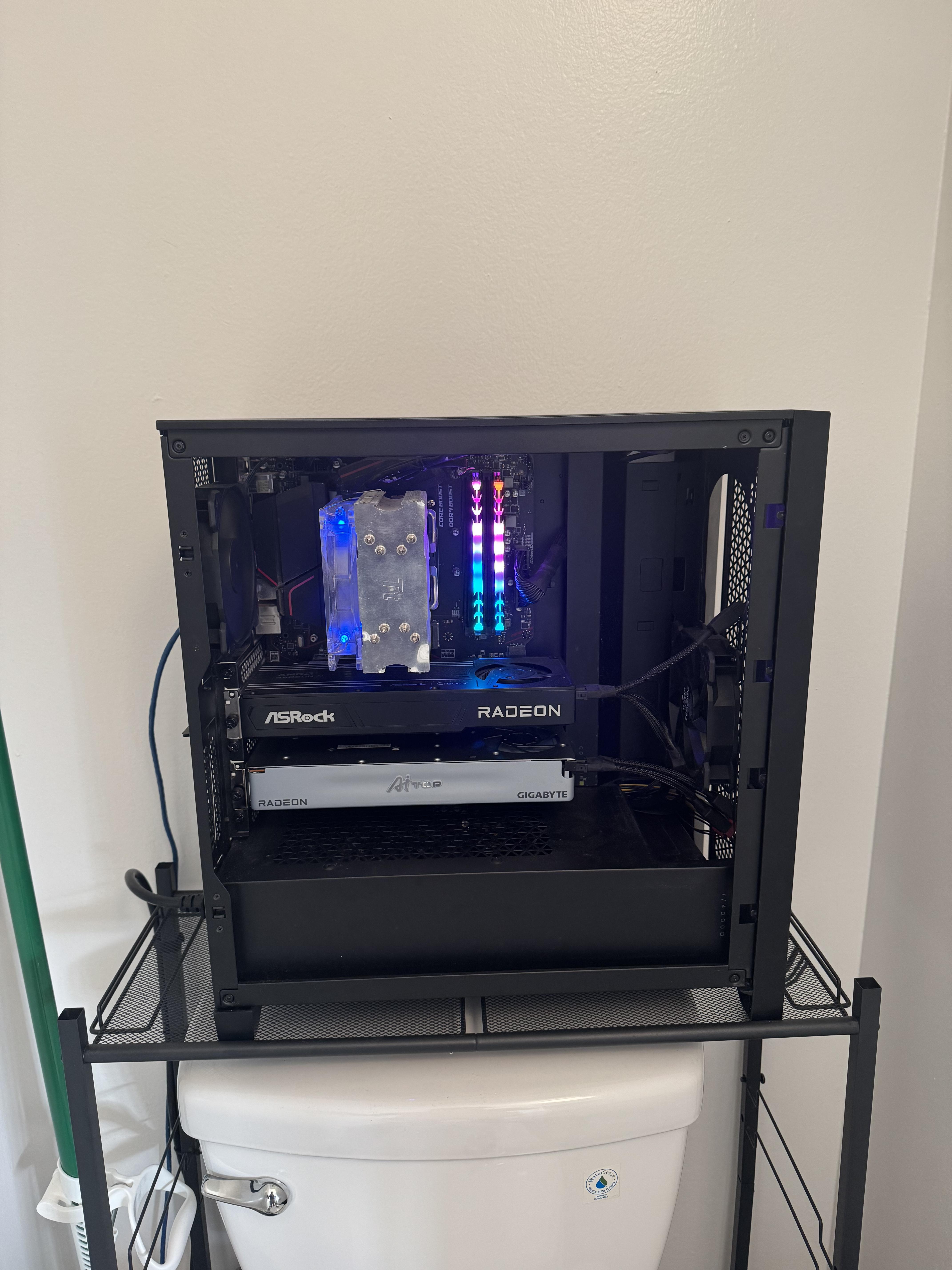
My little new homelab 😍

It's been some years since I treated myself to new toys. After toying with the idea, I managed to pull this little kit together. I picked up the board and memory second hand. I got more memory enroute to make the full four channels. I'm having lots of fun tinkering with SGLang and already have some interesting projects to share with the community.

Bit of a boring post but I'm proud of my little workstation. Last time I built a PC, ddr3 was only just being released and you could buy a decent gaming system for less than $1000

Specs:

  • Motherboard: Gigabyte TRX-50 AI TOP

  • CPU: AMD Threadripper 9960x

  • Memory: 128GB 5600 (64GB currently)

  • GPU: 2 x Gigabyte R9700 AI PRO

  • PSU: H1500i platinum

  • Cooler: Arctic Liquid Freeze WS360

  • Case: Fractal Design North XL

AMD FTW!


r/ROCm • • Sep 27 '26

~500 tok/s from one R9700: Qwen3.8 27B now does 492 tok/s at C8 and 4,100+ tok/s prefill (+20 % decode, open 3‑bit weights)

Post image
134 Upvotes

Update (28 Sept): one image now does 65K with 8 requests at once and 200K long context, plus a 4-bit KV cache, image input and a crash fix.

git pull the repo, then pick a mode:

bash models/Qwen3.8-MXFP4-DFlash2/run-rocm10.sh                   # 65K, up to 8 requests at once (default)
bash models/Qwen3.8-MXFP4-DFlash2/run-rocm10.sh --context 200000  # long context: one conversation up to 200K

No flags = the 65K text mode we benchmark. Add --vision for image input.

  • 65K mode, more room. With the 3-bit weights, a new 4-bit KV cache holds 1.7× the tokens in about the same VRAM (393K vs 251K in vLLM's log). Six 61K or eight 32K requests now run together instead of queueing (248 / 339 tok/s combined), and 4 × 61K decode 17 % faster. Time to first token and single-request speed are unchanged.

  • Accuracy vs the fp8 cache: 

    • GSM8K 96.1 vs 95.3,

    • HumanEval 93.9 vs 93.9,

    • MMLU-Pro 61.4 vs 59.7,

    • needle@61K 100 vs 100.

    • Our new long-session / compaction test (24 synthetic coding-agent sessions) stays within noise too.

  • 200K on the same image. --context 200000 runs one conversation with prefix caching: a new 199K-token prompt takes 94 s to the first token (the old 200K image: 115 s), a follow-up that reuses it 1.2 s, and decode runs at 73–78 tok/s at that length. Every planted fact was found and tool calls work; 220K is tested too.

  • Images. --vision loads the vision encoder (it costs some KV cache: 278K instead of 393K tokens). It read code, a failing pytest run, a web form and a chart correctly, and 8 image requests at once ran fine.

  • Crash fix. Under 3–5 concurrent requests the 26 Sept image could stop with Paiton GDN norm nonfinite/arithmetic error. Fixed; a 10,002-step soak ran clean. If you stay on the old image, add -e RADIANCE_DYNAMIC_WIDTH=0.

Next: the model's full 262K window, and an adaptive longer speculative block (+6.5 % single-stream so far, still in testing).

Update: currently being finalized: a 4-bit KV cache that actually increases how much context fits (not just speed), and a longer speculative block with adaptive length so chat doesn't get slower. We'll post measured numbers once they pass the same accuracy and speed checks as this release.

Follow-up to our earlier Qwen3.8 27B posts.
We shipped a new image with our own rotated 3-bit weights.
Same single card (Radeon AI Pro R9700), same context.

Numbers vs our previous (MXFP4) release, BetterBench 0.6.0, 2 fresh processes per image:

MetricMXFP43-bit W3A4Change
Weighted decode, tok/s153.8184.4+19.9 %
chat / code / file edit121.2 / 179.9 / 179.9135.8 / 226.0 / 195.0+12.0 / +25.6 / +8.5 %
json / math / prose217.5 / 183.8 / 78.5269.0 / 228.9 / 94.7+23.7 / +24.5 / +20.7 %
reasoning / summarization117.8 / 138.4133.5 / 158.4+13.3 / +14.4 %
Aggregate at 1 / 2 / 4 / 8 requests, tok/s122.0 / 204.2 / 308.2 / 425.3148.8 / 249.3 / 368.3 / 492.1+22.0 / +22.1 / +19.5 / +15.7 %
Prefill at 2K / 8K / 16K, input tok/s3,689 / 3,834 / 3,8714,156 / 4,165 / 4,103+12.7 / +8.6 / +6.0 %
Prefill at 32K / 64K, input tok/s3,751 / 3,4553,958 / 3,629+5.5 / +5.0 %
65K-token requests that fit in VRAM2.73.8+44 %

Prefill is faster at every depth, so time to first token is 5–13 % shorter.

Accuracy (served model, greedy, same questions, paired):

BenchmarkMXFP4This model (W3A4)Δ [95 % CI]McNemar p
GSM8K 5-shot (1,319)95.68 %95.30 %−0.38 [−1.44, +0.68]0.58
HumanEval pass@1 (164)95.12 %93.90 %−1.22 [−4.99, +2.56]0.75
MMLU-Pro subset, 0-shot direct answer (14 × 100)62.57 %59.71 %−2.86 [−4.81, −0.90]0.005
Needle at 61,440 tokens (80)100 %100 %01

Honest take: math, code and long-context retrieval are within noise. Knowledge-heavy multiple choice drops about 3 points. That's the price of 3-bit weights.
If that matters for you, --weights mxfp4 keeps the old weights, with this round's other speedups.

What we did, short version:

  • Decode is bandwidth-bound, and our kernels were already at ~97 % of 640 GB/s. So: fewer bytes. 3-bit weights with a scale per 128 weights come to ~3.1 bits/weight vs ~4.25 for MXFP4.

  • 3-bit alone hurt prefill (+12 % time to first token). Prefill on this card is power-capped, not bandwidth-bound. Fix: RDNA4's 4-bit integer matrix ops run about 2× the 8-bit rate at the power cap, and 3-bit weights are valid 4-bit ints. To make 4-bit activations accurate we fold a block-wise Hadamard rotation into the weights and use per-group activation scales. That's prefill only; decode keeps 8-bit activations.

  • Our own GPTQ calibration in the rotated basis. It runs in ~13 min on one MI355X, on permissively licensed data only (we re-did it after noticing some popular calibration sets are NC/SA-licensed, and it came out slightly better).

  • Free win: R9700 decode was bimodal (28 vs 36 ms/step depending on the server start), a known ROCm queue issue. GPU_MAX_HW_QUEUES=1 pins the fast mode. It's in the image now.

  • The model shrinks from 19.2 to 15.9 GiB, and the launcher gives the difference to the KV cache.

Run it:

hf download EliovpAI/Qwen3.8-27B-W3Rot-INT3-Paiton-RDNA4 --local-dir ~/models/qwen38-w3rot
export PAITON_W3ROT_DIR=~/models/qwen38-w3rot   # plus the usual TARGET/DRAFT/CACHE dirs
./models/Qwen3.8-MXFP4-DFlash2/run-rocm10-65k.sh
  • Weights: HF

  • Image: ghcr.io/eliovp/paiton-vllm-plugin:qwen38-rocm10-vllm029-65k-20260926-w3a4-r1

  • Plugin/launcher: Paiton

Next up: a 4-bit KV cache that actually doubles context capacity (the current version passes accuracy but only speeds up reads), and a longer speculative block.
Update: In progress!

Happy to answer questions, and thanks to everyone who replied to the last thread.


r/ROCm • • Aug 28 '26

AMD Jumps From ROCm 7.14 To ROCm 10.0 With ROCm.AI

Thumbnail
phoronix.com
133 Upvotes

r/ROCm • • Sep 30 '25

Comfy UI added AMD support "plug and play", all you need to is download a preview AMD driver, download and unpack comfy ui and execute the "run_amd_gpu.bat" file. no more need to bother with python yourself, its all pre-done. what a relief!

130 Upvotes

https://github.com/comfyanonymous/ComfyUI/releases/

quote:

As of the time of writing this you need this preview driver for best results:

OLD VERSION

https://www.amd.com/en/resources/support-articles/release-notes/RN-AMDGPU-WINDOWS-PYTORCH-PREVIEW.html

UPDATE; NEW VERSION; USE THIS https://www.amd.com/en/resources/support-articles/release-notes/RN-AMDGPU-WINDOWS-PYTORCH-7-1-1.html

UPDATE: NORMAL DRIVER HAS ROCM SUPPORT INTEGRATED

COMFY UI RUNS NATIVELY ON WINDOWS, GO TO WEBSITE; DOWNLAD ; INSTALL, DONE

HOW TO RUN:

if you have an AMD gpu:

run_amd_gpu.bat


r/ROCm • • May 16 '25

PyTorch+ROCm runs on Windows now

Thumbnail
x.com
122 Upvotes

r/ROCm • • Aug 26 '26

We tested whether software not hardware is holding back AMD LLM inference

114 Upvotes

So here's the thing, almost everyone use NVIDIA to run their LLMs, we also do the same, a lot of people we've met use like RTX PRO 6000 or even H100, B300

It seems like everyone eyes is looking at NVIDIA. However we do the math that the raw power alone on AMD GPU MI350X is higher than NVIDIA B200. So what give?

Apparently its the software, ROCM is not as mature as CUDA, their software stack is still lacking behind as well.

However, few weeks ago we've got a handful of MI350X to experiment and develop, and what we did is optimizing AMD tech stack until kernel level for Qwen 3.6 35B A3B and the results we got is much comparable to NVIDIA counterpart

Based on our benchmark, we got:

1x MI350X: 11,161 output tok/s

8x MI350X: 81,331 output tok/s peak with 78,498.66 output tok/s mean

This is 2.16x vLLM throughput on the 8-GPU benchmark

We've decided to open source our kernel and stuff at our github

https://github.com/NetraRuntime/netra-kernel

And also write the blog behind the things we do

https://netraruntime.com/blog/qwen36-amd-mi350x-sglang-vllm-benchmark

However, we're not done yet.

One thing we learned: once the kernels got fast enough, the bottlenecks moved into scheduling, graph coverage, recurrent state, routing, and even HTTP serialization.


r/ROCm • • Oct 06 '26

AMD ROCm 10.1 Released With Many Improvements

Thumbnail
phoronix.com
112 Upvotes

r/ROCm • • Mar 28 '26

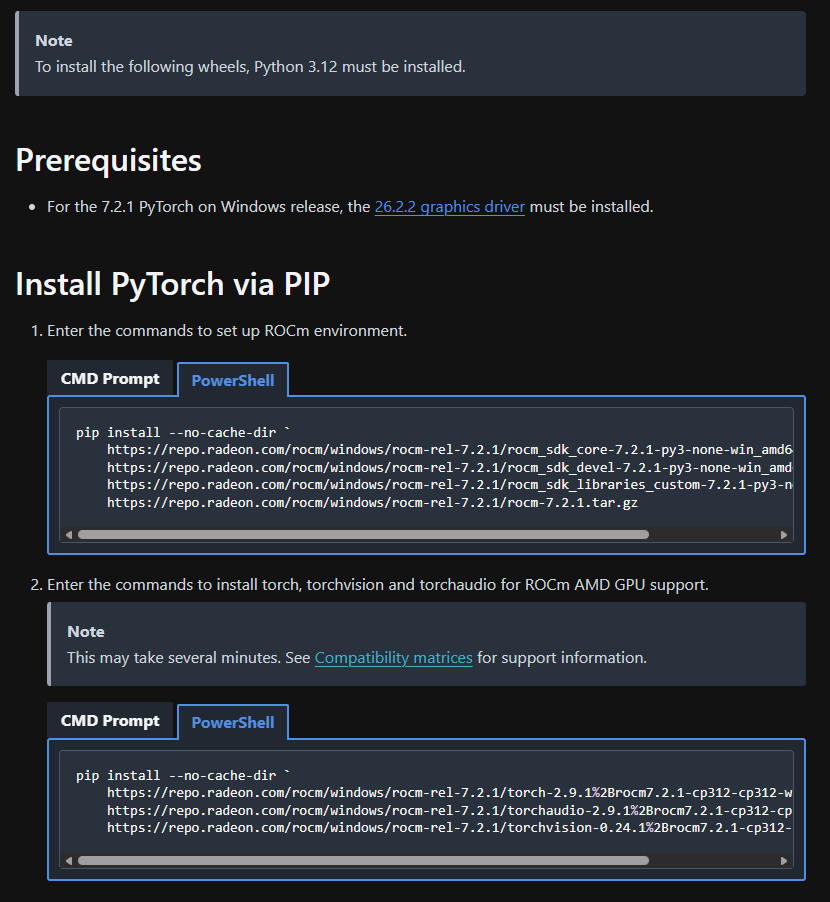
[NEWS] ROCm 7.2.1 + PyTorch 2.9.1 now available on Windows - Native AMD GPU support for ML

Post image
112 Upvotes

Hey everyone, just wanted to spread the word that AMD finally dropped ROCm 7.2.1 for Windows with official PyTorch 2.9.1 support!

https://rocm.docs.amd.com/projects/radeon-ryzen/en/latest/docs/install/installrad/windows/install-pytorch.html


r/ROCm • • Jul 29 '26

AMD Released an AI model

110 Upvotes

Instella Moe 16B A3B Think

A 16 billion parameters and 2.8 billion active parameters model trained end-to-end from scratch on AMD GPUs.

What is your opinion on this?


r/ROCm • • Aug 19 '25

I'm tired and don't want to mess around with ROCM anymore.

110 Upvotes

ROCM is about to release the 7.0 version, but I still haven't seen official support for AMD RX 6000 series graphics cards. You know, this generation of graphics cards will have new models released in 2022.

In the past month, I have tried many times to install rocm, PyTorch and other frameworks for my rx 6800 under linux. However, no matter how I change the system or version, there will always be problems in deployment, such as compilation error reporting, zero removal error reporting, etc.

I don't want to try to train models and construct models like professional AI workers, but simply want to run models shared by the open source community.

But just can't.

I deeply respect the support that many great open source developers have given to ROCM, but AMD's own support for its own official hardware is so poor. As far as I know, the size of AMD's official software team is still very limited.

There are definitely many users like me who still use RX 6000 series graphics cards, and some even use RX 5000 series. If AMD just blindly recommends people to buy new graphics cards immediately without making any adjustments to them, what's the point?

When users want to use their graphics cards for something, but fail due to issues like this, or even become frustrated, they will probably become very disappointed with AMD at some point.

I'm tired and don't want to struggle anymore. My friend once suggested I buy an Nvidia graphics card, but I didn't listen, and now I regret it.

I'm going to switch to an Nvidia graphics card, even if it's a used one.

Honestly, I'm never going to touch AMD again.

If someone asks me for a graphics card recommendation, I won't recommend AMD anymore.


r/ROCm • • Oct 24 '26

Qwen3.8-27B at ~100 tok/s on a single 7900 XTX (patched hipfire)

105 Upvotes

A while back I spent some time tuning hipfire to run Qwen3.8-27B on my 7900 XTX with MTP speculative decoding, mostly with AI coding agents doing the kernel work. I recently benchmarked it against the latest upstream release and the gap is still pretty big, so I figured I’d share in case anyone else is running the 27B on an RDNA3 card.

Setup: 7900 XTX, ROCm 7.2, Linux. Model is the 27B mq4-xts quant from hipfire’s registry, MTP with K=3, Q8 KV cache.

Decode speed, same model file, greedy:

ContextUpstream v0.4.2.1My build
9K~67 tok/s~102 tok/s
39K~59 tok/s~97 tok/s
100K~43 tok/s~90 tok/s

Prompt processing is about the same (mine is 5-16% faster). Both builds got the same answers on a planted-facts test.

Most of the difference comes from two kernels upstream doesn’t have yet: an int8 small-batch GEMV for the speculative verify step, and WMMA-based verify attention. I opened an issue upstream for the first one with a port onto their current beta branch (+10-25% decode on its own), plus a benchmark report:

My build is here: https://github.com/Ben1078/hipfire/tree/rdna3-mtp-decode-v8.2. It’s based on an older hipfire (late September), so it’s more something to look at than a drop-in. Hopefully the pieces make it into upstream properly.

Thanks to the hipfire devs for the project.


r/ROCm • • Oct 11 '26

Upgraded the rig to two r9700

Post image
105 Upvotes

r/ROCm • • Sep 06 '26

I ported ROCm 10.0 to Polaris (RX 470, RX 570, RX 580, etc)

Thumbnail
github.com
102 Upvotes

This project started quite a while ago. I have access to a bunch of local card to run local LLMs on to help me with coding, you can clearly see they were involved in the making of it, but validations are real and the ground work is mine and was originally done by hand for 6.4.4.

A few months ago, I started by wanting to run Audiomuse AI on AMD and kept porting it to older and older cards. To get it working properly, because ORT forces MIGraphX and that's still under active development, I ended up having to build my own images to support every ARCH AMD doesn't include in their official images.

The project expanded and I realized I could build against ROCm 6.4.4 for gfx803, which nobody has done before (all previous work stops around 6.3 or 6.4.0).

It turns out, the reason AMD abandoned it was a bunch of bugs in literally every library that makes up the ROCm stack. Broken kernels, no exceptions for gfx803 not having native fp16, miscomputes, random hangs, page faults, etc. I probably spent over a week chasing intermittent hangs before I realized I had to try lower VRAM frequency VBIOS (RX 570 8GB 1750Mz) on my RX 470 8GB UEFI Mining (running Micro memory at 2100).

But in the end, I shipped 7.14 and I've now arrived at 10.0. Validation suite has heavily expanded, Pytorch 2.14 is shipped alongside ORT 1.29.0 and both pass as many tests as I could reasonably come up with throwing at them.

I also ported vLLM from its gfx906 fork to gfx803 and validated support for Qwen 3.5 architecture, so someone could reasonably run Qwen 3.8 27B without quants, multiple streams on an old mining rig. Obviously I wouldn't expect more than 10-15 tps decode AT MOST if you even have the PCIe lanes for it.

vLLM is not shipped with any image. It's very much build yourself. I will most likely NOT port llama.cpp's HIP support for gfx803. If you're fine with llama.cpp, you can probably use Vulkan and HIP would not grant you any speed advantages.

So if you have a use case for it or a bunch of cards to try vLLM on, please let me know. I'd love to know how people are using it. I've already received some PMs telling me they managed to use it to train a chess model on their old RX 580.


r/ROCm • • May 13 '26

I got tired of hunting AMD GPU + AI configs across blog posts and Discord threads, so I built a curated index — rocmate

100 Upvotes

Every time I set up a new AI tool on my RX 7900 XTX, I spent hours

digging through GitHub issues, outdated blog posts, and Discord threads

just to find the right HSA_OVERRIDE value or the correct PyTorch ROCm

wheel URL. Information exists, but it's scattered and rarely chip-specific.

So I built rocmate — a version-controlled compatibility index + CLI that

tells you what works on your specific AMD GPU:

pip install rocmate
rocmate doctor        # check your system
rocmate show ollama   # see tested config for your chip
rocmate install ollama # install with correct ENV vars

Stable Diffusion WebUI, vLLM, Axolotl, ExLlamaV2) across 5 chip

generations (gfx1100, gfx1101, gfx1102, gfx1030, gfx1034).

What I actually need from this community: configs for chips I don't own.

If you have an RX 6700 (gfx1031), RX 5700 (gfx1010), or any RDNA1 card,

and you've gotten any of these tools running — a 5-minute PR with your

config would help everyone with the same hardware.

GitHub: https://github.com/T0nd3/rocmate

PyPI: https://pypi.org/project/rocmate/


r/ROCm • • Jan 06 '26 Heartwarming

AMD announces AMD ROCm 7.2 software for Windows and Linux, delivering seamless support for Ryzen AI 400 Series processors and integration into ComfyUI.

100 Upvotes

Not sure when the release happens?

https://www.amd.com/en/newsroom/press-releases/2026-1-5-amd-expands-ai-leadership-across-client-graphics-.html

AMD announced AMD ROCm software, the open software platform from AMD, now supports Ryzen AI 400 Series processors and is available as an integrated download through ComfyUI. The upcoming AMD ROCm software 7.2 release will extend compatibility across both Windows and Linux, and new PyTorch builds can now be easily accessed through AMD software for streamlined deployment on Windows.

Over the past year, AMD ROCm software has delivered up to five times improvement in AI performance. Platform support has doubled across Ryzen and Radeon products in 2025, and availability now spans Windows and an expanded set of Linux distributions, contributing to up to a tenfold increase in downloads year-over-year.6

Together, these updates make AMD ROCm software a more powerful and accessible foundation for AI development, reinforcing AMD as a platform of choice for developers to build the next generation of intelligent applications.


r/ROCm • • Jan 04 '25

The Advancement of ROCm is Remarkable

99 Upvotes

I installed the RX6800 on a native Ubuntu 24.04 system and conducted various tests, specifically comparing it to Google Colab’s Tesla T4.

The tests included the following:

  1. Testing Pytorch neural network code(FFN)

  2. Testing the Whisper-Large-v3 model

  3. Testing the Qwen2.5-7B-Instruct model

I recall that the Tesla T4 was slightly slower than the RTX3070 I previously used. Similarly, the RX6800 with ROCm delivers performance metrics nearly comparable to the RTX3070.

Moreover, the RX6800 boasts a larger VRAM capacity. I had decided to dispose of my NVIDIA GPU since I was no longer planning to engage in AI-related research or work. However, after seeing how well ROCm operates with Pytorch, I have started to regain interest in AI.

For reference, ROCm cannot be used with WSL2 unless you are using one of the officially supported models. Please remember that you need to install native Ubuntu.


r/ROCm • • Oct 04 '26

Qwen3.8 27B | 1 x R9700: over half a million tokens of reusable cache, agent turns up to 12× faster, same speed, same accuracy!

Post image
95 Upvotes

TL;DR: Qwen3.8 27B on a single AMD Radeon AI PRO R9700 (3-bit weights + speculative decoding):

  • a coding mode with 569,878 tokens of reusable cache and 262,144 tokens per request, now also with images (496,129 cached tokens);

  • an optional SSD/RAM cache for even more.

Agent turns start up to 12× sooner, and speed and accuracy are within noise of our previous release.

Updates: 5 Oct, SSD/RAM cache for the coding mode. 6 Oct, images in the coding mode and faster starts.

Run it

git clone https://github.com/Eliovp-BV/paiton-vllm-plugin && cd paiton-vllm-plugin
# set the PAITON_* paths as in the README (already set up? just `git pull`)
bash models/Qwen3.8-MXFP4-DFlash2/run-3bit.sh --mode long-kv4                  # coding mode
bash models/Qwen3.8-MXFP4-DFlash2/run-3bit.sh --mode long-kv4 --vision         # + images
bash models/Qwen3.8-MXFP4-DFlash2/run-3bit.sh --mode long-kv4 --extend-cache   # + SSD/RAM cache

Point your agent at http://127.0.0.1:18982/v1 (model Qwen3.8, any API key). There's no new weights download; the launcher pins the new container. Give each image its own runtime cache folder (see the README).

Images

You get more than half a million tokens of cache on one card, images included, backed by multi-hour accuracy runs (GSM8K, HumanEval, MMLU-Pro, needle tests), at essentially the same speed as before.

Coding agents

Coding agents resend the whole conversation on every turn; now only the new part is read. In our sessions 91–92 % of prompt tokens came from the cache.

Workload (3-bit)No prefix cache--mode long-kv4Faster
20-turn conversation, 50K → 253K tokens, whole session1,237 s204 s6.1×
… average wait for the first token63.6 s7.8 s8×
3 agents sharing a 100K repo, wait for the first token on later turns84 s7.0 s12×
New question on a 258K-token document already read134 s2.7 s49×

Images in the coding mode (6 Oct)

  • 496,129 cached tokens and 262,144 per request. Tested with a 200K-token document plus a chart, three rounds of 8 image requests at once, and 5 large images in a row. A 4K screenshot of 15-px code was read back exactly.

  • Every --vision mode: images up to 4K are read at full resolution; larger ones are scaled down. The first answer on a 4096×4096 image takes ~4.6 s instead of ~12 s.

SSD/RAM cache (5 Oct)

--extend-cache picks RAM on bigger machines and the SSD otherwise. After a full restart, on a 16 GB machine with a SATA SSD:

  • 130K tokens back in 6.8 s (46.9 s from scratch);

  • 200K tokens in 9.0 s (86.4 s from scratch);

  • bit-identical to a fresh read.

Since 6 Oct it holds ~40 % more per GB. The SSD cache caps at 64 GiB or a quarter of your free space (~2.8M tokens).

Speed and accuracy

  • Decode: 174 tok/s single-stream, ~460 tok/s with 8 requests (BetterBench), within noise of the previous release.

  • Server start: 180 s first start (was 305 s), 120 s later (was 150 s). The image ships its compiled kernels, so a fresh install answers exactly like our validation runs.

Greedy, paired per questionMXFP43-bit coding mode3-bit 512K mode
GSM8K (1,319)95.6895.5395.45
HumanEval (164)95.1292.0792.68
MMLU-Pro subset (1,400)62.5760.5759.93

Opt-in, --mode long-512k**:** 524,288 tokens in one request. It found 4/4 planted facts at 300K and at 500K. Cold reads take 158 s at 300K and ~6 min at 500K; follow-ups take 2.8–4.4 s from the cache.

No new engine

This is stock vLLM with a plugin: the same OpenAI-compatible server and the same tools you already use. We'll keep publishing ready-built containers that follow upstream vLLM, each fully validated (speed, accuracy, long context) before it ships.

Extra notes

  • The first read of a 258K-token prompt still takes ~2 minutes. The cache helps from the second request on, as long as the start of the prompt stays the same.

  • With a cache tier on, the first read of a long prompt is ~8 % slower.

  • The coding mode pins 2.4 GiB of system RAM. 16 GB of RAM is enough.

  • --mode long --vision (8-bit cache) can misread a single character of tiny text in 4K screenshots; the coding mode reads it exactly.

  • Not yet released: two items from the 5 Oct "coming next" list (short requests during long prompts, and ~59K more cache with faster decode) wait for their accuracy tests.

  • Where the numbers come from: partly our old 16 GB testbench, partly our new machine (Threadripper, PCIe 4.0). The README has every number.

  • MXFP4 (run-mxfp4.sh) is still the most accurate option, and earlier releases are one --image flag away.

What's next: more GPUs

More R9700s are on the way, and tensor parallelism is next. Others are working on multi-card setups too, so expect some healthy competition. Good for everyone running AMD at home!

Paiton


r/ROCm • • Aug 15 '26

Running Qwen3.8-27B-Q8_0 with llama.cpp on AMD Radeon AI Pro R9700 w/ ROCm tweaks

Thumbnail
gallery
95 Upvotes

Edit: Important note @ 12:01am US EST 16th Aug 2026 - If you had downloaded a copy of my diffs before this time then please update them as soon as possible. A number of issues with MTP correctness were discovered both in the upstream mainline branch, as well as my own code, and a further decode correctness issue was uncovered for certain model sizes. These should all be fixed now. If anyone finds any further issues, just drop me a note and we'll try to get it sorted ASAP.


Qwen3.8-27B-Q8_0 on AMD Radeon AI Pro R9700

This post is a followup to my earlier post here: https://www.reddit.com/r/ROCm/s/87da5FHpPO

My goal was to make ROCm the clear and easy choice for which backend to run.

I've tried to label the graphs a little more clearly this time around after feedback from the other post.

Since that post I've managed to eke out a few more small gains, and decided to test and share my results against the new Qwen3.8-27B model

The purpose of this post is to compare and present graphs for the following:

  • Comparison of Qwen3.8-27B-Q8_0 on a single R9700 with different backends

  • Comparison of Qwen3.8-27B-Q8_0 on two R9700's with different backends

  • Comparison of Qwen3.8-27B-Q8_0 on three R9700's with different backends

  • Scaling Comparison of Qwen3.8-27B-Q8_0 on 1 vs 2 vs 3 R9700s with Vulkan

  • Scaling Comparison of Qwen3.8-27B-Q8_0 on 1 vs 2 vs 3 R9700s with Standard ROCm

  • Scaling Comparison of Qwen3.8-27B-Q8_0 on 1 vs 2 vs 3 R9700s with Tweaked ROCm

Environment

Test Hardware

CPU: AMD 9950X3D2

Motherboard: Asus ProArt X870E Creator Wifi

GPU: 3 x AMD AI Pro R9700 - All set to run in PCIe5x4 mode

Memory: 96GB DDR5 @ 6000MHz CL30

Two of the GPUs are in the PCIe5x16 slots, but set to PCIe5x4 mode.

The third card is installed via an M.2->PCIe5 riser, which also grants PCIe5x4 speeds

All PCIe lane bandwidths are measured and verified

Libraries Used

Tweaked ROCm source code

The source code branch for the tweaked ROCm changes is found here: https://github.com/stew675/llama.cpp/tree/rdna-boosts

Building ROCm tweaked llama.cpp from source

I'm going to trust that you already know how to use git to pull the source code and change to the source directory

My Cmake ROCm build setup flags are these. Note that you must set ROCM_714 to installation directory of your ROCm 7.14 SDK

# You MUST set this path correctly
ROCM_714=/path/to/your/rocm-7.14/installation

export ROCM_PATH="$ROCM_714"

HIPCXX="$ROCM_714/lib/llvm/bin/clang" HIP_PATH="$ROCM_714" cmake -S . -B build \
  -DGGML_RPC=1 \
  -DGGML_HIP=ON \
  -DGGML_NATIVE=1 \
  -DGGML_HIP_RCCL=1 \
  -DHIP_PLATFORM=amd \
  -DGGML_HIP_GRAPHS=ON \
  -DGPU_TARGETS="gfx1200,gfx1201" \
  -DCMAKE_C_COMPILER="$ROCM_714/lib/llvm/bin/clang" \
  -DAMDGPU_TARGETS="gfx1200,gfx1201" \
  -DCMAKE_BUILD_TYPE=Release \
  -DCMAKE_CXX_COMPILER="$ROCM_714/lib/llvm/bin/clang++" \
  -DCMAKE_INSTALL_RPATH="\$ORIGIN:$ROCM_714/lib" \
  -DCMAKE_BUILD_WITH_INSTALL_RPATH=ON \
  -DCMAKE_HIP_FLAGS="-mllvm --amdgpu-unroll-threshold-local=600"

# Then build
cmake --build build --config Release -j 16 -- VERBOSE=1

llama-server setup

Aside from the differences for specific backend setup, ie. Vulkan vs ROCm vs Tweaked ROCm, the following configuration is common for all backends used:

Common Server Command: ./build/bin/llama-server --model /llm/models/Qwen3.8/27B/Q8_0/Qwen3.8-27B-Q8_0.gguf --alias Qwen3.8-27B-Q8_0 --prio 2 --fit false --top-k 20 --port 8033 --threads 8 --parallel 1 --top-p 0.8 --min-p 0.001 --verbosity 3 --host 0.0.0.0 --cpu-strict 1 --cpu-range 0-7 --predict 98304 --threads-http 4 --load-mode mlock --cache-ram 16384 --ctx-size 70000 --flash-attn auto --temperature 0.7 --batch-size 1024 --ubatch-size 1024 --n-gpu-layers all --no-kv-unified --cache-type-k bf16 --cache-type-v bf16 --ctx-checkpoints 64 --cache-idle-slots --reasoning-budget 65536 --reasoning-preserve --checkpoint-min-step 4096 --repeat-penalty 1.0 --presence-penalty 1.5

Benchmark command

Test Command: uvx llama-benchy --base-url http://localhost:8033/v1 --tg 240 --pp 2520 --model Qwen3.8-27B-Q8_0 --tokenizer Qwen/Qwen3.8-27B --depth 0 4096 8192 16384 32768 65536

KEY TAKEWAYS

  • ROCm Tweaked outperforms both Vulkan and standard ROCm build in every scenario

  • For Tweaked ROCm, the gain from 1 to 2 GPUs is roughly 60%

  • For Tweaked ROCm, the gain from 2 to 3 GPUs is roughly 10%

  • Unless you need the extra VRAM for context, two cards is best

  • Vulkan gets worse with more than two cards

  • Stock ROCm is just slow once context grows

RAW RESULTS

Qwen3.8-27B-Q8_0, KV=BF16, 1 x Radeon AI Pro R9700

Vulkan

modeltestt/sttfr (ms)
Qwen3.8-27B-Q8_0pp2520946.78 ± 6.802663.43 ± 19.13
Qwen3.8-27B-Q8_0tg24019.60 ± 0.01
Qwen3.8-27B-Q8_0pp2520 @ d4096986.24 ± 7.026710.27 ± 48.76
Qwen3.8-27B-Q8_0tg240 @ d409619.44 ± 0.01
Qwen3.8-27B-Q8_0pp2520 @ d8192969.12 ± 2.8811055.59 ± 33.38
Qwen3.8-27B-Q8_0tg240 @ d819219.27 ± 0.00
Qwen3.8-27B-Q8_0pp2520 @ d16384920.24 ± 2.8020543.26 ± 63.60
Qwen3.8-27B-Q8_0tg240 @ d1638419.08 ± 0.01
Qwen3.8-27B-Q8_0pp2520 @ d32768820.18 ± 2.6743026.47 ± 140.70
Qwen3.8-27B-Q8_0tg240 @ d3276818.45 ± 0.01
Qwen3.8-27B-Q8_0pp2520 @ d65536666.92 ± 2.06102047.27 ± 316.31
Qwen3.8-27B-Q8_0tg240 @ d6553617.34 ± 0.00

ROCm Standard

modeltestt/sttfr (ms)
Qwen3.8-27B-Q8_0pp25201079.74 ± 8.612335.32 ± 18.63
Qwen3.8-27B-Q8_0tg24018.93 ± 0.00
Qwen3.8-27B-Q8_0pp2520 @ d40961072.23 ± 7.806172.38 ± 45.39
Qwen3.8-27B-Q8_0tg240 @ d409618.27 ± 0.00
Qwen3.8-27B-Q8_0pp2520 @ d81921009.76 ± 2.8910608.92 ± 29.33
Qwen3.8-27B-Q8_0tg240 @ d819217.68 ± 0.00
Qwen3.8-27B-Q8_0pp2520 @ d16384896.40 ± 2.3921090.34 ± 56.25
Qwen3.8-27B-Q8_0tg240 @ d1638416.39 ± 0.00
Qwen3.8-27B-Q8_0pp2520 @ d32768721.45 ± 1.7248913.28 ± 118.16
Qwen3.8-27B-Q8_0tg240 @ d3276814.46 ± 0.00
Qwen3.8-27B-Q8_0pp2520 @ d65536520.91 ± 1.19130652.51 ± 298.47
Qwen3.8-27B-Q8_0tg240 @ d6553611.70 ± 0.00

ROCm Tweaked

modeltestt/sttfr (ms)
Qwen3.8-27B-Q8_0pp25201108.34 ± 12.552274.71 ± 25.31
Qwen3.8-27B-Q8_0tg24020.10 ± 0.02
Qwen3.8-27B-Q8_0pp2520 @ d40961157.21 ± 8.475719.09 ± 42.31
Qwen3.8-27B-Q8_0tg240 @ d409619.94 ± 0.03
Qwen3.8-27B-Q8_0pp2520 @ d81921141.54 ± 3.739383.75 ± 31.09
Qwen3.8-27B-Q8_0tg240 @ d819219.79 ± 0.00
Qwen3.8-27B-Q8_0pp2520 @ d163841087.36 ± 3.6817386.11 ± 58.35
Qwen3.8-27B-Q8_0tg240 @ d1638419.46 ± 0.00
Qwen3.8-27B-Q8_0pp2520 @ d32768969.84 ± 2.9636385.90 ± 110.97
Qwen3.8-27B-Q8_0tg240 @ d3276818.84 ± 0.00
Qwen3.8-27B-Q8_0pp2520 @ d65536792.60 ± 2.7785866.79 ± 299.56
Qwen3.8-27B-Q8_0tg240 @ d6553617.69 ± 0.00

Qwen3.8-27B-Q8_0, KV=BF16, 2 x Radeon AI Pro R9700

Vulkan split-mode=layer

modeltestt/sttfr (ms)
Qwen3.8-27B-Q8_0pp2520941.77 ± 6.362677.34 ± 18.08
Qwen3.8-27B-Q8_0tg24018.05 ± 0.02
Qwen3.8-27B-Q8_0pp2520 @ d40961173.67 ± 11.235638.30 ± 54.39
Qwen3.8-27B-Q8_0tg240 @ d409617.89 ± 0.01
Qwen3.8-27B-Q8_0pp2520 @ d81921309.91 ± 4.568178.90 ± 28.44
Qwen3.8-27B-Q8_0tg240 @ d819217.79 ± 0.01
Qwen3.8-27B-Q8_0pp2520 @ d163841388.40 ± 3.9613616.82 ± 38.79
Qwen3.8-27B-Q8_0tg240 @ d1638417.52 ± 0.03
Qwen3.8-27B-Q8_0pp2520 @ d327681340.08 ± 2.6326333.53 ± 51.22
Qwen3.8-27B-Q8_0tg240 @ d3276816.99 ± 0.01
Qwen3.8-27B-Q8_0pp2520 @ d655361153.97 ± 6.2758978.89 ± 321.04
Qwen3.8-27B-Q8_0tg240 @ d6553616.05 ± 0.01

ROCm Standard, split-mode=tensor

modeltestt/sttfr (ms)
Qwen3.8-27B-Q8_0pp25201416.38 ± 23.481780.06 ± 28.80
Qwen3.8-27B-Q8_0tg24029.01 ± 0.05
Qwen3.8-27B-Q8_0pp2520 @ d40961541.34 ± 23.714294.45 ± 66.06
Qwen3.8-27B-Q8_0tg240 @ d409628.21 ± 0.07
Qwen3.8-27B-Q8_0pp2520 @ d81921528.94 ± 9.337007.80 ± 42.43
Qwen3.8-27B-Q8_0tg240 @ d819227.46 ± 0.04
Qwen3.8-27B-Q8_0pp2520 @ d163841425.14 ± 7.1613265.79 ± 66.99
Qwen3.8-27B-Q8_0tg240 @ d1638426.17 ± 0.00
Qwen3.8-27B-Q8_0pp2520 @ d327681208.55 ± 4.4629200.20 ± 107.67
Qwen3.8-27B-Q8_0tg240 @ d3276823.71 ± 0.00
Qwen3.8-27B-Q8_0pp2520 @ d65536909.59 ± 4.5874823.96 ± 376.66
Qwen3.8-27B-Q8_0tg240 @ d6553619.86 ± 0.00

ROCm Tweaked, split-mode=tensor

modeltestt/sttfr (ms)
Qwen3.8-27B-Q8_0pp25201457.92 ± 21.431729.87 ± 25.42
Qwen3.8-27B-Q8_0tg24031.24 ± 0.00
Qwen3.8-27B-Q8_0pp2520 @ d40961641.60 ± 21.374031.51 ± 52.77
Qwen3.8-27B-Q8_0tg240 @ d409630.79 ± 0.07
Qwen3.8-27B-Q8_0pp2520 @ d81921674.79 ± 7.666397.07 ± 29.24
Qwen3.8-27B-Q8_0tg240 @ d819230.52 ± 0.00
Qwen3.8-27B-Q8_0pp2520 @ d163841655.24 ± 10.0211421.77 ± 68.86
Qwen3.8-27B-Q8_0tg240 @ d1638430.11 ± 0.02
Qwen3.8-27B-Q8_0pp2520 @ d327681541.65 ± 9.5522890.95 ± 141.86
Qwen3.8-27B-Q8_0tg240 @ d3276829.36 ± 0.00
Qwen3.8-27B-Q8_0pp2520 @ d655361303.84 ± 9.2752200.88 ± 371.47
Qwen3.8-27B-Q8_0tg240 @ d6553627.95 ± 0.01

Qwen3.8-27B-Q8_0, KV=BF16, 3 x Radeon AI Pro R9700

Vulkan split-mode=layer

modeltestt/sttfr (ms)
Qwen3.8-27B-Q8_0pp2520936.08 ± 7.402693.75 ± 21.30
Qwen3.8-27B-Q8_0tg24016.26 ± 0.02
Qwen3.8-27B-Q8_0pp2520 @ d40961111.70 ± 10.055953.08 ± 53.82
Qwen3.8-27B-Q8_0tg240 @ d409616.13 ± 0.05
Qwen3.8-27B-Q8_0pp2520 @ d81921162.28 ± 5.239217.87 ± 42.34
Qwen3.8-27B-Q8_0tg240 @ d819216.13 ± 0.21
Qwen3.8-27B-Q8_0pp2520 @ d163841161.92 ± 2.4216270.07 ± 33.92
Qwen3.8-27B-Q8_0tg240 @ d1638415.13 ± 0.22
Qwen3.8-27B-Q8_0pp2520 @ d327681071.11 ± 2.8232947.18 ± 86.33
Qwen3.8-27B-Q8_0tg240 @ d3276814.62 ± 0.02
Qwen3.8-27B-Q8_0pp2520 @ d65536888.53 ± 4.5076597.24 ± 388.46
Qwen3.8-27B-Q8_0tg240 @ d6553613.94 ± 0.02

ROCm Standard, split-mode=tensor

modeltestt/sttfr (ms)
Qwen3.8-27B-Q8_0pp25201469.22 ± 28.821717.62 ± 33.00
Qwen3.8-27B-Q8_0tg24034.20 ± 0.09
Qwen3.8-27B-Q8_0pp2520 @ d40961653.39 ± 28.814003.70 ± 69.76
Qwen3.8-27B-Q8_0tg240 @ d409632.24 ± 0.06
Qwen3.8-27B-Q8_0pp2520 @ d81921628.31 ± 22.936580.95 ± 93.27
Qwen3.8-27B-Q8_0tg240 @ d819230.48 ± 0.00
Qwen3.8-27B-Q8_0pp2520 @ d163841522.01 ± 14.9912422.69 ± 122.34
Qwen3.8-27B-Q8_0tg240 @ d1638428.86 ± 0.00
Qwen3.8-27B-Q8_0pp2520 @ d327681266.96 ± 7.9127855.14 ± 174.19
Qwen3.8-27B-Q8_0tg240 @ d3276825.96 ± 0.00
Qwen3.8-27B-Q8_0pp2520 @ d65536917.55 ± 7.9274178.18 ± 639.89
Qwen3.8-27B-Q8_0tg240 @ d6553621.49 ± 0.01

ROCm Tweaked, split-mode=tensor

modeltestt/sttfr (ms)
Qwen3.8-27B-Q8_0pp25201494.97 ± 3.911686.30 ± 4.75
Qwen3.8-27B-Q8_0tg24037.30 ± 0.00
Qwen3.8-27B-Q8_0pp2520 @ d40961745.76 ± 31.973792.19 ± 69.15
Qwen3.8-27B-Q8_0tg240 @ d409635.71 ± 0.10
Qwen3.8-27B-Q8_0pp2520 @ d81921787.03 ± 11.475995.43 ± 38.47
Qwen3.8-27B-Q8_0tg240 @ d819234.35 ± 0.08
Qwen3.8-27B-Q8_0pp2520 @ d163841780.61 ± 15.1210617.95 ± 90.45
Qwen3.8-27B-Q8_0tg240 @ d1638433.89 ± 0.00
Qwen3.8-27B-Q8_0pp2520 @ d327681660.52 ± 8.7321252.42 ± 111.99
Qwen3.8-27B-Q8_0tg240 @ d3276832.84 ± 0.02
Qwen3.8-27B-Q8_0pp2520 @ d655361374.56 ± 15.5449518.77 ± 560.02
Qwen3.8-27B-Q8_0tg240 @ d6553631.09 ± 0.03

r/ROCm • • Sep 02 '26

NVIDIA's crown jewel now belongs to AMD. Isaac sim 6.0 rendering natively on RX 7800XT

Post image
93 Upvotes

After Months of reverse Engineering 3AM coding sessions dozens of translation layers it has been fullfilled Isaac sim CAN render on AMD cards. As you can see this is nowhere near finished materials are mostly broken there is no lighting this is only Raster Mode but Its a start after 4 months of work. Anyways i will now continue to gradually add more features


r/ROCm • • Jun 02 '25

vLLM 0.9.0 is HERE, unleashing HUGE performance on AMD GPUs! using AITER

Thumbnail
xcancel.com
93 Upvotes