r/ROCm • • Feb 28 '26

Absolutely insane how good Nvidia GPUs work for this kind of stuff compare to AMD

5 Upvotes

Right now you can't even use a RDNA 2 GPU with AMD the ability to install ComfyUi doing it manually has somehow been messed up and a fresh install doesn't work either, and even when you use RDNA 3 and 4 there are all sorts of ridiculous HIP errors when using different mods in ComfyUi that you find on CivitAi

And even when I got it to

work by some luck it would take 4 hours to render the same video as my crappy Nvidia which only takes 6 minutes.

I have a crap RTX A2000 GPU with 6GB VRAM in my work PC and it somehow runs ComfyUi with WAN 2.2 perfectly fine can make videos in under 6 minutes at 480p

And this is below the minimum requirements.

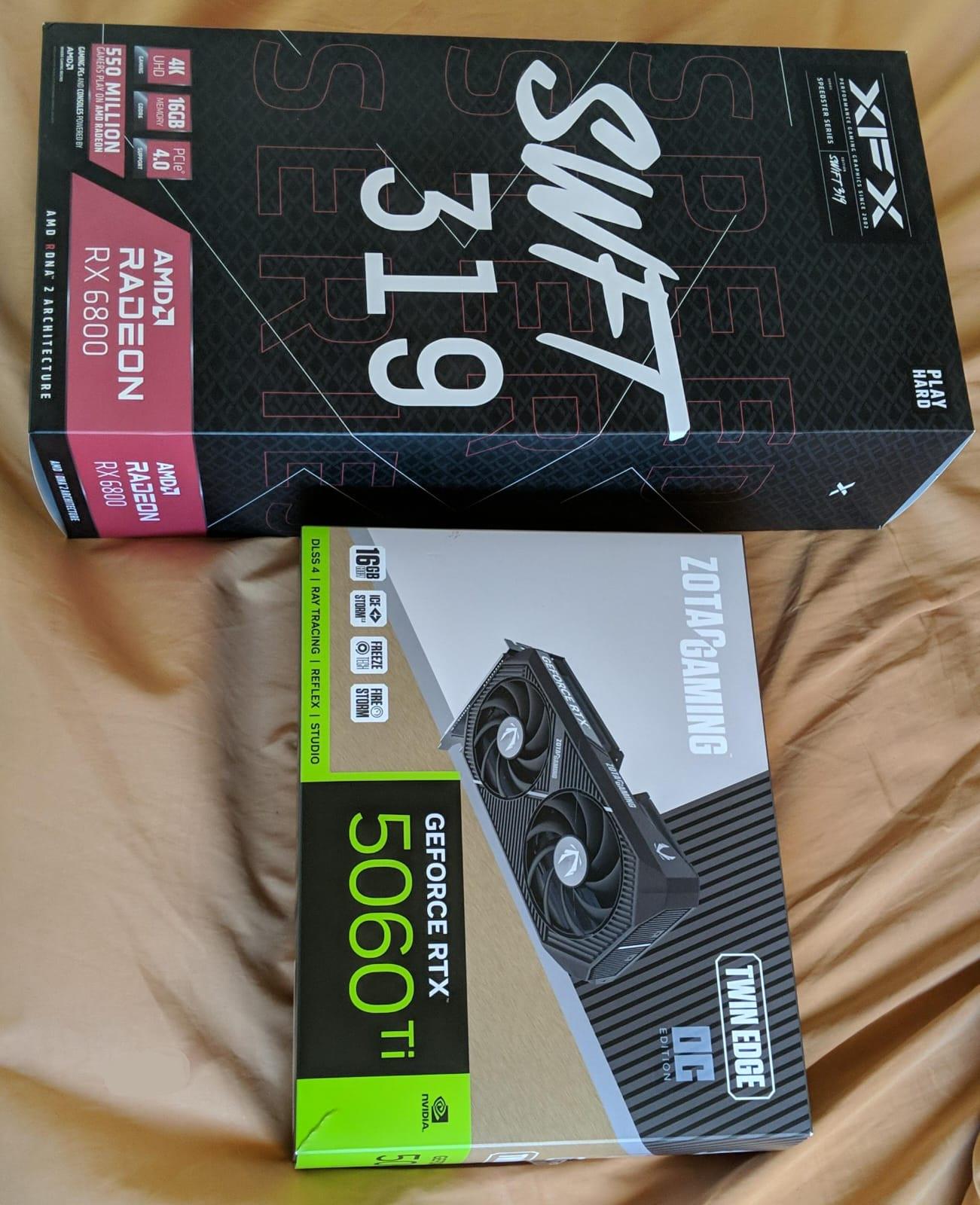
I ended up just ordering a RTX 5060 Ti 16GB on Amazon I got it new for $489 with Free Global Shipping so it will arrive in the Caribbean by March 10th 2026. Gonna sell this RX 6800 first chance I get, don't get me wrong AMD is decent at gaming but I am not going to suffer with AMD using comfyUi.

It's amazing that Nvidia will release a consumer GPU and it will run all these productivity workstation apps just flawless and on windows mind you. Makes you wonder what AMD has been doing all these years with the Radeon GPU line playing marbles while Nvidia was playing chess.

The Radeon GPU division has been plagued with bad management since the days of ATI, sad to see they have only barely gotten better. Maybe it's unfair comparison but at one point Radeon was better than Nvidia Ge-Force when the Radeon 9700 Pro first launched. I always supported the underdog but at this point Nvidia is simply the far better brand even if they are clearly more expensive.

One of the truly impressive things about Nvidia is how far back they support their GPUs like the fact that an RTX 2080 can run DLSS 4.5, AMD still cannot even bring FSR4 to RDNA 2 let alone RDNA 1.


r/ROCm • • Sep 08 '26

PyTorch says CUDA not available on AMD? I wrote a full ROCm fix guide

0 Upvotes

I kept hitting torch.cuda.is_available() → False on my AMD GPU, and it drove me crazy. Turned out to be a mix of missing ROCm drivers, wrong PyTorch wheel, and that HSA_OVERRIDE_GFX_VERSION thing everyone mentions but few explain properly.

I put together a complete, step-by-step repair guide that covers the exact commands and checks I used to get PyTorch running on ROCm.

If you’re stuck, this might save you hours:

https://interconnectd.com/blog/305/fix-pytorch-cuda-not-available-on-amd-gpus-complete-rocm-setup-guide/

What AMD card are you running, and what error are you seeing?


r/ROCm • • Aug 22 '26

AMD's "Gemm-From-Anywhere" was merged and reverted in 24 hours — here's what it tells us about ROCm's software strategy

8 Upvotes

AMD recently tried to unify six different GEMM kernel generators (Tensile, AITER, Composable Kernel, rocRoller, Wave, Triton) behind one hipBLASLt dispatch layer. The implementation was merged on August 20, then reverted on August 21 — not because the kernels failed, but because a packaging conflict caused 28 overlapping files across two ROCm artifacts.

The rollback doesn't mean the architecture was rejected. It means AMD's real challenge isn't producing more kernels — it's building a release pipeline that can turn kernel diversity into one software asset.

I wrote a deep dive on what this means for AMD's software stack and the broader GPU platform battle:

[Link: https://resoneticlab.blogspot.com/2026/08/amd-is-trying-to-turn-kernel-diversity.html]

Would love to hear thoughts from folks working with ROCm — especially anyone who's run into the fragmentation this integration was trying to solve.


r/ROCm • • Mar 18 '26

As promised my 1 week update on ComfyUi after switching from AMD to Nvidia, the experience has been magical and heavenly to say the least

0 Upvotes

ok so following up as promised with an update having switched from AMD to Nvidia having used Nvidia now for 1 full week, The ability to download Pixaroma's 1 click install guide that sets up Comfy with sage attention and everything you can possibly need without having to lift a finger, the ability to download literally any workflow off any website and it just works in 1 go with 0 HIP errors ever everything just works.

github.com/Tavris1/ComfyUI-Easy-Install

^ Gold standard of ComfyUi Sage Attention Install literally 1 click and sets up everything you will ever need for a perfect optimized workflow.

The speed is absolutely mind boggling also, it's only a 5060 Ti but my god how is it so fast?
It's like using AI generation off any frontier platform or Open Ai the speed is insane when using Q8 Models of WAN

And no crashing when generating 720p and above either, it just works.

The absolute crazy thing is you can get this level of performance and god like compatibility on regular Nvidia consumer GPUs as well, no need to buy any "PRO" level quadro or anything like that the consumer GPUs work the exact same.

I would say the support is also phenomenal, friend of mine has a RTX 2080 from ages ago and he says he even gets the latest DLSS support on it. This is like expecting AMD to bring FSR4 on a RX 5700 XT RDNA 1, it ain't never happening.

To me it's compatibility and driver support, to me that peace of mind knowing when I download a workflow from someone everything is automated and just works with 1 click as tho I am using a frontier Grok.com interface and never have to worry about anything is what is truly worth it to me but yeah the 720p WAN generation speed is next level it easily beats a 7900 XTX which is saying something.


r/ROCm • • Mar 15 '25

all rocm examples go no deeper than, "print(torch.cuda.is_available())"

0 Upvotes

all rocm examples go no deeper than, "print(torch.cuda.is_available())"

Every single ROCM linux example I see on the net in a post, none go deeper than .... torch.cuda.is_available(), whose def: is ...

class torch : class cuda: def is_available(): return (True)

So what is the point, is there any none inference tools that actually work? To completion?

Lastly what is this Bullshit about the /opt/ROCM install on linux requiring 50GB, and its all GFXnnn models for all AMD cards of all time, hell I only want MY model GFX1100, and don't give a rats arse about some 1987 AMD card;


r/ROCm • • Aug 02 '26

Kimi K3 on Mi335x

1 Upvotes

We brought up Kimi-K3 on 8× AMD MI355X on our own compiled runtime instead of vLLM/SGLang. Posting the bring-up because the traps were more interesting than the throughput.

Upfront: the runtime is closed source. If that makes this useless to you, fair enough — no signup link below, just the writeup and I'll answer implementation questions in the comments.

What K3 looks like to a runtime. 93 layers — 24 MLA + 69 KDA linear attention. 896 routed experts, top-16, mxfp4, plus 2 shared. Hidden 7168, latent 3584, vocab 163840. ~1.5 TB checkpoint, so TP8 isn't a choice: each rank uploads 195 GiB.

The traps. Four things about this architecture give you a plausible-but-wrong model instead of a crash: no RoPE, an attention output gate, experts at latent width rather than hidden width, and a model-level residual mix that's easy to just… not emit. We shipped two of them. The final norm was reading 9 of 93 layers, and a shared-expert all-reduce was summing the attention output on 92 of 93 layers — TP-only, so a single-GPU run looked fine. Both produced fluent text. Our first latency numbers were taken on that model and we threw them all away.

What caught them, in case it's useful to anyone building similar: a TP1-vs-TP8 control that has to be token-identical on the same asset, and a coverage gate that fails the build when any emitted op or weight goes unread. The second one is cheap and would have caught the missing residual on day one.

Where the time goes. Batch-1 decode, ctx 32k, TP8: ~34 ms/token, min of 6 reps. The weight stream is ~127.6 GB/token, 14.02 GB/rank after sharding — a 2.76 ms floor at measured HBM bandwidth. So we're ~12× off the memory roof, and "decode is memory bound" is just wrong here.

The binding constraint is the dependency graph. The plan is 2,459 packets/token with a critical path of 1,739 and mean width 1.41 — nearly a chain. An empty packet across 256 workgroups costs 5.72 µs, so the chain alone is 9.95 ms before a single weight byte moves. And most of that isn't waiting on counters — it's the signal side, where every workgroup issues cache-wide L2 maintenance that each XCD's L2 repeats.

That's the actual wall, and it's a nice one to have: it's a plan-shape problem, not a kernel problem.

Full writeup with the roofline and the methodology.

https://infervisor.ai/blog/k3-mi355x-bringup


r/ROCm • • Dec 11 '25

I asked Google Gemini About ROCm and TheRock

3 Upvotes

Thought the response from Gemini was interesting and didn't know about the YouTube Developer channel been watching a few of the videos.

"The AMD ROCm "TheRock" project is a new, unified build system and core SDK that is currently in a technology preview phase, with a clear timeline for its stable release and development cadence. ​Here is the information regarding its development and estimated release:

​1. Development Stage and Duration ​Development Stage: The project is currently in a Technology Preview or alpha state. It was officially introduced as part of the ROCm Core SDK 7.9.0 Technology Preview stream, which began around late 2025. "TheRock" is focused on consolidating source code, streamlining the build-from-source process, and improving the Continuous Integration/Continuous Delivery (CI/CD) pipeline for ROCm. ​Windows 11 and PyTorch Support: The project already includes support for building the ROCm Core SDK from source on Windows 11 and also has the capability to build a compatible version of PyTorch against the ROCm wheels, which is a core goal of the effort.

​2. Cadence and Estimated Stable Release ​Current Cadence: The ROCm development stream that uses TheRock is moving to a more open and predictable development process. The plan is for Major and minor versions to follow a fixed 6-week release cycle, with nightly artifacts available for public testing. ​Estimated Stable Release: Based on AMD's official documentation for the technology preview stream, the plan is for the preview to continue through mid-2026. At that point, the new build system and dependency changes introduced by TheRock are expected to replace the current production stream, effectively making it the stable release path. ​In summary, you can expect the full production-ready stable release of the ROCm ecosystem, powered by TheRock, in mid-2026. ​To learn more about the community efforts around ROCm, you can watch this video: ROCm Community Source, Build CI. This video discusses how AMD is working to increase transparency in development, a fundamental piece of the open-source projects like TheRock."


r/ROCm • • Sep 11 '26

NVIDIA PAIR routing to an AMD ROCm node (2×R9700 / gfx1201). Notes.

4 Upvotes

PAIR ships with GPU telemetry only for NVIDIA nodes; AMD nodes report a blind fallback, so the scheduler can't see their load. I added AMD ROCm telemetry to the node-info service and got a two-node cluster routing across an AMD box and an NVIDIA box.

What works:

AMD GPU telemetry (utilization + VRAM) via amd-smi (ROCm 7.2.0), feeding the scheduler the same way the NVIDIA path does. Verified under the Go race detector and live on 2×R9700 (gfx1201) — utilization tracks load.

Routes to llama.cpp/llama-swap on the AMD node — not just Ollama/LM Studio. PAIR only natively knows those two engines, but a custom manifest fronts an existing llama-swap (OpenAI-compatible) server, so my tuned llama.cpp setup serves the cluster directly.

Full stack builds and runs on Linux/ROCm; Kubuntu (AMD/ROCm) node PIN-paired with a Windows 11 (NVIDIA) box — cross-OS cluster, inventory advertised both ways.

Two-node cluster: AMD node PIN-paired with an NVIDIA node, engine inventory advertised both ways.

Mostly vibe-coded, locally. Implementation written by a local Qwen model (3.8 27b Q8); the review/verification loop was local models too. Ran surprisingly well — the review caught real issues and, when I actually ran the tests myself, hadn't fabricated its results.

Setup gotchas:

Engine manifests are embedded into the binary at build time.** Editing the manifest JSON on disk does nothing until you rebuild and restart the broker. Cost me an hour chasing a "broken" manifest that was fine — I just never rebuilt. ./build.sh after every manifest change.

Fronting an existing OpenAI-compatible server (llama-swap here) works via a process-mode manifest + adoption: PAIR probes the running port and adopts it instead of spawning. runtime.bin is required even when it never launches the binary.

Proxies are per-protocol, not per-node — mixed-engine clusters (Ollama on one node, OpenAI-compat on another) split inventory across the two proxy ports; no single endpoint lists everything.

Intel: untested, be warned. The change also touched an Intel xpu-smi backend, but I didn’t test it on my Intel hardware yet — it's built against synthetic fixtures only. Field names and unit assumptions are unverified and possibly wrong. Leave the Intel backend out of the registry until someone validates it on real Arc hardware. Flagging explicitly so nobody assumes it's proven — it isn't.


r/ROCm • • Apr 27 '26

Created r/MacPro2019LocalAI - For Local AI on Mac Pro 2019, AMD GPUs, ROCm, vLLM support, and much more

Thumbnail reddit.com
0 Upvotes

r/ROCm • • Jul 01 '25

OMFG the jankiness

1 Upvotes

I recently was excited to acquire a nice amd laptop with a decent igpu, and OMG the jank.
I tried googling how to use the igpu (680m) with lmstudio or ollama, and there are like 20+ steps including renaming .dll files, or replacing .dll files.

Been using cpu or nvidia or intel igpu for a while, and this is is my first time with rocm.

Can someone please tell me I'm crazy and there is some magic script or installer I can run that will "just work"?


r/ROCm • • Nov 27 '24

Has ROCm 6.3 deprecated 7900 GPUs?

0 Upvotes

I saw some news about ROCm 6.3 recently and decided to check the support matrix - such as it is. From what I can see here: https://rocm.docs.amd.com/en/docs-5.3.3/release/gpu_os_support.html under the "GPU Support Table" it appears that the 7900-series GPUs are no longer supported. It's really rather surprising that they only appear to support gfx900, gfx906, gfx908, gfx90a, and gfx1030. Supported architectures are GCN5.0, GCN5.1, CDNA, CDNA2, and RDNA2. Is this a snapshot in time and RDNA2 / gfx1100 is coming or are they already deprecated.

Am I sending back the 7900GRE that I asked Santa for back unopened and buying nVidia instead? I much prefer the open source approach and that was guiding where I spend my money. Plus in the long term ROCm looks to be more versatile, but if this is really their hardware support strategy, at the very least it's not for people like me.


r/ROCm • • Mar 14 '26

Best upgrade I ever made in my life.

Post image
0 Upvotes

Now I don't have to worry about every website censoring every request to generate a image or video even remotely NSFW, my job involves graphic design and this shit makes my life 100% easier I am now able to outsource my job to this GPU and still get paid without my boss knowing anything.

BTW this thing is impressive the old GPU took 3 hours to render a 5 second video at 720p while the new GPU thanks to CUDA cores etc takes 3 minutes, it's quite a stark difference in performance. Not to mention the old GPU would just randomly crash with some weird ROCm HIP error.

ComfyUi also just works on this GPU, 1 click install and any and everything just works without weird stupid HIP ROCm errors when generating complex work flows.

RTX HDR Works good enough for SDR content on my OLED Monitor that never would have had HDR anyways. It also fixes the black pixelation issues I have with OLED when watching dark compressed videos when I enable both RTX HDR and RTX VSR.

G-Sync Pulsar works great for finally giving me that CRT electron gun clarity without screen tearing on a sample and hold display.

DLSS 4.5 works remarkably well for double the FPS and no ugly pixelation like FSR

To me the most important part is mental health, I no longer have to be angry at the fact that I am depending on incompetent people who doesn't believe these QOL features matters and are only ever seem to be playing catch up in their free time.

I feel now like I got value for my money, and to me that is the most important part and I am no longer being gaslit by the Red team and their Reddit forum blaming me for not being "patient enough" and wait for the low chance that support might come in the foreseeable future.


r/ROCm • • Nov 13 '24

12 years ago

Post image
5 Upvotes

r/ROCm • • Jun 01 '26

You can run AI locally with AMDGPU even on RX580, but how does it compare to Nvidia GPU based local AI?

4 Upvotes

I've recently found out that with ollama.cpp you can run AI locally with ollama.cpp, even so on AMD RX580 on Linux, it's quite easy and damn awesome! I've got 8GB AMD RX580 and it runs flawlessly. I think it uses vulkan as backend, but how does it compare to Nvidia at high end GPU's? I might get AMD 9060XT or so for cheap, I am considering getting one if this is as good as the Nvidia GPU's of the same price. Is there reliable benchmarks for this?


r/ROCm • • Aug 31 '26

Interested in portable local LLM Laotop?

Post image
3 Upvotes

Ya we do have a new products which is 9" laptop with AI MAX 395 + 128GB RAM with 110W TDP

For the same 128GB Unified Memory-class machine, The strix halo is significantly cheaper than DGX Spark.

So the device is the only one with a complete "Screen + Keyboard + Game Controls + Camera + Touchpad + Battery" six-in-one human-machine interaction system. The same AI Max+ 395 chip, the same 128GB Unified Memory architecture, the same gfx1151 ROCm target. Both share all the software ecosystem dividends revealed with AMD Ryzen AI Halo


r/ROCm • • Mar 07 '25

QWQ 32B Q8_0 - 8x AMD Instinct Mi60 Server - Reaches 40 t/s - 2x Faster than 3090's ?!?

0 Upvotes

r/ROCm • • Sep 11 '25

Rocm rx 480

0 Upvotes

Привет,у кого то выходило запускать Олламу на этой карте,я через вулкан запустил llama cpp,работает ,но хочется запустить олламу ,а там поддержки нету хотя карта в принцепе смотрю шустрая,непонятно чего Полярис убрали с поддержки ???


r/ROCm • • May 12 '26

9070XT with Ollama

1 Upvotes

I have 9070XT and want to run Ollama.

I follow this guide https://www.doroch.com/post/ai-on-amd-radeon-rx-9000-local-llm-ollama-rocm-gpt-oss-qwen3/ but it not working

please help.


r/ROCm • • Jun 04 '26

vLLM + Step-3.7-Flash-FP8 R9700 seeking optimization

Post image
1 Upvotes

At 100 req i got 800 t/s output speed, but let's go deeper:

i have an config to launch step 3.7 flash for fp8 quntization, and got around 35-37 t/s for one concruency request, do we have any suggestion to get more speed?

MTP does not working, got only 12 t/s output speed. I use Triton kenrels.

Thanks! Bellow my launch coinfig:

#!/bin/bash
docker rm -f "$1-cached" 2>/dev/null || true

docker run --name "$1-cached" \
  --rm --tty --ipc=host --shm-size=128g \
  --device /dev/kfd:/dev/kfd \
  --device /dev/dri/renderD128:/dev/dri/renderD128 \
  --device /dev/dri/renderD129:/dev/dri/renderD129 \
  --device /dev/dri/renderD130:/dev/dri/renderD130 \
  --device /dev/dri/renderD132:/dev/dri/renderD132 \
  --device /dev/dri/renderD137:/dev/dri/renderD137 \
  --device /dev/dri/renderD138:/dev/dri/renderD138 \
  --device /dev/dri/renderD139:/dev/dri/renderD139 \
  --device /dev/dri/renderD140:/dev/dri/renderD140 \
  --device /dev/mem:/dev/mem \
  -e HIP_VISIBLE_DEVICES=0,1,2,3,4,5,6,7 \
  -e ROCR_VISIBLE_DEVICES=0,1,2,3,4,5,6,7 \
  -e VLLM_ROCM_USE_AITER=0 \
  -e PYTORCH_TUNABLEOP_ENABLED=1 \
  -e PYTORCH_TUNABLEOP_TUNING=0 \
  -e PYTORCH_TUNABLEOP_RECORD_UNTUNED=0 \
  -e PYTORCH_ALLOC_CONF=expandable_segments:True \
  -e PYTORCH_HIP_ALLOC_CONF=expandable_segments:True \
  -e TRUST_REMOTE_CODE=1 \
  -v /mnt/tb_disk/llm:/app/models:ro \
  -v /home/denet/scripts/moe_configs_best:/moe_configs:ro \
  -e VLLM_TUNED_CONFIG_FOLDER=/moe_configs \
  -p "$2":8000 \
  vllm/vllm-openai-rocm:nightly \
  /app/models/models/vllm/Step-3.7-Flash-FP8 \
  --attention-backend TRITON_ATTN \
  --served-model-name "$1" --host 0.0.0.0 --port 8000 --trust-remote-code \
  --tensor-parallel-size 8 \
  --disable-cascade-attn \
  --reasoning-parser step3p5 \
  --enable-auto-tool-choice --tool-call-parser step3p5 \
  --enable-prefix-caching --gpu-memory-utilization 0.95 \
  --max-num-batched-tokens 4096 \
  --enable-expert-parallel --max-model-len 262144 --max-num-seqs 128  --enable-expert-parallel \
  --override-generation-config '{"max_tokens": 16384, "temperature": 0.7, "top_p": 0.95}'

r/ROCm • • Feb 28 '26

Why does ComfyUi no longer work on RX 6800 on Windows?

0 Upvotes

This guide used to work now it just says "Press any key to continue" when you launch the bat file. Anyone has a updated guide?

YoshimuraK

• 19d ago• Edited 19d ago

Follow my note. (Mostly in Thai language)

1. Clone โปรแกรมจาก GitHub

git clone https://github.com/Comfy-Org/ComfyUI.git

cd ComfyUI

2. สร้าง Virtual Environment (venv)

python -m venv venv

3. เข้าสู่ venv

.\venv\Scripts\activate

4. ติดตั้ง Library พื้นฐาน (ตัวนี้จะลง Torch CPU มาให้ก่อน)

pip install -r requirements.txt

5. ติดตั้ง Torch ROCm ตัวพิเศษ (v2-staging) ทับลงไป

pip install --pre torch torchvision torchaudio --index-url https://rocm.nightlies.amd.com/v2-staging/gfx103X-dgpu/ --force-reinstall

การทำ "The Hack" (แก้ไข Bug TorchVision)

เนื่องจากไฟล์เวอร์ชัน Nightly ของ AMD มีปัญหาเรื่องการลงทะเบียนฟังก์ชัน nms ต้องเข้าไปปิดการทำงานด้วยมือครับ:

ไปที่โฟลเดอร์: C:\ComfyUI\venv\Lib\site-packages\torchvision\

เปิดไฟล์: _meta_registrations.py (ใช้ Notepad หรือ VS Code)

หาบรรทัดที่ 163 (โดยประมาณ):

เดิม: u/torch.library.register_fake("torchvision::nms")

แก้ไข: # u/torch.library.register_fake("torchvision::nms") (ใส่เครื่องหมาย # ข้างหน้าเพื่อ Comment ออก)

บันทึกไฟล์ให้เรียบร้อย

สคริปต์สำหรับรันโปรแกรม (Optimized Batch File)

สร้างไฟล์ชื่อ run_amd.bat ไว้ในโฟลเดอร์ C:\ComfyUI และใส่ Code นี้ลงไปครับ:

u/echo off

title ComfyUI AMD Native (RX 6800)

:: --- ZONE ENVIRONMENT --- :: บังคับให้ Driver มองเห็น RX 6800 เป็นสถาปัตยกรรมที่รองรับ

set HSA_OVERRIDE_GFX_VERSION=10.3.0

:: จัดการหน่วยความจำเพื่อลดอาการ Fragment (VRAM Error)

set PYTORCH_HIP_ALLOC_CONF=garbage_collection_threshold:0.8,max_split_size_mb:512

:: --- ZONE EXECUTION ---

call venv\Scripts\activate

:: --force-fp32 และ --fp32-vae: ป้องกัน HIP Error ตอนถอดรหัสภาพ :: --use-split-cross-attention: ช่วยประหยัด VRAM และเพิ่มความเสถียร

python main.py --force-fp32 --fp32-vae --use-split-cross-attention --lowvram

pause

It will work. 😉

(Also use Python 3.12, AMD HIP SDK 7.1, and AMD Adrenalin 26.1.1)

3

Accomplished-Lie4922

• 3d ago

Thanks for sharing. I translated it, implemented it step by step and unfortunately, it does not work for me. I made sure to update the AMD HIP SDK and AMD Drivers as prescribed and I'm using Python 3.12 and installed Comfy UI after those updates according to the instructions above.
When I run the batch script, it just spins for a bit, says 'press any key to continue' and then goes back to the prompt. No messages, no errors, no ComfyUI.
Any pointers on how to troubleshoot?

2

Coven_Evelynn_LoL

OP • 11h ago

Not just you this method stopped working for everyone.

1

Coven_Evelynn_LoL

OP • 19d ago

You are a god damn genius, it works but I have a question why do you have it on"lowVram" if I have 16GB VRAM in my RX 6800 could I change that code in the bat file to put maybe highvram or normal vram? what are the codes used?

1

YoshimuraK

• 19d ago

yes, you can. but i not recommend. it has memory overflow at --highvram and --normalvram.

2

Coven_Evelynn_LoL

OP • 19d ago

ok great I must say you are a god damn genius

1

Coven_Evelynn_LoL

OP • 19d ago

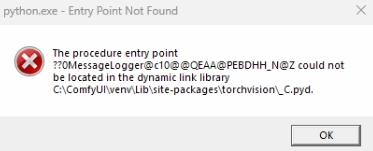
Hey I am getting this error when it launches
https://i.postimg.cc/MHG30Spz/Screenshot-2026-02-09-152626.png
^ See screen shot

1

quackie0

• 19d ago• Edited 19d ago

YoshimuraK

• 19d ago

it's nothing. just ignore it. 😉

1

Coven_Evelynn_LoL

OP • 19d ago

Do you also get that error? also you said use Python 3.12 which is 2 years old any reason not to go with latest?

1

YoshimuraK

• 18d ago• Edited 18d ago

Yes, i got that popup too. It's just a tiny bug that is not important for normal and core workload. You can ignore it.

Python 3.12 is the most stable version today and AMD recommends this version too.

If you are a software developer, you'll know you need tools that are more stable than latest for developing apps.

1

Coven_Evelynn_LoL

OP • 18d ago

Ok so I honestly just clicked ok and ignored the prompt for it to go away. So the good news is it renders Anima images really fast, however the performance in Z Image Turbo and Wan 2.2 it stinks on a whole new level.

Are there any of these models that can be downloaded that will work with the efficiency of anima? I noticed Anima properly uses the GPU compute at 95% in task bar manager where as Wan and Z image turbo will spike to 100 then go back down to 0% then spike to 100 briefly and go down again making the process take forever. To the point where PC would just freeze and I would have to do a hard reboot.

So now I am wondering if there are any other models to download for image to video etc that has the impressive efficiency of Anima which seems to be a really well optimized model

1

More replies

Coven_Evelynn_LoL

OP • 18d ago

I have a question do I have to install this? what if I don't do this line what happens and why is this necessary?

5. ติดตั้ง Torch ROCm ตัวพิเศษ (v2-staging) ทับลงไป

pip install --pre torch torchvision torchaudio --index-url https://rocm.nightlies.amd.com/v2-staging/gfx103X-dgpu/ --force-reinstall

1

YoshimuraK

• 18d ago

It's the heart of the whole thing. It's a AMD PyTorch ROCm. If you use a normal torch package, everything will run on the CPU.

2

r/ROCm • • Feb 10 '26

ComfyUI doesn't work in Windows 11

1 Upvotes

Hey everyone, I used to have ComfyUI working in Windows using RX 9070 XT, however today I can no longer generate anything.

  • I have installed HIP SDK for windows 7.2

  • I have Python 3.12 Installed

  • I have the latest AMD driver 26.1.1

  • My environment variables: HIP_PATH_71=C:\Program Files\AMD\ROCm\7.1
    HIP_PATH=C:\Program Files\AMD\ROCm\7.1
    HIP_VISIBLE_DEVICES=1,2

hipinfo output:

device#                           0
Name:                             AMD Radeon RX 9070 XT
pciBusID:                         3
pciDeviceID:                      0
pciDomainID:                      0
multiProcessorCount:              32
maxThreadsPerMultiProcessor:      2048
isMultiGpuBoard:                  0
clockRate:                        2400 Mhz
memoryClockRate:                  1259 Mhz
memoryBusWidth:                   256
totalGlobalMem:                   15.92 GB
totalConstMem:                    2147483647
sharedMemPerBlock:                64.00 KB
canMapHostMemory:                 1
regsPerBlock:                     196608
warpSize:                         32
l2CacheSize:                      8388608
computeMode:                      0
maxThreadsPerBlock:               1024
maxThreadsDim.x:                  1024
maxThreadsDim.y:                  1024
maxThreadsDim.z:                  1024
maxGridSize.x:                    2147483647
maxGridSize.y:                    65536
maxGridSize.z:                    65536
major:                            12
minor:                            0
concurrentKernels:                1
cooperativeLaunch:                0
cooperativeMultiDeviceLaunch:     0
isIntegrated:                     0
maxTexture1D:                     16384
maxTexture2D.width:               16384
maxTexture2D.height:              16384
maxTexture3D.width:               2048
maxTexture3D.height:              2048
maxTexture3D.depth:               2048
hostNativeAtomicSupported:        1
isLargeBar:                       0
asicRevision:                     0
maxSharedMemoryPerMultiProcessor: 64.00 KB
clockInstructionRate:             1000.00 Mhz
arch.hasGlobalInt32Atomics:       1
arch.hasGlobalFloatAtomicExch:    1
arch.hasSharedInt32Atomics:       1
arch.hasSharedFloatAtomicExch:    1
arch.hasFloatAtomicAdd:           1
arch.hasGlobalInt64Atomics:       1
arch.hasSharedInt64Atomics:       1
arch.hasDoubles:                  1
arch.hasWarpVote:                 1
arch.hasWarpBallot:               1
arch.hasWarpShuffle:              1
arch.hasFunnelShift:              0
arch.hasThreadFenceSystem:        1
arch.hasSyncThreadsExt:           0
arch.hasSurfaceFuncs:             0
arch.has3dGrid:                   1
arch.hasDynamicParallelism:       0
gcnArchName:                      gfx1201
maxAvailableVgprsPerThread:       256 DWORDs
peers:
non-peers:                        device#0

memInfo.total:                    15.92 GB
memInfo.free:                     15.77 GB (99%)

I followed this tutorial from AMD to install Pytorch https://rocm.docs.amd.com/projects/radeon-ryzen/en/latest/docs/install/installrad/windows/install-pytorch.html

When I start ComfyUI i see this message in the logs: no ROCm-capable device is detected

And When I run a model it crashes the moment it tries to load the model and I get this error: hipErrorInvalidImage 200 Device kernel image is invalid

I tried again by using a venv and installing the packages using AMD's tutorial and checked that pytorch is working by running this commad: python -c "import torch" 2>nul && echo Success || echo Failure but when I start ComfyUI I only get Checkpoint files will always be loaded safely. then it stops.

Any idea on how to fix this? I have also tried installing the latest nightlies from TheRock repo but no success.


r/ROCm • • Jun 03 '26

Why ROCm Wins the Throughput Race but Loses the Power Bill on Strix Halo — A 35% Energy Reversal Caused by APU Runtime Polling

4 Upvotes

📌 Intro — Strix Halo, a new "middle-ground" platform
Who this is for — Infra/ML engineers running local LLM workloads on Strix Halo / Ryzen AI MAX+ systems, and any backend decision-maker who has to validate the "AMD GPU means ROCm" intuition. If you ever picked an inference backend based on a single throughput table, this case study is for you.

https://luxuriant-brazil-09c.notion.site/Why-ROCm-Wins-the-Throughput-Race-but-Loses-the-Power-Bill-on-Strix-Halo-A-35-Energy-Reversal-Cau-371b85459d5581e4a86dd5169895ad5e


r/ROCm • • Apr 15 '25

I've spent all day on this and I'm tired. Just want to know why?

1 Upvotes

Ryzen 5 5500U, Ubuntu 24.04 LTS

I installed ROCm following the quick start installation guide

When I got to verifying the installation, rocminfo outputs ROCk module is NOT loaded, possibly no GPU devices. Clinfo didn't show my device either.

I had the exact same installation working yesterday with pytorch. cuda.is_available() was true.

Both rocminfo and clinfo give expected outputs if I disable secure boot.

What did I do wrong during installation and how to fix it?

EDIT: Disabling secure boot allows for the gpu to be discovered and rocm loads as expected.

Following this and setting the environmental variable

echo "export HSA_OVERRIDE_GFX_VERSION=9.0.0" >> .profile

Python 3.12.3 (main, Feb 4 2025, 14:48:35) [GCC 13.3.0] on linux

Type "help", "copyright", "credits" or "license" for more information.

>>> import torch

>>> print(torch.cuda.device_count())

1

>>> cuda0=torch.device('cuda:0')

>>> torch.ones([2, 4], dtype=torch.float64, device=cuda0)

tensor([[1., 1., 1., 1.],

[1., 1., 1., 1.]], device='cuda:0', dtype=torch.float64)

I would still like to know how to keep secure boot enabled, but for now PyTorch is working and I can keep on studying.


r/ROCm • • Feb 18 '26

cant install ROCm on linux mint for my 9070xt

1 Upvotes

hey all! trying to get ROCm to work on my computer, but when i try to download a current version i get a crap ton of errors, so many in fact that "Processing was halted because there were too many errors." Here is as many errors as i can fit within the text box:

dpkg: error processing package rocm-core (--configure):
 installed rocm-core package post-installation script subprocess returned error 
exit status 2
Setting up libxnvctrl0:amd64 (510.47.03-0ubuntu4.24.04.1) ...
Setting up libfile-copy-recursive-perl (0.45-4) ...
dpkg: dependency problems prevent configuration of rocm-device-libs:
 rocm-device-libs depends on rocm-core; however:
  Package rocm-core is not configured yet.

dpkg: error processing package rocm-device-libs (--configure):
 dependency problems - leaving unconfigured
dpkg: dependency problems prevent configuration of rocprofiler-plugins:
 rocprofiler-plugins depends on rocm-core; however:
  Package rocm-core is not configured yet.

dpkg: error processing package rocprofiler-plugins (--configure):
 dependency problems - leaving unconfigured
Setting up xtrans-dev (1.4.0-1) ...
dpkg: dependency problems prevent configuration of mivisionx-dev:
 mivisionx-dev depends on rocm-core; however:
  Package rocm-core is not configured yet.

dpkg: error processing package mivisionx-dev (--configure):
 dependency problems - leaving unconfigured
Setting up libopenexr-dev (3.1.5-5.1build3) ...
dpkg: dependency problems prevent configuration of rocprim-dev:
 rocprim-dev depends on rocm-core; however:
  Package rocm-core is not configured yet.

dpkg: error processing package rocprim-dev (--configure):
 dependency problems - leaving unconfigured
Setting up libmunge2:amd64 (0.5.15-4ubuntu0.1) ...
dpkg: dependency problems prevent configuration of rocm-gdb:
 rocm-gdb depends on rocm-core; however:
  Package rocm-core is not configured yet.

dpkg: error processing package rocm-gdb (--configure):
 dependency problems - leaving unconfigured
dpkg: dependency problems prevent configuration of rocm-debug-agent:
 rocm-debug-agent depends on rocm-core; however:
  Package rocm-core is not configured yet.

dpkg: error processing package rocm-debug-agent (--configure):
 dependency problems - leaving unconfigured
dpkg: dependency problems prevent configuration of rocm-dbgapi:
 rocm-dbgapi depends on rocm-core; however:
  Package rocm-core is not configured yet.

dpkg: error processing package rocm-dbgapi (--configure):
 dependency problems - leaving unconfigured
dpkg: dependency problems prevent configuration of rocm:
 rocm depends on rocm-core (= 7.2.0.70200-43~24.04); however:
  Package rocm-core is not configured yet.
 rocm depends on mivisionx-dev (= 3.5.0.70200-43~24.04); however:
  Package mivisionx-dev is not configured yet.

dpkg: error processing package rocm (--configure):
 dependency problems - leaving unconfigured
dpkg: dependency problems prevent configuration of rocsolver:
 rocsolver depends on rocm-core; however:
  Package rocm-core is not configured yet.

dpkg: error processing package rocsolver (--configure):
 dependency problems - leaving unconfigured
dpkg: dependency problems prevent configuration of mivisionx:
 mivisionx depends on rocm-core; however:
  Package rocm-core is not configured yet.

dpkg: error processing package mivisionx (--configure):
 dependency problems - leaving unconfigured
Setting up libswscale-dev:amd64 (7:6.1.1-3ubuntu5) ...
dpkg: dependency problems prevent configuration of rocm-opencl-sdk:
 rocm-opencl-sdk depends on rocm-core (= 7.2.0.70200-43~24.04); however:
  Package rocm-core is not configured yet.

dpkg: error processing package rocm-opencl-sdk (--configure):
 dependency problems - leaving unconfigured
dpkg: dependency problems prevent configuration of hipcub-dev:
 hipcub-dev depends on rocprim-dev (>= 2.10.1); however:
  Package rocprim-dev is not configured yet.
 hipcub-dev depends on rocm-core; however:
  Package rocm-core is not configured yet.

dpkg: error processing package hipcub-dev (--configure):
 dependency problems - leaving unconfigured
Setting up libhwloc15:amd64 (2.10.0-1build1) ...
dpkg: dependency problems prevent configuration of rocfft:
 rocfft depends on rocm-core; however:
  Package rocm-core is not configured yet.

dpkg: error processing package rocfft (--configure):
 dependency problems - leaving unconfigured
dpkg: dependency problems prevent configuration of hipblas:
 hipblas depends on rocsolver (>= 3.32.0); however:
  Package rocsolver is not configured yet.
 hipblas depends on rocm-core; however:
  Package rocm-core is not configured yet.

dpkg: error processing package hipblas (--configure):
 dependency problems - leaving unconfigured
Setting up libelf-dev:amd64 (0.190-1.1ubuntu0.1) ...
Setting up libjsoncpp25:amd64 (1.9.5-6build1) ...
dpkg: dependency problems prevent configuration of rocm-opencl:
 rocm-opencl depends on rocm-core; however:
  Package rocm-core is not configured yet.

dpkg: error processing package rocm-opencl (--configure):
 dependency problems - leaving unconfigured
Setting up libsocket++1:amd64 (1.12.13+git20131030.5d039ba-1build1) ...
dpkg: dependency problems prevent configuration of rocprofiler-sdk:
 rocprofiler-sdk depends on rocm-core; however:
  Package rocm-core is not configured yet.

dpkg: error processing package rocprofiler-sdk (--configure):
 dependency problems - leaving unconfigured
dpkg: dependency problems prevent configuration of hipblas-common-dev:
 hipblas-common-dev depends on rocm-core; however:
  Package rocm-core is not configured yet.

dpkg: error processing package hipblas-common-dev (--configure):
 dependency problems - leaving unconfigured
Setting up amdgpu-core (1:7.2.70200-2278374.24.04) ...
dpkg: dependency problems prevent configuration of rocprofiler-register:
 rocprofiler-register depends on rocm-core; however:
  Package rocm-core is not configured yet.

dpkg: error processing package rocprofiler-register (--configure):
 dependency problems - leaving unconfigured
Setting up opencl-c-headers (3.0~2023.12.14-1) ...
Setting up libglew2.2:amd64 (2.2.0-4build1) ...
Setting up libccolamd3:amd64 (1:7.6.1+dfsg-1build1) ...
dpkg: dependency problems prevent configuration of rocwmma-dev:
 rocwmma-dev depends on rocm-core; however:
  Package rocm-core is not configured yet.

dpkg: error processing package rocwmma-dev (--configure):
 dependency problems - leaving unconfigured
dpkg: dependency problems prevent configuration of rocm-developer-tools:
 rocm-developer-tools depends on rocm-core (= 7.2.0.70200-43~24.04); however:
  Package rocm-core is not configured yet.
 rocm-developer-tools depends on rocm-dbgapi (= 0.77.4.70200-43~24.04); however:
  Package rocm-dbgapi is not configured yet.
 rocm-developer-tools depends on rocm-debug-agent (= 2.1.0.70200-43~24.04); howe
ver:
  Package rocm-debug-agent is not configured yet.
 rocm-developer-tools depends on rocm-gdb (= 16.3.70200-43~24.04); however:
  Package rocm-gdb is not configured yet.
 rocm-developer-tools depends on rocprofiler-register (= 0.6.0.70200-43~24.04); 
however:
  Package rocprofiler-register is not configured yet.
 rocm-developer-tools depends on rocprofiler-plugins (= 2.0.70200.70200-43~24.04
); however:
  Package rocprofiler-plugins is not configured yet.
 rocm-developer-tools depends on rocprofiler-sdk (= 1.1.0-43~24.04); however:
  Package rocprofiler-sdk is not configured yet.

dpkg: error processing package rocm-developer-tools (--configure):
 dependency problems - leaving unconfigured
Setting up opencv-data (4.6.0+dfsg-13.1ubuntu1) ...
Setting up libtesseract5:amd64 (5.3.4-1build5) ...
Setting up libexif-doc (0.6.24-1build2) ...
dpkg: dependency problems prevent configuration of hipify-clang:
 hipify-clang depends on rocm-core; however:
  Package rocm-core is not configured yet.

dpkg: error processing package hipify-clang (--configure):
 dependency problems - leaving unconfigured
Setting up libdrm-amdgpu-common (1.0.0.70200-2278374.24.04) ...
dpkg: dependency problems prevent configuration of hipblaslt-dev:
 hipblaslt-dev depends on hipblas-common-dev (>= 1.0.0); however:
  Package hipblas-common-dev is not configured yet.

dpkg: error processing package hipblaslt-dev (--configure):
 dependency problems - leaving unconfigured
Setting up libraw1394-tools (2.1.2-2build3) ...
dpkg: dependency problems prevent configuration of hipfort-dev:
 hipfort-dev depends on rocm-core; however:
  Package rocm-core is not configured yet.

dpkg: error processing package hipfort-dev (--configure):
 dependency problems - leaving unconfigured
Setting up libpsm2-2 (11.2.185-2build1) ...
dpkg: dependency problems prevent configuration of hipcc:
 hipcc depends on rocm-core; however:
  Package rocm-core is not configured yet.

dpkg: error processing package hipcc (--configure):
 dependency problems - leaving unconfigured
Setting up xorg-sgml-doctools (1:1.11-1.1) ...
dpkg: dependency problems prevent configuration of rocm-smi-lib:
 rocm-smi-lib depends on rocm-core; however:
  Package rocm-core is not configured yet.

dpkg: error processing package rocm-smi-lib (--configure):
 dependency problems - leaving unconfigured
Setting up libevent-core-2.1-7t64:amd64 (2.1.12-stable-9ubuntu2) ...
Setting up libqt5opengl5t64:amd64 (5.15.13+dfsg-1ubuntu1) ...
Setting up libamd-comgr2:amd64 (6.0+git20231212.4510c28+dfsg-3build2) ...
dpkg: dependency problems prevent configuration of rocblas:
 rocblas depends on rocm-core; however:
  Package rocm-core is not configured yet.

dpkg: error processing package rocblas (--configure):
 dependency problems - leaving unconfigured
Setting up libpsm-infinipath1 (3.3+20.604758e7-6.3build1) ...
update-alternatives: using /usr/lib/libpsm1/libpsm_infinipath.so.1.16 to provide
 /usr/lib/x86_64-linux-gnu/libpsm_infinipath.so.1 (libpsm_infinipath.so.1) in au
to mode
dpkg: dependency problems prevent configuration of hip-doc:
 hip-doc depends on rocm-core; however:
  Package rocm-core is not configured yet.

dpkg: error processing package hip-doc (--configure):
 dependency problems - leaving unconfigured
dpkg: dependency problems prevent configuration of rccl:
 rccl depends on rocm-smi-lib (>= 4.0.0); however:
  Package rocm-smi-lib is not configured yet.
 rccl depends on rocm-core; however:
  Package rocm-core is not configured yet.

dpkg: error processing package rccl (--configure):
 dependency problems - leaving unconfigured
dpkg: dependency problems prevent configuration of hipblas-dev:
 hipblas-dev depends on hipblas-common-dev (>= 1.4.0); however:
  Package hipblas-common-dev is not configured yet.
 hipblas-dev depends on hipblas (>= 3.2.0.70200); however:
  Package hipblas is not configured yet.

dpkg: error processing package hipblas-dev (--configure):
 dependency problems - leaving unconfigured
dpkg: dependency problems prevent configuration of rocsolver-dev:
 rocsolver-dev depends on rocsolver (>= 3.32.0.70200); however:
  Package rocsolver is not configured yet.

dpkg: error processing package rocsolver-dev (--configure):
 dependency problems - leaving unconfigured
Setting up libhsakmt1:amd64 (5.7.0-1build1) ...
dpkg: dependency problems prevent configuration of rocrand:
 rocrand depends on rocm-core; however:
  Package rocm-core is not configured yet.

dpkg: error processing package rocrand (--configure):
 dependency problems - leaving unconfigured
dpkg: dependency problems prevent configuration of rocalution:
 rocalution depends on rocblas (>= 2.22.0); however:
  Package rocblas is not configured yet.
 rocalution depends on rocrand (>= 2.1.0); however:
  Package rocrand is not configured yet.
 rocalution depends on rocm-core; however:
  Package rocm-core is not configured yet.

dpkg: error processing package rocalution (--configure):
 dependency problems - leaving unconfigured
dpkg: dependency problems prevent configuration of hip-dev:
 hip-dev depends on rocm-core; however:
  Package rocm-core is not configured yet.
 hip-dev depends on hipcc; however:
  Package hipcc is not configured yet.

dpkg: error processing package hip-dev (--configure):
 dependency problems - leaving unconfigured
Setting up libfabric1:amd64 (1.17.0-3build2) ...
Setting up libgdcm3.0t64:amd64 (3.0.22-2.1ubuntu1) ...
dpkg: dependency problems prevent configuration of rocm-llvm:
 rocm-llvm depends on rocm-core; however:
  Package rocm-core is not configured yet.

dpkg: error processing package rocm-llvm (--configure):
 dependency problems - leaving unconfigured
dpkg: dependency problems prevent configuration of comgr:
 comgr depends on rocm-core; however:
  Package rocm-core is not configured yet.

dpkg: error processing package comgr (--configure):
 dependency problems - leaving unconfigured
dpkg: dependency problems prevent configuration of hiprand:
 hiprand depends on rocm-core; however:
  Package rocm-core is not configured yet.

dpkg: error processing package hiprand (--configure):
 dependency problems - leaving unconfigured
dpkg: dependency problems prevent configuration of rocprofiler-sdk-rocpd:
 rocprofiler-sdk-rocpd depends on rocm-core; however:
  Package rocm-core is not configured yet.

dpkg: error processing package rocprofiler-sdk-rocpd (--configure):
 dependency problems - leaving unconfigured
dpkg: dependency problems prevent configuration of hipsolver:
 hipsolver depends on rocblas (>= 4.2.0); however:
  Package rocblas is not configured yet.
 hipsolver depends on rocsolver (>= 3.32.0); however:
  Package rocsolver is not configured yet.
 hipsolver depends on rocm-core; however:
  Package rocm-core is not configured yet.

dpkg: error processing package hipsolver (--configure):
 dependency problems - leaving unconfigured
Setting up libcholmod5:amd64 (1:7.6.1+dfsg-1build1) ...
Setting up libgdcm-dev (3.0.22-2.1ubuntu1) ...
Setting up libdrm-dev:amd64 (2.4.125-1ubuntu0.1~24.04.1) ...
dpkg: dependency problems prevent configuration of roctracer:
 roctracer depends on rocm-core; however:
  Package rocm-core is not configured yet.

dpkg: error processing package roctracer (--configure):
 dependency problems - leaving unconfigured
dpkg: dependency problems prevent configuration of rocm-openmp:
 rocm-openmp depends on comgr (= 3.0.0.70200-43~24.04); however:
  Package comgr is not configured yet.
 rocm-openmp depends on rocm-device-libs (= 1.0.0.70200-43~24.04); however:
  Package rocm-device-libs is not configured yet.
 rocm-openmp depends on rocm-llvm (= 22.0.0.26014.70200-43~24.04); however:
  Package rocm-llvm is not configured yet.
 rocm-openmp depends on rocm-core (= 7.2.0.70200-43~24.04); however:
  Package rocm-core is not configured yet.

dpkg: error processing package rocm-openmp (--configure):
 dependency problems - leaving unconfigured
dpkg: dependency problems prevent configuration of rocprofiler-systems:
 rocprofiler-systems depends on rocm-core; however:
  Package rocm-core is not configured yet.
 rocprofiler-systems depends on rocprofiler-sdk (>= 1.1.0); however:
  Package rocprofiler-sdk is not configured yet.

dpkg: error processing package rocprofiler-systems (--configure):
 dependency problems - leaving unconfigured
dpkg: dependency problems prevent configuration of rocrand-dev:
 rocrand-dev depends on rocrand (>= 4.2.0.70200); however:
  Package rocrand is not configured yet.

dpkg: error processing package rocrand-dev (--configure):
 dependency problems - leaving unconfigured
dpkg: dependency problems prevent configuration of rocprofiler:
 rocprofiler depends on rocm-core; however:
  Package rocm-core is not configured yet.

dpkg: error processing package rocprofiler (--configure):
 dependency problems - leaving unconfigured
dpkg: dependency problems prevent configuration of composablekernel-dev:
 composablekernel-dev depends on rocm-core; however:
  Package rocm-core is not configured yet.

dpkg: error processing package composablekernel-dev (--configure):
 dependency problems - leaving unconfigured
dpkg: dependency problems prevent configuration of amd-smi-lib:
 amd-smi-lib depends on rocm-core; however:
  Package rocm-core is not configured yet.

dpkg: error processing package amd-smi-lib (--configure):
 dependency problems - leaving unconfigured
Setting up libdc1394-dev:amd64 (2.2.6-4build1) ...
dpkg: dependency problems prevent configuration of hip-samples:
 hip-samples depends on rocm-core; however:
  Package rocm-core is not configured yet.
 hip-samples depends on hip-dev; however:
  Package hip-dev is not configured yet.
 hip-samples depends on hipcc; however:
  Package hipcc is not configured yet.

dpkg: error processing package hip-samples (--configure):
 dependency problems - leaving unconfigured
dpkg: dependency problems prevent configuration of rocsparse:
 rocsparse depends on rocblas (>= 4.1.0); however:
  Package rocblas is not configured yet.
 rocsparse depends on rocm-core; however:
  Package rocm-core is not configured yet.

dpkg: error processing package rocsparse (--configure):
 dependency problems - leaving unconfigured
dpkg: dependency problems prevent configuration of rocm-cmake:
 rocm-cmake depends on rocm-core; however:
  Package rocm-core is not configured yet.

dpkg: error processing package rocm-cmake (--configure):
 dependency problems - leaving unconfigured
Setting up libevent-pthreads-2.1-7t64:amd64 (2.1.12-stable-9ubuntu2) ...
dpkg: dependency problems prevent configuration of rocprofiler-sdk-roctx:
 rocprofiler-sdk-roctx depends on rocm-core; however:
  Package rocm-core is not configured yet.
 rocprofiler-sdk-roctx depends on rocprofiler-register; however:
  Package rocprofiler-register is not configured yet.

dpkg: error processing package rocprofiler-sdk-roctx (--configure):
 dependency problems - leaving unconfigured
dpkg: too many errors, stopping
Processing triggers for libc-bin (2.39-0ubuntu8.7) ...
Errors were encountered while processing:
 rocm-core
 rocm-device-libs
 rocprofiler-plugins
 mivisionx-dev
 rocprim-dev
 rocm-gdb
 rocm-debug-agent
 rocm-dbgapi
 rocm
 rocsolver
 mivisionx
 rocm-opencl-sdk
 hipcub-dev
 rocfft
 hipblas
 rocm-opencl
 rocprofiler-sdk
 hipblas-common-dev
 rocprofiler-register
 rocwmma-dev
 rocm-developer-tools
 hipify-clang
 hipblaslt-dev
 hipfort-dev
 hipcc
 rocm-smi-lib
 rocblas
 hip-doc
 rccl
 hipblas-dev
 rocsolver-dev
 rocrand
 rocalution
 hip-dev
 rocm-llvm
 comgr
 hiprand
 rocprofiler-sdk-rocpd
 hipsolver
 roctracer
 rocm-openmp
 rocprofiler-systems
 rocrand-dev
 rocprofiler
 composablekernel-dev
 amd-smi-lib
 hip-samples
 rocsparse
 rocm-cmake
 rocprofiler-sdk-roctx
Processing was halted because there were too many errors.
E: Sub-process /usr/bin/dpkg returned an error code (1)