r/MoonlightStreaming • • 9h ago

Nightjar/Rubylight

23 Upvotes

I am a bit confused about nightjar and rubylight. It seems to be extremly popular recently. My understand was that it is specifically for AMD hosts.. Did that change?

On Github I see NVIDIA mentioned as well


r/MoonlightStreaming • • 15m ago

Apollo Moonlight Microphone

1 Upvotes

Anyone got microphone working for moonlight streaming from pc to your phone?
Looking to play games with a mic.
Tried steamlink but seems like it doesn't work, or my team mates aren't responding.
But if using discord on my phone in a chatroom it works.

Hoping to have a solution to use mic for random game matches.


r/MoonlightStreaming • • 16h ago

Sunshine foundation /moonlight v+ vs RubyLight/NightJar

15 Upvotes

Hello everyone. I currently using Sunshine Foundation and Moolight V+, and I see a lot of people recommending RubyLight and NightJar. I want to know if some of you have some feedback on which one is better. Why thanks

Edit: I have a AMD Ryzen 7 5800X 32GB of RAM and graphic card I have a AMD Radeon RX 7900 XT.

Device use for the remote play I have my Vivo X300 Ultra and my tablet Xiaomi Mi Pad 6 Pro.


r/MoonlightStreaming • • 5h ago

What are ppl getting for latency with cellular/another network --host enthernet pc.

1 Upvotes

Trying to find benefits over steam link and agter 3 days of testing I have 0 from other networks/cellular.

On same wifi she rips but separate network steam link lower latency and stability


r/MoonlightStreaming • • 11h ago

MoonlightWeb vs Apollo + Moonlight + Tailscale

3 Upvotes

Which one’s better? I’ve been using MoonlightWeb for remote streaming (about 5mi distance) and it works well and doesn’t need any installation (just browser). I was wondering if using Apollo + Moonlight with Tailscale is better in terms of performance and latency. Has anyone tried both?


r/MoonlightStreaming • • 16h ago

Is this latency good enough or can I improve it even more?

8 Upvotes

Sunshine + Moonlight

PC is connected though LAN, but no wifi 6 unfortunately.

Non-steam game.

Controller plugged in to phone.

Desktop mode (not big picture).

2620x1280 (Native).

120fps, monitor is set to 120hz.

50mbps bitrate.

Prefer lowest latency.

The rest of the settings are unchanged.

Please let me know if there's anything I can change to better the lantency


r/MoonlightStreaming • • 14h ago

Better than Shield for Streaming?

4 Upvotes

Hi guys,

I'm sure this question has been asked a million times already, but I'd like to upgrade my system or figure out what might be causing my problem.

Host PC with Sunshine:

CPU: AMD Ryzen 7 7800X3D

GPU: AMD Radeon RX 7900 XTX

RAM: 32 GB DDR5

Network: ~900 Mbps down, ~60 Mbps up FRITZ!Box 7530 AX (Wi-Fi 6)

Client: Samsung S95BA (Tizen) with Moonlight

The problem right now is that I can't establish a stable connection between the host and the client. Neither via Wi-Fi nor via a direct LAN connection.

What's the best streaming device right now, aside from an NVIDIA Shield Pro (2017)?


r/MoonlightStreaming • • 13h ago

PC in my living room

3 Upvotes

Hi! I recently got a new PC for Moonlight streaming, and I'd like to set it up like an Apple TV or Fire Stick. Is there a TV-style UI for Windows (similar to Android TV), or is it possible to install Android TV directly on the PC and keep it running 24/7?


r/MoonlightStreaming • • 17h ago

Disabling WLAN autoconfig fixed intermittent Moonlight stutter on my Windows 11 hotspot

5 Upvotes

I was getting occasional stutters while streaming from Sunshine on my Windows 11 PC to Moonlight on my iPhone. The PC uses Ethernet, and the iPhone connects directly to the PC’s mobile hotspot through a Qualcomm FastConnect 7800.

The stutters happened during normal gameplay, even with the Wi-Fi panel closed. What helped me track it down was finding a way to reproduce the exact same hitch: I could open the list of nearby Wi-Fi networks on the PC and immediately see the stream stutter on the iPhone.

Microsoft confirms that Wi-Fi scans can temporarily increase latency. While the adapter scans, it has a harder time sending and receiving packets. Microsoft’s low-latency driver guidance also recommends limiting how long the adapter spends away from its active channel during a scan. That matches the hitch I could reproduce by opening the network list. Microsoft’s WlanScan documentation · Microsoft’s low-latency Wi-Fi driver guidance. Microsoft Learn

What fixed it for me

I opened PowerShell as administrator on the Sunshine PC and ran:

netsh wlan set autoconfig enabled=no interface="Wi-Fi"

The hotspot kept working, the intermittent stutters stopped, and opening the Wi-Fi list mid-stream no longer caused a hitch.

Wi-Fi is the interface name on my PC. You can find yours with netsh wlan show interfaces. The trade-off is that Windows will no longer automatically connect to Wi-Fi networks through that interface. That works for me because the PC uses Ethernet. Microsoft’s netsh wlan reference. learn.microsoft.com

To turn autoconfig back on:

netsh wlan set autoconfig enabled=yes interface="Wi-Fi"

r/MoonlightStreaming • • 12h ago

Voidlink & Vibepollo - amazing streaming, frustrating touch controls

1 Upvotes

I was hyped to run Voidlink / Vibepollo with my iPhone Duo streaming from my gaming PC.

I wanted to play grand strategy games like Hearts of Iron 4, Civ 6, and Crusader Kings 2, as well as turn based tactical games like XCOM. My hope was that the touch controls would feel intuitive (i.e. pinch zooming, easy tapping, etc.). I absolutely hate clamp controllers that hold the phone. I just wanted touch gaming.

My experience has been so frustrating that I feel like I must be doing something wrong. The touch works in odd ways- sometimes it registers, sometimes it'll do things that just wouldn't make sense (pinching makes a box to highlight things, etc.)

Has anyone else had this experience? Any tweaks or different streaming software to improve it?


r/MoonlightStreaming • • 13h ago

Moonlight FPS custom cap

1 Upvotes

Hi all, I recently got a big upgrade with a new tv the LG c6 77 inch oled, and before this I was playing on a 15 year old tv with moonlight on the Apple TV. So I have 4k 165hz now, but Apple TV is limited to 60 but that’s not the issue bc there’s no way my 8gb 3060 is producing enough fps for me to utilise the extra refresh rate settings.

However the moonlight app on my Apple TV seems to be extremely restricted, it doesn’t allow u do set a custom bitrate, resolution, FPS, or anything. It has preset settings which u cant fine tune for ur setup. Now I am running fh6 at 4k now and getting a pretty stable 45fps, and my tv does have many VRR settings however the mismatch between 45 and 60 is still quite painful. And I can’t set a custom fps it’s only 30 or 60. Also I have both the Apple TV and my pc wired, perfect connection not a single stat on overlay goes above 0 except for host processing latency. But I am just wondering if maybe I have the wrong one or idk how I can fix this and set the custom FPS to be 45 for the Apple TV moonlight.

I heard of people with LG TVs that use some sort of program or something similar to get moonlight onto the TV, however idk how it would work if the TVs decoder or chip is powerful enough or if it’s even better tthan my Apple TV.

Also I see the setting in sunshine that says minimum cpu thread or core count or something and if u raise it I think it reduces host latency or helps in some way if u have a good cpu, and I know my CPU is quite good especially bc it has 32 threads but does this matter? What should I set this to

Long list but thank u to any responses and recommendations.

  • Apple TV 2017 4K

  • LG/C6/77

  • Ryzen 9 5950X + 8GB 3060 + 32GB ram

  • Dual wired setup

  • 100mbps bitrate


r/MoonlightStreaming • • 13h ago

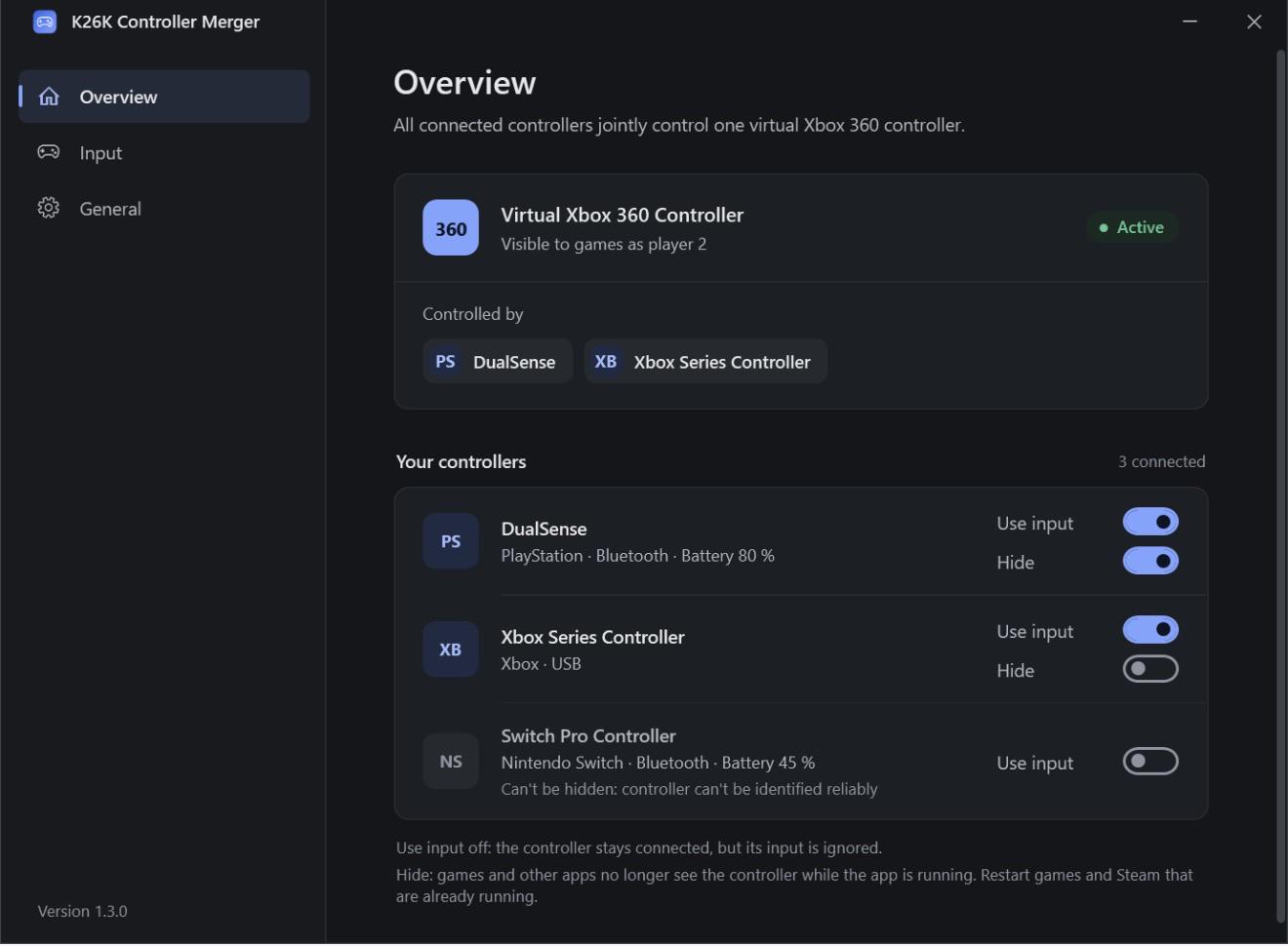
I created the K26K Controller Merger Tool because I was tired of having to change the controller settings every time

Post image
1 Upvotes

I created the K26K Controller Merger Tool because I was tired of having to change the controller settings in emulators every time I switched from playing locally to playing remotely on Windows.

The tool takes the signals from all connected controllers and routes them to one virtual Xbox controller.
Therefore, you no longer need to change the settings or make the workaround/alternative via Steam client.

The second thing for which the tool is good to use is when you want to support your child while playing, you can control Player 1 simultaneously with two controllers.

Unfortunately, the app is not yet signed. I don’t want to pay any money for this, and I only need relevance to get a free signature from the SignPath Foundation.

Only Windows.

(I had to recreate the post because my previous one was blocked for some reason)

I put the link to the project in the comments. I hope the post won’t be blocked again.


r/MoonlightStreaming • • 1d ago

Am I the only one using moonlight/artemis for a second monitor?

Post image
83 Upvotes

A lot of people ask me what the smaller screen in my setup is for and I have to explain what moonlight streaming can do :) Feels like such an underrated use for moonlight. I've made this tablet’s entire purpose to be a second monitor most of the time. This is a samsung s7+. I chose it because of the processor, amoled screen, wifi 6, 120hz, and it was $250 at the time. I can slide down windows to it, duplicate the screen and pick it up with me to continue my game in bed, and it doubles as a drawing tablet for my pc with the s-pen. I recently switched to vibepollo but I don't like the stream resuming feature being less smooth compared to regular apollo and it makes my task bar crash :(. So I'm also asking for alternatives to check out.

Edit: Rubylight/Nightjar makes stream resuming seamless and translucent task bar doesn't crash anymore :) Issue fixed!


r/MoonlightStreaming • • 18h ago

[Update] ProsperoSunshine 0.6.9 – co-op from several devices, web UI, keyboard & mouse, more firmwares

Thumbnail
reddit.com
1 Upvotes

r/MoonlightStreaming • • 23h ago

If full Dualsense haptics is my target, which fork should I go for?

2 Upvotes

I am looking for full Dualsense support, which fork would be the best option for me?

Thanks!


r/MoonlightStreaming • • 1d ago

Decoding latency for sd 8sgen4.

Post image
6 Upvotes

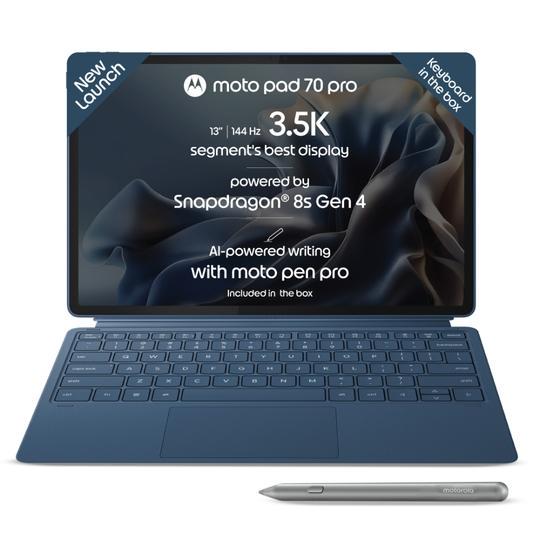
I am intending to buy this tablet to use as portable screen for pc as well as tablet. But I saw some comments that 8s gen 4 and 8s gen 3 have high decode latency for some reason even with Artemis. Currently I tested with my tab s9 with 8gen 2 and it gives 4 to 5ms at native 1600p and 120hz. Can anyone with this chip give me a practical experience. Thanks.


r/MoonlightStreaming • • 21h ago

Anyone got two Joy cons with gyro working?

1 Upvotes

Anyone got two Joy cons with gyro working?


r/MoonlightStreaming • • 1d ago

Moonlight not launching session

3 Upvotes

I just got my hands on a magicpad 4 from honor and it's great but moonlight won't lauch any session it just gets me back to the menu without even an error or anything, to be honest i think i already tried everything i really don't know what to do, can someone help ?


r/MoonlightStreaming • • 1d ago

Google TV blocking Artemis APK installation

1 Upvotes

I am trying to install Artemis on my Android TV using the Downloader app, which I have given permission in the settings to download non-Google applications, but Play Protect is still blocking me from installing it, with no option to override. There are no Play Protect options to turn off, and when I contact Google, the AI (the only option for communication anymore) says it's not possible to disable Play Protect on Google TVs. Can I just not use Artemis then? There must be a way... Please help!


r/MoonlightStreaming • • 1d ago

Best way to improve my streaming experience

1 Upvotes

I want to stream my PC from my office to my TV downstairs. I want to stream 4K60fps, preferably with 5.1 Surround. Currently when I stream it looks and sounds good, but has a decent amount of stuttering and artifacts.

I have Spectrum Internet 1Gbps. So in ideal conditions 1000Mbps download, 30Mbps upload (hard cap set by Spectrum on all their domestic fiber plans).

Router eero 7 with extension pods.

I currently stream to my Apple TV which is connected to the main eero pod (connected directly to the modem) via ethernet.

My PC is connected to another eero pod in the office via ethernet, but this pod is not directly connected to the modem (Speedtest on PC averages 600-800Mbps down, 30Mbps up).

PC Specs:

CPU: 7800x3D
GPU: 7900XTX
RAM: 32GB DDR5
SSD: Samsung 980 PRO 2TB
OS: CachyOS HTPC on LTS Kernel (SteamOS experience)

I am also able to setup my SteamDeck OLED downstairs to stream on if it would be a better experience than the Apple TV for a client.

EDIT:

Host is using Sunshine Version 2026.914.233613
Config is no changes except Vulcan Encoder is set to auto on both options.

Client is Moonlight for Apple tvOS
Codec AVI
Display Full Screen
V-Sync off
Frame Pacing off
Video Decoder - Force Hardware Decoder
Enable HDR
Unlock Bitrate (Target is 4K60, I just unlocked it because the highest option otherwise was also stuttering)

r/MoonlightStreaming • • 1d ago

any difference between 1gbe and 2.5gbe ?

0 Upvotes

My pc has a 2.5gb ethernet port that I have running into a 2.5gb switch that I use for my nas, but I'm typically streaming off my Apple TV, which has a gigabit port. I'm noticing a tiny bit of input lag (which could be caused by anything lol) but I'm wondering if it would be worth it to use something that has a 2.5gb port as well? Anyone have any real experience with both and notice any difference ?


r/MoonlightStreaming • • 1d ago

New to streaming. Why does my iPhone perform so much better than my Legion Go S?

4 Upvotes

I need to keep my Legion Go S (moonlight) hardwired with Ethernet if I want consistent performance- otherwise the signal drops (reduce your bitrate! Warning) for a few seconds once every few minutes.

My iPhone Duo (VoidLink) can be pretty much anywhere in my house and it’s smooth as butter and never hiccups.

I don’t know much about this tech. Is it newer chips? iOS vs Linux?


r/MoonlightStreaming • • 2d ago

Quick way to check if your TV's connection is good enough for Moonlight (free app)

Thumbnail
gallery
37 Upvotes

Before blaming the host PC or the encoder settings, it's worth checking the TV end. I built TV Monitor partly for that.

The lag test measures ping, jitter and packet loss on the TV itself and gives you a verdict. My TCL on 5 GHz Wi-Fi got:

26 ms, jitter 14 ms, loss 0% - "Laggy - use a cable or 5 GHz Wi-Fi for Moonlight"

The jitter was the giveaway.

Results are saved per network, so you can:

  1. Run it on Wi-Fi

  2. Plug in a cable and run it again

  3. Compare the two

You can also leave a small speed overlay on screen while you play, set to only appear when the connection dips, so you can match stutters to network drops. Position, size and what it shows are all adjustable.

Free for Android TV / Google TV / Fire TV:

**Download TV Monitor (GitHub)**
•Added a Downloader code: 9551008

Update (v1.17): now also runs on Android phones and tablets, with a touch layout, live speed in the status bar and a draggable overlay. Also tested on a Google TV Streamer. Nothing changes on TVs.

TV Monitor 1.18 is out

  • The speed overlay no longer wobbles on TVs. It stays one size now.

  • New colour themes: Dark, Light or Black.

  • Cleaner, less cluttered screen.

  • Router ping now works with a VPN on.

Installs over the old version and keeps your settings. Same download link, or Downloader code 9551008.

Full change log


r/MoonlightStreaming • • 1d ago

Moonlight/Sunshine -> Voidlink/Vibepollo

Thumbnail reddit.com
1 Upvotes