r/MSI_Gaming • • Dec 22 '24 Helpful Heart of Silver Polished Silver Turd Take My Silver Silver is Forever

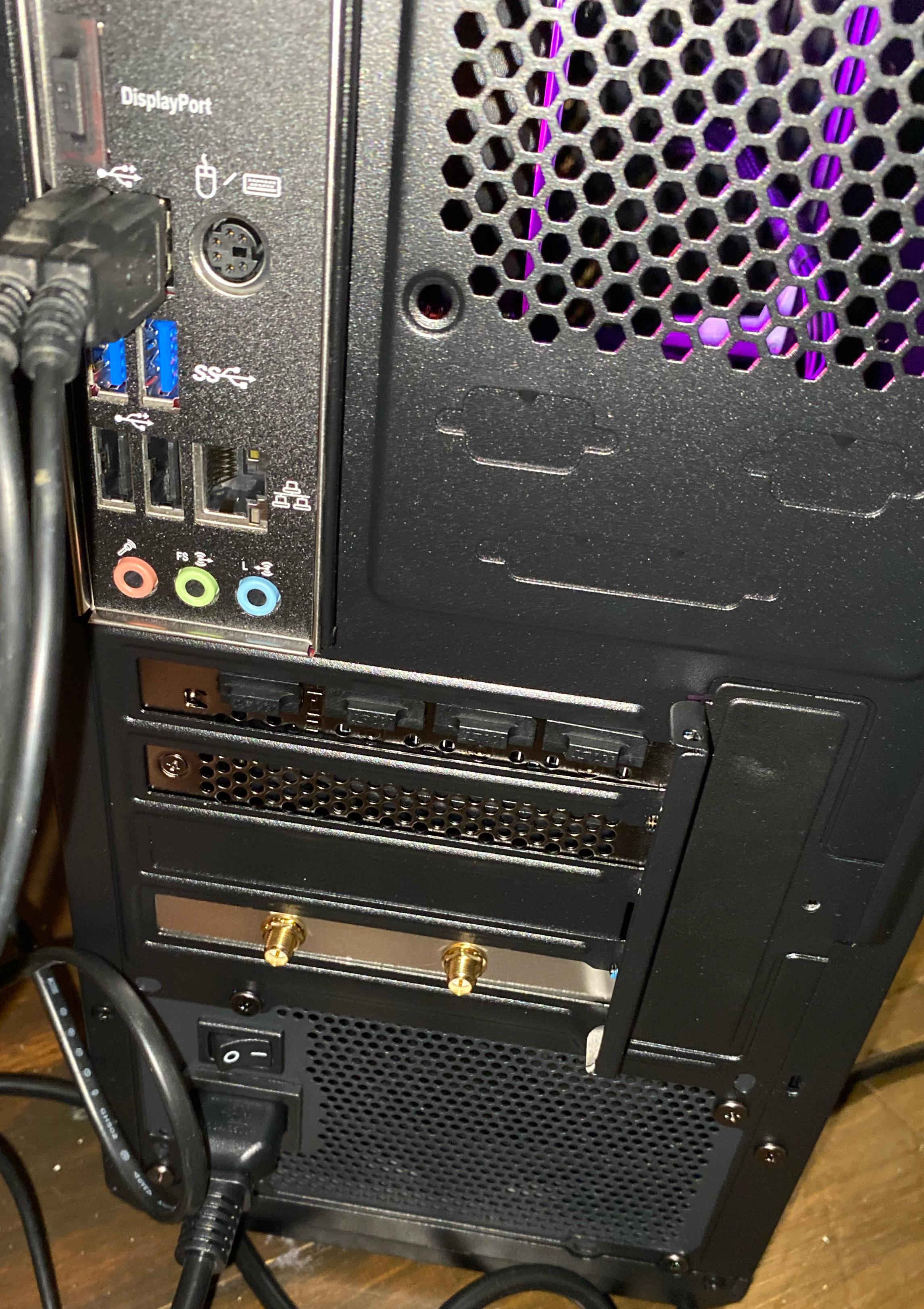
Troubleshooting might be a stupid question but where do i plug my hdmi cable

Post image
6.6k Upvotes

r/MSI_Gaming • • Feb 24 '25

Build Share bday gift from wife 🥰

Thumbnail
gallery
3.0k Upvotes

pc building is fun, yet somewhat challenging this build, compact case with large as fxxk parts, yet very rewarding, perfectly great for watching YouTube

godlike out of the box BIOS A20, didn’t update to latest A24, keeping A20 as it is running fine

once windows installed, did nothing but updated the dynamic dashboard firmware to the latest 16-Jan FW, then updated data

MSI center installed mystic light only, not gonna touch DD3, keeping it stock

I did used the EZ connect hub with fans connected to it, and it connects to EZ bridge

the only thing isn’t working properly is Bluetooth, can’t find my xbox controller, and my Keychron keyboard


r/MSI_Gaming • • Oct 24 '25

Discussion Im bound to get 120fps 4k max settings now.

Thumbnail
gallery
2.5k Upvotes

This GPU died. This is just a joke! I wanted to clean it ao I csn display it on my shelf because its one of the best looking GPUs imo


r/MSI_Gaming • • Feb 24 '24

Build Share What a little powder coat can do...

Post image
1.6k Upvotes

r/MSI_Gaming • • Oct 19 '25

Discussion 5090 killed itself while idling

Post image
1.5k Upvotes

Well, my Gaming Trio OC killed itself while being idle after starting windows. I created a support ticket already and wait for an answer. What's your experiences with RMA from MSI directly (especially EU/Germany)

It held up for about 7 months.


r/MSI_Gaming • • Jul 05 '25

Discussion Passion year after year.

Thumbnail
gallery
1.3k Upvotes

When passion becomes an open door to memories.


r/MSI_Gaming • • Oct 10 '25

News Why is MSI supporting this?

Thumbnail
gallery
1.2k Upvotes

r/MSI_Gaming • • Oct 28 '25

Discussion My (advertised as NEW) B650 Tomahawk motherboard came with an MSI SSD already installed in a slot.

Post image
1.1k Upvotes

Did I get lucky and maybe the motherboard came with an MSI SSD that the testers forgot about? Or what are the odds I got a used motherboard that someone returned, but they forgot to remove the SSD?

Everything looks brand new the box looks like I was the first person to open it.


r/MSI_Gaming • • Oct 05 '25

Discussion My 5090 bit the dust

Post image
1.0k Upvotes

My pc started crashing under load the last few days. Troubleshot everything including swapping to a different PSU and still kept happening with black screens on reboot.

Gpu: Msi rtx 5090 gaming trio

Unplugged the connector to see it was visibly burned which explains the crashes.

It's so frustrating that this much power is being funneled through this tiny connector.

Had to order a new GPU in the mean time as the RMA could take up to 4 weeks.

Hopefully not an issue caused by my rm1000i psu but doesnt seem like it.


r/MSI_Gaming • • Jul 24 '25

Discussion My 4090 died under warranty and MSI wont replace it. I have no idea what to do

941 Upvotes

I bought a 4090 from Newegg about 2 years ago brand new. I’ve been using it just fine with no problems up until a month ago. I was playing some games when my monitors went black. I tried restarting my pc, no luck. I tried a different computer, still no luck.

I contacted msi and I was able to send it in for RMA on the 4th and it arrived on 9th. I didn’t receive confirmation until a week later. The estimated time it was supposed to be repaired and shipped to me was the 21st. The 21st arrived and crickets so I emailed them and they told me it was just now getting repaired. On the 22nd they emailed me saying they couldn’t replace the card and would refund my 1440$ which was 500 dollars less than what I paid for it.

I called RMA customer service and asked why it couldn’t be replaced, and they told me they didn’t have any to replace it with. I said okay would I be able to receive a full refund? And they told me I would need to send a receipt to the support email. I emailed them the receipt and did not hear back again. I call them again on the 23rd and it was the same customer service rep as before. I asked him about the emails I had received and If I could talk to the person who had emailed me. He told me that he didn't have access to those emails nor could he talk to the rep that was emailing me, he told me the only way I could talk to the rep was by emailing them myself because he was unable to talk with them himself. I said okay and hung up.

Today, the 24th, I called them again. It was the same rep I had talked to the last two days. I tell him again the amount of money they offered me was insufficient and I would like a replacement card. He told me the cards warranty was prorated and was the reason they couldn't offer me the full value of the card, which is untrue. I told him that and I asked again for a replacement card. He then told me that he would have to talk with the rep and look at the receipt for the card that I had sent previously. Both of which he said he was not able to do before. At this point I have been lied to not once but twice. I asked why the card couldn't be repaired instead of being replaced and they told me they didn't have the parts available and then I asked about a 50 series card which they have stocked on their website and he said he couldn't do that either because that would take away RMA cards for the people who bought new 50 series card.

At this point, I am exhausted and unsure of what to do. Any assistance would be greatly appreciated. I cannot afford a replacement at this moment, and even if I received a full refund, I would not be able to purchase another 4090 or a 5090 with it. I simply want to be able to use the product I purchased.

TLDR: I returned a 4090, and MSI was unable to replace the card. They offered me a partial refund and have lied to me.

UPDATE: I have finally gotten ahold of a supervisor and have received full reimbursement although its not my desired outcome its good enough. I also contacted Gamers Nexus and am waiting on a response.


r/MSI_Gaming • • Dec 04 '24 Take My Silver Polished Silver Turd

Troubleshooting Is my gpu fried?

Thumbnail
gallery
816 Upvotes

All the damage is localized to the hdmi port of the gpu no other scotch marks or damage to anywhere on the mother board or any of its components.


r/MSI_Gaming • • Jan 24 '21 Heart of Silver

Guide: How to uninstall Nahimic completely from your system

608 Upvotes

I searched quite a bit and there wasn't a complete guide on how to do this. I don't use the mirroring service and in fact it has often caused me issues. It is completely unnecessary software, and worse, probably makes your system more easily taken over by malware. So, I removed it, then reinstalled it just for you guys, so I could write this guide.

This software is kinda crazy because just removing the drivers and deleting files from C:\Windows doesn't kill it; it re-installs itself and re-enables itself. You need to delete all traces of it and remove any trace from the driver store before it will stop doing this. It behaves like malware. And there's no official tool to uninstall it because the company that makes it is a bunch of cowboys that don't know what they're doing.

Anyway, I tested the following procedure and it removes all trace of this shitty software:

  1. Open Services and find the Nahimic service and stop it. You can set it to disabled but we will delete it later.

  2. Open Task Manager and find the following processes and end them:

     A-Volute NS
     Any MSI related processes

Yes, the MSI malware will reinstall the nahimic malware, even if all you want is to run the RGB bullshit.

3. Open regedit and find these keys and delete them:

    Computer\HKEY_LOCAL_MACHINE\SYSTEM\CurrentControlSet\Services\NahimicService
    Computer\HKEY_LOCAL_MACHINE\SYSTEM\CurrentControlSet\Services\Nahimic_Mirroring
    Computer\HKEY_CURRENT_USER\SOFTWARE\A-Volute

4. Open device manager and uninstall the Nahimic mirroring device (under Sound, video and game controllers). "Delete the driver software for this device" should be ticked.

5. Grab Open Driver Store Explorer from here and unzip it into a folder, and open RAPR.exe. Sort by Provider.

Find Anything provided by "A-Volute" or "Nahimic" and tick the box on the left.

Tick "Force Deletion" and click "Delete Driver(s)".

Delete the folder once you're done with the tool.

6. Open Explorer and delete the following:

    C:\Windows\System32\A-Volute
    C:\Program Files (x86)\MSI\One Dragon Center\Nahimic
    C:\Windows\System32\NahimicService.exe
    %APPDATALOCAL%\NhNotifSys

Yeah, seriously, the Dragon malware reinstalls the Nahimic malware.

7. Open task scheduler, and find all mentions of Nahimic or A-Volute and delete it if you see it.

8. Restart Windows.

Now, check Device Manager and Services and Nahimic should be absent from there. If you search C:\Windows you should find no files with the name "Nahimic" or "A-Volute" in them. If you do, just nuke them, and restart, and check again; it should be fine though.

If you've installed the Nahimic software from the Windows Store you might want to remove that before doing any of this. I would guess it probably also re-installs all this shit if you don't. Because thats how these guys operate; they install garbage on your computer without asking.

if it comes back (thanks to /u/tart-me)

You can prevent it from coming back on updates by blacklisting its device ID from driver installation. Open Device Manager and right click on Software Components>A-Volute Nh3 Audio Effects Component driver entry and go to Details>Hardware Ids and add that hardware ID as a string to HKEY_LOCAL_MACHINE\SOFTWARE\Policies\Microsoft\Windows\DeviceInstall\Restrictions\DenyDeviceIDs

Hope this helps someone.

Edit: After 24 hours IT CAME BACK. I'll update this guide once I nail down this fucker.

Edit2: Looks like installing dragon center re-installde nahimic. So, let that be a lesson to us all.

Edit3: Added suggestion to check task scheduler.

Edit4: See comment by /u/tart-me to blacklist from further updates.

I've replaced my MSI motherboard over this bullshit. I am never using MSI again after this. Shame, as the motherboard was decent in other regards.


r/MSI_Gaming • • Aug 30 '26

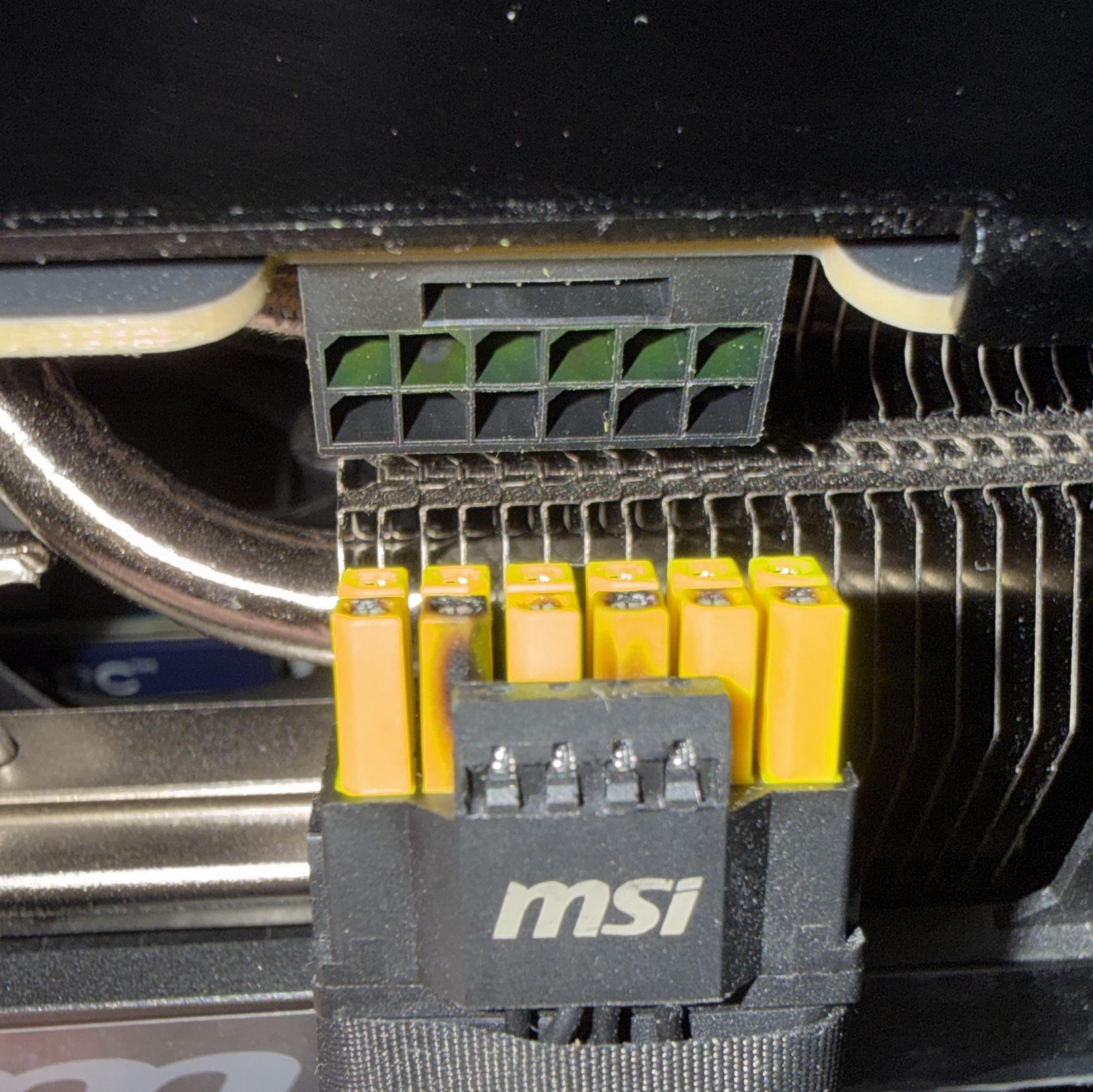
Discussion MSI 5090 power connector is a joke

Thumbnail
gallery
588 Upvotes

I know for certain I had it all the way plugged in.

Update: good to go boys
https://www.reddit.com/r/MSI_Gaming/comments/1w32ekb/follow_up_to_the_melted_connector/


r/MSI_Gaming • • May 31 '26

Discussion MSI called my firmware bug a "Linux issue." AMD's engineers disagree. Now two BIOS updates later, still no fix.

518 Upvotes

UPDATE (JUNE 15th): I had wanted to mention this sooner, but it turns out it was an AMD issue the entire time.

https://arstechnica.com/security/2026/06/users-cry-foul-after-amd-stripped-memory-crypto-from-its-consumer-cpus/

UPDATE: Significant new information has emerged. MSI's technical team went well above and beyond once this reached the right people, and the evidence now points clearly away from MSI as the responsible party. A more complete update is coming once I've finished following up on a few threads. Stay tuned.

I have an MSI MPG X870E EDGE TI WIFI. TSME (Transparent Secure Memory Encryption) is a hardware security feature built into AMD processors that automatically encrypts everything in RAM, making it impossible to read your data even if someone physically removes your memory chips. It's supposed to be activated by the motherboard firmware, and on my board it silently isn't.

When I first reported this to MSI, their response was:

"We do not support Linux or can troubleshoot issues with an unsupported OS."

TSME has nothing to do with Linux. It's activated by AGESA before any OS even loads. If it's broken, it's broken for everyone on this board regardless of what they're running. So I took it to the AMDESE GitHub instead. Tom Lendacky, AMD Fellow Software Engineer and the original author of AMD SME/TSME support in the Linux kernel, responded personally. So did Mario Limonciello, AMD Senior Principal Software Engineer. Both confirmed TSME activation is purely a firmware responsibility and that a tsme_status reading of 0 with the BIOS option enabled is a firmware bug. Both pointed me back to MSI.

MSI then sent me a custom BIOS file. It flashed successfully but the resulting firmware failed to boot, leaving my system stuck at POST code 01 with no display and no BIOS access. Recovery meant using the Flash BIOS button to reflash the previous firmware, then re-enrolling Secure Boot keys and TPM2 unlock slots across three encrypted drives. After all of that, TSME was still broken. MSI's response at that point:

"We do not have any update at this time."

I followed their recommended escalation path and continued waiting. Today I installed the latest public BIOS release. TSME is still not working. BIOS version: 1.A90 (04/30/2026) tsme_status: 0 Two public BIOS versions. One custom file from MSI support that bricked my system temporarily. Still broken.

How to check if your X870E board is affected Run this from any Linux live USB:

find /sys -name "tsme_status" 2>/dev/null | xargs cat

0 = TSME not active despite what your BIOS claims 1 = TSME working correctly

Windows doesn't expose TSME status through any built-in tool, and nothing like HWiNFO64 or CPU-Z reports it either. Windows users on this board are almost certainly affected and just have no way to know.

Full AMD GitHub thread: https://github.com/AMDESE/AMDSEV/issues/292 If you have the same board and get the same result, file a ticket at https://www.msi.com/support. The more people report it the harder it is for them to ignore.

TL;DR: TSME silently doesn't work on MSI MPG X870E EDGE TI WIFI. MSI blamed Linux. AMD's own engineers confirmed it's a firmware bug affecting every OS. MSI sent a BIOS file that took my system down, and the latest public release 1.A90 still doesn't fix it. Windows users are impacted too but have no way to check.

Cross-posted to r/Amd, r/linux, r/linux_gaming, r/buildapc, r/CachyOS


r/MSI_Gaming • • Feb 21 '25

Troubleshooting How can I hook up my GPU to my PSU?

Post image
489 Upvotes

Hi, I bought a MPG A1000GS to run my 3080 GPU, but I cannot connect it. The box contains 2 yellow 12pin cables and 1 PCIe cable. I have 3 slots on my card. Do I need to buy additional PCIe cables or can I use my old ones from a Corsair CX750M to connect it? Or do I have to buy a different PSU? Thanks


r/MSI_Gaming • • Dec 31 '24

Purchase Is this a joke??? 600$????

Post image
482 Upvotes

r/MSI_Gaming • • Dec 05 '20

Please stop MSI

Post image
453 Upvotes

r/MSI_Gaming • • Jul 16 '19

[MSI] B450 Tomahawk Update

432 Upvotes

Hello everyone,

We understand many of you have had issues booting and flashing the Beta BIOS for various motherboards, especially in the B450 line. As a PC builder myself, I understand what it is like to have spent money on expensive components and not be able to use them. This is frustrating to everyone including us, even more so when our test boards are playing nicely making it hard to replicate these problems. I personally apologize for the lack of communication regarding fixes for these issues. This was mostly the case because up until now there has not been much information of substance that we can provide to you. Trust me when I say this subreddit and social media avenues are monitored daily and your issues are being passed along to our engineering team.

Our BIOS team is working very hard to release stable BIOS versions for all motherboards compatible with Ryzen 3rd gen processors. Please understand that this is no easy task especially for so many models, and is certainly not as simple as copy/pasting code. We estimate that new BIOS with the new AGESA will be released closer to the end of this month for most board models.

It is clear that the largest community concern at this time is for the B450 Tomahawk. Our BIOS team has provided another Beta BIOS v.191 for the B450 Tomahawk which is still undergoing testing. As a disclaimer, this is still a work in progress so some features like XMP may not be working correctly with some RAM models and stability is not 100% guaranteed. So far from our testing, we were able to boot fine with this version (though the same could be said for the previous one) using an AMD RYZEN 5 3600 but YMMV. This is definitely not the final version so any feedback is greatly appreciated. Hopefully more of you are able to at least boot your systems with this.

IF YOUR B450 TOMAHAWK IS BOOTING FINE WITH THE PREVIOUS v18 BIOS, DO NOT UPDATE TO THIS ONE! (just to be on the safe side)

DOWNLOAD FOR B450 TOMAHAWK BIOS E7C02AMS.191

EDIT:

Here is a .zip version if you do not have a way to extract .7z files

A newer BIOS version E7C02AMS.1A0 is available.

As a reminder:

Are You Ready for Ryzen 3000 Series Processors? Get the Latest BIOS and Easy Upgrade with Your AMD 300 / 400 Series Motherboards.

HOW TO use Flash BIOS Button

Pro Tips:

  • Unplug the 24pin power cable from the motherboard and remove the CMOS battery from the motherboard for about 5 minutes. After 5 minutes, reinstall the CMOS battery and reconnect the 24pin power cable and CPU power cable.

  • Make sure your USB Flash Drive is formatted to FAT32. EDIT: To make sure your USB Flash Drive is formatted correctly, you can use a third part program such as RUFUS .

  • Make sure to extract the contents of the B450 TOMAHAWK.7z file from the download, and rename the extracted file E7C02AMS.191 to MSI.ROM

  • Place the MSI.ROM file in the root directory for your FAT32 formatted USB Flash Drive.

  • Make sure you connect the USB Flash Drive to the correct Flashback USB port on the motherboard. Then press the Flashback button.

*Though it sounds like wizardry to me, some users here have had successful boots by not connecting the RESET switch from their case to the motherboard. It is worth a shot as well.

Again, this is still a Work In Progress. So please report any issues you run into with this release. Thanks you all for your patience and support!


r/MSI_Gaming • • May 11 '26

Troubleshooting Rtx 5070 90°

Thumbnail
gallery
413 Upvotes

I acquired this MSI Ventus 2X RTX 5070 at auction, and I must say it has a slight problem. It's the very first 90° RTX 5070 model. Apparently, that's supposed to offer better performance... Anyway, I obviously had to disassemble it first to get it into my PC, otherwise, the heatsink was making contact with my RAM. I was able to see the extent of the damage. Some capacitors are slightly unsoldered, the heatsink is completely bent, but miraculously, it works. I've been able to test it so far without the fans because I still have a few things to straighten. But if anyone happens to have a compatible heatsink in good condition, I'd be very grateful! Let me know.


r/MSI_Gaming • • Mar 25 '25

Discussion I RMAed my card and now it's gone.

407 Upvotes

I've managed to get a new 5070 ti from msi store about a month ago. Sadly the card must have been defective, so I've sent it back to MSI for repairs. I've just got an email that they're unable to fix it and they'll reimburse the money. Unfortunately, the stock is non existent and I won't be able to get new card for a long time, especially at the price I bought it previously. Msi denies me a chance to swap it out for a new one. This sucks and I'm venting.

Update: I've pushed my issues with MSI and a service person promised to give me a resolution by the end of the week, but simultaneously I got an email that my money was reimbursed. Let's wait and see

Last update : They offered me 5% discount on the next purchase. What a joke. I bought gigabyte windforce at msrp and it works flawlessly. Safe to say, it was my first and last exposure to MSI products :)


r/MSI_Gaming • • Sep 06 '25

Discussion Customer support, the whole reason I bought this company for my build

Post image
389 Upvotes

Pending on actually getting the GPU, after only two emails to get the correct format on the information they needed. It looks like they're just going to replace it even though I'm out of warranty. Definitely sticking with this company in the future if it all goes well and I don't get jerked around after they get card. I always saw posts but it's nice to actually experience. Compared to my NZXT Experience


r/MSI_Gaming • • Jul 25 '19

MSI customer support in a nutshell

Post image
383 Upvotes

r/MSI_Gaming • • Dec 08 '24

Troubleshooting Is there any explanation for this cpu light?

382 Upvotes

I played for about a minute and got hit with just a black screen but my computer stayed on with the cpu light turning on. I’ve been trying to figure this out for the past 3 weeks and every time I think I get somewhere, I’m put right back into the same place.

Msi rtx 4070 Ryzen 9 5900x X470 gaming pro Corsair 850w gold

It’s not just red dead that crashes like this. I’ve had party animals, gta and the finals crash like this too.


r/MSI_Gaming • • Nov 12 '23

Discussion Sent gpu for rma gor back the same gpu with sharpie all over it.

Thumbnail
gallery
377 Upvotes

My hpu was failing after only a year. It kept giving me an nvlddmkm.sys error. I sent it for a repair, rma accepted, it arrived and then "fixed". I recieved the same gpu today with sharpie marks all over the back. I have documented proof of it before and after state. I will be contacting my msi again if they do not resolve this I will elevate it. This is ridiculous. What joke of a company.