r/MSI_Gaming • u/rvvcz • Mar 19 '25
Troubleshooting whats going on at MSI these days??
0
Upvotes
mind you this all started with the bios flashback button not working lol
r/MSI_Gaming • u/Informal-Abies5306 • Oct 17 '26
r/MSI_Gaming • u/Adventurous-Bend8836 • Sep 10 '24

MSI Motherboard Not Lighting Up After PC Build
I recently finished building my PC using the MSI b650 edge wifi motherboard. However, I’ve noticed that the motherboard's RGB lighting is not lighting up.The system powers on, and my RAM still lights up as expected, but the motherboard itself remains dark.
I’ve double-checked the connections, including the power supply, and everything seems secure. Could you assist me in troubleshooting this issue?
Thanks in advance for your help!
r/MSI_Gaming • u/linkman440 • Dec 03 '25

Looks like the new motherboards are live on MSI website
r/MSI_Gaming • u/Electronic_Shape6517 • Jan 20 '26

Ill put in the exact model couldn’t figure out after a ton of effort MPG Infinite Z3 AI Gaming PC
r/MSI_Gaming • u/Spibberino • Dec 02 '25

Bought the MPG 271QRX QD-OLED, a 800 USD msrp OLED monitor last May. Love the colors, the high refresh rate, its an amazing monitor. I have over 4000 hours on the monitor. I was using it normally the other day, when I press the power button gently as usual to turn the monitor to stand by mode, the two plastic prongs holding the button in place snapped (To clarify I don't baby my monitor but I do take good care of it).
I then took photos and filed a warranty for the monitor. I received an email earlier today, "MSI’s engineer replied - The buttons on this machine fell off due to external force
This is not covered by the warranty."
So my question is what's the warranty for then? How's the button not covered under warranty (yes its not the panel but still) it's like your iPhone warranty only covered the screen but not the camera or the body. I don't know what's the warranty on other high end OLED monitor but safe to say I won't be buying another MSI monitor LOL.
r/MSI_Gaming • u/Critical-Ad-5418 • Aug 23 '26
I uploaded this video so you guys could see how badly the games run, even though my laptop is an MSI Sword 17 HX B14VFKG (bought in May 2025, used to run smoothly). I played the following three games: DiRT Rally 2.0, Microsoft Flight Simulator 2020, and Euro Truck Simulator 2. I'd appreciate it if you could comment down the solution for this.
P.s. The framerate for Dirt Rally 2.0 and ETS2 is 60 fps; idk why it looks so weird here. The framerates are fine; it's the constant freeze that's bugging me.
EDIT: I'm fucking sorry that the term I used, "High-End," hit most users' nerves. I used to play on a laptop that didn't even hit "10%" on PC Game Benchmark. When I purchased this laptop, it ran flawlessly with no freezes even at high settings till this year, so again, I'm fucking sorry I didn't use the accurate term for my laptop. But I came here for help, not to be lectured or belittled.
r/MSI_Gaming • u/RingoStarrPower • Jun 15 '25
In march I purchased a brand new MSI 4070 TI Super Gaming x Slim. Right out of the box, I had issues with the card. It would accumulate tens of thousands of PCIe Lane errors if it operated at PCIe 4.0x16. I knocked it back down to PCIe 4.0x8 and the issue resolved itself. It worked fine for a while and then slowly died. I am okay with that, sometimes a bad gpu gets into the mix. I tried the GPU in multiple rigs and it was instantly clear that the issue was the GPU. So, I took the next step. I rma'd it. I got the GPU back today and it literally worked for 10 seconds before dieing. At this point, my thinking was this: I can RMA it again, spend 80 bucks to insure the package and for 2 day shipping, wait two weeks for MSI to 'fix' it and probably get back the same broken GPU because that seems to be a recurring theme with MSI products after I googled my situation. MSI never even told me what was wrong with it or what work had been done on it. So, having come to the conclusion that the problem is MSI, I contacted Amazon despite the product being out of the 30 day return window. Amazon graciously decided to take the product back. I am dropping off the GPU at UPS tomorrow and I already bought a new GPU from a reputable brand. If you are considering purchasing an MSI product, consider this a cautionary tale because there is no reason why it won't happen to you. For obvious reasons MSI has lost my business. How hard is it to run a single benchmark test to confirm the GPU works? How could the repair techs be so grossly incompetent? This has happened to plenty of people, some people on reddit have had to rma their MSI gpu 3 times or more before getting a functioning GPU back.
r/MSI_Gaming • u/Jascmu • Sep 15 '25
I just purchased a MSI motherboard and like a normal person, AFTER I FINISHED INSTALLING THE MOBO I WENT TO REGISTER IT, NOT BEFORE INSTALLING, and when registering it it asks for a CHK number and says it is on a sticker physically on the MOBO, meaning I would have to open my case and disconnect my MOBO to get this CHK number as it is not visible just looking at it through the glass panel. HAS ANYONE AT MSI EVER INSTALLED A MOTHERBOARD?!?! NO ONE REGISTERS IT BEFORE INSTALLING AND EVERY OTHER MANUFACTURER HAS ALL THE INFO YOU NEED ON THE BOX!!!
I even went to their customer service and suggested that maybe instead of pissing off their customers with this type of backwards logic, as there are so many posts about this exact issue online, only for their customer service to basically tell me that they did it deliberately to stop fraud and theft. I then suggested that maybe they could start adding a sticker on the box that says "dont forget to record your CHK number before installing", only for them to ignore me and ask if I have any other questions.... GOOD LUCK MSI because I will never buy another MSI product ever again because if this is how they handle customers suggestions and if they don't think of something as simple as this, what else are they forgetting to think of when making their hardware?!?
r/MSI_Gaming • u/RoMeOayt • Jan 03 '25
Hi Guys,
Both of my 2 laptops I bought from MSI broke down in the same place shortly after the warranty period ended. I thought the first one was a coincidence, but it can't be a coincidence that this failure coincided with the exact same time on a new laptop.
I bought my first laptop in June 2019. A broken screen section due to a case hinge problem in July 2021. Just as soon as the warranty expires.
I got my second laptop in November 2022 and the same problem in December 2024. Just as soon as the warranty expires.
I will never buy MSI again and you can advise your relatives not to buy MSI either.

r/MSI_Gaming • u/TheBrrman • Feb 27 '26

What the heck is this? came with my new PC.
r/MSI_Gaming • u/OkashiraXIII • Dec 24 '24
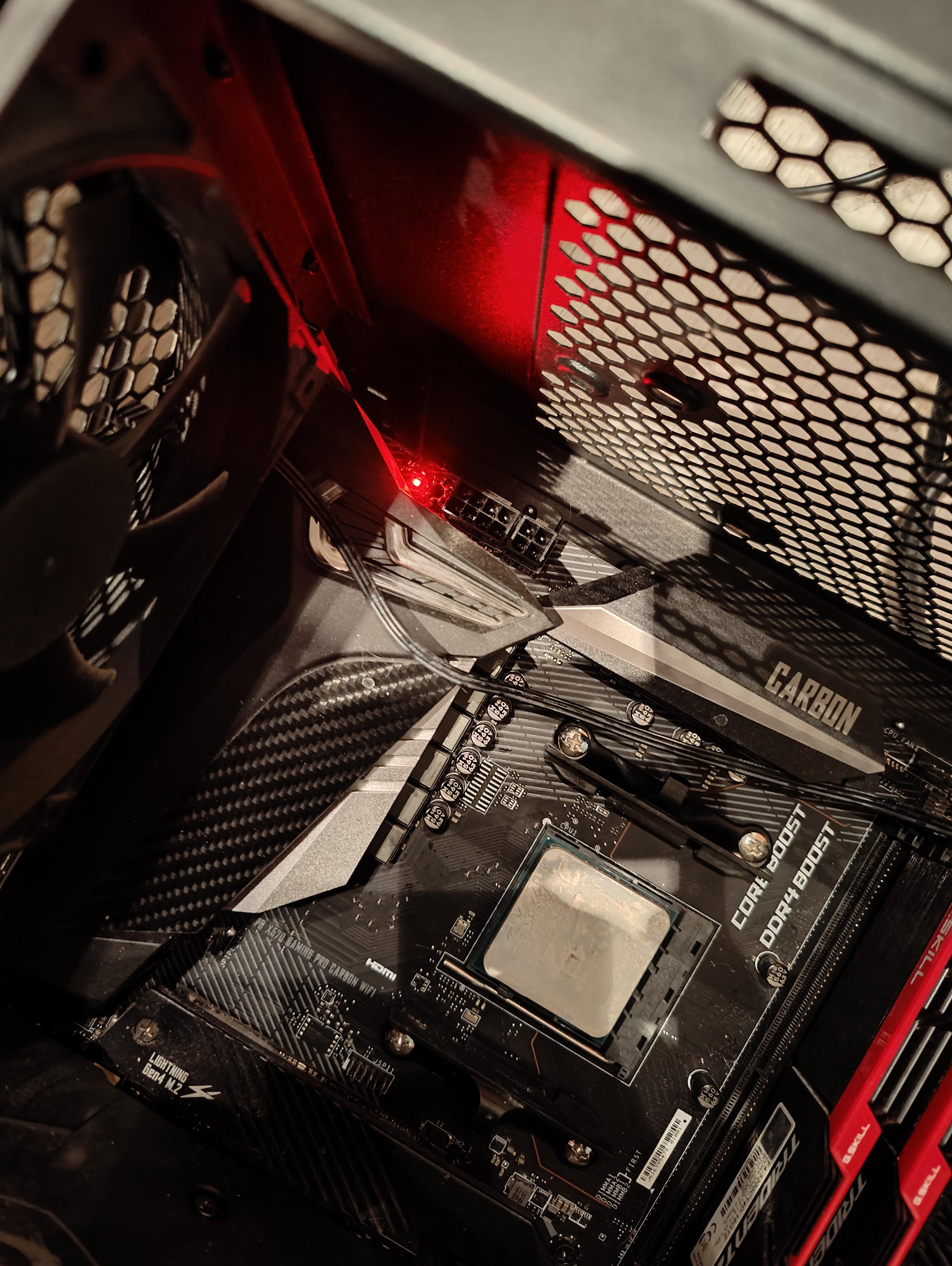
Hey guys, I wanted to upgrade my cpu from 3700x to 5900x I flashed bios then put the new cpu, now my pc won't start, i even put back the old cpu but nothing changes Is this big red led related to power supply ? Because the others ones "cpu ram gpu" are not lit Help please 🥲
r/MSI_Gaming • u/Alexander_Solar • Jan 19 '26
I have a view sonic that is 10 years older than this monitor and works perfectly. But this 300usd thing is already broken? Wut ?¿
r/MSI_Gaming • u/Interesting-Bug-6048 • 10d ago
Windows update destroyed my entire pc because it updated my already stable good (566.36) nvidia driver during sleep despite disabling every related setting. Now fans work all the time, never stops, even when idling at 47c. Im so sick of fan noise I stopped using the pc. Would wake me up at night because fans turn on every 3secs then stop, repeat forever.
I reinstalled everything clean with ddu in safe mode. Got the good driver and tried without msi center or with. Whatever windows did, its still broken. The game that ran at 144fps perfectly drops to 80s the moment I need it the most and lags and stutters now. I did everything clean, including settings. Now, in-game cpu hits 95c because it wont speed up the fans, and games run like dogshit again, cant even hit 144fps anymore. This is a brand new katana 17 b13v. I dont want your fucking AI agent on my nvidia app. Newest drivers make my 4070mobile run like shit, its horrible. I already did every regedit or setting that could stop windows auto updating the nvidia driver. What is this mess. I already reformatted because of this and it worked for 6months until windows decided to force update what already worked and break it.
r/MSI_Gaming • u/Pescatore777 • Jul 24 '26

Even after tax in Florida, it still saves $100 rather than buying from MSI. *for some reason, the tax exemption in FL doesnt work on PC cases
EDIT: It is now SOLD OUT
r/MSI_Gaming
•
u/Public-Subject2939
•
Nov 08 '25

I have mpg x870e carbon wifi with 9950x it will not boot red and orange light turns on
Im trying to do a bios flash I downloaded the file from https://www.msi.com/Motherboard/MPG-X870E-CARBON-WIFI/support I went to properties click unblock then unzip the file renamed it to MSI.ROM made sure my usb is fat32 32gb copied it and when i click boot it flashes 8 times and stops I tried everything single thing but it wont work
r/MSI_Gaming • u/SecretKats • Mar 10 '25
I’m actually losing my mind with this. I just dropped $4000~ on a new PC build and I’m getting error codes just sitting at my desktop doing nothing.
The error codes jump from 60 to 50 and then dip into high 40s. They go back and forth but mainly stay at 49 50 51 52 53.
Video added to post.
After about 30 seconds of idling at desktop it hovers around 49 50 51 52 53, like I mentioned above.
I have done a CMOS reset, I have flashed BIOS to a couple different versions. Nothing is working and I’m losing hope and wanting to get a different MOBO.
Can someone help me please. Thank you.
CPU: Ryzen 9 9900x GPU: RX 9070 XT MOBO: MAG x870 tomahawk wifi RAM: 4 x 16gbs T FORCE SSD: 2TB internal PSU: flower 1000W Liquid cooling fans.
r/MSI_Gaming • u/Founntain • Aug 02 '24
r/MSI_Gaming • u/RLelling • Sep 13 '25

So I've been saving for a new "dream" PC for ages now and I could finally start ordering parts! Unfortunately the first purchase, the MSI MPG X870E Carbon WiFi motherboard, arrived in this banged up, unsealed box.
The lid was half-open as is visible in the 2nd picture (I took these pics first thing when receiving it, and that's just how the lid was when I got it), and the box is visibly damaged. Also note how dusty and dirty it looks.
I'm not normally a packaging snob, but given that this is a very expensive purchase I'm very anxious that there could've been damage, and I hope I'm not being unreasonable when I say that for a high pricepoint, I'd also like the packaging to at least not look like someone sat on it. There was no foam or other protective packaging to protect the mobo against impacts either, and this package travelled across 2 countries to get to me.
The reason I'm posting here is to ask: are MSI motherboards usually packaged like this? Is this standard, or are they usually sealed? Is it reasonable to demand a replacement? And - should I just silently return it (via Amazon DE) or should I take the complaint to MSI's support?
r/MSI_Gaming • u/ThePatriots_ • Jun 21 '25

Aerodynamic left 🥀
r/MSI_Gaming • u/TomorrowMammoth4529 • Sep 12 '25

so i am trying to seat up new ryzen 9 5900x into my b450 tomahawk motherboard, i am not sure why it is not fully seating into the motherboard please help!! It is urgent
r/MSI_Gaming • u/MadCake92 • Oct 27 '25
My journey started trying to get a Quest 3 wireless connection working above 400 Mbps. Shame on me, I seem to be on a streak of buying shit products. I will preface this by saying I am on all the latest version of all drivers and BIOS.
I started my adventure with this mobo by facing this issue: https://www.reddit.com/r/MSI_Gaming/comments/1grkwom/x870_tomahawk_wifi_no_ethernet_connection/ . Fresh everything, ethernet not working. Wohoo. And the issue is a whopping 1 year old.
But now I am trying to setup a working bridged network connection between a dedicated quest3 wifi router, the ethernet port and the mobo 's wifi interface. I managed to get it work, for a while. Iperf3 was showing above 600Mbps, everything seemed more or less stable, save for the fact that every time re/started the PC, the network bridge was gone and I had to disable and enable it. An alarming annoyance, but I chose to leave it at that.
Then all of a sudden it started showing issues. I thought I was getting interferences on the wifi router, but no, after a lot of debugging I found out that the ethernet interface was now showing 100Mbps instead of the usual 1Gbps. I troubleshooted in a myriad ways but I could not get it to show 1Gbps again. I did the usual CMOS reset, power cord unplug, and network configuration factory reset. The ethernet interface would show 1Gbps again, and revert back to 100Mbps the minute after.
I then thought, ok, maybe the ethernet is faulty, let's try with a USB - ethernet adapter. It turns out, after a lot of debugging again, that it can do 1Gbps on the download, but 4Mbps on the upload. I discarded a faulty adapter with another laptop, which I cannot believe I am going to say this given I effing hate Apple, but the macbook has been pretty consistent across all experiments and nothing has failed or underperformed during my network tests.
My next step was to try different USB ports (all of them on the back). They showed even worse performance, degrading from 1Gbps / 4Mbps to 100Mbps / 1Mbps. Even those labeled with 10Gbps of bandwdith.
My final step has been to try the frontal USB ports and... voilá. Finally got the full bandwidth. For a minute at least, then back to 500Mbps / 1 Mbps.
I just cannot believe that such a premium motherboard carries all these issues. I was wary of MSI for a long time after another bad experience a decade ago, but decided to give it another chance because my supplier insisted. I have crossed it from my list of brands, this time for good.