r/LaptopRepairEngineer • u/Independent_Ad_2850 • Sep 28 '26
Need your help tech bros

33
Upvotes
Desperate post. Girlfriend is devastated. Do you think there's any hope of having this repaired?
r/LaptopRepairEngineer • u/Independent_Ad_2850 • Sep 28 '26
Desperate post. Girlfriend is devastated. Do you think there's any hope of having this repaired?
r/LaptopRepairEngineer • u/Psychedelic_Shrooom • 22d ago

Laptop won’t turn on and I found this exploded mosfet but can read what’s on it.
MOBO MODEL: MS-14K11
Laptop MSI stealth 14 studio A13V
r/LaptopRepairEngineer • u/pop_emm_popo • Oct 09 '26

Hello! (≧▽≦)
I am a student and can't really afford a new laptop, the options are Disappointing as well, like why tf would I want something with only 4-8 gb ram, THAT'S less than my phone! 😭
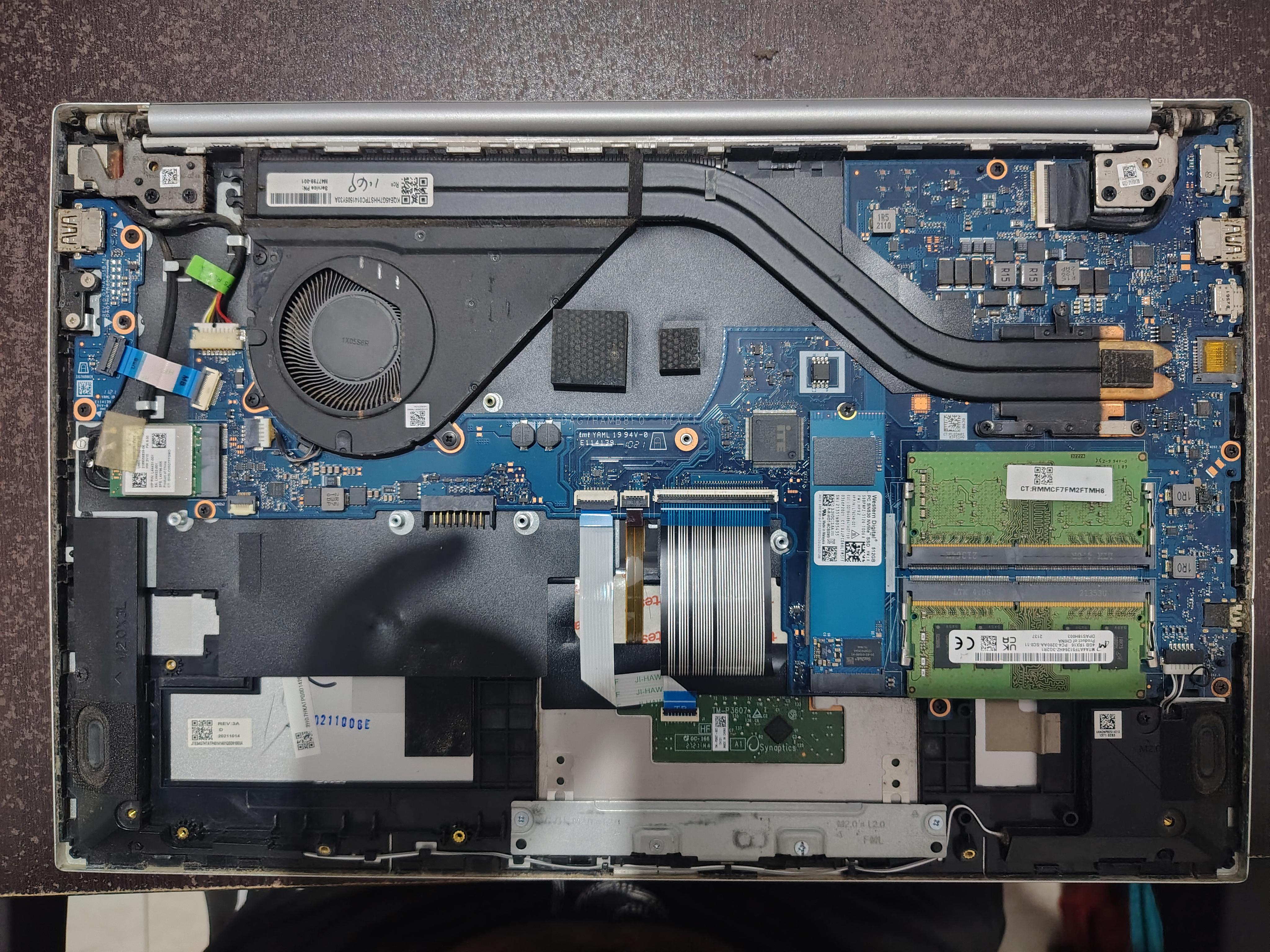
This one has been down for the last 3 or so years (sat untouched, no efforts were made to repair) after the repair dude told us that the graphic card has been removed, hence why the screen "won't work" (right buddy...he obviously messed up)
but I am grown up now and the itch got to me. I dissected the laptop today and right off the bat I noticed a few things
One ram stick is missing (I hope the guy who stole it gets diarrhea in the middle of an important event)
thermal paste is laughable cause wow it's powder at this point.
bad tape job EVERYWHERE they put tape on the place where the SD card is supposed to go (I might be wrong)
Ai summary cause I would definitely mess up the hardware name:-
Extreme Thermal & Cooling Failure (Primary Overheating Cause)
* Bent Radiator Exhaust Fins: The metal fins on the heatsink vent are squished together, blocking hot air from exiting the chassis.
* Dried & Overflowing Thermal Paste: The thermal paste over the CPU and GPU is completely baked dry and hard, acting as an heat insulator instead of transferring heat to the copper pipes.
* Trapped Dust Blanket ("Fluff"): A thick layer of lint and dust was trapped inside the fan housing right against the exhaust vents.
* Bad Fan Repair Job: Previous technicians slapped white masking tape across the fan casing, messing up proper airflow.
2. Damaged & Glued Display Connector (LVDS Cable)
* Missing Metal Socket Clip: One side of the metal bracket/retaining structure on the motherboard LVDS socket is broken/missing.
* Glued in Place: To fix the loose connection, a previous repair shop dumped glue directly into the display socket tracks, locking the cable in place and making normal disassembly impossible without heat or solvent.
3. Missing Internal Hardware & Components
* Wi-Fi Card Missing: The WLAN Mini PCIe slot is completely empty—no wireless card installed, and no internal antenna wires present.
* Internal Speakers Missing: The left and right internal speaker modules were removed from the palmrest casing during a prior repair and never replaced.
* RAM Removed/Missing: Both SODIMM memory slots are currently empty.
* Missing Motherboard Screws: Multiple mounting points around the board perimeter and heatsink area are missing their internal screws.
4. Miscellaneous Modding & Cosmetic Anomalies
* SD Card Reader Mod: Kapton (yellow insulator) tape was stuck directly inside the SD card slot metal casing.
* Marker Notes: Hand-written shop inventory numbers (DL167) are scrawled on the fan housing and motherboard PCB.
Ai summary end
............................................................................
Ai included some stuff I REMOVED from the laptop myself while I disassembled it, (like that coin battery thingy, lithium battery) so I am sorry about that but I am not editing it cause who knows? I could be wrong.
Currently the whole thing is disassembled.
I had fun disassembling it, wanna make it alive again so here I am (ㆁωㆁ)!!
I want to know the parts that need replacement (like the display cable) and what needs to be done to save the laptop, I am willing to replace parts to level it up but for now I just want to make it work again and the upgrade will come eventually (display, external separate webcam, better speaker, whatever is possible on this thing)
Current status:
it turns on just fine like always, the screen OCCASIONALLY popped up sometimes (loading screen or Asus screen) and the fans ALWAYS work, so it's clearly not dead and worth saving
DMs open but may not respond right away cause there are creeps, ✌🏽😭
So...
Tech gals and bros, what to do?
I have attached pictures I hardly understand, but you guys will!
Thankks!
r/LaptopRepairEngineer • u/FREEFALLL666 • Oct 01 '26

I fitted it with a new battery, but it's not charging. I know that the power supply is working but it is not showing the power indicator light either?
r/LaptopRepairEngineer • u/Liks_22 • 9d ago

Good day i need help my laptop got wet overnight while its on and chargkng and when i opened the back of my laptop to wipe the wet parts i noticed this burned part do i need to replace motherboard or is it still repairable? Thank you for the answer
r/LaptopRepairEngineer • u/Green_Cheesecake_756 • Oct 19 '26

I have tried all this
Restart -> shut down -> unplug the charger -> hold the power button for some time -> plug the charger back in -> reinstall the battery again -> but nothing works
r/LaptopRepairEngineer • u/Free_Economics_449 • Sep 29 '26

The laptop was on the floor next to bed and was on, I nocked my phone from the table and it then hit the laptop on that spot, the laptop went off and now makes a subtle tac tac like sound every 7sec, I can't afford a new laptop, it's not even a year old and my mother saved up and got it for the University (if she finds out I'M DEAD)
Is there any thing that I can do myself to fix it or is it cheap to fix it?
(2nd pic is what the inside looks according to Google)
r/LaptopRepairEngineer • u/xeth-kun • Sep 07 '26

Unit still boots when powered but shows no display even when using an external monitor. Upon boot up LED blinks exactly 5 times, which states that it is a board problem as per HP.
Already tried a hard reset, clear the CMOS Battery, re-seat RAM, and holding Win + B / V to reset BIOS. still no display.
Image above are pictures of the motherboard and what i suspect is a blown component. is it repairable or is it due for replacement or is it not worth the effort.
Kindly let me read your suggestion and/or experience. Thanks.
r/LaptopRepairEngineer • u/RandomIndianDude7 • Oct 19 '26

Model - Lenovo IdeaPad Flex 5 Ryzen 7 5000series.
The laptop doesn't boot at all. If we plug in the charger and wait for sometime. The laptop back heats up. The battery area doens't it. It's near the cpu.
Also the charging led while charging is on. But the main power button seems to do no effect.
I have tried disconnectimg the battery and powering the pc using only charger but again it heats up with no sign of life. I have also tested using an hdmi cable but the display doesn't boot. So it's not the display most probably
r/LaptopRepairEngineer • u/Reck02 • Oct 03 '26
This is an hp 15 pavillion eh laptop. A few days back I connected lenovo ThinkPad's c type charger to and suddenly the smoke started coming out 😭😭😭. I visited a care center to ask what could be the issue. They said if smoke came then the motherboard is likely damaged. But he never looked inside the laptop. So I just wanna confirm if the motherboard is actually damaged. Experts help please 🥺.
r/LaptopRepairEngineer • u/LeastKangaroo4859 • Jul 13 '26

Hey Reddit, I’m not very tech savvy. What should I do about the hinges attaching the screen to the keyboard side breaking apart?
r/LaptopRepairEngineer • u/localmemelord69 • 28d ago

I was working on my laptop of 6 yesterday and smoke came out of the right side of the images, through the keyboard. After first inspection of the components without taking anything out, nothing looks burnt or damaged. I’m taking it to a repair shop today and want second opinions.
Here are the photos
r/LaptopRepairEngineer • u/Impostor6684 • Sep 23 '26
When charging...there is no flickering issue...But when charging unplugged...there is flickering...please tell me any solution guys...
It is lenovo G40 to 80 series laptop....
r/LaptopRepairEngineer • u/ThatHoliday4408 • Sep 01 '26

Hello, I have an Acer Nitro 5 AN515-54, and I’m having a problem with very high fan speeds even during very light usage. My current BIOS version is Insyde Corp. v1.33 (17/11/2020), and I’m running Windows 10 Pro 22H2 (OS Build 19045.3448) with UEFI mode. The main problem is that both fans sometimes run at around 4,000–4,800 RPM, even when the laptop is not under heavy load. For example, the CPU fan can reach around 4,200–4,500 RPM and the GPU fan around 4,000–4,200 RPM, while CPU usage is only around 6–18%. I checked the temperatures and power consumption using HWiNFO. The CPU temperature was around 41–48°C, with CPU Package Power around 5.7 W at the time, and a maximum observed value of approximately 13.3 W. The GPU temperature reached a maximum of around 37°C, with a GPU hotspot maximum of around 56°C. The GPU thermal limit is 87°C. No CPU thermal throttling was detected. I also tested the laptop in BIOS and Windows Safe Mode, and the fans were still running loudly. I performed an EC/power reset, which made the fans quieter temporarily, but the problem returned when I started using the laptop or opened a program. I also reset NitroSense, which produced a similar temporary improvement. NitroSense is set to Auto and CoolBoost is OFF. I also checked Device Manager and Windows Services. There are no yellow warning icons, and I could not find any obvious Acer/Nitro/Insyde service or device related to the fan controller. I’m also concerned about the SSD. CrystalDiskInfo is showing the SSD’s health/status as problematic (see attached screenshot). I’m not sure whether the SSD problem could be related to the fan issue, or whether these are two separate problems. My main concern is that I don’t want to spend money on a new SSD if the high fan-speed problem is actually caused by something else.
r/LaptopRepairEngineer • u/Current_Mall_4314 • 12d ago
The screen is flickering and I can't do nothing
It was working fine before, but out of nowhere it started flickering on the desktop. A minute later it was impossible to do anything. When it flickers, it doesn't move, only during the moments when there's an image, which is just...Just for a second, then I restarted it. Before, I managed to get into the BIOS by blinking, but now it won't even let me do that.I've restarted it and cleaned the battery, but nothing has worked. Now it's stuck on startup, the screen goes completely black, and the HDMI port doesn't respond. The screen works for a second and then goes black and then alternating the LEDs in the photo
r/LaptopRepairEngineer • u/LILJNES • 25d ago
This is what it does, any ideas?
r/LaptopRepairEngineer • u/Nevin_A_A • Sep 26 '26
Hey everyone! I don't know if this is a common question asked in this community since I just joined this but here we go.
If u check out my profile and scroll down u will see how I messed up my laptop by spilling coffee on it. A very dumb mistake. I regret this very very much especially after getting to know that hp doesn't replace components and would replace my motherboard directly(I can't afford that). This has motivated me to learn how to repair laptops and such systems in general.
So, experienced laptop repair engineers and other such redditors who are reading this post, how can I proceed with my objective of wanting to learn more about laptop and computer repair and so on? Any advice or information would be really helpful!!!
How did u become a laptop repair engineer?
r/LaptopRepairEngineer • u/Fullbags • Aug 19 '26
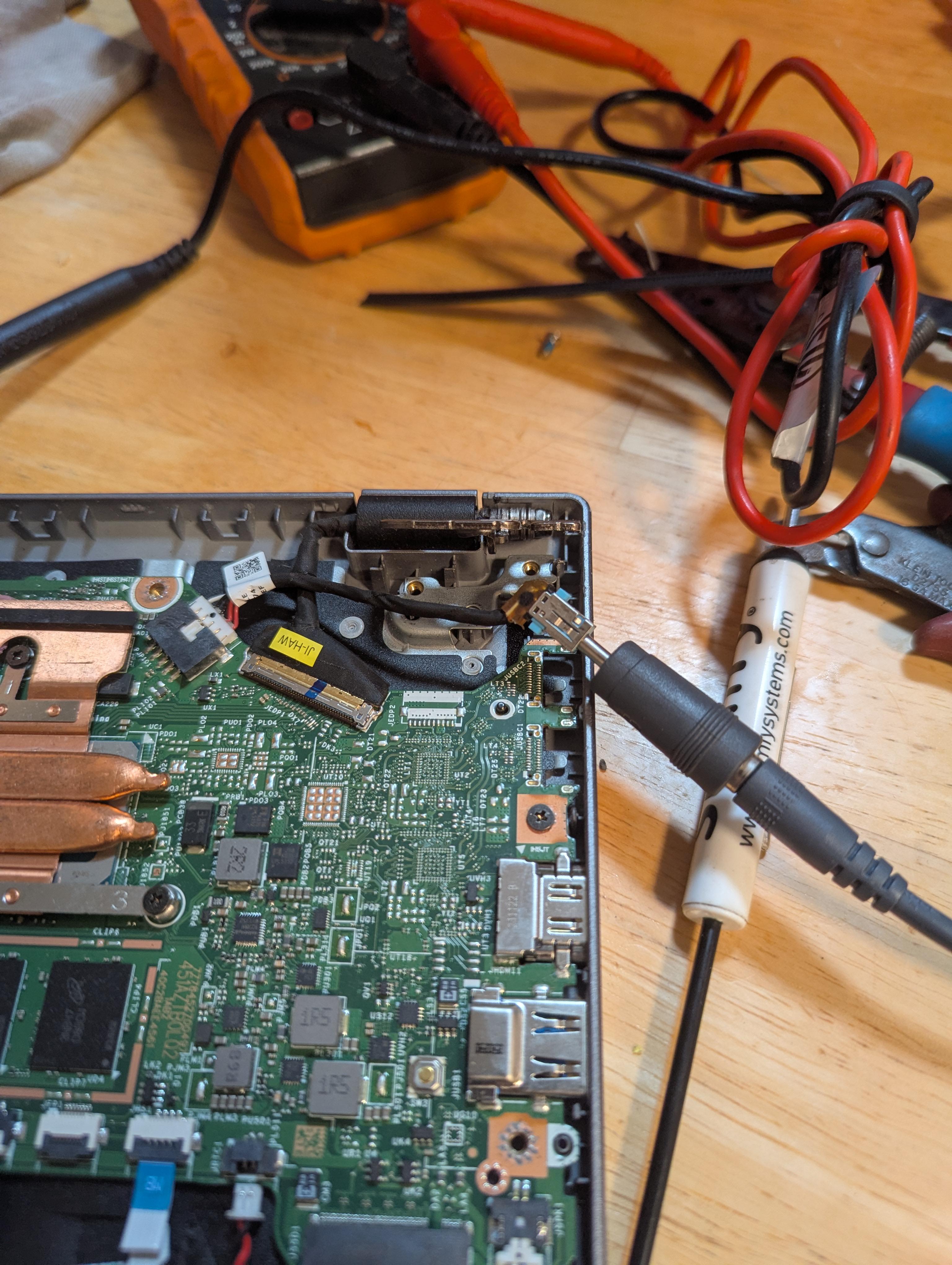
Hello again Reddit.
I have a work laptop of an Acer 5-15. It stopped taking a charge after being from job site to job site over a couple years. I've tested the AC adapter and get the typical 19.5V. However, I can't read that 19.5V anywhere coming into the laptop. I've tried the negative lead on the pins and the copper grounds, with red on any of the pins and get no voltage readings. I tried the negative lead on the barrel of the plug with red on any pins and still get no voltage.
Now, because I can't seem to find the exact IH5JT DC-In cable anywhere, I'm wondering what the white wire/pin might be used for here? It seems any other chargers I find are only 2/4 pin with black and reds. I wouldn't mind splicing a new jack or custom drilling plastic to fit new plugs, but I can't find 5 pin DC cables that might work.
Y'all got any input before I just have to wait for my company to bother ordering a new laptop and setting it up for me? On the clock with no other work right now LOL
r/LaptopRepairEngineer • u/amatureaesthetic • 10d ago

Ants were there in my laptop bag and they entered my laptop like there were a lot so I used a hair dryer to force them out 😭 but the key caps melted and and came out ( the laptop is working and alll keys are also working just the keycaps are out) what should I do and how much will it cost I am a student and I am scared of my Dad he is a hardworking guy and currently I don't want to stress ( also scared of him😭😭) pls suggest beat course of action 🙏🙏🙏
r/LaptopRepairEngineer • u/Potential-Sir-1823 • 19d ago

r/LaptopRepairEngineer • u/WarsmithHonsou • Oct 13 '26

I repasted a MSI gx60 with the a10 cpu, cause these temps looked stupid high, after it still was giving me really high core temps. Is this possibly reading wrong??? Or maybe something else is wrong.
r/LaptopRepairEngineer • u/chamatkari_chuttad • 21d ago

hi peeps need some help here;
i got my laptop fked it has been like this for around 2 months now so the whole story behind it was like:
it randomly got blacked out (didn't turn on)
[note: the charging led was working which means the power was being supplied it was not just turning on]
on a specific day (a very imp one for me but that's another depressing story) and i removed the back panel and inspected the parts found no issues in it, just changed the thermal paste and still the issue persisted after some days I patted on it and shook it (not rigorously) and it got turned on and so I was like okay no issues it was nothing
but that's where i was wrong the same issue was there again and resolved but for the final time nothing worked neither patting nor shooking [still the charging led worked]
so i went to the nearest repair shop (lenovos official one) and they were closing and said they'd require it for a full day for finding what issue is persistent and the probably foreshadowed the motherboard issue might be there
aight so another time i went to another repair shop which was unofficial but my friend's laptop got repaired there so i trusted him (spoiler alert: major mistake)
so he opened the laptop in front of me found some power ic was fucked and said he would change it and would repair it in 24 hours, i patiently waited it had been one and a half day and there was no response from him so i naturally got worried and called him and he said in total 3 ics were fucked i said okay no worries repair em and tell me the price id pay you
but then passed around 3-4 days since i had given him my laptop and when i rechecked some response from him he said the motherboard is fucked i got angry and asked him to deliver it back and don't do any further repair on it (the games gone) when i got back i checked if the charging led was working or not [as expected it didn't] and then i knew the laptop got completely fked;
then i went to the person who sold me this laptop and gave him for the repair and he said the motherboard needs to be changed
it has been more than 2 months and he still has not found any good deal on the motherboard
...
so yeah
laptop is : Lenovo IdeaPad Gaming 3
Specs:
i5 11th gen i5-11320H;
rtx 2050 4gb;
16 gb ram ddr4;
512 SSD storage
ig the motherboard number was smth: LA-L161P
tldr: my laptop's motherboard got ruined and it isn't under warranty any help or tips would be cool
its a long read im sorry
r/LaptopRepairEngineer • u/IncineratorAlien • 22d ago
r/LaptopRepairEngineer • u/Quirky-Employ9299 • Oct 23 '26

Hello, on my ASUS TUF GAMING A15 laptop I'm getting these green lines across 90% of the screen.
Opening and closing the screen doesn't make a difference. You can notice the lines as soon as you hit the power button so it's even visible in the bios.
Basically I'm not able to take any actions because all I can see is that top sliver of the screen. Connecting to a second monitor does nothing.
Do I have any option here to factory reset and see if that fixes the issue? And how would I do that if I can't see anything on the monitor?
thanks for your time
r/LaptopRepairEngineer • u/Puzzleheaded_Way9204 • Oct 16 '26

This is my Thermal module. And one of the fan sounds like a car. A guy from repair center said that I need to lubricate it and clean off the dust. I know how to clean it, but I don’t know how to lubricate it properly.