r/LaptopRepairEngineer • • Sep 15 '26

[Laptop Repair] - Technician said to change mother board but I can’t.

Thumbnail
gallery
0 Upvotes

Hi everyone,

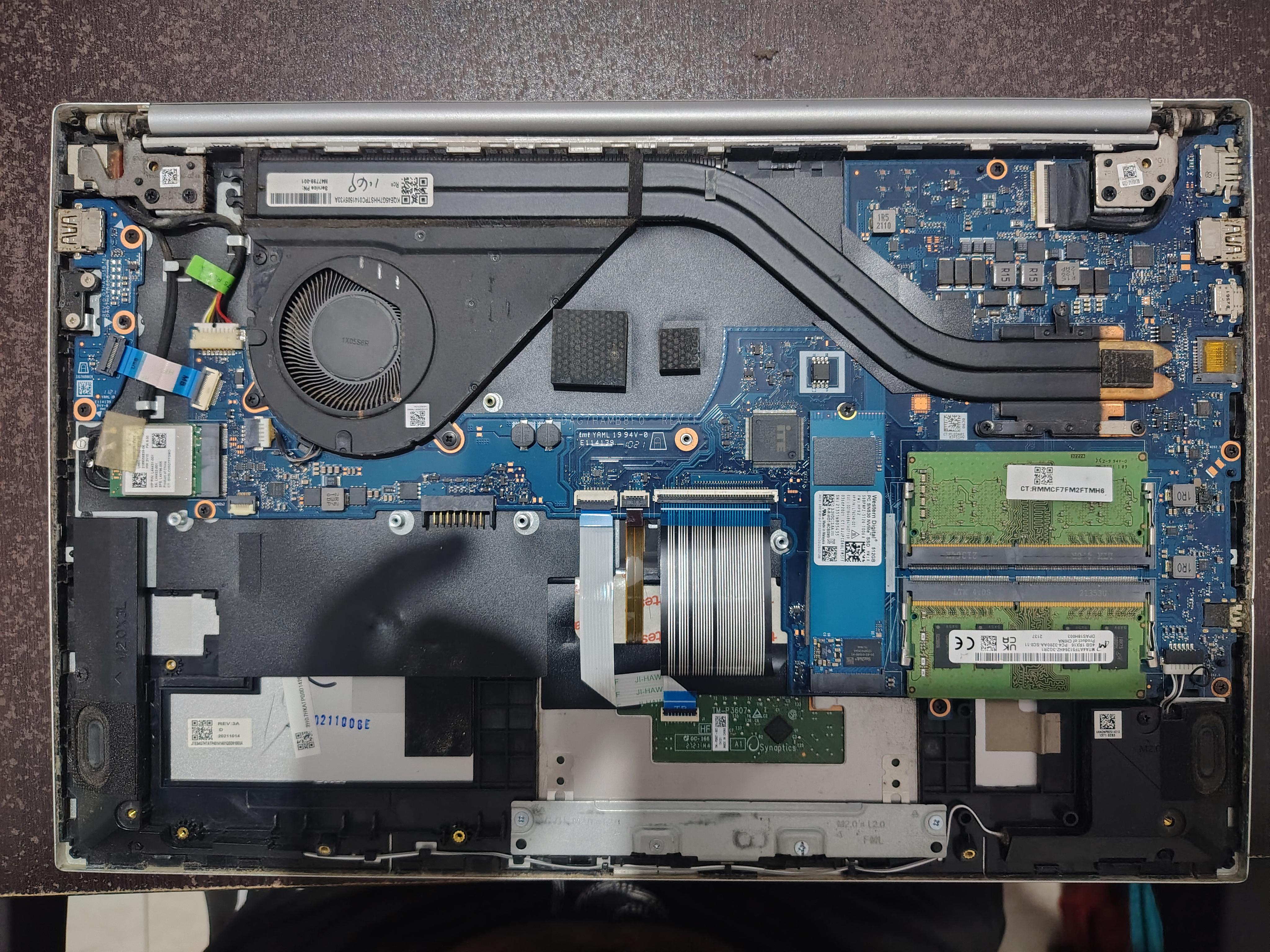
I own a laptop HP OMEN - 15-en0008sa

Yesterday, water spilled on my laptop. It worked fine for a moment. Suddenly I received a notification: USB port malfunctioned and system went off soon.

I tried rebooting it but nothing worked.

When clicked power button,

- Power LED stays ON
- Only one fan runs
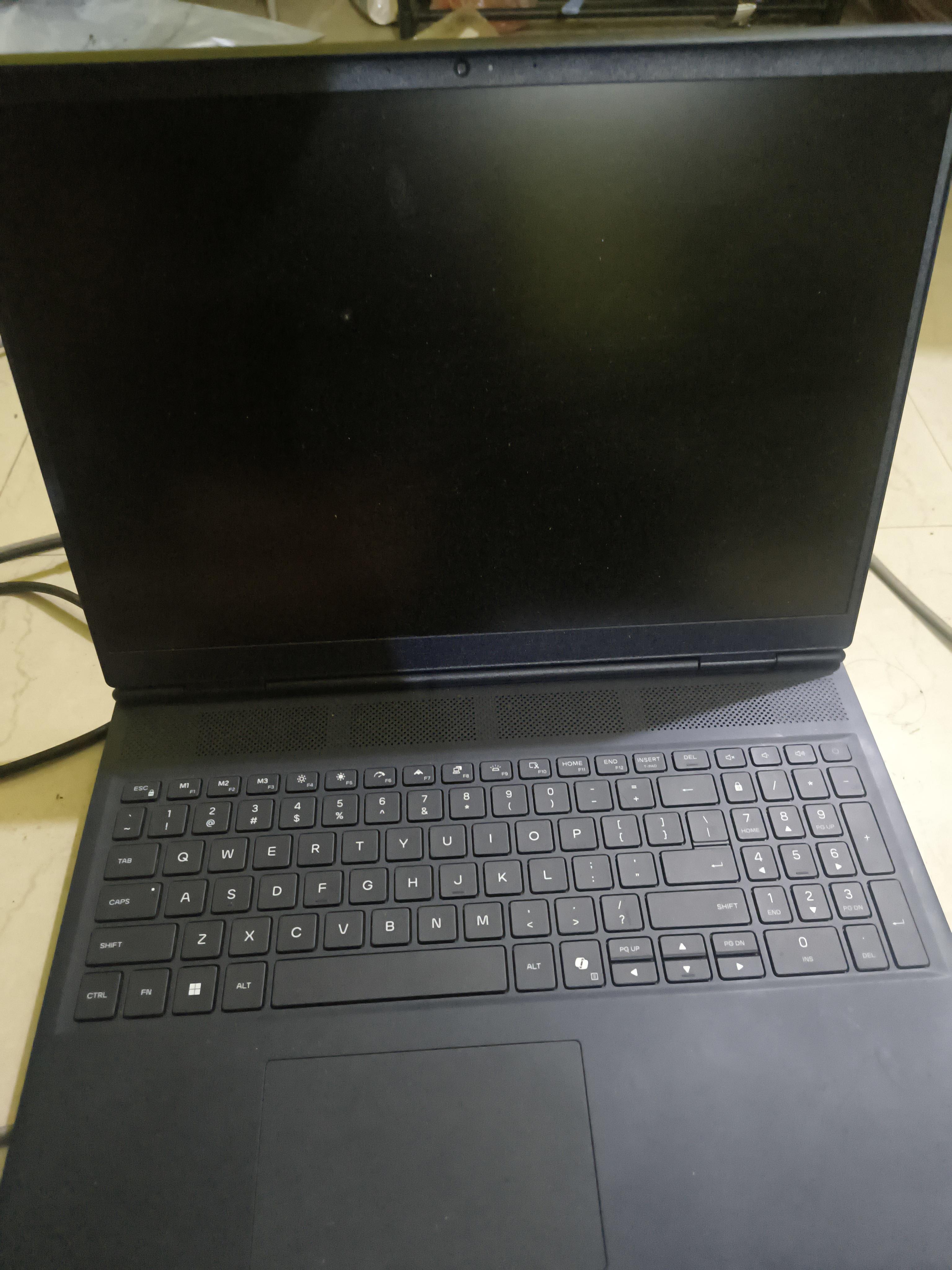
- Completely blank screen

I took this to local technician who said, CPU was damaged during the water splash and the motherboard has to be completely changed.

He also said, the system does not output platform reset signal.

I have a degree in electronics. I have opened the back cover and set it up. I have only a multimeter. I really want this to be fixed. I cannot afford full board replacement at this point.

Could someone please help me?? I genuinely want to find the issue. I cannot convince my self that CPU is damaged.

Note: The last photo was sent by the technician - USB port board with water damage near the connector.


r/LaptopRepairEngineer • • 8d ago

Can someone tell me what this part in the middle is and why it randomly started to smoke?

Post image
1 Upvotes

r/LaptopRepairEngineer • • Oct 22 '26

LF laptop repair shops around QC

0 Upvotes

hiii, help ur girl out.

I have 2 laptops, I need repair shops like Rob Pangan from Pampanga and PatRick's Computer Repair from Cavite kaso ang layo nila😭 I need your recommendations around QC lang sana.

1st laptop: Lenovo ideapad 3
issue: backlight

2nd laptop: Asus
issue: idk😭 mga 5days di nagamit since umuwi kami province then ayaw na mag open nung pag uwi namin

na-try namin ipa free check-up dito malapit samin pero ang oa ang pricing


r/LaptopRepairEngineer • • 15d ago

Idk what to do please help

Post image
0 Upvotes

I did BIOS update through HP SUPPORT ASSISTANT but after this completed my laptop goes off, fans goes off and power led is still on. I have tried few methods but i won't turn on.. please help me


r/LaptopRepairEngineer • • 25d ago

Why factory Reset?

1 Upvotes

So, i just got my laptop back from beaing repaird. The damage was physical only. Missing some screws, something wrong with the hinges, and the bottom was opening up slightly and something was broken in there so screwing in one screw just kinda did nothing. BUT WHY DID THEY HAVE TO FACTORY RESET IT?! THERE WAS ONLY PHYSICALY DAMAGED! I LOST ALL MY FILES I HAD SINCE I DIDN'T HAVE THE ABILITIETY TO BACK ANYTHING UP BEFORE GETTING IT REPAIRD! WHY?!


r/LaptopRepairEngineer • • 17d ago

Best way to source replacement panels?

1 Upvotes

Hoping to upgrade a couple of laptops screens and finding it a total minefield finding what i'm looking for specifically, mostly as so many specifications are left out of listings by sellers.

I know they can be found on panel look but it's a labourious pain to cross check everything and even then is sometimes missing important info like response times and even colour gamut.

Then there's the ali listings that list one model number and say further down the page that you'll be sent an equivalent panel.. probably from a different manufacturer....

And lastly there's compatibility issues I'm not fully schooled in yet but I've seen it mentioned that finding a screen that will work goes beyond just matching pin layouts and protocols.

Anyone have any tips, sources or links for finding decent aftermarket replacement panels?


r/LaptopRepairEngineer • • Sep 24 '26

Il ya des croix rouges a côté de mes fichiers

Post image
1 Upvotes

Il ya des croix rouges a côté des fichiers

Lorsque je pose le curseur dessus on dit erreur

J'ai besoin de vos suggestions svp


r/LaptopRepairEngineer • • Sep 28 '26

Need your help tech bros

Thumbnail
gallery
33 Upvotes

Desperate post. Girlfriend is devastated. Do you think there's any hope of having this repaired?


r/LaptopRepairEngineer • • Oct 03 '26

Want to figure what's wrong with the laptop

Post image
11 Upvotes

This is an hp 15 pavillion eh laptop. A few days back I connected lenovo ThinkPad's c type charger to and suddenly the smoke started coming out 😭😭😭. I visited a care center to ask what could be the issue. They said if smoke came then the motherboard is likely damaged. But he never looked inside the laptop. So I just wanna confirm if the motherboard is actually damaged. Experts help please 🥺.


r/LaptopRepairEngineer • • Oct 09 '26

To all tech bros, need guidance

Thumbnail
gallery
16 Upvotes

Hello! (⁠≧⁠▽⁠≦⁠)

I am a student and can't really afford a new laptop, the options are Disappointing as well, like why tf would I want something with only 4-8 gb ram, THAT'S less than my phone! 😭

This one has been down for the last 3 or so years (sat untouched, no efforts were made to repair) after the repair dude told us that the graphic card has been removed, hence why the screen "won't work" (right buddy...he obviously messed up)

but I am grown up now and the itch got to me. I dissected the laptop today and right off the bat I noticed a few things

  1. One ram stick is missing (I hope the guy who stole it gets diarrhea in the middle of an important event)

  2. thermal paste is laughable cause wow it's powder at this point.

  3. bad tape job EVERYWHERE they put tape on the place where the SD card is supposed to go (I might be wrong)

Ai summary cause I would definitely mess up the hardware name:-

  1. Extreme Thermal & Cooling Failure (Primary Overheating Cause)

* Bent Radiator Exhaust Fins: The metal fins on the heatsink vent are squished together, blocking hot air from exiting the chassis.

* Dried & Overflowing Thermal Paste: The thermal paste over the CPU and GPU is completely baked dry and hard, acting as an heat insulator instead of transferring heat to the copper pipes.

* Trapped Dust Blanket ("Fluff"): A thick layer of lint and dust was trapped inside the fan housing right against the exhaust vents.

* Bad Fan Repair Job: Previous technicians slapped white masking tape across the fan casing, messing up proper airflow.

2. Damaged & Glued Display Connector (LVDS Cable)

* Missing Metal Socket Clip: One side of the metal bracket/retaining structure on the motherboard LVDS socket is broken/missing.

* Glued in Place: To fix the loose connection, a previous repair shop dumped glue directly into the display socket tracks, locking the cable in place and making normal disassembly impossible without heat or solvent.

3. Missing Internal Hardware & Components

* Wi-Fi Card Missing: The WLAN Mini PCIe slot is completely empty—no wireless card installed, and no internal antenna wires present.

* Internal Speakers Missing: The left and right internal speaker modules were removed from the palmrest casing during a prior repair and never replaced.

* RAM Removed/Missing: Both SODIMM memory slots are currently empty.

* Missing Motherboard Screws: Multiple mounting points around the board perimeter and heatsink area are missing their internal screws.

4. Miscellaneous Modding & Cosmetic Anomalies

* SD Card Reader Mod: Kapton (yellow insulator) tape was stuck directly inside the SD card slot metal casing.

* Marker Notes: Hand-written shop inventory numbers (DL167) are scrawled on the fan housing and motherboard PCB.

Ai summary end

............................................................................

Ai included some stuff I REMOVED from the laptop myself while I disassembled it, (like that coin battery thingy, lithium battery) so I am sorry about that but I am not editing it cause who knows? I could be wrong.

Currently the whole thing is disassembled.

I had fun disassembling it, wanna make it alive again so here I am (⁠ㆁ⁠ω⁠ㆁ⁠)!!

I want to know the parts that need replacement (like the display cable) and what needs to be done to save the laptop, I am willing to replace parts to level it up but for now I just want to make it work again and the upgrade will come eventually (display, external separate webcam, better speaker, whatever is possible on this thing)

Current status:

it turns on just fine like always, the screen OCCASIONALLY popped up sometimes (loading screen or Asus screen) and the fans ALWAYS work, so it's clearly not dead and worth saving

DMs open but may not respond right away cause there are creeps, ✌🏽😭

So...

Tech gals and bros, what to do?

I have attached pictures I hardly understand, but you guys will!

Thankks!


r/LaptopRepairEngineer • • 10d ago

My messed up big time with my HP laptop

Post image
6 Upvotes

Ants were there in my laptop bag and they entered my laptop like there were a lot so I used a hair dryer to force them out 😭 but the key caps melted and and came out ( the laptop is working and alll keys are also working just the keycaps are out) what should I do and how much will it cost I am a student and I am scared of my Dad he is a hardworking guy and currently I don't want to stress ( also scared of him😭😭) pls suggest beat course of action 🙏🙏🙏


r/LaptopRepairEngineer • • Sep 29 '26

Accidentally dropped something on my Ideapad Slim 3 15AMN8, won't turn on, makes subtle tac tac every ~7sec. I'm broke and can't afford a new laptop

Thumbnail
gallery
12 Upvotes

The laptop was on the floor next to bed and was on, I nocked my phone from the table and it then hit the laptop on that spot, the laptop went off and now makes a subtle tac tac like sound every 7sec, I can't afford a new laptop, it's not even a year old and my mother saved up and got it for the University (if she finds out I'M DEAD)

Is there any thing that I can do myself to fix it or is it cheap to fix it?

(2nd pic is what the inside looks according to Google)


r/LaptopRepairEngineer • • 11d ago

Hey guys…I have an ASUS ROG Strix G16 laptop. Around 4 months ago, I got the CPU reballing done from a local shop (they charged ₹8500). For the first few months after the reballing, everything was working fine. However, for the past some time, the laptop has started having a serious problem read bod

Post image
2 Upvotes

Normal tasks (browsing, YouTube, documents, light work) work perfectly fine.
• But as soon as I try to start any game, the laptop suddenly shuts down.
There is no blue screen or error message — it just powers off completely when a game is launched.
I suspect the issue might be related to the CPU reballing..can u guys tell me what can be the issue?


r/LaptopRepairEngineer • • 28d ago

Want to figure out what’s causing smoke out of DELL XPS 13 2020 model

Thumbnail
gallery
8 Upvotes

I was working on my laptop of 6 yesterday and smoke came out of the right side of the images, through the keyboard. After first inspection of the components without taking anything out, nothing looks burnt or damaged. I’m taking it to a repair shop today and want second opinions.
Here are the photos


r/LaptopRepairEngineer • • Jul 13 '26

Broken hinges

Thumbnail
gallery
10 Upvotes

Hey Reddit, I’m not very tech savvy. What should I do about the hinges attaching the screen to the keyboard side breaking apart?


r/LaptopRepairEngineer • • 11d ago

Screen freezing

0 Upvotes

My HP Victus 16's screen freezing usually while im playing a game and i can't control anything so i have to press power button for close to computer.. It's just happening on charging not on battery(and it's not about charging adapter i tried it with another one)So i need help for finding what is the issue and what should i gonna do?


r/LaptopRepairEngineer • • Sep 23 '26

Alienware not turning on

Post image
2 Upvotes

My 2 months Dell Alienware aurora 16 stopped working

I turned on my laptop and put it on charge it had around 40% battery

Then I opened fc26 it loaded then suddenly went blank

None of the buttons are working nor its taking charge

The adaptor indicator shows when I connect the charger to the socket but as soon as I put it in the laptop it turns off

Please help I'm gonna cry


r/LaptopRepairEngineer • • Apr 25 '26

Beyond the Schematic: Mastering BoardViewer (.brd, .cad, .fz) for Faster Diagnostics

2 Upvotes

You have the schematic PDF. You know the signal name (e.g., PM_RSMRST#). But you're staring at a dense motherboard with no component labels. How do you find that specific test point in under 30 seconds?

The answer is BoardViewer software. This is not just a "nice to have." It's the difference between a 1-hour repair and a 4-hour repair.

1. What is a BoardView File?

It's the PCB layout file exported from the CAD software (Allegro, Altium, PADS). It contains the exact X/Y coordinates and part designators (e.g., R1234, C5678) for every component on the board.

  • File Extensions: .brd (Allegro), .cad (PADS), .fz (Fritzing/OpenBoardView), .pcb, .bv (BoardViewer).

  • Required Software:

    • OpenBoardView (Free, Open Source) - Supports .brd, .cad, .fz.

    • FlexBV (Paid, Industry Standard) - Supports encrypted .bv files.

    • BoardViewer (Free, Basic) - Supports .brd.

    • Allegro Free Physical Viewer (Free, Official Cadence).

2. The Workflow (Schematic -> BoardView -> Multimeter)

Example: You determine that RSMRST# is stuck low. The schematic says it's on Pin 18 of U3001 (SIO) .

Step 1: Find U3001 in BoardViewer.

  • Open the .brd file in OpenBoardView.

  • Press Ctrl+F (Find).

  • Type U3001.

  • The software will zoom and center on the exact location of the SIO chip.

Step 2: Highlight Pin 18.

  • In OpenBoardView, right-click on U3001 -> Show Pins.

  • A list of pins appears. Find Pin 18.

  • The software will highlight the exact pad under the SIO.

Step 3: Find the Nearest Test Point or Via.

  • You can't probe under the BGA chip.

  • Look for a trace coming out of Pin 18.

  • Follow it visually in BoardViewer.

  • You'll see it go to a tiny via or a resistor (e.g., R3012).

  • Now search for R3012.

  • That resistor is on the back of the board and easily probed.

Total Time: 15 seconds. Without BoardViewer? You'd be tracing blindly with a multimeter in continuity mode for 10 minutes.

3. Advanced BoardViewer Tricks

Trick 1: Net Highlighting

  • Click on Pin 18 of U3001.

  • Press N (Net Highlight).

  • The software will highlight EVERY trace, via, and component connected to that signal (the RSMRST# net).

  • You can instantly see that it goes to the PCH, a pull-up resistor, and a test point.

  • This is the most powerful feature. It shows you the entire circuit path.

Trick 2: Find Shorts Visually

  • You have a short on 3.3V ALW.

  • In BoardViewer, find the 3.3V ALW coil.

  • Highlight the net (press N).

  • You now have a visual map of every single component connected to 3.3V ALW (there may be 50+ capacitors).

  • Now use the Voltage Injection method. When the bad cap gets warm, you already know exactly where to look on the board because you saw it highlighted in BoardViewer.

Trick 3: Reverse Lookup (Board to Schematic)

  • You find a burned component on the board.

  • You want to know what it is and what it does.

  • In BoardViewer, click on the burned spot. The software will tell you the Reference Designator (e.g., PQ8001).

  • Go to the schematic PDF. Search for PQ8001.

  • You now know it's the VCC_CORE High-Side MOSFET.

4. Where to Get BoardView Files

  • BadCaps.net Forum: The ultimate repository. Search [Boardview] Model Number.

  • Paid Sites: Vinafix.com, LaptopSchematic.com (Subscription based, but have rare files).

  • Manufacturer Leaks: Sometimes .brd files are included in BIOS update packages or service manuals (rare).

5. The "Missing BoardView" Scenario

If you don't have the .brd file for your specific board, you can often use a similar platform file.

  • Example: You're working on a Dell Latitude 5420. The board is GDF40 LA-K491P.

  • Search BadCaps for LA-K491P.

  • If not found, search for LA-K481P (similar chipset, layout will be 90% identical). The component locations and net names will be close enough to guide you.

Question: What's your preferred BoardViewer software? I'm using OpenBoardView but considering FlexBV for the encrypted file support. Is it worth the cost?


r/LaptopRepairEngineer • • Sep 23 '26

It's my laptop screen already funked up?

2 Upvotes

A few days ago I cleaned my screen with the screen on (i knew what could happen) and when I turned on the screen was flickering, I waited 2 days to drain the moisture, and looking a reddit diagnose.


r/LaptopRepairEngineer • • Oct 13 '26

Temps after repaste MSI gx60

Post image
6 Upvotes

I repasted a MSI gx60 with the a10 cpu, cause these temps looked stupid high, after it still was giving me really high core temps. Is this possibly reading wrong??? Or maybe something else is wrong.


r/LaptopRepairEngineer • • 21d ago

Need help finding a replacement motherboard for HP ProBook x360 440 G1 (i5-8250U) - Mumbai, India

Thumbnail
gallery
2 Upvotes

Hi everyone,

I own an HP ProBook x360 440 G1, and unfortunately, it has stopped working.

Laptop details:

- Model: HP ProBook x360 440 G1

- Product Number: 7NU39PA#ACJ

- Processor: Intel Core i5-8250U (8th Gen)

- RAM: 16 GB

- Storage: 512 GB SSD

- Serial Number: 8CG9281CQS

The problem:

The laptop doesn't power on at all. There are no indicator lights, fan activity or any response when I press the power button.

I took it to a local laptop repair shop. After inspecting it, they told me that the motherboard is damaged and needs replacement. However, they haven't been able to source the required motherboard.

I've been trying to find a replacement but haven't had much luck so far.

I'm looking for:

- A new or refurbished original HP motherboard.

- Compatible motherboard part number: L28241-001 / L28241-601 (subject to verification).

- Sellers or vendors who deal in older HP laptop spare parts.

- Any reliable laptop repair shops in Mumbai that might be able to source or repair the board.

I'm based in Mumbai, but I'm open to purchasing from anywhere in India if shipping is possible.

I'd really appreciate any leads, seller contacts, websites or suggestions from anyone who has dealt with a similar issue.

I'd prefer repairing the laptop rather than replacing it, provided the repair is economically sensible.

Thanks in advance!


r/LaptopRepairEngineer • • Sep 23 '26

When charging...there is no flickering issue...

8 Upvotes

When charging...there is no flickering issue...But when charging unplugged...there is flickering...please tell me any solution guys...

It is lenovo G40 to 80 series laptop....


r/LaptopRepairEngineer • • Apr 12 '26

Fan Spins. No Display. No POST. The Complete Signal Analysis Workflow (DRAMRST# to PLT_RST#)

2 Upvotes

You press power. The fan spins up. The power LED stays solid. The CPU gets warm. But the screen remains black. No Caps Lock response. No external display.

Basic training stops here: "Bad motherboard. Replace."

Engineering training starts here: "Which signal is stuck?"

This post maps out the exact sequence of events that must occur after the power rails come up. If you understand this chain, you can fix 80% of "No POST" boards without guessing.

The POST Sequence Checklist (Intel Platform)

Use an oscilloscope or a logic probe. Check these signals in this exact order.

1. DRAMRST# (Memory Reset)

  • Location: Pin 30 of the DDR4/DDR5 slot (verify schematic).

  • Expected: Should start LOW (0V) and then rise to HIGH (1.2V/1.35V) after the CPU receives VCCST (Standby Rail) and VCCIO.

  • The Trap: If DRAMRST# is stuck at 0V, the RAM is held in reset. The PCH/CPU cannot initialize memory.

  • Common Cause:

    • Missing VTT_DDR (0.6V reference voltage). Check the tiny voltage divider near the RAM slots.

    • Faulty SMBus pull-up resistors on the RAM slots (I2C lines shorted to ground).

    • Bad CPU (rare, but bent socket pins under the CPU for memory channels will cause this).

2. SMBus Activity Check

  • Location: Pins SMB_CLK and SMB_DATA on the RAM slot.

  • Expected: During POST, these lines should show brief activity (pulses) as the PCH reads the SPD EEPROM on the RAM stick.

  • Reality: If the lines are stuck at 3.3V, the PCH isn't even trying to read RAM. Back up to PCH_PWROK.

3. PCH_PWROK / SYS_PWROK

  • Location: Near the PCH (Platform Controller Hub).

  • Expected: 3.3V steady.

  • Critical Detail: This signal tells the PCH: "All main power rails (VCC_CORE, VCC_SA, VCC_GT) are stable. You are clear to boot."

  • Trap: This signal is often driven by a tiny AND-gate IC or a voltage supervisor chip (e.g., RT8231, UP1540). If that chip doesn't see all rails, it won't release PCH_PWROK.

  • Test: Measure voltage on all coils near CPU. If even one rail (like VCCSA) is 0V, PCH_PWROK will be 0V.

4. PLT_RST# (Platform Reset)

  • Location: This is the GOLDEN SIGNAL. Find it on the PCH side or test points near the BIOS chip.

  • Expected: Should start LOW (0V) for a split second, then rise to HIGH (3.3V) and stay there.

  • The Hard Stop: If PLT_RST# is stuck at 0V or stuck at 3.3V (no pulse) , the PCH is refusing to release the CPU from reset.

  • Why? Three main reasons:

    1. Bad BIOS/ME Region: Corrupt firmware. The PCH loads the BIOS, sees garbage, and holds PLT_RST# low forever. Solution: Re-program BIOS chip (ensure you clean the ME region!).

    2. Missing VCCST_PWRGD: The 1.05V Standby rail for the PCH internal logic is present, but the "Power Good" signal is missing.

    3. Shorted Clock Crystal: The 32.768kHz RTC crystal is shorted or the load capacitors are bad. The PCH cannot count time, so it locks up.

The "No POST" Diagnostic Tree (Decision Map)

text

Fan Spins -> Check CPU VCore
   |
   +---> VCore 0V? -> Check VRM Enable (VR_ON). Trace back to SIO.
   |
   +---> VCore Present (0.8V - 1.2V)?
          |
          +---> Check DRAMRST# (Pin 30).
                |
                +---> DRAMRST# = 0V? -> Check VTT_DDR / VCCIO / Bent Socket.
                |
                +---> DRAMRST# = 1.2V?
                       |
                       +---> Check PLT_RST#.
                             |
                             +---> PLT_RST# Stuck Low? -> Flash BIOS.
                             |
                             +---> PLT_RST# = 3.3V? -> **CPU is likely dead or socket connection issue.**

Advanced Tip: The "Light Tap" Test

When PLT_RST# is stuck low and BIOS reflash doesn't fix it:

  1. Power on the board.

  2. Apply gentle pressure with a plastic spudger on the corner of the PCH die.

  3. If the board suddenly boots when you press down, you have BGA cold solder joints under the PCH. This is a classic sign of a dropped laptop. Requires PCH reflow or reball.

Question for the Community

What's the weirdest cause you've found for PLT_RST# being stuck low?
I once found a 0.1uF cap shorted on the SPI_CS# line of the BIOS chip. The PCH couldn't talk to the BIOS at all, but the BIOS chip itself was fine. Took 4 hours to find that little gremlin.

Share your "No POST" horror stories below. This is where real engineers are separated from parts swappers.


r/LaptopRepairEngineer • • 3d ago

anyone have any ideas how i can fix this?

Post image
3 Upvotes

so basically i have this issue on my laptop. where i resetted it and it took me straight to bios. and it says that there is no storage device present, (it was working perfectly fine before)


r/LaptopRepairEngineer • • Oct 08 '26

HP BATTERY ALERT

2 Upvotes

how can i bypass this thing? my laptop keyboard isn't working and I don't have a wired external keyboard to connect it with my laptop, I couldn't press enter even though I want to. It automatically goes into system recovery and even if I chose to continue it still repeats the same process over and over