r/DigitalPlanner • • Jun 28 '26

this silently tracks every single day automatically and for free

Thumbnail
gallery
230 Upvotes

I'm not entirely sure if this fits here... but kind of? I had an idea driving home one day that life is a simulation. I then was like we are just Sims trying to do things to make us happy.

Hence I spawned LifeXP. It's completely free, no database, no server, completely private, it's literally just a passion project I've had over the last couple of months.

Heres how it works:

  • Download the app, allow access to your devices data (location, health, movement)

  • Answer some questions to set your therapeutic baseline to grow (or not grow) from.

  • ... thats it.

The app will automatically detect where you've been, put it on a timeline for you, and you gain XP for things like sleep, exercise, time in daylight, social hours, etc.

Any new location you visit will show as Unknown, just tap it, pick the location from the map pins nearby, or label it, and you never have to do it again.

I have been really liking it and have built weeks of history and it's really cool to go back in time and see where I've been. If you give it a try let me know!

Also if you do try it please let me know any feedback you have! I'd love to make it better.

https://apps.apple.com/us/app/lifexp-habit-life-tracker/id6771204439


r/DigitalPlanner • • Jul 16 '26

Calendar apps kept hiding the big picture, so I put my entire year on one screen

Thumbnail
gallery
194 Upvotes

Most calendar apps are great at showing me today or this week.

But trips, birthdays, school breaks, busy seasons, and the things I’m looking forward to kept disappearing across 12 different screens.

I wanted to see the shape of my year at a glance—what was coming up, which months were overloaded, and where there was still room for something meaningful.

So I built Yearfully.

Beyond the year view, I use categories to see how I’m spending my time, shared calendars to plan with family, and dedicated spaces for goals and ideas—so the things I want to do can eventually become things on the calendar.

This is my actual 2026 calendar: family events, trips, work, birthdays, and personal plans, all visible on one screen and color-coded by category.

It isn’t meant to replace a detailed daily calendar. It’s the zoomed-out layer above it—the view I use when I want to plan a life, not just a Tuesday.

Sharing it because I figured some of you might also think in seasons and years instead of weeks.

https://yearfully.com


r/DigitalPlanner • • Jul 07 '26

Automatically track every day of your life for free (v1.3 & FREE CODES)

Thumbnail
gallery
176 Upvotes

You may have seen me a little while ago. I'm nonstop working on making LifeXP better and getting through lots of feedback, and wanted to say thank you for giving it a try!

I recently released v1.3 to solve a lot of the issues, with 1.3.1 on the way soon!

In case you haven't seen this before, here is the gist:

I had an idea driving home one day that life is a simulation. I then was like we are just Sims trying to do things to make us happy.

Hence I spawned LifeXP. It's completely free, no database, no server, completely private, it's literally just a passion project I've had over the last couple of months.

Heres how it works:

  • Download the app, allow access to your devices data (location, health, movement)

  • Answer some questions to set your therapeutic baseline to grow (or not grow) from.

  • ... thats it.

The app will automatically detect where you've been, put it on a timeline for you, and you gain XP for things like sleep, exercise, time in daylight, social hours, etc.

Any new location you visit will show as Unknown, just tap it, pick the location from the map pins nearby, or label it, and you never have to do it again.

I have been really liking it and have built weeks of history and it's really cool to go back in time and see where I've been. If you give it a try let me know!

Also if you do try it please let me know any feedback you have! I'd love to make it better.

https://apps.apple.com/us/app/lifexp-habit-life-tracker/id6771204439

Lastly, I want to give back, I am handing out free codes of the pro version that gives cosmetics / some extra features. If you already subbed, this will stack to your existing sub. Please send me a DM and I'll share a code!

Again thank you all so much I'm super happy folks are enjoying it and I will keep working on making it better.


r/DigitalPlanner • • Jul 07 '26

I made a calm life admin planner for people who forget things unless they write them down immediately

Post image
160 Upvotes

I’ve been working on a digital planner designed for people who need one calm place to put everything before it disappears from their brain.
I wanted it to feel less like a strict productivity system and more like a gentle life admin hub — somewhere you can quickly add things, see what needs doing, and come back to it without feeling guilty if you missed a few days.
It includes:

🧠 Today’s Focus — a simple place to capture what matters most today

✅ Daily + weekly planning — so tasks can flow into your day/week without rewriting everything

📌 Task hub — for life admin, errands, reminders, and things you keep putting off

💭 Brain dump — for random thoughts before they disappear

🔁 Habits + routines — for repeatable things without making it feel overwhelming

💸 Budget + bills — for subscriptions, bills, and money reminders

📅 Appointments + documents — so important dates and paperwork aren’t scattered

🧘 Self-care + mood/energy tracking — because some days need a lighter plan

🧹 Weekly + monthly reset pages — to help get back on track without starting over

I also added different themes, a calm mode, and a local version so it can be used without needing a subscription.

I’m still improving the layout and demo data, but I wanted to share the current version because I know a lot of people struggle with planners that are either too rigid, too plain, or too overwhelming.

Would love any feedback on the layout — especially from people who use digital planners for ADHD, life admin, or home organisation.

For anyone who asked, the planner is here:
ADHD Life Admin Planner

It’s called the ADHD Life Admin Planner and it’s designed to be more of a calm life hub than a strict dated planner. No


r/DigitalPlanner • • Jul 19 '26

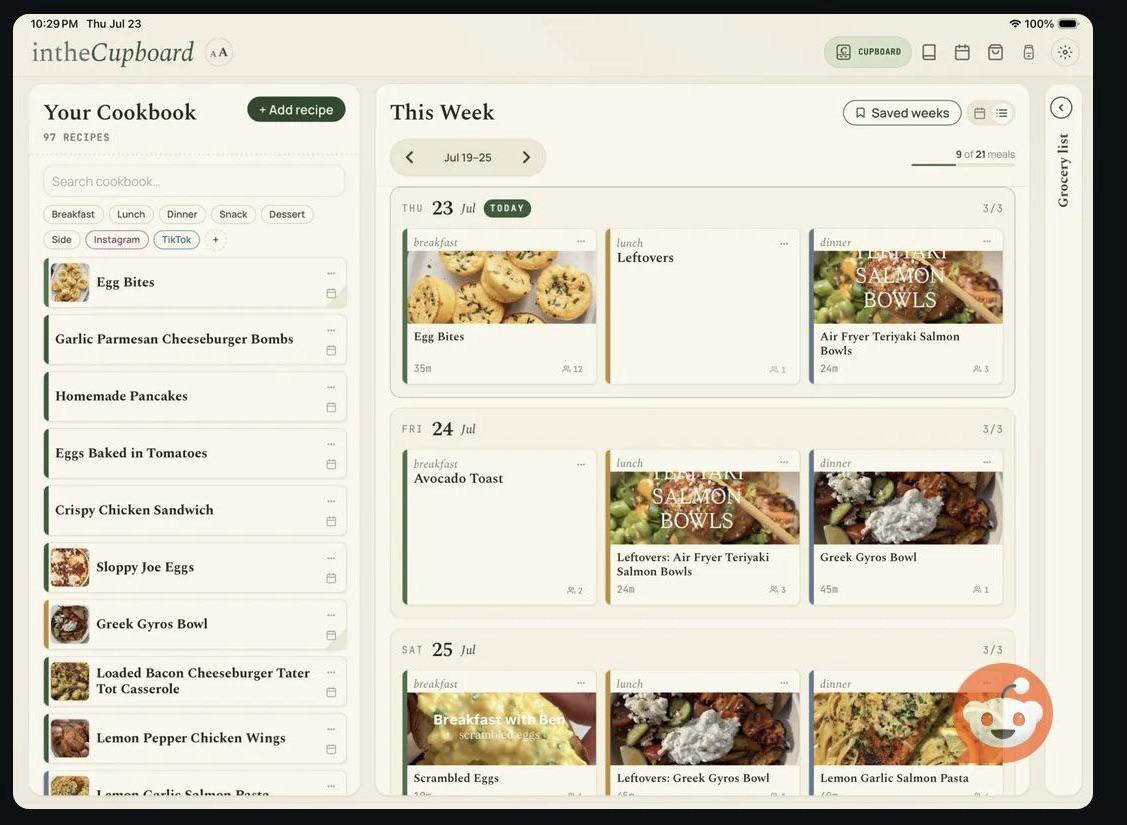
I built a shared meal planner for me and my wife and now we're at 300 users!

Post image
144 Upvotes

Two months ago I realized all the meal planning in our house was falling on my wife. She loves trying new recipes and needs a plan. I'd have been fine eating the same three things forever, so I just let her carry it. When I was going to cook I had to ask "what am I making tonight?" and get pointed to a reel, a sticky note in a cookbook, or a tab she had open somewhere.

So I built us a shared planner. You save recipes from wherever they live (Instagram, TikTok, websites) into one cookbook, drag and drop them onto a weekly grid, and the grocery list builds itself from whatever you planned, sorted by aisle.

I posted it to Reddit and got so many people asking for a link that I decided to pursue putting it on the App Store and it just passed 300 users. Tiny by app standards but surreal to me that strangers are planning their weeks on a thing I built for the two of us.

If you want to check it out it's at inthecupboard.app/get


r/DigitalPlanner • • Oct 21 '26

My 2027 tree style habit tracker google sheet

Thumbnail
gallery
138 Upvotes

Hey guys, so this is my current favorite habit tracker.

It's super cozy and beautiful so its easy to stay consistent with it.

below is a full explaination of this habit tracker.

Track Your Habits

  • 12 Monthly Habit Trackers: One tab for every month, each holding up to 15 daily habits.

  • One-Click Ticking: Tick a habit off with one click and everything else updates for you.

  • Daily Progress Chart: A bar chart for every day of the month, with each week in its own color.

  • Weekly Progress Bars: See how each week of the month went, plus your best week.

Watch Your Habits Grow

  • Growing Habit Tree: A tree grows from seed to full bloom through 5 stages as your percentage climbs.

  • Today’s Bloom: Your tree sits right beside your habits, so you can watch it grow.

  • Daily Forest: A little tree grows under every day of your progress chart.

Weekly, Monthly & Yearly Habits

Weekly Habits Track weekly habits for weeks 1 to 5, plus an extra habits column, with a progress ring.

  • Monthly Habits: Up to 16 monthly habits with their own progress ring.

  • Monthly Learning: Keep a short list of what you learned each month.

  • Yearly Habits: Track up to 15 yearly habits and see each one’s percentage for the whole year.

You can check it out from link below for more better overview.

https://organizeddashboard.com/template/habit-tracker-pro


r/DigitalPlanner • • 5d ago

I made a free generator for fully hyperlinked daily planner PDFs (Boox, reMarkable, Scribe, iPad, Android)

Post image
121 Upvotes

As I start setting up meetings for next year I wanted a hyperlinked daily planner I could set up exactly the way I like, so I built a small web page that generates one. I've bought various ones over the last 4 or 5 years so wanted to see what Claude and I could come up with that suits the way I work (yes, it very much vibe-coded)

It’s free, there’s no account, and nothing gets uploaded: the PDF is built entirely in your browser.

Link: https://cosmo-nz.github.io/Daily_Planner/

What’s in the planner

  • A cover page with a month index (optional)

  • A calendar page for each month, where you tap any date to jump to that day

  • A Daily Plan page for every day: tasks with checkboxes, reminders, and a timed schedule

  • 1–3 lined Daily Notes pages per day

  • Links everywhere: month tabs on every page, a week strip to hop between days, arrows that step a week (or a month on the calendar pages), and buttons to switch between a day’s plan and notes

What you can customise

  • Planner name (shown on the cover)

  • Any year from 2026 to 2035

  • Monday or Sunday week start

  • Left- or right-handed layout (the navigation swaps sides)

  • Schedule hours (06:00–20:00 in 30-minute steps), with 30- or 60-minute rows

  • Font: PT Sans, Inter, Atkinson Hyperlegible, Bitter or PT Serif

  • Page shape, so it fills your screen:

    • 3:4 for e-ink tablets (Boox, reMarkable, Kindle Scribe, Kobo, Supernote) and 13" iPads

    • A4 shape for 11" iPads, iPad mini and printing on A4

    • 16:10 for Samsung and other widescreen Android tablets

A full year comes out at around 1,100 pages and takes a few seconds to generate. The pages are vector, so they stay sharp at any screen resolution, and once the page has loaded onto your tablet it works offline of course.

I mostly use it on my Boox, so I’d love to hear how the links behave in other apps and devices.

If you want to have a look at the code (or clone the repo for your own changes) it is on GitHub: https://github.com/Cosmo-NZ/Daily_Planner


r/DigitalPlanner • • Oct 17 '26

My 2027 Daily planner, goal planner & habit tracker google sheet

Thumbnail
gallery
105 Upvotes

I made one Google Sheet for all your day, week, month, habits and goals. Type once, everything updates automatically.

👇 This planner puts it all in one Google Sheet.

- Daily Planner:

Time blocks, top 3 priorities, mood, sleep, hydration, workout and meal log

- Weekly Planner:

tasks sorted by 4 color-coded priority levels

- Monthly Calendar:

full month view with upcoming events

- Habit Tracker:

12 habits, one tracker per month, weekly and monthly progress

- Goal Tracker + Vision Board:

6 life areas with sub-goals

- Customization Tab:

change colors to match your style

What's more is you don't have to pay for monthly subscriptions at all.

👇 You can download this planner from link below

https://organizeddashboard.com/template/daily-planner


r/DigitalPlanner • • Oct 24 '26

Visuel, the first Mind Map focused Task App

103 Upvotes

Edit: Visuel is available in the EU again

Checkout r/Visuel for future updates

Visuel is a task management app with focus on mind map. I have put a lot of effort into making the interactions feel smooth, intuitive and enjoyable.

The best way to get a feel about the app is to simply try it out, being an early user comes with big advantages later down the line.

Thank you for your attention, and happy trying! If you enjoy the app, leaving a rating would really help me out!

Joey
https://apps.apple.com/app/apple-store/id6759396580?pt=128299842&ct=r1&mt=8


r/DigitalPlanner • • Sep 09 '26

Automatically track every day of your life for free (optional pro & FREE CODES)

Thumbnail
gallery
101 Upvotes

Hi!! It's been a bit since I posted last in here, but I wanted to share an update on LifeXP.

In case you haven't seen this before, here is the gist:

I had an idea driving home one day that life is a simulation. I then was like we are just Sims trying to do things to make us happy.

Hence I spawned LifeXP. It's free to use with an optional pro tier (you can skip the pro option in onboarding), it has no database, no server, completely private, and it's been a passion project that seemed to resonate!

Heres how it works:

  • Download the app, allow access to your devices data (location, health, movement)

  • Answer some questions to set your therapeutic baseline to grow (or not grow) from.

  • ... thats it.

The app will automatically detect where you've been, put it on a timeline for you, and you gain XP for things like sleep, exercise, time in daylight, social hours, etc.

Any new location you visit will show as Unknown, just tap it, pick the location from the map nearby, or label it, and you never have to do it again.

I have been really liking it and have built months of history and it's really cool to go back in time and see where I've been.

Also if you do try it please let me know any feedback you have! I'd love to make it better.

Apple: https://apps.apple.com/us/app/lifexp-habit-life-tracker/id6771204439

or for Android folks: https://play.google.com/store/apps/details?id=com.jessekhach.lifexp

We've shipped some new visualizations recently and made the engine MUCH better. The next major thing I'm working on is making naming places easier, you only need to do it once per new location and never again, but I know it's a bit of a nuisance.

& as always trying to make the engine better to make sure it captures everything correctly.

PS: I also am giving away a handful of codes to the pro version, it just lets you unlock some more visualizations and some cosmetics, but the core app is and will always be completely free to use. Please leave a comment if interested and I will send you a PM or just dm me directly!

Thank you again, and I always love to hear feedback and make things better so please let me know if you give it a try and your thoughts!!


r/DigitalPlanner • • Jul 03 '22

I made a 120 days daily Study planner since classes are going to start 🍓

101 Upvotes

r/DigitalPlanner • • Apr 04 '22

reading journal inspo for book lovers! here’s a book review page

Post image
89 Upvotes

r/DigitalPlanner • • Mar 27 '21

I made a free daily planner and wanted to share it here! Download link in the comments :-)

Post image
88 Upvotes

r/DigitalPlanner • • Jun 13 '22

Started filling up my Plant Care Journal 🌿

86 Upvotes

r/DigitalPlanner • • Jun 02 '26 Bravo

built this for myself, been using it every morning for 3 months.

Post image
83 Upvotes

r/DigitalPlanner • • Sep 29 '26

my digital planner :)

Post image
80 Upvotes

r/DigitalPlanner • • Sep 27 '26

It’s 2026. Does anyone still prefer printable planners over apps?

72 Upvotes

I've tried quite a few productivity apps over the years, but I still find myself going back to simple weekly planners and checklists on paper.

There's something about seeing the whole week in front of me without notifications, menus, or another screen that just feels easier.

It also feels a little funny to still prefer paper in 2026 when there are so many digital tools available now.

Does anyone else still use printable planners or trackers, or have you completely moved to digital?


r/DigitalPlanner • • Oct 12 '26 Bravo

HomeBoard — an open-source self-hosted family dashboard

Post image
67 Upvotes

I've been building my own self-hosted family dashboard and I've finally got it to the point where I'd like other people to start breaking it.

HomeBoard
https://github.com/MooreSi/HomeBoard

I originally wanted something I could leave running on a screen in the house that combined our family calendars, photos, weather and a few useful bits of information without relying on another hosted subscription/service.

Then feature creep happened.

It's now got multiple ICS calendars, continuous calendar browsing, family profiles, shopping/checklists, chores and points, kids' routines, meals, bin reminders, countdowns, photos, weather, RSS, themes, a visual layout editor, portrait displays, scheduled screens/playlists, backup/restore and a PWA-style management interface.

It can run directly under Node, in Docker, or as a Proxmox LXC.

One of the main things I've tried to retain is the self-hosted/local-first approach. Calendar credentials and settings live on the server and it's intended primarily for a trusted home network rather than being another cloud dashboard.

I'm running it myself, but this is very much WIP rather than a finished 1.0 release.

What I really need now is people with environments that aren't mine.

I'd be interested to know:

• Does the install experience make sense?
• Does it behave properly on different displays/tablets?
• What would stop you actually using it?
• Are there obvious integrations I'm missing?
• Is the family organisation side useful or should the project stay closer to being a pure dashboard?
• What have I overcomplicated? 😄

I'd particularly love some testing from Docker, Proxmox and Home Assistant/home-lab users.

Also very happy to have collaborators. If anyone fancies contributing code, integrations, themes, documentation, testing or even just helping shape the direction, PRs/issues/discussion are very welcome.

Repo is here:

https://github.com/MooreSi/HomeBoard

Cheers


r/DigitalPlanner • • Nov 14 '20

I made my handwriting into a font using the website calligraphr!

Thumbnail
gallery
64 Upvotes

r/DigitalPlanner • • Aug 29 '22

I was looking for a Hello Kitty digital planner but could not find any so i made my own

Post image
63 Upvotes

r/DigitalPlanner • • Aug 06 '26

[Update] Meal planner i made my wife taking off!

Post image
62 Upvotes

I posted this to Reddit and got so many people asking for a link that I decided to pursue putting it on the App Store and it just passed 400 users. I know it's tiny by app standards but surreal to me that strangers are planning their weeks on a thing I built for the two of us.

Three months ago I realized all the meal planning in our house was falling on my wife. She loves trying new recipes and needs a plan. I'd have been fine eating the same three things forever, so I just let her carry it. When I was going to cook I had to ask "what am I making tonight?" and get pointed to a reel, a sticky note in a cookbook, or a tab she had open somewhere.

So I built us a shared planner. You add recipes from websites or instagram/TikTok and they save into one cookbook Then you drag and drop them onto a weekly grid, and the grocery list builds itself from whatever you planned. Both of you see each other's updates!

If you want to check it out it's at inthecupboard.app/get


r/DigitalPlanner • • Jun 26 '26

Made a digital planner that's a 24h dial instead of the usual vertical layout

62 Upvotes

Wanted to see my whole day as one shape instead of scrolling a column. So it's a clock. Full 24h ring, blocks are wedges. You draw a sleep block and it paints an energy curve over the next day (built from your sleep + circadian rhythm), so you can actually see your morning fog and afternoon crash before you plan into them.

if anyone wanna try it check reassign.ai

Question since you all live in planners: does a circular day read better to you than a vertical one, or does the column just win?


r/DigitalPlanner • • Jul 09 '24

Made this cute digital planner and I am too excited to even take a proper video

61 Upvotes

It took me forever to make it and I love it so much


r/DigitalPlanner • • Mar 20 '25

I am obsessed with making stickers for my planner !

Thumbnail
gallery
59 Upvotes

Does anyone else like to make their own stickers ?


r/DigitalPlanner • • Jul 09 '26

2026 - 2027 Life Planner

Thumbnail
gallery
57 Upvotes

Hey guys, 🫡

This is a complete life planner I've made that helps you track your goals, habits, weekly planning, tasks, journaling and day-to-day life.

✅ What’s inside:

  • Daily login window for accountability

  • Habit tracking with streaks

  • Goals by life areas (work, health, personal)

  • Eisenhower matrix for task clarity

  • Mini to-dos, reminders, and events

  • Journaling + monthly reflection

  • Wheel of life for balance checks

  • Light & dark themes

🎁 It’s for those who seriously wants to organize their life.

➡️ https://organizeddashboard.com/template/life-planner