r/Bios • • Nov 24 '24

Latest BIOS version for Asus P7H55-M/V-P7H55E/DP MB

2 Upvotes

I looked everywhere for latest bios version for this mainboard, but it’s doesn’t helps me. Do you guys know where I can get it?


r/Bios • • Nov 21 '24

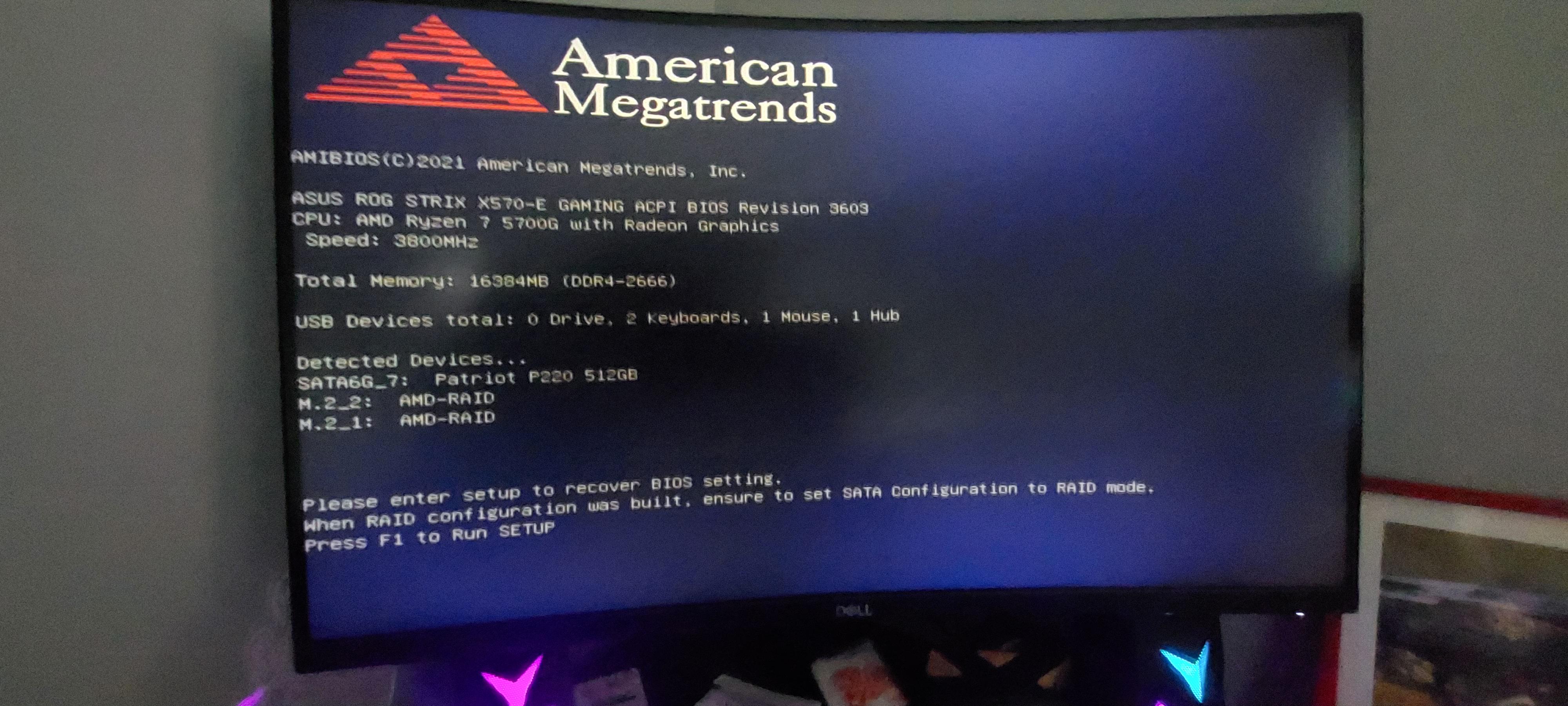
Bios Setup POP Up?

Post image
3 Upvotes

So for about 2 weeks I have been getting this pop up whenever I launch my PC. Unfortunately, I don't know what this means or what to do with about it. I just click F1 as it says, then I press exit, then my pc launches as normal.

However, I do want to solve/fix this as I don't want this to develop into a problem.

I literally changed nothing on my PC that I am aware of, or anything on BIOS. The only thing I can link it to is that my PC power cord got yanked out while it was on, and this pop up stared very close after that happened.

Any and all input will be greatly appreciated. And thanks for reading my post thus far 🙏👌


r/Bios • • Nov 21 '24

Dell G5587 Bios for flashing with CH341a

1 Upvotes

Hi I'm having an issue my bios has been corrupted and the normal Dell bios recovery methods failed. I'm now trying to flash the bios but I'm unable to find a proper .BIN file for this laptop model Dell G5587.

I was able to read from the bios chip. The only bios files I was able to obtain from the Dell website are .RCV and .EXE of which I could not find a way to extract the .BIN file out of it.

Can anyone help me out here? Thanks in advance.
Bios driver on dell website: https://www.dell.com/support/home/en-us/drivers/driversdetails?driverid=7cr4w&oscode=wt64a&productcode=g-series-15-5587-laptop


r/Bios • • Nov 20 '24

I cant remove the bios password fujitsu lifebook e751

1 Upvotes

How do I remove the bios password from my fujitsu lifebook e751 I have tried everything from trying to get a code when typing the password wrong 3 times and getting a code but I simply wouldn't work then I removed the cmos battery but that also didn't work. it would be really nice if anyone could help me with this


r/Bios • • Nov 11 '24

Thinkpad p53 bios password

1 Upvotes

Does anyone know a working way to reset the BIOS password on a ThinkPad P53 laptop? I have a ch341a programmer and I have already dumped the BIOS. I tried locking pins 5 and 6 when starting up - it doesn't help.


r/Bios • • Nov 10 '24

Bios for Toshiba satellite S855D-S5148

1 Upvotes

Hi guys I have a problem with my old Toshiba Satellite laptop I have buy two ddr3 8gb sticks of ram but my laptop doesn't accept it this a laptop that I Wana upgrade for my little girl for school the bios that comes with its v6.4 I been searching non stop for almost a week now and I don't find the latest version that is 6.70 anywhere if someone can provide the bios update it will be awesome and you will be doing a little girl very happy please help thanks


r/Bios • • Nov 09 '24

Hp Elitebook 1040 G4

2 Upvotes

I bought a second hand Hp 1040 G4 computer but it wants bios password. Can someone help me how to reset it?


r/Bios • • Nov 07 '24

Just Restart Dell Optiplex 9020

2 Upvotes

I cannot update the BIOS

Whenever I update through Windows, the device only reboots and when I update through USB FAT32

It shows me the warning not to disconnect the power, then I agree and it just restarts


r/Bios • • Nov 06 '24

How do I reset the BIOS on this laptop to erase the password someone set to lock me out of my own laptop...

Thumbnail
gallery
4 Upvotes

Someone has set a BIOS password on my new laptop in order to lock me out, not going into specifics but they did it to fuck withe as a going away present when I booted them out of my life... Below are as many pictures as I have of the device.

I have attempted to get it to flash some sort of code when I enter the wrong password but nothing ever flashes on the screen, I removed the battery as you can see, but after holding down the button and even waiting several days it still remains the password.


r/Bios • • Nov 02 '24

Motherboard PRO B660M-P DDR4 not booting on bios

1 Upvotes

Hi there, I want to install a bios upgrade to update to an i7-14700, currently, I have an i3-12100f, 16GB DDR4 3200, GTX 1660 TI.

It boots normally into my windows when connecting my SSD.

But it does nothing when I remove the SSD (no hard drives connected) and try restarting and pressing DELETE.

It stays in a black screen... on the EZ debug LED, I got a yellow light on "boot" led.

I have already restarted the CMOS by removing the battery and putting it on again

I'm also using a cabled-keyboard

Is there another button (besides DELETE) to trigger bios boot?
Is there some configuration that might be enabled that makes it impossible to trigger bios boot?


r/Bios • • Nov 01 '24

Whos fumbling in bios?

Post image
3 Upvotes

The problem: I enabled Secure boot and the status is still disabled, I looked at the tutorials and couldn’t find anything. I pressed F10 and rebooted the laptop 2 times, nothing changed. Help to enable it Secure Boot Status


r/Bios • • Oct 25 '24

uefi bios password reset

2 Upvotes

Hi, i have been struggling to reset the bios password on my HP X360 PROBOOK G7, i have tried replacing cmos batttery, leaving it out, entering it incorrect many times for the recovery code but all it does it lock me out completely. is there any work around?


r/Bios • • Oct 15 '24

Updating the BIOS

1 Upvotes

What up fellow Dudes!

Before I physically install my new CPU for my MB I want make sure that im using the lastest BIOS version for my MB.

My current MB is a : Gigabyte B560M DS3H AC LGA 1200 mATX

And its currently running BIOS version: American Megatrends International, LLC. F4, 27/04/2021

So yes 3 years old, it needs an update.

On this link below you can see at the top of the page is version F14 Dec19 2023.

So is that the lastest version that my MB will use? I just simply download that version on to a spare USB pendrive that I have, then upload it to the BIOS? Then it's updated?

https://www.gigabyte.com/Motherboard/B560M-DS3H-AC-rev-1x/support#support-dl-bios


r/Bios • • Oct 10 '24

Toshiba l55w bios reset jumper

2 Upvotes

Bought at an auction back in maybe 2017? Had a BIOS pw, I’ve never gotten past it, but just found the laptop and had forgotten about it, figured I’d try again.

There is NO way to reset it without getting into the motherboard (I’ve tried everything available on the web). There really isn’t any info on the web for this specific model.

But I do think I found the reset jumper location. It has three nodes (or whatever they’re called). The box they are in is labeled J5401. They are arranged in a triangle essentially. Technically I’m looking at the motherboard upside down, so if we call the top node (1), the bottom left (2) and the bottom right (3), here are some things that happen.

If I arc 2-3 while turning on the laptop, it either turns on as usual and the BIOS pw screen appears (or a “date/time” screen that then leads to the BIOS screen- and there is nothing I can do on the date/time box except press enter), OR it won’t turn on at all.

When I arc 1-2, the laptop turns itself on without me pressing the power button. And BIOS screen comes up. From what I read, for every Toshiba model I have seen, this reset jumper method supposedly worked. But not so far for me on this model, but it does seem like I found the right thing. Just don’t know if I’m doing it right. Any thoughts??


r/Bios • • Oct 09 '24

BIOS only lists one drive but Disk Management lists two

1 Upvotes

Hi,

I have an HP DV7 [Win7] that came with two hard drives, Western Digital and Toshiba. In Disk Management it shows both drives. But in the BIOS, it only lists one drive. I've looked at every setting in the BIOS but can't find it.

Boot Order in BIOS lists the following:

Notebook Hard Drive

Internal CD/DVD Rom Drive

USB Diskette on Key/USB Hard Disk

USB CD/DVD ROB Drive

!USB Floppy

Network Adaptor

Is there a way I can boot to the other drive? I want to put Zorin on that one.

Thanks,

phn


r/Bios • • Oct 08 '24

how to overclock non k cpu for i7 6700 on asus h110mk

1 Upvotes

i read some posts some say they can overclock a non k cpu with bios mod how do i do that?


r/Bios • • Oct 06 '24

Hp elitebook 1030 g3

1 Upvotes

My laptop has a weird issue, when I power it on its normally stuck on a complete blank screen I just see "_" this symbol on top left side of screen

If I click ESP button continuously, it get me to boot settings and all the settings mood.

I can do bios settings, boot order, power option etc

But whatever I do and restart my laptop it gets back to the same screen And usually after this screen, it moves to another screen which say Hp Protected by hp sure start

But it is never booting to windows.

And not even working to boot window from USB, so I can install windows.

Changed ssd, not working Deep Cleaned all parts as well Changed therml paste

But no luck, can anyone help please.


r/Bios • • Sep 28 '24

BIOS upgrade failed.

2 Upvotes

Hello!

I tried to update my BIOS, which is ended up in a failure, my pc just restarted. Since that i tried to reset my bios (which i guess worked cause i had to unplug the gpu just for bring the screen alive, and trying anUSB recovery.

The PC in a BIOS recovery mode asking for TGZ490P.CAP I plug the USB stick (FAT32), and i have a bright black screen and a Green QLED.

It’s an Asus TUF Z490-plus.

Am I have to get a new motherboard?


r/Bios • • Sep 23 '24

Frequent BSOD crash after BIOS update [WINDOWS 10]

1 Upvotes

Hello,

My MB: Gigabyte X570 Aorus Pro.

CPU: Ryzen 7 5800X3D (no OC)

RAM: DDR4 2x16GB 3000MHz CL15

I updated my BIOS from F36a to F39d. Before flashing BIOS my system worked properly (I know, I shouldn't have updated it in the first place, I just like having everything up to date).

Anyway, it seems BIOS update went smooth (haven't created backup though).

Now, when I try playing any demanding game like Cyberpunk 2077, God of War etc, after about 30-60min in game my PC crashes BSOD. As long as I'm not in game, using browser, other programs, PC does not crash, only in game (sometimes pc freezes and crashes even when trying to launch game).

Also, interesting is that when PC crashes BSOD and restarts, PC can't even boot Windows anymore, I get this "Reboot and Select proper Boot device or Insert Boot Media in selected Boot device and press a key". To boot windows again, I have to shut down pc completely and then turn it back on.

What I tried so far:

  1. In BIOS I reset default settings

  2. I disabled RAM XMP profile, at the moment RAM runs at stock speed 2133MHz.

  3. I set my CPU cooler fan speed mode to silent as well as my case fans speed mode set to silent (this was also set with older BIOS and I had no problems).

  4. SATA hot plug set on DISABLED to not show my SSDs as removable disks on Windows (this setting was also set the same with previous BIOS version).

In game I use no other 3rd party programs other than MSI Afterburner (haven't reinstalled Afterburner though).

What possible solution you recommend to solve this? Is it possible to downgrade to my prior BIOS version? Maybe MSI Afterburner was causing constant BSOD crashes?

Thanks.

r/Bios • • Sep 15 '24

Accidentally changed from uefi to CSM, after changing back can't boot

1 Upvotes

So I made a mistake changing from UEFI to CSM and saved it, now after switching it back it won't recognize any of my drives as bootable. It sees the drives in bios but not as a boot drive.

Everything was absolutely normal before. Windows 10 and MSI z790

Really stuck here, any help is appreciated.

EDIT: Fixed, had to use windows install flash drive to manually rebuild MBR. Saved all data and back to normal


r/Bios • • Sep 14 '24

AAOEN IMBM-Q170A

1 Upvotes

Hey everyone. I have the motherboard listed in title, and I'm trying to update the bios. I've tried changing the boot order, I've unzipped everything to a USB flash drive, it's fat32, and there is no option to flash in apito utilizes. If anyone can help me, I'd be obliged. I have to update to go from 6th gen i7 to 7th Gen i7.


r/Bios • • Sep 10 '24

Forgotten pw on Lenovo 300e

2 Upvotes

Hello everyone , i've got this Lenovo 300e that my father got at a second hand place , ive got to format and use It , but the bios IS blocked by pw and I would LOVE to be able to change the fn optio. And so , IS there any way i can get to either know the pw or bypass It somehow?

Thanks a lot!


r/Bios • • Sep 07 '24

how to reset mediacom smartbook 142 bios

1 Upvotes

i have a mediacom smartbook 142 pc ,i was messing with the bios and i changed some settings but after the restart the pc doesnt start nd the screen doesnt display , itjust gives me a blue light (which means that the pc is powered but nothing on the screen ) i tried unplugging the battery since the pc doesnt have a cmos battery and i let it sit for a while and tried to power it hoping that this would reset the bios but nothing changed , pls help


r/Bios • • Sep 07 '24

BIOS Update Files Not Found

Thumbnail
gallery
1 Upvotes

While trying to update Bios I have came across a problem. When I get into M-Flash and click on my flash drive, the folder is in there but there is nothing inside of it. I extracted the .zip file from MSI’s website into the flash drive, and made sure the update file was in the folder, but when I get into M-Flash there is no update file.


r/Bios • • Sep 06 '24

Ami f73

2 Upvotes

Hi, how can i accses advanced options on ami f73 bios ? My laptop is HP 15s-Eq1000