r/Bios • u/WiiFitT7ainer • Dec 29 '23
Set my Ram to 3600 MHz & Dram to 2666 MHz, Why Task Manager saying Ram is 2666 MHz???
0
Upvotes
Title says it all; Any help is greatly appreciated!
r/Bios • u/gyroswrld • Jan 23 '21
I can't seem to get it working myself
r/Bios • u/steve6770 • Apr 02 '24
What do I need to know about updating my bios, and how would i do it? Is it even feasible to solve my issue?
I have a pc that my future son-in-law made for me. I don't see any kind of name on it, but this kid knows his stuff. He is currently too busy toi help me with thios, so I thought I would try this.
As stated, no name on the tower. Motherboard is Gigabyte B460 HD3. Bios Ver. F3. 16 gigs of RAM
Here is my situation. It started when I got hacked. They got into my pc, all of my email accounts, my Google drive, thr whole 9. They even got into my cell phone, and upon investigation, they even exploited my cell phone to broadcast so others can listen in.
With all that in mind, I purchased a few Yubikey 5 NFC's, set them up, setup was a breeze and they seem to work well. My bank doesn't have anything to do with them. Why is beyond me.
Anyway, the yubikeys protect my accounts, not my equipment. I started looking into what I could do about that, wanted to turn TPM on, couldn't find it in my BIOS, moved on.
So i decided to go with Microsoft Bitlocker. Big mistake.
Started setting it up, didn't look like it took, went thru the steps again. and same thing, didn't think it took, set it up again, didn't look like it took, gave up on it.
It wound up locking my hard drive, the recovery key didn't work, and I read that if I formatted the hard drive, it would remove the lock protection, but would also delete all my data. I saw it as not having much of a choice, so that's what I did, which brings me to the Reddit page.
With nothing plugged in to the USB ports, the computer can boot into BIOS, no problem. I had a few usb sticks laying around that had had windows install files on them, made them with Rufus and the downloaded-from-Microsoft .iso file for Windows 10.
Tried plugging those USB's in, and on bootup , I get the welcome screen with the little circle that spins around, and it loops , just keeps spinning and spinning. Does not even START to load the install files. Had it spinning for 3.5 hours this morning to no avail.
This where I am currently, I don't THINK I changed anything in the BIOS, but it got me thinking maybe I can just update the bios and it would be good to go, and then I can re-install Windows.
I have never done this before and would need someone to hold my and and give me step-by-step instructions , or give me a link to a site that would do so. I am just afraid of screwing it up even more than it is.
The hard drive in question is a CX2-8B256-Q11 NVMe LITEON 256GB.
r/Bios • u/Practical-Menu-4687 • Apr 02 '24
does anyone know how to code a bios firmware and how to flash it on a cip (and also how to add your own logo there)?
r/Bios • u/Smoothiype • Apr 01 '24
I have windows 11 and it worked before but suddenly it stopped working. I tried every method but it always reboot to windows normally. my pc: Lenovo 12th Gen Intel(R) Core(TM) i5-12450HX 2.40 GHz 16.0 GB 64-bit operating system, x64-based processor
r/Bios • u/Ok_Individual_4711 • Mar 20 '24
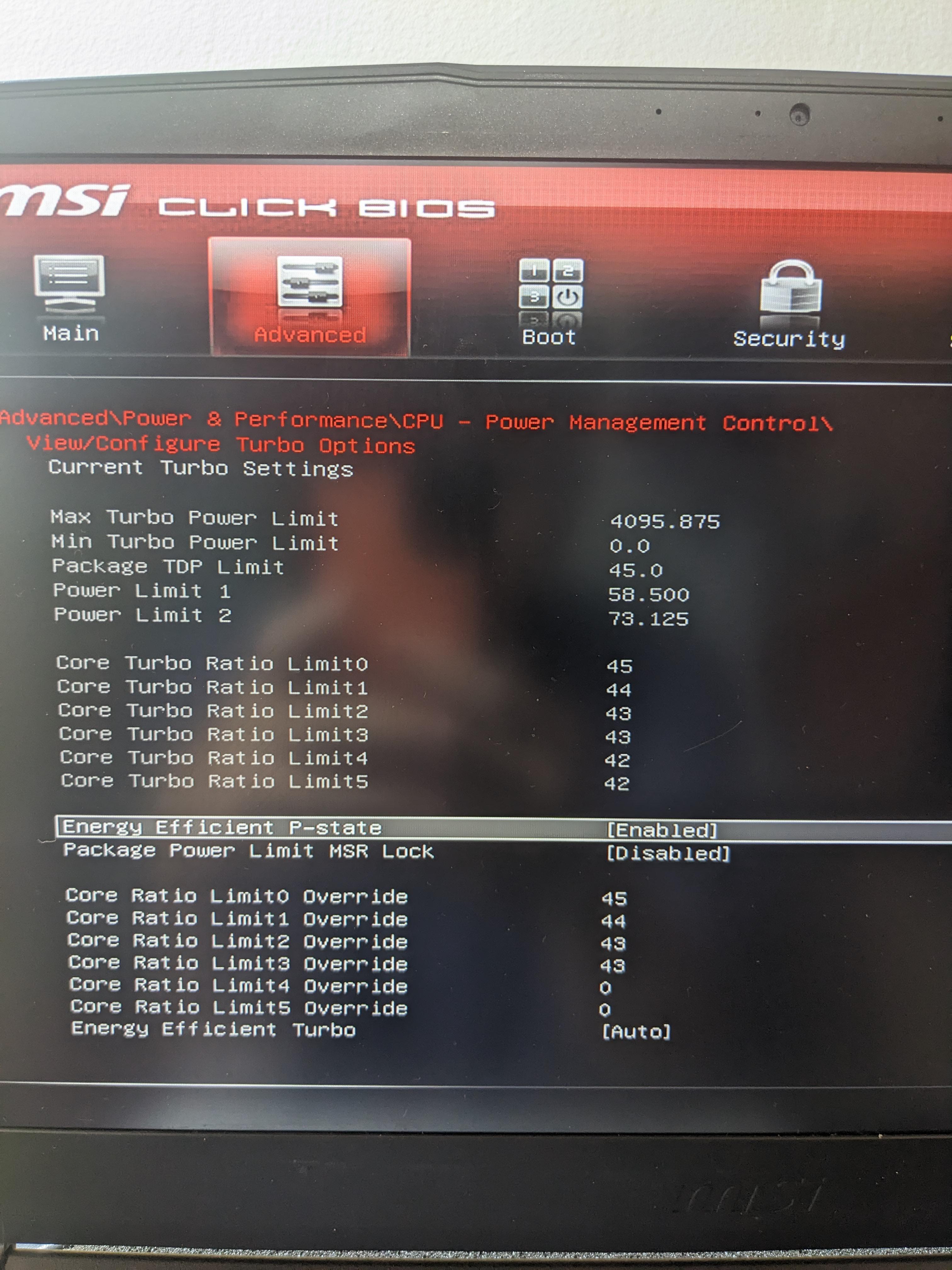
Hello everyone, I own an msi gf65 thin 10ue which is equipped with a core i5 10500H cpu. Based on the specifications from Intel, this CPU should have reached a maximum turbo frequency of up to 4.5 GHz, however on the GF65 it was limited to 4.1 GHz, this has been recorded in the BIOS by MSI. I want to ask if there is any method that can help my CPU run at 4.5 GHz, the clock speed it should be achieving?
r/Bios • u/Precise-Clock • Mar 11 '24

r/Bios • u/-Happyx • Jul 22 '24
so yesterday i went to boot to bios to tweak some stuff and i realised that the bios's gui suck. why does it have to be so pixelated and weird and overall ugly?
r/Bios • u/samirgaire0 • Apr 08 '21

r/Bios • u/YourCmtByTracyJordan • Dec 28 '10
Liz Lemon! I have a bio! Don't tell that judge tho', or he'll make me join the Coast Guard!
r/Bios • u/Bmknifton • Feb 09 '20
I saw a post a little while ago about a asus p7h55-m si board with a xeon x3470 in it and someone mentioned it needs a custom bios, any idea where I could acquire one
r/Bios • u/chris-shaw • Feb 17 '24
Does anyone know of a custom bios for this, tried dropping in a socket suitable Xeon but found out Lenovo bios on this machine doesn't support the Xeon line
r/Bios • u/Fearless_Might4467 • Jul 18 '24
Hello I wanted to know how can I change my bios with a new one? I have a 11400f and a medion B560H6-EM2 (Motherboard) version 560H6EM2.103 from 2021 and we are in 2024 so I think it's time to update that. Can someone help me.
r/Bios • u/[deleted] • Nov 11 '24
Does anyone know a working way to reset the BIOS password on a ThinkPad P53 laptop? I have a ch341a programmer and I have already dumped the BIOS. I tried locking pins 5 and 6 when starting up - it doesn't help.
r/Bios • u/British_tea_guy • Oct 25 '24
Hi, i have been struggling to reset the bios password on my HP X360 PROBOOK G7, i have tried replacing cmos batttery, leaving it out, entering it incorrect many times for the recovery code but all it does it lock me out completely. is there any work around?
r/Bios • u/Haunting_Client6498 • Nov 07 '24
I cannot update the BIOS
Whenever I update through Windows, the device only reboots and when I update through USB FAT32
It shows me the warning not to disconnect the power, then I agree and it just restarts
r/Bios • u/[deleted] • Nov 06 '24

Someone has set a BIOS password on my new laptop in order to lock me out, not going into specifics but they did it to fuck withe as a going away present when I booted them out of my life... Below are as many pictures as I have of the device.
I have attempted to get it to flash some sort of code when I enter the wrong password but nothing ever flashes on the screen, I removed the battery as you can see, but after holding down the button and even waiting several days it still remains the password.
r/Bios • u/Many_Celebration_901 • Nov 10 '24
Hi guys I have a problem with my old Toshiba Satellite laptop I have buy two ddr3 8gb sticks of ram but my laptop doesn't accept it this a laptop that I Wana upgrade for my little girl for school the bios that comes with its v6.4 I been searching non stop for almost a week now and I don't find the latest version that is 6.70 anywhere if someone can provide the bios update it will be awesome and you will be doing a little girl very happy please help thanks
r/Bios • u/EducatorLimp7792 • Nov 21 '24
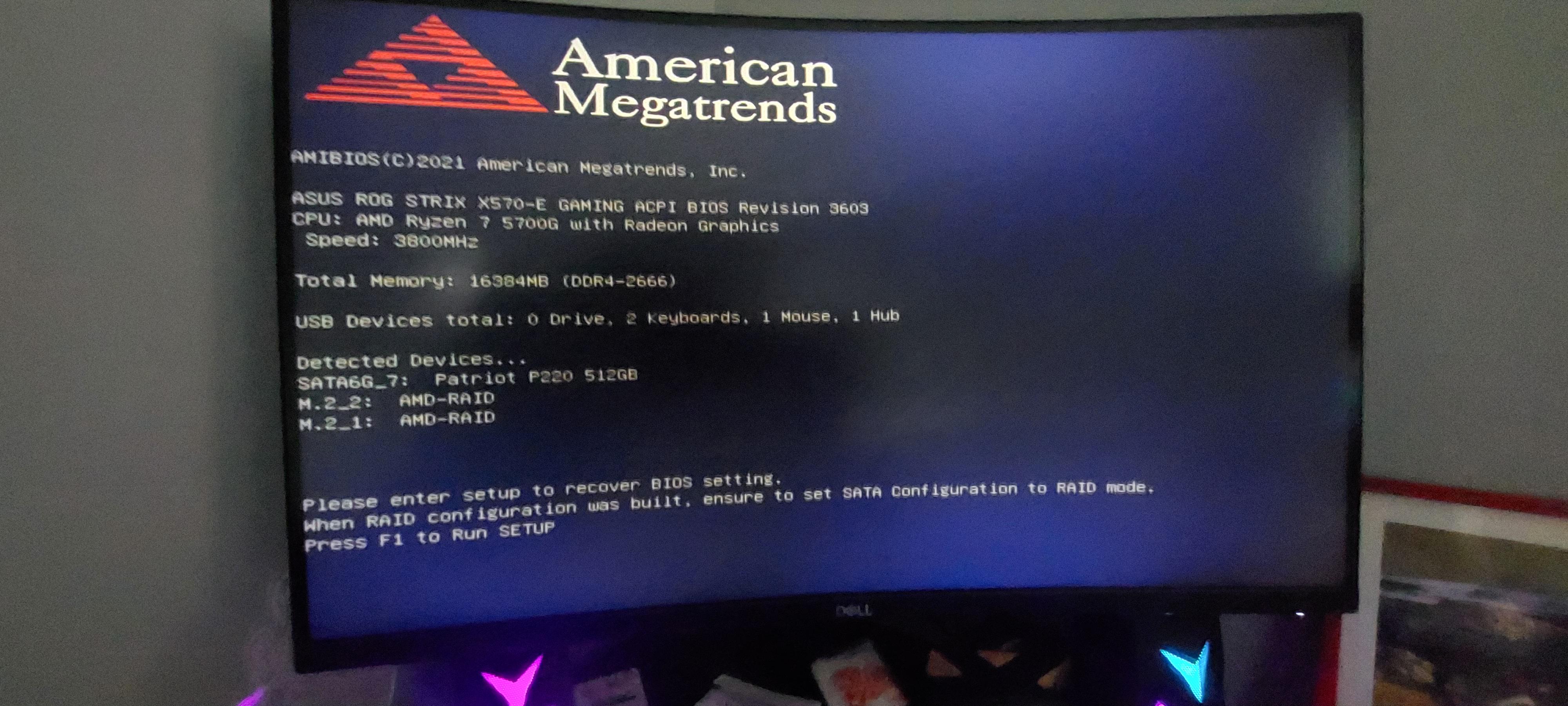
So for about 2 weeks I have been getting this pop up whenever I launch my PC. Unfortunately, I don't know what this means or what to do with about it. I just click F1 as it says, then I press exit, then my pc launches as normal.
However, I do want to solve/fix this as I don't want this to develop into a problem.
I literally changed nothing on my PC that I am aware of, or anything on BIOS. The only thing I can link it to is that my PC power cord got yanked out while it was on, and this pop up stared very close after that happened.
Any and all input will be greatly appreciated. And thanks for reading my post thus far 🙏👌
r/Bios • u/Intelligent-Coyote86 • Nov 24 '24
I looked everywhere for latest bios version for this mainboard, but it’s doesn’t helps me. Do you guys know where I can get it?
r/Bios • u/Arnotronix • Nov 20 '24
How do I remove the bios password from my fujitsu lifebook e751 I have tried everything from trying to get a code when typing the password wrong 3 times and getting a code but I simply wouldn't work then I removed the cmos battery but that also didn't work. it would be really nice if anyone could help me with this
r/Bios • u/Mindless-Pin-2646 • Nov 09 '24
I bought a second hand Hp 1040 G4 computer but it wants bios password. Can someone help me how to reset it?
r/Bios • u/Def_frog • Nov 01 '24

The problem: I enabled Secure boot and the status is still disabled, I looked at the tutorials and couldn’t find anything. I pressed F10 and rebooted the laptop 2 times, nothing changed. Help to enable it Secure Boot Status

