Sport Timer, simple interval timer, ideal for HIIT, Cardio & Fitness. Free, no tracking, no ads… BoxingTimer, MMA, Wrestling, Judo, BJJ, RoundTimer, SportTimer
Sport Timer – RoundTimer – The Simple, Ad-Free Interval Timer for Fitness It is the essential interval timer for HIIT, cardio, and fitness training. Free - No hidden fees. Just a clean, intuitive interface that helps you stay focused on your fitness journey.
Why Athletes Love this Sport Timer
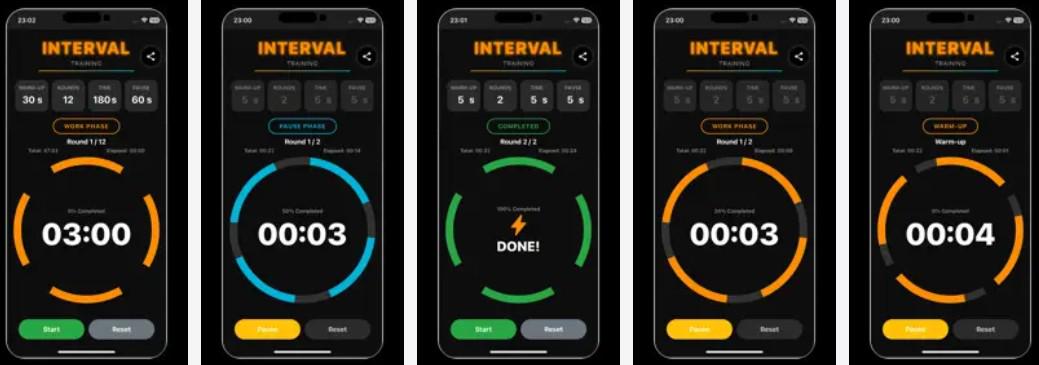
Simple Interface – Set up your workout in seconds with just four parameters: warm-up, work interval, rest period, and rounds. No confusing menus.
Visual Guidance – Color-coded display: blue for warm-up, red for work, yellow for rest, green when finished. Never lose track during intense sessions.
Custom Workouts – Perfect for HIIT, Tabata, running, cycling, strength training, yoga, and martial arts.
Smart Features – Lock function prevents accidental changes during sweaty workouts. Progress percentage shows how far you’ve come.
Audio Cues – Optional sound alerts for interval changes (toggle on/off for gym use).
Total Duration – See your entire session length before starting.
Privacy First Unlike most fitness apps, Sport Timer:
Collects zero personal data
Works completely offline
Requires no account creation
Contains no tracking or advertisements
Your workout data stays on your device where it belongs.
hey mensa, yes, there are still many other ideas. However, they require enough active users. For now, I’m simply observing how users react, what their priorities are, etc. The app should work simply, I don’t want to add features that make it complex.
Nothing to thank! Thanks so much for the feedback! I tested it on three different real iPhones and didn't have to scroll at all. Are you using a Mini, by any chance? Like a 13 Mini? It would be a huge help if you could share a screenshot and let me know which device you’re on. (Just a heads-up: a double-click opens it in fullscreen!)
thank you too much for the screenshots, got it. There are a few more issues to tackle, the warm-up screen isn't supposed to look like that either. I will fix it next time. Even worse news: Apple took two weeks to approve my last update...
So, you’ll need a bit of patience. The circle and timer should have scaled automatically, but for some reason, they didn't on the iPhone 17 Pro.
This could be the Solution for this issue: iOS “Display Zoom” Many users of Pro/Pro Max models have enabled “Display Zoom” in iOS settings. This renders the operating system at a lower logical resolution and then scales it up. As a result, calculations that rigidly rely on Dimensions.get('window') often become misaligned, since the logical pixels no longer match the physical expectations of the UI design. When this coincides with the font scaling mentioned above, large SVG elements may suddenly overflow beyond the screen edge (as seen in your fullscreen screenshot).
When I go into the Display Zoom setting the options are Larger Text and Default. Mine is set to Default.
There is also a Text Size option one menu back from the Display Zoom setting. There, it's a slider with a small A on one side and a larger A on the other. I tried a bunch of settings.
Your app displays properly if the slider is at the middle. If I move it anywhere to the left of middle, the display does not change. If i move it to the right, your numbers get larger until they display incorrectly.
Not sure if this is a concern of yours but if it's possible to adjust the display dependent on what users choose, that would be best as you'll enable it for people with vision issues. Or, at the least, if there's a way for your settings to override that setting (as the numbers are large anyway) that would be better than honoring them without concern for how they render (which I think is how it is now).
Hopefully this helps. I'll attach grabs with the slider all the way to the left, in the middle, and all the way to the right. (My own default is between middle and right).
Just to clarify: the app isn’t mine - the Sport Timer Pro user posted it, and as a moderator of the subreddit, I read it and simply wanted to help.
Overriding or manipulating system settings on iOS is indeed very difficult and in most cases, impossible due to Apple’s sandboxing and security model.
That said, setting an upper limit (e.g., capping font size or scaling) could be a practical solution to prevent the UI from breaking or elements overflowing. 😊
Hey Mensa are you there? I tested the apps with the emulators, 17pro, 17proMax, also with iphone 8, i could not find the problem, the only way could be to integrate you as a tester, so i can hope to find the bug blind and upload a test version to apple that only you can download and test. Otherwise a have to ask friends if anyone have a iphone 17pro ... i dont know ... it had to autoscale up and down ...


1
u/SofwareAppDev Feb 25 '26
Interval Timer UI sieht cool aus, ist das eine neue App?