r/AppsWebappsFullstack • u/Mammoth-Anywhere7285 • Feb 25 '26
FREE Interval Timer - Boxtimer - HIIT, Tabata, RoundTimer, NoSubscription, NoAds, NoTracking, Offline
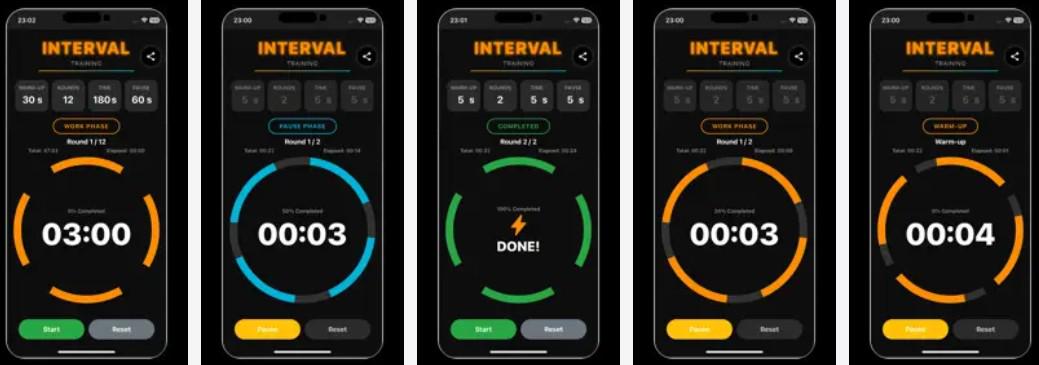
IOS: https://apps.apple.com/de/app/my-sport-timer/id6753763349
Sport Timer, simple interval timer, ideal for HIIT, Cardio & Fitness. Free, no tracking, no ads… BoxingTimer, MMA, Wrestling, Judo, BJJ, RoundTimer, SportTimer
Sport Timer – RoundTimer – The Simple, Ad-Free Interval Timer for Fitness
It is the essential interval timer for HIIT, cardio, and fitness training. Free - No hidden fees. Just a clean, intuitive interface that helps you stay focused on your fitness journey.
Why Athletes Love this Sport Timer
Simple Interface – Set up your workout in seconds with just four parameters: warm-up, work interval, rest period, and rounds. No confusing menus.
Visual Guidance – Color-coded display: blue for warm-up, red for work, yellow for rest, green when finished. Never lose track during intense sessions.
Custom Workouts – Perfect for HIIT, Tabata, running, cycling, strength training, yoga, and martial arts.
Smart Features – Lock function prevents accidental changes during sweaty workouts. Progress percentage shows how far you’ve come.
Audio Cues – Optional sound alerts for interval changes (toggle on/off for gym use).
Total Duration – See your entire session length before starting.
Privacy First
Unlike most fitness apps, Sport Timer:
Collects zero personal data
Works completely offline
Requires no account creation
Contains no tracking or advertisements
Your workout data stays on your device where it belongs.
#SportTimer #IntervalTimer #RoundTimer #HIITTimer #BoxingTimer #MMATimer #FitnessTimer #WorkoutTimer #HIITTraining #CardioTimer #MartialArtsTimer #RoundBasedTraining #TrainingTimer #IntervalTraining #FitnessApp #WorkoutTimerFree #NoAdsTimer #WorkoutTimerPro #SportTimerApp #FitnessTracking
1
u/mensachicken Mar 02 '26
When I go into the Display Zoom setting the options are Larger Text and Default. Mine is set to Default.
There is also a Text Size option one menu back from the Display Zoom setting. There, it's a slider with a small A on one side and a larger A on the other. I tried a bunch of settings.
Your app displays properly if the slider is at the middle. If I move it anywhere to the left of middle, the display does not change. If i move it to the right, your numbers get larger until they display incorrectly.
Not sure if this is a concern of yours but if it's possible to adjust the display dependent on what users choose, that would be best as you'll enable it for people with vision issues. Or, at the least, if there's a way for your settings to override that setting (as the numbers are large anyway) that would be better than honoring them without concern for how they render (which I think is how it is now).
Hopefully this helps. I'll attach grabs with the slider all the way to the left, in the middle, and all the way to the right. (My own default is between middle and right).
Left