r/ASRock
•
u/hooosier-daddy
•
Dec 07 '24

Battlestation Proud of my new build

972
Upvotes
Showcasing my x870 steel legend and phantom gaming 7900xt! I love it!
r/ASRock
•
u/hooosier-daddy
•
Dec 07 '24
Showcasing my x870 steel legend and phantom gaming 7900xt! I love it!
r/ASRock • u/mattmcnabb • Nov 12 '23

Asrock x670e Steel Legend x Asrock 7800xt Steel Legend.
Paired with Phanteks.
r/ASRock • u/No-Spinach-6129 • May 06 '25

This system was built on Feb 14, 2025. It has been ROCK solid since it was put together.
Computer was left to idle for about 24 hours, when I came back to wake it up it was unresponsive. Monitors did not wake, did not respond to reset button or even holding the power button down. Disconnected mains power, drained excess power using power button, turned power back on and attempted to boot. This time, CPU and DRAM lights solid and no POST. I tried a few times for restart, waited 45 minutes, still no POST. I removed my graphics card and used iGPU, still nothing. BIOS Reset multiple times, no POST. Tried 1 stick of ram in each slot, no POST. BIOS already on 3.20, but attempted flashback to 3.20 and still, no POST, DRAM and CPU lights remain. I removed AIO pump head (I do not have a "secure frame") and re-installed, no POST. Tried to boot/post with no USB devices, no go.
Specs: MOBO: ASRock X870 Pro RS WiFi (BIOS 3.20 since it came out) CPU: Ryzen 7 9800X3D (2502PGE) AIO: Arctic Liquid Freezer 3 Rev2 RAM: Team Group T-CREATE EXPERT 32GB (2 x 16GB) DDR5 6000 CL30 (CTCED532G6000HC30DC01) on the QVL GPU: EVGA RTX 3080 Ti FTW3 Ultra Gaming Boot: Samsung 990 Evo Plus 2TB (running at 4x4 per MOBO settings) PSU: Rosewill FORTRESS 750w Platinum
BIOS settings: EXPO On Aggressive RAM profile That is about it for any OC items, other than that, stock.
Was just thinking that day, after reading even more dead 9800X3D posts, that I was going to get a "success post" in to perk up the community. I guess that ain't going to happen. Already have a Gigabyte X870 board on the way. Will RMA all of this and sell the ASRock board, unfortunately.
r/ASRock • u/ZoteTheMitey • May 19 '25

It's been months!
What is the number now? Close to 200?
r/ASRock • u/IndependenceIcy6646 • Jul 10 '25
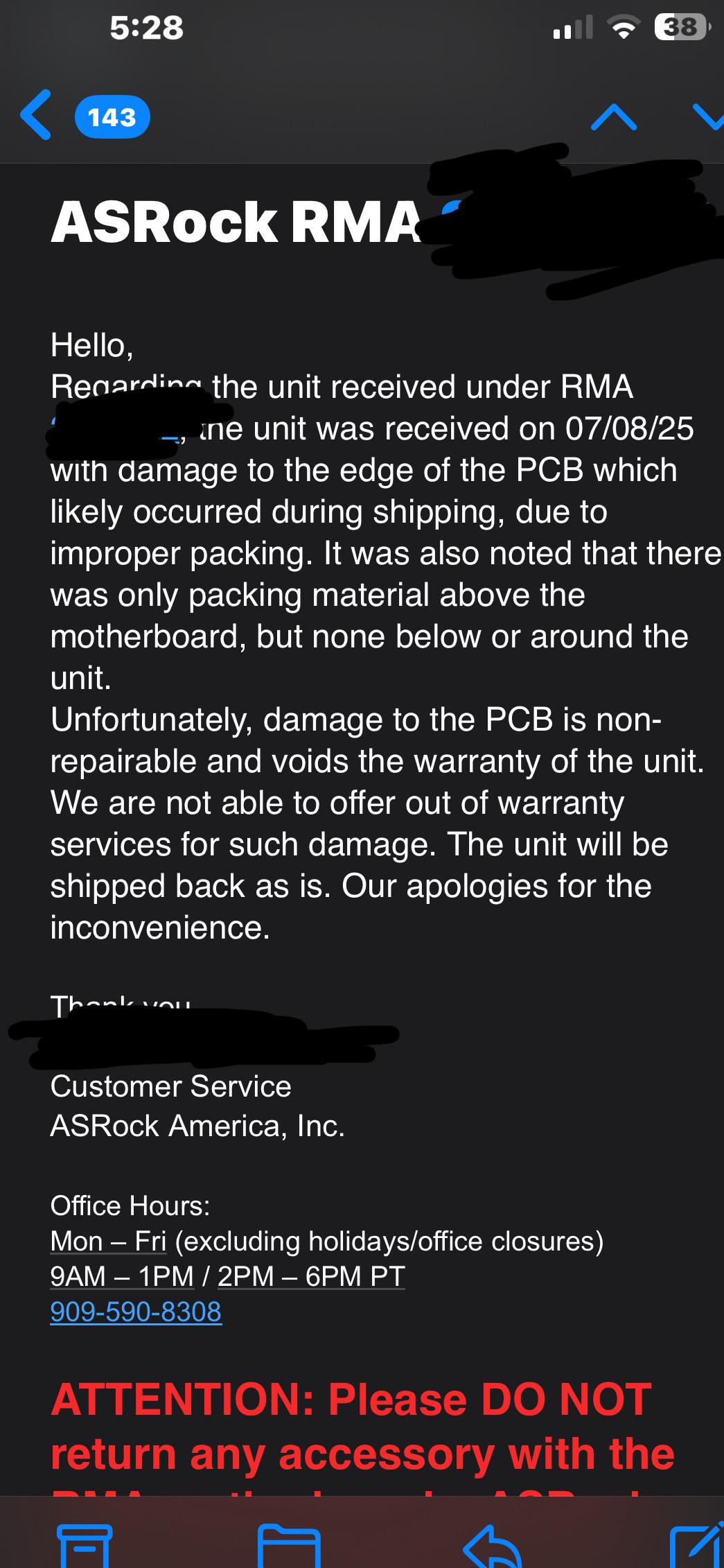
Asrock can eat a big bag of poo with no handles. Just dealt with their poo customer service department to rma an x870e Taichi I got in January that unalived itself and my 9800x3d. RMA went relatively smoothly though it took a couple of weeks. Had to pay out of pocket for their mess up to ship. Just received this email today that’s bs and lies. I hand packed it with bubble wrap all around the damn board with foam on top and bottom. I even specifically asked if I should ship the box it came in, inside another box with padding due to the sensitive nature of the board. Was told no because they’d just throw the box away and send another one in box. Well great advice. Forget Asrock as a brand and definitely forget their stupid customer service. Worst pc building experience I’ve had over the last three decades of building. This message’s wording has been changed from its original hate filled rant.
r/ASRock • u/SoupaSoka • Feb 21 '25
Hey folks,
As you've probably seen by now, there seems to be an abnormal number of 9800X3Ds that are dying, often (but not exclusively) on ASRock boards. The posts are getting frequent enough that we'd like to consolidate discussion here as well as provide consolidated updates if any news comes from ASRock, AMD, or elsewhere.
Some notes:
ASRock and AMD are aware of the reports
It isn't yet known what is causing the issue or if it's an ASRock issue, an AMD issue, or an issue from both.
The CPU deaths seem inconsistent; some CPUs seem DOA, some die within hours/days/weeks. Some deaths seem to be during active use while others occur in an attempted POST/boot.
There is at least one report, from u/Fancy_Potato1476, of a "revived" 9800X3D thanks to a BIOS flashback
u/natty_overlord has created a nice summary post linking many of the reports
The issue has been gaining more mainstream news tractions e.g. Yahoo, TechPowerUp, etc
If you have experienced a 9800X3D failure, and if you're willing, please consider providing your information to this Google form (created by u/ofesad). My fellow moderator, u/CornFlakes1991, is monitoring the results. Please add your CPU's batch number to the form if possible.
As a brief reminder, myself and u/CornFlakes1991 are not ASRock employees and cannot provide any RMA replacements for your CPU/MB, but CornFlakes does have direct contact with an ASRock rep and has been forwarding these issues along to them. Please submit RMA requests directly to AMD/ASRock if you think your CPU or MB have failed or are not working properly.
If you have thoughts on the failures, or want to post about a failure you've experienced, please try to consolidate them as comments to this post.
February 21st update/suggestion:
If you can't post with your 9800X3D after a BIOS update, flashback to the BIOS version you had before using BIOS flashback. If this still does not resolve the issue, reach out to ASRock. If your system doesn't POST anymore all of a sudden, try flashing back to an older BIOS (3.10) and see if this fixes it. Not every boot/POST issue is a dead CPU! If your 9800X3D doesn't boot anymore even after you attempted the above mentioned, reach out to AMD and ASRock and please will out the form mentioned earlier in this post, as it helps us gather data and investigate this individually.
February 24th update:
ASRock has released BIOS 3.20 which may help anyone stuck on boot issues (but not a dead CPU) on BIOS 3.10. more info here: https://redd.it/1ix0w1j
**March 20th update: ** Adding a mini-FAQ:
Q. What are the causes for this problem?
A. The cause for dying CPUs is not known yet. However, the boot issues have been tackled with BIOS 3.20.
Q. My CPU is dead, what should I do?
A. Reach out to both AMD and ASRock.
Q. My system suddenly doesn't boot anymore, what should I do?
A. Update your BIOS to 3.20; if that's something you already have done or it did not solve the issue, reach out to ASRock and AMD.
Q. My CPU boots fine on a different motherboard, what should I do?
A. Make sure you've updated to BIOS 3.20 on the board where it doesn't boot. If it still doesn't work, reach out to ASRock.
Q. Should I be worried about my ASRock + 9800X3D build?
A. There are hundreds upon hundreds of systems out there running fine without reporting issues. While there certainly are issues with some 9800X3D / ASRock motherboard builds, it still seems to be a minority of the total population.
May 25th 2025 Update:
See below YouTube video for more insight into the situation.
r/ASRock • u/Animeeshon • Sep 06 '25

Code 00, tried switching ram memory, clearing CMOS, reset, bios flashback, without gpu, without ram, different PSU, and without m.2 ssd. And no the cat did not overheat it as I've monitored the temps and it also literally displays on the motherboard.
r/ASRock • u/kanmuri07 • Sep 22 '25

https://x.com/gamersnexus/status/1970191414232322242?s=46
Just as an FYI to the people that thought GN gave up on this: no, they haven't. GN has a lot of news and hardware to cover, and the hardware world does not solely revolve around ASRock issues.
r/ASRock • u/AMBOSHER • May 29 '25

r/ASRock • u/Seraphax • May 29 '25

r/ASRock • u/sokratz • Oct 12 '25

Ok ok. Just a little punchy this morning. :)
r/ASRock • u/SuperbiaXYZ • Sep 15 '26

Come back after a long day of work in the hot ass heat only to turn on my pc and notice it is taking way longer than usual to boot up. Check the motherboard and I'm getting 00 codes. Love to see it
Specs:
Asrock x870e phantom nova
64gb corsair vengeance 6000mhz
Ryzen 7 9800x3d
Rtx 5090
Asrock pg 1300 gold
Windows 11 home
Bios version: 3.15
Edit: Put a new 9800x3d inside and everything booted up perfectly fine. I immediately updated to the latest bios 4.43 idk if that matters or not. I'm gonna send the dead one in for RMA to AMD.
r/ASRock • u/OCAMAB • Oct 16 '25
This isn't actually the first time. I just kinda wanted to use this gif.
I'm sure we'll get like 5 today after this post lol.
r/ASRock • u/nvidia_rtx5000 • Jul 09 '25

Just went to my pc thats been idle since yesterday and it wouldn't wake up when I moved the mouse. I rebooted and it code 00. I repeated the cpu, reset cmos, updated the bios with the usb flashback, no dice.
Cpu and socket looks pristine and I had manually set soc voltage in bios so it was constant, no spikes, at least I never saw any since buying the cpu in January and having soc manually set.
B650e Taichi
I guess I reach out to amd for a new cpu?
r/ASRock • u/AMBOSHER • Sep 30 '25

r/ASRock • u/Booooomkin • May 09 '25

r/ASRock • u/ruspartisan • Sep 01 '24

r/ASRock • u/Andrios23 • May 27 '25

9800x3d- picked up 11/24/24 Nova x870e -delivered 11/26/24 Win11 Thermalright AM5 secure frame kit. Arctic liquid freezer 2-360 using offset-previous build.
PC has been working perfect with every bios revision.
Decided to update to 3.25. Installed and booted up perfect.
Next day my pc never recovered from sleep.
00 on motherboard when trying to boot. Had to unplug to reboot/restart. RGB come on but fans very weak.
Most likely dead? Don’t have any other AMD cpus to test atm.
r/ASRock • u/Ostermex • Aug 07 '25

Before I get into it, the specs:
Board: B850 Steel Legend WiFi CPU: Title RAM: Kingston Fury 6000mhz (it's supported) Bios: 3.20 - 3.25 - 3.30 (updated as soon as they came out basically, maybe a day later at most) Bios settings: Nothing touched except EXPO
Got this trio back at the beginning of March, was not aware of the CPU killer boards, and it was before anyone really covered it.
When I discovered all the failures as they were flooding in, naturally I was super worried, as I put a lot of money into this, especially since I'm not from a country where your average salary gets to cover luxury expenses like this.
But I thought I was safe, seeing how there were no reports (at the time) of a B850 Steel Legend causing failures.
It started with a random shut down about a month ago (BIOS 3.30), was watching a video, not doing any work in the background. When it turned off, I thought that was it, it's over. But it turned on with no issues when I switched it on, and I noticed my PSU cable was a little loose and I attributed it to that.
About two weeks ago was when I knew it was just a matter of time, as I turned on my PC, and the red light was turned on as pictured, with no boot, but, after holding down the power button, and powering it on again, it worked normally.
Then, this Saturday night, I go out, turn off my PC, don't come back until very late in the morning, only to find my PC powered on, with the red light on as pictured. This time there was no saving it.
I have no idea how the PC turned on, as I live alone.
Over this week, I pretty much tried everything, shuffling RAM, reseating everything, flashbacks of literally every bios version, nothing worked. Sent the CPU to the place I bought it from, as the board still works, since I tested my old CPU on it
Would've tried to test the CPU on another board, but I sold my old one.
Let's hope my warranty is good and they don't try to bullshit me out of it.
There was no physical damage on anything, so there's that also?
Wish me luck friends.
Never buying ASRock boards again.
r/ASRock • u/Puzzleheaded-West-97 • Aug 04 '25

I wanted to be optimistic, despite many posts here on Reddit about CPUs dying with this manufacturer, but it didn’t even take 2 to 3 months for me to experience the infamous issue.
The motherboard is a B650 Steel Legend WiFi.
I was using BIOS version 3.20.
There was no overclock or PBO.
My water cooler is a Thermalright 360.
There are no burn marks on the processor, but it no longer works.
If I could, I’d get my money back and return this motherboard.
r/ASRock • u/TurtleHermit365 • May 19 '25

Wasn’t aware of the reports about this CPU with AsRock MOBOs.
Mine is the AsRock B650 Pro RS on the latest BIOS 3.20 which I updated a week or so ago.
Used this MOBO with a 7900 for over 2 years without issues. Upgraded to a 9800X3D in January and yesterday my PC wouldn’t boot with a red diagnostic CPU LED light on.
Bought an MSI X670E motherboard and new RAM. Same issue with the CPU.
Opened RMA with AMD today. Hopefully it won’t take long to get a replacement.
r/ASRock • u/Ultracheese3 • Nov 11 '25

So since there are not a lot of posts from 7800x3d's frying, decided to post mine. BIOS ver: 3.06

