r/zsaVoyager • u/pgetreuer • 1h ago
Wireless Voyager captain's chair
10
Upvotes
r/zsaVoyager • u/dantheman5398 • 4h ago

The Voyager is easily the best ergonomic keyboard I’ve ever used. I have the Trackball Navigator on the right, which is amazing. Never want to go back to anything else. Completely recommend it.
I recently got the Trackpad Navigator on the left. It’s kind of fun, mostly for the occasional two-finger scroll, but completely unnecessary. I’ll keep it because I already have it, but I could easily live without it.
The palm rests are DeltaHub Carpio 2.0s. I have small hands, so I use the small ones. The larger ones might be a better fit if you have more average-sized hands.
I’ve tried different variations of ZSA’s 3D-printed palm rests, generic palm and wrist rests, and using nothing at all. None of those options felt as good to me as the Carpios.
It is absolutely true that they’re ridiculously overpriced. About $60 for the pair. I would happily pay some other company a lot less if they had something as good, but so far I haven’t found it. So I’m happy to let myself get price gouged.
So that’s my setup: Voyager, double Navigators, palm rests, and a bunch of wires.
Using the stock carrying cases would mean taking off the Navigators, unplugging several different cables, packing everything in its own case, and then throwing the palm rests somewhere else.
I’m a very lazy person. I don’t want to do that every time I commute to the office or fly for work.
What I care about is the absolute minimum amount of effort to transport this particular setup. Within reason, I’m happy to have a bigger, clunkier case if it means I don’t have to take everything apart and put it back together every time. I just want to pick things up, put them in their spots, and be done with it.
I burned a ridiculous number of AI tokens looking for a case with exactly the right dimensions, feel, and weight. Light but still protective, just enough room for everything to sit flat without a bunch of wasted space, and something that felt custom without being crazy expensive.
The best fit turned out to be the Analog Cases PULSE. It’s designed to carry the Akai MPK Mini IV, a small piano-style MIDI keyboard, but happens to be almost exactly the right size for this setup.
The custom printed trays give everything its own spot, and the foam in the lid helps keep it seated. It took several iterations to get the fit and ease of removal right, but I’m extremely happy with how it turned out.
I printed the trays in white PLA on my Bambu Lab A2L, which I absolutely love. These are straightforward prints, though, so a basic 3D printer should be able to handle them.
I also put together this animated walkthrough of the build with AI’s help. I went through it in detail to make sure it faithfully follows the steps I actually took. It’s the real build process, just streamlined and made a little nicer to look at:
To pack it, I lift the keyboard halves into their trays with the Navigators still attached and their connecting cables still plugged in. The palm rests go in their slots, and I pop the ball out of the right Navigator into its separate travel seat. Close it, zip it up, done.
If your goal is a compact carrying solution, look elsewhere. This definitely isn’t it. And if you’re carrying a vanilla Voyager without Navigators or palm rests, it’s probably overkill.
But for the five or so people out there with a setup like mine, I really think this is a lot simpler.
If there’s interest, I can share a detailed follow-up post with the 3D print files, full instructions, and links to all the products I purchased. Happy to answer questions about the setup or the case!
r/zsaVoyager • u/Plus_Boysenberry_844 • 1d ago

If you have one, what do you like and dislike? I am thinking on getting one but wanted to here from the early adopters.
r/zsaVoyager • u/alanbreck21 • 1d ago
Anyone purchased from the US recently? If so, what (if any) import duties were you charged? I’m considering the wireless Voyager, and trying to get an accurate sense of the total cost.
r/zsaVoyager • u/shankyjs • 2d ago

I was worried they would still need cables for the navigator modules; they said heck no. CRAZY
r/zsaVoyager • u/Pristine_Ladder_8394 • 2d ago

Hey everyone, looking to sell my classic ZSA Voyager. I'm parting with it simply because I don’t use my computer much these days.
Details:
Price: $570 CAD / No trade (Interac Etransfer accepted)
Condition: Great condition with zero functional issues. All keys register properly and the RGB backlighting works perfectly.
Switches: Includes your choice of either Sunset or Red switches (pick whichever one you prefer). I plan to sell the other switch set separately, though I can include both for an added cost.
Also Included: Original cables, carrying case, and extra keycaps.
Shipping & Pickup: Can ship in Canada at the buyer's expense, or meet up locally near downtown Toronto (or at a subway station near the downtown core).
Comment before PMing. First come, first serve.
Happy to provide timestamps or extra photos upon request!
r/zsaVoyager • u/mctechnology17 • 2d ago
Short demo of something I've been building: QMK (the Vial fork) running on a wireless split, a Corne v3 with nice!nano v2 on both halves.
- Halves talk over BLE, typing works over Bluetooth
- Plug in USB and Vial picks it up (that's the moment in the video)
- nice!view on one half, OLED on the other
- Choc switches with MX spacing, low-profile ceramic keycaps, aluminum case
- It lives in its own keyboard folder: no changes to the QMK core
Not official QMK support, just my own module. Happy to answer questions. QMK or ZMK on your wireless board?
r/zsaVoyager • u/tomtomtomtoms • 3d ago
Consider me surprised! I thought ZSA were firmly in the wired only side. Looks neat, backwards compatible with the navigator too.
r/zsaVoyager • u/Competitive-Pop7515 • 2d ago
Does anyone know if ZSA is considering a trackpoint attachment to the Voyager, and/or has anyone made their own?
r/zsaVoyager • u/OrderSafe4183 • 5d ago

I got the voyager a while ago to use a keyboard more comfortably. At the time you couldn't use two navigators. Now you can, but they have to be different kinds. Has anyone tried this out? If so, how is it? Does anyone know if they're working on getting the same kind working on both sides?
r/zsaVoyager • u/Patricepatson • 6d ago

The new switches are back and my wallet is empty again. Thanks ZSA!
r/zsaVoyager • u/piers-pulumi • 9d ago
I too bought them early on, but after a couple of weeks’ usage I decided they weren’t for me and so I’m going back to the more tactile ones that came with the board.
They’re really smooth and so so quiet so will work great if you’re in an office that doesn’t love that click as much as you do.
They cost me £60 for all 60 switches, so I’ll sell for that and whatever it costs to ship them to you from the UK.
I’ll add some photos in the morning but if anyone wants them before I put them on eBay now’s the time as they’re out of stock in the ZSA site right now.
r/zsaVoyager • u/AgeVivid5109 • 11d ago
Thanks to all who make this community a place worth visiting frequently and sharing our journey with this great keyboard.
r/zsaVoyager • u/rymndhng • 12d ago
Hey folks,
I’ve found the time-based deactivation options unsatisfying. I type fast, and I couldn’t find a timeout setting that didn’t misfire key-presses: either it dropped me out while I was moving slowly, or it lingered and triggered keys on the automouse layer.
To fix this, I changed the trackpad to leave the automouse layer when the finger lifts. It has worked well for me so far, and addresses both problems above. I’m sharing it in case others have thoughts or want to try it.
r/zsaVoyager • u/TheHarpocrates • 14d ago
Hi all,
I’ve been vibe-building Vibemapp, a Linux app for ZSA keyboards in the style of gnome (GTK4/libadwaita). Right now it has these features:
Live layout.
Smart layers.
Overlay.
Trackpad and trackball overlay.
Heatmap.
Insights.
Tray icon.
It never flashes firmware or writes to the keyboard.
I’ve only tested it on my own Voyager with the trackpad. I don’t have a trackball, so if you do, I’d love to hear if it works. Same goes for Moonlander and ErgoDox owners, and anyone not on Arch.
Repo and install: https://github.com/AlbertFlindt/vibemapp
It’s free and open source (GPL), and not affiliated with ZSA. Feedback, bugs and “I wish it did X” are all welcome, here or as a GitHub issue.
If you are on Macos, perhaps take a look at this post: https://www.reddit.com/r/zsaVoyager/s/7LmNfELrDy
r/zsaVoyager • u/megarameno • 15d ago
Still learning my layers, and I got tired of keeping Keymapp open in a window next to whatever I’m working on. So I vibe-coded a little fix, and Claude did most of the typing. Full disclosure: I’m not a Swift dev. I described what I wanted, poked at it a lot, and kept saying “more of that”.
Voyager Ghost is a tiny macOS menu-bar app that floats a see-through copy of your Oryx layout on top of everything. Clicks go straight through it, so it never gets in the way. It:
shows the layer you’re on and lights up keys as you press them
uses the LED colors from your Oryx layout
shows the Navigator trackball rolling, and switches to a scroll indicator when you hold drag-scroll
draws your combos and lights them up when they fire
has a dumb-but-fun light show mode where only the keys you hit light up and ripple. There’s also a version where your other layers fade in as a ghost underneath when you switch to them
picks up your layout straight from the keyboard, so there’s nothing to set up
plays nice with Keymapp: it borrows the keyboard and hands it back when you quit
Works with the Voyager and the Moonlander, on macOS 14 and up. It’s free and open source (MIT), and not affiliated with ZSA.
Repo, screenshots and how it works: https://gitlab.com/tbulva/voyager-ghost
Download: https://gitlab.com/tbulva/voyager-ghost/-/releases
Heads up: it isn’t notarized by Apple, so macOS blocks it the first time. Go to System Settings → Privacy & Security → Open Anyway.
It’s vibe-coded, so expect rough edges. I’d love feedback, bug reports, ideas, or “you know Keymapp already does X, right?” comments. Issues and MRs welcome!
**Update:** 0.3.0 adds Linux and Windows versions, a layer-name HUD and bigger sizes: https://gitlab.com/tbulva/voyager-ghost/-/releases
r/zsaVoyager • u/DiskCharacter7946 • 16d ago
with zmk wireless tech improvement and the high cost, is the voyager outdated now? MoErgo Go60 seems like good value, but also don’t want to compromise on quality. which split keyboard is king now?
r/zsaVoyager • u/depressed_swan • 18d ago

Price: $475 CAD
Selling my ZSA Voyager ergonomic mechanical keyboard. Purchased new for ~$570 CAD total and only used 3 times.
It's in essentially brand-new condition with no noticeable wear. I realized the split keyboard layout wasn't for me.
Pickup available in Downtown Toronto or Calgary (during winter break)
SOLD!
r/zsaVoyager • u/joren_ • 19d ago
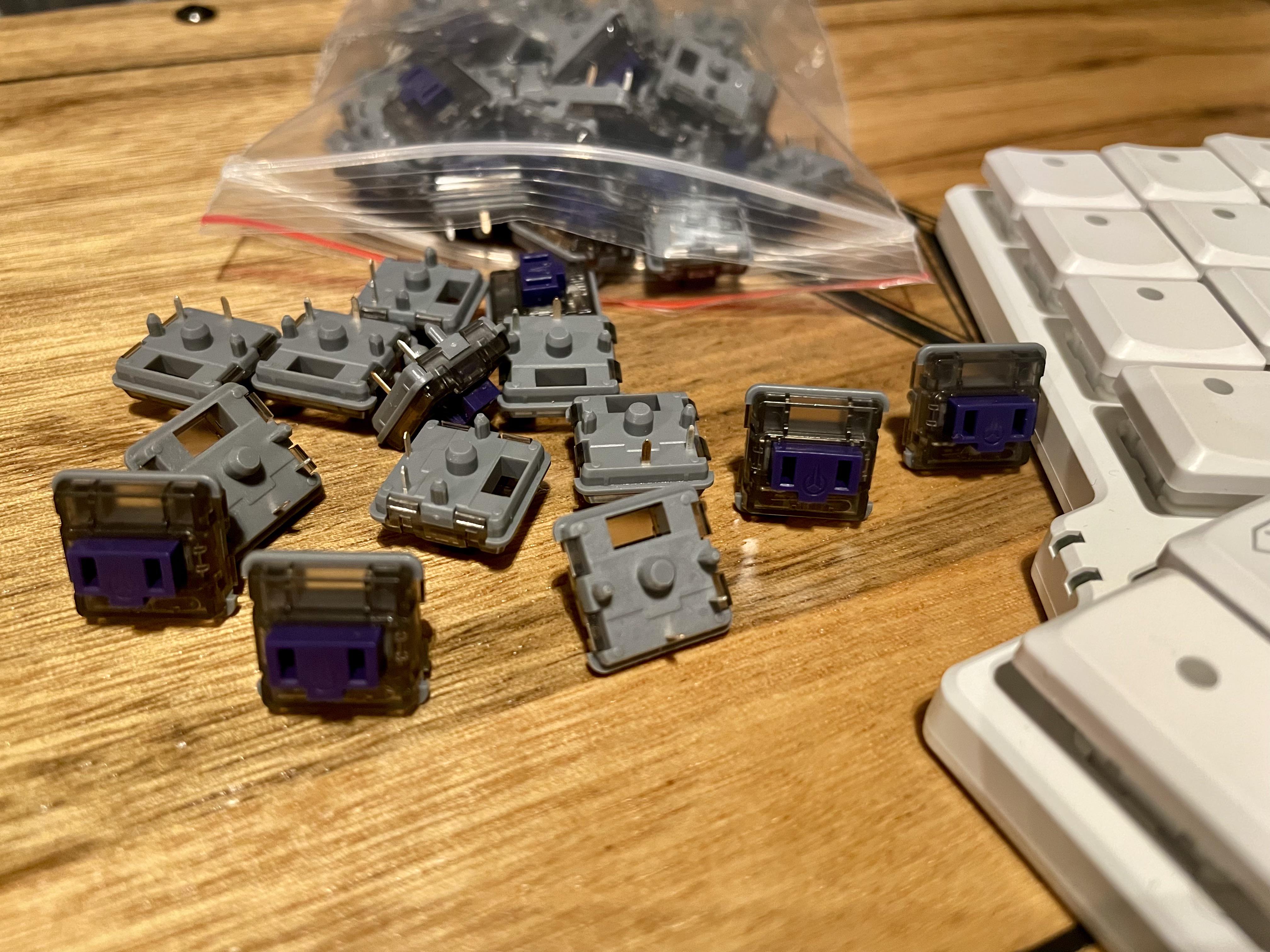
I was looking for a quieter switch than my Sunsets, and decided to give the new Platypus switches a try. Turns out I prefer a tactile switch, so I'm selling them.
I paid 80 dollars for them + import vat and duties, which turned out to be an extra 61,68 euros.
Selling them for 75 euros + shipping I'll take the hit for the vat/duties. Shipping from Belgium.
SOLD
r/zsaVoyager • u/IntelligentSquare196 • 20d ago
I have created it but before I start ordering fully finished products, I'd like to know if anybody is interested in converting to wireless between the halves and how much you'd be willing to pay for an adapter.
It looks like right now on battery it will last 4 days on average without LED lighting, and about 8 hours with LED lighting. It can also run directly off of USB with LED lighting. While running on USB, battery charging will be slower if you have LED lighting on also. Without lighting it will recharge in a couple of hours.
The battery in the design can be made larger or changed to one that charges faster. It just matters more what people are looking for.
r/zsaVoyager • u/KurtiZ_TSW • 21d ago
My Voyager had a fault in the board, meaning I couldn't easily fix it. I contacted them for help and they said I was just outside my warranty :(
BUT they said they'd replace it anyway! ⭐
They sent me a part, but I was moving countries at the time so couldn't send the faulty part back to them when they asked :(
BUT they said no problem, take your time ⭐⭐
Then I was about to mail it back and asked for their address
BUT they said, "actually, because postage is expensive, don't worry - just keep it for spare parts or donate it ⭐⭐⭐
I wish all customer service was like this. Was incredible
r/zsaVoyager • u/PeteToscano • 22d ago
I enjoy the Navigator trackball more than I expected, but the very light weight of the ball itself bothers me some. Is replacing the ball a thing? Assuming a similar size and smoothness, is there any danger to replacing it?
Any suggestions?
TIA!