r/workstations • u/AJ1096 • 17h ago
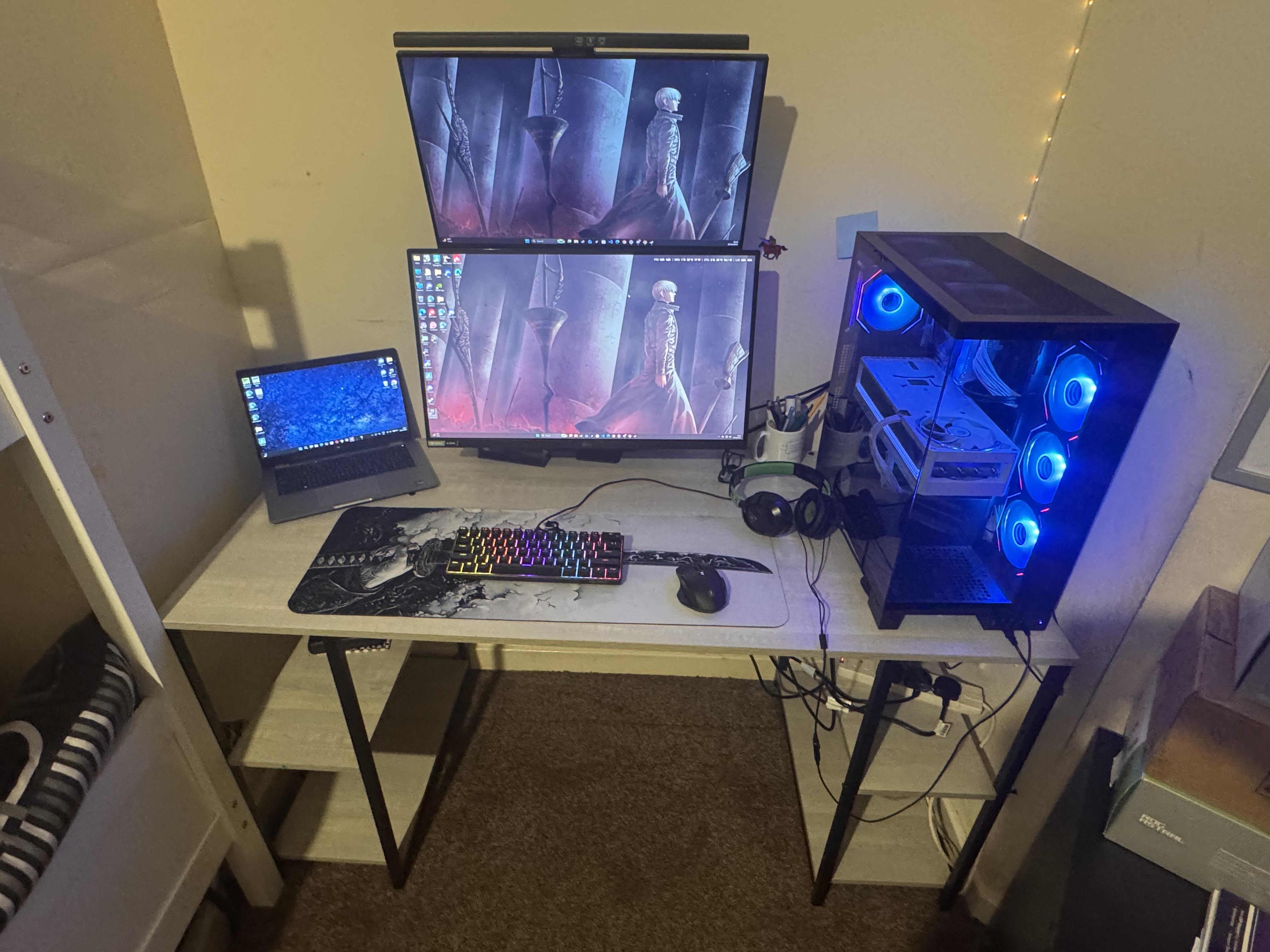
Set up Day/Night

62
Upvotes
Just moved to a new spot, never had an office/studio room before & loving it!
r/workstations • u/AJ1096 • 17h ago
Just moved to a new spot, never had an office/studio room before & loving it!
r/workstations • u/Funny-Perception3739 • 1d ago
Lived at this place for 2 years and built it from the ground up. These images are dome of my favourite ones I clicked. I shall be dismantling this and downsizing to live with my family, health reasons. I love that it has been my sanctuary and not a lot of people understand this feeling. Sharing it with those who get me would be the first step ✨
r/workstations • u/sankarrx • 1d ago
Hey all, I’m setting up my desk for two jobs and want a clean setup with zero chance of mixing anything between J1 and J2. I’d like a sanity check from people who’ve done this.
What I have:
J1 laptop and J2 laptop (both Windows, company-managed)
Two monitors, one for each laptop, so no video switching needed
One keyboard + one mouse (wired)
One headset
No webcam
Plan:
UGREEN USB 3.0 2-computer switch (the one with the desk button). Both laptops plug into it, and the keyboard and mouse plug into the switch. Press the button to switch between J1 and J2.
Headset NOT on the switch. I’m planning a 2 headsets (one for each) so I don’t lose audio on one laptop when I switch.
Priorities:
Nothing linking the two laptops. No Mouse Without Borders, Synergy or anything else that touches both machines or shares a clipboard.
Fast switching. I know basic USB switches take 1–3 seconds. Is that annoying day to day?
Overlapping meetings. This is the big one. Both jobs sometimes have calls at the same time and I can’t risk the wrong team hearing me.
Questions:
Anyone using the UGREEN switch (or similar)? Any issues with IT flagging it on company laptops?
How do you handle one headset across J1/J2, especially with overlapping calls? Multipoint, two headsets, or something else?
Any settings you’d change, like disabling the laptop mics and speakers so audio can’t fall back to them?
Anything you wish you’d known when you set up your desk?
r/workstations • u/CaliVibing222 • 2d ago

This is my home office I use two monitors consistently and one for reference. I have a 32 inch center screen, 27-in on the left and a portable 16-in below.
I struggle with my second screen because the 32-in is a good size but I like having a bigger screen than 27 in. The problem is I don't use the screen on the left very often because I have to turn my head so much.
Would it be better to replace the 27-in portable and get 2 24 in or 2 22 in monitors for the sides of my 32 in? I'm just not convinced I will use the monitors on the sides if it's too far off to the side.
Maybe it's my Desk that's the problem or the setup. I just really need to be efficient it's affecting my work.
Thank you so much for your tips and advice!
r/workstations • u/_fat_santa • 3d ago

Yesterday my standing desk crapped out in the worst possible way, fully raised and unable to come back down. While I'm getting that fixed I still needed a desk so I ended up having to use one of our spare folding tables.
For a crappy folding desk I think this is about as good as I can do. The biggest difference was when I added a piece of spare wood to the top to help add some rigidity and make the surface flat (the table itself is pretty badly warped since we use it for cookouts and have had many grills on top of it).
I'm honestly surprised I got it to look as nice as it did all things considered.
And for anyone wondering, the blue tape on the edge is so I'm not resting my forearms against the sharp edge of the wood.
r/workstations • u/DYC212 • 3d ago
I just gave my home studio a serious and long-deserved upgrade! Check out my new IQUNIX EV63 Ghost in the Shell keyboard. I first saw the keyboard at gamescom in Cologne Germany and I immediately fell in love. I opted for the Shell Core edition because it felt like the color scheme would make my desk pop!
r/workstations • u/spooner_lv426 • 4d ago

r/workstations • u/Historical-Swing5152 • 5d ago
I'm currently studying BSc animation VFX and gaming which has some variety in it. I want a proper setup and these are the things I already own
MSI Katana rtx 5050 i7 14thhx 16gb/1tb
512gb external SSD
Evofox banshee mouse
Evofox controller (just for fun and testing)
Digital pad(no inbuilt screen) (I forgot the brand)
Wireless earbuds (I'm thinking of buying proper headphones)
Laptop stand
Membrane wired keyboard
I'm just a beginner in this and I want serious upgrades and help. Please tell something 🫡
r/workstations • u/Top-Concern5561 • 6d ago

r/workstations • u/imahdibo • 7d ago
r/workstations • u/EastCoastRapper • 6d ago
Just what the title says. I have three cameras that use CF Express Type B. Recently have been looking at the CalDigit TS5 Plus, but was thinking how CF Express Type B never seems to be included in modern docking stations and are usually stand alone readers. Why is this? I'd pay another $100 or so for a docking station to include CF Express.
r/workstations • u/The_Wirral_White • 7d ago

Virtually 99% finished work and gaming man cave , added RGB light strip as someone suggested in r/desksetup .
Pics ( Lights on, Lights off and the basic chatGPT idea )
Think turned out better than thought, under desk mounted the PS5 so out of way, taken just under a month, and the nightmare that is and was the cable tidying hidden with a cable hammock ( still some tidying to do but better than what was there before ).
Hopefully all that's left is a better chair, had a few ideas and don't wanna spend more than £300 if can help it, shortlisted 3 ( £150-225 ish ) so far but open to any suggestions, ideal spend up to £300 ish , max £500 ish.
EUREKA ERGONOMIC Typhoon Gaming Chair, COLAMY Ergonomic Office Chair & COLAMY Ergonomic Mesh Office Chair
Basically the Alex, Saljan & Olov setup with added small Alex for Printer
r/workstations • u/Dangerous_Ad8184 • 7d ago

r/workstations • u/proud_bean • 9d ago
sooo, i've worked remote before but it was max. 2 days per week but got this new job where it will be 12x36 (work for 12hours and rest for 36hours) with 1 day per week in office.
as this will be intensive remote, i would like tips for a good performance and how to get the most out of it.
currently i live in a small flat where i'll work in the main area (kirchen + living room), next year i'll be moving to my apartament where i'll have a separate room to use as office
r/workstations • u/Kimjunghyeon_vizicub • 10d ago

it's my workspace in the office
r/workstations • u/neoburnett • 10d ago
Posted my setup here a few years back. Finally redid it, so here’s the update.
Desk
Mac mini [M1]
Alienware [AW3225QF] curved ultrawide, white stand
Apple Magic Keyboard with numeric keypad
Magic Trackpad
Logitech MX Master 3S
FLEXISPOT standing desk
Staples mesh chair with headrest
Audio / video
GoPro on a gooseneck arm as the webcam
Blue Yeti USB mic
Apple Airpods Max
Bose soundbar on the shelf
Happy to answer questions.
r/workstations • u/Visco242 • 11d ago

Got my new computer 🖥 ☺️ my studio is growing.
Visco 242
r/workstations • u/Jaconator02 • 11d ago

It’s a global industrial desk 6ft x 3ft. Actual usable size is 5ft x 2ft 6in.