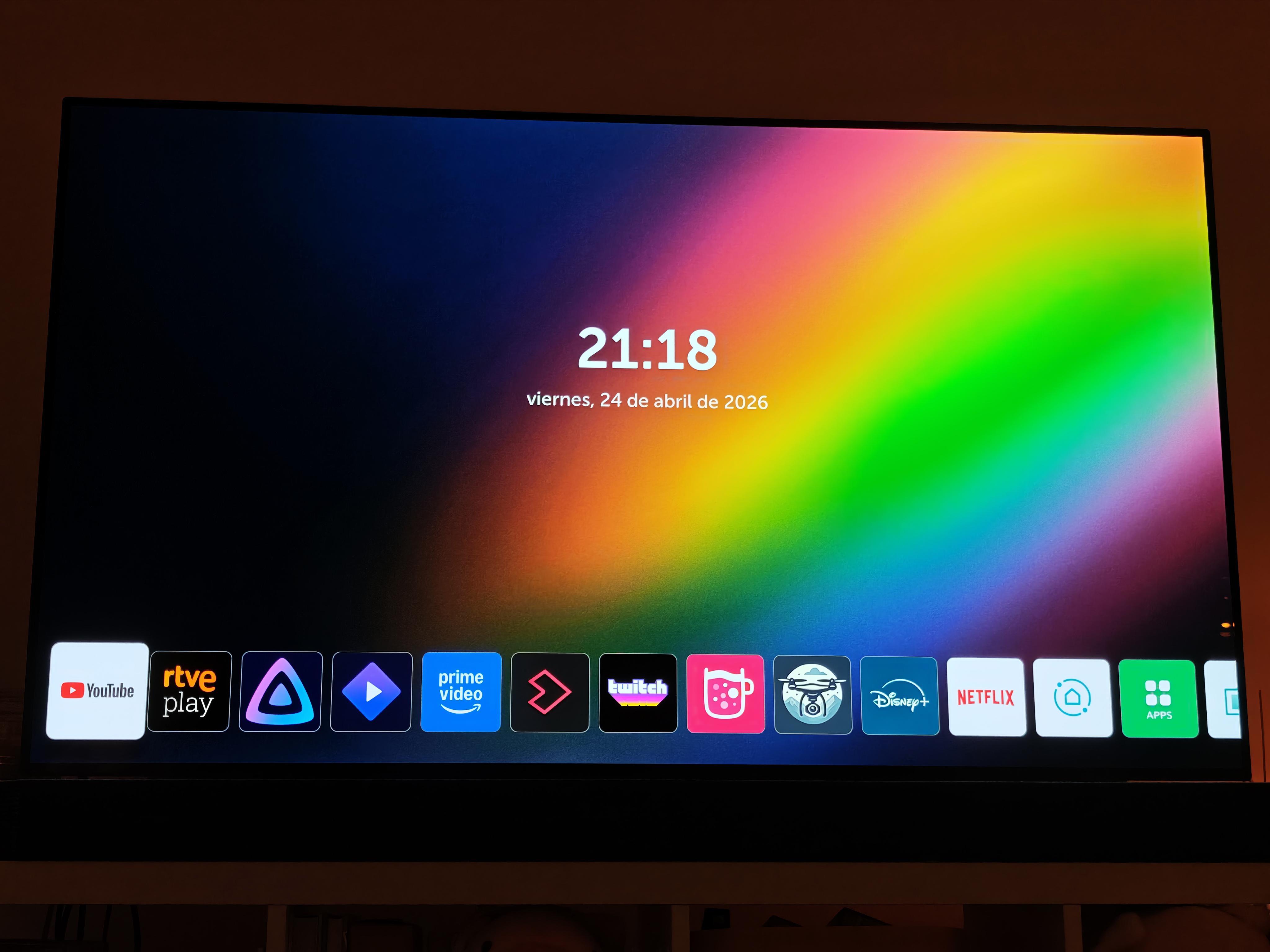
I've been working on a little hobby project: webOS Custom Launcher for rooted LG TVs.
I was inspired by the excellent webOS Launcher by partridgeworks, the amazing people in this subreddit who keep experimenting with and improving our TVs, and, of course, AI! I don't have a coding background, so AI has been a huge help in bringing this idea to life.
Why another launcher?
I have an older LG TV running webOS 4.x, and while the TV itself still works great, the default LG Home launcher is painfully slow and, honestly, a bit boring. I wanted something minimal, lightweight, and snappier that could give my old TV a new lease on life.
That's what I'm trying to build with this project. It's primarily targeted at older, slower LG TVs running webOS 4.x, since that's the hardware I have available to test on.
I'm really curious to know how it performs on newer and faster TVs, though! If anyone tries it on a different webOS version or TV model, I'd love to hear about your experience.
I'm also happy to implement suggestions and improvements. Just a small disclaimer: I'm learning as I go, and I'm relying on the free tier of AI tools. Sometimes, implementing a single change, debugging it, and testing it on my TV takes me days. So please don't expect rapid updates, but I'll do my best whenever I can!
Most importantly, a huge thank-you to everyone here who has shared their projects, knowledge, experiments, and discoveries over the years. Projects like these are what inspired me to try making something of my own, despite not having a programming background.
It's genuinely exciting to give my old, boring TV a little new life instead of feeling like I need to replace it just because the software experience has become sluggish.
Yes, your set-up was the inspiration for the initial layout. I like the clean and minimal set-up that you've done. I have implemented some font thickness and position changes for the clock in settings as you can see in comments but I didn't dive into font types. I'll see if I can implement different fonts for clock in the future updates.
Hahaha, I added a lot more than that, check out the latest update 2.1.5 and actually I'm in the process to release 2.2.0 with even more features and fixes
Love this. Wish there were a way to close running apps like there is on the standard LG Home app. I experience crashes in things like Netflix if there’s too much stuff eating memory in the background.
Thank you for the appreciation. I think some apps are kept open in background unnecessarily and that consumes a lot of RAM. I turned them off through Glasshouse and I felt the system to be more responsive after that. I don't want to implement that feature in this project as it is supposed to be a minimal launcher. Btw look out for the update I'm pushing today that is faster and has more features.
Thanks for the review and nice set-up. If possible please share your WebOS version too. I think hiding app labels should be fairly simple to implement in future updates.
I've thought to add few others small features too. It will take some time but I'll make another post when I push another update.
Something else to report: adding a few images to a folder locally on the TV and the "Change picture every" and "Shuffle" (whether off or on) won't cycle through the different images. Is this expected behavior? Wondering if you were able to get it to work. Tried on a cold and issue persisted- no images cycling for wallpaper from local files I myself placed.
That's weird. I also tested shuffle from both local and USB folder and both worked. Are any files larger than 8MB/25MP? I think it might be due to these size limitations.
I noticed that the launcher settings currently only list official LG Store apps and native system apps. Apps installed via webOS Dev Mode or Homebrew don't show up in your launcher Setting menu. Would it be possible to add an option to detect and select these "third party" apps for the launcher?
It looks very nice and polished, I like it... would it be possible to add the weather to the home screen??... And another thing I'm looking for that no launcher has is a two-row or grid scheme for apps, even better if can be divided into categories; I have many apps and one row makes it awkward. Thank you in advance!
This is pretty nice, but for some reason the icons don't show up for me for homebrew apps even though I have "List app list via Homebrew Channel" enablaed. Also, it would be nice to have a separate row for the inputs, now they're just kind of off somewhere in the list of apps.
Edit: welp, it just stopped working after rebooting the TV, nothing but the cursor showed up when I brought up the home menu. I reinstalled it, back to the default Home now. Btw, looks like it has the exact same icon as the partridgeworks' webOS Launcher? That's a bit confusing.
Hi, were the apps hidden in settings or did not show up in settings either? Also exactly what happened after reboot and did you use any method to make it default launcher before reboot?
Salve a tutti,sto cercando di cambiare launcher pure io,potete indicarmi la guida io ho una LG C1 webos 6,sono gia riuscito a scaricare homebrew channel,ma non riesco a mettere il root
I believe it should work this way: when you press home, the Hearth launcher should appear instead of the WebOS launcher, but that doesn't happen, or at least it should open at some point, but it doesn't i can only open it through the app.
I really want home back to work for my TV as well but I don't know if it's compatible with an LGC3 just yet and I commented on the GitHub and have yet to hear anything back or see any movement in over a week now
I have implemented one small helper that hands over the home screen from LG home to this launcher every time so home/back/exit keys all lead to this launcher only (there's a slight delay and a black screen momentarily). You can test it out and report if it works for you.
Is it possible to implement a "Channel List / Content Feed" feature in future updates? Like the original LG launcher or Android TV/Projectivy launcher channels, it would be great to have content feeds (recommendations/continue watching rows) from supported apps like YouTube, Prime Video, or the web browser directly on the home screen.
I think that would require pulling data from the apps which can prove to be difficult. I'll consult with claude but I'd say not to keep your hopes up for this one.
The root can be reverted just with a factory reset through TV remote or SSH so I think it is pretty worth it (also considering that LG is collecting shit ton of our personal data).
There is no "how to root this os version", you need to look for your specific tv model. Search awesome-webos, you'll have all the info you need there, like the website canirootmytv etc
If you have developer mode on and WebOS dev manager working then you can try installing it. It should work in theory but some features like replacing home will not work. Do report back after testing.
It runs the launcher and Home-button helper on the TV, with automatic startup and a long-Home emergency exit; no always-on PC or router script. Installation needs a computer and LG Developer Mode, and the Developer Mode session must remain active.
Tested on LG C3 OLED55C3RLA, firmware 43.21.71; I can't confirm compatibility with your TV without its model/firmware. Short Home returns directly to our launcher on that setup, while exiting through Back can still briefly show LG Home. The README includes setup and recovery instructions. Disclosure: this is my project, separate from the launcher in this post.
Update (v0.7.0): optional Developer Mode auto-renewal (Beta) is now included, off by default. Enable it in Settings. It runs on the TV and contacts LG directly, without third-party token hosting or an always-on external device. Real renewal on stock unrooted TVs still needs community validation, so keep checking the official timer and extend manually if needed. Details: https://github.com/Razdva122/clean-your-tv-lg-webos/blob/main/docs/DEVELOPER-MODE-BETA.md
 1



8
u/Rudra_77 Oct 17 '26
Different wallpaper and clock configuration as example.