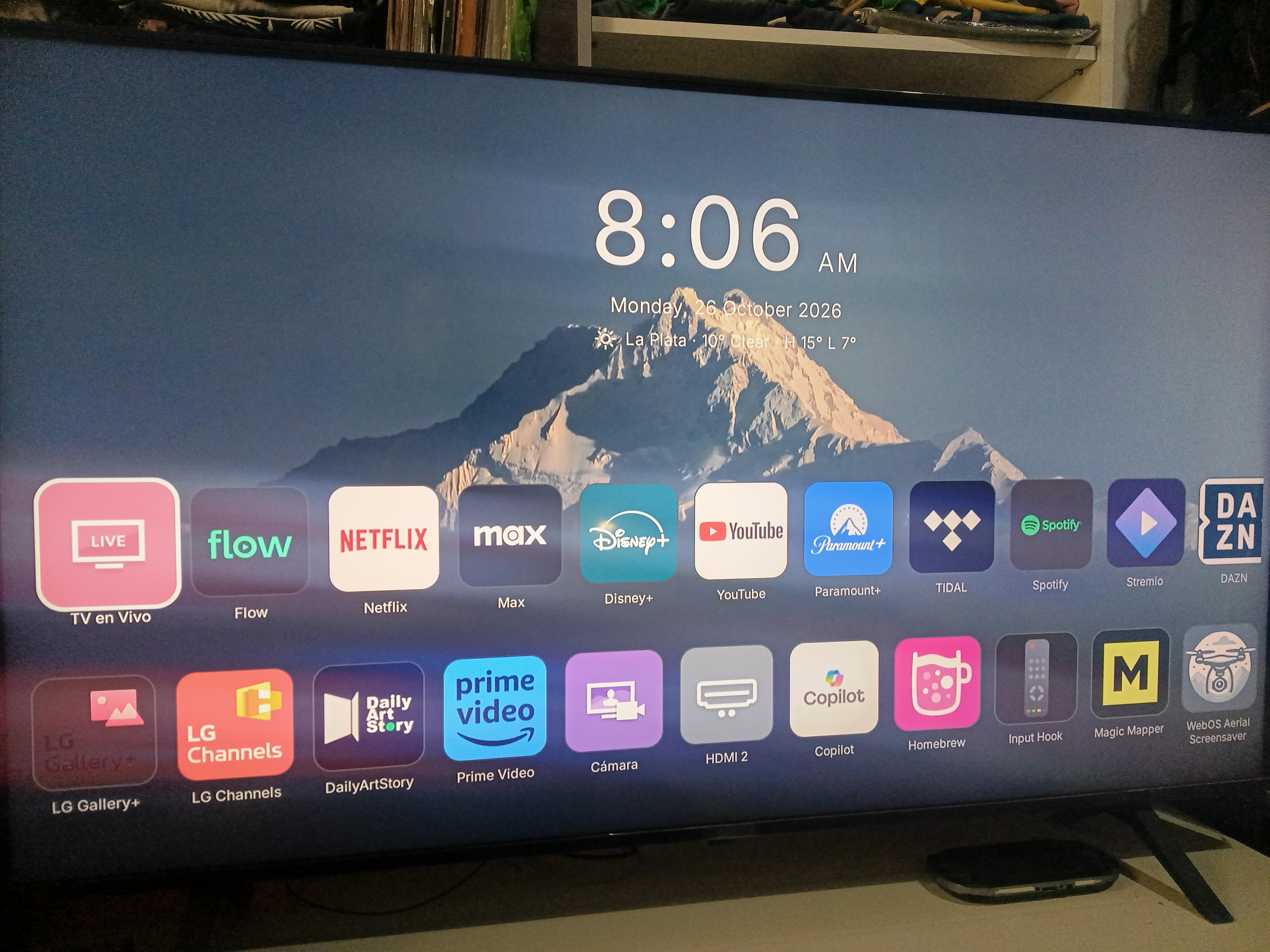
I’ve released another major update to Hearth, my minimal launcher for webOS TVs!
This update brings several new features, more customization options, performance improvements, and experimental support for older webOS 3.x TVs.
Here’s what’s new:
Recent apps panel: Press Back on the home screen to access your recently used apps. (credits to u/batmanrises123)
Quiet mode and OLED shift: Automatically fade app icons after inactivity and enable slow pixel shifting to help reduce OLED burn-in risk.
More customization:Custom apps/source icons and labels, Six icon shapes, adjustable icon spacing, wallpaper opacity, name colour, bottom fade, and widget shadow with adjustable strength.
More clock options: Ten additional fonts and six levels of font thickness. (credits to u/batmanrises123)
Nature wallpapers: Built-in nature photos with slideshow and cross-fade support.
Improved performance: Reduced unnecessary screen redraws and clock updates, making navigation more responsive.
Experimental webOS 3.x support: A legacy build for older TVs running Chromium 38.
Experimental non-root app discovery: An option to load the full app list on TVs running Developer Mode without root.
Better LG Home replacement: A guide for using LG Input Hook for a cleaner Home button experience without any flash (recommended). There’s also a new method using SAM aims to prevent LG Home from flashing before Hearth opens but has a delay.
webOS 11 improvements: A fix for root-dependent features that require an additional one-time permission step.
Hearth is still a hobby project, and some features are experimental or haven't been tested on every TV model. Check the README for details, limitations, and setup instructions.
Absolutely Love it! Just one thing I would love to have: An ability to change App Icons. Would Look so clean if I could make the first 3 icons match the rest.
It is already there. Settings>Apps>Long press>Custom icon App labels also can be edited and same options are available for sources with few built in presets.
Interesting! I cannot find it. I went to Hearth Settings > Apps > Long pressed on YouTube for example..and then the tick mark goes off. I mean, long press is not doing anything and is behaving like a single press.
Cool. Is there any way to replace LG Home completely? Whenever I cold reboot it goes to LG Home and after 20 seconds it opens Hearth, is it possible to completely disable LG Home,I've all supportive settings turned on in hearth settings but still LG Home comes up on cold reboot
No i want HDMI to be the last input. I mean it's connected to set up box so. So after cold reboot TV goes to HDMi as default, and when I press home button it goes to LG Home app
Finally! Uploaded my custom icons as well. I have tried every single Home Launcher. This is literally the fastest, cleanest and perfect home launcher I have come across. Going permanent on my LG C6.
Hi, I'm the one who requested the weather widget and the two rows before... thanks! I've been testing it and I'm very happy with the configuration options and the new backgrounds included. However, there are still a couple of things I'd like to see before making it my default:
Being able to list the web links bookmarks from the browser that the LG home screen displays in the app row... In your previous version, they were shown, but their names weren't displayed, and the icon wasn't the actual one for each page, but rather the same one repeated across all of them. I use those links that the browser creates as bookmarks a lot (web radio stations, the full YouTube Music player site, the full Glasshouse dashboard, etc.), and having the option to create them from the Glasshouse dashboard made that function even more useful. I'd like to have them back in your launcher with their names of possible.
...Perhaps you could add a third row or separate section for web links?
Perhaps you could also add a FAVORITES row/section at the top of the regular rows, say with 5 or 6 icons. These could be any type: apps, inputs, web links, settings shortcuts etc., but in a fixed row that doesn't scroll like the others?
Could you make the clock and weather text colors/icons somewhat semi-transparent? At least the hour text. This would prevent them from being too bright and risking for a burn if they remain stationary and also allowing for a better appreciation of the background image.
I like a lot the backgrounds you've incorporated... Would it be possible to link to a free image repository for more of those types of images on request? I think there are several Linux community servers that could be used, with landscapes, space photos, animals, etc. Having an infinite random slideshow would be a really nice touch!
I know it's asking a lot, but finally I'd like to have a feature that completely turns off the TV if no input is registered after a certain amount of time, without scheduling fixed times. But I think that should be a lower-level feature, beyond the home launcher itself.
Surely it's a request for the Glasshouse developer (it's incredible that TVs don't have this function by default, only the screensaver, which can stay on for hours if you forget to turn it off and fall asleep).
Congratulations on everything you've achieved so far; the launcher is beautiful and runs very smoothly, much better than stock on my TV, and thank you in advance for sharing your work, saludos!
I'll see what all I can implement in the next one and btw someone already contributed OLED Care module which shifts widget and app row few pixels continuously and I have merged the code and shipped in 1.2.0 and it is on by default so do check it out.
The TV has a function called like that, but it's actually only three dimming levels to switch between. It also has a timer-off mode, but it must be set permanently on a fixed hour; it doesn't work like the way I mean.
By the way the Glasshouse developer just implemented it, but it takes into account the time passed since the screensaver launched, which is cool but doesn't work in apps like YouTube. That's why I'd like something that counts from the user's last interaction; I often fall asleep watching or listening music on YouTube, and that would be great. Here's the issue I created: https://github.com/rorygallagher2024/glasshouse/issues/985
Returning to your app, one small issue I found is that when navigating the rows of apps with the magic cursor, often the acceleration is so fast that it becomes impossible to hit what you want. Thanks again!
That is not how sleep timer should work. Imagine someone watching a movie without touching remote, or someone listening to background music or podcast while working, this will turn tv off abruptly. I don't think we should implement that.
I understand what you're saying, but I specifically thought of it (as a setting) for when someone goes to bed and falls asleep or leaves background music on and goes to do other things. Many times you find the TV still on later after hours of showing the screen saver.
That's why I thought about periods of "inactivity" for triggering longer than 1 hour, 2 hours, etc.... Ironically, the Glasshouse dev implemented it today, but with a maximum of half an hour, which for me is very little.
I m using it but even after enabling it as input in settings it doest start first. I see lg launcher at startup and after few seconds hearth starts. Any way to make it launch hearth only and faster?
Workaround for the Live TV icon, although the new icon is only shown in the inputs page, not apps, I just added as a fav from the inputs page and the new icon is shown on the home screen.
For background icon color, i can see that comes from the theme so will have a dig into that. Custom theme colors is probably a 'nice to have' but there's are enough themes at the moment.
I am myself using it with glasshouse as it is a great privacy app but glasshouse home and Hearth have same purpose, to replace LG Home. Non rooted users have limited functionality but I am releasing an update today that makes it more usable for non root users so check that out when it comes.
Televizyonuma daha önce böyle herhangi bir işlem yapmadım bu konuda acemiyim nasıl yapılacağına dair bana yardım edebilecek biri var mı şimdiden teşekkürler
Read this - webosbrew.org/ Ask any AI model to guide you through the steps After rooting show AI mode Hearth GitHub repo page and it will guide you further
Try make that long bar with apps small and make a second and 3rd bar scrolling down.. it’s exhausting to press 7 times on remote to get to the last app
Hey Liking this launcher but I have one issue, screensaver mode no longer seems to work, so the TV stays at full brightness ECT no matter how long you leave it, is there a way to fix this?
The current version of Hearth does not change any settings related to screensaver so maybe check your system settings or any other app that changed screensaver settings.
If you want dimming in quiet mode then I'll see if I can implement it.
Yeah I'm not sure if the TV detects it as a always on app? So if I pause prime video for instance after ~5mins it'll go to standby/screensaver mode, but having hearth as my main launcher while on the launcher home itself it never does, yeah all I'm really after is a auto dim after a certain amount of inactivity just for my own OCD so I'm not worried about burn in, other then that the launcher is absolutely fantastic! Has absolutely everything I wanted and love how clean it is! Cheers for the work.
Hmmm random, I've only just rooted and added it today, might be conflicting with something else, I did try a few of the screensavers in the homebrew store and when I tried to use the preview none of them was working so evidently something on my side I'd say, would appreciate the auto dim feature though if I can't figure it out! Don't really need a screensaver with hidden apps toggled on looks great as is!
Just installed and it looks great. One issue tho, with pointer active it's nearly impossible to select the app/input. The icons are moving left and right way too fast and far from the display edges
Looks nice. A question, are you a developer using AI or a non-developer one to build it? I want to try it but a bit worry about its quality... Seeing tons of "I build a TV launcher..." posts recently.
I'm a non developer using AI to build this. This does not modify any critical system part. At most it adds few scripts in the boot order which can be disabled via SSH and instructions for that are given in Readme page of the project.
Enjoy this while it lasts folks - soon the REA process will be deemed "too dangerous" (for billionaires) and made illegal. The only reason it exists in the first place is because said billionaires are only now realizing how much power they just gave back to the public :D.




7
u/Rudra_77 Oct 25 '26
A big thanks to the all the contributors for the amazing support!