r/vivaldibrowser
•
u/Dont_Use_Google
•
Feb 14 '26

Misc Spotted on r/BuyFromEU - Go Vivaldi!

840
Upvotes
r/vivaldibrowser
•
u/Dont_Use_Google
•
Feb 14 '26
r/vivaldibrowser
•
u/x-15a2
•
13d ago

r/vivaldibrowser
•
u/pafflick
•
Aug 28 '25

Browsing should push you to explore, chase ideas, and make your own decisions. It should light up your brain.
When an artificial assistant sits between you and the web, Big Tech filters what you see and decides what you don't see. Your judgment is outsourced.
A browser that browses for you is like paying a robot to go out for dinner with your friends and give you a summary of the evening when it gets home.
Vivaldi is taking a stand. We choose humans over hype, and we will not turn the joy of exploring into inactive spectatorship.
Without exploration, the web becomes far less interesting. Our curiosity loses oxygen and the diversity of the web dies.
We exist for you to explore the web on your own terms. We refuse to reduce you to a passive spectator.
We're fighting for a better web where you're in control
— Jon von Tetzchner,
Vivaldi's CEO and Co-founder
r/vivaldibrowser • u/TurbulentTopic39 • Jun 20 '26

r/vivaldibrowser • u/Boundless70 • Apr 08 '26

Vivaldi is packed with incredible features like deep customization, advanced tab management, built-in notes, and intuitive gestures. If it only had an ad blocker as robust as Brave's, it would easily be the best browser out there—especially on Android
r/vivaldibrowser • u/shishio_mak0to • Jul 10 '26

r/vivaldibrowser • u/pafflick • Jan 29 '26
With this release we’re raising the bar for Tab Tiling, with drag-and-drop tiling and opening links directly into tiled tabs. Alongside stability improvements and a set of carefully chosen refinements, this release is set to make your daily browsing smoother, more powerful, and more enjoyable.

Vivaldi is built for people who love exploring the web, and who demand more from their browser.
With Vivaldi 7.8, we raise the bar, yet again. This release puts Tab Tiling front and center, or on the left. Or the right. Or above. Or below. Tab Tiling now has faster interactions, smarter workflows, and new ways to work with multiple pages at once, without breaking your flow.
It’s a powerful start to the year, focused on real productivity and real control.
Tab Tiling is one of those features that can fundamentally change how a browser feels, once tiling becomes part of your workflow.
Instead of constantly switching back and forth between tabs, you work with them together. Like ebony and ivory, in perfect harmony, but not just side-by-side; they can also be above and below, or in a grid. Tab Tiling lets you compare, reference, monitor, and think in parallel.
With Vivaldi 7.8, we’ve focused on making Tab Tiling feel less like a feature you activate and more like a natural extension of how you browse.
Creating tiled layouts is now as simple as dragging a tab (or multiple) from the Tab Bar into the main content window of your currently active tab. By hovering the dragged tabs over different areas you can choose how to tile.
Just drop it where it makes sense, and Vivaldi does the rest.


Once your layout is in place, you’re not locked into it. You can rearrange tiles on the fly, resize them, or drag in additional tabs at any time. Your workspace stays flexible, adapting instantly as your task evolves.
And because tiled tabs behave like regular tabs, you can combine tiling with other Vivaldi features. For example, set periodic reloading on selected tiles to keep live content up to date, while the rest of your layout stays exactly as it is. It’s perfect for monitoring changing information without constant manual refreshes.
This makes tiling something you can use exactly when you need it. You might start with a single page, then quickly pull in a second tab to compare prices, review documentation, or keep a reference visible while you work. The layout adapts instantly, without interrupting your flow.
It’s especially useful when:
Writing or researching and keeping sources visible alongside your main document.
Comparing offers, designs, product specs, or data across multiple pages.
Following live updates while continuing to work in another tab.
The key difference is speed. A moment after you think “I want to see these side by side”, you already are.
Once you start working with tiled layouts, it quickly becomes a browser super power, and you want a quick way of tiling new tabs.
That’s where “Open as Tiled Tab” comes in.

Instead of opening a link full screen and rearranging your layout afterward, you can open it directly into a tiled view. Your main tab stays put, your context stays visible, and the new content appears beside it.
Combining the power of other Vivaldi features, you can trigger this instantly with a Mouse Gesture, making it effortless to open in a Tiled Tab when needed.
Together, these improvements turn Tab Tiling into something you can use casually, frequently, and creatively.
You can start small with two tabs, then grow into more complex layouts as your task demands it. You can rearrange on the fly. You can build a workspace that matches how you think.
This is what best-in-class features look like in a browser: not complicated, just deeply effective once you start using it.
Managing many tabs should feel empowering, not fragile. Vivaldi 7.8 strengthens tab handling in ways that support complex, long-running sessions.

Pinned tabs now support domain restriction.
This keeps pinned tabs predictable. A pinned mail tab stays mail. A pinned project tool stays exactly where you expect it.
And yes, this finally makes pinned tabs behave the way they always should have. As Tony, our Chief Tab Tester asked, “Why didn’t they always do this?”. The answer is: we didn’t think of it before. We’ll own that one. Luckily, our community did think of it, and we listen to our users.
Speaking of pinned tabs, if you’re using Vivaldi Mail, our built-in mail client, there’s an extra bonus. Pin your mail tab, and it stays pinned across all Workspaces. Your inbox is always there when you need it.
And not only that! Mail now works across all your Vivaldi windows. Previously, your mail view lived in a single window, which meant switching windows if you wanted to check or write mail while working elsewhere. With Vivaldi 7.8, that limitation is gone.
Open a new Window, switch Workspaces, or reorganize your setup. Your mail is still there.

Because mail is built directly into Vivaldi, it behaves like part of the browser, not a separate app bolted on the side. Making it available across all windows turns it into what it should be: a core tool that’s always within reach, exactly when you need it.
Combined with smarter pinned tabs and Workspace support, mail now fits naturally into even the most complex setups.
Are you the kind of person who needs a new perspective every day? The kind of person who just needs a bit of extra spice to your day? Do we have something fantastic for you! The Daily Image option for your Start Page.

When enabled, your background updates automatically each day with high-quality photography from Unsplash. It’s a small touch that adds variety without distraction.
As always, it’s optional, like any other Vivaldi feature you decide whether to enable it or not. It’s your browser.
Beyond the headline features, this update comes with improvements in several areas that shape the overall experience.
Important stability improvements: Significant effort has gone into improving stability. With a new and improved crash logging system we have been able to fix more crashes than ever. QA estimates “two full buckets of crash fixes” and are happy to report all known crashes in our own code are fixed. That said there is still a slim chance you encounter a random crash, “which could literally be caused by your neighbor’s microwave and cosmic radiation screwing up your PC’s RAM. What can be fixed, is fixed” – Vivaldi QA team.
Caret browsing as a dedicated setting, giving you clear control over keyboard-based navigation and text selection. It’s a great accessibility feature that lets you navigate websites using the keyboard as if they were text documents.

A new installer for Windows that makes setup smoother and more reliable.

Every Vivaldi release, large or small, builds on the same idea.
We don’t answer to investors pushing features that benefit them instead of you. We don’t track your behavior or treat your data as a business model. We focus on building a browser that adapts to how you work, respects your choices, and gives you real control over your experience.
We believe browsing should push you to explore, chase ideas, and make your own decisions. It should light up your brain. When an artificial assistant sits between you and the web, it filters what you see and decides what you don’t see, it’s outsourcing your judgment.
So we have taken a stand. We choose humans over hype, and we will not turn the joy of exploring into inactive spectatorship.
That philosophy runs through Vivaldi 7.8. From powerful Tab Tiling to thoughtful refinements across the browser, every change serves one goal: making the web work better for you.
If you enjoy using Vivaldi, please tell someone about us. Recommendations from people who actually use the browser matters more to us than any advertisement ever could.
Vivaldi 7.8 is ready today. Download it and put your tabs to work.
As always, thank you for being part of the Vivaldi community. Together, we’re fighting for a better web, one release at a time.
For the full list of changes, please go to our blog: https://vivaldi.com/blog/vivaldi-on-desktop-7-8/
r/vivaldibrowser
•
u/MrShortCircuitMan
•
Jul 09 '26

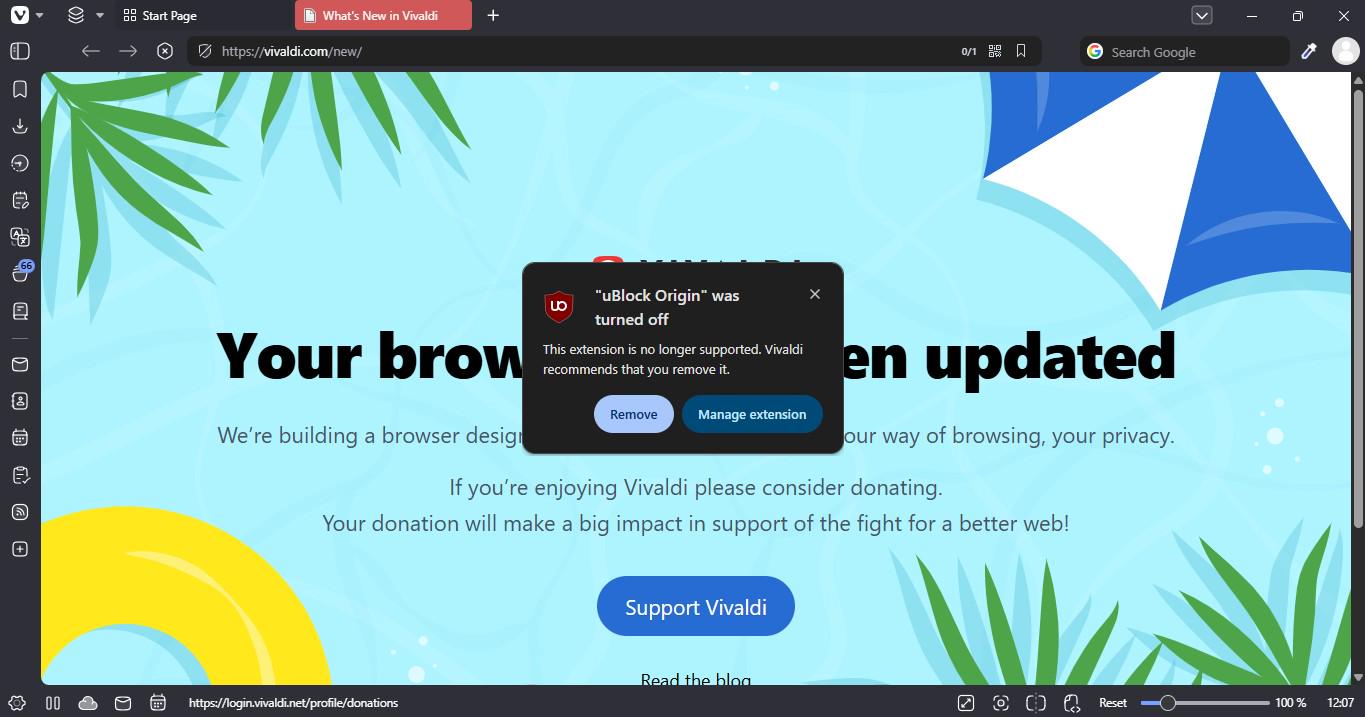
Version: 8.1.4087.46
r/vivaldibrowser • u/Rude-Interaction-194 • Jun 11 '26

I'm thrilled that I don't have to rely on Chrome anymore!
r/vivaldibrowser • u/Azeustro • Sep 12 '26
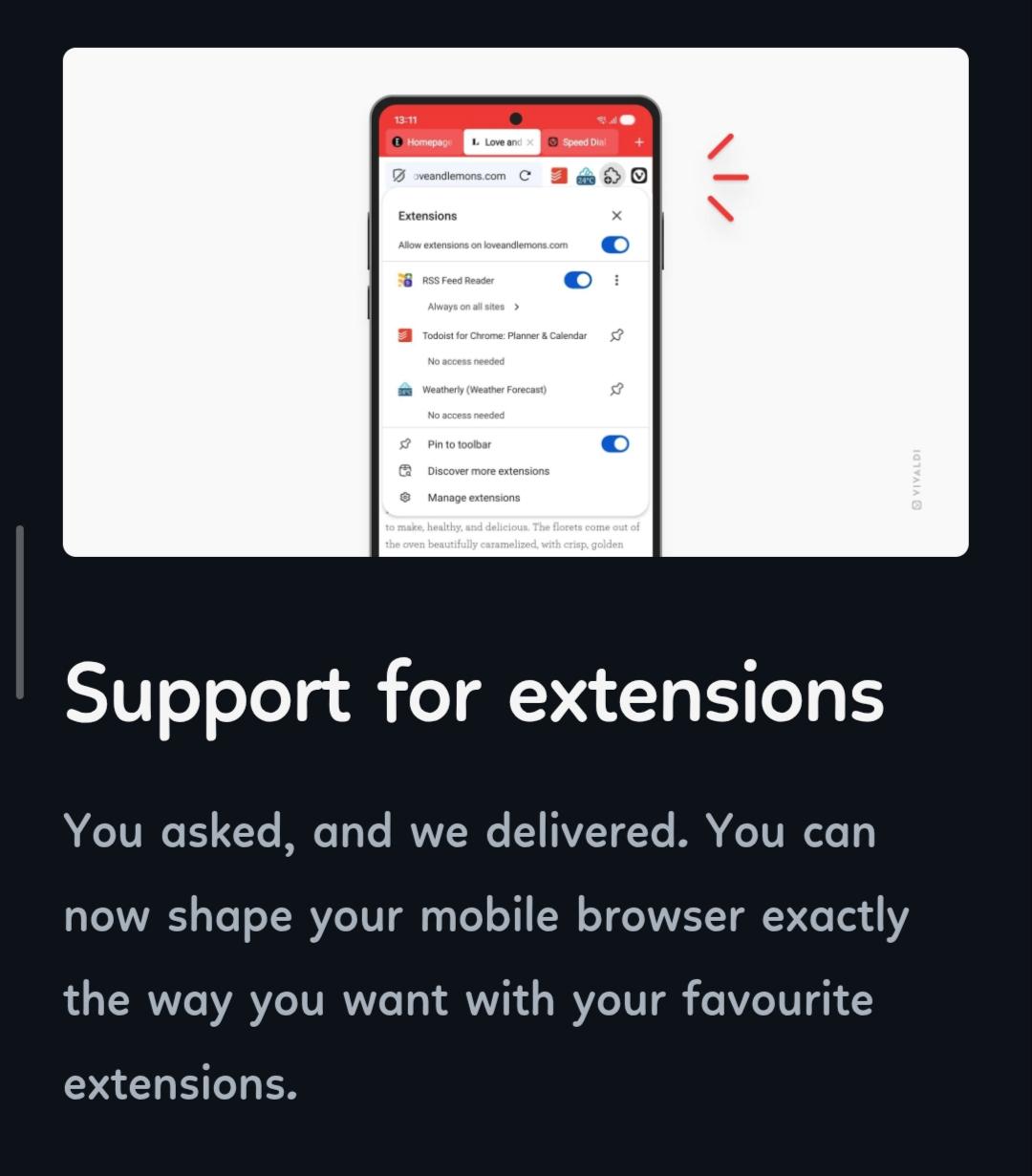
Out of all the Browsers I used ( I used almost every browser available for Windows and Mobile, Vivaldi has shocked me with Performance, Features, Community)
Whatever the community asks Vivaldi works on it.
It's such a pleasure to join this community and use such a Properly Built Browser with no Bs.
This extensions feature for the mobile app just blew my mind.
Version : Vivaldi 8.2.4147.58 (Android).
r/vivaldibrowser • u/pafflick • Oct 24 '24
r/vivaldibrowser • u/Visible_Assumption96 • Mar 31 '26

Version: 7.9.3970.39 (Official Build) (64-bit)
r/vivaldibrowser • u/[deleted] • May 04 '21
r/vivaldibrowser • u/acceptable_humor69 • May 22 '26

r/vivaldibrowser • u/crod242 • Jan 28 '23

r/vivaldibrowser • u/pafflick • Mar 27 '25
Proton VPN is now integrated into Vivaldi’s desktop browser to offer users enhanced privacy protections and all the VPN functionality they need without requiring any additional downloads or updates. Bringing together Proton VPN and Vivaldi provides a superior online experience, combining Proton’s best-in-class VPN with Vivaldi’s power, advanced customization, and uncompromising stance on user control.

The web is shifting.
In a world increasingly defined by tech giants and monopolies, users are waking up. They’re choosing privacy over profiling, sovereignty over surveillance, independence over inertia.
And at the heart of this shift are tools that respect users, not exploit them.
That’s why we’re proud to announce something big: Proton VPN for Vivaldi.
Yes, a world-class VPN, trusted by journalists, activists, and privacy die-hards alike, is now integrated natively into Vivaldi on desktop. No extra downloads. No complicated setup. Just powerful privacy, on your terms.
Vivaldi and Proton share more than a product vision, we share values.
We’re both European companies, proudly outside the orbit of Silicon Valley’s extractive playbook or China’s state-driven oversight. We don’t believe your personal data should be a bargaining chip.
With this partnership, we’re uniting two forces in tech that build for people, not investors. It’s not about growth hacks or shareholder slides. It’s about protecting the web for the people who use it.
As governments and users alike reassess their relationship with tech, especially in light of escalating geopolitical tensions, there has been a huge increase in demand for independent, non-aligned, and values-driven solutions.
Europe needs European alternatives. In fact, everybody deserves European alternatives. And with Vivaldi and Proton, you’re getting exactly that. No hidden backdoors. No state surveillance. No alignment with any political agenda, just a commitment to keeping the web open, secure, and democratic.
Proton has consistently proven itself as a rare kind of tech company. It has challenged invasive surveillance laws, taken governments to court, and stood up for the rights of users everywhere. Its mission is transparent, and its actions speak louder than marketing ever could. Proton is governed by a Swiss non-profit and has no political leaning, just like Vivaldi is politically neutral. And just like Vivaldi, Proton is fighting for a better web. And now we’re doing it together. Will you join us?

It couldn’t be simpler:
Make sure you’re using the latest version of Vivaldi on desktop.
Click the ”VPN” button in the toolbar.
Log in or create a Vivaldi account.
Flip the switch. That’s it. You’re protected.
Download the latest version of Vivaldi with Proton VPN today.
Read the story on our blog.
r/vivaldibrowser • u/filypl • Jan 07 '26

With the UI autohide it's not only the most functional and stable but also the best looking browser. Having went through almost all of them, I finally feel completely satisfied. Just wanted to share my joy, have a good one everyone!
r/vivaldibrowser • u/[deleted] • May 21 '26

r/vivaldibrowser • u/[deleted] • Jun 26 '26

First things first, ever since I started using Vivaldi, I've never looked back.
The wide range of customization options it gives users is something no other browser can match, and it's honestly the only thing holding me back from switching.
But I really think there are some gaps in Vivaldi that need to be fixed.
It's only a matter of time before uBlock Origin support on Vivaldi is dropped too.
And ngl, Vivaldi's native ad blocker just isn't effective. It really needs a major overhaul, both in terms of UX and functionality.
Having a robust and powerful native ad blocker doesn't just improve the out-of-the-box experience for users, it also reduces performance overhead, which is exactly what Brave achieves with Brave Shields.
Vivaldi Sync can genuinely be a productivity killer sometimes.
At times it works perfectly, and other times it just keeps showing "Connecting..." for hours.
With Vivaldi 8.0, we did see a major UI overhaul, and the experience has been much better since then.
But to be very honest, there are still some UI/UX inconsistencies in the browser.
For example, the Vivaldi menu button isn't that useful. We need something closer to what most browsers offer instead of Vivaldi's nested menu system.
I'm talking about a Chrome-style menu.
The profile-switching UX could also be merged into the menu, similar to how Chrome handles profile switching.
These points come from someone who genuinely enjoys using Vivaldi every day. The browser already has a strong foundation, and fixing these rough edges would make it an even better experience for everyone.
r/vivaldibrowser • u/pafflick • 23d ago
Vivaldi 8.3 is bad news for bad ads. A rebuilt Ad and Tracker Blocker puts you in charge of what gets through, one site at a time, and vertical tabs get even better.

We aren’t part of the Big Tech oligarchy, and our business doesn’t depend on knowing all about you to predict when you are ready to buy a new toothbrush. While most browser companies turn your browsing into data for harvesting, and profiles to sell, Vivaldi gives you a European alternative that respects your privacy. With 8.3, we have given our Ad and Tracker Blocker a major upgrade so you can send the surveillance machinery home empty-handed.
We aren’t against respectful advertising. A contextual ad that matches the page you’re reading, and doesn’t follow you around afterwards, is a fair way for a site to pay its writers. The ads we object to are the ones that track and profile you. They follow you from site to site and remember things about you that you never chose to share. The built-in Ad and Tracker Blocker was created to make those bad ads sad. Rad!
How much advertising you want to block depends on YOU, who you are and what you’re reading. Some people want every tracker and ad long gone, and don’t mind if it causes a site to occasionally misbehave. Others want the sites they use to work perfectly every time. Some want a bit of both, depending on the site.
For this release we have given the Ad and Tracker Blocker an extensive rebuild to handle large filter lists more efficiently. We’ve also given it an updated design and new labels.
The updated Ad and Tracker Blocker gives you four default levels of protection to choose from:
Off: turns the built-in blocker off completely
Light: blocks most known trackers and some ads
Strong: blocks more trackers and ads, sites may break
Aggressive: blocks almost all trackers and ads, sites may break

You can set your default level of blocking from settings or when onboarding to Vivaldi. The level you select from here will be applied to all sites, but in Vivaldi we always give you more. Ad blocking shouldn’t be all or nothing. In Vivaldi, you can decide how much of the web gets through, one site at a time, on every device you use. That’s the kind of control a browser should give the people who use it.
Levels really pay off when you set them per site. Put that dj-set on Youtube on full blast without ads breaking your beat with Aggressive. Keep your bank on Light so every form works as expected. Turn protection down on the small independent site you trust and whose ads you’re happy to see. To set a level for the site you’re on, click the shield icon in the Address Bar. Vivaldi remembers your choice, so each site loads the way you decided.
If you are particularly interested in the topic, we’ve also added the option to create “custom” levels. In these levels you configure everything yourself, giving you full control over which blocklists are used. You can add a custom block list either added from a remote URL or from their file manager.

The new Ad and Tracker Blocker is also available for Vivaldi on Android and iOS today, so your protection looks and works the same way on your laptop, your phone and your tablet.
Long before vertical tabs were a talking point in our industry, they were introduced as an option in Vivaldi, and we have continued to improve the workflows for those who prefer to have their tabs on the side. With our 8.0 update this year, we introduced a redesign that really gave the vertical tabbers a sought-after update. With 8.3 we’re stepping it up with two new additions. If you like your Tab Bar stacked the same order as your sandwiches, listen up.
With Expand Tab Bar on Hover, you can keep the vertical Tab Bar slim, with just favicons showing, and give the page as much of your screen as possible until you actually need your tabs. When you’re looking for a tab, move your cursor over the Tab Bar and it smoothly expands to show full titles. Move away and it slides right back. The feature works when the Tab Bar sits on the left or right side of the window.
Pinned tabs on a vertical Tab Bar can now sit side by side in a compact grid at the top, neatly and all in order. If you instead prefer the “old” way with each pinned tab taking a row each, there is obviously a setting, this is Vivaldi. Your mail, calendar and project tools stay one click away, and there’s far more room for everything else you have open.

If you’re yet to try vertical tabs, this is your sign. If you’re already in love with vertical tabs, you’re welcome.
Someone sends you a long list of links in an email or a chat, and you want to open every one of them. The desperate times of clicking them one by one are finally over! Copy the whole list, paste it in the Address Field, and Vivaldi opens each URL in its own tab. Research sources, someone’s wishlist, the reading list a colleague shared: all of them open simultaneously in each own tab, ready to stack, tile or work through one by one.
Links often carry tracking parameters that tell a site who shared them and where they came from. Copy Sanitized Link strips those out before the link reaches your clipboard, so the person you send it to gets the page and nothing else. It’s an easy habit that keeps a bit more of your browsing to yourself.

Reader Mode has gotten some tender love and caring for 8.3. It now opens faster and scrolls more smoothly, so you can switch from a busy page to a clean, readable article in a moment and settle in.
Vivaldi now supports Chrome’s Tab Groups API for extensions, so extensions built around tab groups can now work in Vivaldi.
We cannot repeat this often enough: Vivaldi is an independent employee-owned European company. That means we don’t answer to advertisers or a VC firm pushing features that benefit them instead of you. We don’t collect data, we just want to make a great browser that helps you explore the web.
Every release we do is built for the people who use Vivaldi. With 8.3 we’re giving you more control over what you see, what follows you, and how your tabs look. As our marketing department said: “this is a really on-brand release”.
If Vivaldi helps you explore more, tell someone about it. Helping a friend, colleague or family member make the switch is one of the best ways to fight for a better web.
Vivaldi 8.3 is also out today on mobile. Read what’s new in Vivaldi 8.3 on Android and iOS.
As always, thank you for being part of the Vivaldi community. Together, we’re fighting for a better web, one release at a time.
For more information and full changelogs, head over to our blog: https://vivaldi.com/changelog-vivaldi-browser-8-3/
r/vivaldibrowser • u/Puzzled_Swim_6869 • Mar 29 '25
Title says it but, Switched from using Google since I had a PC to Vivaldi. Literally not looking back.
I'm a Canadian who is so mad at American companies who have intentionally tied themselves to trumps team. Ran from Google for this reason.
Honestly thought I'd have to make some compromises, which was fine with me. Google mob was at trumps inauguration so I was done after that.
Plot twist was it's way better than chrome, yet not so unfamiliar where I didn't have to literally relearn how to surf the webz.
Also, maybe weird to mention, but I rated the app and got a thank you for doing so right after. That meant a lot. Other than maybe a local Pizzeria, I've never reviewed something like this and felt heard and appreciated for even trying it. Kinda cool there seems to be a level of outreach online.
I'm installing it on my partners devices tomorrow (she's also looking to de-chrome).
Thanks for such a user friendly, but fun to make your own software!


