r/techforlife • • 7h ago

Which small computer tasks are actually worth automating?

2 Upvotes

I'm looking for practical examples such as sorting downloads, renaming batches of files, or resizing photos. Which jobs work well with a simple script or built-in feature, and what checks keep them from quietly making a mess? A small project that can be tested on copies of a few files would be ideal.


r/techforlife • • 7h ago

How does this still work?

Post image
1 Upvotes

r/techforlife • • 2d ago

Best keyboard for coder? Gift for bf

2 Upvotes

Hi all! Between the holidays and my bfs birthday coming up, id love to hear some cool tech items.
He’s a coder/developed his own platform and always on his computer. He has his laptop and two monitors.
I was thinking of a nice keyboard and curious what everyone would recommend along with anything else really cool? Tech edition.
He’s in his early 30s just as additional info.

Any insight/recs would be greatly appreciated.
Budget is flexible but ideally would like to keep it around $500-$600 between holidays and bday

Thank you!!


r/techforlife • • 3d ago

Looking to replace my wifes Fire tablet 10

4 Upvotes

It is starting to have issues and I feel it isn't long for this world, what are some recommended replacements. She only uses it for internet browsing and the Kindle App. She wants an e reader and I am figuring just going with an actual kindle but wanted to know what you all thought.


r/techforlife • • 4d ago

After 15+ years I left IOS!

Post image
117 Upvotes

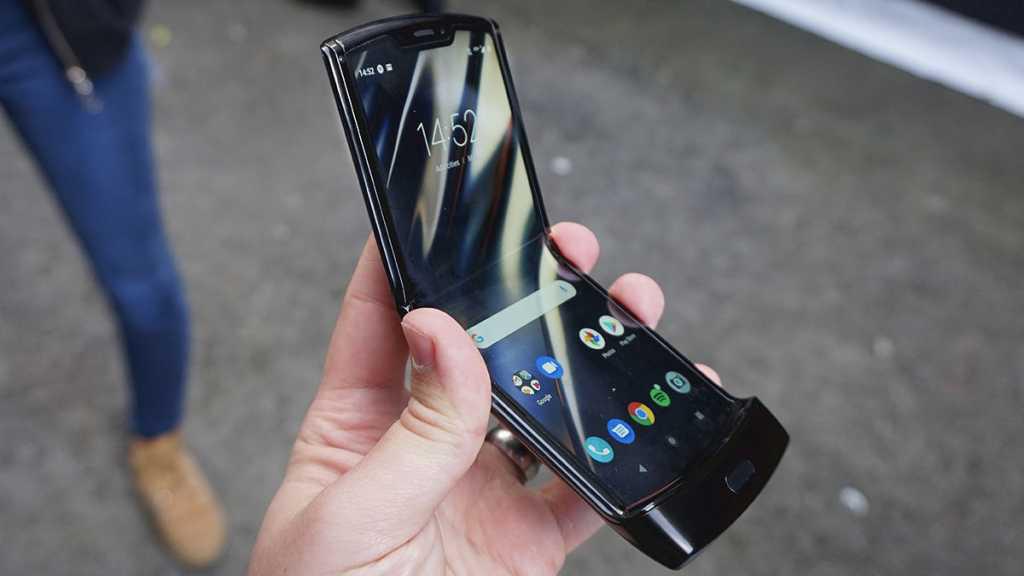
Yes! I've finally switched teams, got rid of my iPhone, and made the move to my first Android phone — the Moto RAZR


r/techforlife • • 4d ago

Back on IOS AND IP 18 pro after 18 years

Thumbnail reddit.com
1 Upvotes

r/techforlife • • 4d ago

Internet while flying

0 Upvotes

On flying recently I noticed passengers around me on the internet browsing different websites. I asked the air stewards if there was any Wi-Fi onboard and they said there wasn't.

I had mobile data switched on, but as much as I tried to view websites over the internet, I just could not connect.

Anyone have any ideas on how they did that please?


r/techforlife • • 5d ago

What everyday gadget has actually held up for you?

2 Upvotes

I drive a truck full-time, and I’m curious what gear people still use after the new wears off. It could be a charger, a tablet, or something you keep in the cab. What’s one gadget you’d buy again, and what’s the one thing you wish it did better?


r/techforlife • • 5d ago

Are portable TVs actually worth it?

11 Upvotes

I keep bringing my laptop into the kitchen to watch stuff while cooking, then taking it back to the bedroom at night. Been thinking about getting one of those TVs on wheels instead.

I've looked at the LG StanbyME, Hisense S6 and Samsung Movingstyle. I like the idea of having a screen I can move between rooms without dealing with cables every time. Would be nice for workout videos too.

Anyone actually using one at home? Mainly wondering how easy they are to move around and if the speakers are loud enough for the kitchen.

Also curious if a regular TV on a rolling stand would work just as well.


r/techforlife • • 7d ago

27M tech guy, my cousin is visiting from the US and wants to gift me something. I want something unique and futuristic. Help? I dont want to burden him so it should be in $200-$300 range

6 Upvotes

My cousin is coming from US and wants to buy me a gift, I dont wanna burden him so it should be around $200 to $300. I'm a 27 year old guy who's into tech, but I honestly don't know what I want and I'm stuck.

I don't want the usual stuff like earbuds or a smartwatch. I'm looking for something unique that feels like it's from 2027, a gadget that's new, a bit futuristic and not everyone has one yet. Black Friday and Cyber Monday are around the corner, so it would be great if it's something that goes on sale.

It needs to be easy to carry in a suitcase What would you get if you were me?

Thanks in advance!


r/techforlife • • 6d ago

Gaming headset recommendations

3 Upvotes

I am on the market for a new headset that’s reliable, not too fragile, and won’t break the bank. I’ve been using Turtle Beach for a long time now, and it’s worked great, but it’s getting old, and I’m not too knowledgeable on other brands. Any help is much appreciated.

Thanks!


r/techforlife • • 8d ago

Any good value products for work?

10 Upvotes

I've bought so much random stuff for my desk over the years, and honestly half of it barely gets used lol. Anything else you'd recommend that's actually worth buying for work?


r/techforlife • • 12d ago

What’s something you switched back to "low-tech" because the smart version was annoying?

29 Upvotes

As much as I love good gadgets and automation, some things just feel way more complicated than they need to be when they require an app, Wi-Fi, or a subscription. 

Curious what everyday items you prefer keeping completely simple versus where tech actually makes life better.


r/techforlife • • 15d ago

Does anyone else take a picture of a cable before unplugging everything?

Thumbnail reddit.com
4 Upvotes

r/techforlife • • 17d ago

What do you guys think about the Tunity ? Does it really work ?

2 Upvotes

r/techforlife • • 20d ago

I built Pure Brief AI to keep a meeting’s context attached to its next actions

1 Upvotes

I’m the founder of Pure Brief AI, a native Mac meeting-notes app. The small everyday-tech problem I’m working on is what happens when a useful note gets separated from the conversation that explains it.

“Send the updated proposal” can look clear in a task list. Tomorrow, the useful detail might be which change was discussed, or whether somebody only suggested it.

In the app, the transcript, AI notes and suggested tasks belong to the same meeting. A task retains a source quote so you can inspect the words around it. Questions about that individual meeting also return supporting transcript lines. The aim is to keep the context within reach while you decide what to do.

For actions you want in your daily list, you review the task, edit the details and export selected ones to Apple Reminders. That is a one-way export. Changes aren’t synchronised between the apps, and it doesn’t automatically assign work to other people.

The short video shows the task/source interface with fictional demo data. It’s an edited excerpt, with processing sped up. It isn’t an accuracy or speed benchmark. A source quote still needs interpretation; the AI can miss a condition or a later change of mind.

Transcription and AI notes run on the Mac by default. Initial model downloads, periodic licence checks and optional connected features use the network. Choosing optional ElevenLabs transcription with your own key sends audio to that provider.

Apple Silicon and macOS 15+ are required. Standard is $49 once for one Mac, with a 30-day trial. The demo, download and current launch offer are at https://purebrief.ai/ .

For anyone already using Reminders or another task list: do you keep the reason behind a task with it, or go back to the original notes when you need context?

r/techforlife • • 22d ago

What’s the one smart home gadget that actually improved your daily routine, not just added tech clutter?

32 Upvotes

For me, a simple smart lock and motion-sensing lights in the hallway ended up saving more mental energy than any fancy app ecosystem, but what’s the single piece of everyday tech you genuinely can’t live without now?


r/techforlife • • 22d ago

made a tiny tool to clean your laptop screen without accidentally pressing everything lol

3 Upvotes

okay so i built this little thing called WipeMode.

ever tried cleaning your laptop screen and ended up clicking random stuff or typing nonsense because your keyboard was still active? 😭

yeah, that's what this is for.

it has:

  • black screen mode

  • white screen mode to spot dust and streaks

  • keyboard lock so you can clean without accidentally pressing anything

it's pretty simple but does the job.

would love if you guys tried it out and shared some feedback. bugs, suggestions, anything is welcome!!

link: https://wipemode.vercel.app/

lmk what you think :)


r/techforlife • • 23d ago

Questions on compressed air blowers

4 Upvotes

Looking into different ways to clean all the tech toys I have and I’m tired of buying compressed air cans nonstop. I’ve seen some small handheld blowers that might do it but I’m unsure if they’re either powerful enough to actually clean tech or the flip side, way overpowered and could damage things. Anybody have experience with something that will work for me?


r/techforlife • • 25d ago

HAL refusing to open the doors in 2001: A Space Odyssey hits differently after you’ve spent all day arguing with a chatbot

2 Upvotes

r/techforlife • • 28d ago

what's your go to setup for keeping everything charged on a road trip?

7 Upvotes

i am packing for a longer road trip soon with my friends and just realized how bad my car charging setup is. we’ll have three phones for maps, music and finding food stops. Then there’s a camera, wireless earbuds and a small laptop for checking stuff at night. that one usb port in my car is basically useless. last time we used a cheap multi port adapter from a gas station and it literally got super hot and stopped working halfway through the drive. so now i am trying to figure out what actually works for longer trips. do you guys mostly use a bigger power bank in the back seat? i’ve been looking at the p63 one since it can handle higher power and charge more than one device. or is a good multi port car charger plugged into the 12V socket enough?

also how do you guys deal with all the cords when everyone is charging something at the same time? would love to know what setup you actually trust for long road trips.


r/techforlife • • Oct 25 '26

This is in response to the exclusion created by the biggest Subreddit for opensource on Reddit.

Thumbnail reddit.com
1 Upvotes

r/techforlife • • Oct 22 '26

Help me pick a Smartwatch

3 Upvotes

hi dudes, so we have to set a really low budget for a smartwatch. I’m a fan of Samsung—I already own Samsung device—but if that’s not an option, something with a similar "Samsung feel" would work too. I’m looking for good sports tracking, but also smart features—ideally a standalone watch that can make calls independently (not strictly necessary, but it would be a nice bonus). A camera would be a plus (though not essential), and access to apps like the Google Play Store is a MUST. If I had to prioritize, I’d choose smart features over the tracking. Could you help me find a good watch that fits these needs and has thin screen bezels? I know that i might be asking much for the budget, but i believe in it!😂 (Note: I use Family Link, so please make sure it doesn’t disable any of the watch’s features. Thanks in advance!)


r/techforlife • • Oct 22 '26

Worth the lack of support?

Thumbnail reddit.com
2 Upvotes

r/techforlife • • Oct 20 '26

LPT: How to quickly free up disk space on a laptop

20 Upvotes

ried tracking down what was eating my drive by hand. I ran du -sh * in my terminal, opened folder after folder trying to guess what was safe to kill, and went down rabbit holes on YouTube to check if deleting a folder would brick my system. That usually took me two hours, only to free up a sad 2GB. Finally, I found a much better way to deal with it.

You need two things.

  1. a clean tool from GitHub that scans storage: https://github.com/KKKKhazix/khazix-skills/tree/main/storage-analyzer

  2. an AI agent that lets you add custom skills. I used Workbuddy since it comes with free models like DeepSeek. The heavy lifting comes from the skill itself, so using a tool where you don't pay for extra tokens or credits makes the most sense.

Gave the link to it and told it to install it as a skill. It ran a security check first, and once it looked clean, it set up the files on my machine.

Then I gave it this prompt: "Scan my disk to find the biggest folders and files eating up space, and give me cleanup advice. Rule number one: do not touch or modify anything in my Desktop or Downloads folders. Rule number two: before running any delete action, you must ask me and get my clear approval for every single item."

When it finished the scan, it gave me a clean HTML report. The report broke everything down into 3 buckets: Junk that is safe to remove, files you should review before touching, and system files you must never delete.

I rebooted my apps and everything ran fine with zero bugs. If you worry about killing important files, just make sure the bot asks you before it removes anything. It worked way better than generic cleaning tools that never reach those deep cache folders.