r/rosettalabs • • 14d ago

Rosetta DBT Studio can now fix failed dbt models with AI: you review and approve every change

3 Upvotes

Hi everyone,

We've added an AI fix feature to Rosetta DBT Studio, our free, open-source desktop app for dbt.

When a model fails, for example because of a typo in a source reference, you can fix it in three steps:

Fix with AI: send the failed run's error to the built-in AI assistant.
Allow: the assistant reads the error, explains what caused it, and proposes a fix.
Keep: review the proposed change and accept it. The model file is updated and the next dbt run succeeds.

Nothing changes without your approval. You see the explanation and the exact edit before it's applied.

The project is open source, and feedback and contributions are welcome:
https://github.com/rosettadb/dbt-studio

We'd like to know how you debug failed models today, and where AI help would actually save you time.

r/rosettalabs • • Sep 16 '26

Local dbt vs Rosetta DBT Studio - same project, two ways in

3 Upvotes

We put together a short comparison of working with a local dbt project through VS Code + dbt extensions versus Rosetta DBT Studio.

For the comparison, we used the same local PostgreSQL database, the same 14 tables, and the same dbt project.

We look at:

  • What each setup requires before you can start

  • Python and virtual environment setup

  • dbt and adapter installation

  • profiles.yml configuration

  • Generating staging models

  • AI provider options, including local AI

  • Querying, notebooks and lineage

  • Object explorer, data lakes and runnable pipelines

The goal is to compare the actual workflow — not just a feature list — and see how much setup is required before you can start working on the project.

Watch the full comparison: Local dbt vs Rosetta DBT Studio: Which Setup Takes Less Work?

#dbt #DataEngineering #OpenSource


r/rosettalabs • • Aug 25 '26

Complete Interface Tour in Rosetta DBT Studio

2 Upvotes

We just released a new video walking through the Rosetta DBT Studio interface and showing what each part of the app does.

In the video, we cover:

• DBT Studio and project management
• SQL Editor and Notebooks
• Object Explorer and cloud storage
• DataLake and DuckLake
• Flows and FlowFile
• Database Connections
• Settings, AI, and Keystore
• Plugins and Task Manager

If you’re new to Rosetta DBT Studio, this is a good overview of the app and everything available in one place.

#dbt #DataEngineering #SQL #Analytics


r/rosettalabs • • Aug 28 '26

dbt Wizard vs Rosetta DBT Studio - what’s the difference?

Post image
2 Upvotes

We put the two side by side to compare pricing, privacy, AI flexibility, local development, and the overall developer experience.

With Rosetta DBT Studio, you get:

AI-powered dbt development

Choice of AI model — OpenAI, Anthropic, Gemini, Ollama, LM Studio and more

Local-first development — your data stays on your machine

SQL Editor, AI Agent and Visual Lineage

Notebooks, DuckDB and Cloud Explorer

Full offline support

Open source and free

The goal is simple: make powerful dbt development tools accessible without requiring a cloud subscription.

What matters most to you in a dbt development environment: AI, privacy, local development, or price?

#dbt #DataEngineering #AnalyticsEngineering #OpenSource #DuckDB #DataTools #AI #SQL #RosettaDBTStudio


r/rosettalabs • • Aug 20 '26

How to Install Rosetta DBT Studio on Windows & Mac

2 Upvotes

We just published a new guide for installing Rosetta DBT Studio on Windows and macOS.

The video covers the full setup from download to first launch, including:

  • Windows installation

  • macOS installation (Apple Silicon & Intel)

  • Python setup

  • dbt + database adapter installation

  • First launch and setup

  • Quick interface tour

The goal is to make getting started with dbt as simple as possible — no terminal setup and no separate Python installation required.

Would love to hear your feedback if you give Rosetta DBT Studio a try!


r/rosettalabs • • Aug 19 '26

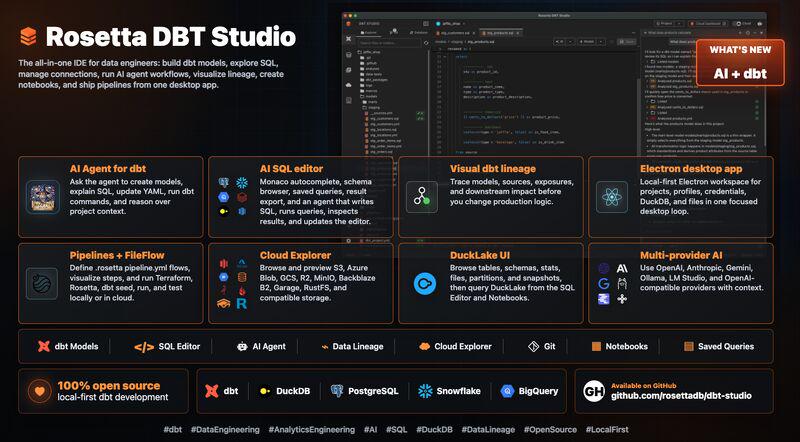
Introducing Rosetta DBT Studio - the all-in-one IDE for data engineers.

Post image
2 Upvotes

We built the tool we always wished existed.

One desktop app. Everything you need:

🤖 AI Agent for dbt - ask it to write models, explain SQL, update YAML, run commands. It reads your project context and just works.

⚡ AI SQL Editor - Monaco editor with schema autocomplete, an agent that writes and runs queries, and reads the results.

⌁ Visual dbt Lineage - trace models, sources, and downstream impact before you touch production.

📊 Analytics & Reports - describe the dashboard you need. AI builds the SQL, charts, and KPIs. Export as a static site and share anywhere.

☁️ Cloud Explorer - S3, Azure Blob, GCS, R2, MinIO, and more.

🦆 DuckLake UI - browse tables, partitions, snapshots, and query directly.

🔗 Multi-provider AI - OpenAI, Anthropic, Gemini, Ollama, LM Studio. You choose.

100% open source. Local-first. Built for engineers who want speed, control, and no context-switching.

⭐ Star us on GitHub - https://github.com/rosettadb/dbt-studio
Download for macOS · Windows · Linux

We can't wait to see what you build next.


r/rosettalabs • • 11d ago

Rosetta DBT Studio can now turn Markdown and SQL into a static analytics site that opens without a database

2 Upvotes
Hi everyone,

We've added analytics pages to Rosetta DBT Studio, our free, open-source desktop app for dbt.

You write a page in Markdown with SQL blocks, and the app renders it as a dashboard:

KPI tiles: a BigValue tag displays a single metric from a SQL query.
Charts: LineChart and BarChart tags visualize query results directly.
AI assistance: the built-in assistant can write, run and fix the page with you.
Static export: Build Analytics Site generates a website in your project folder (analytics-page/index.html), next to your models.

The query results are built into the exported site, so it opens in any browser without a database connection. That makes it easy to share a report with people who don't have access to your warehouse.

The project is open source, and feedback and contributions are welcome:
https://github.com/rosettadb/dbt-studio

We'd like to hear how you share dbt results with stakeholders today, and whether a static export like this would fit your workflow.

r/rosettalabs • • 5d ago

Rosetta DBT Studio’s AI can now build dbt models from one prompt, and nothing is saved until you approve it

2 Upvotes

Hi everyone,

We've been working on the AI assistant in Rosetta DBT Studio, our free, open-source desktop app for dbt. It can now take a single prompt and build out models across your project.

How it works:

You describe what you want in plain English in the chat panel.
It reads your project first, including models, sources and conventions, before writing anything.
It writes staging models, then marts, following the style your project already uses.
It adds YAML tests and runs dbt deps and dbt run for you.
Every change waits for your approval. You review the files and choose what to keep.

In the demo, one prompt produced six files: SQL models and YAML for staging, revenue and customer metrics.

The project is open source, and feedback and contributions are welcome:
https://github.com/rosettadb/dbt-studio

We'd like to hear how you feel about AI writing dbt models. What would you need to see before trusting it in your own project?


r/rosettalabs • • 26d ago

Pipelines You Can See, Edit and Run | Rosetta DBT Studio

2 Upvotes

Your pipeline.yml, drawn as a graph you can see, edit and run, all inside Rosetta DBT Studio.

See it: your pipeline shows up as a visual graph
Edit it: double-click a step, change it, apply. The YAML is written for you
Type it: prefer YAML? Add a step and the graph keeps up
Run it: locally or in Rosetta Cloud, and watch each step turn green

Rosetta DBT Studio is a free, open-source desktop app for dbt.

GitHub: https://github.com/rosettadb/dbt-studio


r/rosettalabs • • Oct 22 '26

dbt Development Doesn't Have to Be Complicated

2 Upvotes

We've been working on Rosetta DBT Studio, a desktop application designed to simplify the dbt development experience.

The goal is simple: spend less time setting up environments and switching between tools, and more time actually working with your data.

Rosetta DBT Studio brings together dbt setup, SQL editing, database connections, project management, and data lineage in one place.

Here's a quick video showing what we're trying to improve.

Check it out: https://rosettadb.io

We'd love to hear your feedback, especially from people working with dbt regularly. What's the most frustrating part of your current dbt workflow?


r/rosettalabs • • 21d ago

Notebooks in Rosetta DBT Studio: SQL cells that hand results to Python as a DataFrame

2 Upvotes

We added notebooks to Rosetta DBT Studio, our open-source desktop app for dbt. A notebook mixes SQL, Python and text cells. A SQL cell runs on your connection and passes the result to Python as a pandas DataFrame, so you can go straight from a query to a matplotlib chart. You can also pip install packages per notebook and import existing .ipynb files.

Repo: https://github.com/rosettadb/dbt-studio

Would love feedback, especially from anyone who switches between a SQL tool and Jupyter today.