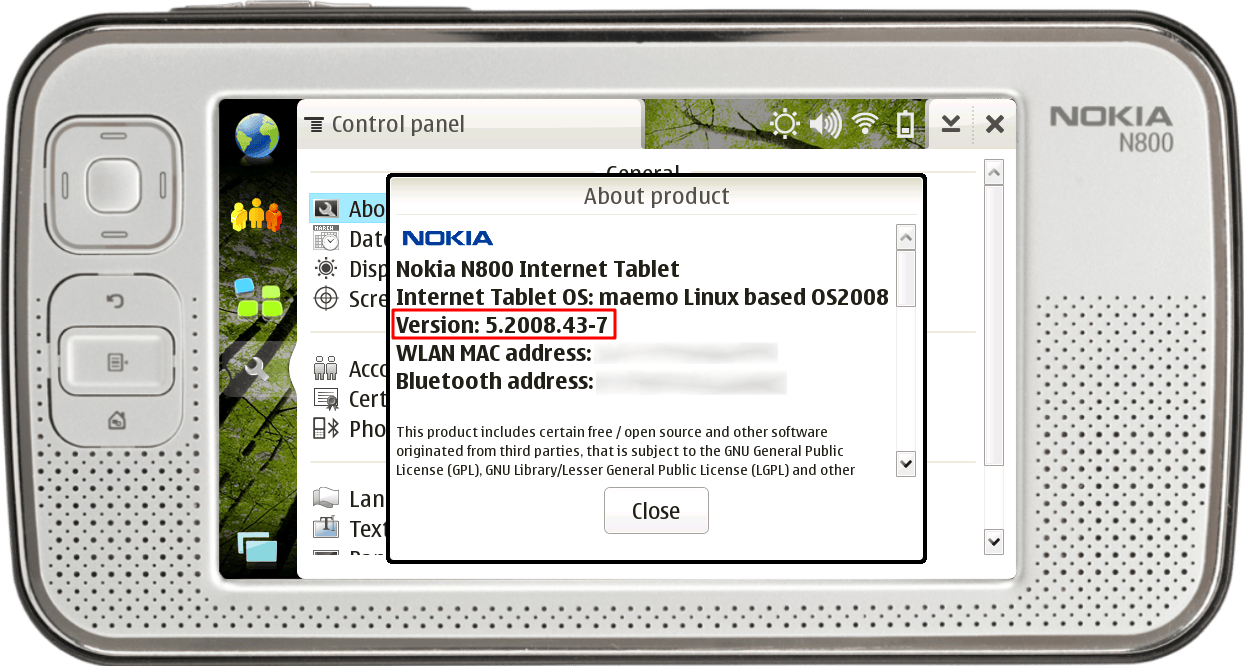
I’ve put together a webpage that hosts all the available firmware versions for the Nokia N800 internet tablet. If you’re restoring a device, experimenting with different OS releases, or just preserving history, this might be helpful.
I wanted to share a simple hardware mod I did to keep my Nokia N800 running using a more common battery model. Since BP-5L batteries are getting harder to find (especially new ones), I adapted a BL-5C battery instead. It has a bit less capacity (around 1020mAh vs. 1500mAh), but I still managed to get around 4 hours of usage, which is pretty decent for this old device
Here’s how I did it:
Separating the BL-5C PCB from the cell: The top of the BL-5C has a small PCB (printed circuit board) with the 3 contact pads. I used a precision knife to carefully cut through the solder joint and separate the PCB from the battery cell without damaging either part.
Trimming the plastic to align the contacts: To make the contacts line up correctly with the Nokia N800's connectors, I cut about 5mm of plastic from the top part of the battery (where the PCB is). This exposes just enough of the contacts to fit properly in the N800.
Reconnecting the cell: I soldered the PCB back onto the battery cell. Alternatively, you can simply align the contacts manually and secure everything with electrical tape, though this method is a bit less reliable for long-term use.
Filling the extra space: Since the BL-5C is physically smaller than the BP-5L, there’s extra room in the battery compartment. I filled the gap using hot glue to keep the battery in place and prevent it from moving around. If you have the time and access to a 3D printer, you could also design and print a small battery adapter or spacer, which would make the fit cleaner and more secure.
Final result:
The N800 powers on and functions normally.
I got about 4 hours of runtime, which is enough for testing apps, web browsing, or just playing around with Maemo.
If you're having trouble finding a BP-5L, or just want a fun DIY project to revive your N800, this might help.
Alternative Repositories for the N800 – How to Update Your Sources
If you're having trouble accessing the default repositories on your N800, you can switch to alternative mirrors that are still online. Here's a quick guide on how to update your sources:
1. Update the Hildon Application Manager Catalogue
Update any URLs that are no longer working. For example:
Find: http://catalogue.tableteer.nokia.com
Update to: http://catalogue.viniciuspaes.com

Find: http://repository.maemo.org
Update to: http://maemo.viniciuspaes.com
Enable or disable repositories as needed.
3. Update Hildon App Manager Sources
Edit the file:
vi /etc/apt/sources.list.d/hildon-application-manager.list
Although this file is automatically generated by the Hildon App Manager, you can manually edit it to avoid rebooting.
Example:
Find: deb http://catalogue.tableteer.nokia.com/updates/diablo-2/ ./
Update to: deb http://catalogue.viniciuspaes.com/updates/diablo-2/ ./
Let me know if you have any questions or need help updating your system.
EDIT:
Hello everyone,
Due to abusive cloning/mirroring that is overloading the server, this Maemo mirror repository will be taken offline.
Just wanted to share that I’ve successfully set up the official Maemo SDK inside a virtual machine configured for the Nokia N800, running Maemo 4.1.2 (Diablo) firmware.
After configuring the Scratchbox environment and getting the cross-compilation toolchain up and running, I managed to compile htop for the N800's ARM architecture.
Feel free to download, test it, and let me know how it works on your devices! Also, if you have suggestions for other programs to compile or need help setting up the SDK, just reply here — happy to help.
Hey everyone, I recently needed the Nokia flasher for a project involving a Nokia N800, and realized that most of the official links are dead and reliable mirrors are hard to find.
So, I’ve reuploaded all the Maemo Flasher 3.5 (version 2.5.2.2) installers I could gather — compatible with devices like the Nokia N800, N810 and N900.
Open Terminal (Command Prompt or PowerShell on Windows)
Navigate to the Flasher-3.5 folder:cd "C:\Program Files (x86)\maemo\flasher-3.5"
Copy the firmware image to the flasher-3.5 folder.
Fully charge your Nokia N800/N810 — this is critical to avoid bricking the device.
Turn off the Nokia N800/N810.
Connect the device to your PC using a USB cable.
Turn on the Nokia device while holding:
N800: Press and hold the "Home" button.
N810: Press and hold the "Swap" button.
Wait until the USB icon appears in the upper-right corner of the screen.
Back in Terminal, execute the following command (replace [FIRMWARE-IMAGE.bin] with your actual firmware file): flasher-3.5 -F [FIRMWARE-IMAGE.bin] -f -R
Flags explained:
-F: Specifies the firmware image file.
-f: Forces the flashing process.
-R: Automatically reboots the device after flashing.
USB device found found at bus 001, device address 002.
Found device RX-34, hardware revision 1302
NOLO version 1.1.16
Version of 'sw-release': RX-34+RX-44+RX-48_DIABLO_5.2008.43-7_PR_MR0
Sending xloader image (8 kB)...
100% (8 of 8 kB, avg. 2218 kB/s)
Sending secondary image (96 kB)...
100% (96 of 96 kB, avg. 3583 kB/s)
Flashing bootloader... done.
Sending kernel image (1500 kB)...
100% (1500 of 1500 kB, avg. 3959 kB/s)
Flashing kernel... done.
Sending initfs image (2273 kB)...
100% (2273 of 2273 kB, avg. 4103 kB/s)
Flashing initfs... done.
Sending and flashing rootfs image (134912 kB)...
100% (134912 of 134912 kB, avg. 4143 kB/s)
Finishing flashing... done
Sending request 0x83 failed!
Unable to get error strings: Broken pipe
➡️ Note: The Sending request 0x83 failed! and Broken pipe errors at the end are normal and can be ignored if all flashing steps completed successfully.
✅ Done!
Your Nokia N800/N810 should now boot with the new firmware.
This guide will help you clone your Nokia N800 system to the internal memory card (near the battery), freeing up space and potentially improving performance.
After a bit of experimentation, I managed to compile Python 3.5.10 for the Nokia N800 using the Diablo toolchain (Scratchbox). This build is threadless (threads disabled) to simplify dependencies and improve compatibility with the old Maemo environment.
At the moment, PIP is not working, because the build does not include SSL support. Maemo’s OpenSSL requires some additional legacy patches, so HTTPS/SSL is unavailable for now. Python itself runs fine, but anything requiring SSL—including PIP—will fail.
The .deb package and the install script are available here:
Please do not install manually (e.g., using dpkg -i). Python is tightly integrated with the Maemo system, and replacing the system Python can break the OS.
The script installs Python 3.5 safely under:
/opt/python3.5
It also creates backups automatically and avoids touching any system components.
Current Status
Python version: 3.5.10
Threads: disabled
SSL/HTTPS: not available
PIP: not functional
Target devices: Nokia N800 / N810 (OS2008 Diablo)
Stability: experimental but working
Good for: running local scripts, experimenting with Python 3 on legacy hardware
Not good for: installing modules that depend on SSL or PIP
Next Steps
If I can get a working OpenSSL build for Maemo, I’ll try enabling SSL in a future update and attempt to make PIP functional.
Feel free to test it, break it, and report back. 😄 Happy hacking on ancient hardware!