I’ve been eyeing the mx master 4 for some time now, and with the beautiful limited edition (though somewhat cringy “special edition” print) I decided to give it a try. I loved the mouse wheel and it would’ve been perfect looks wise, but I just couldn’t get over the weight and the horrible polling rate…I thought I wouldn’t mind 125hz but it feels like manoeuvring a heavy truck with the precision of a storm trooper. For now, it’s back to my trusty old g502x lightspeed with modded silent switches. Maybe this will help someone who also considered switching from a gaming mouse to a “productivity” mouse in the future.
Got a MX Master 3 with failing rubber on Ebay. I coated it with epoxy. looks great and I prefer the smooth surface better. It really glows under UV light. Around the wheel is not great. I could not epoxy without screwing up wheel motion. I used clear fingernail polish. Far from great, but close enough for me.
i have bought the keyboard, i love it but i have a problem with it.
When i bought it the pictures they use had a keyboard with an integrated wire. And the picture and item is not what you receive.
When i receive it, it has a simple mobile phone usb-c cable to use it. I mean, it shouldn´t be any problem and yeah everyone will say, you won´t move it but sometimes you need to and i feel that i will wobble and it is a weak spot and im debating if change it for another keyboard.
Started two weeks ago and then got worse. Happens on all inputs. On the coaxial and optical, it would crackle, and mute. It doesn’t put the control pod on mute but the sound just shuts off. I power cycle it and the cycle repeats. Happens on sound card and also onboard so it’s not a problem with the source. What could be the problem?
I know it's old and I got a newer replacement combo set with a keyboard (also Logitech) but this still comes to life and I'd only need to solder a wire in the keyboard to get that working again too. It would be great to get this working fully again, even if another old EX100 combo would be something around 5$ used. I just want to see if I can restore partially working equipment I used to use for a decade until only maybe a year or two ago.
Because the G915 X LIGHTSPEED (Black, Linear) features black keycaps, the key legends are completely invisible without the backlight turned on, making it necessary to keep the LEDs active while typing. However, the current minimum 1-minute timeout after typing stops is far too long, and I would really like the LEDs to turn off within 5 seconds instead.
I would like to suggest updating the Logitech G HUB software so that users can manually customize the "Lighting Sleep" inactivity timer to any duration between 5 and 60 seconds. Since 1 minute feels unnecessarily long for my workflow, I specifically want the ability to set it to 5 seconds.
Please consider adding an option that allows users to directly set the inactivity timeout between 5 and 60 seconds. Thank you for your time and consideration.
- Logi Options+ 2.9.1013853, clean install (the legacy Logi Options is fully removed)
- Tested over Bluetooth and over a Unifying receiver (C52B)
Problem
No button remap ever works. Example: the top button is set to Mission Control in the "All applications" profile. Pressing it still switches the wheel between ratchet and free-spin, which is the mouse's built-in action. No other remap works either, in any app, including keyboard shortcuts and per-app profiles (Chrome).
What does work
- Options+ detects the mouse and shows the battery level.
- Settings stored in the mouse apply, for example "Swap left/right buttons".
- Back/forward work as native buttons 4/5.
So Options+ can talk to the mouse, but it never takes over the buttons.
Already tried
- Accessibility (on macOS 27: "Device Control and Data Access"), Input Monitoring and Bluetooth are all granted to Logi Options+. Confirmed in the TCC database. No Secure Input active.
- Code signature is valid and notarized (certificate valid until 2030), so the January 2026 certificate issue does not apply.
- Removed and re-added the mouse in Options+ and in macOS Bluetooth.
- Paired through the Unifying receiver instead of Bluetooth.
- Activated the Options+ HID driver extension (com.logi.optionsplus.hidfilter). It shows as "activated enabled" and owns the receiver.
- Restarted the agent, restarted the Mac, and reset Options+ to empty settings.
About five months ago, I designed and showcased transparent versions of the MX Master 4 mouse. Logitech is likely aware of the interest in this type of product, so I am wondering why they haven't made one yet. Is there some major technical or manufacturing issue preventing it?
Meanwhile, Sony is actively releasing the DualSense controller in so many different colors that it constantly surprises me, and numerous Chinese brands are aggressively entering the market with high-performance mice at very affordable prices. Why is Logitech standing so still? Are they simply too busy developing the next generation, like the MX Master 5?
While browsing the web recently, I even saw a Chinese user who custom-made a transparent shell for the MX Master 4.
I won't say much more. To everyone at Logitech, please step it up. I'm not saying this to mock the company or get some kind of amusement out of it—it just saddens me to watch a company I truly love slowly turn into a sluggish, out-of-touch relic.
I've had it on my first G815. Did the warranty claim and got another. It didn't happen on the replacement. But that being said I also went wireless I forget how many months after the replacement and picked up the G915. And it happened to that. Did another warranty claim. It eventually happened to the replacement as well. Did another warranty claim, SMH. But this time they were out of the G915, so they sent me a G915 X. Started to have issues with that, SMH. So I tried this free software from gethub called G915 Stutter Fix and the issue went away on the G915 X.
Since I have so many keyboards now I started to look into different Kailh choc V1 low profile switches. I like tinkering with things especially if it doesn't matter if you screw it up, and after taking apart and experimenting on one of my G815, it turns out switching out switches is actually fairly easy if you know how to solder. (though tedious if you plan to do the whole board not to mention it can get expensive as Logitech's keycaps can't be used on Kailh choc v1 so you have to buy the switches and caps) I bought a decent 40 dollar electric desoldering pump which made the desoldering part take all of about literally 6 seconds per switch as you only have to desolder 2 pins. Soldering the two pins back on takes longer if you have a cheap soldering iron like I do that doesn't get as hot as it should, but it's still fairly easy to do in under a minute per switch.
Now here's why I'm making this post. I wanted to see if I could repair one of my G915 with either some Kailh choc V1 or by harvesting one of the good switches from one of the other keyboards. So I went to here to test which switches was double clicking so I'd know not to try and harvest those. Something I did before my warranty claims as it's a quick and easy way to see the double click and test the whole board. And now get this. No double clicks. None. Not a one. Both G915 work just like they did out of the box. Why? lol Well either they've healed themselves which would be a really neat trick. Or it's the G915 Stutter Fix software that I now have running. So I now have to wonder about all of you who've had double click issues. Have any of you tried that software? ROFL has Logitech been wasting a metric shit ton of money sending people replacement keyboards for a freaking software issue?! Is that really all it's been all this time with so many people? I mean sure yes debris and crap can get into the switches so I'm sure some people's switches are actually bad. But I have to wonder how many now. If this is largely a software issue that's a pretty big fuck up, SMH. So I'd like to hear from any of you who have double click issues and see if that software fixes it for you. And BTW as software go this is one of the lightest. It just runs in the background taking all of 10.2 MB of memory. Which means it's such a simple fix for Logitech to implement it makes their fuck up so much worse, SMH.
I am using the keyboard to type this, but it won't type into the word doc I am writing. Any ideas? I've replaced the batteries and performed a hard restet on the keyboard. I've removed the device from Bluetooth devices and reconnected it. I've changed the F key it is connected through. I can type into Excel spreadsheets, but not MS Word docs. It is bizarre!!! Any ideas????
The title pretty much says it all. I've used Razer for years, up until last month when both my Kraken V3 headset and my Basilisk V3 mouse broke within a week of each other, both of which I replaced with Logitech stuff (went for the G502 mouse and the Pro X headset and like both a lot so far!)
I'm now rather eager to replace what's left of my Razer peripherals with Logitech ones, and next on my chopping block is my keyboard. Don't get me wrong, this is arguably the most consistent piece of Razer hardware I've had, but cleaning it is a nightmare and I am DESPERATE to get Razer Synapse off my computer.
I've seen a G213 keyboard on Amazon for £27, and I'm basically wondering if this is a hidden gem, steal of a deal or if there's a better alternative? I really liked the wrist rest on my Razer Ornata V3, and it seems the G123 has similar, if not the same.
I get antsy buying products so I'd rather ask here before I bite any bullets. Thx in advance :3
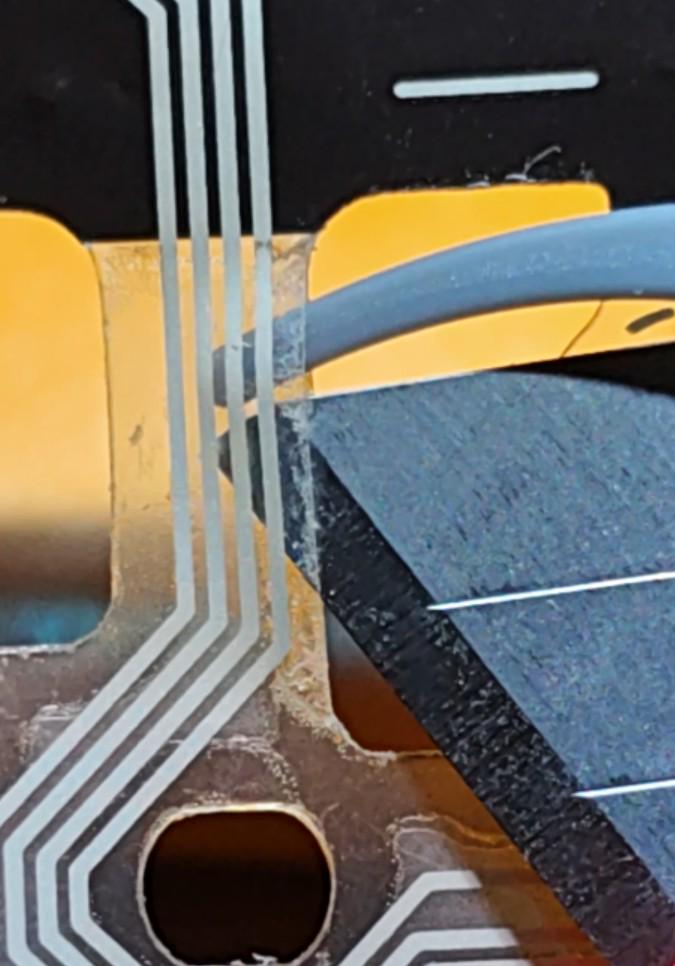
today I was able to Finally dismantle the membrane. after my silver conductive ink arrived ordered online.
Note that once you melt the plastic rivets to access the membrane there is no coming back. when you assemble it back the only thing that will hold them in place are the screws.
after careful visual inspection I found the broken trace. just like what Deepseek told me that having several keys broke at once there is 90% chance the broken trace are near the ribbon cable.
I'm lucky that the issue was at the outer lane. coz if the inner lane is the issue I would probably call it a day and move on. coz accessing the inner one are nearly impossible.
This trace is in between F10 and F11 going up to the ribbon cable
the fix looks ugly and messy. but if it works.. it works.
I'm buying a new keyboard anyway. a cheaper one. with a better repairability. I bought This keyboard thinking it would be my last one.
and I guess it was a mistake buying expensive keyboard only to find out that it got broken in just 3 years. and guess what I was expecting the battery would be the first to break like any other devices.
but no.. it's the membrane!!
---------
it's the same with mx master 3 I was expecting the battery would be the first to break but then it was the mouse switch. but I was able to solder a new mouse switch using Kailh GM 8.0 and now I believe this mx master 3 would last me forever.
--------
I will sell this keyboard on local 2nd hand marketplace or just give it to my nephew if they needed one. I'm buying a cheaper one.. under $30.
I made a Deep conversation with deepseek and went deep the rabbit hole of keyboards. . . and it told me the only thing that make mx mini key expensive was it's spill proof design and it's logi+ software. but in terms of repairability cheap membrane keyboard is the best coz the membrane are not sealed. Mechanical is better if I know soldering. . . and unless you are into competitive gaming. buying an expensive one is not a wise decision to make.
la solución es tecla esc + o, esc + o, esc, esc + b, de vuelta esc, tienen que comenzar a parpadear las tres luces súper rapido, no lo intenten conectar, apagenlo y cuando lo vuelvan a conectar tiene que estar parpadeando solamente la luz del numero de dispositivo que quieran conectar, ya sea 1, 2, 3, una vez lo conecten, traten de poner bien el código, si una vez ponen el código pero se esquivan, vuelvan a apagar el teclado y intenten conectarlo nuevamente, una vez introducen el código si este no se conecta toquen la tecla enter y esperen unos segundos
I bought an MX Keys Mini Mechanical about 2 months ago, and over the past few weeks it's started acting really weird. It basically looks completely frozen. The backlight starts flashing erratically, it loses connection to the Logi Bolt receiver, and Easy-Switch stops working, so I can't change devices.
Turning it off and on again doesn't help. As soon as it powers back up, it goes right back to the same behavior. I've also tried the reset key combinations, and it doesn't respond to them at all.
After a few hours, it comes back to normal to just starting doing it again after a couple minutes. I tried with other devices and with BT connection too and its the same.
Has anyone run into this before? Any ideas on how to fix it? I have already opened a ticket with Logi, but its kinda slow right now...
Hello! Does anyone have a work around to get DTS X for Speakers to work with the Logitech G560 speakers? All drivers are up to date, G HUB is up to date. Motherboard drivers are up to date. I own a licensed copy of DTS X. I cannot get it to work for the life of me. I am connected via USB as well.
I have a couple of 3S mice, one paired to my work-provided MacBook Pro that goes to the office with me, one paired to my personal MacBook Pro that stays at home. The former works absolutely fine all the time, but the latter will suddenly stop working periodically - it's charged and connected via Bluetooth and also visible in Logi Tune, but moving it around doesn't move the cursor on-screen. The only thing that seems to fix it is restarting my laptop, which suggests it's a software issue not a hardware one. Any suggestions?
Coming back for a third update since folks here have been kind enough to let me share progress on this.
I build Orbtile, an app that drives the Logitech MX Creative Keypad directly over USB and turns each of the nine LCD keys into a live status tile for AI coding agents (Claude Code, Codex, Antigravity, Kimi Code, ZCode). When a session needs approval, it jumps to the front and you can hold Allow or tap Deny straight from the keys.
I just shipped version 1.1, and the big addition is animated character key styles alongside the original Frosted orb. Each character lives on its LCD key and reacts to what that session is actually doing:
Bit: a tiny robot whose face is a screen. Three dots while thinking, a turning gear for tools, scrolling lines while writing, both arms up with "!" when it needs approval, and glitched X eyes on an error.
Dew: a calm drop of water. Watches bubbles rise while thinking, swings a wrench for tools, bounces when waiting for you, and sags into a puddle on an error.
Ember: a flame that refuses to go out. Throws sparks while running tools, shoots tall and hops when waiting for permission, and settles into a glowing coal when offline.
Neko: a loaf-shaped cat. Rests its chin on a paw while thinking, swings a tiny hammer for tools, perks its ears and waves when it needs you, and squeezes into a box while compacting context.
Puff: a little cloud whose weather is your session. Mist on startup, a drizzle of text lines while writing, a sun when done, and a small storm with a bolt on an error.
You can pick one style for the whole keypad, or assign a different character to each coding agent in Settings (for example Neko for Claude Code, Bit for Codex, Ember for Antigravity) so you can tell which agent is waiting without even reading the text. Whatever you pick on the computer syncs to the keypad and the iPhone and Android companion apps too.
Quick answers for anyone seeing this for the first time:
Options+: stays installed, and Orbtile does not need it. Hold both page buttons for 1.5 seconds (or use the menu bar / tray) to switch back to Options+, and quitting Orbtile hands the keypad straight back to Options+ as well.
G915 X LIGHTSPEED – Is this behaviour normal or have I got a faulty unit?
Recently upgraded from the original G915 to the G915 X LIGHTSPEED. I did consider other brands, but the G915 X had pretty much everything I wanted: a full-size, low-profile design, dedicated macro keys, volume roller and multi-device connectivity. I was also already accustomed to the layout.
Really like the feel of the keyboard, but I'm experiencing several frustrating issues:
Switching to Bluetooth is almost instantaneous, but switching back to LIGHTSPEED takes 5–8+ seconds for the correct lighting to load.
The keyboard flickers several times and cycles through different lighting effects, despite inputs working almost immediately.
Lighting frequently reverts to the default blue with pink WASD keys.
Flickering persists even with onboard memory enabled and all Logitech software terminated.
Disconnecting the charging cable reduces the flickering but doesn't eliminate it.
Getting custom lighting to persist across connections is unnecessarily complicated.
Using onboard memory means sacrificing some advanced macro functionality.
I've tried completely reinstalling G HUB, resetting onboard memory, disabling Windows Dynamic Lighting and disabling the Logitech LampArray service. Both keyboard and receiver firmware are up to date.
My original G915 handled switching between devices considerably better. The main reason I upgraded was because it had developed persistent key chatter and intermittent backlighting issues.
Are these common issues with the G915 X, or have I received a faulty unit? Has anyone managed to achieve seamless switching between Bluetooth and LIGHTSPEED whilst retaining custom lighting and macros?
I'd rather keep the keyboard as the hardware itself ticks pretty much every box for me, but I'm struggling to understand how the software and device switching experience can seemingly be worse than its predecessor.
My Logitech C930e kept failing in the Camera app, Teams, etc. Sometimes it worked once, then died again. Posting the fix in case it saves someone a few hours.
**Symptoms**
- Camera works briefly or not at all
- `sc query FrameServer` shows STOPPED with exit code **1067**
- System event log: Event 7034, *"The Windows Camera Frame Server service terminated unexpectedly. It has done this 50 time(s)."*
Logitech used to bundle **Personify ChromaCam** (background blur software) with its webcams. It installs a virtual webcam called **"Personify Virtual Camera Universal"**. ChromaCam itself was long gone from my PC, but the virtual camera driver was still there, and it crashes the Frame Server service on current Windows 10.
Disabling the device in Device Manager **didn't stick**. It came back enabled by itself and the crashes returned. You have to delete the driver.
**Fix** (Admin PowerShell)
Find the driver's oem number:
pnputil /enum-drivers
Look for Original Name `psycamera.inf`, Provider `Personify Inc.` and note its Published Name (mine was `oem55.inf`).
2. Remove the device and delete the driver (swap in your oem number):
**Tip:** paste the commands by selecting and copying the text. Some copy buttons and "Run" buttons in other apps paste into a non-admin shell or mangle the quotes, and then the commands silently fail.