9
55
16
u/Low_Chance Jul 19 '19
This was a really funny screenshot/question combo, thank you : )
If I had a nickel for every hour I've spend furiously debugging what turned out to be a simple typo... well, I'd probably only have a few dollars but that's still a lot of hours dammit!
14
Jul 19 '19
This made me laugh. Not because it's fun or easy to laugh at those with less experience than you (a plague in the tech industry IMO) but because this is so relatable.
Get used to it OP. And fins a decent linter to help you out with these things.
9
u/aikilink Jul 19 '19 edited Jul 19 '19
OP, I'm seeing people suggesting that you should use a 'real' editor like WebStorm here. I'm sure WS is awesome, but with a few plugins (which are super easy to use install), you can get plenty of features in VSCode.
I love discussing editors, but comments like those really can cause frustration. Using a certain editor is not going to make your journey of learning to code that much different. I wasted time changing editors when someone said, "Oh, for what you're doing, you should really use "X", or another time when someone at a meetup says, "I only use 'Y', and here's why you should too!" At the end of the day, you can write your html in notepad, and still learn how to code. Please don't doubt your use of VSCode. As you code more and more, you may realize that there is some other editor you want to try, and that will be fine.
My strongest advice is to keep writing code. Today you learned that you can add a linter to your editor, and now you can keep writing code, with that tool to help you.
I'm not very far ahead of you on the learning journey, but feel free to PM if you have any questions with loops or functions or anything. :) Code on! And welcome to the club!
Edit - TL;DR: Don't let people distract you from what you are here for: writing code. :)
5
4
u/playdead_ Jul 19 '19
Don't feel bad about this. I learned early that like 90% of the time when something doesn't work, I should first check basic spelling, syntax, semicolons, etc. before I start questioning whether I'm applying concepts incorrectly. Most of the time I've just overlooked something ultra simple.
4
7
6
u/xkwilliamsx Jul 19 '19
Lets work on screengrabs too.
Windows has Print Screen button, snipping tool, and game bar screenshots.
Apple has that CMD+4 shortcut too.
1
3
3
3
3
2
2
2
u/dreid_dev Jul 19 '19
would you still need to declare x as a var let const as well? or does js not enforce
2
u/maujood Jul 20 '19
One of the more nuanced posts on this subreddit. Thanks for sharing OP and have my upvote.
2
u/BoDiddySauce Jul 20 '19
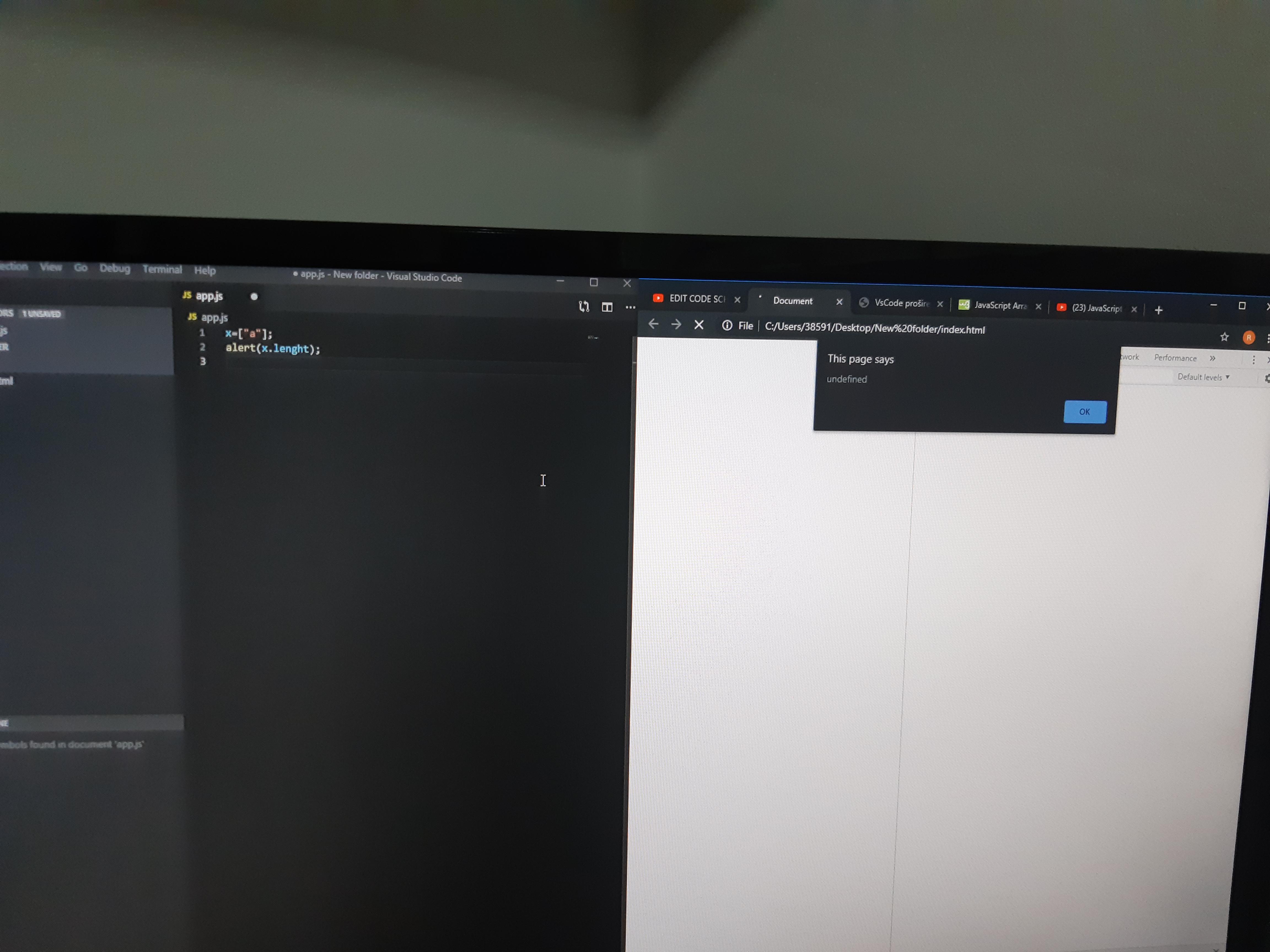
LOL the prior comments. But yeah, for future debugging/learning purposes, the browser alert you created by typing `alert(/* stuff here */)` is calling the native browser `alert` function (hence the `()` part) with an argument (`x.lenght`) and since `lenght` isn't actually a property of `x` (because you misspelled "length"), it is `undefined` as it was never declared and set to a value, which is what the alert is saying. Same as doing something like:
```
const obj = { name: 'BoDiddySauce' };
console.log(obj.randomProperty);
```
The property `randomProperty` of `obj` hasn't been declared or assigned a value, so by default it is `undefined`, which is what the log statement will show you.
2
u/starchturrets Jul 20 '19
Others have already mentioned ESlint, which can be really helpful for catching errors, but there’s also Prettier, which is helpful for formatting code so it looks nice, and Live Server, which saves you from constantly refreshing your browser while writing code.
2
2
2
2
2
3
u/crazedizzled Jul 19 '19
This is why real editors like WebStorm exist, where silly typos like that are obvious.
3
2
u/mcdylanb Jul 20 '19
you should add extensions that has intellisence or you could go for IDE like JetBrains WebStorm so its easier to find problems/bugs.
0
Jul 19 '19
[deleted]
2
u/RedJohn286 Jul 19 '19
Yeah no its not that just a typo
8
u/insertAlias Jul 19 '19
Technically you don't have to declare the variable. It will become a global variable if you have not declared it; attached to
window.That said, you absolutely should declare all your variables.
const x = ["a"];Or this, if you plan on changing the value of that variable later:
let x = ["a"];If you're using "strict mode" (which you eventually should be), this would be an error.
1
Jul 19 '19
You can mutate x if it was declared with const just cant reassign it. So technically you can totally change the array into something else with const.
4
2
5
Jul 19 '19
No you dont it will Become a global if you dont have strict mode implemented
2
u/andrew-dewitt Jul 19 '19
Which is also something to be avoided, but that's a different can of worms.
254
u/senocular Jul 19 '19
That's what happens when you misspell
length;)