r/kinesisadvantage • u/No_Sir_4971 • Aug 23 '25
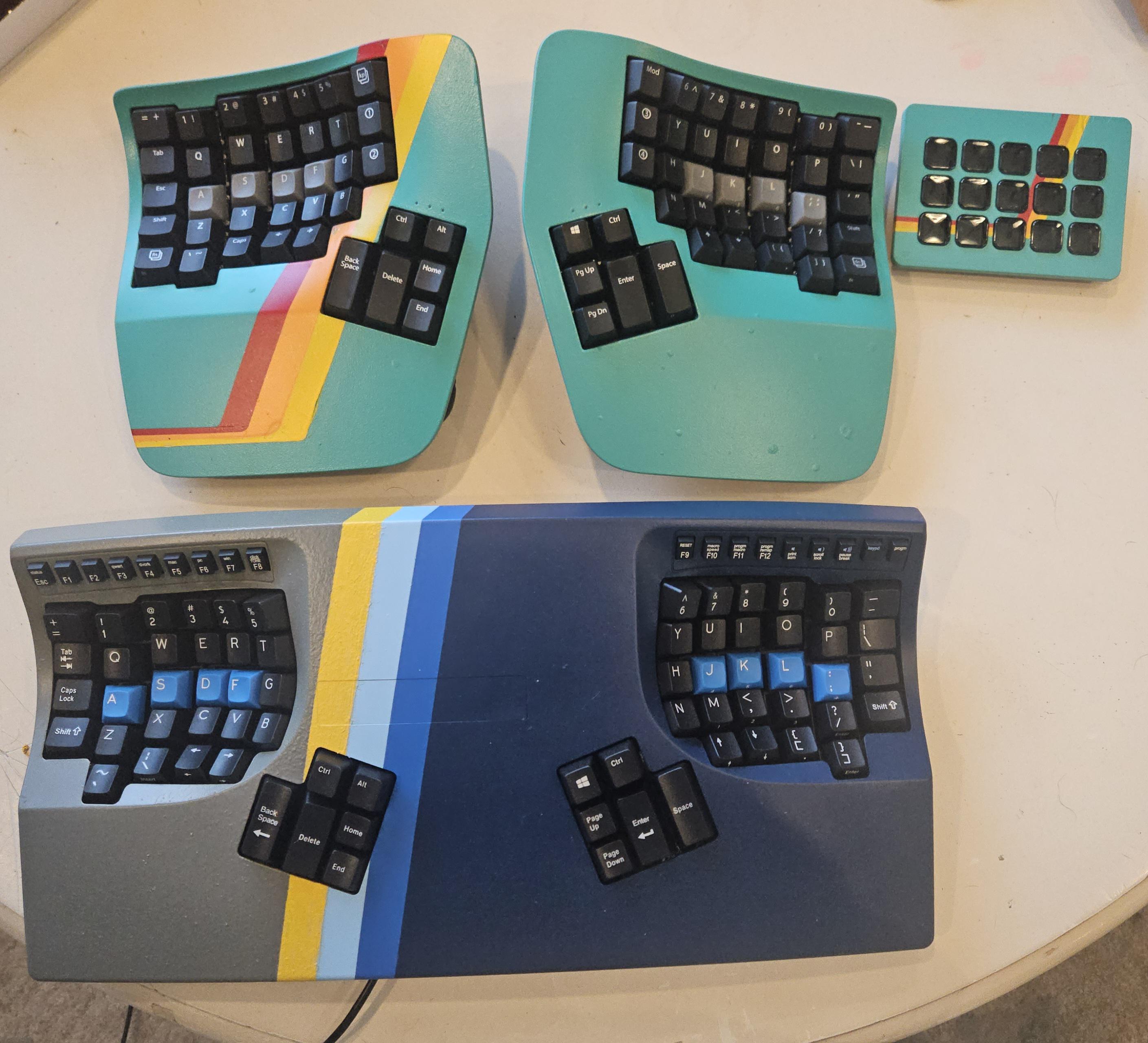
Painted my 360 and 2
213
Upvotes
r/kinesisadvantage • u/funkyjunkymonky • Apr 17 '25
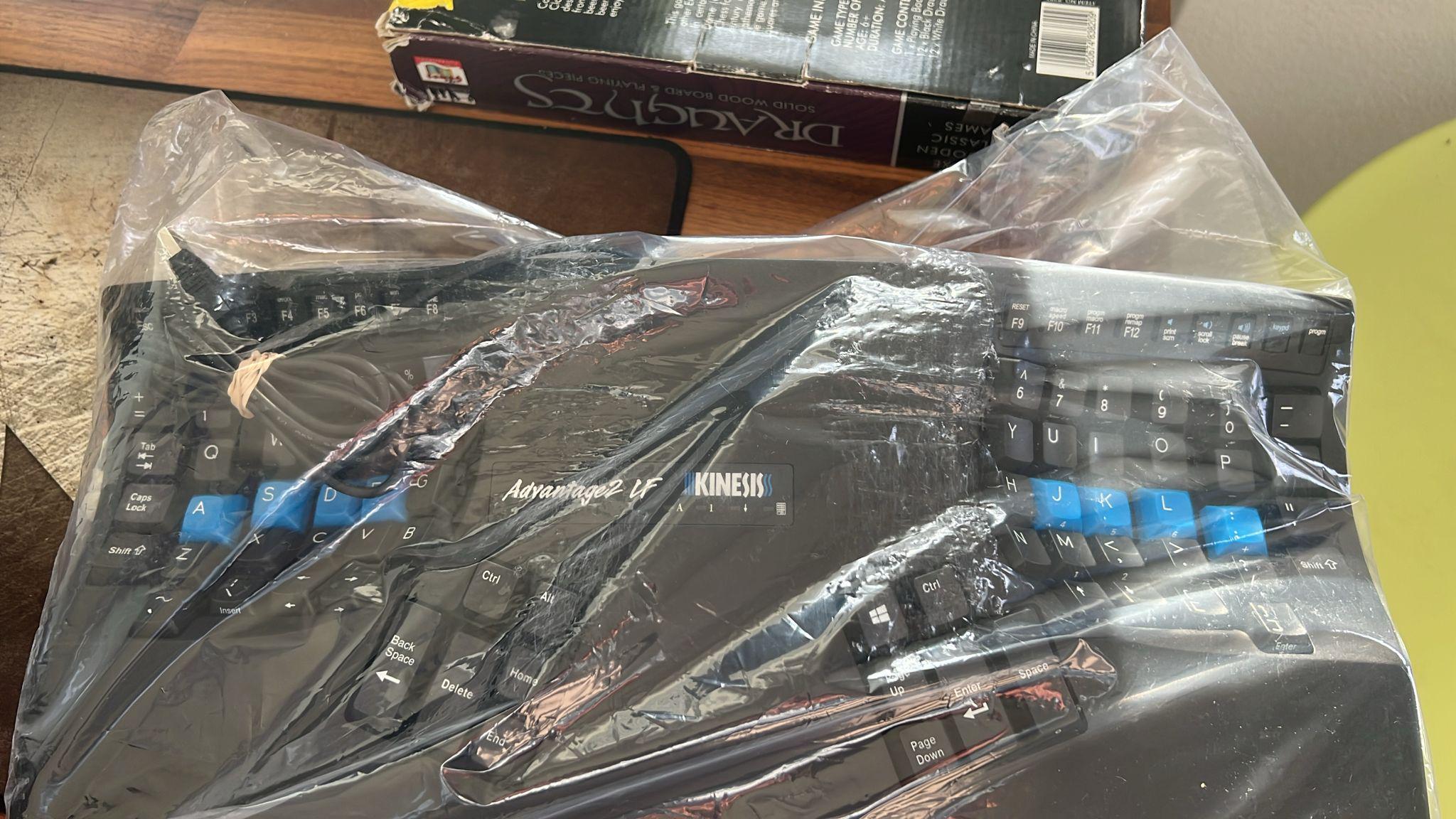
After saving money for 2 years, I finally received my dream keyboard, the kinesis advantage 2.
It is not easy to switch from a normal keyboard (keychron k2) to a separated keyboard. And because I am coding a lot, I wanted to ask you if you have any advices about mapping keys. I already mapped my page up and page down key, to ctr+c and ctrl+v; My escape key is also now the key cap. I am just trying to get used to it. Frustrating to be so slow, but extremely excited to handle it properly.
r/kinesisadvantage • u/inthelimbo • Dec 18 '24

r/kinesisadvantage • u/MorgulKnifeFight • Apr 20 '26

r/kinesisadvantage • u/bsick_ • Apr 15 '25

I'm extremely impressed with this keyboard. I'm currently typing on it right now and it has felt like such a dream. It's inspired me to become a better programmer by finding out my best macros and also woking on my touch typing. I had about a 85% perfect touch typing before this and now with just a week of daily practice I'm typing back up to my normal speed (75wpm on tests) with the actual proper technique.
I have the pink kalih quiet switches and it feels really smooth to type.
For gaming, I have used the "Key Press" option, similar to num lock, and moved over the left side's native key mappings to the right by one (W=E). This gave my left hand the intended spot it's supposed to be in as designed for this keyboard. This is so much better for WASD style games, and honestly this thing is good for gaming.
Keycaps: I've recently ordered the blank PBT keycaps as it's highly regarded on the subreddit.
By far, the coolest thing is the recent firmware update with Kinesis Clique. It seemed like all the reviews about this model hated the "flash" process to update their keymapping. I was down to do it, but their new web based version, kinda kicks ass.
Travel Case: I've also digged around the subreddit and found this as the best bang for your buck when it comes to a travel case. Very good article.
The only thing with this keyboard is that I never got to build a custom keyboard that has really nice sound yet. The thocky sounding keyboard is one of my favorite. I also really wish I could get ceramic keycaps. I have gotten around that desire by building out a custom thocky keyboard for my girlfriend which we are both stoked on. Overall, this has been extremely worth it because it has made typing feel so natural and my wrist pain has subsided!
r/kinesisadvantage • u/amynias • Apr 28 '25

I got this Signature series Advantage 360 wired (SmartSet) for $390 with coupon before Kinesis raised the price to $600 last week. White shell, black shine-through keycaps, white backlight, Kailh Box Pink 35g linear silent switches, and cushy magnetic black palm-rests. I absolutely love the aesthetic of the black-on-white, and the white backlight is lovely and professional-looking (even though I rarely look at the board while touch typing, took 2+ months and I'm up to 65wpm). The pink switches feel and sound great. I find the stock/lowest tenting setting to be the most comfortable/natural-feeling. I also have the foot pedal plugged into the left half. Very premium look and feel. I love sharing pictures of my Advantage 360 with people because they think it looks so alien haha. Imo once you get used to the Advantage ortholinear column-staggered contoured keywells, there's no going back. It's such a great typing experience. I use the wired version so I can easily switch between MacOS, Windows 11, and Fedora Linux without worrying about Bluetooth shenanigans and batteries running out. I'm currently in the market for a carry case or backpack that can accommodate the Advantage 360, so if anyone has any recommendations, I would really appreciate it!
r/kinesisadvantage • u/PostHumanJesus • Jan 30 '26

"Buy any new Advantage2 model keyboard and get a 2nd Advantage2 for $150 off.
Use code ADV2BOGO150 during checkout, only at the Kinesis store."
Thought i'd share in case some of you aren't on the mailing list.
This is sad news as the KA2 is a fantastic keyboard and the GOAT in my eyes.
r/kinesisadvantage • u/Interesting_Arm_7250 • Dec 14 '25

After trying 3 split keyboards. KA 360, Glove 80, and ZSA Voyager, I ended up coming back to Kinesis, I honestly didn't know about the signature edition given that I bought the first one from amazon. When I discovered the signature edition I had to get the black one. Looks really nice.
Voyager did not work as daily driver even with tilting upgrade. But still would be one that I would use ocassionally or for travelling.
Now between glove 80 and Kinesis, Glove feels a little more ergonomical, but I guess I discovered I like more the mechanical layer than low profile. And those extra keys really help a lot on a workflow with macros where you just require a single key, insteand of combos, or combinations. At least for development this is incredibly usefull. With Glove 80 there are combos or hold actions, but it is just something in those extra keys that just flows.
Palm pads are ok, but definitly not using them is already very ergonomical, and sometimes I feel better without them, one thing you experience with palm pads is a slight more comfort with the thumb layer.
r/kinesisadvantage • u/the-red-turtle • Jan 08 '23
This is a review of the Kinesis 360 PBT QWERTY keycaps on an Advantage 2.
The upshot is that it's a terrific upgrade to the stock Advantage 2 keycaps, with a few minor steps back in ergonomics.
ERGONOMICS: The Kinesis 360 PBT keycaps have a nearly identical profile to the Kinesis Advantage 2 keycaps, with a few slight differences that Advantage 2 users may notice.
The biggest two are the home row and the top thumb row keys. The Kinesis 360 homerow keys have a shallow, nearly imperceptible "dish" compare to the aggressively dished Kinesis Advantage homerow keys. They are perfectly serviceable, but I missed the "dish" and replaced them with Signature Plastics PBT deep dish DSA keycaps. The image below shows the shallower profile of the Kinesis 360 homerow "a" key compared to the Advantage 2 and Signature Plastics deep dish DSA.

The Advantage 360 top thumb row keys (leftmost keycap on the image below) are slightly shorter than on the Advantage 2 (middle keycap). I prefer the taller Advantage 2 keycaps. I've switched them out for Signature Plastics SA-P Row 1 keys (rightmost keycap), which have a high profile like the Advantage 2 originals.

There are other slight differences to the keycap profile, including the "page up" and "page down" thumb keys, the 1.25u keys, and possibly to the "g" and "h" keys (see Advantage 360 and Advantage 2 profiles below). I have a hard time noticing these differences.


MATERIALS AND COLORWAY:
From a materials perspective, the 360 PBT keycaps are a substantial upgrade over the Advantage 2. They are made from PBT instead of ABS and should be more resilient to keycap shine. The dye sublimated legends will not rub off with use, unlike the pad printed Advantage 2 keycaps. The 360 keycaps are also much thicker than the Advantage 2 keycaps, which give them a slightly deeper sound.
Color-wise, they fit well with the black Advantage 2. The first image below are of the Kinesis 360 PBT QWERTY keycap set on an Advantage 2, with SA-P top row thumb keys. The second image is of the same setup, but with deep dish DSA home row keys.


There are reports that the colors vary between the Advantage 360 PBT QWERTY, blank, and Advantage 360 ABS keycaps. I do not have these other sets to confirm.
OTHER MINOR POINTS: The keycaps come in a nice cardboard and plastic tray. They also include a wire keycap puller and several extra blank and macro labeled keys.
Two notes for Advantage 2 users -- because there are no function keys on the Advantage 360, the keycap set does not come with the chiclet function keys. Also, there is no "insert" key between the "~" and left arrow keys. I replaced it with one of the macro keys.
PRICE: This Advantage 360 PBT QWERTY set is $75. The blank PBT set is $50. The cost of the keycaps is more than most traditional keyboards. On the other hand, cobbling together a similar PBT keycap set will cost as much or more from other vendors.
CONCLUSION: Overall I think Kinesis did a great job with the Advantage 360 PBT QWERTY keycaps. There are minor steps backwards with the profile of the home row and the top thumb keys, but most users will likely not notice.
r/kinesisadvantage • u/amynias • Sep 21 '26

If anyone here runs Linux, particularly with the Gnome DE, which supports a lot of useful touchpad gestures, I highly encourage you to try your Advantage 360 (mine is the Smartset wired Signature Series with white shell, white backlight, and palm pads with 35g Kailh Box Pink silent switches) with the Apple Magic Trackpad 2 USB-C. The trackpad is plug-and-play on Linux with a native mainline kernel module. I use the Loftmat 2 mousepad for a nice cushioned feel and to move the trackpad around for easier ambidextrous use. This setup is also great if you have RSI or carpal tunnel symptoms, I've found it much easier on the hands than a traditional mouse and keyboard with the separation, tenting, and easier scrolling with the trackpad.
r/kinesisadvantage • u/eugene8080 • Sep 25 '23

I found a Herman Miller + Joystick setup for flight sims and I decided to try it with the kinesis advantage 360. https://www.reddit.com/r/hotas/comments/mmmyp2/herman_miller_aeron_diy_mounts_with_quick_release/
Pros:
I have a multiple monitor setup and having the keyboard on the chair lets me swivel to the monitor I'm using without turning my head for an extended period of time.
I can retract my shoulder blades and not round my shoulders no matter where my chair is placed relative to the desk
Cons
The space for the mouse is a bit small
It doesn't fit my extra USB numpad so I have to actually learn to use the numpad built into the Advantage360
r/kinesisadvantage • u/ThisSiteCanBlowMe • Oct 15 '26

r/kinesisadvantage • u/loss_of_signal • Jan 13 '26

The work is not quite finished yet, but I thought I might share
BlackPill mod, with a nice!nano for wireless support.
keycaps, MT3
Foam insert for sound proofing
ZMK config:
https://github.com/nol00p/ZMK-Blackpill-adv2
r/kinesisadvantage • u/ClickLickBoom • 27d ago
I've had my Advantage360 Pro for a while and wanted a faster way to try layouts on my Mac. I also use an Icelandic keyboard layout, and no editor showed the keys the way my Mac actually types them. So I built one.
Remap360 is a free, open-source Mac app:
Live editing over USB. Click a key, pick what it should do, and it's on the keyboard instantly. Try it, then Keep Changes or Revert.
Keycaps show your own keyboard language. Legends follow the Mac's keyboard layout (English, German, French, Nordic, Icelandic…), including the Shift and Option characters.
Mac shortcuts built in: Mission Control, Spotlight, screenshots, Lock Screen, media, volume, brightness.
One click adds a MacBook-style top row to the Fn layer.
A Test Pad that shows exactly what each key sends, plus automatic backups and layout export/import.
It uses the same live-editing protocol as Clique (ZMK Studio), so changes show up in both. It needs a Pro with the Clique-capable firmware; older keyboards need Kinesis' one-time update. It's signed and notarized, and runs on Apple Silicon and Intel with macOS 15+.
Download and source: https://github.com/daffy-dev/remap360
This is the first public version, so feedback and bug reports are very welcome. Not affiliated with Kinesis, just a happy owner.
r/kinesisadvantage • u/Interesting_Arm_7250 • Sep 08 '25

Setup:
KA 360 wired with blank keycaps
Glove 80
Trackball: Kensignton Slimblade Pro
Wrist Rest: kensington Ergosoft for Slim Mouse
Chair: I Seating Caselli C
Dev environment: Ubuntu Linux with awesomewm and Emacs as main editor.
This is my setup for programming, mainly on Linux with Awesomewm and Emacs, some thoughs on these keyboards, is that I found that those chairs with adjustable armrests fit wonderfull regarding the ergonomics and the split design.
I use mainly Kinesis advantage because I found that those 4 extra function keys work great with emacs regarding file management and project navigation, and for me been able to just quickly remap a macro has been a great. Some things I noticed while using emacs that makes heavy use of ctrl x and Meta, is that Glove 80 you really can do those actions without problem, so ergonomically, Glove80 really feels like that, a glove. Yet, I prefer KA because I feel an interesting improvement of workflow with those 4 extra keys and instant remapping.
What I did for Glove 80 was to use the kinesis advantage layout to keep the shift keys with pinky fingers, this way I can without problem preserve muscle memory and not have context switching problem.
Regarding the trackball, I found that using that angle is very comfortable, but yet when doing some figma that is not my main skill, I will simply change to traditional mouse. Having tested the trackball, personally is not something I would use for design programs, but maybe some people can handle it, In my case is just ovassionally so I'm ok just changing to mouse on those few ocassions.
Feel free to ask any questions.
r/kinesisadvantage • u/roherdzik • Jan 10 '26

Hi folks, today I got a great deal on the local market for my second Kinesis Pro. I’ve been using my first one for over a year now with the stock configuration of brown switches. At the beginning, I actually wanted to return the keyboard, but after some time the switches started to feel nice, and until today I was like: “OK, I like them.”
Yesterday I spotted a great deal on our second-hand market for a brand-new Pro model. I thought it would be good to have another keyboard, since I work from the office quite often, so I could keep one there (until now I was commuting with my keyboard in my backpack).
The listing didn’t include any information about the switches, and the seller couldn’t answer my question, so I went there hoping the keyboard might be equipped with something new (not browns). Luckily, I ended up with a pink Pro version.
To be honest, I still like both of them, but if I had to keep only one, I would definitely go with the pink version. The scratchiness of the browns isn’t entirely my thing — I can use them, but my best typing speed and overall feel come from the Pink linears.
You can also see my rather crazy keycap choices on both keyboards. That’s what I find comfortable — it helps me control the key tilt and adjust it to the ergonomics of my right hand after a minor accident I had.
r/kinesisadvantage • u/b1uegh0st • May 13 '25

Disclaimer: I understand that
People moved on to mostly talk abt the 360 recently.
Some people talked about using mt3 profile on their (360 mostly, one on advantage).
mt3 profile is not exactly the hot new kid on the block anymore, maybe even a bit hard to get (drop still has them, I think)
Anyway Just want to drop some pictures and notes here in case someone wonders if they should try this spherical keycap profile on your belove Advantage.
TL, DR: I prefer this to SA (have a half-half picture with 2 profiles, for your rev). It’s lower than SA and I feel that it fits the keywell better.
Note that higher keycap will A. Be closer to your finger, so that’s comfy; but B. They also exagerated the distances between columns and keys.
Need to alter the case (“B” and “N” place, mostly).
Below is just some extra notes for someone who may need it:
If you don’t alter the case, B and N will sit at half-pressed (but not actually pressed, so still usable, just feel weird typing on them).
I got the keycap at 1800 kit (as in full keyboard with numpad). The numpad part provides enough 2u for your big thumb keys ( space/backspace ). It even comes with some weird angle (the numpad “Enter”s, they tilt forward) that one can customize to his/her liking.
I do have an extra kit for modifier key (ctrl, alt, etc.) which is flat, not tilted upward. So that’s interesting to combo them. Tilted ones at top and bottom, so on and so forth. I guess this plays the same with SA or other profile that provide 2 types of modifier profile.
r/kinesisadvantage
•
u/Yellowcat123567
•
14d ago


i used to use the adv2 in my lap all the time. Since is was a large single board design it was easy and felt natural . For how my body is that was the most ergonomic way to type. I wanted the Bluetooth features on the 360 but could not stop thinking about lap mode. here is my mount
r/kinesisadvantage • u/Interesting_Arm_7250 • Apr 09 '26
The towel mod is working great. Sound is lower that what can be perceived when recording, but in case someone wants to hear the difference, with headphones is more clear.
Regarding keycaps, not sure if bad luck or something, but I have 2 KA2 and every time I tried to change the keycaps, I ended up messing up one of the thumb cluster keys where half of the switch would be pulled along with the keycap, it only happened with thumb clusters, the second time was just a matter of pushing again the switch and no damage was made, so be carefull with thumb cluster when changing keycaps.
r/kinesisadvantage • u/NoMolasses1153 • Mar 25 '26

For context, I’m a dev who’s always been into keyboards. I built my own gaming keyboard when I was younger, then moved onto a custom Corne, lubed and filmed the switches, ZMK, the works.
I was walking down the street this summer and saw a Kinesis advantage just sitting in a free bin outside someone’s house. They weren’t moving or anything, it was in a bin literally marked “Free.” I knew what it was so I took it home, cleaned it up thoroughly, and have been using it ever since. I fucking love it. I type faster than with my corne, the concave is remarkable and feels better than any tenting configuration I had before.
This feels like a very strange and lucky way to find my endgame keyboard. I’m not religious but it literally felt like God sent me a message lmao. Thought if there’s anywhere people would get a kick out of the story it’s here. Was initially planning on just selling it, now I think going to sell my corne.
I included a photo from the day I found it.
r/kinesisadvantage • u/dschk • Apr 25 '25

Having been a big fan of the original KinT by Michael Stapelberg, I have finally made a Raspberry Pi Pico version with QMK (the RP2040 has been my favorite MCU for building QMK boards, as it is the easiest to flash and is also super cheap). I bought my MCU's for about $2 each on Aliexpress.
Some people may have seen my RP2040 mod of the KinT board with wires, but I have finally made a PCB design that can take the RP2040 directly. I also borrowed heavily from u/dj_edit's pillzmod project, as it made use of much easier-to-solder through-hole components, as well as a re-positioned combined footprint for the main keywell FCC connectors that can take both the vertically installed FCC cable of the KB500/KB600 variants, as well as the horizontal direct-to-PCB versions of the earlier Classic/Essential/Contoured models as you can see in the attached photo. It worked perfectly, so thanks to u/dj_edit for that!
Here's the Github repository for the PCB and QMK files: https://github.com/oneleaftea/KinP
Hope some of you find this helpful!


