
5
Oct 06 '20
2020-10-06 13:33:56: Error on line 162:33: TypeError: undefined is not an object (evaluating 'data.current.temp')
😕
6
u/mzeryck Oct 06 '20
It sounds like /u/Exodus101 helped out - for anyone else, it does take OpenWeather a few hours to activate the API key sometimes (which would also cause that error!)
→ More replies (1)3
u/dralth Oct 07 '20
Curious, why OpenWeather API instead of DarkSky API? Thanks!
2
u/mzeryck Oct 07 '20
The DarkSky API was shut down, sadly. Maybe someday Apple will provide a native weather API...
→ More replies (1)1
u/Exodus101 Oct 06 '20
I first got the same error. Running the script from the Scripts screen fixed it for me.
2
u/moshnaked Oct 06 '20
I really like the medium ones, the one on the right I'd use more unless I start using reminders!
Would it be possible to make a small widget just to display events, or are medium and large widgets only supported?
Love the scripts, great work!
2
u/mzeryck Oct 06 '20
I looked a little bit, it should be possible if you make the fonts small enough and don't show too many events. The slightly older one I made was actually originally designed for small widgets so it might work better.
2
u/moshnaked Oct 06 '20
Awesome this worked perfectly! I was able to just comment off the dateDisplay so it is only showing events.
2
u/harubyday124 Oct 06 '20
Would it be possible to put the the changing background unsplash code for this?
https://gist.github.com/cassianomon/efffbe09d20013986cd4ffc0f362a3e2
6
2
u/fowlergmu Oct 07 '20
I absolutely love this and how easy you've made it! Right now I'm not getting my calendar events to show in the widget, and I'm not sure if I'm doing anything wrong, any advice?
1
u/mzeryck Oct 07 '20
The main culprits I've seen so far: make sure your calendars are enabled in the default iOS Calendar app, and/or run the script within Scriptable itself before adding to your home screen. The other possibility is if you have calendars through work, they might block 3rd-party apps.
2
u/fowlergmu Oct 07 '20
It's interesting because your previous script (https://github.com/mzeryck/Transparent-Scriptable-Widget/blob/master/mz_transparent_widget.js) shows my events, so I'm not sure what's different. Thanks so much! I'll keep messing with it and see if I can find anything.
1
u/mzeryck Oct 07 '20
Weird, let me know if you find anything! Someone else just deleted it and re-added, and the events started working again, so who knows. Oh, and I also haven't added tomorrow events to the new code yet, which might also explain some of the differences.
4
u/Exodus101 Oct 06 '20
Thank you so much for this! Already loved your other script, but this new one is even better. All those customizable options are great, making it so easy to play around with it.
1
u/_ffsake_ Oct 06 '20 edited Jul 01 '23
The power of the Reddit and online community will not be stopped. Thank you Christian Selig and the rest of the Apollo app team for delivering a Reddit experience like no other. Many others and I truly have no words. The accessible community will never forget you. Apollo empowered users, but the most important part are the users. It was not one or two people, it's all of us growing and flourishing together. Now, to bigger and greater things. To bigger and greater things.
3
u/mzeryck Oct 06 '20
That design is exactly the one I've been using on my home screen!
1
u/princepush Nov 30 '20
Whenever I try to add the Weather Cal script as a medium widget, it looks as if it’s the large widget that is just cropped down (the date is cut off at the top and events are cut off at the bottom) it works well as a large widget but is there a way to get it to work as a medium one? I’m new to all of this but you’ve made it way easier than I expected it!
1
u/mzeryck Nov 30 '20
Totally! The code will always display everything in the layout, even if it doesn't fit. But it's easy to adjust the layout. You can read about it more here, but essentially you can add or remove items from the layout list to fit things better. For example, for my home screen I just deleted the "sunset" and "battery" items and made sure the number of events in my preferences isn't too many.
1
u/lucca2727 Oct 06 '20
What app is that?
2
u/mzeryck Oct 06 '20
It's Scriptable, an app that lets you use Javascript to automate things on your iPhone (including making widgets!)
→ More replies (1)
1
u/luccy98 Oct 07 '20
love the last widget!
1
u/mzeryck Oct 07 '20
Thank you! I made it so the background matches the sky throughout the day (sunrise, sunset, twilight etc)
1
u/luccy98 Oct 07 '20
could you share that script!?
3
u/mzeryck Oct 07 '20
Yes! It's here. Just make sure to change
const imageBackground = falseinstead oftrue. And the layouts are:Left column:
left,
current,
future,Right column:
right,
date,
space,
greeting,Let me know if you would like more help formatting!
1
u/dralth Oct 07 '20
This is so great. Thanks for all your hard work.
I wish Apple or Scriptable (not sure who) allowed a tap to have different actions depending on what you tap. So if you tap the weather it opens a weather app, and tapping a calendar event opens the event. Maybe some day!
1
u/mzeryck Oct 07 '20
I'm glad you appreciate it! And this is actually possible - I just haven't had time to implement it yet.
1
u/dralth Oct 07 '20
Oh excellent! You're right, looks like this was added Monday in version 1.5.1.
1
1
Oct 07 '20
i have no idea what im doing with javascript, how do i set it up like it is on the top left in this post?
1
u/mzeryck Oct 07 '20
In the LAYOUT area, change the left column list to be:
left,date,greeting,space,events,And the right column list, just change the order so it's:
left,space,current,future,You'll also want to scroll down and set
const dynamicDateSize = false. I think that should do it! Let me know if you need any more help!1
0
Oct 10 '20
[deleted]
1
u/mzeryck Oct 10 '20
The bottom-right widget uses this left column:
left,current,space,future,And this right column:
right,date,space,greeting,For tomorrow's weather, there's a setting called
tomorrowShownAtHour. You can decide when tomorrow's weather is shown - if you set it to 0, it will always show.
1
u/Brokenladder65 iPhone 14 Pro Max Oct 07 '20
Oh wow, thaanks! It’s so amazing. This widget is one, that worked perfectly because it wasn’t made for a beta version of scriptable. Amazing work, looks beautiful!
1
1
u/TheKingDish Oct 07 '20
Hey @mzeryck I downloaded the scriptable app and used your script to get a picture for the widget, can you tell me the link where I can get the third widget in this picture please. I'm new here.
1
u/mzeryck Oct 07 '20
I got that photo from the Vellum app, in the Best of 2019 section. And that widget itself uses the default layout.
1
u/TheKingDish Oct 07 '20
I actually wanted the widget link in the third picture.
1
u/mzeryck Oct 07 '20
If you mean the widget that's on top of the photo of mountains, you should be able to follow the directions for this script and it will work.
1
u/Goldaniga Oct 07 '20
These all look great. I particularly like bottom left. A couple of questions since I’m not a JS expert. Where do I put the image path to make the background transparent? And is it possible to have the events only show the ones from specific calendars? I have so many and I’d like to filter a bit.
2
u/mzeryck Oct 07 '20
To make it transparent, I'd recommend running this script first, and at the end tap "Export to Photos". Then you can run the Weather Cal script and select the exported photo. (If you already have a photo in the widget, you can set forceImageUpdate = true and run it one time to reset the image background.)
For specific calendars, you would need to go a bit more into the code. If you find the enumerateEvents function, there's a nested shouldShowEvent function with a few lines of if-statements. You could add a line above the canceled statement with logic like:
if (event.calendar.title == "Bad Calendar") { return false }1
u/Goldaniga Oct 10 '20
Thank you. I haven’t tried the calendar thing yet but I managed to sort out the background following your guidance.
I keep getting an error regarding the location though. “Your location could not be determined. Please try again later”
Is there something I can add to the code to revert to the last known location rather than displaying the error message?
Every now and then getting a huge black square with red writing on my homescreen is less than ideal.
Thanks a lot.
2
u/mzeryck Oct 10 '20
Yikes. Yeah I didn't test this enough. If you download the newest version, I believe I've fixed this. Also, someone added the ability to pick specific calendars - there's a
selectCalendarsarray you can add items to like["Work", "Personal"]→ More replies (1)1
u/Goldaniga Oct 11 '20
This is perfect. The only thing I can’t work out is how to show “Tomorrow” as a label before the events for tomorrow. I have nothing today and I’m seeing events for tomorrow but without the label so I could easily get mixed up.
It’d be nice if it kept displaying the “Enjoy the rest of the day” message, followed by a “Tomorrow” label to differentiate.
Is this possible?
1
u/mzeryck Oct 11 '20
Oh weird, the tomorrow label isn't showing at all? It's true that there's not currently a way to show the NoEventMessage at the same time as tomorrow's events, but it should always have the TOMORROW appear above them.
→ More replies (1)
1
u/ShadowStonk Oct 07 '20
How do I make the BG transparent?
2
u/mzeryck Oct 07 '20
Follow the directions in this script, at the end select "Export to Photos". Then you can use the exported photo as the widget background.
1
u/ShadowStonk Oct 07 '20
Wait how do I actually set it as the background though? There isnt an option to do so
2
u/mzeryck Oct 07 '20
If you run the script from within the Scriptable app, it should pop up your photo library and you can select a photo!
1
1
u/dkujay Oct 07 '20
How I could change the click behavior on weather to open a designated weather app (DarkSky) instead of a browser window to weather.com?
2
u/mzeryck Oct 07 '20
You would need to edit two places in the code to change the URL to
"darksky://". On line 748,currentWeatherStack.url = "darksky://"and line 796,futureWeatherStack.url = "darksky://"
1
u/Kruukka Oct 07 '20
2020-10-07 18:10:50: Error on line 184:33: TypeError: undefined is not an object (evaluating 'data.current.temp') know how to fix this?
2
u/mzeryck Oct 07 '20
If you've added your API key to the
apiKeyvariable, OpenWeather might take a few hours to activate it (not sure why it takes a while).1
1
u/Kleaky_ Oct 07 '20
How do I get the widget like it is in the bottom left?
1
u/mzeryck Oct 07 '20
If you follow the directions on this page, it should work! Let me know if you run into issues.
1
u/HelpMeSendPie Oct 08 '20
I still got 2020-10-06 13:33:56: Error on line 162:33: TypeError: undefined is not an object (evaluating 'data.current.temp') even though it's been almost 8 hours since I signed up for the API Key, was wondering if I did something wrong? Trying to make it call a city from Malaysia as I'm not in the US, would that be the issue?
2
u/mzeryck Oct 08 '20
I don't think that's the issue - I just tested putting in Kuala Lumpur into OpenWeatherMap's site, and they have data there.
Can you try making a new script in Scriptable, and pasting this in (adding your API key between the ""), and seeing if you get the same error?
const apiKey = ""const weatherReq = "``https://api.openweathermap.org/data/2.5/onecall?lat=3.139003&lon=``101.686852``&units=``metric``&lang=en&appid=``" + apiKeyconst data = await new Request(weatherReq).loadJSON()console.log(data)1
u/HelpMeSendPie Oct 08 '20
Got it! But I’m not sure why it’s so small, how do I make it bigger? Currently it’s only the size of the medium widget.
Sorry, I’m a real newbie at code.
2
u/mzeryck Oct 08 '20
You can change the size of the preview that's shown within Scriptable using
const widgetPreview. Then, you can add and remove what elements you want to show in theLAYOUTsection. And if you want to mess with fonts and sizes, head to theconst textFormatsection. I hope that helps you get started!→ More replies (1)
1
u/CNight3 Oct 08 '20
Hi, I’ve ran your newest script and the weather is half cut off at the top on the bottom left widget. I’ve tried changing the font adding/removing space with no luck
1
u/mzeryck Oct 08 '20
Hmm that's weird. If you could send a screenshot of the widget & the layout code I'd be happy to take a look.
1
u/CNight3 Oct 08 '20
Here are the images, one is taking away the space, the other is with the space inserted images .
const columns = [{
// Settings for the left column. width: 0, items: [
left,
greeting,
date,
events,
end]}, {
// Settings for the right column. width: 100, items: [
left,
current,
future,
end]}]
1
u/mzeryck Oct 08 '20
Ah I see what's going on. The left-hand column is larger than the widget - the greeting is being displayed above the date, but it's getting cut off. And, I'm guessing the numberOfEvents = 3 (so there's an event cut off at the bottom).
I'm going to try and think of some longer-term solutions here, but for now if you remove the greeting or reduce the number of events displayed, it should work!
1
Oct 08 '20
[removed] — view removed comment
1
u/mzeryck Oct 08 '20
So the widget code is not smart enough to autoscale - if there is too much content, it will get cut off. I'll try to think of some ways to deal with this, but in the meantime you would just need to reduce the size or amount of content (like changing the numberOfEvents or the font size on the greeting)
2
Oct 08 '20
[removed] — view removed comment
1
u/mzeryck Oct 09 '20
Glad you got it working, FYI the newest version has a
paddingsetting (might not be worth it if you already made specific adjustments but thought I'd let you know).
1
u/Hk_1234 Oct 08 '20
@mzeryck is there any possible way I can add time on the widget ? If so, how ?
2
u/mzeryck Oct 08 '20
It isn't currently possible, as Scriptable doesn't support the API that would be needed. (Widgets don't update often enough to do it manually.)
1
Oct 08 '20
I tried to add the battery option but I don’t really know where to put it in the code. Can you help please?
2
u/mzeryck Oct 08 '20
Sure. Each item in the layout (like greeting, date, etc) is just a function. Layout functions need to have a single input, which is the WidgetStack of the current column. Toward the bottom of the code, you can see many of those functions like
function date(column). The code inside the function just needs to add items into the column WidgetStack. You can get WidgetStacks that are aligned correctly by callingalign(column)which returns a WidgetStack.If you (or anyone else reading this comment) don't want to get that far into the code, know that battery is the #1 item on my list to add very soon!
1
u/jcna007 Oct 08 '20
Have I done something wrong? Been trying to add this weather apiKey but it keeps saying URL not found? Weather is for Montreal btw!
Here it is: const apiKey = "api.openweathermap.org/data/2.5/weather?lat=45.5017&lon=73.5673&appid={API key}"
2
u/mzeryck Oct 08 '20
You'll need to create an account with OpenWeatherMap to get the API key. When you do, you can go to this page to see the key. It looks like a bunch of random letters and numbers. Just click this little icon to copy it: https://imgur.com/a/S4VbBXb
Then, you can just paste that code into the apiKey variable. The rest of the code will handle adding it to the URL!
So the final will look like this:
const apiKey = "abcdefghijklmnopqrstuvwxyz"→ More replies (1)1
u/LinkifyBot Oct 08 '20
I found links in your comment that were not hyperlinked:
I did the honors for you.
delete | information | <3
1
1
u/DangerFloof_ Oct 08 '20
Just tried these widgets and they’re awesome! Is there anyway to have the wallpaper for the scriptable widget alternate between specific photos each day? Perhaps for instance, I could choose a set of my favorite images, put them in a file in the files app, then each day the widget will have a background that is one of the images in the file.
2
u/mzeryck Oct 08 '20
Ooh that's a great question. Yes, it is definitely possible with Scriptable! My code uses the on-device app container, which isn't visible in Files. But if you look at the documentation for FileManager, you can access any files in iCloud. Then you could use and cache a random number generator to pick a random file each day.
1
u/feshroll Oct 08 '20
heyy! love the update from the transparent event widget. the only issue i have rn is that i get this error message:
2020-10-08 10:33:59: Error on line 250:32: TypeError: widget.addStack is not a function. (In 'widget.addStack()', 'widget.addStack' is undefined)
the only things i’ve messed with are the greeting messages and setting the dynamic date to false, so not too sure what went wrong
1
u/mzeryck Oct 08 '20
WidgetStacks were added to Scriptable just a few days ago - could you check the App Store app and see if you have an update? The support was added in version 1.5.1, I think it's on 1.5.2 right now.
1
u/Daredevilgkc Oct 09 '20
Hi, amazing tweak .. Just got off the Jailbreak and this is making me not miss it .. can you please help me stack the Current Weather Icon and Current Temp (not the high and low) horizontally.
1
u/mzeryck Oct 09 '20
It's sadly not very easy to do - I tried messing around with the stacks in the
currentfunction, not sure how comfortable you are with Javascript but it might take some time adjusting the WidgetStacks.1
1
Oct 09 '20
Cool widget but sometimes I got an error :your location could not be determined. Please try again. How can I fix that? Localization is turn on for scriptable and could you please add the feels like data and city name in the weather widget? Thanks.
1
u/mzeryck Oct 09 '20
If you go to the Settings app > Scriptable > Location, is "While Using the App or Widgets" checked? Also, in the script, is
lockLocationset to true or false?I've been thinking about adding condition (like "Sunny" or "Drizzle") in addition to the icon, as well as city name.
1
Oct 09 '20
Yes, localization is whIle using app and widget, lockLocation is false but got the same error. Yes please, sounds good adding conditions-city name and feels like I use that data a lot.
2
1
u/brandon_clay Oct 09 '20
Getting the following error: 2020-10-09 14:19:40: Error on line 8: SyntaxError: Unexpected EOF
1
u/mzeryck Oct 09 '20
That's a new one! Could you share the code (or the first few lines of it)?
→ More replies (2)
1
u/whiskeyslayer Oct 10 '20
Having an issue where running an updated version of the weather cal script in scriptable doesn't allow me to choose a new back ground image. For example when I ran the script for the first time I was able to choose the background image for a large widget and it worked perfectly. I then decided to edit the script for a medium widget and when I ran the updated script it no longer prompts me to choose a back ground image and instead automatically defaults to the original image. Ive attempted deleting the script from scriptable, deleting the images from camera roll, etc. Still some how is finding the original image in a cache and using it. Im pretty new to this stuff so its likely im doing something wrong, any ideas?
1
u/mzeryck Oct 10 '20
Yeah it behaves this way on purpose - basically, while you're adjusting settings, you can run the script each time to see the preview without being prompted to choose a photo every time. But there is a fix! Just change
const forceImageUpdate = true, and it will prompt you for a new image again. Once you're happy with the image you can change it back tofalse. Hope that helps!1
u/whiskeyslayer Oct 10 '20
Ahh it was right there in the instructions! Thank you so much for the quick reply!
1
1
u/rasherff Oct 10 '20
Error on 572:51:type error:undefined is not an object(evaluating ‘weatherDataRaw.current.temp
1
u/mzeryck Oct 11 '20
At the top of your code, is your API key added? Should be something like
const apiKey = "abcdefghijk12345"Otherwise sometimes the issue is that it takes a while for the key to be activated by OpenWeather.
1
u/seacatos Oct 11 '20
I love this script! Thanks so much. Is it possible to configure the layout to have 2 rows? Such that I can have the top row in a 2-column layout and the bottom row in a 1-column layout?
1
u/mzeryck Oct 12 '20
I am thinking of doing that. I'm still trying to figure out the syntax, since I like how simple it is adding items to columns currently.
1
u/seacatos Oct 12 '20
Yes, I really like how simple to configure the columns! Thanks for considering my request
1
u/mzeryck Oct 14 '20
Just letting you know, the newest version allows you to make rows! :)
→ More replies (1)
1
1
u/X-Kerwin Oct 11 '20
How can I show the sunrise and sunset time? I see this parameter in the code.
2
u/mzeryck Oct 12 '20
I just added it! You can now add
sunrise,to any column. You can also set the number of minutes withshowWithinif you only want it to appear when it's close to sunrise/sunset.→ More replies (1)
1
u/X-Kerwin Oct 12 '20
Excuse me, this icon can be changed to 2/3 when the battery <100%>70% is displayed, 1/2 when the battery <70%>40%, and 1/3 when the <40%>20% is show?script
1
u/mzeryck Oct 13 '20
I fixed it!
1
u/X-Kerwin Oct 13 '20
Do you mind if I translate this code into Chinese and post it in another GitHub?
1
u/mzeryck Oct 13 '20
You would be welcome to submit a pull request to add a "zh" folder if you want, or feel free to just fork the repository. 谢谢
→ More replies (1)→ More replies (1)1
u/X-Kerwin Oct 13 '20
Hello,The charging icon is not displayed when charging.
1
u/mzeryck Oct 13 '20
Accidentally deleted that feature! It's back now.
1
1
u/harubyday124 Oct 13 '20
hello, the widget was working fine for me until this morning i got this error:
Error on line 225:33: TypeError: undefined is not an object (evaluating 'data.current.temp')
1
u/mzeryck Oct 13 '20
That's weird. Can you try running the script from within the app, and see if the error persists? If so, mind using pastebin and DMing me your code (removing the API key first)?
1
1
u/JoshywaBoo Oct 14 '20
These widgets are awesome! Is there a way to show reminders instead of events from the calendar?
1
u/mzeryck Oct 22 '20
Sorry I totally missed your comment. If you're still interested, someone made a version with reminders!
1
u/JoshywaBoo Oct 22 '20
Thanks! I tried it but for some reason the image background won’t show.
1
u/mzeryck Oct 22 '20
Try setting
const forceImageUpdate = trueand then running the script. You should be prompted to choose an image that was created using the invisible script.1
u/JoshywaBoo Oct 22 '20
I’ve tried that, but every time it would come out with a grey background. The widget works with your version, so I’m confused as to why it doesn’t with this version.
1
u/mzeryck Oct 22 '20
Ah, it's because that code was written a few weeks ago, so it's an older version. If you want, you can use the most recent code, and literally just paste this function at the bottom of the script. I think that should work!
→ More replies (4)1
u/mzeryck Nov 07 '20
I know you asked a while ago, but in case you're interested (or anyone else sees this comment) I finally added reminders! https://github.com/mzeryck/Weather-Cal
→ More replies (1)
1
u/Dinstl Oct 19 '20
Thanks. It’s awesome. Whenever am charging the phone, I get error line 1062: battery100.bolt image not found error. Anything I need to add in the code?
1
u/mzeryck Oct 22 '20
I accidentally updated the code with a typo! You can change it to "battery.100.bolt" or just use the newest version of the script. Sorry about that!
1
1
u/gregma Oct 24 '20
Really awesome Script, thx so much for sharing! Just love my new homescreen! One question... is it possible to Open buildin weather App instead of safari/weather.com? Noticed that it‘s possible with cal app...
1
u/mzeryck Oct 24 '20
Sadly Apple doesn't provide a way to do that. One alternative is having it open the Dark Sky app using the "darksky://" URL scheme.
1
u/gregma Oct 25 '20
Question: A todays all day event is shown also at the „tomorrow“ view... Is that a known Bug?
1
u/mzeryck Oct 27 '20
Hmm, I haven't seen that happen before. The script uses the built-in `tomorrow` function, which you could test by creating a new script and pasting this code in:
let events = await CalendarEvent.tomorrow([])for (item of events) { console.log(item.title) }This will list out what events Scriptable thinks are happening tomorrow.
→ More replies (1)
1
u/big_damn_heroes_sir Oct 28 '20
How in tarnation did you get the top right widget to push the date column across the center line? I’ve messed around with column width and I can’t seem to make it happen.
1
u/mzeryck Oct 28 '20
I just moved the date into the right column! If you're using a recent version of the code, you can make your layout section look something like this:
row,column(90)current,future,space,column,date,events,space,1
u/big_damn_heroes_sir Oct 28 '20
The problem I keep running into with that is the date gets shoved waaaaay over like this, like there’s extra padding on the right side.
1
u/mzeryck Oct 29 '20
Ah, I see. The default setting for the large date is for it to break across two lines like that. If you change
staticDateSize: "small"you'll see it gets smaller. And you can adjust the font size in thetextFormatsection (there are separate settings for the small date and for the first/second line of the large date).
1
Oct 29 '20
Can anyone help me with the API please?
1
u/mzeryck Oct 30 '20
How can I help?
1
Oct 30 '20
Uhm....sorry,but how do I change my image background if I want to ?
1
u/mzeryck Oct 31 '20
Near the top of the script, change `const forceImageUpdate = true`. Then, when you run the script it will prompt for a new image.
→ More replies (1)1
1
1
Nov 02 '20
2020-11-02 19:15:19: Error: The data couldn’t be read because it isn’t in the correct format.
2
1
u/michavez22 Nov 07 '20
I can’t seem to get the weather to work. It’s very frustrating.
2
u/mzeryck Nov 07 '20
I'm happy to help if you tell me what error you are getting or what issue you are having!
1
u/michavez22 Nov 07 '20 edited Nov 07 '20
I opened an account with the address you provide, “api.openweathermap.org/data/2.5/weather?zip={zip code},{country code}&appid={API key}”
I use this his and input the information it asks for but I get
2020-11-07 08:32:52: Error: The URL is invalid.
Thank you for your help!
2
u/mzeryck Nov 07 '20
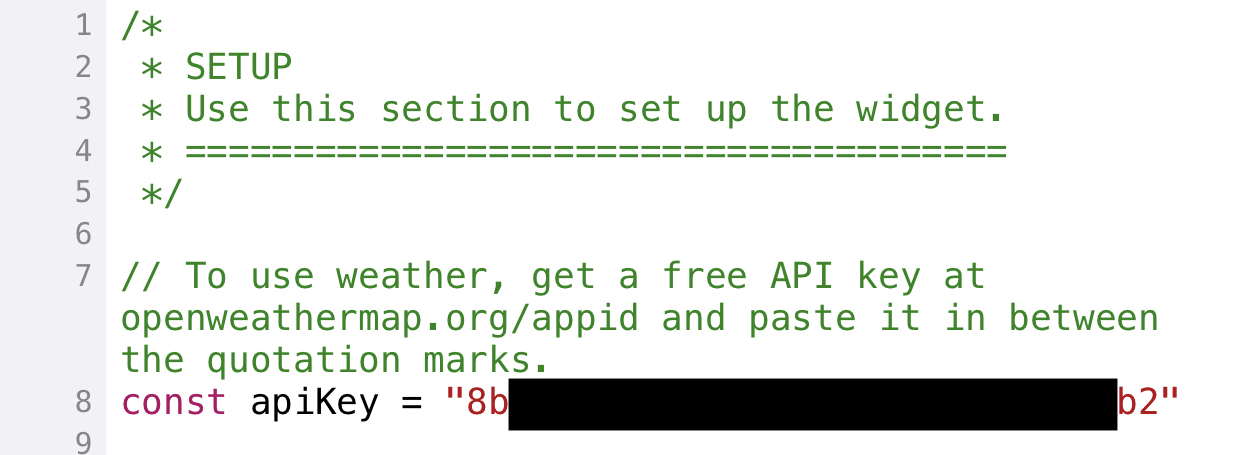
For the widget to work, you just need the API key itself to be added. It should look like this screenshot (my key is blacked out). The widget code formulates the URL for you!
→ More replies (1)1
u/michavez22 Nov 07 '20
One more question... is there a way to remove the picture from the scrip or do I need to make a new one with a new API key? Thank you!
1
u/mzeryck Nov 07 '20
Hey, so glad I could help out & that you're enjoying the widget! You only need one API key, no matter how many widgets you create. If you like your current widget, but just want to change it, you can make a couple small edits near the top of the script to get what you want.
If you just want to change the image, you can set
const forceImageUpdate = true, and then run the script. It'll prompt you to select a new image. Or, if you would rather not have an image background at all, you can setconst imageBackground = falseto use a gradient background. Hope that helps!2
u/LinkifyBot Nov 07 '20
I found links in your comment that were not hyperlinked:
I did the honors for you.
delete | information | <3
1
u/Joehowes Nov 07 '20
when i create a 'large' transparent wallpaper and then create a 'large' weather widget it doesnt match the background... it seems as if the script is taking a medium one i made originally and blowing it up (6S+)... even if i create a bottom image and then try to create a bottom weather widget, it still uses the same image (so the top image and not the newly created bottom) with no option for me to select a new one?
1
u/mzeryck Nov 07 '20
I'm working on a smoother way to deal with this, but for now, near the top of the script you can change
const forceImageUpdate = true, and then run the script. It will prompt you to select a new image!2
1
u/Joehowes Nov 10 '20
Quick question, how can I reduce the padding at the top of the widget? There appears to be quite a bit of space between the top of the screen and the top of the widget. Thanks!
1
u/mzeryck Nov 11 '20
It depends on what layout you're using. What's the topmost item? (Basically, what's the first item in the LAYOUT list?)
1
u/Joehowes Nov 11 '20
This is what my layout looks like. Let me know if a picture would help, thanks again for the help
const items = [

  row,
     column,
     date,
     greeting,
     sunrise,
column(90), current, future,
   row,


     column,
     events,
2
u/mzeryck Nov 12 '20
Ah okay, this is because there's no "space" item. By default the widget will basically just center everything. If you add
space,aftersunrise,it should look better!
1
u/alcoholguy Nov 11 '20
How to change the action when I tap on weather area? (like when I tap on it, it opens my native Weather app instead of weather.com website)
2
u/mzeryck Nov 12 '20
Sadly, there isn't a way to do that, since the Weather app doesn't support URL schemes.
1
u/OkHeight3 Oct 06 '20 edited Oct 06 '20
This looks great. Really excited to use this. Currently getting the following error;
2020-10-06 20:26:32: Error on line 162:33: TypeError: undefined is not an object (evaluating 'data.current.temp')
Was wondering if you had any idea how to get around this, or whether it’s because my open weather API key is brand new?
Thanks!
*Edit u/exodus101 has kindly solved this in reply to this comment
2
u/Exodus101 Oct 06 '20
I first got the same error. Running the script from the Scripts screen fixed it for me.
1
2
1
1
1
1
1
1
1
u/CoyoteDisastrous Dec 13 '22 edited Dec 13 '22
I may be in over my head here. The only thing I have been able to successfully update is the background. The calendar isn’t syncing, reminders didn’t get added after I changed preferences, and my weather API isn’t working (it’s been 12 hours or so)
1
u/CoyoteDisastrous Dec 23 '22
Can I use any weather api? I’m not able to get open weather to work. After 24 hours my widget still isn’t showing weather. Also not getting any reminders.
0
Oct 08 '20
[deleted]
1
u/mzeryck Oct 08 '20
The month view would be difficult, but I've been meaning to add color - hoping to do it soon!
1
0
1
Oct 06 '20
[removed] — view removed comment
3
u/mzeryck Oct 07 '20
Hmm, that one is the default layout. What problem are you having?
1
Oct 07 '20
[removed] — view removed comment
2
u/mzeryck Oct 07 '20
Ah yes! You can decide when it switches by setting
const tomorrowShownAtHour. (If it's 0, it will always show tomorrow's weather.)
1
Oct 07 '20
[removed] — view removed comment
1
u/mzeryck Oct 07 '20
A few folks have mentioned issues with work calendars, since some workplaces restrict 3rd-party access - could that be it?
1
Oct 07 '20
[removed] — view removed comment
1
u/mzeryck Oct 07 '20
So unfortunately it doesn't currently support reminders (for some reason, the reminders code is way more complicated than calendars, so I haven't done it yet). If you use Google Calendar it should work, as long as it's added in Settings > Calendar > Accounts.
1
Oct 07 '20
[removed] — view removed comment
1
u/mzeryck Oct 07 '20
Honestly, I had so much fun just seeing if this concept would work, and was stoked that it did.
And yeah, I've been meaning to add back in the future events stuff (it was in an older widget I did) I just haven't moved it to this version.
Scriptable doesn't currently support Health, I'll be really excited if it does in the future!
2
1
Oct 07 '20
[removed] — view removed comment
1
u/mzeryck Oct 07 '20
Yes! I actually just added that feature. If you use the newest version of the code, you can edit the
noEventMessagestring to say whatever you want.
1
Oct 08 '20
[removed] — view removed comment
1
u/mzeryck Oct 08 '20
If you use the default code, the only thing you need to do is delete
greeting,in the left column layout.
19
u/mzeryck Oct 06 '20
I hope it’s OK to post this here (and sorry for posting and deleting, I accidentally grabbed the wrong image). This a follow-up from my post last week with a customizable Scriptable widget. My scripts are totally free and I don’t gain anything from people using them (other than happiness that people are enjoying them).
This new script allows you to completely define how to lay out your widget, without writing code. You just specify what you want in each column (if anything) and what direction to align it in. There are more detailed directions if you follow the link.
If you know how to write Javascript, you can even make your own elements! All you need is a function that takes a single WidgetStack (representing a column) as an argument.