r/homelabindia • • 29d ago Regret Mindblown

🧰 Project Log Indian YouTuber stole my router OpenWrt flashing scripts, hid a self-promo link in fake "hex hardware constants" to cover it up [Forensic Breakdown]

502 Upvotes

Hey everyone,

I recently published an open-source project that allows users to flash OpenWrt on the Jio AirFiber AX6000 (JIDU6J11) router completely over SSH without opening the device or soldering UART: https://github.com/themayankraut/Jio-AX6000-6J11-OpenWRT-SSH

A YouTuber named THE_DIY_DADDY took my entire repo, renamed variables, added fake technical jargon, and published a video with a download ZIP containing my exact scripts and pre-compiled binaries.

The hilarity of how he tried to hide it:

He added variables throughout the code that look like low-level kernel/NAND memory addresses (MEM_INIT, TCP_OPT, RSA_PAD, CRC_CHK).

If you decode the hex values, it literally spells: "Subscribe to THE_DIY_DADDY channel: youtube.com/@the_diy_daddy"

He then created a bogus "tamper check" that verifies the string length to act like a NAND integrity check.

He also credited a fake/unknown name ("Mahendra Mali") at the end of the script to avoid linking back to my repo.

A DMCA takedown has been filed on YouTube with full forensic diffs and commit timestamps.

Full technical documentation and authentic files are available on GitHub: https://github.com/themayankraut/Jio-AX6000-6J11-OpenWRT-SSH


r/homelabindia • • Oct 13 '26 Bravo

💡 Setup Showcase My homelab is a Pi 5 in a plastic bag hanging off the wall

Post image
494 Upvotes

ACT fiber comes in at the top, into their little GX ONT, yellow cable across to a TP-Link Archer doing routing duty, and the actual server — a Pi 5 4GB — lives in a plastic carry bag hanging on a nail, along with a 2TB WD external drive.

The Pi runs Pi-hole, Jellyfin, and the usual *arr stack under Podman, all reachable over Tailscale. The 2TB drive just became the media volume after the SD card started crying at 84% full.

Cable management is aspirational. Ventilation is... the bag has a hole in it. Uptime is honestly fine.

Anyone else running their infra off a wall nail, or am I the only one living like this?


r/homelabindia • • Apr 17 '26 Mindblown

💡 Setup Showcase started with a raspberry pi, now i run an entire AWS region at home

Thumbnail
gallery
473 Upvotes

i have documented everything here - https://0xn1nja.dev/homelab

feel free to give thoughts


r/homelabindia • • 24d ago

💡 Setup Showcase Hit a jackpot! Couldn't be happier!! Read Description.

Thumbnail
gallery
429 Upvotes

I was visiting family in Singapore last month and I randomly opened carousell Singapore and saw this listed there for merely S$275 (~₹20,500) and I grabbed it then and there at 10 pm in the night.

Hardware

  • PC: HP EliteDesk 800 G5 Mini

  • CPU: Intel i7-9700, 8 cores and 8 threads. 3.0 GHz base, up to 4.7 GHz turbo.

  • RAM: 32 GB DDR4, two 16 GB Samsung SO-DIMMs in dual channel, running at 2667 MT/s

  • Storage: 512 GB NVMe for the system (came with 100% health), plus a 128 GB SATA SSD just for backups {SATA was installed by me - again 100% health}

  • Graphics: Intel UHD 630 only, no dedicated GPU, so all AI runs on the CPU

Software

  • Ubuntu 24.04.5 LTS (kernel 6.8), Docker 29.9, all set up with Docker Compose

  • Everything is reachable only over Tailscale. Nothing is open to the internet.

Containers (22)

  • AI: Ollama, Open WebUI, Whisper (speech to text), SearXNG (private search)

  • Monitoring: Prometheus, Grafana, node-exporter, cAdvisor, Uptime Kuma, Dozzle (logs)

  • Network and admin: AdGuard Home (blocks ads on my devices), Homepage, Watchtower (updates apps at 4 AM), a read-only Docker socket proxy

  • Automation: n8n

  • My own apps: a custom web app (nginx), my Telegram bot, a news bot for me and my brother, and a sandboxed app for a really close friend that runs on its own Tailscale node with no access to my data

Local AI (Ollama 0.40, CPU only)

  • Qwen 3.5 in 0.8B, 2B, 4B and 9B sizes

  • Gemma 4 12B and 26B (mixture of experts, about 4B active)

  • Qwen3 30B-A3B

  • EmbeddingGemma and nomic-embed for search

  • Up to 4 models loaded at once. The 4B chat model and the embedding model always stay in memory.

  • Thinking mode is off by default in Open WebUI, so simple chats answer really fast

What it does every day

My own web app (a home-screen app on my iPhone, built from scratch):

  • Home: weather, calendar, world clock, news, a planner, and a budget area

  • {Most fun} Journal: I write every night. A local LLM rates the mood, adds tags and writes a summary, and it builds a weekly recap and “deep insights”. All of it stays on the box. I even use Wispr Flow so doesn’t take more than 8-10 mins to write a 800-1000 words detailed archive of my day. (Would want to read it when I am 70 lol).

  • Gym tracker: my 4-day split, sets, personal records, progress charts, and a share card for each workout so that I can share it all with my PT easily

  • Server page: live per-core clock speeds and temperatures, usage bars, load and unload buttons for AI models, restart buttons for apps, and a night log of scheduled jobs

Telegram bot:

  • Understands casual messages, using embedding search over example phrases with an LLM as tie-breaker

  • Reminders, notes and goals

  • A 7 AM morning brief: weather, calendar, flights, news and an overnight server recap {I have never been more updated ever since I started doing this}

  • Summarised news on World, India, F1 and new tech. Local LLM with web scraper gives me upto 5 news on: International, National, Merger & Acquisition, Apps and Tech and F1 news.

  • Gym and subscription nudges, plus a Sunday weekly report

Backups:

  • Nightly backup at 3:30 AM, keeping the last 7, plus copies to the SATA SSD 4 times a day

  • Hourly push to a private GitHub repo, encrypted with git-crypt

  • Will experiment with blob storages to learn more about it

  • A Google Drive copy through rclone (I designed Rcloner this on top of rclone to be able to enjoy speeds upto 300-400 MBps. I am lowk done with Google Drive web / app.

Self-healing:

  • A watchdog restarts anything that dies and only reboots after 30 minutes down

  • If Wi-Fi drops for 3 minutes, the box starts its own setup hotspot so I can pick a new network

  • DNS settings are fixed so it keeps working after an outage

File transfer: a web file manager I built (Node plus WebDAV) with an in-browser code editor. Finder and my phone can mount it.

Remote access: Claude Code runs on the box itself, and I reach it from my Mac or phone. VNC is there when I need the desktop. Agents run all the time, $20 subscription does me good.

The web app screenshots are attached.

I am open to sharing the source code if someone wants to set this up.

I WOULD APPRECIATE IF YOU GUYS COULD SUGGEST ME WHAT MORE COULD I DO WITH MY SETUP (Except k8s, Proxmos, n8n, etc.)

REPO: https://github.com/theappfoundryco/personal-homelab-server


r/homelabindia • • 21d ago

💡 Setup Showcase Ripped out the motherboard from an old laptop and made a Frankenstein homelab

Thumbnail
gallery
426 Upvotes

r/homelabindia • • Feb 13 '26 Bravo

💡 Setup Showcase 1-Year Raspberry Pi 5 Homelab (India) – Started with Jellyfin, Now Running Full Media + Cloud Setup

Thumbnail
gallery
408 Upvotes

I discovered this subreddit last night and wanted to share my Raspberry Pi homelab that I’ve been running 24/7 for about a year now.

I originally built this server just to run Jellyfin for media streaming, but over time, I kept adding more apps and features, and it slowly turned into a full homelab handling media, downloads, storage, and remote access.

Also wanted to share this for anyone thinking about starting a homelab — you really don’t need an insane amount of money. Most of my hardware is reused from an old computer, and it still works great.

Hardware:

  • Raspberry Pi 5 (8GB)

  • 128GB Kingston SSD for OS (reused from old computer)

  • 1TB WD HDD for storage/media (reused from old PC)

  • PiBox dual-bay HDD/SSD docking station connected via USB (supports 2 drives)

  • Running everything through CasaOS

Media Automation Stack:

  • Jellyfin

  • Radarr

  • Sonarr

  • Prowlarr

  • Bazarr

Download Clients:

  • qBittorrent

  • SABnzbd

  • GoSpeed (used similar to JDownloader for direct downloads)

  • Cross-seed

  • FlareSolverr

Network & System:

  • Pi-hole + Unbound (network-wide ad blocking + local DNS)

  • Portainer (container management)

  • Homepage (dashboard)

Storage & Files:

  • Filebrowser

  • rclone (sync/backups)

Photos:

  • Immich (running without ML)

Remote Access:

  • Tailscale for secure access to my server from anywhere

  • Cloudflared tunnel connected to a custom domain

Performance & Stability (after 1 year):

  • Running 24/7 with no major issues

  • RAM usage stays around ~35% consistently even with multiple containers

  • Jellyfin is set to Direct Play only, so there’s no transcoding load on the Pi

  • Reused HDD/SSD via the docking station have been stable so far

  • Main limitation right now is storage space and heavier workloads

What I use it for:

  • Fully automated media downloads + streaming

  • Direct downloads handled by multiple clients

  • Remote access to all services when outside home

  • Sharing Jellyfin access with friends/family

  • Giving limited Filebrowser access so it works like a personal Google Drive

  • Sharing files using direct links accessible from anywhere

  • Network-wide ad blocking for the entire house

  • Photo backup and storage

  • Learning Docker, networking, and self-hosting in general

Future plans:

  • Adding more HDDs for extra storage

  • Proper backup strategy

  • NVR/camera integration

  • Maybe upgrading to a mini PC later while keeping the Pi for lighter services

If anyone has questions about the setup or wants details on how something is configured, I’d be happy to share.

Update Post: Link


r/homelabindia • • Aug 03 '25

My first home server 🫡

Thumbnail
gallery
349 Upvotes

My very first home server, nothing fancy, running an Intel i3-5005Ux4 CPU, 12 GB DDR3 RAM, and a 1 TB Crucial B500 SSD.

Took the motherboard out from a laptop with a damaged display and broken keyboard. Going to use it to run CasaOS hosting PiHole and Home Assistant, and also thinking of running Jellyfin.

I have added those foam feet below the motherboard to keep it elevated. The CMOS battery holder broke while removing it, so I had to hot glue that one. Also, I didn't know where to keep this thing, so I found that old chair. Everything is working great, and I will improve it in the coming months.


r/homelabindia • • Nov 01 '25

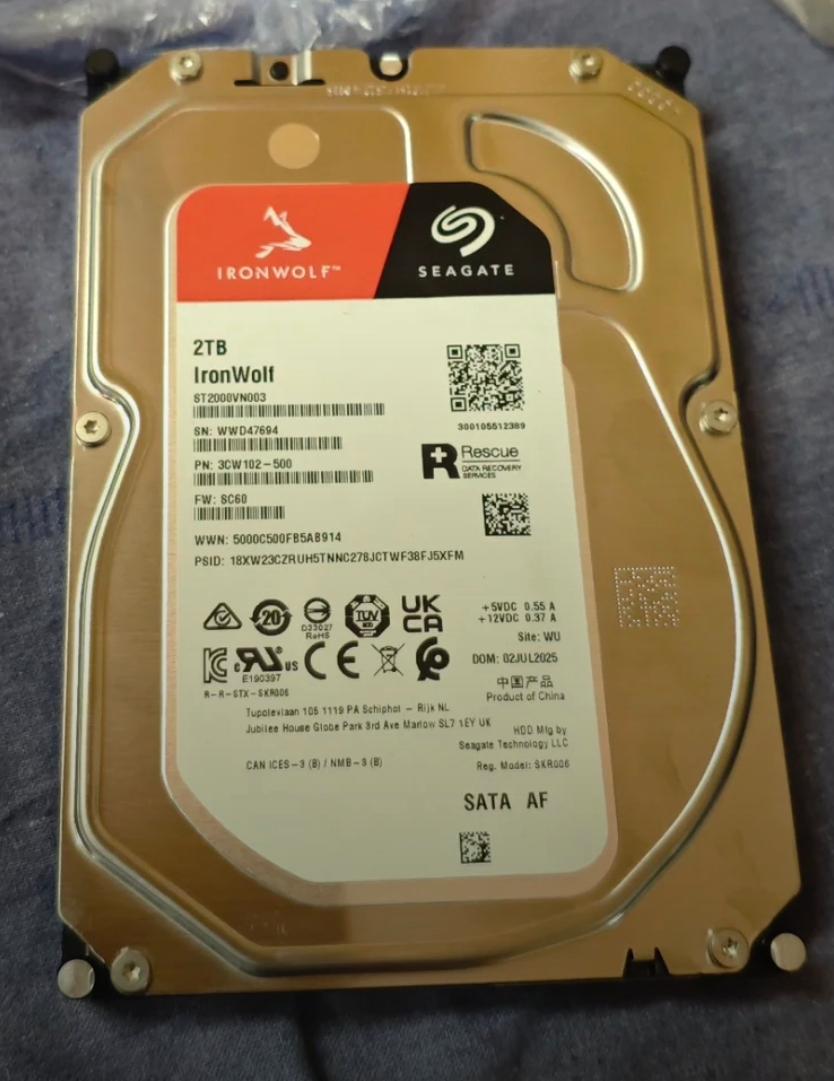
Off-Topic Someone from this community gifted me a brand new ironwolf hdd!! Thank you kind redditor

Post image
338 Upvotes

Actually wanted to make this appreciation post after I setup linux media server on my simple jellyfin server, but i have been busy for some weeks now due to festival loads.

I have been using jellyfin to stream for one year now, some months ago I finally decided to make a dedicated pc to serve this purpose (previously was just using my gaming pc)

Last month my two 1tb hdd died , and lost so much of media , fortunately nothing was personal but it would be pain in ass to get everything back . So I started looking to buy new hdds . I never checked hdd prices, only bought SSDs . And it was my first time buying new hdd.

So I was baffled to see any decent 2tb hdd touching minimum of 7k. And made a post here about my shock.

That's when u/mrnottoobright contacted me and gifted me brand new 2tb ironwolf. I am so happy to see this hdd in my hand. Really thank you brother.

And this really motivate me to pass down this kindness to someone else in future when I become more financially stable.

Thanks all lot mrnottoobright, thanks a lot all of you, I lurk in this sub a lot and see everyone is so supportive here


r/homelabindia • • Feb 21 '26

💡 Setup Showcase My first home Lab 🙃

Thumbnail
gallery
321 Upvotes

Hey everyone I'm new to homelabbing and recently built my first small home server setup. Would love some feedback and suggestions for improvement.

Hardware: Raspberry Pi 4 (1GB RAM) OS: OpenMedia Vault (on 8GB SD card) Storage: 1TB HDD Used as NAS (backups + motion storage) Raspberry Pi 5 (4GB RAM) OS: 64GB USB pendrive

Runs: MotionEye (2 USB webcams for pet monitoring ) SHT3X temperature & humidity sensor MQ9 LPG gas leak sensor (kitchen safety)

Network Setup: Airtel Xstream ONT in bridge mode TP-Link Archer C60 handling routing AdGuard Home running inside Home Assistant Tailscale for secure remote access (no port forwarding)

Is my network setup okay? Any security improvements you recommend? Any services I should try next? Thanks!


r/homelabindia • • Dec 18 '25

💡 Setup Showcase A real investor’s portfolio

Post image
320 Upvotes

r/homelabindia • • Aug 26 '25

Local ISP pulled the plug after i used 20TB of their "unlimited internet"

303 Upvotes

r/homelabindia • • Aug 12 '26

💡 Setup Showcase My ₹38k Intel N150 homelab setup - Debian, Jellyfin, Immich, Tailscale and portable 5G Wi-Fi

Thumbnail
gallery
295 Upvotes

I recently (About a year) upgraded my home server to a Skullsaints Ash mini PC based on the Intel N150. I wanted something compact, low-power and easy to leave running.

It shipped with Windows 11 Pro, but I wiped it and installed Debian on bare metal. I had been running an Arch Linux machine as server earlier, so I reused the HDD from that machine for media storage.

Specs

  • Intel N150

  • 16 GB RAM

  • 512 GB SSD

  • Around 1 TB reused HDD for media

What I paid

ItemPriceBought From
Skullsaints Ash mini PC, Intel N150 / 16GB / 512 GB₹24,999 (Oct 2025)Amazon
TP-Link TL-WR1502X₹3,728 (June 2026)Flipkart
Qualcomm SDX55 5G USB dongle₹8,258 including tax (June 2026)The Techtellectual
Ambrane Stylo N20 20,000 mAh power bank₹1,275 (July 2026)Flipkart
Kitchen rack₹186 (July 2026)Flipkart

Total: ₹38,446, excluding the reused HDD and SATA to USB 3.2 Connector.

I replaced my D-Link DIR-600M with the TP-Link TL-WR1502X partly because the old router had become a bottleneck for Wi-Fi and wired speeds. But the main reason was that the TP-Link can run from a basic power bank.

Paired with the SDX55 5G dongle and the Ambrane power bank, it becomes a portable Wi-Fi setup that I can take outside. It gives my phone and other devices their own Wi-Fi network without requiring a wall socket. I can also keep my phone’s cellular radio off when I want to while still using internet through the router and 5G dongle.

Docker Stack

  • Jellyfin

  • Immich, PostgreSQL, Redis and Immich ML

  • Radarr, Sonarr, Lidarr, Prowlarr, FlareSolverr, qBittorrent Web UI and Seerr

  • Tailscale for remote access

  • Caddy and DuckDNS — currently stopped while I rework the configuration

  • OpenRouter proxy

  • Hermes Agent and the Hermes web dashboard

  • SearXNG and Camofox Browser for Hermes

I only use legitimate media sources.*

iPhone apps I use with it

  • Hermes Conduit

  • Swiftin iOS

  • Immich

As I am adding AI agent Stack with cloud models, Figuring out the best way to use the N150 without running out of RAM. Suggestions are welcome, especially from anyone else using 5G as part of their homelab network.


r/homelabindia • • Feb 25 '26

💡 Setup Showcase First homelab as a commerce guy

Post image
295 Upvotes

Chartered Accountant by profession. Somehow still interested in tech and gaming. So here's my setup! If you can call it that.

The Router is a TP Link XC220-G3 running JioFiber. It is connected via ethernet to the Pi 4 which has pihole and unbound hosted.

The Pi also has a media server setup (sonarr, radarr, qbittorrent, jellyfin, prowlarr, bazarr) on docker containers. Also accessible via internet through a VPS tunnel. I also run an aqi monitor which is tied up to this.

I am looking for a power backup solution for the Pi. I found a hat for it but not sure if it'll fit with my case. I also had a cuzor UPS for the router but it's connectors got loose so it's gone for repairs for now.

Keeping a balm just beside this setup because it gives me headaches often.


r/homelabindia • • 6d ago

Off-Topic Massive thanks to the legends who cracked the Jio AirFiber and made it usable for the rest of us

292 Upvotes

Just wanted to take a moment to appreciate the absolute wizards in this community who put in the work to unlock the Jio AirFiber and make it actually useful. I know many of us have been stuck with locked-down hardware, and these folks changed the game.

Huge thanks to:

  1. Prince Pathria – For providing the initial links to unlock the SSH. That was the first crack in the wall.

  2. Mahendra Mali – The legend behind maxshell.py. Absolute game-changer.

  3. Mayank Raut – The Man, The Myth, The Legend. Enough said.

  4. The user (dapatotopapi) – For sharing the method with the community because "information shouldn't be gatekept." Respect.

  5. u/Outside-Pianist673 – For the incredible write-up on running OpenWrt 25.12, AdGuard Home, and Samba NAS on the JIDU6701 without breaking Jio internet, Wi-Fi, or provisioning. That is some next-level documentation.

  6. Sandiep-The Protagonist!!!!

For anyone who wants to try this out, here are the links from the screenshots:

Seriously, thank you all. This is what the community is about.

We truly appreciate the efforts of all other developers and contributors.

Mine was JIDU6401 with 3.2.6 Dated 21 Sep 2026


r/homelabindia • • Aug 27 '25

Selling homelab setup in Bangalore

Post image
283 Upvotes

Selling my homelab setup in Bangalore as I'm moving to my hometown. Detailed list of all components - https://docs.google.com/spreadsheets/d/1YADMwIFbs5yYttowHPhAwbBo-nSLrWspbj--DHakaLs/edit?usp=sharing

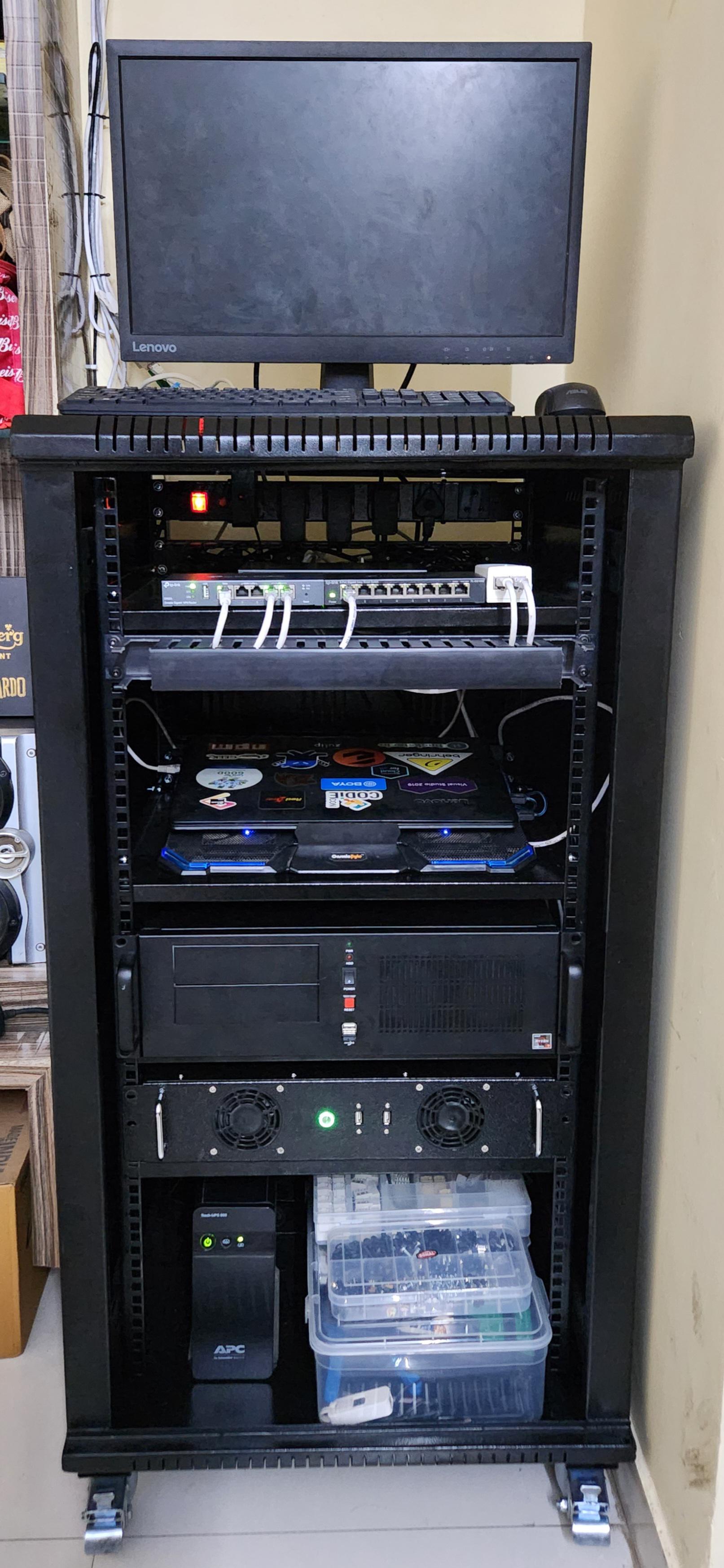
Router - TPLink Omada ER605 Switch - TPLink Omada SG2008 AP - TPLink Omada EAP245

UPS - APC 1100VA

Server Rack - 22U 600X600 Networking Rack, 4X600 depth full shelf, cable manager, power strip

Server Details Chassis - Mootek Industrial 3U Rackmount Chassis MoBo - MSI A520 pro CPU - Ryzen 7 2700 RAM - Corsair Vengeance 2X16 GB 3200MHz PSU - Gigabyte Bronze 450W Storage - 6X2TB drives (5 seagate, 1 wd) & 2TB WD brand new for backup replacement SSD - 128GB NVME for OS & 2X128GB SATA for SSD pool GPU - Nvidia GTX 1030

Additional 2U server rack chassis

Lenovo 22inch FHD VA Monitor 4X1 USB-HDMI Switcher Asus wireless keyboard & mouse combo Ethernet cable tools and supplies all included with organizer boxes

There are some spare SSDs both NVME & SATA plus some adapters (pcie to sata, nvme to sata) with all required cables.

Looking for a local deal in bangalore F2F. Actual amount of entire setup is nearly 1.2L Asking Amount - 85k


r/homelabindia • • Jul 24 '26

Off-Topic Canon event

Post image
281 Upvotes

Never thought i would manage to cross my FUP limit, now i have to survive for 2 more weeks on 1 mbps


r/homelabindia • • Oct 09 '26 Bravo

💡 Setup Showcase Pixel 6a as an always-on home server: 1TB HDD, Syncthing, SMB, Tailscale

Post image
279 Upvotes

Sharing my low-power homelab. No PC, no Pi, just an old Pixel 6a.

Hardware

- Pixel 6a (rooted), always on

- 1TB HDD in a powered USB enclosure (powers the HDD directly)

- USB-C hub dongle with pass-through charging, so the phone stays plugged in 24/7

- HDD mounted on Android using an ext4 FUSE layer

Software and network

- Tailscale: Pixel is always on my tailnet. No port forwarding, no public IP

- Syncthing: Photos and videos from my Vivo sync to the Pixel. On the iPhone I use the Synctrain (a Syncthing client)

- Google Photos: Pixel backs up to Google Photos

- SMB: Whole HDD accessible from any device, on local Wi-Fi or anywhere over Tailscale

- DroidVNC + SSH: Since the Pixel is rooted, I can control the whole device with DroidVNC and SSH into it, from home or away

- code-server

- Custom app: Self-hosted app I use daily

Photo flow

  1. Vivo + iPhone → Syncthing → Pixel (HDD)

  2. Pixel → Google Photos

  3. Result: one copy on the HDD, one copy in the cloud

Why this setup?

- Low power draw (not measured yet, will update)

- Built-in "UPS" (the phone battery)

- Silent and tiny

- Cost almost nothing, since I already had the phone

Downsides

- FUSE ext4 is slower than native

- Android can kill background apps, so battery optimization must be disabled for everything

Happy to answer questions or share setup steps.


r/homelabindia • • Jul 13 '26

💡 Setup Showcase Pi Server

Thumbnail
gallery
261 Upvotes

Update on the Pi Server Tower.

Added all the Pis that I had. The server is now running with 7 out of 10 Pis active.

I got suggestions from the last post and will be using them for Monitoring and for Power failure (smooth shutdown of the Pis).
Uptime Kuma, Coolify and NUT are already in the works.

This setup has 4 Raspberry Pi 5, 3 Raspberry Pi 4, 1 Raspberry Pi 3 and 2 Raspberry Pi Zero W v1.1.
Gigabit ethernet switch for GitLab and GitLab Runner and the 100Mbps switch for the slower Pi Zeros, Raspberry Pi 3 and less network demanding Pis.


r/homelabindia • • Jul 02 '25

My first homelab

Thumbnail
gallery
253 Upvotes

This is my first homelab, and I’ve been working on building it for the past 1.5 years. The rack has 3 servers, all running Debian 12, and all services are running on Docker. I’m using Homepage as my dashboard.

The rack includes the following components:

1.) An HP monitor, which is used to display the output of htop or glances.
2.) An iBall tower PC (Core 2 Duo and 4GB RAM). This is my media server, running Plex, Jellyfin, and the *arr stack.
3.) A Raspberry Pi 4 (2GB RAM). This is running networking-related services like AdGuard Home, Gotify, Miniflux, etc.
4.) A Compaq Presario C700 (Core 2 Duo and 4GB RAM). This is running services like Nextcloud, Paperless-ngx, Mealie, etc.

There’s also a Digisol router placed next to the Raspberry Pi 4 which currently isn’t being used, it's just sitting there for now. Initially, I planned to install OpenWrt on it, but turns out it doesn't support OpenWrt.

Let me know in the comments what you think of my setup and what else I could add to improve it!


r/homelabindia • • 28d ago Bravo

Off-Topic Jio STB Jailbroken ( Success )

Thumbnail
gallery
237 Upvotes

Jio can suck my sideloaded cock through wireless ADB!!!
Jio STB jailbroken
Success
Wireless ADB granted

lol first thing i did was disable auto update of firmware

My STB model is
JMSB200A with version 25.1.9

Edit:- A better tutorial and repo have been posted:- https://www.reddit.com/r/IndiaTech/s/cDe5eCyLSE

Thanks to

https://github.com/JFC-Group/Housekeeping-PoC


r/homelabindia • • 10d ago

💡 Setup Showcase 1 year of homelabbing: started with one mini PC, now it runs the whole house

Thumbnail
gallery
231 Upvotes

Started about a year back with just a Lenovo M70q Gen 3 and Proxmox. No real plan. It kept growing one container at a time, and this is where it has reached now.

I made an interactive map of the whole thing (click the flows on top to trace them): https://claude.ai/artifact/7EutBohicGDfvDjNs6Q6Pr

Hardware

  • Server: ThinkCentre M70q Gen 3, i3-12100T (35W TDP), 48 GB RAM, 512 GB NVMe + 2 TB SSD, Proxmox VE 9.2

  • Routers: 2x JioRouter AX6000 flashed with OpenWrt 25.12. One is the main router, the other is an AP

  • Switch: TP-Link TL-SG108E

  • NAS: Synology on 2 aggregated gigabit links

  • Internet: ~200 Mbps fiber with static IPv4. Backup is a phone on USB tethering, router switches over in about a second

What runs on it

  • 22 LXCs + 2 VMs. One VM is a Docker host with 23 more containers

  • Pi-hole + unbound, blocking around 37% of ~108k lookups a day

  • 26 public hostnames via Cloudflare Tunnel -> Caddy + Coraza WAF. No open ports for any of them

  • WireGuard for when I'm outside

  • Home Assistant: 74 devices, 21 automations

  • Jenkins, SonarQube, n8n, Postgres, ERPNext, Paperless-ngx, Actual Budget, Grafana + Loki, Authentik and a bunch more

  • PBS backs up every guest to the NAS every night

Things I'm most happy with

  • Landline on Asterisk. The fiber landline comes in on its own voice VLAN. Asterisk in a 512 MB LXC holds the SIP registration now, so the landline rings on softphones on our mobiles, on Wi-Fi at home or over WireGuard outside. No ATA box.

  • Guest Wi-Fi by voice. One voice command turns on the guest SSID (separate VLAN, isolated) with a fresh password and sends it as a QR code.

  • Roaming between the two OpenWrt routers with usteer + 802.11k/v on non-overlapping channels. Finally works properly.

Happy to answer questions, especially on Proxmox, or the landline setup. Also open to suggestions on what to add next.

---

Update:

Here's the guide to set up the Fiber Landline on Asterisk server to enable calling via personal devices: https://claude.ai/artifact/PshnzR3RtU9P6vK8wwLZx2


r/homelabindia • • Jul 11 '26

💡 Setup Showcase Started with a RaspberryPi. Ended up with a mini rack

Thumbnail
gallery
219 Upvotes

Setup is a P330 with i7 and 32gb ram and an HBA card to have 8 drives (6 in the front and 2x 2.5 inch ones beside the PSU)

The tiny PC runs proxmox and multiple LXCs to run a media server, pihole and Immich

No longer need the jhandu balm to keep working on my homelab now

Original Post: https://www.reddit.com/r/homelabindia/s/H4DomvdbxV


r/homelabindia • • 15d ago

💡 Setup Showcase One Jio Router fixed my Entire Home Assistant

Thumbnail
gallery
218 Upvotes

I started learning Home Assistant few months back.
With one Excitel Router and TP Link Extender, I thought I will be able to conquer the path towards automating my home.

I started by adding 1 Tasmota device using ESP01 Relay module to unlock my door,. Then gradually I added 8 Tasmota devices, 2 Phillips Wiz Light, 1 WS2812, 4 ESP 32 C3 and 1 ESP32 Wroom integrating Temperature Sensors, Presence sensor, Water Tank Level sensors and SSR Relay to control Geyser.

I almost had 16 active devices which were communicating over Wifi and this is where the real trouble started. One extender and a basic Excitel router were not capable to serve all my devices.

I had no budget to upgrade to Mesh routers and that's when I got to see the post of Jio routers with OpenWrt.

I ordered two routers, one for main gateway which would connect to my Excitel router and another router as AP over Cat6. Apparently one single router served all my devices and I now have a fully functional home assistant with all sensors and devices connected smoothly and working flawlessly.

Now I can even control the LED lights of my router when my water tanks gets full or empty.


r/homelabindia • • Jul 03 '26

💡 Setup Showcase Pi Setup For Home Lab

Post image
217 Upvotes

Been working on this homelab setup.
Got GitLab hosted (Pi5 with NVMe) at home along with a GitLab runner for CI/CD (Pi4).
The Pi Zero is a PiHole and serves DNS.
I am now working in an application that'll run on another Pi server (Pi5), code will be maintained in GitLab locally.
Took it apart to put it together in this neat build.
Will post again in a few weeks when it's all up and running again.

Edit: Fixed spelling and grammatical errors.