I'm trying to use a Debian 13 server as a Time Machine destination for a MacBook Pro M5 running macOS 27.
Server (Optimus)
Debian 13, Samba 4.22.11
Dedicated Samba user: tmuser
Share: [TimeMachine]
Path: /home/timemachine
Configured with vfs objects = catia fruit streams_xattr
fruit:time machine = yes
fruit:time machine max size = 500G
Share is writable by tmuser
Mac client
MacBook Pro M5, macOS 27
What works
I can connect in Finder using smb://optimus.local/TimeMachine as tmuser.
I can create and delete files/folders in the share.
Samba confirms that tmuser exists and is enabled.
What fails
Time Machine cannot connect. It reports:
BACKUP_FAILED_AUTHENTICATION_ERROR (29)
The underlying SMB connection returns error 80, for both the Bonjour hostname and optimus.local.
The macOS logs show:
Unable to get a MechTypes for the MechType session using credentials
There are no MechTypes available for the MechType session
There are no user credentials to add to the MechType session
OpenSession failed 80
The log also says the credentials may not exist in the System keychain.
Question
Since Finder can authenticate and write to the share, I'm wondering whether this is a macOS Time Machine credential/keychain issue rather than a Samba permissions problem.
Has anyone successfully configured Time Machine on macOS 27 with a Debian/Samba share? Any suggestions for troubleshooting the System keychain credentials or Samba's fruit configuration would be appreciated.
Dell posted fiscal Q3 on Tuesday night: record revenue of $54.9 billion, up 103% year over year, and an AI backlog that closed the quarter at $132.3 billion after $60.2 billion of orders booked in three months. The revenue print is not what changes your purchase order. The backlog is. Every rack in that backlog is queuing for the same NAND wafers, the same DDR5 dies and the same contract slots as the U.2 drive or the RDIMM you were going to buy in January.
TrendForce's Q4 2026 forecast points the same direction from the pricing side: enterprise SSD contract prices up 23–28% quarter on quarter, conventional DRAM 10–15%, NAND flash 15–20%. Buyer behaviour shifts within days of a report like that, and so does our inbox. Five questions came up repeatedly this week. Below are the answers, with the bench notes we keep next to the test rig.
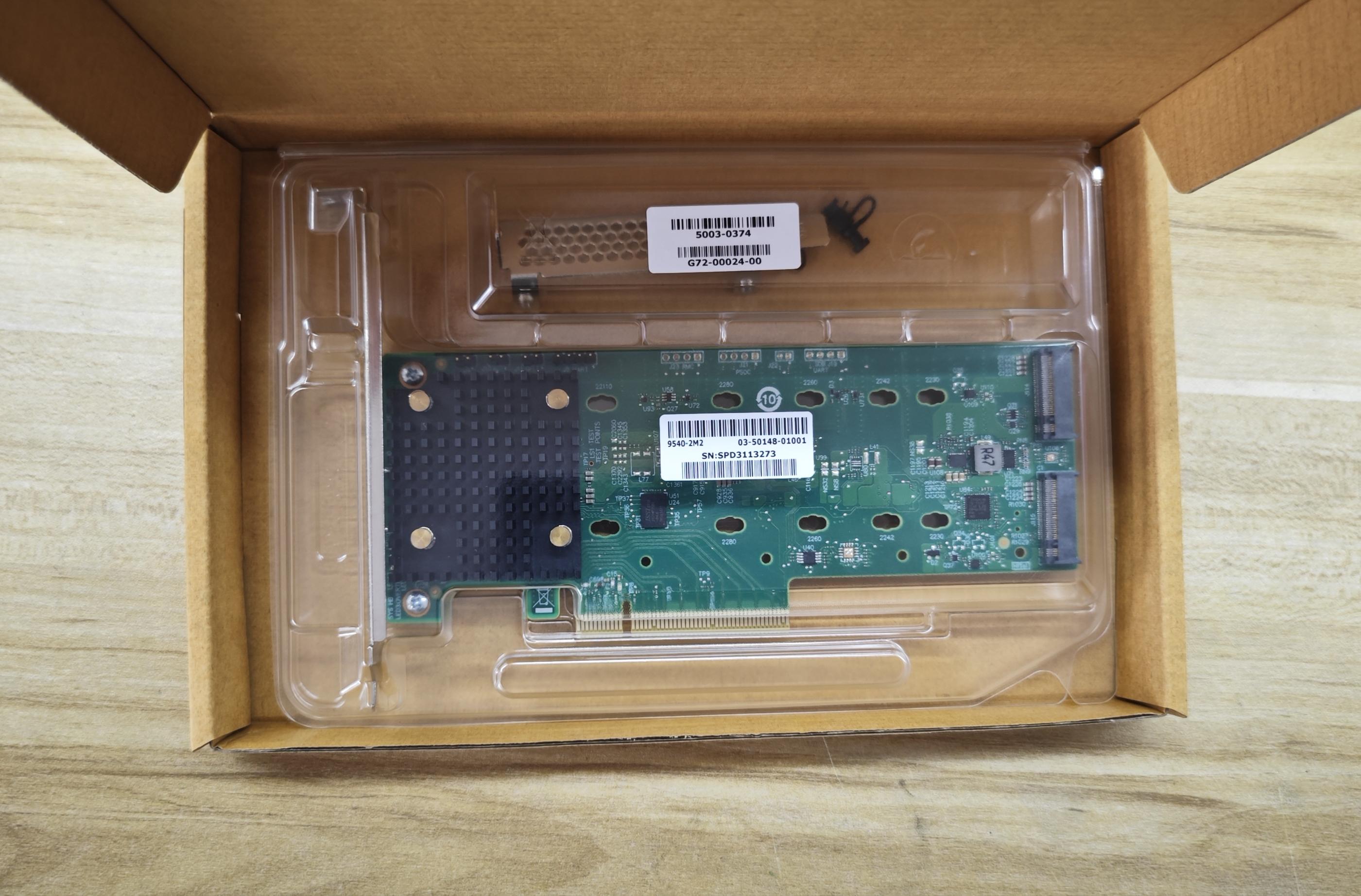
The card in question is the Broadcom MegaRAID 9540-2M2: a tri-mode RAID controller with two M.2 NVMe slots and 2GB of cache, part number 9540-2M2 on the carton, originally sold as an OEM factory option and pulled out of decommissioned servers a few years later. It exists because of one specific problem. You need RAID 1 for a boot volume or a small VM datastore, you do not want to pay U.2 money for 2× 480GB, and you do not want a software mirror that dies with the operating system. Two M.2 drives on a card with cache and a real firmware stack solves that — at the cost of a card that is picky about boards, drivers and how it was tested.
Q1: "Will it work in my board? I have a Gigabyte B650, a Supermicro X11, an old Huawei 2288H."
This is where the 9540-2M2 earns its reputation. On our line the Gigabyte boards only passed the full test cycle under Windows 10 — not Windows 11, not a WinPE image. Boards outside the OEM list often enumerate the card but never load the driver, so the card looks dead in the OS while the BIOS is perfectly happy with it. On Huawei 2019-generation servers we watch drives drop out of the configuration mid-rebuild. None of that means the card is faulty. It means the card was qualified against a narrow platform list and everything outside that list is luck. Ask for the board model before you buy, and if the answer is a consumer desktop board, budget a test window.
Q2: "How do you test a used one, and can I see proof?"
We run Broadcom's CRT, the compatibility report tool. Ours executes on a Huawei server because that is the platform where it reports cleanly. Two things surprise people. First the input: you type Cn, and later Q to exit. The tool does not accept a drive letter or a silent flag. Second the output, which comes back with garbled characters mixed into the report. That is normal and not a symptom of a bad card. The number we actually read is the log count — 5115 entries on a healthy run. If a seller shows a screenshot with a different count, or with no count at all, you are looking at a photo of a tool somebody opened and closed.
Q3: "The label says FRU 03-50148-01001. Is that the same card?"
Usually yes, and this is the most common reason people conclude they were sold a fake. Big OEMs buy these cards under their own FRU, so the sticker carries a number that is not the Broadcom retail part number. Our own note on this model says, verbatim, that the FRU may not look identical to the OEM original. Check something else instead: PCB revision, cache module footprint, and whether the controller string in the firmware reads back as a 9540-series device. A sticker is the easiest thing in the world to reprint. The controller string is not.
Q4: "2GB of cache on an M.2 RAID card — does it do anything?"
It changes what the card is allowed to do, not how fast the drives are. With cache you get RAID 5/6 write-back behaviour and, with it, a real battery or supercap question, because a cached write that has been acknowledged to the OS and then lost on power failure is exactly how people lose a boot volume. Consumer M.2 drives carry no power-loss protection of their own, so the card's cache protection is doing all the work in that chain. If a used unit arrives without its protection hardware, run it write-through or treat it as a plain HBA. The card will not warn you. The label on the cache module will.
Q5: "What should I ask before buying a used tri-mode card in this market?"
Four things, in order. Which firmware is loaded, and whether it matches the driver you intend to run. Whether the cache module is present and its protection hardware intact rather than quietly removed for shipping. Whether you get a compatibility report with a log count, not a photograph of a card. And whether the seller will tell you which platforms the card failed on — a listing that only names the platforms it passed has not been tested, it has been advertised.
One more thing worth saying plainly, because it comes up in every thread about used controllers: the failure mode of these cards is almost never the silicon. It is a firmware mismatch, a cache module that went missing at some point in the last five years, or a platform nobody qualified. That is why the questions above are boring and specific rather than dramatic. Boring and specific is what keeps a $200 card from costing you a weekend.
With enterprise SSD contracts moving 23–28% in a single quarter and Dell sitting on a $132.3 billion AI backlog, used tri-mode hardware is about to look cheap for the wrong reason. The price advantage is real. So is the qualification risk. Spend the time you saved on money on testing instead, and get the seller to send you the evidence before the invoice, not after.
Disclosure: I work for a used hardware seller in Tuen Mun, Hong Kong. We buy decommissioned servers, test the cards on our own line and sell them on. The 9540-2M2 notes above come from our own bench files, including the two that make the card look awkward. No links in this post; reference material is in the first comment.
Hey guys currently cleaning up my home lab and need to re-pad and repaste my rtx 6000 (turing), I'm unsure the size of pads I need. GPT is telling me .5mm and 1mm. But the sources that gpt supplies me, like most sources, are not very reliable.. anyone know?
Im new to the self-hosting side of networking. I just replaced my all-in-one Eero Max 7 router with a Dell Optiplex running OPNsense (dual 10Gb NIC), a hybrid managed 2.5Gb/10Gb switch, and a single Omada BE11000 AP. I have a Raspberry Pi 4 also running alongside the OptiPlex, with a Pi-hole instance for OPNsense and the Omada controller app for the AP. What should I do next? I do plan on VLANs (i already have a guest network on the AP), but is there anything else I can do with this amazing new setup? I've seen that you can control OPNsense with the OPNsense mobile app; has anyone done that, and is it worth it?
I have two monitors. I want to use one or both of the monitors for my two laptops, desktop PC, PS5, and Switch. Is there KVM switch or something similar that would allow me to connect all of these devices?
Completely new to the hobby just dabbled in home.assistant to make a voice assistant. I wanna really really dive in now I have my nas set up. So if you had 1000 what would you do? Lights? A new router? A new server (im using a raspberry pi 4 rn)
I’m a new student going into a computer networking program. Wanted to learn a bit before and during. Stumbled across this hole “home labs”, wanted to get into it but wow my brain is going a bit in circles. I also just moved into a new home with new and okay wifi setup or at least better then what i have before. (150MBs sat to 1GB fiber)
Learned I need some proper goals for some better help, so here are my goals.
The basics a. Network management, being able to split my network to 4 groups (would you do VLANs or subnets? Both or smth else?) b. A moderate amount of security; digital(firewall), physical(electrical current prot, and raid storage), and home security (cameras, sensors). Would you recommend anything else?
Personal/longterm c. Some form of NAS and be able to show off my videos and photos from afar is to enticing also making my own “one drive” sounds fire. d. Server or VM setup, again newbie idk if their the same of different. Also maybe Minecraft Yk priorities e. AI Agent setup for diagnostic, email, notes and a bit of code, I’m the least organized person and I think this would help a lot
Here’s a bit what I know: you have your ISP (1GB fiber for me) Connected to router to switch(s) to hosts I will need a pc or a NAS specific device? Need a pc for the servers and for the agents What I plan to do is hookup 5 rooms with wired Ethernet.
I want plenty general knowledge plz help and correct me and my understanding also guide on specs and hardware recommendations. I have a good amount of change spare just not infinite. Here are some questions I have of the top of my head while I’m at it. - Is firewall built into router? I’ve seen mini router pcs to just normal routers. - my ISP provided a wireless one is that ok? Should i go full wired or can i do both? - can i make a pc thats both a NAS and a Server/VM setup or do i want to split it up? - im not looking to generate videos or music with AI Agents, does that impact what i chose for CPU/GPU? - a big question for ram do i need DDR5? or is a lot of DDR4 fine? will it be a pain to upgrade later? Is there a chance that I would have to?
I’m looking to go a bit all out, part of the challenge, plus there’s a community of people that can help. I want to set up the small things, had a lab before that we got to login and change basic passwords to switches, and I want more. Please help me with my new hobby and lab.
For the moment, this is what I think I will do: Promox on the NUC for a LLM and heavy task (game server, like big Windows Vm, or CLI DEV/host pre-prod product).
The tower will be for only testing iso or will be on promox to for the smaller task.(only got 1gig link, and less powerfull but still capable)
The reason that I will go on trueNAS is I don't wan't to pay a license fee.
My idea with TrueNAS is to do this: the 5 hdd disk in a ZFS pool (RAIDZ2, I got a clod spare in my hand), my two 512gb nvme in a raid-0 I wanted the full speed to transfer the files and use it as a cache disk to copy afther to the disk pool.(FYI: I may add a 8tb nvme (only for movie, music or other files that need fast reading) and put the OS on a usb port or on a external nvme enclosure)
But my question his, I think the best solution is to but Promox on it and use proxmox in a VM, une in docker from proxmox jellyfin, Wiregard and the little bit of the compute power that I have for a local image recognation in truenas. But I think I will still have a bit of power to add small vm or docker for website or think like that...
Or my other solution is this: install nnatively TrueNAS on in, and config my jellyfind, wiregard, and the image recognation, but doing that I will lose the AI orchestration that I will main still have will proxmox.
What will you do in my case? or what do you advise me to do?
I have a small form factor Dell Optiplex that is running ZimaOS that I'm using to run Immich for easy photo backup from family iPhones. I can only fit one drive in the case, but have some older, still functioning drives that I wanted to hook up to this machine. I read that USB is not reliable, so thought I would get a PCI-e SATA card and run the drives outside the case - literally running the SATA cables from the PIC-e card out the back of the case.
Ok cool - had a friendly neighbor 3D print an HD cage for me and now I'm here because I can't figure out how to power these things. Am I really the only idiot that's tried to do this? I can't find any product that would power 4 hard drives separately from the main computer's PSU. Is there really not a solution for this??
My dumb ideas so far:
Use an old PSU, short pins 4 & 5, power the drives. No - not safe
Put old PSU outside the Optiplex case and run the cables in, to power the machine, then use the SATA cables to run the cage drives. No - bc the Optiplex only uses the 6 & 4-pin plugs, the PSU doesn't turn on, likely bc pins 4 & 5 of the 20-pin plug isn't in use.
Try a multiple PSU adapter from amazon (this thing)? No idea if this would work or if this is the intended use of the product.
Split off SATA power from the Optiplex PSU & see how many drives I can power since the Optiplex is only running the board and 1 drive. No graphics card. This is the best solution I've come up with so far. Prob can't run all 4 drives. Even 2 would be cool.
So I don't know - call me names, but help me figure this out? Thank you all. I bow in appreciation to the hive mind.
Seven weeks ago I posted when the first two Ryzen 9 9950X nodes of this 48V DC solar-assisted rack finally lit up. Today the rack is up to 6 Ryzen nodes, my old Proxmox/k3s homelab has been officially retired and absorbed into it (two Minisforum MS-A2s survived the merger), and our actual production web services are now running live on this wooden cabinet.
Looking at 256 vCPU and ~536 GiB of RAM humming away inside plywood shelves in Kyoto—with a dual-R9700 GPU server below and a Mac Studio casually claiming the penthouse floor—I honestly still half-expect the SketchUp drawings from March to sue me for taking them literally.
It definitely did not go smoothly though. Here is what fought back over the last six weeks:
Way more fuses and way more crimping than I signed up for After all the great electrical-safety feedback on my earlier posts, I ended up adding way more DIN-rail fuses than I originally budgeted for—both in money and in sanity. I am a software guy, not an electrician, so learning to crimp and wrestle heavy-gauge DC cables inside a tight wooden cabinet turned into an unexpected upper-body workout. It will never win a datacenter cable-porn award, and my thumbs still remember every single lug, but every branch is properly fused and measured now and I am weirdly proud of it.
The custom rear fan panels worked great—then the RSP power supply humbled me The transparent polycarbonate rear fan panels finally arrived and went on with six Noctua industrialPPC 140mm fans. Airflow for the Ryzen blades is dialed in now and honestly looks awesome from the back. The MEAN WELL RSP grid backup supply, on the other hand, sounded like it was preparing for takeoff at Kansai International Airport. To save my ears, I swapped its stock fans for quiet Noctua fans—and immediately discovered why MEAN WELL used tiny jet engines in the first place. Without enough static pressure, the RSP started getting way too warm. My deeply scientific thermal-engineering fix for now (photo 5) is slapping two aluminum heatsinks onto the lid and aiming a cheap USB desk fan straight at it. Following the proud Kyoto homelab tradition of steel-pillar heatsinks and plastic-folder airflow baffles, it looks ridiculous and works great.
Watching the cluster run on Kyoto sunlight never gets old With a Victron SmartShunt wired in, Home Assistant now tracks the whole picture: rooftop solar, 48V battery, RSP grid backup, AC servers, and the rest of the building. Since October 5, the rooftop panels have produced 198.63 kWh on the 48V DC side and 72.63 kWh on the AC plug-in solar side (271.26 kWh total). On a clear November morning around 9 AM (photo 8), the DC panels put out ~720 W—running the entire ~474 W cluster on pure Kyoto sunlight with 0 W from the RSP while still pushing ~230 W into the battery! Over longer stretches (photo 9), solar + battery supplied 49.1% of the DC bus over the last 7 days (45.9 vs 47.59 kWh across 167.8 recorded hours), 41.3% so far in November (125.52 vs 178.15 kWh), and 41.2% cumulatively since October 24 (152.38 vs 217.18 kWh across 769 recorded hours). Not 100% off-grid—turns out the sun still refuses to work night shifts in November—but powering almost half of a 24/7 6-node Ryzen cluster off balcony railings feels awesome.
Discovering that an all-CPU rack was not enough Back in March I boldly declared this would be a pure CPU-density rack—just clean rows of Ryzen blades, zero GPU drama. That plan survived about five minutes of real AI traffic. Even the separate dual-R9700 box could not keep up with our LLM and audio workloads by itself, so a Mac Studio quietly moved into the top shelf to help shoulder inference. Turns out modern workloads laugh at all-CPU purists; you really need a balanced mix of CPU and GPU machines.
Migrating live production while building the platform (and breaking things along the way) Honestly, the software side tested my sanity even more than the 48V wiring. I was building the hosting platform at the exact same time as gradually cranking up the live traffic split from our old setup—which is a polite way of saying I caused more than a few real production outages while flying a plane I was still bolting together. Early on I got carried away writing custom Python and Node.js glue (my own scale-to-zero gateway, custom CI pollers, a single-node SQLite control plane). Disk usage quietly ballooned past 3 TB, SQLite started throwing multi-second writer locks, and my own safety checks ended up blocking my own deploys.
Those outages hurt, but they forced me to rip out most of the custom plumbing and lean into boring, rock-solid OSS:
Cilium in full eBPF mode without kube-proxy (~36 Gbps over the 40GbE DAC links)
CloudNativePG (PostgreSQL 17 HA) replacing single-node SQLite for the control plane
Official GitHub ARC runners scaling from zero
KEDA + KEDA HTTP Add-on replacing my custom idle gateway (cold wake dropped from ~16s down to ~2.4s, and memory dropped ~80%!)
Native MinIO bucket replication from Kyoto to a TrueNAS box in Tokyo (~15 ms RTT), with a weekly automated non-destructive restore drill that spins up temp containers, checks PG PITR + 5 SQLite DBs + registry blobs in ~36 seconds
gVisor + Cilium network policies isolating untrusted workloads from the LAN
Coming out the other side of those rough weeks, the whole stack finally feels genuinely solid. Back in March I mentioned wanting a place to deploy lots of small AI-built web apps without worrying about cloud bills—and that part actually turned into a real platform we run our own services on (and just started opening up at pangea.host). Still plenty to polish, but seeing real users hit hardware I crimped and bolted together in Kyoto is easily the most fun I have had with computers in years.
Happy to answer any questions about the 48V DC wiring, the Noctua/USB-fan RSP rescue, the solar numbers and Home Assistant setup, or the Kubernetes and Kyoto-to-Tokyo DR stack!
Hi guys, not sure if this is the right place to ask this question but I will still ask. So I have an APC UPS 1100 and it supports my TV and Playstation. I am not sure if I am supposed to keep the wall socket plug on at all times where my UPS is plugged in or turn it off when I turn off my UPS? Google gave me mix reviews, some said keep it on at all times even if the UPS is not powered on. Others said turn it off from the wall socket when not in use. I don’t want to harm the UPS’s battery. Please suggest what I should do. Thank you.
I'm redoing my rack I replaced some old enterprise servers and I'm cleaning up the cabling and network equipment. I also added a face for local llm that reacts vllm stats. I'm going to print a proper bezel but for now it's just bungeed on.
I was originally planning to put it in the top rack slots, but I thought it looked ok here. What do you guys think?
So I started my own little homelab. I've always wanted one for testing Kubernetes but when I started my jellyfin on my main desktop, I realized that I should make my own home lab.
Hardware
12u DeskPi Rack
I have a deskpi 2u Screen
3d printed a mount on top and a generic mobile display
8 port gigabit 1gb switch, gigaplus 2.5gb 10port switch with 2 sfp+
So my work was upgrading the workstations they use for the servers. They are hp z4 g4 with the 2123 cpu. I’m able to get 6 of them. I plan on running promos on one of them. The question I have is should I do 128gm of ram in one and 64gb in the other or is that entirely too much for a basic home lab with this old of tech. Also if anyone has any upgrade advice to these things it’s greatly appreciated
Today, I found out by luck that my main truenas pool is degraded. One of the drives failed a month ago and I didnt receive any emails or notifications about it even tough everything was working fine some time ago. Luckily I run a hot spare that took over but without me actively checking, there could have been another failure that might have led to data loss.
So take this as a reminder to check/test your notifications and monitoring systems!
Some of you might own a thinkcentre m75q gen 2. (amd, ryzen 7 5750 or so)
I was thinking about upgrading my current minipc (with an i7 7700) to the m75q. My main reason to do so would be better performance for inference in paperless with local models. Does someone have experience with that?
The 4B models i tried did run, but both results and speeds were not encouraging. Before spending money, i'd like to hear your experiences with this specific cpu, or similar!
Hi y’all! I recently dusted off my homelab and figured I’d finally make a post about it
I originally built this server around August 2025 and have been loving it ever since
For some context, my last company had an “old” computer they wanted to get rid of so I offered to take it. When I opened it up, I discovered it had a killer 16-core AMD Ryzen 9, a Corsair AIO, AND 64 GB of DDR4 RAM 🙏🙏
I already had a decent AM5 gaming PC, so I couldn’t really use these parts to upgrade my main rig Instead, I decided to turn them into a homelab
Services: Plex: Picked up the lifetime subscription back when it was around $200
Jellyfin: My girlfriend actually prefers Jellyfin over Plex, so I keep it running for her lol
Immich: I use the spare 2 TB HDD for an additional backup of my personal photos. Since the server is at my parents house and I moved halfway across the country, I wanted another layer of protection in case something happens to my main RAID array
Tailscale: Makes it easy to manage everything remotely
Cloudflare Tunnels: Bought a cheap domain and set up a few aliases/subdomains so we can access Jellyfin and Immich over internt
Wake-on-LAN + Raspberry Pi 4: My parents house occasionally has power outages, and I was getting tired of asking them to manually turn the server back on. I set up a Raspberry pi 4 on the same Tailscale network AT my parents house that stays powered on and can send a WOL message to the server locally
Overall, it’s been a super fun project, and I’m really happy with how it turned out. My next steps would be to buy a better GPU and tinker with local AI models, I bought the 1030 bc it was really cheap and I wanted something to help transcode media
I'm pretty new to this and have spent the last few months doing research making notes, redoing my notes, making charts and drawings, redoing my charts and drawings. So I've gotten a bit stuck in a loop. I'm not saying I don't want to make any mistakes, I know I will. But I'd like to avoid expensive mistakes, so I try to get a solid idea of what I want to do before starting.
It's also fair to add that I've delayed building until I get the essential equipment and stuff's expensive so it has taken some time.
I'm also not allowed to tinker with my network until exam season is over, so 11 days to go 😂
Anyway, I don't have any experience with actual network configuration. All I've done thus far is religiously use firefox browser, mullvad vpn, ublock origin and privacy badger. But I'm now going to be setting up a headless server and have understood that SSH, Sunshine/Moonlight, Cloudflare, Pangolin, Tailscale or Netbird, Wireguard are ways to remote in and access from outside local network. I'd like the ability to access my media library from outside my house at some point. Are people combining multiple of these tools? (Feel like I've read something about setting up one tool behind another). I also want to set up a Wake-on-LAN connection to my gaming pc for heavier workloads. Also pfSense or OPNsense. And probably some good monitoring tools aswell would be best practice. Now I'm starting to ramble, but this is the exact loop I'm stuck in.
So for you wizards who have done it all before, any advice? Where should I start? I would love to hear about your experiences with the tools, what you like or don't like, what gave you a migrane but a really good learning experience? And how do you keep track of all your configurations?
Thanks for taking the time. Any advice appreciated!
As black friday is nearing and hdd price being absolutely crazy, does anyone know a good place to keep an eye out for discounts of big exos drives or disks like 14 or 12tb enterprise level drives ?