r/firestick • u/Maxxxx404 • Feb 11 '26
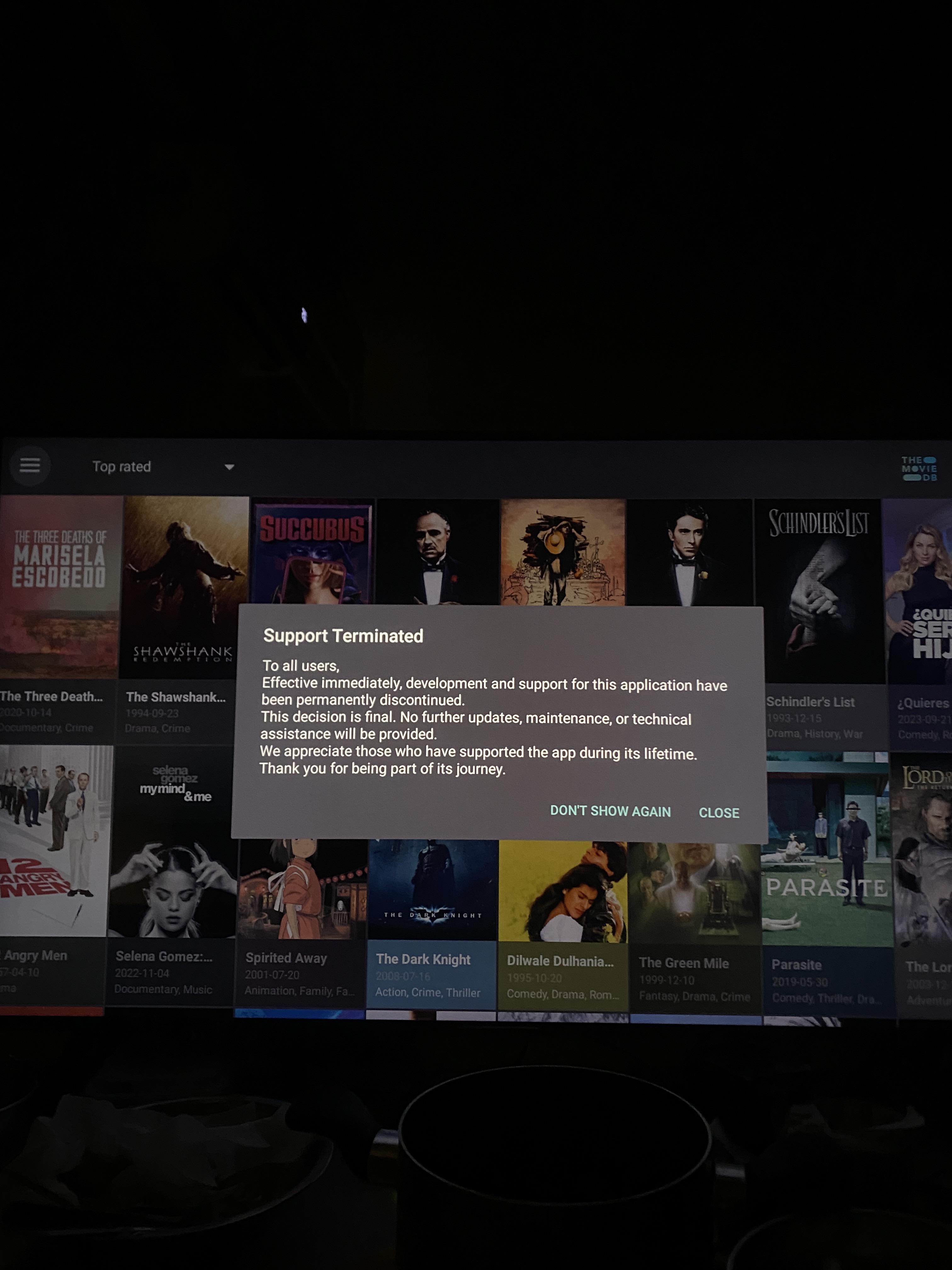
Firestick Apps R.I.P Cinema HD
696
Upvotes
Any good alternative?
r/firestick • u/Maxxxx404 • Feb 11 '26
Any good alternative?
r/firestick
•
u/_-stuey-_
•
Dec 03 '25


Been doing a few fire sticks for friends and family the last few weeks. Just wanted people to know it’s still possible to grab brand new 4k max sticks at a huge discount right now, block the updates upon initial setup, then kill OTA updates, ADEP (the famous blacklist) and ARCUS (Amazon system app protection) using Launcher manager.
From there now the stick will never update, and they still ship with pre September 25th patched firmware (8.1.5.3) allowing me to get rid of the horrible ad ridden Amazon launcher, and install Project ivy. Giving me a device with no ads, no blacklist, and just does what it’s told and works.
Just thought I’d put this out there as the fire stick is an awesome piece of kit when setup correctly, and I see a lot of people suggesting other devices.
You don’t need to switch products, but to get a fire stick setup like mine, it does need to be done correctly upon first boot, and you only get one crack at it…..if it grabs that first update your cooked.
r/firestick • u/user676095 • Feb 22 '26

r/firestick • u/Vuoshino • 29d ago
r/firestick • u/CoconutSwimming9183 • Oct 25 '25
When I wasn't home using Sports X or Sportsfire , I used to watch all my UFC on Streameast on my phone. With it gone for good...anyone suggest an alternative? Thanks
r/firestick • u/Internal_Line9441 • Dec 29 '25

I've had three versions of Firestick since 7 years, and used it was a fan of it, but later I realized the amount of Ads they started putting in and some sideloaded apps couldn't work without Google Services + Amazon will move to its new non Android OS in the future. Also, not having LAN is a no go now for me since I finally moved from 4G home internet to Cable 1gbps.
I can say that this little guy for $99 fulfills everything. Everything is from Google, so supports all Apps, you have much more customization options and it's much faster. Couldn't recommend this more.
r/firestick • u/Galwayjoker69 • May 03 '26

Today was the day! I’ve been eyeing this bad boy for a while since the news broke and while I loved my firestick, I had to face reality as cloning apps only go so far! So here’s a quick review!
Out of the box! Swapped with the firestick and took five minutes to set up and another ten minutes in total for my apps!
It runs so smooth but the remote could be better,I enjoy the UI as we can keep the main apps being used in place no matter what! Also it runs the firestick apps from our favourite places! so that’s sweet!
No ads in your face!! That was amazing not to feel like I was getting hit with buy this etc!
Sound and image is much better on this 4k device compared to the firestick 4k.
When you do download downloader allow it to access files after that go on to downloader,get an app! It will say permissions and allow and it runs right away,if anything much faster than the firestick.
Minor issue!
Internet connection stopped once but now it’s totally fine!
For £49 on Amazon it’s a great replacement for the firestick if anyone is looking to replace,truthfully and it sucks to say but it’s probably best to grab a replacement as the future of Amazon tv doesn’t look great!
Sadly my journey with the firestick is over but I hope this post helps anyone who’s looking for a replacement!
r/firestick • u/bloodshot-tequila420 • Feb 13 '26
Mobiflix downloader code 2434497
I used cinema HD for months and it finally went kaput, another Redditor blessed me with this information. It’s only right that I pass it on. It actually has a much nicer interface than Cinema HD too
Go forth and watch like you hearts depend on it 🙇♂️
r/firestick • u/cabo169 • Oct 22 '25
It’s a common misconception and actually incorrect terminology being used when referring to a Fire Stick. Can we please stop perpetuating the use of incorrect terminology???
Jailbreaking is done primarily on iOS systems(Apple).
Similar to Rooting on and Android OS.
Jailbreaking and rooting are used when you are changing the operating systems. It is much more involved than what is needed to be done on a Fire Stick.
Fire Sticks you are NOT changing the OS, you are just activating “developer options” and “allowing apps from unknown sources” in order to SIDELOAD apks and apps.
A 10 minute internet dive can tell you most of what you need to know to set up your own device. STOP paying people outrageous prices to do this for you. They are just taking full advantage of your laziness.
Bring all the hate if you want. People need to know and learn the difference.
r/firestick • u/Background-Being8119 • Jun 30 '26

r/firestick • u/MrWrestlingNumber2 • Jul 01 '26

Came across this today...
r/firestick
•
u/karimm1h
•
Apr 14 '26

Onstream just randomly stopped working on my tv, tried a couple other apps but they were all kinda trash and full of ads.
Ended up switching to hot player (you can find it in downloader) with TiVicore and it’s actually been really smooth so far. setup wasn’t hard and everything just works
r/firestick • u/the_rakiya • Jun 10 '26
Like title says goodbye firestick
I was using firestick since COVID time, it was great,.you could have all the apps in the world on it but now it feels kind of strict and that I don't like...
So today I just bought Xiaomi Tv 4k stick and it is the best, you can download downloader app and all the apps in the world...
Everything runs smooth, no lagging, no restrictions... Pure android...
And to set it up it took me an hour tops bc i use only few apps, but the knowing that it will stay the same and that you can have apps like cinemata or smth like that feels great
So if anyone needs recommendation for firestick alternative I would suggest Xiaomi Tv stick 4k.. it is 65€ in my country (60$) and it is the best thing you can have.
r/firestick • u/HoTHaRRY • Nov 02 '25
What with Amazon stating they'll be blocking "dodgy" streaming apps on even current models of the Firestick, I thought I'd try and help a bit with instructions to disabling updates.
⚠️ Important Warning: Before you begin, please be aware that blocking updates will prevent your device from receiving new features, bug fixes, and critical security patches. Proceed at your own risk.
Here is the step-by-step process.
1. Enable ADB Debugging on Your Firestick
First, you need to enable Developer Options and ADB on the device itself.
From the Firestick home screen, go to Settings (the gear icon). Select My Fire TV. Select About. Highlight the first item in the list (e.g., Fire TV Stick 4K) and press the Select button 7 times. You will see a small message at the bottom of the screen that says, "You are now a developer." Press the Back button on your remote. You will now see a new Developer Options menu. Select it.
Turn ON the setting for ADB debugging.
2. Find Your Firestick's IP Address
You'll need this address to connect to your device.
Go to Settings > My Fire TV > About. Select Network. Look for the IP Address on the right side of the screen (it will look something like 192.168.1.35). Write this down.
3. Connect and Disable the Update Package
You will need an ADB client to send the command. The easiest way is to use an app on your Android phone, but you can also do this from a PC/Mac. Example using a "Remote ADB Shell" App (on Android):
1.Download an app like Remote ADB Shell from the Google Play Store on your phone (or any similar ADB client).
2. Open the app and ensure your phone is on the same Wi-Fi network as your Firestick.
3. In the app, enter your Firestick's IP Address from Step 2.
4. The port number is always 5555.
5. Tap Connect.
6. A message will pop up on your TV screen: "Allow USB debugging?"
7. Check the box for "Always allow from this computer" and select OK
8. You are now connected. In the app's command line, type the following command exactly as written and press Enter:
pm hide com.amazon.device.software.ota
9. The shell should return a message like Package
com.amazon.device.software.ota new state: hidden. This confirms the update service is now hidden from the system and cannot run.
How to Verify It Worked
You can check if the block was successful:
On your Firestick, go to Settings My Fire TV > About.
Select Check for Updates.
It should now either spin indefinitely or return an "Update Error," confirming it can no longer check for updates.
How to Re-Enable Updates
If you ever want to receive updates again (for example, to fix a bug or access a new feature), you can reverse the process.
Connect to your Firestick using the same ADB method.
Run the following command:
pm unhide com.amazon.device.software.ota
3. After running this, you can restart your Firestick, and it will be able to check for updates normally.
Hopefully that helps extend the life of your Firestick.
Edit: This may not work depending on your current software. If you get results along the lines of "Error: java.lang SecurityException: Neither user 2000 nor current process has android.permission.MANAGE_USERS." Then you'll have to work on your router level of things with these instructions:
If the commands above still give you a permission error, then the ADB method is fully locked down on your device. The only remaining reliable method is to block the update servers at your router level.
This method stops your Firestick from ever being able to contact Amazon's update servers in the first place.
You would need to log in to your home router's settings (usually by typing an IP address like 192.168.0.1 or 192.168.1.1 into a web browser). Find the "Parental Controls," "Website Filtering," or "URL Blocking" section. Add the following domains to the blocklist:
amzdigital-a.akamaihd.net firs-ta-g7g.amazon.com softwareupdates.amazon.com updates.amazon.com d1s31zyz7dcc2d.cloudfront.net
Updated to add: amzdigitaldownloads.edgesuite.net prod.ota-cloudfront.net
This is a more advanced method, as every router's interface is different, but it is 100% effective as the Firestick simply can't download any update file.
2nd edit: If you use a VPN, you'll want to block those domains from within your VPN client, NOT at the router level.
r/firestick • u/ootd_dress • Oct 29 '25
Okay, I’m honestly frustrated right now. I’ve been seeing rumors that Amazon might limit. or even remove sideloading on Fire devices. Are you kidding me?? That’s literally the main reason a lot of us choose Firestick in the first place.
If this turns out to be true, what’s even the point of having one? The whole appeal has always been the freedom to install what we want, not just what Amazon decides is “approved.” Take away sideloading, and suddenly it’s just another walled garden like Apple TV but worse, because it’s filled with ads and Amazon self-promotion everywhere.
I mean, seriously what’s left of Firestick without sideloaded apps? Just a glorified Prime Video launcher? Do they not realize how much this would upset the entire user base?
Has anyone actually confirmed this, or is it just a rumor? Because if it’s real, I’m seriously considering switching to Android TV or another more open platform.
Update: everyone recommended that I try Google Gobuyiptv, and I was pleasantly surprised! Thank you all for the suggestion and help.
r/firestick • u/not-a-painting • Oct 27 '23
Hi all, I hope this isn't against any rules (I looked but didn't see anything). Please read the post fully and don't download Smart Tube from anything but Github. On to my tip;
I had an Nvidia Shield for a while, then life got weird and I had to move. I had SmartTubeNext on it, and it was amazing for skipping ads and sponsors.
With the ridiculous increase in ads lately, and a lot of people not getting their YT to work, I thought it might help some people to drop this info here.
First, grab the "Downloader" app from the App Store if you don't already have it.
Enter developer mode by navigating to your settings, and "my Fire Stick". On the about section, highlight "my fire stick" and click it repeatedly until it says you're in developer mode. This allows you to access a hidden menu. Return to the previous screen and select "developer options", select "allow apps from unknown sources"
edit -I've been informed you don't need the code, and that the 'stable' version is probably better. You can enter code 28544 into the Downloader browser and it'll take you right to the stable version of SmartTubeNext much faster/easier than listed below. Thank you /u/Sendthalot -
Open the downloader app and go to "browser" and type in "Kutt.it/stn_beta". Allow the installation and wait for SmartTube to download and install.
When you're done, just load up SmartTubeNext like YT and you can login and enjoy ad free viewing.
If you want more detailed information on developer options visit
to learn more about installing and Smart Tube visit
r/firestick • u/Spicy-Dicey • Jan 24 '26

r/firestick • u/[deleted] • Dec 13 '25
r/firestick • u/Cevap • Oct 01 '26
Firestick 4K Max Gen 2 rooted with Monet Launcher. Free from bloat and ads! Can’t explain any of this to comply with rules, but Google is your friend!
r/firestick • u/[deleted] • Dec 11 '25

RIPs im shocked and horrified
r/firestick • u/zube01 • Nov 19 '25

Hi. I just received the attached notification, while opening a fire stick app. Any suggestions
r/firestick • u/ScaryWubDubz • Oct 25 '26

Before/after of my Fire Stick (a couple of my own apps blurred). I got tired of the trailers, sponsored rows and sports ads on the home screen, so I built a small Windows tool to strip it back, and I'm sharing it here since it's free with no ads and no in-app purchases.
What you get:
- Amazon's ad and tracking services switched off (sponsored home-screen content, usage logging, crash reports, Alexa shopping prompts, Wi-Fi password backup)
- You pick which apps stay. It asks about each one instead of guessing.
- Projectivy Launcher installed and set to open when you press Home
- Extras: install .apk/.apkm files from your PC, uninstall apps
Why it's safe to try:
- No root, just ADB (Developer Options → ADB Debugging)
- Apps are disabled, not deleted, and "Undo everything" puts them all back
- System essentials are on a protected list and never touched: Amazon's home screen, Appstore, Settings, remote/Alexa, casting
- There's a preview mode that changes nothing
Why another tool?
There are good existing options (Launcher Manager, various debloat scripts). This one is aimed at people who've never used ADB:
- It asks about each app one by one instead of removing a fixed list, so you keep exactly what you use
- Preview mode, plus one "Undo everything" option that restores every app it touched
- No setup: it downloads Google's adb itself, and it's one double-click on Windows
- It checks your Fire OS's Android version and tells you which Projectivy download will actually install, which is the step that tripped me up (`INSTALL_FAILED_OLDER_SDK`)
- It installs .apkm bundles directly from your PC, not just plain .apk files
Setup: download the zip, extract it, double-click `Start-Here.bat`, type your stick's IP, and accept the prompt on the TV. It fetches Google's adb for you on first run.
Heads-up: on Fire OS, Amazon's home screen still gets the Home button first, so pressing Home quickly can flash it before Projectivy takes over. And Projectivy's "Android settings" shortcut only blinks; hold Home → Settings instead. Both are Fire OS limits, confirmed by Projectivy's developer.
Windows only for now, with basic Mac/Linux scripts. Tested on my Fire Stick (Fire OS 8). Reports from other models are very welcome. Built with help from Claude (AI). Not affiliated with Amazon or Projectivy.
GitHub (MIT, everything readable): https://github.com/ScaryWubDubz/Fire-Stick-Debloat
Bug report form is on the GitHub page, or comment here.

