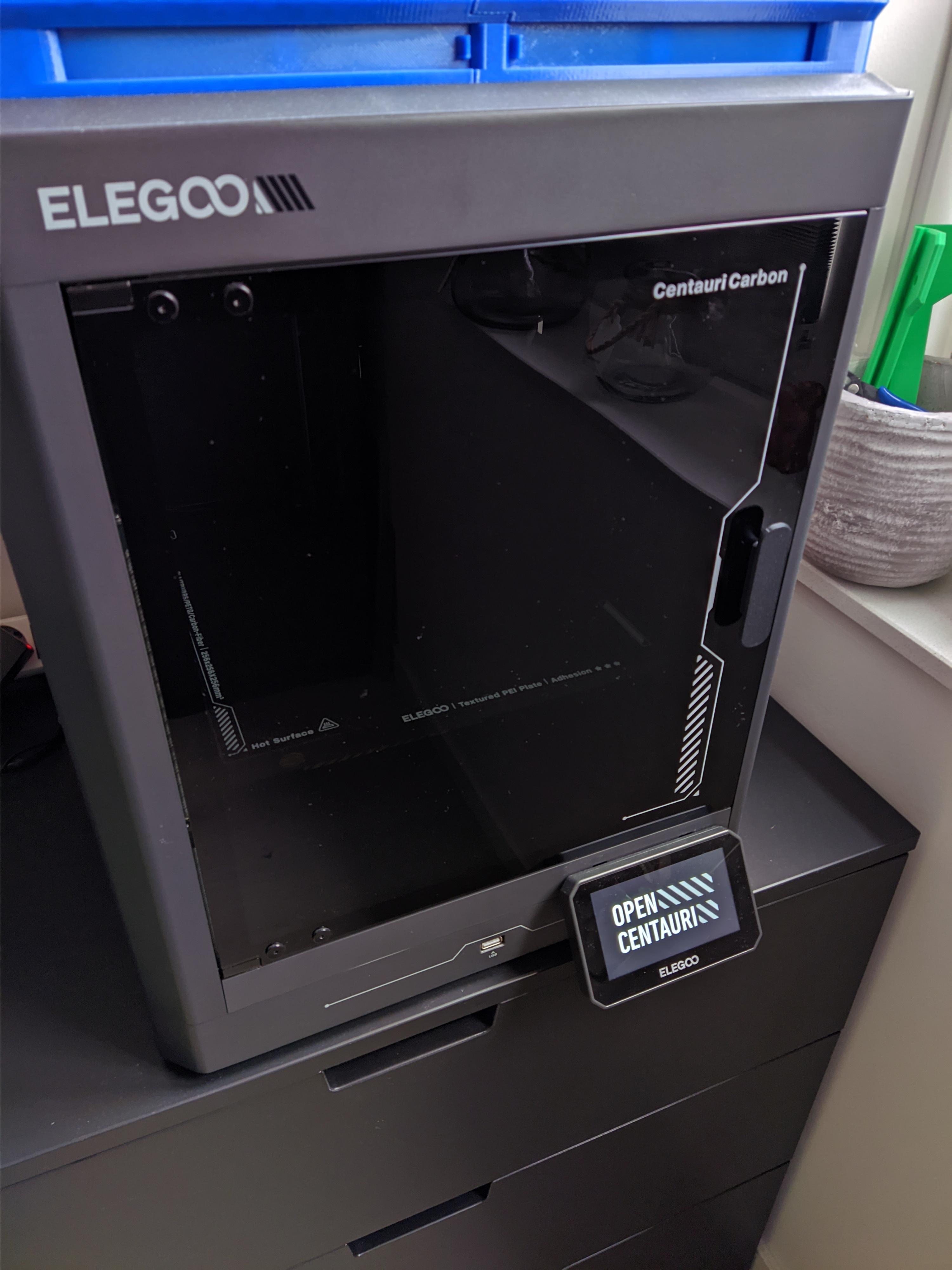
The past few months i've been working on a custom mainboard for the Centauri carbon. It is designed to be a drop-in replacement. The only extra parts needed are a BTT CB2 and a display. This board will bring "standard, vanilla" klipper and AMS support to the Centauri carbon.
PSA for Centauri Carbon owners: community analysis indicates the printer’s firmware is Klipper-based with custom changes, which would trigger GPLv3 obligations to release the modified source. As of now, the source hasn’t been provided and they are outright denying that it uses Klipper code. Please help ask Elegoo to comply so users can audit, fix security issues, and contribute improvements. You can find proof in the link provided.
Due to changes in global trade and tariffs, we may adjust product pricing on our US official store (us.elegoo.com) in the coming months. Stores in CA, UK, EU, AU, and JP will not be affected.
If there is a price adjustment, we will announce the update about a week in advance on our website and other official channels so you have time to plan. All confirmed orders placed before the change will be honored at the original price and delivered as promised.
Thank you for being part of the ELEGOO family - we truly appreciate having you with us!💙 If you have any questions on this topic, it's best to directly email our service team at [email protected].
Just to clarify: ELEGOO didn't stop Centauri Carbon multicolor system development—it's still in progress.
Many of you are interested in the filament holder design, so I'm sharing more info today:
First, the filament holder is installed with an additional part.
Second, the filament holder is passive (without motor), but it can rotate to prevent filament tangling. You can see how it works between swaps from the video from last time.
Enjoy seamless 4-color printing with the CANVAS system's instant color switching and smart filament detection, while auto refill and tangle detection maintain smooth, hassle-free multicolor printing.
Printed entirely on a CC2 in multiple pieces and glued together. I'm aware the scale of the chest is off and he still loves it lol. STLs are from Aguilar Workshop. Printed entirely on PLA+
These 3 options are unacceptable please do not lead us on, instead of saying cannot guarantee a release date please have the common decency to say if there will or will not be a release ever for an AMS/MMS we deserve that bare minimum! Options are currently we keep paying a company that keeps lying ($50 off of $100 of filament) to or $80 of the new model which the price has not been released. We are not trusting you “promises” anymore the least you can do is be real with us! This is an amazing failure of epic proportions!
First and foremost, we would like to express our appreciation for your continued support. At Elegoo, we always attach great value to your voices. We recently noticed discussions on the print head cable of Centauri Carbon 3D printer.
Information on the Design of Centauri Carbon
We would like to take this opportunity to provide information on the design of Centauri Carbon print head cable.
About Print Head Cable
The cable features a flame-retardant outer jacket with a cotton inner core.
Specifications:
Component 1, 2, 3, 4: Conductors. These conductors consist of a copper core and a flame-retardant insulating jacket.
Component 5: Outer Insulation Layer. The material of the layer is flame-retardant flexible PVC, with V-1 flame retardancy rating.
Component 6: Metal Shielding Layer.
Component 7: Anti-Breakage Filler Zone (cotton).
Internal Tests and Conclusions
After receiving feedback, we conducted product testing continuously for two months to inspect this scenario. The tests include:
1. Flammability test
Even with a non-flame-retardant internal cotton core, the outer flame-retardant insulation layer ensures that the cable is effectively isolated from oxygen and suppresses combustion, presenting no fire hazard.
2. Aging tests, including:
a. Two months of continuous printing, and five million cycles of the print head rapidly traveling (2 times per second) between the top-left and bottom-left extreme positions
b. Temperature cycling test
Overall, the results show the cable remains physically intact and electrically stable, confirming that the risk of the cable catching fire due to wear and tear under normal use is extremely low.
Future Optimization of the Centauri Series
We understand and fully respect your concerns. Even a minuscule risk deserves our full attention. As always, we will continue to optimize the Centauri series to deliver the best possible user experience.
We plan to apply the following optimizations in future production batches:
1. The connection between the cable and the Type-C connector will be changed from vertical to parallel, and the cable will be rerouted. This design significantly reduces the bending angle of the cable when the print head moves to the four extreme positions, keeping the risk of cable damage to minimum.
*Demo of bending angles with the current and new design
2. The thickness of the Type-C fixing tab will be increased from 3 mm to 6 mm, which helps prevent poor contact caused by the fixing tab.
3. The cable mold will be optimized, increasing the insulation layer thickness by 0.1 mm. During cable processing, the core wires will be more tightly wrapped, improving structural integrity and significantly extending the durability of the cable.
4. The internal cotton core will be upgraded to a flame-retardant material (V-0 rating), providing dual-layer flame protection inside and out.
5. The cable length will be increased by 50 mm, allowing more flexibility and bending space during print head movement.
6. The length of the strain relief will be increased by 4 mm, from 7 mm to 11 mm to allow more flexibility.
We will apply the updates to the Centauri series manufactured from November. Due to differences in manufacturing and shipping batches, the product you receive may not yet include these updates.
Our Promise
To thoroughly address your concerns, we will provide a free upgraded cable to customers in need. (Due to shipment time, please confirm with our support team about the exact delivery date: https://www.elegoo.com/pages/cc-support)
It is always our priority to optimize products for the best user experience. We will continue to listen and always welcome constructive advice. We will keep you updated with the progress of the printer head cable optimization.
Before you click the order button for Centauri Carbon, here's your chance to WIN one!
How much do you think Centauri Carbon will cost? Leave your guess in the comments for a chance to win amazing prizes! We'll reveal the price on Feb 17, 9:00 AM EST. The winners will be selected on Feb 18 from the participants who provide the closest correct answer.
Prizes & Winners: 2x Centauri Carbon 3D printer 3x 50% off discount code of Centauri Carbon 6x 1kg filament
Rules:
Each participant can only have one valid entry under each post.
The giveaway is held across Facebook, Instagram, X, Discord, Reddit, and YouTube community.
After years of printing, the fun starts again by designing and printing new parts for printers. I took parts from multiple uploads, modified and designed new. This is the end result, including the use of my old riser to not waste
We are just close to hitting 🎉6000 MEMBERS🎉 in our Reddit r/elegoo, as a celebration for it and thanks for your support, we are doing a Giveaway. Join us and comment as we listed, and have a chance to get a 3D Printer or Laser machine, or 1kg Resin or 1kg PLA!
🎁Prizes:
Special Prize: Neptune 4 Pro or Mars 4 or Phecda 10w (1 winner)
I printed out a fan silencer with a carbon insert and a new tool head cover. This made my printer so much quieter now, it feels like a whole new printer. The tool head cover alone has solved all of my random rattle noises, I hardly ever notice my printer is running anymore. Even my roommates have noticed how much quieter is it is. I highly recommend printing these things if you get a chance.
(The actual surprise was that Finnish Post actually used common sense for a change. I was told that the printer will be delivered tomorrow, but I noticed from tracking that it’s actually registered in the nearby post office, which is located at the same shop I was going to visit today anyway. A few messages in the chat and the driver dropped it back there for me to pick up today.)
After the printing is complete on CC, two options appear on the screen: Printing completed: Confirm / Print Again. In my opinion, the color coding of these two options should be reversed.
This has actually never happened to me. I've never needed to reprint the same model after a successful print. And even if I did tap "Print Again," the printer wouldn't really be ready anyway, since I'd still have to clean the build plate and prepare it again every single time.
When a print finishes, I'm naturally drawn to the green option because it's more visually prominent. To me, "Confirm" is the primary action after a successful print, so I think it should be the one highlighted in green, while "Print Again" should be the secondary option.
Hi. Welcome to 3D printing. It's great, and we're glad you're joining us. (ONE OF US!) The Neptune 4 Max is great, but.... here's the thing. You bought a relatively complex printer as your first printer.
Yup, the Neptune big-format printers are some of the easiest to use of the big format printers. But they're still complex, and the large size will exacerbate any user error and any setup problems you might have.
These printers are also new. They're new from a hardware standpoint and they're new due to software. There are some teething pains with this printer series, as there are with every new printer series. So if you're jumping in to the printer market here, give the process some time and use it to learn your printer more closely.
There are a lot of errors a first user can make, and a lot of setup problems. That's especially true here because the Neptune 4 Max is the first gen of these printers with Klipper. Klipper goes whoosh fast. When you go faster, accuracy is harder to maintain.
So think of swimming slowly in a small pool. You need to get from one side of the pool to the other without deviating from your swim lane. Not too big of a problem. That's a traditional 3D printer. You still need to know how to swim, but most swimmers can go from one side to the other side of a small pool and not really deviate too much off course.
That's previous printers. Smaller, slower.
Next, imagine swimming across a whole Olympic sized pool. It's going to take more work to get from one side to the other and maintain your position in the lane.
That's a pre-Klipper wide formate printer.
Now, imaging that Olympic sized pool except you have to swim as fast as you can, sometimes 2x-5x faster than you ever swam before. You're going to need a lot of skill to make it to the other side still in your lane without, you know, getting dead.
Klipper printers from Elegoo also use their own build of Klipper, not the most recent public version, so they have to make firmware to match their own build of klipper, and sometimes newer versions of klipper have fixed issues anyhow.
So, some things to know. And don't worry these all have videos about them. I have a channel on YT and I'll be making some to help people. (Here's one I did on the problems people are having with the Neptune printer, and some of these are user error, and some are not. - https://youtu.be/yrAuKnJC8EY?si=mjFOrvLe3tjNMLW8)
If you have anything you want me to cover in a video about setup, let me know.
Tips
Z-Axis Offset
The Neptune 4 series has auto bed leveling calibration. That's not the same thing as setting the Z-offset. It can measure the variations in the flatness of the bed without knowing the right height for the Z. It's like you could measure the variations in the floor of your house with a level without knowing how far off the ground your toes are in your shoes.
Watch a video on Z-axis leveling. Watch a recent one because it's gotten a lot easier with the control panel on these machines to do leveling, so a video from years ago is going to scare you.
This issue can lead to the Blob Of Death where filament wraps around the nozzle and inside of the print head and engulfs wires, and then you need a new printhead. Then email [email protected], which is their support. And be patient, they're in China, you're not, it takes a while for an email to get to them, them to reply, and then you reply.
When you send them a question always include your serial # and a picture of what's wrong. You'll save time.
Firmware
The original firmware for the Neptune 4 had an issue where it wouldn't save the Z-Axis offset after calibrating it. So you'd print once, great. Print later and you'd spew filament pasta everywhere.
You can get the firmware here. Owen, one of the mods, is an Elegoo employee, monitors all the threads, and is super super helpful.
You can also get it on the Elegoo website, though Owen has firmware here before it's uploaded there, I've found.
My video has some tips on firmware install. The TLDR is that you have to update both the printer and the controller. Printer uses a USB thumb drive, controller needs a MicroSD card. And you need to take the back off the controller.
Update only the printer and not the controller and you're adding more problems.
As a general rule, don't update firmware unless you have a particular issue. If the printer is working, don't f- with it. If it's not saving the Z-Offset, that's a problem.
Slicing Software
All printers have to have a model "sliced" to be printable. It's converting pretty model into thin strand of plastic, to end up with pretty object.
Elegoo's branded version of Cura is ooolllddddd. It's 4.8 and Cura is now 5.5.
Usually a printer is supported in all the major slicers right away. The Neptune is only supported officially via Elegoo Cura 4.8, and in Prusa, which I link to in another video. It's not the final profile, but prusa and their working profile is better than Cura 4.8.
Orca Slicer (a very nice slicer, my fave) now has profiles for the Neputune lineup but the slicing times listed are really off from what elegoo does. Like 50% slower sometimes. I have to do a long print to see if Orca is more accurate than Cura in the time estimates or Orca really is going slower.
But if you're new, use Cura 4.8, because it's offically supported. You won't have to guess as much if your problems are your slicer.
There are like 60 million print settings in a slicing program, and every setting changes something. Until AI runs our printers and can set everything on the fly, they're just complex programs. There are some things that won't print unless you click some of the checkboxes or do some setting in some obscure menu. Just look up z-hop videos and you'll see what I mean.
But most prints can print without too much fiddling, especially if you have a profile for the filament your're using. The "generic PLA" profiles are basically just mean averages of the best settings for PLA.
Be careful to select the right bed material, as this affects bed temperatures, which are crucial for your first layer to stick.
Cool plates can be run with no heat (in most cases) and PEI needs a temp around 60ºC. Run a PEI plate with the cool plate settings and your prints will fail.
Hardware
It would be great to have a giant printer that's just plug and play. We're not there yet. There are some hardware things to deal with when printing to a big printer like Max.
As some people have mentioned here some of the axis screws are loose in shipping. The belts often need to be tightened or loosened compared to how they're set at the factory.
Again, there are good videos on this.
Start Small
It's not a good idea to go right to building a full-bed-sized death star. We know, we know, you got the printer to make stuff that's biiiggggg. But start small.
Benchy is a good place to start, but you should do more than just print that.
There are test cubes you can print to check the accuracy of the axis, and a very important test is called a temperature tower.
Every brand of filament, hell every spool of filament has slightly different characteristics. Sometimes a print fails because the filament is a few degrees to hot or cold when being printed.
A temperature tower prints different layers of the test print at different temperatures. You can look at it and see what the right temp is for your filament. I use the same filament all the time (look for Elegoo's PLA on Amazon, it comes out to like $13 a roll in a two pack and it's very very consistent). I don't do temp towers for that brand much, unless I'm seeing issues.
Keep Your Filament Dry
Filament absorbs water. The reason silica gel comes in the package with your filament is because silica likes to absorb water just a bit more than filament does.
When filament absorbs too much water the temperature profile changes, the melting and flow changes and you get failed, stringy prints.
Many times a failed print diagnosis should start with drying out your filament.
There are filament dryers you can buy, some are linked on my videos, but just go to amazon and look for them. Sunlu makes some nice ones.
Some people use food dehydrators which is fine, I just personally wouldn't then use the dehydrator to make food. That feels like you're cooking in a box of cancer.
But wait! Doesn't my filament come sealed? Yup. And if it was packed in a room with high humidity, it was packed in water in the air. So you could end up with sealed filament that's wetter than stuff in your printing space, if the humidity there was low.
And a filament dryer, at least the cheap ones, doesn't actually dry unless it has a way to vent the moist are of unless you use a dessicant in it. There are some "rechargable" dessicants you can get. They soak up water, then stick them in the oven for a bit and the water comes out, and you can use it again.
Clean Your Bed
PEI, the shiny metal your print bed is made of is amazing. So much better than cold plates and glass plates that needed glue.
But, PEI hates grease. Any oils make a print not stick. Clean it off between prints with rubbing alcohol. It's a good idea to give it a quick wash with dish soap and warm water (not using anything like scotch brite pads, they'll take off the surface) and dry it. There often is residue from the factory on it and this gets it off. And if you have adhesion issues and rubbing alcohol isn't helping, try to clean it.
Bad Models
Man there are so many free models, and holy hell some of them suck. A lot of people post things online that just fail because the model doesn't work right. If you're trying to print something and it fails, try to print something else to see if it's the model.
Good Resources
Reddit is a great place to come and ask for help, but with new printer releases it feels like there's always a million people asking for answers to why their prints failed. We're happy to help but please meet Reddit half way and google first. If your layers shifted during printing try googling "layer shift during 3d printing."
Also, with so many things that can make a print fail, the comments on these posts are largely just a stream of people giving one of the things I said above, but very few people agreeing on the cause.
People in r/3dprinting seem to be more into helping people with new issues than in the forums for particular printer brands or models. Although you'll still get "RTFM, I used to have to solder my motherboard to print, the least you can do is watch a video" on those posts.
So before you post, think about the things you tried, the slicer, the filament, the settings, etc, because posting those along with "HELPMEPLZ" will get you help faster.
But as I tell my son there's nothing you're experiencing that hasn't happened to someone before. They solved the problem, you can too.
And as we YouTubers say, if you have anything you'd like to add, leave it in the comments below.
TLDR: The CC printers seem to make loads of improper connections to command-and-control servers and upload LOTS of your data. Reset the printers, and do not connect them to Wi-Fi unless you have a method to prevent them from accessing the internet. Elegoo has been avoidant, and provided poor answers to the questions they have been asked.
Update - 7-Aug
Final update - I am incredibly disappointed with Elegoo's response to this situation. I've approached them several ways, and the most information I've been given is posted here and in the comments. I've shared pcaps with them. I've given them my personal contact info, so we could have a conversation about what I (and others) are seeing. It took several days for them to even get me the old firmware version to test. In short, they are sticking their heads in the sand. They are choosing to ignore the problem, hoping this will go away.
WIth that said, before I go any further, I want to explain one of the problems that some of you are experiencing. Several of you have stated that you saw poor network performance for all users after connecting the printer to Wi-Fi. There is a simple reason for this: IF the printer cannot connect to its servers, or it isn't getting what it expects from the MANY tracking servers it connects to, it begins flooding requests out. EACH of these requests are transmitted across Wi-Fi in their own transmit opportunity, which means the printer is taking control of the airtime again, and again, and AGAIN. As my screenshots below show, it occurs multiple times every. single. second.
This is the chatty Kathy at your office who will not shut up, so the important conversations can happen, but in Wi-Fi, only one device can talk at any one time. Its like holding an important meeting over walkie-talkie...but you've got a chatty Kathy who just wants to talk about the weather...non-stop...all of the time.
There are only two things you can do here: 1-Disable networking on the device and use the USB port only
2-Connect the printer to a Wi-Fi radio that is not used be any of your other devices, and which runs on a different channel. Notice, I said radio...not WLAN/SSID. That will not be enough. In my case, I'm connecting it to a dedicated 2.4GHz radio in its own SSID. It gets access to the internet, and nothing else. My computers can create a connection to it, but it cannot initiate a connection to anything inside my network. If you are trying to replicate this, it is what is referred to as a Stateful Connection.
That doesn't prevent the device from doing off-channel scanning, and potentially capturing traffic some other way. I also have logging and alerting configured for the device, so I'll see what I find long-term.
BUT ultimately, we should not need to do this.
As soon as a replacement main board is available for this printer from a reputable supplier, you can be sure I will be installing it.
In the meantime, I'm also experimenting with using a Raspberry Pi in USB mass storage mode to present a network share that just looks like a USB drive to the printer.
Update - 31-July - Update 2: I included the specific questions I asked Elegoo to clarify for us.
I've heard from u/Elegoo_Offical both in the comments and on my support case. The response to my ticket is the same as below. They are saying that it is simply checking for internet access.
There are many questions they have not answered:
Why does the printer need to make these connections? What is the purpose? Why does it maintain the connection, checking often for content, and then sending resets to the connection before reestablishing them immediately afterwards? What does that content contain? Are you sending commands to the printer based on these calls? Why have several redditors noticed their printers uploading GB's of data when the printer is not being used? Why are the printers making so many calls? Will Elegoo provide a method to disable this behavior? Will Elegoo printers function without these calls being successful? If not, why not? Where in the terms, privacy policy, or otherwise did you inform users of this behavior?
In short Elegoo is hoping this will go away, and we'll ignore it.
I've sent PCAPs off to several application/web experts who are reviewing the data.
I will repeat what I stated before. I will not connect this printer to Wi-Fi without being able to enforce policy that prevents it from accessing the internet.
I will also be replacing the controller/MCU as soon as possible!
Update - 29-July First, I've been asked by several in comments and in chat whether limiting DNS access is enough to block the printer from reaching the internet. Sadly that is not the case, as the machine makes DNS calls directly to 1.1.1.1 by IP. So it would resolve anything it needs from Cloudflare.
I received a response to my ticket last night that requested I make a video demonstrating the issue, as I had not provided enough information. I sent another PCAP, and requested they escalate it to the Product Management or Dev Team.
I've also been asked by many of you what the actual data looks like, and I've struggled with how to demonstrate that for those who are less fluent in Wireshark. The printer is checking in with servers, which are then either telling the printer to do nothing but keep the session alive, or giving the printer another host to check in with. This is standard reverse-shell activity. How do you guarantee you can get through a firewall? You pop a reverse-shell.
So, lets try this:
The system is making HTTP GET request to a series of servers constantly:
Most of these are keep alives. Hypertext Transfer Protocol
GET /generate_204 HTTP/1.1\r\n Request Method: GET Request URI: /generate_204 Request Version: HTTP/1.1 Host: www.google.com\r\n Accept: */*\r\n \r\n
and that creates a response that looks like: HTTP/1.1 204 No Content\r\n Response Version: HTTP/1.1 Status Code: 204 [Status Code Description: No Content] Response Phrase: No Content
Others return something like: Hypertext Transfer Protocol HTTP/1.1 204 No Content\r\n Response Version: HTTP/1.1 Status Code: 204 [Status Code Description: No Content] Response Phrase: No Content
At some point, the printer sends resets to all of the connected servers, and then starts again.
There also seems to be some confusion around the number/how often the printer is doing this. When I said constantly, I meant non-stop multiple times each and every second.
The PCAP I will share has 14442 packets that were captured in 20 minutes on a machine that should have been completely quiet with no user on its web interface, and no print job running.
I'm still awaiting a response from Elegoo beyond "I don't understand your problem." I'm also losing patience. u/Elegoo_Official u/nicemars u/owen_ou
FINAL UPDATE FOR 28-June: I did open a ticket with Elegoo support. I'm waiting to see what they have to say for themselves. I will update as soon as I hear anything.
As you can see in the comments below, there are several others who have confirmed what I am finding. So, this is no longer about proving the issue, but instead demanding that Elegoo resolve this issue. I hope they respond over night.
The printers are keeping these sessions open, and checking for statuses, which are returned in the same way that any command and control server operates.
I strongly suggest you hard reset your printers, and either do not connect them to Wi-Fi at all, or restrict their ability to talk to the internet, and any other device on your network except for the computer you print from.
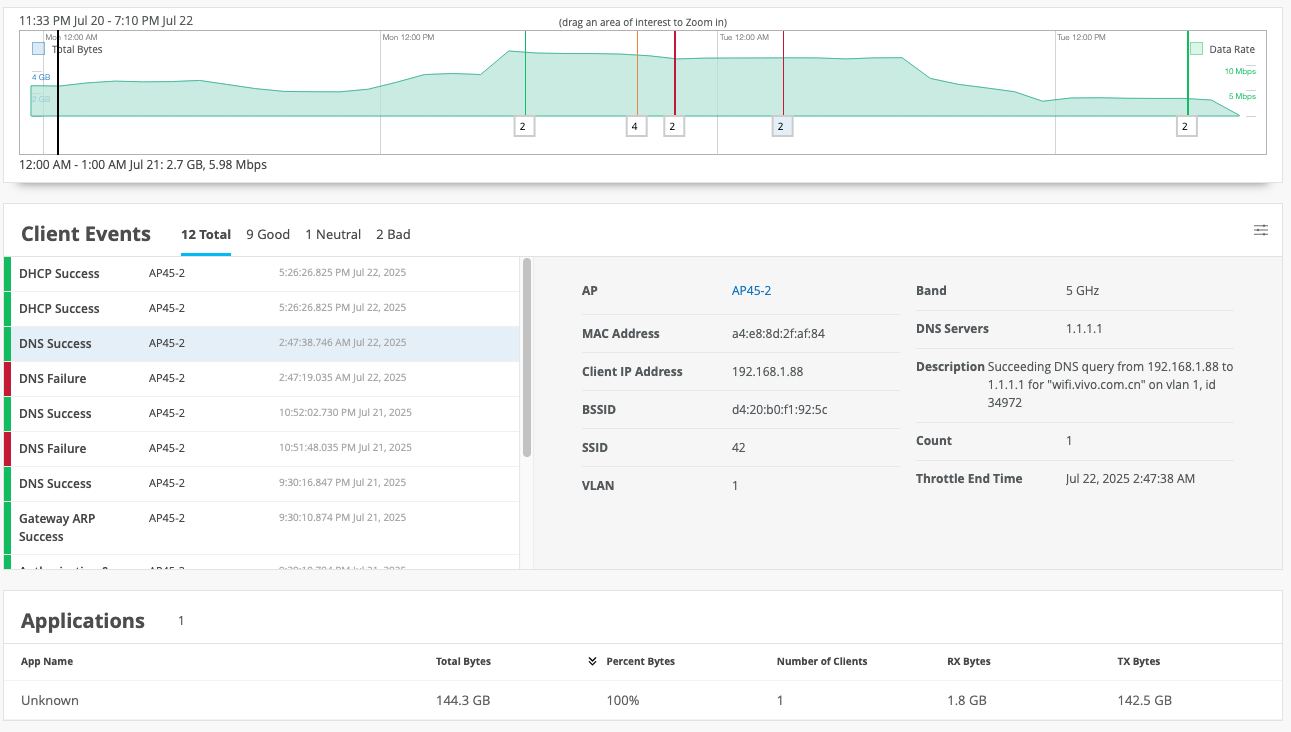
I want to reiterate what I stated below. Over the last 7 days, my printer has UPLOADED a total of 176GB! That is not just a streaming webcam, or some other normal use case. Again, look at the graphs and you will see the obvious difference.
Those who are using Elegoo slicer should also consider whether they want to keep that software running on their systems. I started right out of the gate with OrcaSlicer, so I can't test it. It might be worth setting up a system with it to see what kind of traffic it generates.
That is absolutely unacceptable. The fact that we even have to ask these questions is simply unacceptable!
I'm going to give Elegoo until tomorrow to respond. My hope is they have a good answer. But now I'm fairly certain that won't be the case, and I'll see how uncomfortable I can make this whole situation for them.
Edit 1: Updated to add the screenshot Edit 2: I put the IP's the device is calling in the comments. Those IP's were called during a single 10 minute packet capture, while the printer was completely idle, and after it had been up for over 30 minutes, so this isn't the initital startup flurry of conversations most devices have. This is just standard, on going traffic. Edit 3: I've added a screenshot of all conversations from that same capture.
Edit 4: The Plot Thickens! I went back and checked general traffic info for the device for the last 7 days. In 54 hours, right after the printer was setup, it UPLOADED 142GB of traffic!
To be clear...that was OUTBOUND traffic. I'm also including this screenshot that shows several print jobs that occurred, so that you can see what a normal print job looks like, that included the camera stream, etc. Those first few days, eclipses every print job.
Original Post: This morning, I went to kick off a print before leaving for the office, but I couldn't get things to work. A quick restart didn't solve it, so it was time to dig deeper. I work as a network/wi-fi engineer, so my home has an enterprise grade network, that I know incredibly well. When things go wrong, its usually easy to troubleshoot.
Since it was being finicky, I did what I always do, I took a packet capture. Which led to this post.
The amount of garbage traffic the CC's are sending is stunning. I've just started digging into the PCAP's, but I'm incredibly disappointed in Elegoo. I've started a packet capture that will run the rest of the day, and I'll take a look when I get home. That will also get shared with several security researchers I know, to see what they find.
I absolutely understand the need for some basic user experience monitoring, and I understand how/why that is used in product development. However, this is beyond excessive. Almost 4000 frames in under 5 minutes, while the printer is sitting completely idle, with the screen off.
I'll be monitoring this throughout the day out of curiosity, and to update this post.
However, some of the most worrying frames are the malcrafted frames being sent to my firewall. These aren't DDNS/MDNS/Discover protocol du jour or DHCP/DNS/ARP or any other expected network traffic. These are improperly formatted unicast frames.
This evening, after I get home, I will be building firewall policy that puts my printer in its own security zone, and only allows whatever is needed to print through. No DNS or internet for you Elegoo! But I know many of you cannot do that. At the very least, you should turn your printer physically off anytime it is not actively in use
My hope is that we can get a third party manufacturer to build a proper klipper-based board for the printers, because based on what I'm seeing so far, I no longer trust these devices to behave on my network or any other.
Elegoo, you should be ashamed, but I would welcome any information you would like to provide.
Screencap of the PCAP for visibility and proof. There are several keys exchanged in plain text as part of the requests and I haven't figured out whether they are session/printer based so I can't share the PCAP until I have a better understanding of that.
I'll keep you all up-to-date as I learn more. Should Elegoo decide to just delete this, I'll post it elsewhere, so we can keep the conversation going.