What's the best web hosting? So, I just went through the painful process of switching web hosting providers again. My old hosting provider started slowing down a lot, and my site kept going offline. I run a small business website, and every time it went down, I lost potential customers. The last straw was when I contacted support, and they took 10 hours to reply with a copy-paste answer (not to mention the AI chatbot lol).
After testing a few web hosting providers, I narrowed it down to SiteGround, Cloudways, and Hostinger. SiteGround has great customer support and fast speeds, especially for WordPress hosting, but it’s more expensive. Cloudways gives you flexible cloud hosting with strong performance, but it’s not the easiest to set up if you’re not tech-savvy. Hostinger seems to be the best for cheap website hosting, with decent speeds and a simple dashboard, but support isn’t as strong as the others.
What do you think is the best web hosting in 2025? Have you used SiteGround, Cloudways, or Hostinger, or do you recommend something else? If you need cheap website hosting or the best WordPress hosting, what’s been your experience? Let me know in the comments
So we're waiting years for a new version and you don't fix this basic problem !
And this is just a button, imagine when there are multiple elements all on top of each others, just put those options OUTSIDE the element we want to edit, not on top of it !!
It is frustrating and I had to create a meme about it but please tell me this will be fixed or there's already a way to do so.
Apologies guys I have not replied back to lot of you and was missing in action for sometime, but just wanted you all to know that I am still alive and working on this and more. I have updated the skill files til Divi v5. 7.4 and are working on few exciting things. Will update about the same very soon or if you are not the person to wait go ahead and check https://divilove.com to know what's cooking. 😊 Will also be sending out mails tonite to all the subscribers for the announcement and road ahead. Thank you for all your love and support.
------- Previous post ------
Hey everyone!
So a few days ago I started building something interesting for myself — a Claude skill file that teaches Claude how to generate JSON layouts for Divi pages. The idea is simple: instead of manually building pages inside Divi, Claude can generate the page structure as a JSON file which can then be imported directly into Divi.
It's still in the early stages, but it's already capable of generating basic page structures for Divi 5, and I'm planning to keep training and improving it so it can handle more complex layouts and modules.
Honestly, I'm pretty excited about where this could go because it could make page building much faster and more automated.
I'm curious — would anyone here be interested in something like this? Happy to share more details or even the skill file if people want to try it out.
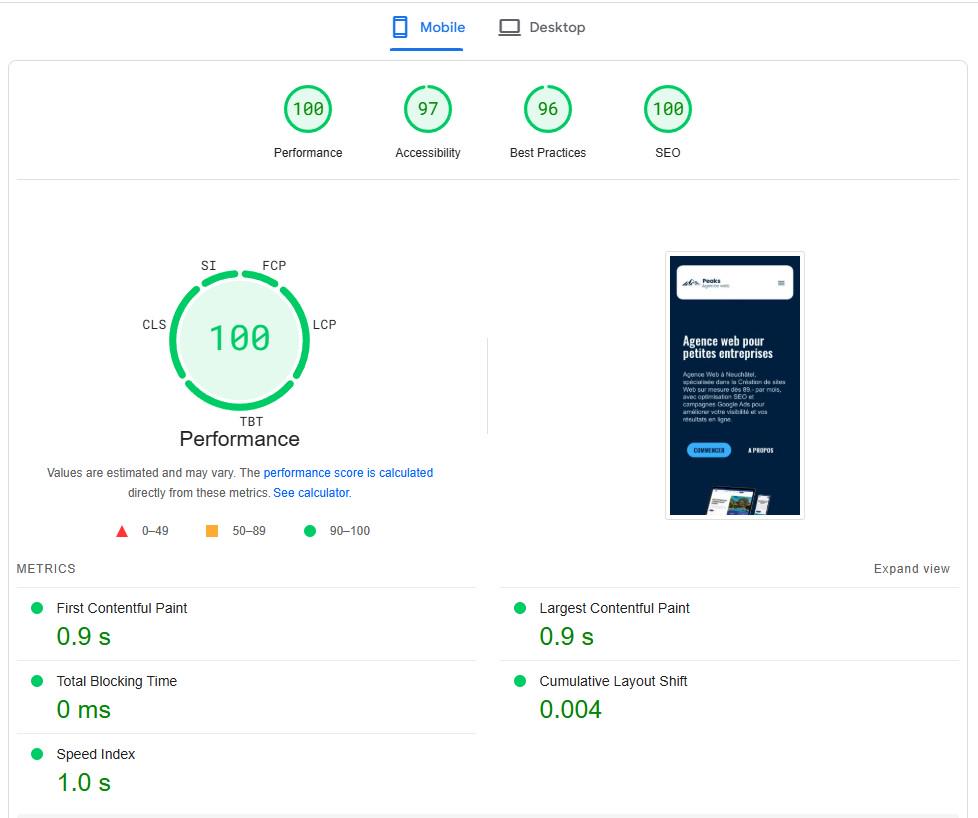
I’m super proud to share that I finally hit a 100/100 PageSpeed Insights score — yes, even while using Divi 4! 🚀 I run a web design agency based in Switzerland (https://peaks.ch/) and reaching this milestone has been a big win for me and my clients. Fast websites mean better UX and stronger SEO.
I've been a Divi 4 user for the entire life of my agency. I always wait 6 months or so after a new platform drops. I won't be migrating my legacy sites any time soon, but we will be building with Divi 5 moving forward.
Of course, it takes some adjustment. But when people say it is faster, they don't just mean loading and builder times. The structure of the UI has changed in such a way that updating element content/settings is much, much more efficient.
I started by individually clicking on each module to reach settings, like Divi 4. But then I got to know the right side "HQ" for every live module.
At the very top, you can see the element waterfall: section > row > column > module. Clicking on any of those keeps you in the design HQ sidebar for a different element, instantly. Use the Content > Elements tab to move back down the waterfall.
Besides the better functioning "extend styles" and variable manager, this single element toolbar without popups is where it's at. Muscle memory is starting to kick in for all of the tabs, and I'm moving faster and faster.
That is all! In a world of AI, which I use extensively elsewhere, it still cannot design something unique and handcrafted. My sites aren't the most amazing, or the prettiest, but we have a style that is unique and notably not AI.
So I hope Divi can survive the AI revolution, and keep making progress on page builder tech. It was likely years of extremely difficult development time running 2x platforms, and they persevered. They deserve some props for that. Good luck everyone!
Published 5–6 websites this year using Divi 5 (including beta), just awesome how this version is really a game changer (I have been working with Divi since the first version). PD: I recommend using always a custom child theme for every website.
Hey everyone! I wanted to share a project I’m super proud of – https://dipidoos.portfolioexhibit.com/ . I built it entirely on WordPress using the Divi theme and DiviFlash plugin.
I focused on:
Clean, modern design
Fully responsive layouts
Fast loading speed
SEO-friendly structure
I honestly think this is one of the best Divi-based websites I’ve created so far, and I’d love to hear your thoughts, feedback, or suggestions for improvement.
Please help save my sanity in Divi 5. Currently in Divi 4 when I input a value in any field (margin, padding, whatever) unless I put something in within about two seconds the field auto-completes itself and in most cases its adds the wrong type of value, like px when I want rem or %, for example. It's maddening because it happens over and over throughout my workday, every day!! Just let the user put in the value when he/she wants to.
I need to vent a bit because working with the recent versions of Divi has become an absolute nightmare, and "frustrated" is putting it lightly.
The amount of bugs, glitches, and visual inaccuracies in the builder lately is unbelievable. Basic, everyday tasks — like simply managing module presets or tweaking the styles on a basic FAQ accordion — turn into a huge headache and a complete waste of time.
What makes it worse is watching all the marketing hype and effort being poured into useless AI features that almost no serious, professional web designer actually relies on for client work. Instead of chasing trends and playing around with AI gimmicks, the dev team urgently needs to read the room and re-prioritize:
Fixing long-standing bugs and broken UI elements.
Ensuring layout accuracy between the builder and the actual frontend.
Making the core builder fast, stable, and rock-solid.
We don't need shiny new AI bells and whistles if the foundation is crumbling. Please, stop the feature creep and focus on stability, security, and the core workflow that professionals actually use every single day.
Is anyone else struggling this much with recent updates, or is it just me?
Started a new project recently and thought why not get started with D5 since it’s being launched shortly.
I have to say I’m really impressed. Took a couple of hours to find my way around confidently but in essence it shares quite a few similarities with D4 but on steroids, far more customizable options.
Standouts for me are the nesting options and customizations you can now make to rows and columns. Putting content like buttons side by side is now easy. No more custom css.
Loop anything is great to create custom blog designs, you’ll never use the blog module again.
Interactions is great for making pop-up’s or banners you want to close on click (just had a client that requested this)
You can inject content inside contact forms like images or texts which is really interesting.
Overall the speed of the builder is much faster than D4.
The conversions I’ve performed from D4 to D5 all went smoothly, with a few formatting issues. I have now converted 3 sites.
Only been using it for 2 days now but has surpassed my expectations. Very pleased!
Is it me or is Divi 5 pure chaos? Is the whole thing with variable numbers in nested presets in nested templates with global defaults and randomly hidden defaults (Spacing, Line height, Padding, etc.) in CSS just pure rage bait?
I'd consider myself a well experienced user but the more I jump between Framer and divi projects the more it hurts.
Buttons, especially if you want NO Icon are completely broken. Random padding out of nowhere, icons i turned off appear consistently in preview mode. Animations/Size behave like I chose "only show Icon at hover".
How the F are you supposed to use shadow presets in general? Like seriously? Simply assigning my custom preset on shadow preset "none" does nothing. Changing it to "preset 1" (the one I created my own shadow preset with) does overwrite my preset and it looks like the default preset 1 shadow. I just gave up on it and create the styling by hand every time.
My latest achievement is a new text preset that does not accept changes in font type. Doesnt matter if I chose font: heading, body, or one of my custom font variables. I can even chose a different font by hand in the preset options OR directly in the text field. Divi simply doesnt care.
WooCommerce modules... the fact that you can only add/edit pagination in the woo commerce products module, not via the heavily promoted loop builder is insane. Unfortunately there is no way to style a lot of these important bits. I cant even add a single shadow to the individual article cards in the overview. The shadow is applied to the whole module in general. Are you kidding me? Do I really have to sell a webshop to my customer that looks like straight out of windows XP ?
Only solution is custom code or 100 Plug-ins? Been there done that, result is crazy slow, unstable and PSI does not like it at all.
Are my expectations to high?
Okay the rant is over. Thank you for listening. I would love to hear your opinion or any advice. If you want to have a chat about these things, feel free to message me. Can you recommend any plugins that dont kill my performance?
Edit: I will start a list here
Woo Cart totals: Button alignment does not work. Button moves with the general text alignment settings of the Module. LOL Question: Where can i split the Layout like "Space between" the words like sum, and the actual number? Right now is to the left and middle (ugly af)
Woo Cart Products: I have to set all borders to solid instead of none, so my bottom border does actually show. Random hover effect on the remove button that is not in the settings (neither normal nor hover) Input fields have random background colour aswell Image size randomly jumps from 200px on desktop to 180% on mobile and completely disappears (even with lower size)
honorable mention: random border lines on some modules, eventhough, thickness and colour are non existent. e.g. Woo Cart Products
I don't get why they haven't fixed this yet. We all know the pain:
You update something on the website, Theme Customizer CSS maybe, then half the website reverts to default CSS with the default blue bar across the top, etc. Tons of styles and design choices disappear, DIVI goes back to out-of-the-box styles on lots of pages, maybe the whole site.
Then, you freak out realizing live traffic is seeing what looks like garbage and not what you designed at all...
So, if this has happened to you before, you know to rush into the DIVI menu > Theme Options > Clear CSS Cache - click it, refresh, and wa-la, everything is back to how it should be - whew. Only a few people hopefully saw that embarrassment, and hopefully not the client! lol
The thing is, this problem has been going on for how many years now? It's basically just an accepted well known common issue DIVI users have gotten used to dealing with, though for some users this is a jarring freak-out-oh-sh!t-moment and crappy experience that sends them rushing to google to figure out wtf just happened, or worse, editing their code thinking they broke something, when they didn't, going in circles.
I think this issue is amplified by CDN / hosting caches where there's some kind of mishap in timing of DIVI clearing it's internal cache and the hosting or CDN caching it before it writes the new one, perhaps? I really am not sure entirely why it happens, but I will say this:
After waiting YEARS for DIVI5 to be the awesome improvement we all want it to be, instead of just copying Elementor UI/UX, I really thought obvious issues with DIVI that have been multi-year pains in the @ would have been top of the list to fix. Especially ones that basically break the entire design to the public because of 1 fixable issue.
DIVI Guys, this is not that complex to fix this issue. And it's a massive bad look that leaves some customers thinking "DIVI just broke my whole design".
FFS, if the admin user can simply go to your UI panel, and click 1 button that fixes everything, why is the system not detecting this and doing it for us automatically!? It's not like clicking your mouse has some magical power that the system doesn't?
Think about it. Here's just one fix idea:
The internal cached DIVI CSS could have a timestamp added to the top, for example, and then that time stamp could just be checked on the front end on the next page load, or automatically, and if it's found that it's not updated, it could run the magical cache-clear button itself, and this huge slip up could be auto-solved for everyone automatically, making the horrible experience and emails from site owners freaking out that the design "has disappeared" or "why did you make it all blue" emails a thing of the past.
Maybe there's an even better engineering-level solution, I don't know, but I feel like adding a fail-safe check-and-clear method as a backup way of ensuring this problem fixes itself would be a great place to start.
Rant complete. Looking forward to the future of DIVI being rock solid.
i've been building on WordPress for 24 years. used Divi for several projects (including my first "venture", urbankid.ro) and various client sites over the years.
recently shipped something that might interest this community: a way to let AI coding assistants safely edit Divi layouts without the usual "oh shit, what did i just break" moments.
quick note: i put real effort into making this post valuable whether you use my plugin or not. the insights about AI + page builders, the duplicate-before-edit workflow, the technical details - all useful regardless. i hope this sparks genuine conversation about AI and WordPress development, not just a commercial thread. if it feels promotional, i've failed. the goal is useful discussion.
the insight
AI coding assistants (Claude Code, Cursor, Windsurf) are great at WordPress... until they touch page builders.
they see Divi's shortcodes and JSON structures as noise. one wrong edit to _et_pb_page_layout and your layout is toast. so most developers just avoid using AI on Divi sites entirely.
not because AI can't handle it. because the risk isn't worth the convenience.
what i built
a WordPress plugin that does two things:
1. teaches AI what Divi actually is
AI now understands all 200+ Divi modules (et_pb_text, et_pb_section, et_pb_button, etc.)
can parse layout structures (sections, rows, columns, modules)
makes surgical edits to Divi's JSON without breaking things
2. duplicate-before-edit workflow
AI never touches live pages
works on a copy, you review in WordPress admin, then publish or trash
if something looks wrong, just delete the duplicate
no complicated rollback systems. no git archaeology. just: "does this look right? yes → publish, no → trash."
actual use cases
bulk updates: "update all hero sections to use the new company tagline"
AI finds relevant sections, updates text modules, creates duplicates
you verify and publish
consistency enforcement: "make sure pricing pages use the same three-column layout"
AI analyzes pages, identifies inconsistencies, suggests fixes
you decide what to keep
tedious configuration: "add UTM tracking to all buttons in /services/"
AI updates button URLs on duplicates, leaves design untouched
you review before going live
pattern replication: "this testimonial section works - use it on all service pages"
AI extracts structure, replicates properly, maintains responsive settings
you verify each instance
how it works technically
Divi stores layouts as JSON in post meta. the plugin:
gives AI complete context about your site (Divi version, modules used, layout patterns, settings)
duplicates the target page
parses Divi's JSON structure
makes specific edits
validates before saving
presents for your review in WordPress admin
you're still designing in Divi Builder. AI just handles the repetitive parts through natural language commands.
what this isn't
this isn't "let AI design your site."
it's "delegate tedious updates to AI so you can focus on actual design decisions."
AI doesn't know good design. but it can update 50 contact forms without getting bored or making typos.
real workflow example
here's what it looks like:
bash
# you're in terminal with Claude Code or Cursor

you: "update the contact form on all location pages to use
the new email address [email protected]"

AI: [uses respira to find all /locations/ pages with contact forms]
[creates duplicates of each page]
[updates email field in each form]
[returns: "found 12 location pages, created duplicates
with updated forms, ready for review"]

you: [review changes in WordPress admin]
you: [publish the ones that look good]
you: [trash any you don't want]

done. 12 pages updated in 3 minutes instead of 30.
honest limitations
new layouts: AI can build basic Divi structures, but you'll refine in Divi Builder
complex animations: can replicate existing patterns, can't invent sophisticated new ones from scratch
theme builder: not supported yet (headers/footers/archives)
visual creativity: great at "make buttons blue," terrible at "design compelling hero"
learning curve: if you've never used command-line AI tools, there's a small ramp
also supports 10 other builders
Divi was one of the first i implemented because of how it structures data, but the same intelligence system works for:
each builder has its own intelligence package so AI understands the modules/widgets/blocks perfectly.
WooCommerce integration - just released today
running Divi + WooCommerce? there's an add-on that lets AI manage products, orders, and inventory through the same duplicate-before-edit workflow.
€7/month with a 7-day free trial. requires Respira Core + WooCommerce.
launch pricing - 86 seats left
🚀 early adopter special: first 100 customers pay this rate forever
right now in early adopter phase. 1-year licenses at launch pricing:
€19/year for 1 site (Starter: 63/75 seats left)
€199/year for 20 sites (Agency: 23/25 seats left)
14 sold so far. 86 lifetime-price seats remaining.
after these 100 seats are gone, same features switch to monthly pricing (€19/month and €199/month).
early adopters get this rate forever because they're helping me figure out what works, what breaks, what's missing. your feedback shapes the product. in return, you lock in €19/year while others will pay €19/month after launch.
we're building this together. that's worth 92% off.
7-day free trial. no credit card required.
if it's not for you, 30-day money-back guarantee.
why this might matter
the duplicate-before-edit approach came from watching people freeze when they realized AI could touch production sites.
the tech works fine. the trust doesn't - until you show them it's just editing a copy.
"sandboxing isn't overhead, it's the product" (credit: danieliser from Anthropic, who validated this approach in another thread).
psychological safety matters as much as technical safety.
if you want to try it
let me know in the comments or in private and i can give direct you the right way - start free, no card required
works with: Claude Code, Cursor, Windsurf, Codex, or any MCP-compatible AI assistant
not affiliated with Elegant Themes. just someone who's used Divi enough to understand how it stores layouts and thought "AI should be able to work with this safely."
built solo, still figuring things out, feedback welcome.
curious what actual Divi users think. is delegating repetitive updates to AI useful? or solving a problem that doesn't exist?
I have been using Divi for about 10 years and have hundreds of posts on my site. I am currently testing the Divi 5 migration in a sandbox environment, and the whole process has been absolutely painful.
If not for the fact that Divi 4 will eventually become obsolete and unsupported, I wouldn't even be considering this. But right now, Elegant Themes really needs to get their shit together.
Here is what I have found so far, and why you should wait:
1. Selective Sync is Gone (and Presets are Flawed)
In Divi 4, I relied heavily on Global Galleries with Selective Sync so I could keep a uniform style but change the images on a per-post basis. Divi 5 killed Selective Sync completely.
The intended workaround is to use Divi 5 Presets, but there is a massive oversight: Presets do not support any of the values inside the Content tab. My global galleries used the Content tab to randomize the image order and set the post count to 1,000. Because presets strip this out, every migrated gallery defaults back to the standard Divi behavior. Who the hell wants a gallery that only shows 4 pictures at a time with pagination? It’s just silly.
I did create a custom plugin to fix some of this. It basically converts a gallery to the Divi 5 style and assigns a choesn preset. I 'hacked' the preset to manually add the missing content attributes. And, while it works, it is not a fix. Saving the preset will remove those manual changes. I am considering a more rigid solution of hooking into WP options (where presets are stored) so I can fix the presets on the fly when they are used.
2. The Migration Engine Destroys Content
The migration doesn’t just fail to convert some things, it actively breaks them.
Three of my articles were completely destroyed. Just gone.
A several others (that I know of so far) were corrupted and filled with broken code.
To fix this, I essentially have to manually copy and paste the content from a backup version of the website.
3. CSS and Styling Headaches
I was able to figure out a lot of the CSS changes and rebuild most of the display elements, but there is still a very long way to go. The backwards compatibility they promised just isn't working for me on certain Divi 4 features.
The migrator disappointed and left me with broken pages.
My Recommendation: Do Not Update Yet
If you cannot make a sandbox of your website, especially if you have a lot of content, do not do this update. Because of the sheer amount of data loss and corruption I've found, there is no option right now other than to edit and audit every single page with human eyes. For a website with so much content, the amount of work required to do that is insane, potentially costing weeks of free time just to get back to where I started. And this is only what I have found so far.
Divi 5 is simply not ready for prime time.
Edit: I wrote "Saving the preset will remove those manual changes" and after more testing found that the manual edits to the object were not destroyed after updating the preset in the UI.
Hey guys just wanted to say a quick hello and tell ya a bit about me. Im a restaurant owner and I outsourced my website like 10 years ago.
They built it on wordpress and about maybe 4 or 5 years ago I changed my web guy and he built on Divi. I needed him for all the updates and so I bit the bullet and leaned Divi 5 and took it over.
The migration was pretty smooth aside from one major thing. Animations The original site on Divi 4 had a lot of the content built with animations kind of swipe in and slide in type stuff. That worked well on Divi 4.
But after the migration to Divi 5 nothing worked. So I talked to many designers. Rebuilt a bunch if stuff and trying for about a week of how ti fix it. Chat GPT, Gemini etc. It was crazy , eventually i sent screenshots to Gemini as a last ditch effort, i was gonna revert back to 4 then it happened .
GEMINI mentioned that a lot of Divi 4 sites thay migrated to Divi 5 that used animations, the animations got stuck and would not work.
So I tried and turned off all of the animations in all the sections and saved it, it worked!
So if you are having issues with the migration from 4 to 5, and your sections are working on the preview but not on the actual site, turn off all of the animations, save it and then check again. If I can save even one person from this headache and wasted time, I'll be happy.
I almost deleted the home pages to rebuild them because of the dumb animations getting stuck. It was legit a last ditch effort and i almost gave up on my wordpress and Divi journey.
So there ya go, if you have any questions lemme know.
A little while back, I shared a prototype of a new Divi layout I was working on. After quite a bit of waiting and hard work, I'm excited to say it’s finally available online!
Right now, I've just got the homepage layout live, but I’m definitely open to creating more pages and maybe turning it into a full layout bundle. I’d love to get your feedback on what you think and if you have any suggestions for additional pages or improvements! Thanks in advance!
Just a quick addition: I used the new Divi 5 pop-up features to create a sidebar that can be closed either by clicking an X button or just clicking outside of it. If anyone’s interested, I can put together a little tutorial on how I set that up. Let me know what you think!