r/csharp • u/Aggressive_Run1429 • 13d ago
Help Housekeeping tips?

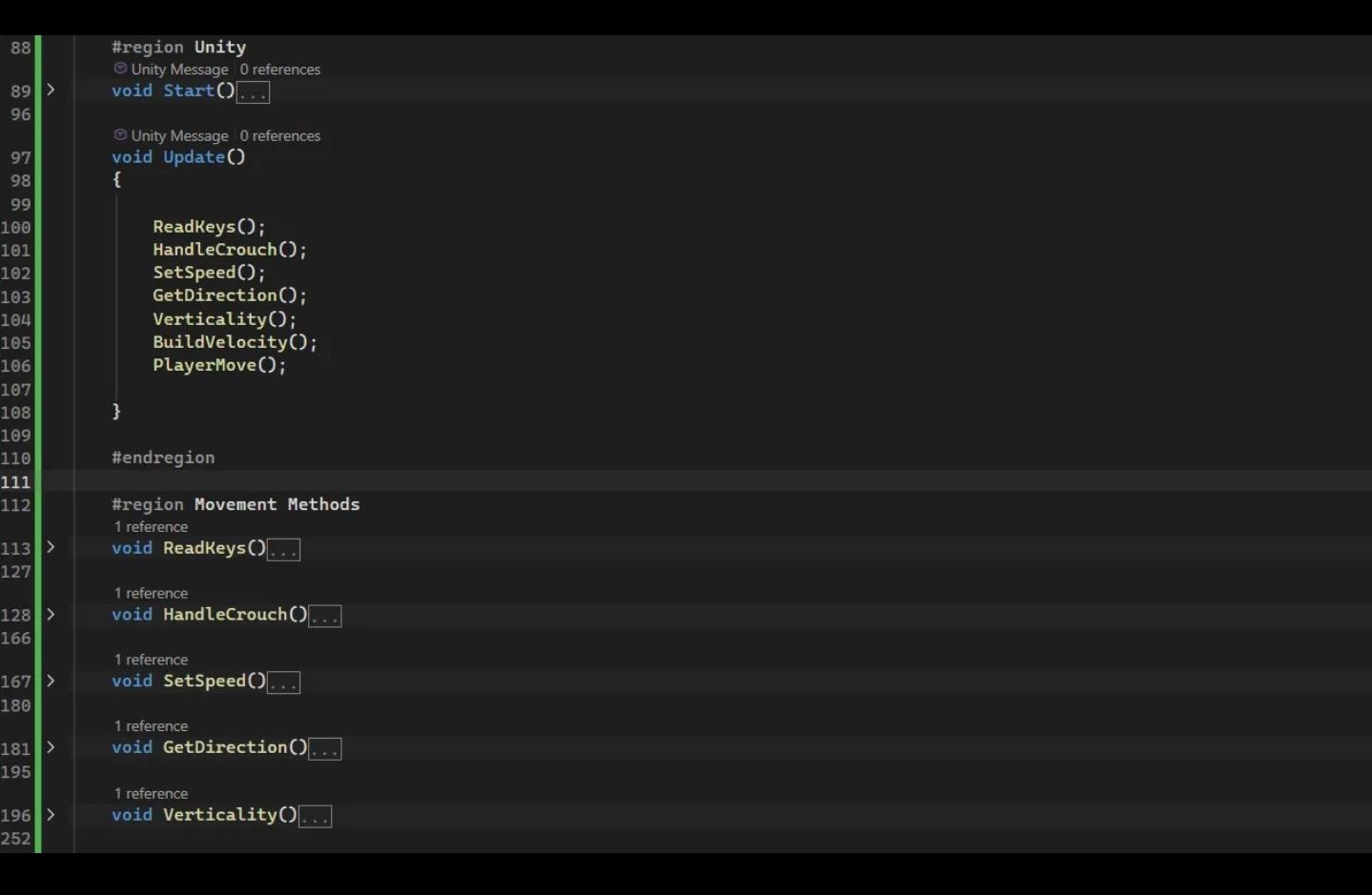
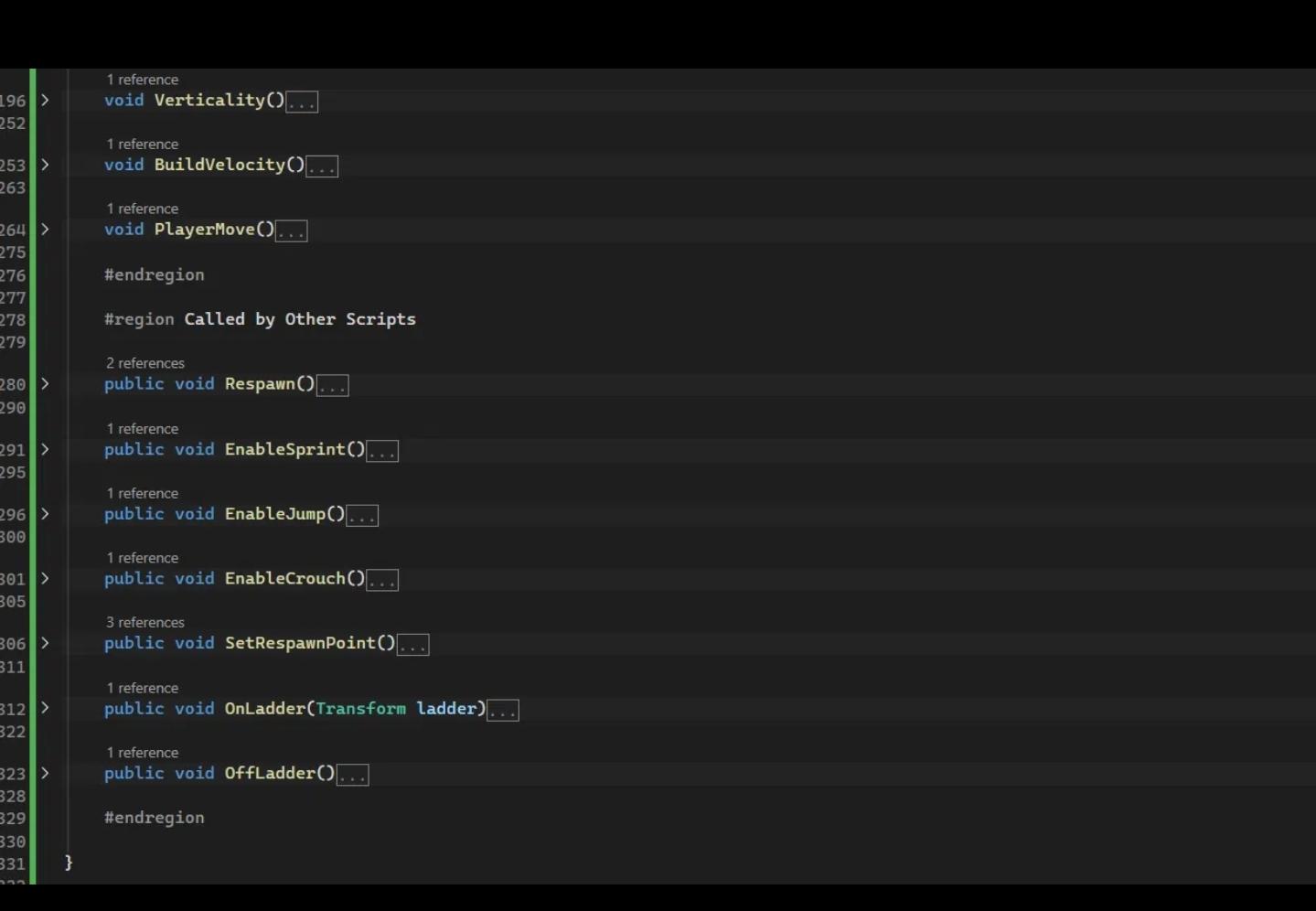
Hiya - please can anyone give me some housekeeping tips for C# in Visual Studio? I'm currently getting into it with Unity for learning to program games.
My Update was getting a bit long so I separated it into methods, and I've further organised everything into regions for fields, and also for methods in the class. I've mainly done this for my own readability as everytime I wanted to go in and edit something id go fuzzy just looking at the wall of text.
The script isnt that long that I could use different scripts at the moment but are there any more things I can use or good practice I can try?
T.i.a!
13
u/sixtyhurtz 13d ago
Don't use regions. If a file is too big or cluttered, sort that out. It's usually a sign your class is doing too many things.
Other than that, I guess it's fine? If Unity is just calling that Update method, then I guess that's basically your main entry point as far as your code goes.
5
u/Aggressive_Run1429 13d ago
Okay, cheers! I'm still very very basic at it, so clutter is probably gonna be my life!
Are regions generally not used or not good practice?
6
u/Artmageddon 13d ago
Kind of both; they were introduced very early on in .net 20+ years ago, but people have realized that if you have to use them, it’s better to refactor and make your classes or methods smaller.
The fact that you’re thinking about this sort of thing is a great sign, keep going!
2
u/user_plus_plus 13d ago
I think it depends with regions. I have worked on commercial codebases where there were some facade classes 8k+ lines long, frequently modified, and they had a pretty predictable structure, 3 or 4 big regions per file and we had ~2 dozen of these facades. The regions were limited and understood, and these classes all were structured in the same general order/grouping. This helped maintainability.
However there were some classes in the UI which had triple nested regions. It actively made it harder to maintain because there were just too many regions to keep up with. Everyone on the team ignored them.
So for solo developer projects who cares go for regions if it helps you. With a team, just don't make it too complicated, you shouldn't need an instruction manual to understand the regions.
1
u/Worried_Aside9239 9d ago
I’ve seen regions get abused. To me it depends on the intent. Our codebase uses them like comments to fold sections of code :/
In my opinion, a region is a sign that you have a logical grouping that can be extracted into a class or method. I’ve seen regions inside huge methods and have always told my teammates, “this region could be a method with the same name.”
In my experience, regions don’t collapse/expand with keyboard shortcuts the way that I expect them to and that’s what irks me the most.
1
u/Pit_Soulreaver 13d ago
While there are better solutions to refactor: partial classes are the better regions. They keep the availability of private members, but already sort into their own files.
4
u/Sacaldur 13d ago
I don't want to be that guy, but your code is improvable.
ReadKeys doesn't return anything. It probably adjusts member variables just so that other methods can use the values. This way the dependencies between the methods are completely hidden and a refactor might accidentally break things.
SetSpeed takes no parameters, GetDirection doesn't return anything, Verticality is a bad method name (it doesn't start with a verb, and thus it's unclear what it's doing).
PlayerMove should be MovePlayer. But then it still doesn't receive the player as parameter. If this is the Player class, it should be called Move (or PerformMovement).
2
u/Nyzan 13d ago
Only use regions for templated code. E.g. if you have a class that implements both IEnumerable and IEnumerable<T>, the IEnumerable methods will just be delegate methods for the IEnumerable<T> methods. In cases like this I put the IEnumerable methods behind a "IEnumerable delegates" region since those methods will never be touched (outside of a complete class refactor). But that's the only time I ever use regions.
1
u/binarycow 13d ago
Sometimes, I find it appropriate to split a type up into multiple files, using the partial keyword.
1
u/jwendl 12d ago
I'm not a fan of regions. Unity though makes it tough to isolate classes to single units of work. The goal for every method should usually have 1 specific purpose and classes be similar functionality to the domain of business logic that class is doing. Regions are kind of anti-pattern in that way. If you have so many methods in a class that you need regions it should be split up into smaller classes.
Then inside each class I usually use the pattern of
Using Statements
Primary Constructor
Private member fields
Public functions
Public properties if any (usually I leave properties to be records of object types in C# 10 - which I'm not sure Unity supports - it's been a while)
Public Event Handlers
1
u/Fabulous-Change-5781 12d ago

I'm a lead C# software engineer and I banned the use of regions in our codebase. There is nothing inherently wrong with regions, but I find that when they are used they are abused. A class starts small but once you don't have to scroll the whole thing you let the class do way too much. Once I banned regions developers naturally started refactoring their classes so that they did less and are usually less than 300 lines. I've never used Unity tho so I'm not sure of the limitations it puts on C# and there might be a valid reason to use regions with Unity.
1
u/tivro 10d ago
Breaking up "Update()" was a good move. I’d do another pass where you try to read it without opening any of the methods. "GetDirection()" sounds like it returns a direction, but it’s "void". If it updates a field, "UpdateMoveDirection()" would tell me that. If it just calculates a direction from input, I’d pass the input in and return the direction so you can see where it goes next.
I don’t mind the occasional region, but if I need nested regions to find my way around, I’ll look for things that could live on their own. I’d start with movement vs. checkpoints and respawning. A good gut check is “Could I change how checkpoints work without touching the code that makes the player jump?”
I also wouldn’t worry about other scripts calling methods by itself. A checkpoint calling "SetRespawnPoint(position)" is pretty clear about what it wants and which position it means. I’d reach for an event when the player is announcing something that already happened, like "Respawned", so the camera or UI can react without the player needing to know about them.
You don’t have to split it all up now. I’d start with the names and see what still feels hard to follow.
1
u/Boarlock98 9d ago
if a file is getting too big you can use partial on each class and spread them over multiple files, that way you can keep logic contained to what its related to
17
u/Tiny_Confusion_2504 13d ago
If it is logical to move some behaviour to a different class, you could consider that.
However your methods seem small enough to just leave as is.
I find your structure pretty clear. (Regions don't bother me)