r/coolify • • 13h ago

Coolify-rs

7 Upvotes

I love coolify and support its development, but the Livewire UI has always felt slow to me, and with all the security issues I wanted something leaner. so I rewrote it in rust. same API, same postgres schema, same UI, just runs as a single service (not affiliated with the coolify team btw)

on a small 2 core VPS it idles at about 30MB of ram vs 372MB for regular coolify, and the API handles around 6-9x more requests/sec. full benchmarks are in the repo

give it a shot and let me know how it performs for you!

https://github.com/coolify-rs/coolify-rs

let me know if this sort of post is not allowed here, I will happily remove this. TY


r/coolify • • 21h ago

Every Coolify tutorial starts with a 5 dollar Hetzner box you can't order anymore. What I'd set up instead

10 Upvotes

I helped two friends set up Coolify last month and both got stuck at step one. The tutorials they followed start with a CX22 at Hetzner. The CX line, CX23 these days, has shown currently unavailable since early September. The CPX boxes you can still order were repriced for new orders on June 15, and the CPX22 went from 7.99 to 19.49 euros. So the five dollar starting point in half the guides out there is gone, and people end up on whatever is cheapest, which is usually too small.

Coolify asks for 2 cores and 2 GB minimum, and that's fine for Coolify itself. The problem is builds. Our first Next.js build with Nixpacks on a 2 GB box went straight into swap and took the running apps down with it. If you build on the same server that serves traffic, plan for 4 GB, or move the builds somewhere else.

That last option is the one I wish the guides covered. Coolify has a builds only server role. You add a second box, give it that role, point your app at a registry like GHCR and turn on the build server option in the app settings. Builds happen there, the image gets pushed, and the production box only pulls and runs it. Both sides need the same CPU architecture, which caught me once with an ARM builder in front of x86 servers. It also doesn't work for Docker Compose deployments, so those still build where they run.

Two other things bit us.

Docker images pile up fast when you deploy often. Coolify has automated Docker cleanup with a disk threshold, so turn it on before the disk fills up on a Saturday night.

Back up the Coolify instance itself, not only the databases. Losing the control plane means recreating every app, every environment variable and every domain by hand.

For one of them we ended up splitting providers. Coolify and his side projects stay on an older Hetzner box he's had for years, which is still cheaper than anything he could order there today. His client apps deploy to a PrivateAlps VPS in Switzerland, added to the same Coolify as a second server over SSH. Those apps hold other people's data, so he wanted disks the host's own staff can't read, no activity logs, and hardware the provider actually owns rather than racks rented from someone bigger. Per GB it still costs more than Hetzner, even after the hikes, and he's fine paying that for one layer.

If you'd rather not run the control plane at all, Coolify Cloud is 5 dollars a month and still deploys to your own servers. That's the closest thing left to the old five dollar start.


r/coolify • • 18d ago

CDM — Coolify Deploy Manager (v3.0.2)

Thumbnail
gallery
0 Upvotes

Project Name:
CDM — Coolify Deploy Manager (v3.0.2)

Repo / Website:
https://github.com/Cris0338/CDM-Coolify-Deploy-Manager

Description:

Hi everyone!

First of all, sorry about my English. I'm Italian-French and I'm using AI to help translate this message.

I'm not a professional developer. I'm just someone who loves computers, technology, learning new things, and solving practical problems.

I use Coolify to manage several projects and applications. I know Coolify already has a great web interface and even a PWA, and I'm certainly not trying to replace either of them.

I simply wanted a different way to work with Coolify directly from my Windows desktop.

After a lot of experimenting, testing, fixing bugs, and help from AI, I created CDM — Coolify Deploy Manager.

The features I personally find most useful are:

  • Deployment progress in the Windows taskbar: I can start a deployment, minimize CDM, and continue working while monitoring its progress from the taskbar or system tray, without keeping the application window open.

  • Integrated SSH tunnel: CDM helps configure and manage an optional restricted SSH connection, with a dedicated SSH key and limited Linux account, without having to manually establish the tunnel each time.

  • Customizable dashboard: I can organize application cards however I like, rearrange them, lock their positions, and keep my preferences between sessions.

  • Staging and production: Applications are clearly organized by environment, making it easier for me to see what I'm working on.

  • Deployment controls: I can launch individual or selected deployments with confirmation, follow their progress, and check deployment activity.

  • Native Windows integration: CDM runs as a portable desktop application, supports the system tray, and can start automatically with Windows.

I realize that Coolify already provides most of the underlying functionality. CDM is simply a different interface that integrates better with my personal Windows workflow.

It may not be useful to everyone, and that's perfectly fine!

Deployment / Installation:

CDM is a portable Windows 10/11 x64 application built with .NET 10 and WPF.

No installer or additional server is required.

Download the generic executable from GitHub Releases, launch it, and follow the setup wizard to connect it to your existing Coolify installation.

It's a Windows desktop companion for a self-hosted Coolify instance, not another service you need to self-host.

The application is free to use and redistribute under a custom license that prohibits resale. It is not distributed under an OSI-approved open-source license.

The public executable contains no personal server configuration or credentials. CDM can create a personalized portable executable containing your connection settings and credentials; this profile is not encrypted and should be kept private.

A note about the GitHub history:

You might notice that the repository has very little commit history.

When I initially published CDM, I later discovered that I'd accidentally included some personal configuration details and references to my own environment.

Rather than simply removing those files while leaving the information in Git history, I decided to rebuild the public repository from a clean source snapshot.

That's why the current repository starts with a fresh history. The previous development history remains in my private backups.

Version 3.0.2 is the cleaned-up public release.

AI Involvement:

I've used AI extensively to help develop, debug, test, and document CDM.

I'm not claiming to have written every line of code myself.

I came up with the idea, defined what I needed, guided the development, tested the application on my own setup, and worked through the problems along the way.

AI was a major part of the development process, and I prefer to be completely transparent about that.

I'm also using AI to translate this post!

Why I'm sharing it:

Originally, I built CDM just to make my own life easier.

Now that it works well for my needs, I thought it might be useful to someone else too.

I'm not trying to sell anything, and I'm certainly not pretending to be an expert.

I also understand that people who are already happy with Coolify's web interface or PWA may have absolutely no need for CDM.

But if someone prefers a dedicated Windows application, with taskbar deployment progress, a managed SSH tunnel, and a customizable dashboard, perhaps they'll find it useful.

And if even a few people do, I'll be happy.

Any suggestions, bug reports, or constructive feedback are very welcome. I'm still learning, and there's always room for improvement.

Thanks for reading!

Cris0338

Latest release:
https://github.com/Cris0338/CDM-Coolify-Deploy-Manager/releases/tag/v3.0.2


r/coolify • • 18d ago

Deploying the ullwimbalu app self hosted.

1 Upvotes

Should the jackind be installed to bare metal or is an abstraction needed?


r/coolify • • 19d ago

Deploying bananana.dev’s self-hosted control room through Coolify: custom Compose available

4 Upvotes

I’m Roman, the developer of bananana.dev. I’ve put together a custom Compose definition for running its Brain through Coolify.

This isn’t an included Coolify service. It’s a custom deployment using this Compose file.

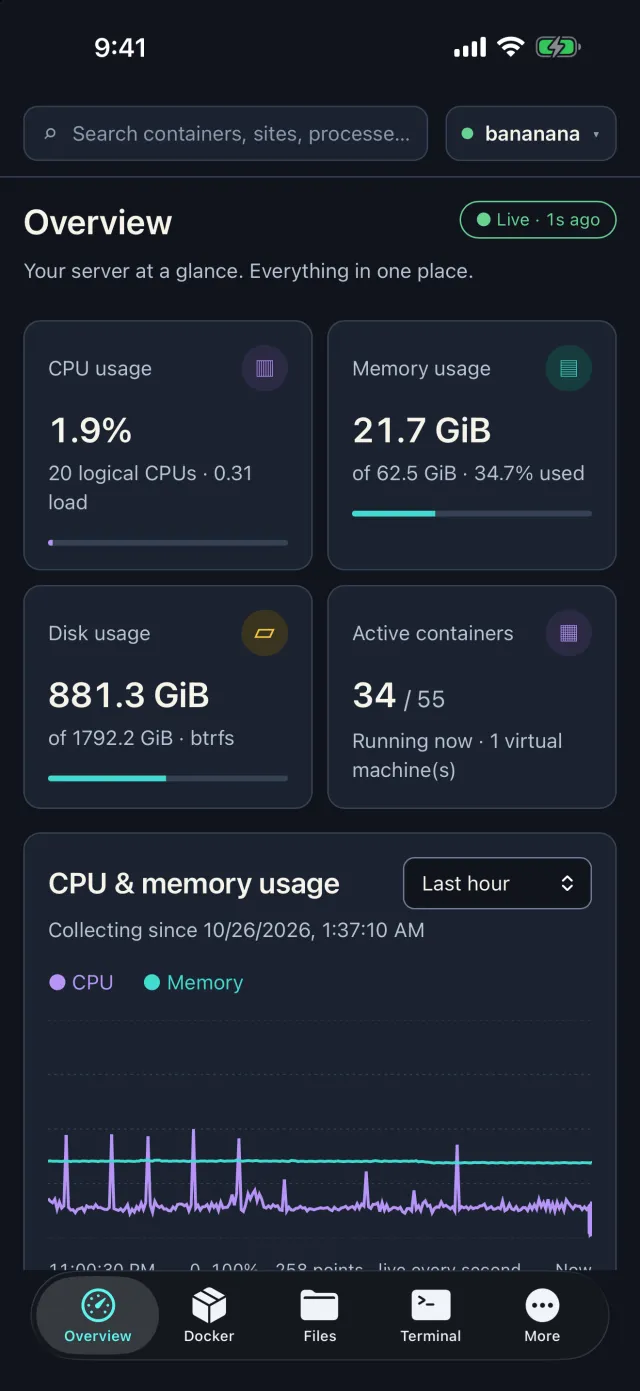
bananana.dev is a control room for the machines themselves: live readings, alerts, automations, files, terminals and history across Linux, macOS and Windows. The Brain runs on your hardware. You can reach it from a browser or the iPhone/Android apps through an encrypted relay, without router port-forwarding.

The aim isn’t to replace Coolify’s deployment workflow. It’s to give you a place to check and manage the machines running your services, including the ones that aren’t Coolify hosts.

You’ll need a setup token. It’s closed source, with a free plan covering one Brain, up to 10 devices and 10 GB of relay traffic a month.

Overview screenshot · Docker docs

I’d appreciate feedback on the Compose setup and where this fits, or doesn’t fit, alongside your Coolify workflow.


r/coolify • • 20d ago

I built a control room that sits on top of Coolify and finds everything with zero setup

6 Upvotes

AI can get an app live in an afternoon. It won't tell you what to check next. Here's what I check now:

  1. **Can your backup restore?** Restore it into an empty database and compare. The first time I did this, one table came back with 0 of 4,698 rows.

  2. **Can a stranger read your tables?** Try your public database key while logged out and see what comes back.

  3. **Are your keys in the browser?** Search your shipped JavaScript for them.

  4. **Is anything open that shouldn't be?** Check your server's ports from outside.

  5. **Will you know when it goes down?** Something outside your server has to check, because a dead server can't tell you it died.

I got tired of doing this by hand, so I built **Unit 7** with Claude Code. It's a free, self-hosted tool that runs these checks and explains what it finds in plain words. When it finds a problem, it writes the prompt for your AI, then checks that the fix worked.

It works best if you run your own server or Coolify. It's early, so expect rough edges.

Repo: https://github.com/Nandkishorrr/unit7

What would you add to this list?


r/coolify • • 25d ago

I made a self-hosted Excalidraw for teams that deploys on Coolify in 3 steps

14 Upvotes

I run my own instance on Coolify, so I made the deploy as short as I could:

  1. New resource: Public Repository, https://github.com/maciekzygmunt/excaliself, branch main

  2. Build Pack: Docker Compose, location /docker-compose.coolify.yaml

  3. Deploy

Coolify generates the Postgres password and the auth secret, and passes the service domain to the app as BASE_URL. Postgres stays on the internal network, and drawings live in a volume, so they survive redeploys.

What you get: the official Excalidraw canvas inside a small app with accounts, folders, a shared team space, search inside drawings, and live collaboration with guest links. Free, MIT.

Two Coolify things I ran into, in case they save someone time:

  • Auto-deploy fires on push, before CI has published the new image, so you deploy the old one. If you want every push live, build on the server instead (there's a separate compose file for that).

  • PR previews get the production env values by default. I run previews on an in-memory database so they can never touch the real one.

Docs: https://excaliself.com/docs/coolify/

Feedback welcome.


r/coolify • • 29d ago

Cloud Coolify dashboard is damn slow

8 Upvotes

Cloud version app.coolify.io, server its managing is a Hetzner > CCX23 | x86 | 160 GB | ubuntu-16gb-hil-1-ccx23

The new dashboard version UI is very difficult to navigate. But lets put that aside, why is it so slow?

When the new dashboard launched, every click required 3 to 5 seconds to load. But this week, its taking ~10 seconds for each page to load, and most of the time the page won't even load, it gets stuck in loading.

Am I doing anything wrong?


r/coolify • • Oct 21 '26

PHP Security Advisory 2026 (PHP2Shell)

Thumbnail
coolify.io
21 Upvotes

Self-hosted users: take action now

Stop your Coolify container or isolate your instance from the public internet until you can install the emergency Coolify release. Your already deployed applications will continue running.


r/coolify • • Oct 12 '26

I built Coolify Mirror: an open-source tool to move Coolify projects and data between servers

26 Upvotes

I built this for moving apps between two self-hosted Coolify servers without recreating their configuration and data by hand. It's super fast to get started and super easy to use: select what to move, create a backup, then paste the generated restore command on the new server and confirm after reviewing the preview. It's an independent Go CLI/TUI, not affiliated with Coolify.

On the source, you choose selected resources or a whole instance and create an encrypted backup. It prints a restore command with a share code for the destination. The destination downloads and checks the backup, shows what it will restore, and asks before changing Coolify. The backup includes configuration, env vars and secrets, database data, volumes, files, and images. After restore, the tool checks the running resources and local proxy responses.

Current limits: both servers need the exact same Coolify v4.3–v4.6 version and root/sudo access. A full restore needs a fresh, empty Coolify; selective restores can merge into an existing instance. DNS records, webhooks, and scheduled tasks still need attention during cutover. It also supports scheduled off-site backups; see the repo for setup and limits.

Repo and setup: https://github.com/mtalavi/coolify-mirror

Walkthrough: https://coolify-mirror.pages.dev

If you have ideas or run into a migration case the tool doesn't cover, I'd welcome feedback or an issue.


r/coolify • • Sep 13 '26

Unable to reach own domain from within container

3 Upvotes

I've spent my entire Sunday on this, and I'm running out of ideas :'(

I wanted to migrate my app and its services to a new server. I do use Convex, which runs on cloud.<domain>. For whatever reason my services that want to connect to Convex can't resolve cloud.<domain>. Not even the convex container itself is capable of doing so. The domain stayed the same, I just switched the DNS records to the new IP.

When I run

node -e "fetch('https://cloud.<cloud>').then(r=>console.log('OK',r.status)).catch(e=>console.log('FAIL',e.message,e.cause))"

within the container the error is "Connect Timeout Error" UND_ERR_CONNECT_TIMEOUT.

Here's some things that I already tried:

  • I can run the same command on the machine itself, it works fine.

  • I can run the same command everywhere else, it works fine.

  • I can open the domain in different browsers, it works fine.

  • I can run the same command via docker run --rm node:20-alpine node -e "<command>" , it works fine (to make sure it's not docker related)

  • the service uses Connect To Predefined Network

  • I have compared Proxy settings of my old server and the new one - both are identical

  • I have restarted the Proxy

  • When I ping the domain the correct IP responds

  • I tried re-installing Convex, didn't help.

  • The only thing I find weird is that the log of the new servers proxy is empty. But again, I do reach the domains via browser.

  • Edit 1: also added "default-address-pools" to my docker daemon json with {"base":"10.0.0.0/8","size":24}, still doesn't work

  • Edit 2: using docker run --rm --network coolify curlimages/curl:latest curl -v -m 10 https://<domain> doesn't work, but using a network created by coolify works

  • Edit 3: just tried to get rid of Convex and used a simple Dockerfile (deployed via Coolify) that simply pings my domain. Doesn't work.

I'm running out of ideas here. Anything I'm missing? :(


r/coolify • • Sep 11 '26

Coolify without SSLIP

2 Upvotes

I noticed pretty much every service on Coolify is provisioned with an SSLIP address. Don’t get me wrong, it makes sense, but sometimes I wish I could just run the service as a simple localhost application on a assigned port and get to it with 192.168.x.xx:8090 (for example).

I feel like I’m missing something because this seems like a simple config that I am just completely blind to.


r/coolify • • Sep 06 '26

How are you guys provisioning postgres dbs?

1 Upvotes

Been experimenting with coolify as I need to get off of heroku.

quick question for folks using this in prod.

How do you provision your dbs?

Using the postgres resource in coolify creates the db with a superuser user as default (thats how it is in postgres image).

Naturally, we should configure the resource to create the db and app user in the postgres instance.

Coolify has no out of the box support for this as far as I can see.

I've settles on hosting an init script and explicitly running it by ssh into my VM everytime.

Obviously, this defeats the purpose of cooligy.

Any thoughts?


r/coolify • • Aug 15 '26

Most effective way to handle SSH Brute Force Attacks in Coolify

6 Upvotes

Hello everyone, after running a couple of tests I have found out that my server is getting a lot of unwanted SSH requests, making some of my deployments not working.

How to handle this, do I need to install fail2ban, if so how? And is installing fail2ban something that can be done on Coolify > Terminal > localhost or does it strictly need to be done on a cmd? (the reason why am I asking is because one time I ran a command before on the coolify terminal and the server froze)


r/coolify • • Aug 14 '26

Need guidelines to self-host production ready n8n using Coolify

Thumbnail
reddit.com
3 Upvotes

r/coolify • • Aug 10 '26

Server is unreachable or misconfigured when redeploying

2 Upvotes

Hello everyone, havent been able to push some changes of a project, it says that there was a SSH connection problem.

Have no idea what to do, have some really important work that needs to get deployed.

I am hosting it on Hetzner, I have tried all important commands to see if there is a RAM spike or CPU spike, however everything looks normal.

Any help is appreciated, thank you.


r/coolify • • Aug 07 '26

As a java developer I agree

Post image
15 Upvotes

r/coolify • • Aug 04 '26

CRON using Bearer Tokens / Coolify Dashboard

1 Upvotes

I currently call CRONs from Coolify with a key sent through GET, because their UI allows me to construct whatever URL.

However I want to send and Authorization: Bearer header instead of a query parameter

* Headers don’t leak into access logs the way query strings do
* Headers don’t appear in browser history or proxy logs
* Much safer for storing in scheduler configurations

Does Coolify support this in their UI? Can’t seem to find it. Thanks!


r/coolify • • Jul 30 '26

Building an unofficial native mobile client (iOS & Android) for Coolify — ProjectX

4 Upvotes

Hey r/Coolify,

I run most of my self-hosted services using Coolify, but checking logs, monitoring container health, or triggering rollbacks from a mobile browser when a build fails on the go hasn't been the smoothest experience.

To solve this, I started building ProjectX — a fast, native mobile app (built with SwiftUI for iOS and Jetpack Compose for Android) designed specifically as a mobile client for Coolify instances.

Key features planned for V1:

- Zero-Trust Architecture: API tokens and credentials are stored strictly on-device in iOS Keychain / Android Keystore. No middleman relay servers.

- Native Log Streaming: Real-time Docker event and deployment logs over direct WebSockets.

- Instant Push Notifications: Get notified immediately if a deployment fails or a container crashes.

- One-Tap Rollbacks: Revert services to healthy states directly from your phone.

We just published our public architecture roadmap, feature voting board, and alpha waitlist:

https://projectx-coolify.vercel.app

Since you use Coolify daily, I would love your feedback:

  1. What mobile actions or features would be most useful to you?

  2. Are real-time logs and status alerts your main priority on mobile, or do you need full management capabilities?

(Note: ProjectX is an independent native client and is not officially affiliated with or maintained by Coolify).


r/coolify • • Jul 16 '26

Coolify terminal User Interface

7 Upvotes

Hi!
(I hope I'm not breaking any community guidelines)

I been using coolofy to manage a volunteer association infrastructure for the past year or so.
As I usualy live and breath within the terminal I created an interface that allows you to browse teams, projects, environments, resources, environment variables, deployments, start new deployments and see deployment logs without leaving your terminal.

This is a work in progress, as I'm planning to add more features.

Feel free to check it out in https://github.com/MicaelMCarvalho/coolify-tui


r/coolify • • Jul 15 '26

Help understanding Teams

1 Upvotes

I'm struggling to understand how the Teams function works in Coolify. I guess I was expecting Root Team to have access to all servers and then other teams could be granted access to a subset of servers and other objects.

In a multi-server deployment, is it advised to just have all 'members' be part of the root team?


r/coolify • • Jul 10 '26

cloudflare tunnel configured - what about Origin Certificates?

1 Upvotes

Hi all!

I have setup tunnel for my coolify instance, works great and was fast to complete with the "Cloudflared" resource.

Now, my apps are available on http and https, so I would like to force it https of course.
Ref: https://coolify.io/docs/integrations/cloudflare/tunnels/full-tls#2-setup-tls-encryption

Now the guide is super clear for 1 domain (thanks coolify team), however, if you have many domains (for example domain.com domain2.com domain3.com), will I need to literally create a origin certificate for every one of them separately? I mean when adding new apps with new domains this get's quite tedious.

My question is: Is there any way to create 1 origin certificate for multiple domains, ideally so that new ones are added automatically. If not, any hacks?


r/coolify • • Jul 07 '26

Coolify and DNS

2 Upvotes

I’m a developer but very new to coolify. I’m renting a VPS but using a raspberry pi to host coolify . Currently I’ve setup the DNS records on my VPS account. However I’m watching various tutorials that seem to be saying I should set them (DNS records) up within coolify. Now the fact that the PI is on my desk within my home network, this makes little sense to me. What am I missing (besides a lot!)

Thanks all
Nigel


r/coolify • • Jul 03 '26

Coolify on Vultr, nextjs website

2 Upvotes

Has anyone used VULTR to host their site?
How well does Coolify run?