r/bash • u/jhartlov • Jan 11 '25
Something i do on all BASH scripts I write. What do you guys think?
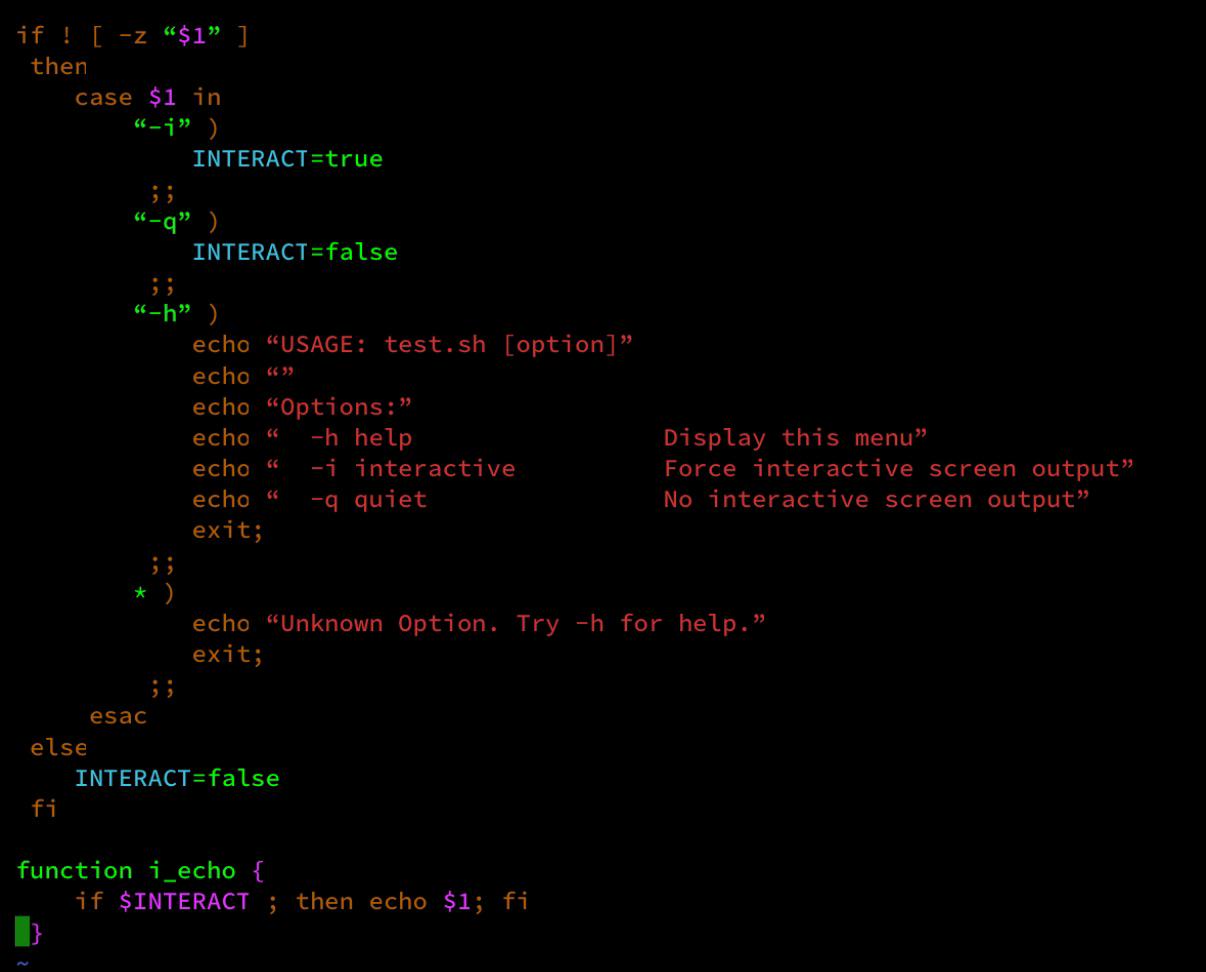
Something I do to almost every one of my scripts is add the following at the top:
The idea behind this is I can add in debugging i_echo statements along the way throughout all of my code. If i start the script with a -i it turns INTERACT on, and display all of the i_echo messages.
You can easily reverse this by turning INTERACT to true by default if you generally want to see the messages, and still have the -q (quiet) option.
Would anyone else out there find this helpful?
9
u/wReckLesss_ Jan 12 '25
Yep, same, although I prefer -v for "verbose" since it's a very common flag for CLIs.
v_echo() {
    [[ $VERBOSE == "true" ]] && echo "$1"
}

VERBOSE=false
while getopts "v" opts; do
    case $opts in
        v) VERBOSE=true ;;
    esac
done
shift $(( OPTIND - 1 ))
3
8
4
u/hyongoup Jan 12 '25
For what it’s worth, in my experience (again probably not worth much) I have found — help to be more consistently implemented for help than -h
2
3
u/divad1196 Jan 12 '25
Use heredoc
Default values should be at the top and then override. Do not use a "else"
There are a few things that can be changed for the if: use " [[ ... ]] in bash most of the time. The "!" Can be put inside the brackets. There is flag for " ! -z", but basically you can check the presence or absence of args by checking their counts.
You code doesn't manage multiple options. You could keep what you have but there are native tools for that.
1
u/jhartlov Jan 13 '25
Help me understand why I should not use else.
If you see up above, I was called out for being unelegant because I mistakenly chose ! -z instead of -n. When compute resources are such that I need to ridiculously concerned about setting a register then immediately unsetting it….wouldn’t setting interact then making a decision that could potentially immediately unset it be considered equally as unelegant?
2
u/divad1196 Jan 13 '25 edited Jan 13 '25
It was hard to understand but:
In general, better designing your structure allows you to remove the "else" bloc and reduce conigntive complexity. You can search for "CodeAesthetic" channel on youtube and look the "Why you shouldn't nest your code". That's the video I now give to my apprenticies.
No, setting a variable then changing its value is not "unelegant". When you put your variables at the beggining with default values:
you have a self-documenting effect where all variables and their default values can be seen
it encourages you to have consistency: it is better to use a sentinel value that check whether or not the value exist (at least in bash, in other language, you have a dedicated type which is "Optional")
it reduces the risk of errors as you don't risk to forget to set the default value
...
So no, it's absolutely not "unelegant", it's in fact part of the good practices as long as the cost of instanciation/assignation is trivial.
if it's not trivial and/or when working at the maximum optimization possible, then it's a tradeoff of readability/maintenance against performance.
But you are not concerned by that in bash. Now, if you take C:
assigning a const (int or char[]) costs nothing, especially during initialization of the space on the stack
with assignation in if-else, you will always have an assignation later. And necessarily 2 jump operations (one after the "if" to avoid the else, and one before the "if" to avoid the if-block and go directly at the beginning of the else-block). This operation compensate the assignation you tried to avoid.
you complexify the job the compiler (but it shouldn't matter much)
3
u/tr00gle Jan 14 '25 edited Jan 15 '25
Do you use this exclusively for scripts that don't take additional arguments, either via flags with values or raw args?
A lot of the getopts (or even getopt if you like long flags) suggestions may also be borne out of a desire for flexibility, i.e. some scripts take no args, some take many, and using getopts or a while loop to iterate through and process all the positional arguments gives that flexibility.
+1 to the use of getopts, standalone usage functions with heredocs, and referencing script names programmatically.
When I first started writing shell scripts more often, I cam across this "minimal safe bash script template" that kinda showed me the light on a number of these things that people are mentioning.
Lastly, re: the file extension thing. I'm generally a fan of the google shell style guide and how they describe it. I would like to prefix bash libraries with .bash, things expected to run with /bin/sh with .sh, etc. In practice though, I work somewhere where all shell scripts are suffixed with .sh, and that's it. There are dozens of them scattered over dozens of repos, with untold references to those scripts in docs and other scripts. It's not a great use of my time to go through and fix those, and then evangelize the "right way" there, so I just append .sh to all of them. ¯_(ツ)_/¯ Sometimes we have to live in the real world and not the one we wish exists.
Either way, thanks for sharing this. One of my favorite things about this sub (and programming in general) is seeing how other people solve problems like this. I never thought to embed any sort of conditional inside a logging function, and thanks to this thread, I've seen a few different ways to do that, and I might just start doing it msyelf.
2
u/jhartlov Jan 15 '25
You have no idea how thrilled I am to see this response. It seems as though most people have taken it as an opportunity to take potshots.
You made my day! Thanks again!
2
u/thseeling Jan 13 '25
Am I the only one to think that
if ! [ -z "$1" ]
is quite unelegant?
We have both operators: -z to test for an empty variable, and -n for a non-empty one.
2
u/jhartlov Jan 13 '25
I am sure that deep down in the trenches of bit land I am doing an undesirable double register flip that back in the days of landing on the moon would probably have made a huge difference. Luckily that processing unit of mine is capable of billions of decisions every second.
I’ll be sure to change my ! -z to a -n to avoid a terribly unelegant command set that leads to my elegant result…with my thanks.
77
u/Bob_Spud Jan 11 '25
Suggest learning what getopts does and what a heredoc (here document) is - it saves a lot of work like that.
18
u/rad2018 Jan 12 '25 edited Jan 12 '25
I use something similar to this (shown below) for every script that I write; I use 'getopts', and it works pretty good:
F_ID=""; F_SEC=""; F_USE=""; S_ID=""; S_SEC=""; valid=""; OPTION=":hs:e:"
while getopts $OPTION ARG; do
  case $ARG in
    h)   valid=1; echo "Paramaters are as follows:"; F_USE="Y";
         show_usage; echo "";;
    s)   valid=1; S_ID=${OPTARG}; F_ID="Y";;
    e)   valid=1; S_SEC=${OPTARG}; F_SEC="Y";;
    \?)  valid=0; echo "Invalid option: -${OPTARG}"; F_USE="Y";
         show_usage; echo "";;
    :)   valid=0; echo "Argument needed for option: -${OPTARG}"; F_USE="Y";
         show_usage; echo "";;
  esac
done

function show_usage() {
  echo ""; echo "  usage: track [-s S_ID#] [-e S_SEC#]"
}
I may not write efficient code, but I do write 'nice' (and maintainable) code.
** UPDATE: I used a code block markdown; should be easier to read now. 😁
4
0
May 05 '25
[deleted]
2
u/rad2018 May 05 '25 edited May 05 '25
I said that I write 'nice' code. 😉 Fact is, I don't profess to be a coder (like you), so writing efficient code isn't one of my strong suits.
One thing to note is that 'printf' doesn't always work consistently between variant flavours of LINUX (and esp. UNIX), so I use 'echo' instead. Many of my applications operate on a plethora of systems, so I try and keep the baseline code 'generic'.
BTW, you could've sent me a private note indicating your thoughts outlined above instead of publicly, but I do appreciate your candor nonetheless... 😘
2
u/rad2018 May 05 '25
One more thing...
I ran the code through ShellCheck (https://www.shellcheck.net/), and outside of the obvious, it had only minor issues.
2
u/terminalchef Jan 12 '25
The suggestion on getops is a good one. I use them for flags or arguments to the script
2
u/discordhighlanders Jan 19 '25
Don't mean to necro, but it might be worth checking out getopt as well (the
coreutilsone written in C). I have a preference for using this one over the bash built-in one.
44
u/oh5nxo Jan 11 '25
Functions can be defined, and redefined as needed, like
i_echo() { :; } # default, do nothing
if false
then
    i_echo() { printf "%s\n" "$*"; } # verbose
else
    i_echo() { :; } # silent
fi
i_echo this is seen, or not
Not that this would offer any advantage in general. Just an observation.
0
Jan 11 '25
[deleted]
5
u/oh5nxo Jan 11 '25
echo() { :; }:)
0
Jan 11 '25
[deleted]
2
u/oh5nxo Jan 11 '25
I don't know, have been living in a unix cloister :/
It wouldn't surprise me if bash on environments not providing /dev/null, Microsoft world, would turn /dev/null into NUL: or whatever automatically, stealthily. Don't know.
2
u/BigChrisDev Jul 31 '25
I'm not too good at bash yet, but in my understanding you sometimes can use echos as return arguments from a function, like in
someFunction() {echo "This will be returned"
}
and if you call it via BLA=$(someFunction) , the value of $BLA will be the echo.
The problem with what you said for this is that AFAIK the first echo in the subshell function counts, so if you wanna do some kinda debug echo in there it would be passed back instead of the actual result.
Am I right?
2
u/MogaPurple Aug 01 '25
The entire echoed output of a function gets returned as if it were its stdout.
Actually there is stderr too, and I usually write the debug info to stderr, so you can redirect (or not redirect it) separately.
someFunc() {
    echo "Content 1"
    # debug to stderr
    echo "Debug: writing Content 2..." >&2
    echo "Content 2"
}

# Content 1
# Content 2
contents=$(someFunc)

# "writing Content 2" goes to the screen if stderr of the script is not redirected.
2
u/BigChrisDev Aug 12 '25
So what is $contents then? An array with all the echos?
1
u/MogaPurple Aug 12 '25 edited Aug 12 '25
Not an array, it's a string of all the echoed output concatenated together. Newlines usually gets inserted between the lines, unless you supress it (echo -n).
The output of the above example
echo $contentswould be:Content 1 Content 2EDIT:
Also, if you call an external program or other nested function, their output would be redirected into it too. So do not treat "echo" anything special, it just puts the argument string(s) to the given output stream (stdout, stderr, or something else, any file descriptor)1
u/BigChrisDev Aug 13 '25
Alright, thank you.
I'm writing some kinda helper function now - for me to train - to either turn this into an array or let me extract single echos on the fly from this. Do you think it would make sense to write a whole on script for this that you'd call in your other scripts? I don't know what's the common way for stuff like this. Do bash people write "helper libraries" or just rely on tools already there to use in this? Like taking this string and cutting it woud work too, right?
15
u/Mister_Batta Jan 11 '25
For the -h, I put the output in a function and call it rather than telling them to use the -h option.
1
u/Paul_Pedant Jan 13 '25
If "interactive" means "input is from stdin", then you might explore automating this whole thing using the simple Bash built-in test [ -t 0 ] or [[ -t 0 ]].
1
3
Jan 11 '25
You can also skip the else part and inherit from runtime environment if desired.
INTERACT=${INTERACT:-false}Self parsing for usage/help output is neat.
3
u/smeagolgreen Jan 12 '25
If you are going to template this and use it often, you may want to incorporate some means of setting the script name (test.sh) in a variable if you output the usage help. Number of ways of doing it with $0, basename, etc.
3
3
3
2
u/csdude5 Jan 12 '25
Something I do to almost every one of my scripts is add the following at the top
I've been doing web programming for most of my adult life, but I'm a baby when it comes to bash.
In Perl and PHP, though, I've always written a variables script that I include on "most" of my scripts. This variables script holds variables and functions that I use regularly throughout all of the other scripts.
Someone recently (yesterday, maybe) showed me how to include scripts in bash, so I'm currently building a variables.bash script that I can include as needed.
I only mention it because, if you're including this script on most of your scripts manually, you might benefit from creating it once and including it. Then if you need to make changes along the way, you just have to do it once :-)
2
1
1
1
0
19
u/siodhe Jan 11 '25
You should double quote that $1 after "if".
Those semicolons after "exit" do nothing
quoting the case targets doesn't help you for these examples
non-exported variables shouldn't be in all caps
if you intend strong quoting, use single quotes
don't put a spaces before " )" in case targets
don't put dot-extension in command names (this is a cargo cult thing from DOS, which works very differently in DOS)
that "echo $1" should also double quote the $1
if the syntax was wrong, you should return a non-zero exit code