r/akaiMPC • u/Opposite_Position507 • 39m ago
I still think these machines are soo slept on!

1
Upvotes
I always come back to my MPC One, for me it just zaps the fun back into the process and eases my overthinking.
r/akaiMPC • u/pr0cesor • 11d ago

Hakai creator announced that Hakai Gen2 is NOW available for download with the blessings of AKAI Pro team.
HAKAI development covers various devices in the Akai MPC ecosystem, including:
MPC X / MPC X SE
MPC Live / Live II / Live III
MPC One / One+ / One Gen2
MPC XL
MPC Key series
Akai Force / Force II (both soon)
Note: Compatibility depends on the specific release. Not every feature or payload is available for every device.
Download: https://github.com/medampire/HAKAI/releases
Hakai FB Group: https://www.facebook.com/groups/296222559189064
r/akaiMPC • u/pr0cesor • Jan 13 '26
Technical Specifications
Digital Audio System
ADCs: 24-bit @ 44.1, 48, 88.2, or 96 kHz
DACs: 24-bit @ 44.1, 48, 88.2, or 96 kHz
Digital Signal Processing: 32-bit floating point
Mic Inputs 1–2
(2) balanced XLR+1/4” (6.35 mm) TRS
Frequency Response: 20 Hz – 20 kHz (+0.19 / -0.16 dB)
Dynamic Range: 109.8 dB (A-weighted)
SNR: 109.3 dB (1 kHz, +4 dBu, A-weighted)
THD+N: 0.001% (1 kHz, +4 dBu, -1 dBFS)
Preamp EIN:
-134 dBu (max gain, 40 Ω source, A-weighted)
-129 dBu (max gain, 150 Ω source, unweighted)
Maximum Input Level: +12.7 dBu
Sensitivity: -45.5 dBu
Gain Range: 58.2 dB
• Line Inputs 1–2
(2) balanced XLR+1/4” (6.35 mm) TRS
Frequency Response: 20 Hz – 20 kHz (+0.09 / -0.05 dB)
Dynamic Range: 109.8 dB (A-weighted)
SNR: 109.4 dB (1 kHz, +4 dBu, A-weighted)
THD+N: 0.001% (1 kHz, +4 dBu, -1 dBFS)
Maximum Input Level: +20.1 dBu
Sensitivity: -9.6 dBu
Gain Range: 29.7 dB
• Line Inputs 3–4
(2) balanced 1/4” (6.35 mm) TRS
Frequency Response: 20 Hz – 20 kHz (+0.09 / -0.05 dB)
Dynamic Range: 110.8 dB (A-weighted)
SNR: 109.7 dB (1 kHz, +4 dBu, A-weighted)
THD+N: 0.001% (1 kHz, +4 dBu, -1 dBFS)
Maximum Input Level: +20.3 dBu
Sensitivity: -10.3 dBu
Gain Range: 30.6 dB
• Instrument Inputs 1–2
(2) unbalanced 1/4” (6.35 mm) TS
Frequency Response: 20 Hz – 20 kHz (+0.15 / -0.05 dB)
Dynamic Range: 111.0 dB (A-weighted)
SNR: 109.6 dB (1 kHz, +0 dBu, A-weighted)
THD+N: 0.0013% (1 kHz, +0 dBu, -1 dBFS)
Maximum Input Level: +10.1 dBu
Sensitivity: -19.6 dBu
Gain Range: 29.7 dB
• Phono Inputs
(2) unbalanced RCA
Dynamic Range: 103.3 dB (A-weighted, 65 mVrms @ 1 kHz, -1 dBFS, 20 Ω source)
SNR: 97 dB (A-weighted, 4 mVrms @ 1 kHz, 20 Ω source)
THD+N: 0.036% (1 kHz, -46 dBu, -1 dBFS)
Maximum Input Level: 65 mVrms (1 kHz)
Sensitivity: 2 mVrms (1 kHz)
• Main Outputs 1–2
(2) impedance-balanced 1/4” (6.35 mm) TRS
Frequency Response: 20 Hz – 20 kHz (+0.06 / -0.31 dB)
Dynamic Range: 115.6 dB (A-weighted)
THD+N: 0.003% (1 kHz, -1 dBFS)
Maximum Output Level: +20.3 dBu
Output Impedance: 100 Ω
• Line Outputs 3–8
(6) impedance-balanced 1/4” (6.35 mm) TRS
Frequency Response: 20 Hz – 20 kHz (+0.06 / -0.24 dB)
Dynamic Range: 116.3 dB (A-weighted)
THD+N: 0.005% (1 kHz, -1 dBFS)
Maximum Output Level: +20.4 dBu
Output Impedance: 100 Ω
• Headphone Outputs
(1) 1/4” (6.35 mm) stereo headphone
(1) 1/8” (3.5 mm) stereo headphone
Dynamic Range: 100.6 dB (A-weighted)
THD+N: 0.025% (1 kHz, -1 dBFS, 10 mW/channel into 32 Ω headphones)
Frequency Response: 20 Hz – 20 kHz (+0.06 / -0.31 dB)
Maximum Power Delivered: 260 mW (<1% THD, 32 Ω headphones)
Maximum Output Level: +20.4 dBu
Output Impedance: 32 Ω
• Pads
(16) velocity- and pressure-sensitive pads with 3D sensing
( banks (selectable via Pad Bank buttons)
• Knobs
(17) 360° touch-sensitive Q-Link knobs
360° encoder with push
(7) 270° knobs (gain, mix, level)
• Buttons
(105) dedicated buttons
(36) single-color LED
(43) dual-color LED
(1) dualcolor + red
(17) RGB LED
( unlit
• Displays
(1) 1280×800 full-color, optically bonded, multi-touch display (10.1” / 256.5 mm)
(17) monochrome 128×32 OLED displays
• CPU/Memory/Storage
CPU: 8-core processor
Memory: 16 GB
Storage: 256 GB internal NVMe SSD + SATA expansion bay
• Connections
Physical
(2) 1/4” (6.35 mm) combo XLR/TRS inputs (stereo pair)
(2) 1/4” (6.35 mm) TRS line inputs (stereo pair)
(2) RCA phono inputs (stereo pair)
(2) 1/4” (6.35 mm) instrument inputs
(2) 1/4” (6.35 mm) TS footswitch inputs
( 1/4” (6.35 mm) TRS outputs (4 stereo pairs)
1/4” (6.35 mm) stereo headphone output
1/8” (3.5 mm) stereo headphone output
(4) 5-pin MIDI outputs
(2) 5-pin MIDI inputs
( stereo 1/8” (3.5 mm) CV/Gate outputs
USB Type-C port
USB Type-A ports
SD card slot
power adapter input
drive bay for 2.5” SATA drive
• Wireless
Wi-Fi
Bluetooth
• Power
19 V, 3.42 A, center-positive (adapter included)
• Dimensions (Display Flat)
21.4” × 19.2” × 3.7” (543 × 488 × 94 mm)
• Weight
15.87 lbs / 7.2 kg
Akai MPC XL Competitive Differences
8-core Gen 2 processor with 16GB RAM for next-level performance
Standalone operation with expanded I/O and built-in SSD
3D MPCe pads with velocity, pressure, and quadrant sensing
10.1” HD multi-gesture touchscreen with adjustable tilt
16 Q-Link knobs with individual OLED displays
Dedicated XL Channel Command strip with OLED and encoder
256GB internal SSD with expansion bay and SD card slot
Standalone capability—no computer required
Supports 32 plugin instruments, 16 audio tracks, and 256 voices
Max RAM: 16GB
Internal Storage: 256GB NVMe SSD (expandable via SATA)
Processor: Gen 2 8-core CPU
Inputs: Mic, Line, Instrument, RCA Phono (XLR/TRS Combo)
Outputs: 8x Line TRS, Dual Headphone (1/4" & 1/8")
CV/Gate: 8 stereo outputs
MIDI: 4x Out, 2x In (5-pin DIN)
USB: 1x USB-C, 3x USB-A
Display: 10.1” 1280x800 multi-touch, 17 OLED sub-displays
Dimensions: 21.4” × 19.2” × 3.7” (543 × 488 × 94 mm)
Weight: 15.87 lb (7.2 kg)
Main unit
Power adapter
Quick start guide
What do you think?


r/akaiMPC • u/Opposite_Position507 • 39m ago
I always come back to my MPC One, for me it just zaps the fun back into the process and eases my overthinking.
r/akaiMPC • u/CricAnime • 1h ago
r/akaiMPC • u/erventser • 4h ago
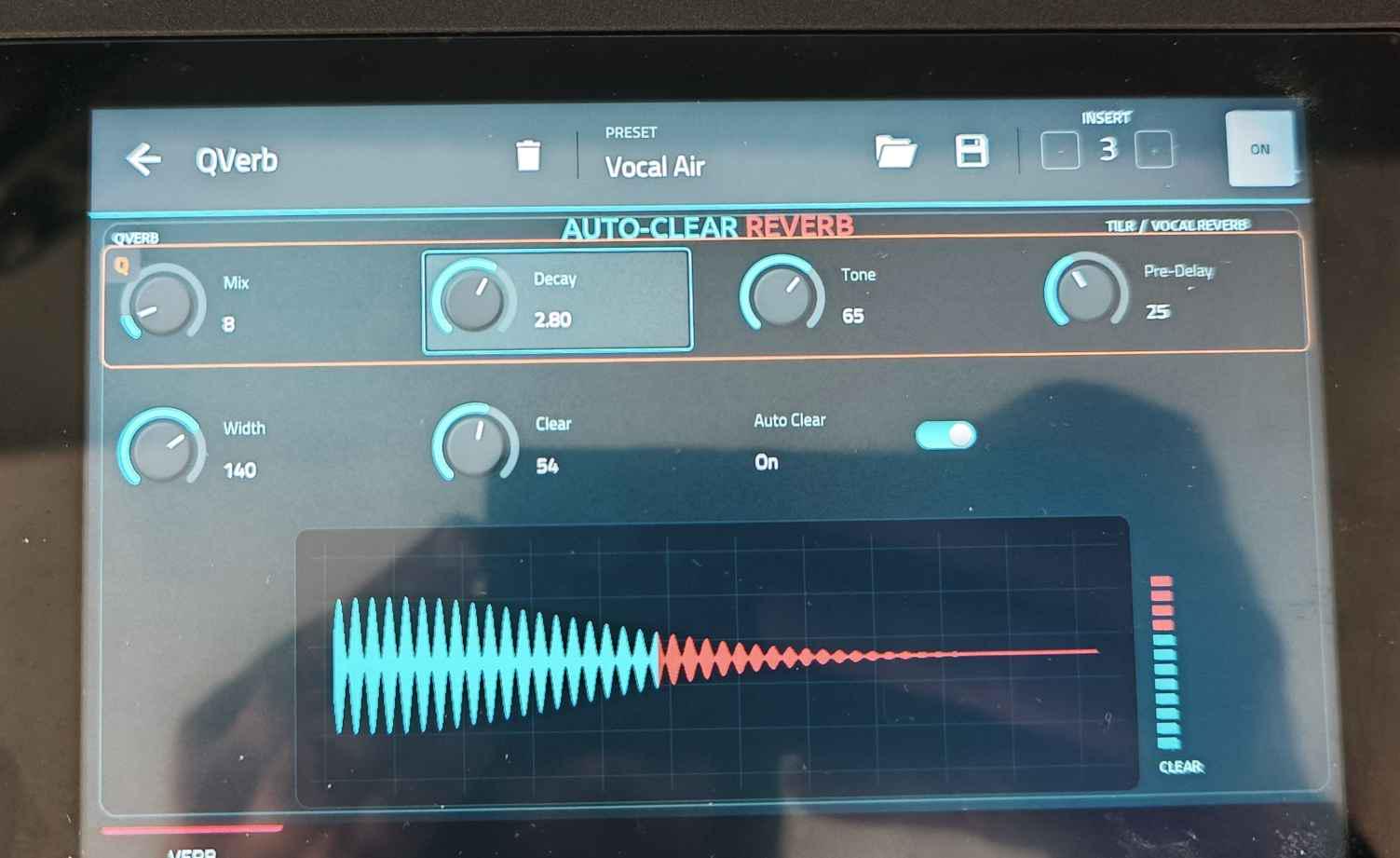
Hello,
days ago i wanted akai's prodelay autoclear feature. So i used Opencode, Deepseek V4.1 Flash and QDelay from Github as Source to implement Autoclear to it and ported it to the mpc.
Because i was missing Sidechain Reverb on the MPC - i thought, it would be great to look up for some great reverb algorithms and to create QVerb based on this concept. And by god, after i put this delay on my drum insert - i was shocked - how soft drums can sound. I didn't expect that, because i had it for my vocals in mind.
Without any bullshit - this free plugin sounds awesome
Youtube Demo
https://youtu.be/BFBGcaqEWoc
Repository
https://github.com/coolvegan/qverb-autoclear
Download (if you have no developertools on your pc with installation manual)
https://github.com/coolvegan/qverb-autoclear/releases/tag/1.0
best regards
r/akaiMPC • u/Embarrassed_Rope_355 • 18h ago
I've had the same Akai MPC Live 1 since around 2016. Over the last year or so I have began to have some issues. The first one to happen is the 4 encoder knobs became very jumpy. Simply touching them would cause the related knob on screen to start jumping around wildly. So if I was in a synth and the knob was on cutoff (for example), it would jump all over as if I was twisting the knob.
Recently though, my MPC has started to majorly slow down. I tried reformatting the SD card, which seemed to help for a week or two, but now it is back to running very slow.
Right now I am trying to save a project, and it has been about 3-4 minutes and it's only about 40% done saving. I tried exporting the audio from the track and after about 30 minutes it wasn't even half done exporting the STEMS. I am going to buy a new SD card to see if this is the problem, but I fear my MPC is just getting old and starting to have some problems as it is a computer basically. I tried deeting some WAV files on the SD card and it kept freezing up for about 30 seconds before I could do anything on it. It has started loading/saving and doing everything slowly such as switching screens or going into a synth or plugin.
Thing is, if it isn't just the SD card and it's the MPC itself having issues after 10 years, I question if I ever want to buy an MPC again. I love that the new generation is beefier in the specs, but I kind of have an issue paying close to $2k for a machine that will die like this after 10 years. I wanted to get the MPC XL, but again, that's a whole lot of money to drop for something that will die like this after a certain time. 10 years sounds like a long time, but not in music gear in my opinion.
I have synthesizers older than the MPC that run like they did on day 1, no issues. Mostly analogue, but my Mininova runs like a dream still. So I'm wondering if it's just the lifespan of the modern MPC's isn't as long as I had hoped or it's something else.
I'm still on version 2.15.1 as version 3 and above had issues with tracks made on the previous firmware versions. Such as audio missing or even though there would be notes on the MIDI piano roll, it would not play the audio for the synth assigned to it.
r/akaiMPC • u/erventser • 10h ago
I needed an Delay Plugin for the Mpc with Autoclear. Was not willing to pay 29 Euros. So i vibe coded one for us:
Video how it looks on the mpc - here https://www.youtube.com/shorts/y5dFlXguOlc?feature=share
Get it here https://github.com/coolvegan/qdelay-autoclear
Best Regards
r/akaiMPC • u/Moodlightgamer • 21h ago

r/akaiMPC • u/damonflores • 23h ago
DFOS goes public Wednesday, Nov 25.
A free custom OS for your MPC Sample.
Card in: DFOS. Card out: stock.
16 tracks, a real mixer, insert FX, 16-channel USB out, grid editor, 60+ insert fx, track mutes per sequence, scales, chord progressions and much much more!
Built by one person, for the box you already own.
Public beta = rough edges. Back up your projects and tell me what breaks.
Link in bio. Not affiliated with Akai or inMusic.
#mpcsample #akaimpcsample #dawlessproducer #stemsplitter #getdfos
r/akaiMPC • u/johnstamos6989 • 1d ago
Hey, since the akai mpc key 61 is now open source, do you guys think its possible to configure it to use it as a midi keyboard now instead of going to controller mode? i could care less about the pads or other buttons, just want to play the keys as a midi keyboard without going into controller mode
r/akaiMPC • u/Petrolmediainc • 1d ago

r/akaiMPC • u/jferments • 1d ago


r/akaiMPC • u/Milkpowder44 • 2d ago


FREE TEMPLATES IN VIDEO LINK DESCRIPTION
r/akaiMPC • u/Nielsdt • 2d ago
r/akaiMPC • u/AkaiMpC4ufme • 2d ago

r/akaiMPC • u/goshone • 2d ago
Akai, why? What is the point of this software. Are you trying to compete with existing DAWs? Because if so, you are missing the mark.
Up to now I’ve only used it to transfer expansion packs. I thought I would give it a go and make a track with the desktop app. I thought it would be a seamless experience, but instead I just completely stalled out. I was confused how to add tracks or change to a synth plugin. There was no videos or tutorials, searched on YouTube and their official channel. Nothing about the latest release, the video link inside the app took me to videos about the standalone UI only. I finally stumbled my way through it but it should have been much easier. Really, if you are trying to push the app, is should be a smoother experience.
What I was hoping for, and something that would set you apart from the other established DAWs, is an easy way to transfer a song I started on standalone, then continue to arrange, tweak, add instrumentation, and hopefully record vocals. Then do final mix and output to computer.
Is this possible with the latest software?
r/akaiMPC • u/Mercadomuse • 2d ago
is anybody in the know of anything relating to like a cloud service similar to what ableton did? or something like a dropbox connect? I would love to access beats easier on my phone / computer 😎

