r/ZephyrusG14 • • Jul 21 '20

Compiled MegaList of FAQ, Tips, and Fixes to Common Problems for New (and Old) G14 Users!

1.7k Upvotes

Since we seem to get a lot of the same/similar questions in this sub, I thought I would make a list of fixes to common problems to reduce spam. I have added an FAQ and some other helpful tips at the bottom as well. Note that if you are a new user, don't worry about doing all of this at once; most of it will only be necessary if you have that specific issue. Comment if there is anything you'd like to get added! Hope all this helps :)

Edit(s): Added more stuff

The List

Most Common/Biggest Issues

Important note: see bottom for discussion(s) on whether disabling boost is right for you. (Likely not recommended for 2022 models and beyond.)

Important note: Any setting of boost to "Efficient aggressive" actually disables boost altogether as this setting does not work on the G14 - however it's not really an issue so long as you use boost only when you need it (e.g. have a power plan with boost and one without and switch as necessary).

Other Issues

Important note: I wasn't able to find a specific post referencing this, but turning up your keyboard backlight has been said to improve coil whine though YMMV.

Important note thanks to /u/justaluckydude: there does not seem to be any fix for a bad fingerprint reader if updating to the latest drivers doesn't work.

Setup Guides and Others

FAQ

Important note: you can also check when your unit was manufactured by the serial number. All serial numbers start L#, where # is the number corresponding to the month your G14 was manufactured (e.g. if it says L7 yours was made in July).

Miscellaneous Tips + Helpful Posts

Important note: hwinfo is another good resource for running system diagnostics, just make sure you run it "sensors only" and disable "show system summary on startup" (the latter will wake your dGPU unnecessarily). Download here.

Important note: Armory Crate will show system temps if that is all you want to know from a diagnostic software.

Promotions

  • Please DM if you know of any :)


Boosting Discussions


r/ZephyrusG14 • • Jun 27 '25 This Helpful

Model 2025 Don't tell my wife, or my wallet.

Thumbnail
gallery
1.5k Upvotes

Initial budget: $1,500. Stumbled upon this subreddit and bought this sleek, sexy beast. Now, I've invested $2,600 in happiness.

Specs: AMD Ryzen™ Al 9 HX 370 32GB LPDDR5X 8000 1TB PCle® 4.0 NVMe™ M.2 SSD NVIDIA® GeForce RTX™ 5070 Ti Laptop GPU 12GB GDDR7

Came with a 200W brick and a 100 USB-C AC adapter.

Uninstalled Armoury Crate and McAfee right after booting into Windows 11.

Stickers off soon, once I've finished testing it with Cyberpunk 2077.

God bless this community for introducing Zephyrus to my world and Serge for the amazing G-Helper.


r/ZephyrusG14 • • May 11 '20 Bravo Take My Silver

Important Update To PROPERLY DISABLE Boosting

1.2k Upvotes

I’ve talked here about disabling boosting in other threads via adjusting the max state to 99%. The flaw with this method is capping the CPU at only 1.7GHz. To maintain stock 2.9/3.0GHz clock with boosting disabled, use this method below instead of 99% max power state.

Using Registry Editor, go to HKEY_LOCAL_MACHINE\SYSTEM\CurrentControlSet\Contro l\Power\PowerSettings\54533251-82be-4824-96c1-47b60b740d00\be337238-0d82-4146-a960-4f3749d470c7 and select Attributes. Modify the value of "Attributes" from 1 to 2. Data should read “0x00000002 (2)”. This will uncover a hidden power option.

After that, go back in the Power Plan Options and a new tab "Processor Performance Boost Mode" will appear. Set it to Disable and click Apply. Also, make sure your max processor state is at 100%. The CPU will now run on the stock frequency.

For a general idea about the performance compared to 99% max state, average FPS went up to about 5-15 with the temperatures still maxing out at the same 75 degree Celsius! The FPS loss from 99% disabled has been recovered while maintaining the benefit! Tiering your games at 1.7GHz, 3.0GHz, and full boosting will allow greater flexible for performance and temperature.

Note: I have the 240Hz G15, but this should be similar performance to the G14.

Credits to deenoekun here for the find


r/ZephyrusG14 • • Jul 05 '20

How to get 10 hours battery

1.0k Upvotes

Battery bar showing less than -7,500mw is the end goal

Here's the goal, get your G14 to have 8+ hours of battery life at idle once you are able to see your dGPU Freq, Memory Freq and Temp at Power Saving. you have won the game!

-5,500 to -7,500 is normal idle discharge rate from a G14 2060, that translates to 8-10 hours of battery.

The vast majority of people get great battery life out of the box, but if you install the wrong driver while trying to do an update, attempt to overclock with some third party tool or get a weird software load from asus you can end up stuck with 4 to 6 hours.

All of this is from the viewpoint of a BestBuy ver w 2060MQ and 4900HS. All the drivers are the same for the other versions w/o the AniMe display so it should work. The idle draw may be different on other models, but having the nvidia graphics draw 0 watts is the key test and should be universal.

Update 05/06/2021 -

I don't use any of these settings anymore. I run a clean install with no armory crate and use this util to set my max TDP to 23 on battery and 35 plugged and run everything on iGPU when unplugged. Current AMD software package and up to date nvidia drivers (even geforce experience for the overlays).

https://github.com/aredden/electron-G14Control

end update

Here's how you get there. (for Windows 10 update 2004)

Get tools, do first steps

Update your system BIOS to the newest version, 216 has some possible power management fixes for sleep mode recovery and other stability fixes.

First, uninstall GameFirst completely. It's junk and nobody wants it and it messes with your power management.

Install the AMD Drivers from AMDs site.

Go into the AMD Radeon Software under Display and disable Vari-bright.

Disable the StartCN Scheduled Task in Task Scheduler to keep the AMD Radeon Software from running on every reboot. You will have to End Task the AMD Radeon Software after every time you use it, but that should be infrequent.. (thanks /u/browser1969!)

Open Task Manager (ctrl+alt+del Select Task Manager) Hit More details find any instances of Radeon Software: Host Application select them and End Task them.

Get Geforce Experience app it will install any new updates as they come out.

Go into geforce experience, click the gear (settings) icon and choose Games. Disable battery boost.

Open your nvidia control panel, go under Configure Surround, PhysX and set PhysX Processor to CPU. thanks /u/erazortt

Install battery bar to get a read of the current discharge rate.

Force iGPU use from within Windows

Hit Start, Run then type in power plan and open the Edit Power Plan control panel. In that window hit Change advanced power settings. You'll see this (with your active power plan as whatever you have it on). This is also where you can set CPU limits and turn off boost if you have done the regedit change to allow that.

Scroll down to Switchable Dynamic Graphics and set it to Force power saving graphics in the On battery dropdown.

Do not plug back in, reboot your computer while running on battery.

Check for awake dGPU

Open Armoury Crate, if it shows GPU Freq, Memory Freq and Temp at Power Saving. you're done! Check battery bar, if it says you're idling at between -4,500mW and -7,500mW all is well, you are done, move on with your life.

It can take up to 30 minutes for the Windows battery time estimate and the battery bar estimate to update.

More checks for active software

If you're running any Corsair peripherals have a look at this from /u/ArtsM for how to get the iCue software to play nice with your battery.

Reopen Armoury Crate, if it shows GPU Freq, Memory Freq and Temp at Power Saving. you're done! If it's stuck at 300MHz and 405MHz and shows a temp then you're stuck on.

In Armoury Crate hit the Keyboard/Mouse icon and choose System then click on GPU Power Saving. This will give you a list of apps using the dGPU. Hit Stop All and say yes to kill them all. If it doesn't let you stop them disable the dGPU in device manager and then re-enable it.

advanced users (this means don't ask for me to help you with this) here are some commands that will do that if you run them in an Admin Powershell. I have my machine run this every time I unplug from AC, it forces EVERYTHING off of the dGPU so I don't have to mess with anything

Disable-PnpDevice -InstanceId (Get-PnpDevice -FriendlyName *2060* -Status OK).InstanceId -Confirm:$false
Enable-PnpDevice -InstanceId (Get-PnpDevice -FriendlyName *2060* ).InstanceId -Confirm:$false

Trigger that with a task scheduled event filter that looks like this.

<QueryList>
  <Query Id="0" Path="System">
    <Select Path="System">*[EventData[Data[@Name='AcOnline'] and (Data='false')]]
</Select>
  </Query>
</QueryList>

end advanced section

A working example

Here's what it looks like on my system with my settings applied. This is my system with 0.1% CPU and 30% backlight! Normal values while watching videos or lightweight browsing will double this power draw and you'll see up to -8,000mW just from the backlight being at max.

If you think everything is right on your system and you simply can't get the dGPU to sleep

(HOW TO CLEAN REINSTALL THE G14)

Backup your stuff and Make a Windows 10 install USB stick, go into MyAsus and grab the AMD Graphics, Chipset Driver (v26.20.14048.2), and the Goodix Fingerprint Driver(v3.0.21.250) the ARMOURY CRATE Service (v2.7.2), and the Dolby Activator and put them on the new Windows 10 stick, also grab the c:\ASUS\esupport folder since the scripts/original drivers here aren't available on the website or via MyAsus. Do a full reinstall of Windows 10. I did a complete deletion of all the partition and let Windows recreate it all from a completely blank drive.

After the Windows 10 install, do ALL UPDATES (including 2004) then install the AMD driver, the Goodix driver, Dolby Activator and the ARMOURY CRATE service that you downloaded from MyAsus (not the old versions from the C:\ASUS folder). Each one of these is a compressed file that you need to decompress and run an install or setup file to actually install them.

Reboot. Check for Windows Updates again.

Download the Nvidia GeForce Experience software, let it update to the newest drivers. Check for Windows Updates AGAIN.

Install the AMD Drivers from AMDs site. the same driver works on all G14s once this is installed go into the AMD Radeon Software under Display and disable Vari-bright. Open Task Manager (ctrl+alt+del Select Task Manager) Hit More details find any instances of Radeon Software: Host Application select them and End Task them.

Disable the StartCN Scheduled Task in Task Scheduler to keep the AMD Radeon Software from running on every reboot. You will have to End Task the AMD Radeon Software after every time you use it, but that should be infrequent. From what I can tell the settings changes work fine after a reboot even if the software is disabled like this. (thanks /u/browser1969!)

All the other software/drivers/utils will have been automatically downloaded/installed with working versions from Microsoft automatically.

Change the CPU boost/TDP to something more sane I like to set Efficient Aggressive from the disable boost AND limit the TDP to 15w with Renoir Mobile Tuning. This is more subjective. Disable boost completely for totally silent fans, up the TDP for all core performance in renders, etc.

Go back into Edit Power Plan -> Advanced and scroll down to Switchable Dynamic Graphics and set it to Force power saving graphics in the On battery dropdown.

Go into geforce experience, click the gear (settings) icon and choose Games. Disable battery boost.

Check for Armoury Crate function, if it doesn't start when you hit the ROG button install the Armoury Crate app from the MS Store. Do the same for Dolby Access by hitting Start and typing Dolby. If it's not there install it from MS Store.

Unplug and see what kind of battery you get. Get battery bar/hwinfo to see the actual raw numbers rather than just going with the estimate from Windows 10.

updated 9/17/2020 with new bios

updated 7/19/2020 removing the need for hwinfo

updated 7/18/2020 with Physx check and more graceful AMD Radeon disable method


r/ZephyrusG14 • • Sep 03 '25 Bless Up

Software Related How I see any thread related to Asus:)

Post image
964 Upvotes

r/ZephyrusG14 • • Oct 06 '23

Model 2021 Got this as a gift from one my clients, said they didn’t need it anymore

Post image
922 Upvotes

Extremely excited to have this beast with me


r/ZephyrusG14 • • Oct 19 '25

Model 2024 I snagged a 2024 AMD RTX 4070 G16 via Best Buy open box for $236 USD.

Post image
912 Upvotes

I should probably provide some context for this, 'cause the story's crazy at face value. In short, this was originally a demo model that had been sitting in the local Best Buy for months. Since the AMD 40 series version of the G16 is now discontinued, the Best Buy staff agreed to let me purchase it. The label implied it'd cost me $539 USD, but one of the staff members reviewed that and to my shock, its true cost was less than half of that. On top of that, I had a Best Buy gift card on hand from a recent trade-in that covered the entire purchase.

I'll probably sell my G14 since I have no need for it now and this G16 has more RAM, a better GPU and CPU and a larger display. However, I won't do that before making sure the G16 doesn't have anything wrong with it. No problems have cropped up in my 6 or so hours of use thus far, but I'll keep you guys posted.


r/ZephyrusG14 • • Jul 18 '25

Model 2024 Traded a PS5 for a 2024 g14

Thumbnail
gallery
879 Upvotes

I've always wanted a g14 and today I was scrolling through FB marketplace as one does and found this asked the dude if he wanted to do any trades and he said yes for a PS5 with no cash on top I spent 200 dollars on my ps5 maybe a year ago and never use it best deal of my life technically a downgrade performance wise from my last laptop but it's a much better laptop and I don't play thet many crazy games anyway


r/ZephyrusG14 • • Feb 11 '21

Gotta restart my laptop I guess

Post image
869 Upvotes

r/ZephyrusG14 • • Nov 24 '24

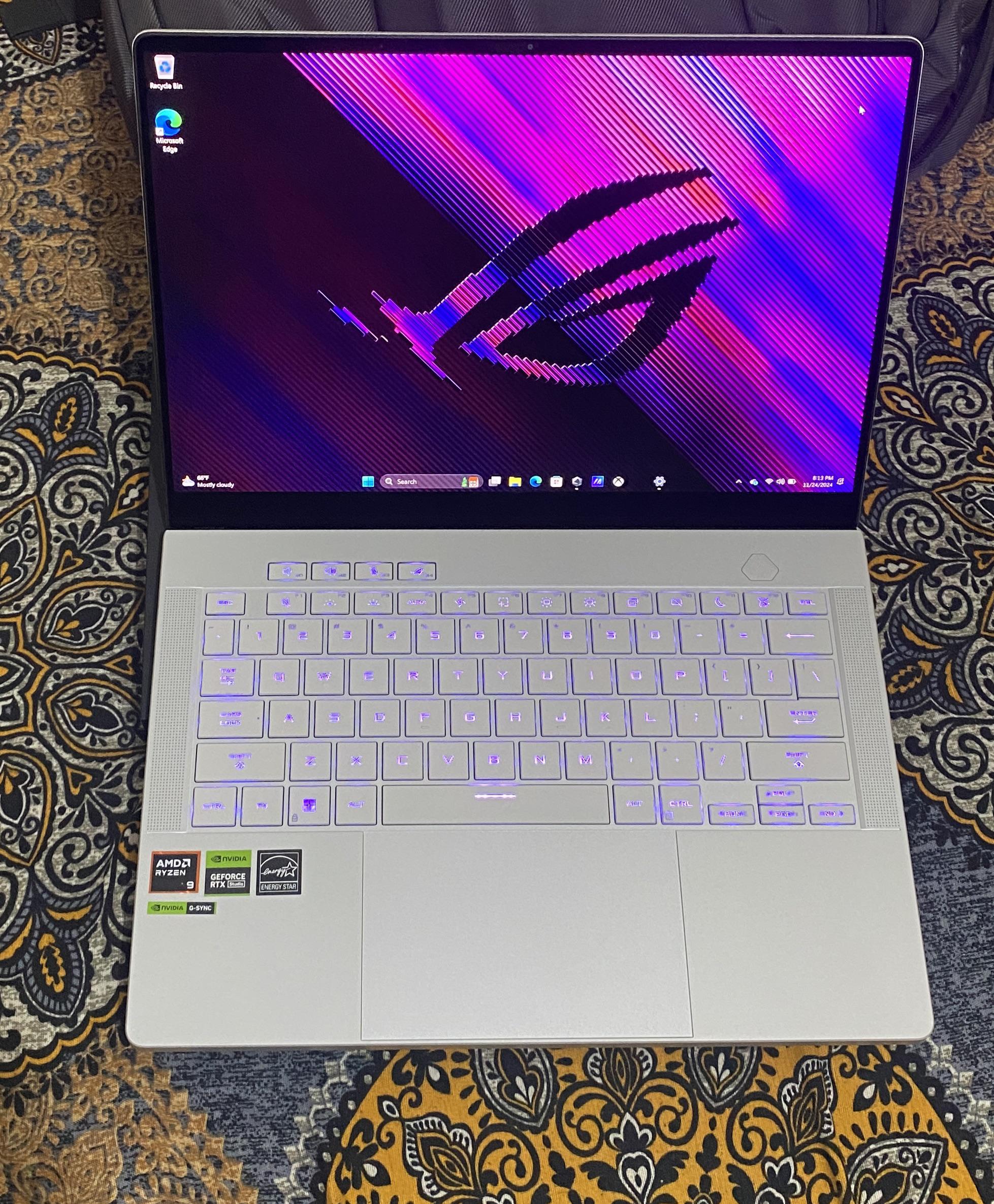
Model 2024 Really liking this macbook

Post image
851 Upvotes

Yes, I also fell for the OLED and the sleek design and the great battery and the response time and the overall aura addition.


r/ZephyrusG14 • • May 01 '25 Polished Gold Turd

Model 2024 So no head? The most ethically questionable zephyrus mod.

Thumbnail
gallery
844 Upvotes

r/ZephyrusG14 • • Jul 30 '24

Model 2024 My very first gaming laptop, 2024, 4070 32 GB. I hope it’ll last me till 2030 and even more 🖤

Thumbnail
gallery
804 Upvotes

Weird combo but I have Oled everything on my main devices. 😎 PC AND IPAD (oled IPP 2024 next to g14) and a stand so she can breathe while I game, in love so far. 🔥🔥🔥


r/ZephyrusG14 • • Nov 25 '24

Model 2022 I'm not sure if I'm proud or embarrassed to be using the same laptop 😂

Post image
759 Upvotes

Saw this meme and thought you guys would enjoy it. P.S. not 100% which model this is


r/ZephyrusG14 • • Jan 21 '26

Model 2025 Flight attendant saw my G14 and bumped me up to first class

Post image
749 Upvotes

I mean she saw it, I don’t really know if that’s why I got the upgrade but I suspect that’s the reason.


r/ZephyrusG14 • • May 24 '20

Summary about controlling fans/boost/TDP - all is possible

738 Upvotes

Date: 14.03.2020

FAN CONTROL

Fan controlling is now entirely possile thx to u/caelis.

Original post with all information: https://www.reddit.com/r/ZephyrusG14/comments/go16hp/fanless_completely_silent_on_battery_manual_fan/

Summary:

  • fan control including stopping the fans at lower temps is now possible with this simple tool

  • there are minimum safe fan levels given for higher temps (the same that Armoury Crate uses), it is not possible to damage your laptop if you don't change something manually

TEMP CONTROL

The easiest and most efficient way of lowering the temps and still achieving the maximum amount of performance. Just set a temp limit (Recommandation: 85C) of your desired value with one of the apps listed below the tdp control section. This way the CPU will still bosst but tdp will be limited dynamically to reach your desired temp. Temps below 95C are absolutely fine in general but 85C is a very good compromise between loudness, heat and performance.

BOOST CONTROL

Deactivating boost and capping the frequency at baseclock of your CPU is possible.

Original post by u/Dr_Redditologist as a sticky with HowTo here: https://www.reddit.com/r/ZephyrusG14/comments/gho535/important_update_to_properly_disable_boosting/

Summary:

  • Capping the boost clock reduces temps by up to 20C and power draw by up to 25W despite still delivering very good performance in multicore use cases - Ryzen 4000 is incredible power efficient at frequencies up to base clock

  • 95% of modern games are GPU dependent and multi core optimized - in this case there is none or only a minor impact on fps (examples are Borderlands 3, Shadow of Tomb Raider, CoD Warone)

Examples:

  • Use case 1: Quieter and cooler gaming of multicore optimized games with manually controlled fans

  • Use case 2: Overnight rendering with lower temps and noise

Not recommended for single/dual core dependent use cases like older games, big Excel projects or modern single core dependent games like ANNO 1800

Update: Good discussion and more examples about boost control: https://www.reddit.com/r/ZephyrusG14/comments/hvq4mt/the_case_for_not_disabling_turbo_boost/

TDP CONTROL

It is possible to control the max used TDP of the CPU with Ryzenadj (https://github.com/FlyGoat/RyzenAdj/releases) as it was already possible on older Ryzen mobile generations. Thx to u/Sayved75 for the hint. It is only possible to set the STAPM and the FAST limit at the moment. Just set these two values to your desired maximum TDP. All changes are gone after restart. Changing profiles in Armoury Crate might change your desired values - reapply might be needed.

For a user interface i recommend RYZEN CONTROLLER https://www.ryzencontroller.com. Set CPU TDP and BOOST TDPs to your desired values. Edit:24.08.20 Renoir compatible Ryzen Controller version released.

An alternative in development is Ryzen Smart Tuning https://github.com/sbski/RyzenSmartTuning Set just the first two values to your desired TDP and enter 0 for the remaining values.

UPDATE: I now prefer this tool, start with admin rights: https://github.com/sbski/Renoir-Mobile-Tuning/releases

Summary:

This enables you to limit power draw and therefore heat while also retaining the ability to let the CPU boost.

  • Use case: single/dual core dependent use cases like older games, big Excel projects or modern single core dependent games like ANNO 1800 while reducing heat and noise like with Boost Control.

  • Unlocking full CPU speed on battery is possible this way with Renoir Mobile Tuning.

Example: Without optimizations you will encounter an avg CPU power draw in ANNO 1800 of 25W. With Boost Control enabled you will encounter a CPU power draw as low as 7W in average in ANNO 1800 while reaching your base clock as max frequency. With TDP Control you can set the CPU also to 7W but will gain more performance as the single core with 100% load will still boost to the max possible frequency while other cores clock down.

A tool to even completely exchange Armoury Crate is to be found here: https://github.com/aredden/electron-G14Control . It enables fan speed changing, change of power plans, and alot more. I hope this answers alot of questions and i will edit this post if needed.


r/ZephyrusG14 • • Aug 12 '26

Model 2026 Sharing my g14 setup 🤍

Post image
734 Upvotes

r/ZephyrusG14 • • Jul 10 '21

2021 Mediatek MT7921 suddenly not working

724 Upvotes

Hello friends. I bought this G14 back in May. Model # GA401QM-211.ZG14

This morning I played Apex for a few hours, went out to run a few errands, and when I came back to use my G14 from sleep, my WiFi and Bluetooth were both not working. I’ve been trouble shooting for hours and have not found a solution.

Event viewer says “the version number is incorrect for this driver.” Device manager says “this device cannot start”. I’ve tried different driver versions for the MT7921. I’ve tried system restoring and recovering. Network reset thru Windows as per the troubleshooting tool also did not work.

Has anyone else had similar issues with this happening? Any advice or fixes?


r/ZephyrusG14 • • Nov 22 '25

Help Needed Why is there such a huge difference

Post image
710 Upvotes

Why is there such a huge difference between my oled monitor and my zephyrus oled screen?


r/ZephyrusG14 • • Jun 29 '23 Heart of Silver

Software Related G-Helper - The Armoury Crate Replacement You Should Know About.

Thumbnail
youtube.com
707 Upvotes

r/ZephyrusG14 • • Feb 03 '23

Software Related ArmouryCrate.UserSessionHelper hight CPU usage - FIX!

701 Upvotes

Hello fellow community,

After an hour of tinkering seems like I have figured out a reason of a bug appearing in a new update of Armoury Crate (5.4.8.0) when a process ArmouryCrate.UserSessionHelper was running in the background and consuming CPU. This could lead to high temps in "iddle" state (cause it wasn't really iddle in fact) or draining battery like crazy.

PERMANENT FIX STEPS

  1. Open folder C:\Program Files\ASUS\ARMOURY CRATE Service (where your Armoury Crate is installed)

  2. Delete (or move to a backup folder) an AC_FDSPlugin folder (you may confirm admin permissions there)

  3. If it doesn't allow you to delete folder still - close Armoury and kill ArmouryCrate.UserSessionHelper in task manager before trying

  4. Reboot!

Voila, now ArmouryCrate.UserSessionHelper should stay calm in a background. Unlike killing process every time, this fix seem to be permanent!

*After quick research I have found that AC_FDSPlugin is responsible for scanning for new games for GameLibrary section, and it's broken now (some people say it's cause of Steam Library, or so). So by removing this folder, you don't limit any working functions of Armoury*.*

------------------------------

*For people who struggle to remove folder, cause it's used by armoury already I crated a very simple script that does it for you and also restarts armoury service. So no reboot should be needed after.

Just download a file https://www.dropbox.com/s/ckw1b3m9m1fphax/armory-fix.bat?dl=0

Right click on it and select "Run as Administrator" (it's needed to restart service)

Let me know if it works for you!

-----------------------

Bonus TIPs

*You can do this extra steps only if you still have issues (otherwise not mandatory)

(Optional) If you are annoyed by a new "red sound-wave" icon in tray appearing since update you can also delete (or move to a backup folder) DenoiseAIPlugin folder in Armoury directory. But then you won't be able to control Armoury AI noise suppression, in case someone used it ....

-------------------------

PS: Alternatively you can use a small and Lightweight tool that I did - G-Helper to do pretty much same as you could do with Armoury, but without Armoury itself :)


r/ZephyrusG14 • • Oct 20 '24

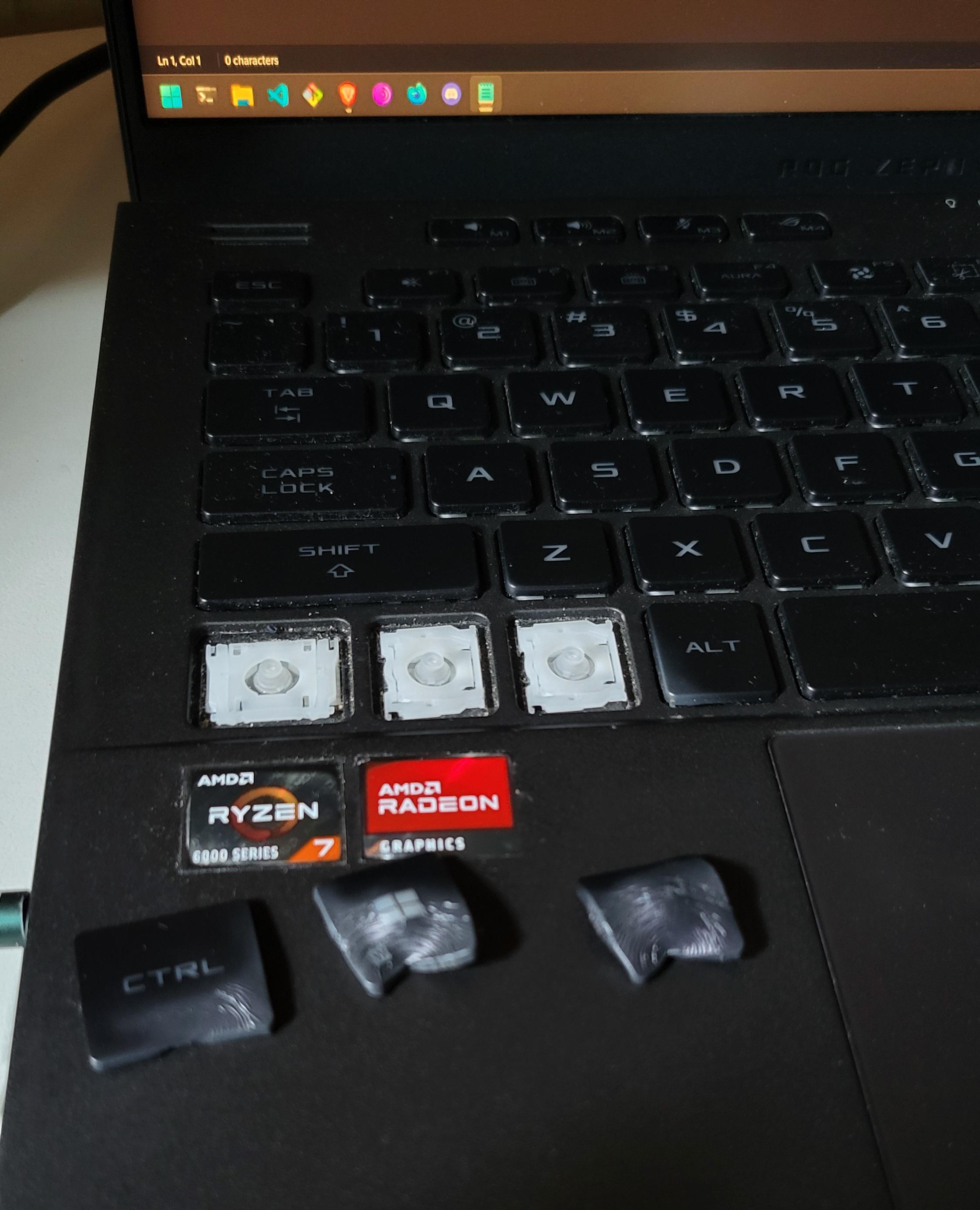
Model 2022 I fucked up! I was trying to use a hairdryer to remove the damn stickers. It ended up melting 4 of my keys.

Post image
688 Upvotes

I'm from India, can I find these replacement keys, I don't care about the resale value, I'm never going to sell this laptop. But it holds a high senimental value.

Can y'all suggest where I can get these keys from. Thank you.

The damn stickers are still not coming off.


r/ZephyrusG14 • • Oct 27 '23

Software Related Whaat???? Wonder what happens if I eject it...

Post image
686 Upvotes

r/ZephyrusG14 • • Sep 09 '22 Bravo

2022 FIXED: Bluetooth devices randomly disconnect and reconnect

678 Upvotes

Apologies if someone else has posted about this elsewhere, but I haven't found a resolution mentioned as I've been trying to figure this out, so thought it may be helpful.

I picked up a 2022 G14 about a month ago and had been dealing with various gremlins until running across u/ispeakuwunese 's excellent BIOS 313 post. That write up is seriously a god-send - if you have this device, you owe it to yourself to read it.

The one thing I've still had trouble with is Bluetooth; throughout the day, my mouse and keyboard would randomly drop, then reconnect, then drop, and so on ad infinitum until a reboot.

I found running the Bluetooth troubleshooter to be useless - or less than, as the Bluetooth radio often would refuse to turn back on afterward.

I finally tracked down the cause - Windows has been disabling the Bluetooth Radio to "save power". Perhaps this would be useful while running on battery power, but it's a nuisance while plugged in and using peripherals.

If you're on Windows 11 and also dealing with this, the fix is easy:

  1. Open Device Manager

  2. Expand the "Bluetooth" entry & find your adapter (e.g. "MediaTek Bluetooth Adapter")

  3. Right-click on your adapter (e.g. "MediaTek Bluetooth Adapter") select "Properties" and click the "Power Management" tab

  4. De-select "Allow the computer to turn off this device to save power" & click "OK"

OPTIONAL:

  1. Open Services

  2. Find Bluetooth Support Service

  3. Make sure the Startup type is Automatic

This is my first device with Windows 11, and I haven't run into this on Win 10, so I'm not sure if this is a Windows 11 issue, or a Windows 11 on the 2022 G14 issue.

If anyone knows of a way to get this feature to work the way I expect it's supposed to (i.e. only on battery power), please let me know.

I hope this information is helpful to someone else!

NOTE: Setting the Bluetooth Support Service startup type to Automatic does not seem to mitigate or resolve the issue alone. The power save feature appears to be the primary factor.


r/ZephyrusG14 • • Oct 21 '24

Model 2024 First gaming laptop ;)

Post image
676 Upvotes

G14 2024/R9/32gb/4060/1Tb