
306
u/Tom_Neverwinter Mar 13 '21
Control panel still has all the settings. Using the new settings menu has a ton of Missing features.
71
u/DiVine92 Mar 13 '21
I don't mind new Settings but I feel like it's really disorganized and very barebones. Sometimes find a specific setting you want to change is a pain in the ass.
There is also too many sub menus. Whole Personalization menu and it sub menus could be displayed on a single page.
6
136
u/AnAndroidGamer Mar 13 '21
That's because Microsoft is slowly implementing the features from the control panel to the settings... (In other words, Microsoft is removing the control panel by replacing it with settings.) Sometime in the future, Microsoft will kill control panel and replace it with settings.
84
Mar 13 '21
The keyword here is "slowly", they started 8 years ago. At this point Windows 11 is closer than the Settings applet being finished.
27
2
Mar 14 '21
because they are rewriting the code base which was there since mid 90s, and they dont put all the resources to finish settings menu obviously because there are other priority tasks. honestly some people surprise me by thinking that rewriting legacy code base to a new systems is so simple and easy.
9
Mar 14 '21
It isn't easy for sure. We're talking about one of the largest companies in the entire world though, one that employs thousands and thousands of programmers.
Others, including Microsoft in the past, write entire operating systems from scratch in a much shorter time period.
And they aren't even making a top AAA game or something. It's a damn GUI registry editor.
3
1
103
u/Jacksaur Mar 13 '21 edited Mar 13 '21
And then everyone will just find a way to reenable it again.
Settings app is shit.Hell, i doubt they'll even go through with removing it in the end. Backwards Compatibility is the main feature of Windows and I doubt they'll be able to port every single thing programs require (like custom menus in Device Management) into Settings.
35
u/kekekmacan Mar 13 '21
Backwards Compatibility does not apply to Microsoft tools, but definitively applied to their APIs.
1
30
u/Ket0Maniac Mar 13 '21
They are Microsoft. They made the old Control Panel. They made the new Settings app. They can port anything they want to. Chill with your speculations.
16
u/Jacksaur Mar 13 '21
They didn't make the custom options that some devices use. That's the point of the word "Custom".
→ More replies (6)3
u/Ket0Maniac Mar 13 '21
What custom options?
20
u/colablizzard Mar 13 '21
Many device drivers add their own tab to the control panel at various levels. Some at the top level, others on the device level. For example a new tab on the mouse control panel to control additional buttons.
→ More replies (1)8
Mar 13 '21
Old edge was killed. Can you enable it?
12
u/Jonas___ Mar 13 '21
The old edge is still installed, but hidden. If you uninstall the new one, the old one gets reactivated.
5
u/Peribanu Mar 13 '21
You can temporarily re-enable it by opening RegEdit, going to
HKEY_LOCAL_MACHINE\SOFTWARE\WOW6432Node\Microsoft\EdgeUpdate\ClientState\{56EB18F8-B008-4CBD-B6D2-8C97FE7E9062}and deleting theBrowserReplacementkey. Then you create a shortcut on your desktop pointing to%windir%\explorer.exe shell:Appsfolder\Microsoft.MicrosoftEdge_8wekyb3d8bbwe!MicrosoftEdgeor open run dialogue and launch that address. Old Edge should start. However, Windows will add a newBrowserReplacementkey next time there is a system update, so you have to go and delete it again.5
Mar 13 '21
Not on latest insider version.
12
u/Jonas___ Mar 13 '21
Finally that piece of shit is gone
7
8
Mar 13 '21
That's..... Your opinion. I liked it. I was good for general web browsing and didn't use much resources battery life was great too.
7
→ More replies (2)6
Mar 13 '21
There are people who doesn't like something untin it's discontinued. Don't trust their opinion.
→ More replies (1)4
u/Jacksaur Mar 13 '21
Completely different situation.
3
Mar 13 '21
How exactly?
7
u/Jacksaur Mar 13 '21 edited Mar 13 '21
Edge is just a browser. Not a core part of the OS since its inception. It's a completely standalone program and doesn't have to interact with many other parts of the OS. It was removed entirely because it could be done so easily, and the newer Edge was a direct upgrade.
Settings is anything but.
10
u/Deadly_chef Mar 13 '21
You would be surprised. A lot of ms internals still rely on internet explorer that's why it's still bundled in win10
→ More replies (2)2
u/Ket0Maniac Mar 13 '21
This guy has been trolling in a lot of comments. Ignore him/her.
→ More replies (1)→ More replies (6)8
Mar 13 '21
Backwards Compatibility is the main feature of Windows and I doubt they'll be able to port every single thing
But how does this apply to control panel? They're already shifting features from control panel.
18
u/Jacksaur Mar 13 '21
Because many programs and devices have their own unique settings and such that need to be supported. Audio devices with their own toggleable features in Sound Control Panel is just one small example. Other more advanced devices can fill whole tabs.
I highly doubt they'll be able to find some "unified" layout to support all that, past a single gigantic scrolling page for every item. It's a waste of time.
4
u/wikked_1 Mar 13 '21 edited Mar 14 '21
I mean you're right those custom driver .cpl hooks exist and they won't be portable to the UWP-style settings without being rewritten. But given enough time Microsoft can and will force changes. For example 16bit device drivers are no longer supported and command.com got retired, along with fileman, win.ini, and all sorts of stuff. It takes a long time for Microsoft to age things out, but it has happened quite a bit over time, just really long timespans.
4
1
u/IWishIWasAShoe Mar 13 '21
Pretty sure Microsoft can, if they want to, design a settings page with tabs as well to fit the needs.
5
-1
4
2
1
15
u/Kociolinho Mar 13 '21
Every single time I try to do something more advanced than change the volume, I have to go to the Control Panel. Ffs, it's 4-5 years since they implemented "Settings" 1st time.
13
u/cocks2012 Mar 13 '21
Also the interface is total crap after 8 years in the making. Will it hurt them to make a decent interface? Why is everything black and white? Why are grids, columns, list views, color icons, drop shadows, group boxes, etc, still missing? Look how this looks https://www.thurrott.com/wp-content/uploads/sites/2/2020/08/manage-disks-volumes.jpg
Its not impossible. Look how great this apps looks https://github.com/jenius-apps/nightingale-rest-api-client
7
u/JohnSmithDogFace Mar 13 '21
It’s a relic of their push towards touchscreen computers, isn’t it? That’s the point of the UI redesign I think. Bigger buttons and more drop downs, plus erase some features so it’s ‘’simpler’’
4
6
u/xombie212 Mar 13 '21
When Microsoft finally kills the control panel everyone should remember that "God Mode" still works as a bypass.
-3
u/FalseAgent Mar 13 '21
Control panel still has all the settings
no it doesn't. All the notification settings and whatnot are only in Settings. Why are people upvoting this garbage?
→ More replies (2)0
u/vitorgrs Mar 14 '21
The other way around is also true lol
there's a ton of features missing on Control Panel, because all 8 > new features settings is at... Settings.


32
u/andersostling56 Mar 13 '21
As administrator i get access denied when I try to access network settings. Using control panel works. Go figure.
31
u/IceBeam92 Mar 13 '21 edited Mar 13 '21
Honestly , I don't understand. Why try to re-invent the wheel when you can enhance your existing one? Put a paint job and be done with it.
Then you can go on to refining and perfecting.
You don't see Microsoft trying to rewrite MS Office from the ground every version and it's really the best productivity suite now.
9
u/LelouBil Mar 13 '21
I recently saw a video that showed "hidden" folders in windows, and it contained the control panel options because it is actually tied to the windows explorer ! My guess is that they are doing this to remove this and do "proper" settings instead of a thing on top of the file explorer
2
Mar 14 '21
Probably this. It's been this way since the very first version of Windows and my guess is that it's just not good to continue using this same system anymore and they need to replace it.
10
Mar 13 '21
People all the people that tend to complain only seem to complain about the UI because they want a touchscreen/tablet kind of experience because most people are complete and utter noobs and can't figure out anything for the life of them and just want the most simplistic shit possible. MS just caters to mainly those people now.
There should be two Windows versions for the general public. The basic/simple utterly useless one with Apple/Android aesthetics and the actual useful prosumer/professional/not-an-idiot one that actually lets you do whatever you want, how you want.
1
u/Junky_Dory Mar 15 '21
That's what I've been thinking for years now!!!.
Truly lapidary truth.
I may add: whenever you want.
0
u/The_One_X Mar 14 '21
Put a paint job and be done with it.
That is what they are doing. They are not reinventing the settings, they are just giving it a paint job. Just giving it a new paint job isn't as simple and easy as some people think.
11
u/AlexHidanBR Mar 13 '21
I agree. Too bad microsoft is removing control panel's features one update at a time. I don't mind using the Settings app but Control Panel is what I'm used to since Windows 7
8
u/real_with_myself Mar 13 '21
Control panel is still a muscle memory for me. That said I never go for something in settings, just search for it (I guess carry over from using android).
8
47
u/Substantial-Swing162 Mar 13 '21
God Mode > Control Panel
8
u/xyz_- Mar 13 '21
Idk, I prefer control panel's interface. But yeah, if I doesn't find something, I go to God mode.
11
u/SandMan3914 Mar 13 '21
Came here to post this. So true
I still prefer the classic windows shell too
37
u/WhizBangPissPiece Mar 13 '21
Who uses category view?!?!
26
u/Janus67 Mar 13 '21
Small icons is the first step!
9
3
u/FalseAgent Mar 13 '21
every single person in the world who uses category are on this subreddit, apparently.
7
1
112
Mar 13 '21
Oh please, control panel is such a mess. Buttons, side menu links, pop up menu boxes. It all feels so derailed. Settings is unified in ui. Only thing people don't like about settings is that all things aren't there. They're slowly getting there though.
15
u/gname6 Mar 13 '21
Maybe I am doing something wrong or whatever, but Settings only let me open 1 instance. I can't open settings several times, so I have to be changing between them.
Control panel let me opne as many as I want so. At least for me, that is more important than the visual part
→ More replies (6)17
u/Jacksaur Mar 13 '21
And they all work fine, each new menu it opens fits what it needs to do. Settings still hasn't caught up and every page has masses of wasted space because they're trying to force everything into their """unified""" style.
You're in the options for your system. It shouldn't have to be a damn work of art.
12
Mar 13 '21
"Just works" is something that's holding windows back. Many things that an average joe will use are there in settings.
has masses of wasted
Look at control panel. It has wasted space too.
7
u/Jacksaur Mar 13 '21
"Just works" is something that's holding windows back.
Holding it back from Looking pretty? Yeah, that's a sacrifice that shouldn't matter in an OS at all.
It isn't even worth bringing up the wasted space in Control Panel when the two are compared. Add Or Remove Programs is a premiere example.
7
Mar 13 '21
Holding back from being a lightweight and non janky os. Win32 apps are ancient. Uwps are very better, functionality wise, battery wise and everything else.
10
u/Jacksaur Mar 13 '21 edited Mar 13 '21
So you'd rather they go the Apple route, and axe support for thousands of programs made over the years?
Thank christ you people don't have a hand in design decisions. Some of us actually make use of the OS, rather than just crying about "muh visual consistency". If you want pretty UIs and a complete disregard for developers, go use a Mac already. Windows isn't for you.
10
→ More replies (1)6
u/Alaknar Mar 13 '21
I like how on one hand you're criticizing MS for not migrating everything to Settings by now and on the other hand criticizing MS for your perceived attempt at axing backwards compatibility.
All the while failing to realise that it's exactly that - a policy of backwards compatibility - that prevents them from actually ripping and tearing all the old stuff out and making the OS look brand new and consistent, with all the necessary settings available in a single spot - the new Settings window.
There have been thousands of articles about the problems they're facing - that some of the settings you see in Control Panel are hacks that "somehow work" but no one know how because the dude who made them died of old age 40 years ago* so I won't go into details.
*just in case: yes, this is a hyperbole.
→ More replies (1)3
u/cheese13531 Mar 13 '21
UWP can't be that good if Microsoft moved away from it with Edge
3
Mar 13 '21
Did they have an option? Chromium isn't an uwp, but a win32 app. In case of old edge, it wasn't the platform that had fault but the browser engine.
8
u/cheese13531 Mar 13 '21
I just think UWPs are pretty much dead at this point. Microsoft might try to revive them with Windows 10 X, but I think web apps are going to take over. If I was to predict the future, I'd say mainstream apps will move to web apps, and any 'serious' apps (like the Adobe suite, games, CAD, software development) will stay as win32.
→ More replies (1)1
u/duke7553 Mar 14 '21
Fact check: Microsoft isn't moving away from the modern features of UWP. They're giving developers the flexibility to bring it to all their apps with Project Reunion. For instance, the XAML UI layer is now decoupled from the platform. The goal is to have new APIs be designed, developed, and delivered in the open--disconnected from the platform itself. Microsoft has stated that the new APIs will be "mostly WinRT" with some exceptions to cater to uncommon scenarios. This is because WinRT allows them to author system APIs in a supported language and have them be used by developers from virtually any language with a projection. A neat example of this is the Rust/WinRT project. Critics will assert "UWP APIs are often limited and poorly designed" which isn't entirely incorrect, but Microsoft is openly planning to improve critical functionality like Windows.Storage, etc. With speculation pointing to a major Windows refresh around the corner dubbed "Windows++" or Sun Valley internally, we have every reason to be excited. Microsoft hasn't been this quiet about Windows since before the large releases of a decade ago.
TLDR: The widely-loathed "all or nothing" approach to the developer story may be dead, but modern features like WinUI, modern APIs, and MSIX are still being developed and recommended by Microsoft. This time, for every app type.
Reference: https://github.com/microsoft/ProjectReunion
6
u/Alaknar Mar 13 '21
9
u/Jacksaur Mar 13 '21 edited Mar 13 '21
There's no point filling up empty space just for the sake of it. If there's only two things required for the page, that's that. The space isn't wasted, it's unneeded and unused.
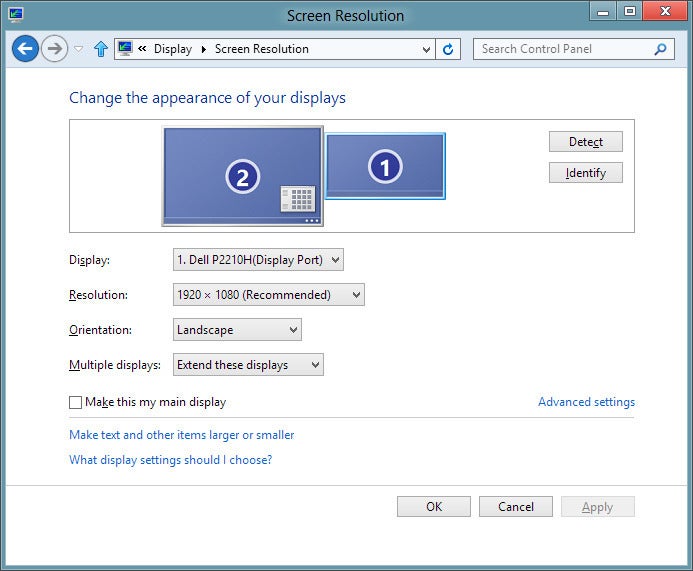
My point was directed at the actual wastes in Settings, Like Add or Remove Programs. UI elements significantly larger than they need to be, actively hindering interaction because "it looks better". The old Multi Monitor settings could all fit into a single shrunken window whereas Settings requires a scrollbar even maximized.
That is waste.
→ More replies (6)22
u/AnAndroidGamer Mar 13 '21
I agree with you, but most users want to keep the control panel because it has been a long time since it has been added to windows and is one of the most popular windows tool/program. By now, Older windows users will know how to use it. Another factor, it takes time for people to get used to the settings app.
In my opinion, I feel like control panel is better since it gives you alot of control overall compared to settings (currently). I also personally like the UI of control panel because you can compare it to the UI of the current File Explorer and how it works because unlike the settings app which is very simplified and overall not my type for managing my computer. (My opinion)
4
Mar 13 '21
I think it will be better instead move everything to Settings, keeping Conttol Panel and Settings both.
28
Mar 13 '21
So in short, people are nostalgic. Yeah, paint me surprised.
16
u/mimicsgam Mar 13 '21
I mean there's a reason radio survive for over 100 years, and telegraphy die as soon as phone was popular. Sometimes things just works
1
u/The_One_X Mar 14 '21
Radio still exists because people still commute to and from work. Without commutes I suspect radio would die out fairly quickly as everyone uses the internet instead to listen to their favorite music or podcast (radio talk show).
15
u/Zlzbub Mar 13 '21
Not just nostalgia, control panel simply fits PCs better and is WAY faster on lower end systems. In fact the Settings app on some PCs I've worked with straight up crashes after a minute of using it.
4
Mar 13 '21
How do you exactly define the fits in PCs exactly? At least Microsoft supports older PCs, other companies straight up say "no way to upgrade an old hardware"
For older PCs anyway I recommend ubuntu or windows 7 or 8.1
12
u/Zlzbub Mar 13 '21
By fits in pc's i mean it doesn't look like it's MADE for touch screens which is what the settings app feels like to me.
5
Mar 13 '21
Why? Are you unable to navigate the app with cursor? I mean I get it that everything is spaced out, but you really think microsoft should just make two modes for all apps. Just so people feel like they're using a "PC".
5
u/Zlzbub Mar 13 '21
That would be a good solution, maybe "Tablet Mode" and "PC mode" could be a thing
6
Mar 13 '21
Which will make the os again more heavy. People are already complaining about disk space taken by windows. A logical (and by logical, I mean not driven by love for old things) decision would be giving unified expand not dividing things.
→ More replies (3)7
u/Zlzbub Mar 13 '21
okay, personally i don't like microsoft's one-size-fits-all approach though
→ More replies (0)1
0
Mar 13 '21
[deleted]
4
Mar 13 '21
Who's not using settings? I do and it's miles better than the control panel. Same can be said about control panel, it's bad in many ways
→ More replies (2)3
u/fatcatdonimo Mar 13 '21
there is literally nothing better about settings. your skin deep analysis reeks of 'i think it's prettier'. some of us prefer substance.
1
Mar 14 '21
I already stated why control panel doesn't appeal to me in functionality in the main comment. At least settings doesn't give me a non resize able dialogue box.
2
u/fatcatdonimo Mar 14 '21
yeah and at least settings does require three clicks and significant mouse travel to accomplish what control panel can do in one click
1
u/The_One_X Mar 14 '21
There is no difference between control panel and settings other than how it looks. They function more or less exactly the same.
2
u/m-p-3 Mar 13 '21 edited Mar 15 '21
Same thing with MS Office and the Classic UI vs Ribbon UI.
Once you get used to Ribbon it works quite well, but if you're already used to Classic UI it makes little sense to downgrade.
I must admit that I find what I need much faster in the Control Panel, and the flat icons in Settings feels a bit too generic and won't catch the eye as quickly.
→ More replies (1)1
u/jamvng Mar 13 '21
This. And the fact that people are used to control panel.
Most of the time I use the settings app. Only the offshoot setting change requires me to use control panel now.
1
0
Mar 13 '21
[deleted]
3
Mar 13 '21
At least the style is consistently inconsistent when you put the control panel and the task scheduler side by side.
Why would a non-power user use a task scheduler?
Besides control panel will be gone soon. It's not that easy (I mean it's windows after all) to just remove advanced stuff from one place and place it in another.
0
Mar 13 '21
[deleted]
5
Mar 13 '21
Did I say everything is ready in settings? Read my top comment again
They're slowly getting there though.



5
u/Waff1es Mar 13 '21
Honestly I just want one or the other. How long has Win 10 been out and we still have a mix of old style input forms and new style minimalist windows? Configuring sound devices can be so jarring.
9
u/Dkurama Mar 13 '21
The new settings are too complicated and 0 intuitive, I think they could add all the original Control Panel settings and put a simple and advanced toggle to get just basic options on the settings page.
I like the new stuff I'm always exited for every new update, W10 improves almost all of the old Windows, but Every update I see the settings more and More complicated and the original Control Panel getting more and more pruned
6
u/lolfactor1000 Mar 13 '21
What do you find complicated about it? I find it fairly easy to navigate and the search helps me find anything that I haven't used before.
1
u/Dkurama Mar 13 '21
Its difficult to find some settings and most of them are redundant or confusing, the search was on the original Control Panel too but I think thats not a feature you can use to compare systems because if that was the case they should bake all the settings on the main start menu search like apple do on Spotlight.
Settings are now a big screen full of text and blank spaces. Maybe It's just a personal opinion, I dont like it haha at the start I was wondering if they were going to put all the Control Panel settings there and in the last 5 years they were adding more and more settings but not finishing the migration of the old control panel, so we are in a rare and ugly frankenstein with half of the settings are in the control panel, and the other half and new thousands of minisettings being added every 6 months
1
u/The_One_X Mar 14 '21
Wouldn't say it is any more difficult than Control Panel to the uninitiated. Just you are used to the Control Panel, and know where things are. So it feels easier. I don't think Settings is necessarily a major improvement, but I do think it is an improvement from a discovery point of view.
6
u/skyesdow Mar 13 '21
I find that the settings app is fine for 90% of the things I need from it. What I don't like is the lack of colors. Makes it hard to find stuff.
6
u/moun7 Mar 13 '21
I just hit the windows key and start typing. It doesn't matter if it's in control panel or settings.
3
3
5
u/Zacker000 Mar 13 '21
I can't be the only one who constantly accesses 'Power Options' and 'Sound' from control panel basically everyday :)
1
4
5
u/Toprelemons Mar 13 '21
Windows is an insanely fragmented OS and just works with everything somehow.
9
u/ifuxit Mar 13 '21
Control panel is so much better than settings if you still remember where everything stood from older os’es. Settings is pretty messy
0
u/FalseAgent Mar 13 '21
better than settings if you still remember where everything stood from older os’es
this is confirmation bias
-6
u/pcbeard Mar 13 '21
Control Panel is super janky. Configuring user accounts is a great example. A total mess. Changing a user’s home directory is nearly impossible to do safely. For some reason when I created an account name 7 characters long, Windows created my Home directory with only 5 characters. This is pretty trivial to change on a Mac or UNIX system.
3
u/ifuxit Mar 13 '21
That’s because they are stripping it so much since settings is a thing. In the Windows 7 days, all the setting where in there and they where mostly easy to find.
2
2
2
u/stealthgyro Mar 13 '21
At this point any setting I find now, gets added to a powershell script with a comment so eventually I just run a script next reload.
2
u/axii0n Mar 13 '21
Personally, I don't care. But holy shit Microsoft please pick one. It's been years.
2
u/SuspiciousTry3 Mar 15 '21
Settings is probably the worst thing about Windows 10. Its such a disaster. Could they just leave control panel alone while they take ages on the settings app? It will be 2090 by the time its on par with control panel.
8
u/Jacksaur Mar 13 '21
It's always funny seeing the comments on these posts: You get to find out who actually makes use of these features, and who just trawl around looking for stuff to complain about because "iT lOoKS BaD".
19
u/po114 Mar 13 '21
I hate when people put looks over functionality
2
u/Jacksaur Mar 13 '21
Same here. No one seems to understand that this is the Settings for your system, it's one of the most crucial sections of the OS and function is absolutely the most important factor.
Instead they'd rather feel like they're looking at some Art when they're reinstalling their drivers apparently.
8
u/eduardobragaxz Mar 13 '21
Settings doesn’t even look that good (in my opinion). I like that it’s UWP, but they should definitely do a redesign.
1
u/Tubamajuba Mar 13 '21
I personally find it funny to see people that are still bitching about the same things over five years after Windows 10 came out. If you still can’t figure out the new Settings app after all that time, or if you literally can’t change an important setting anymore, just go to Linux.
I prefer the old control panel but it’s not coming back and I’ve long since moved on.
2
u/Jacksaur Mar 13 '21
I love the "Just use Linux then" responses because it immediately demonstrates that the person saying so has no clue what they're talking about and isn't worth trying.
1
3
9
u/TuttFox Mar 13 '21
god I hate control panel
1
u/skyesdow Mar 13 '21
Control panel and the Device manager always took forever to open on my old PC.
1
u/m-p-3 Mar 13 '21
I just remember which
.mscto open in Win+R, likesysdm.cplfor the System Properties.0
4
u/killchain Mar 13 '21 edited Mar 13 '21
Settings looks better IMO, but it's silly that almost 6 years later (after the release of W10) it's still missing some stuff from the Control Panel (and yet Microsoft is trying harder and harder to hide the Control Panel).
3
Mar 13 '21
it is sad to see the setting app taking more from the control panel (you will long be missed)
4
u/dovlomir Mar 13 '21
I loathe Control Panel. I know im in the minority, but I do. One day Microsoft will hopefully integrate all of the CP options into the new settings menu and finally kill CP off for good.
3
3
2
2
2
2
u/lordgingerbread Mar 13 '21
Tell me you’re GenX without telling me you’re GenX. (No hate, I kinda feel the same xD)
2
u/jimmyl_82104 Mar 13 '21
Still waiting for the day that they finally combine the two's options. I hate having to go to settings, then just get a link to control panel. Also wish they would allow more than one instance to settings as well.
2
2
2
1
u/korphd Mar 13 '21
God the ""new"" control panel and everything win10ish just takes FOREVER to load and is super unorganized
1
u/Hyperion2005 Mar 13 '21
Currently the entire “System category” which existed in control panel on windows 10 versions before 20H2, has been revamped in 20H2, so this means if u click on System in control Panel, it would open the new modern settings app and show u the About page.
1
u/BCProgramming Fountain of Knowledge Mar 13 '21
A lot of people complain how the older stuff- disk management, disk cleanup, etc. are "outdated" or "look old"... I'll take looking "outdated" (on some subjective scale?) or "old" over being "modern" but being absolute shit to deal with.
The "New" style for settings is to cascade a bunch of information that poorly uses horizontal space down into a long, vertical page of information. Often it is missing information that can be viewed at a glance with the equivalent Control Panel Applet or MMC Snap-in, requiring you to click the element in order to see that information. The page usually concludes with a bunch of hyperlinks to arbitrary other places in settings or that even open control panel applets, some random copy at the bottom, and some internet links.
I've yet to see a "Settings" version of an applet actually be equivalent in usability and functionality to what it intends to replace; let alone be better.
1
u/leiu6 Mar 13 '21
This is an outdated meme. Windows 10 has its problems but at this point the settings app is very usable. I haven’t had to use control panel in a while now.
1
1
u/inetkid13 Mar 13 '21
This shitty new UI have been around for 5 or more years and still lacks basic functionality.
1
u/vmik008 Mar 13 '21
But i see the progress in new settings. When win10 came out it was really awful.
Btw do you use category system in control panel? It allways only confused me
1
1
1
u/Minteck Mar 13 '21
The Settings app is so messy and buggy, I always struggle when searching a specific setting.
1
1
1
1
u/AhmedKiller2015 Mar 14 '21
I don't know if it.. I am lazy to get to memories everything or they are just horribly organized..
Tbh I never went there and didn't use Search... otherwise I never reach what I need
1
1
Mar 14 '21
You can't really work only via settings. It is impossible, of you need to do a real job you have to always use Control Panel ♥️
1
u/StolenSpirit Mar 14 '21
If they EVER AND I MEAN EVER get rid of classic control panel I will raise hell. I know this is in one shape or form going to go away.
1
u/mrduncansir42 Mar 14 '21
I’m so mad that they keep removing options from Control Panel and moving them to Settings.
1
u/FeenixArisen Mar 14 '21
Once this gets sorted out they can work on making the file manager more functional than it was in 3.1
1
1
Mar 13 '21
While i lovw control panel i cannot wait for the day that settings has all of its features and control panel gets removed, settings just looks way better
0
Mar 13 '21
Agh, why are so many people defending Settings here? They just can't tell a difference beetween gold and trash...
-1
-6
u/cybrneon Mar 13 '21
“I prEfEr ConTRol PaNel” well go use Windows 7 or Vista. Using Windows 10, I rarely and probably never went back to the Control Panel again because almost everything a user needs is in the Settings app.
0
u/lolfactor1000 Mar 13 '21
At work I only ever have to go into control panel to get to the mail settings.
0
Mar 13 '21
I don't actually give a fuck where they put these settings, but I am sick and tired of hunting for them in multiple places.
0
Mar 13 '21
It’s called System Preferences and the window itself expands and contracts to accommodate the number of things in the GUI:
-2
u/SecretAgentZeroNine Mar 13 '21
Hopefully by early 2022 Settings = Control Panel to finally get rid of it (Control Panel). Hopefully Microsoft's Windows team gets it right.
46
u/npanth Mar 13 '21
Microsoft seems committed to adding clicks to get to any setting.
Things that took 3 clicks in Windows 7, took 5 clicks in 1909, and take 10 in H2.