r/Windhawk • u/samcux_sa • Sep 29 '25
Windhawk for injecting, WinCux for Walls and Skins

0
Upvotes
I built a free wallpaper + Skins app for Windows users – would love your feedback!
r/Windhawk • u/samcux_sa • Sep 29 '25
I built a free wallpaper + Skins app for Windows users – would love your feedback!
r/Windhawk • u/Few_Researcher_169 • Jun 15 '26
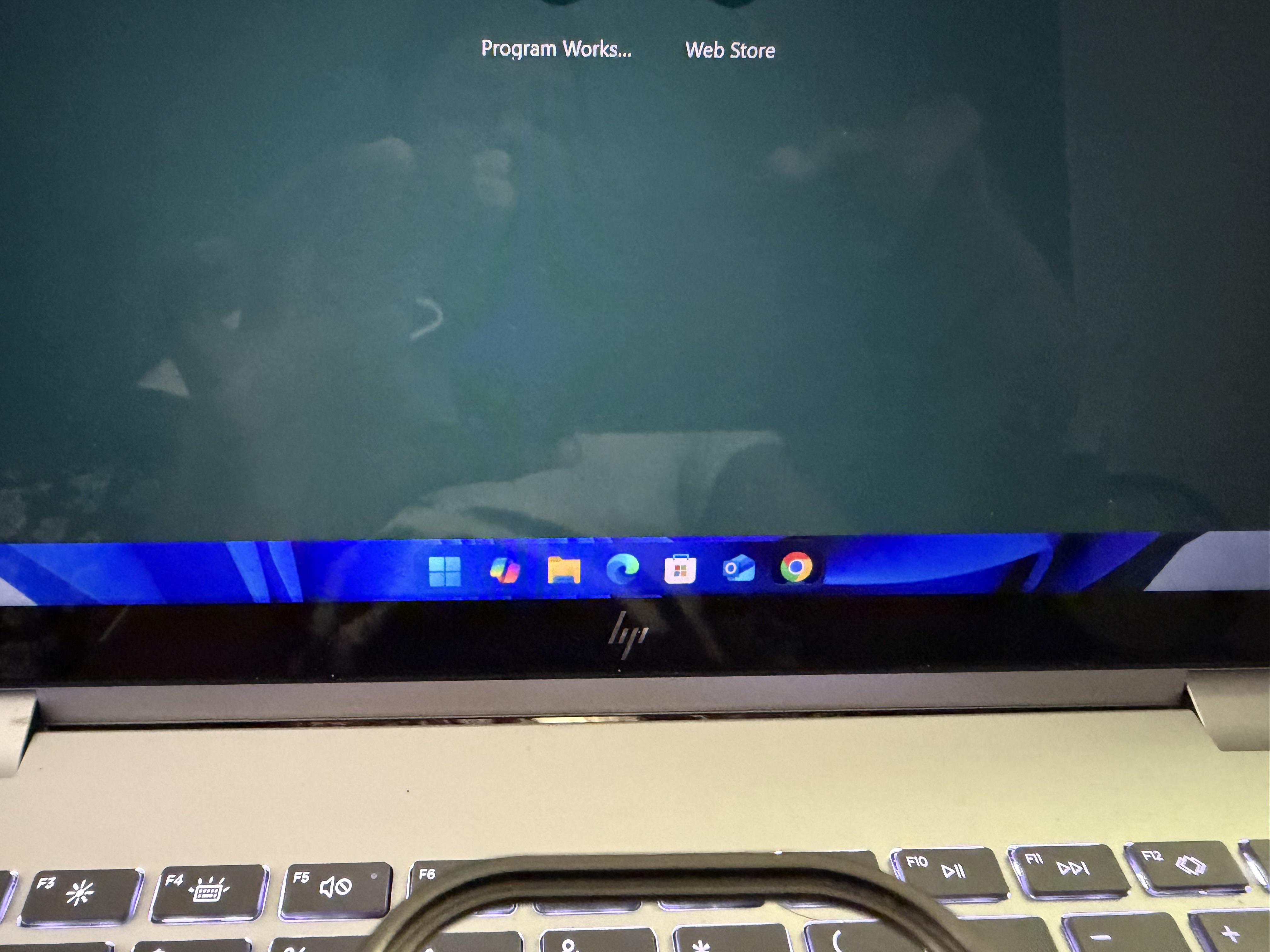
Is there any way that I can stop my windhawk taskbar (Liquid Glass) from messing with chrome or appearing on top of chrome?
I would like it to appear on top of chrome like a normal taskbar instead of just cutting out the entire bottom part
r/Windhawk • u/TOZIC_TEEN • Jun 20 '25

It says Trojan downloader here I scanned using virus total
r/Windhawk • u/wh-updates • Oct 03 '26
Skip harmful files confirmation 0.3.0
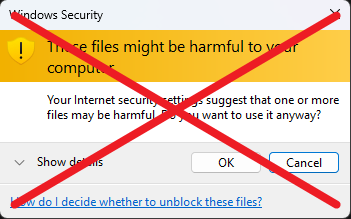
The harmful-files dialog crossed out with a red X
Skips "These files might be harmful to your computer" when dragging files in File Explorer. Windows can show this confirmation when it classifies the source as untrusted, including some network shares.
The mod accepts drag-source confirmations for every source, before constructing the dialog. It targets URLACTION_SHELL_SECURE_DRAGSOURCE with URLPOLICY_QUERY. Other actions and denial policies keep their original behavior. Copy/paste operations using other URL actions are not covered.
To trust a specific network location instead, configure that location in Internet Options > Security > Local intranet > Sites.
Internet zone settings and Zone.Identifier streams are unchanged. Disable the mod to restore the confirmation. Windows DLL files are not modified.
Version 0.3.0 was tested with Explorer drag-and-drop on Windows 11 x64. ARM64 runtime behavior remains untested. Shell symbols are required.
r/Windhawk • u/biven34 • Jan 27 '26

I decided to give the program a try and after some time I got this shit. They definitely were not there before! I've already delete it and still...
r/Windhawk • u/trashysushi69 • Jul 04 '26
clearly every mod is on windows 11, well i hate windows 11 and it sucks, is there a way i can use these mods on windows 10 ?
r/Windhawk • u/LW-Lone_Wolf • Jan 18 '26
r/Windhawk • u/Zejay_yt • Sep 30 '26
Is there a windhawk mod that makes the win 11 file explorer have black as its main background?
r/Windhawk • u/dread122 • Jul 16 '25
Does anyone know how I can diagnose it. And if you ever delt with something like this?
Basically Mediaplay buttons stop working when windhawk starts up. And the only way I can get them to work is by restarting windows without wind hawk.
r/Windhawk • u/unbakedsub • Jun 26 '26
I want to change the opacity of the Windows Glass taskbar style to be more clear. How do I do that? Forgive me, I am not that good with coding.
Thank you
r/Windhawk • u/MolodoyStaric • Nov 05 '25


How can I make it so that the icons can go beyond the taskbar’s boundaries? I tried to get this working with GPT and Grok, but nothing worked.
r/Windhawk • u/gggsw34 • May 08 '26

{
"ShowSeconds": 0,
"TimeFormat": "h:mm tt",
"DateFormat": "dd/MM/yy",
"WeekdayFormat": "ddd.",
"WeekdayFormatCustom": "",
"TopLine": "❮ 𝑅𝑢𝑠𝑠𝑒𝑙𝑙 ⌥ 𝑐𝑝𝑢%cpu% ⨯ 𝑟𝑎𝑚 %ram% ⨯ ℎ𝑜𝑢𝑟 %time% ❱",
"BottomLine": "∷ %weather% ⨯ 🧪 𝑡𝑒𝑚𝑝: %cpu_temp% ⨯ 📆 %weekday% %date%∷ ",
"MiddleLine": "",
"TooltipLine": "",
"Width": 250,
"Height": 38,
"MaxWidth": 0,
"TextSpacing": -1,
"TimeZones[0]": "",
"TimeStyle.Hidden": 0,
"DateStyle.Hidden": 0,
"oldTaskbarOnWin11": 0,
"DataCollectionUpdateInterval": 1,
"WebContentWeatherLocation": "Los Andes, Valparaíso",
"WebContentWeatherFormat": "%c %t",
"DataCollection.NetworkMetricsFormat": "mbs",
"DataCollection.PercentageFormat": "spacePaddingAndSymbol",
"DataCollection.UpdateInterval": 1,
"WebContentWeatherUnits": "C",
"TimeStyle.TextColor": "#5d97c0",
"TimeStyle.FontFamily": "Fredoka",
"DateStyle.TextColor": "#727e91",
"DateStyle.FontFamily": "Fredoka"
}
r/Windhawk • u/[deleted] • Aug 20 '25
i dont wanna get banned :(
r/Windhawk • u/Intelligent-Dig6720 • 5d ago
عندي هذا الفيديو كيف افعل الإضافات هل احد يساعدني
I’ve got this video – how do I add the extras? Can anyone help me?
r/Windhawk • u/Asleep_Candidate_001 • Oct 14 '26
Someone bring siri like ai mod too plsss...
I want to make my roomate jealous who's having macbook...
r/Windhawk • u/wh-updates • 16d ago

Octagonal Windows 1.0.1
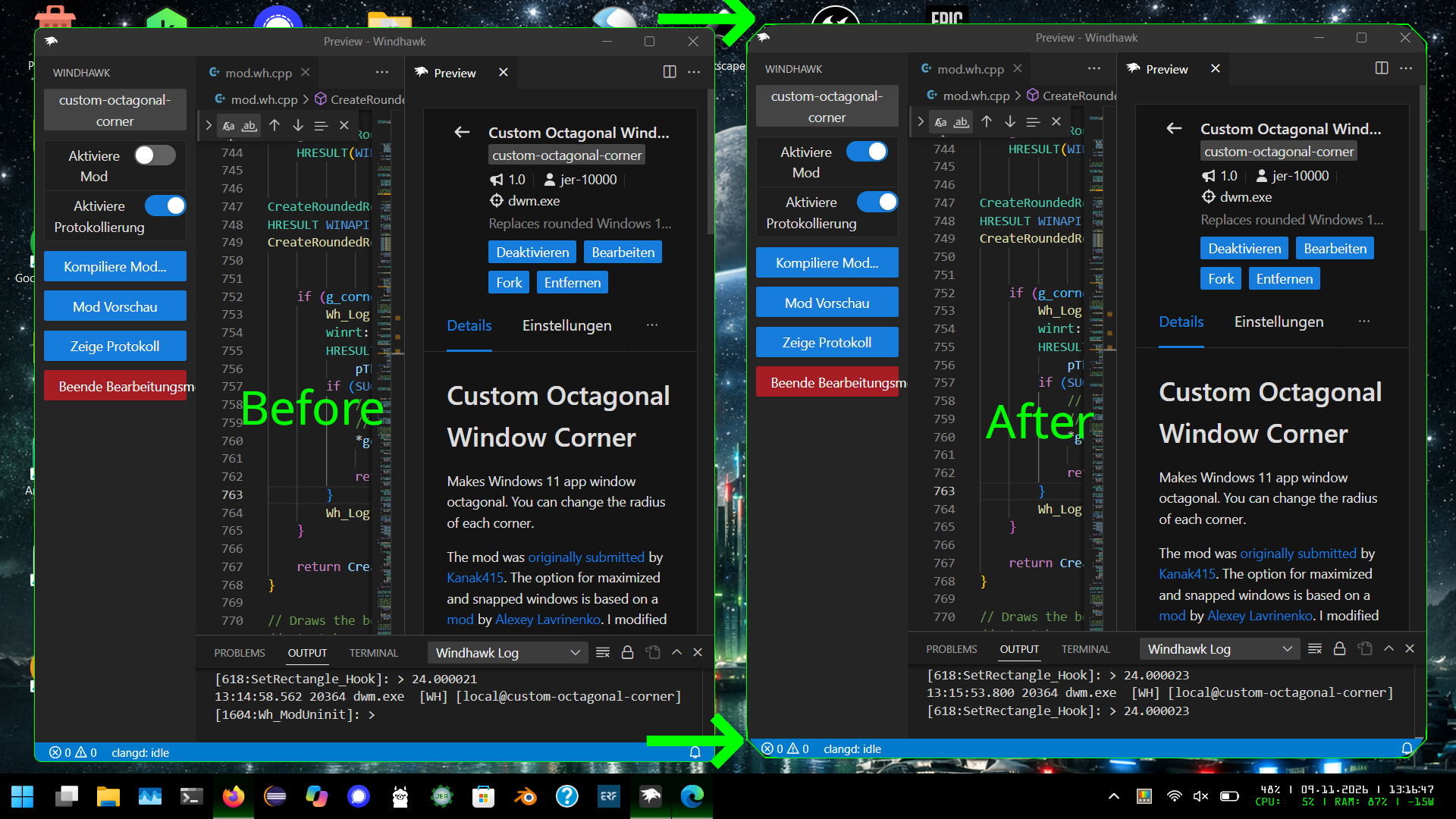
Makes Windows 11 window borders octagonal. You can change the size of each corner.
The mod was originally submitted by Kanak415. The option for maximized and snapped windows is based on a mod by Alexey Lavrinenko. I modified the mod Custom Window Corner Radius from m417z.
This mod needs to hook into dwm.exe to work. Please navigate to Windhawk's Settings > Advanced settings > More advanced settings > Process inclusion list, and make sure that dwm.exe is in the list.
Some elements, such as context menus, use a smaller radius (4px by default). This can be customized separately with the "Small corner size" option.
Standard tooltips can be customized separately with the "Tooltip corner radius" option.
Each window corner can have its own size with the "Per-corner size" option, for example to bevel only the top corners.
Windows 11 squares off the corners of maximized and snapped windows. The "beveled corners for maximized and snapped windows" option enables beveling for them.
Some elements, such as the taskbar, the Start menu, and the notification center, are unaffected by this mod. Some of them can be customized using other mods, such as Windows 11 Taskbar Styler.
Disabling the mod instantly restores default behavior - no system files are modified.
When using this mod alongside Translucent Flyouts, set its CornerType option to 0 ("Don't Change") to prevent conflicts between the two.
This mod is not compatible with Custom Window Corner Radius. Don't use together.
For the best visual experience, consider combining this mod with:
Window Border Customizer
Windows 11 Taskbar Styler
Taskbar Background Helper
A dark taskbar background combined with the Lucent style from Windows 11 Taskbar Styler pairs especially well with octagonal window borders (as shown in the screenshot above).
r/Windhawk • u/Mahdy_fouad • Mar 17 '26
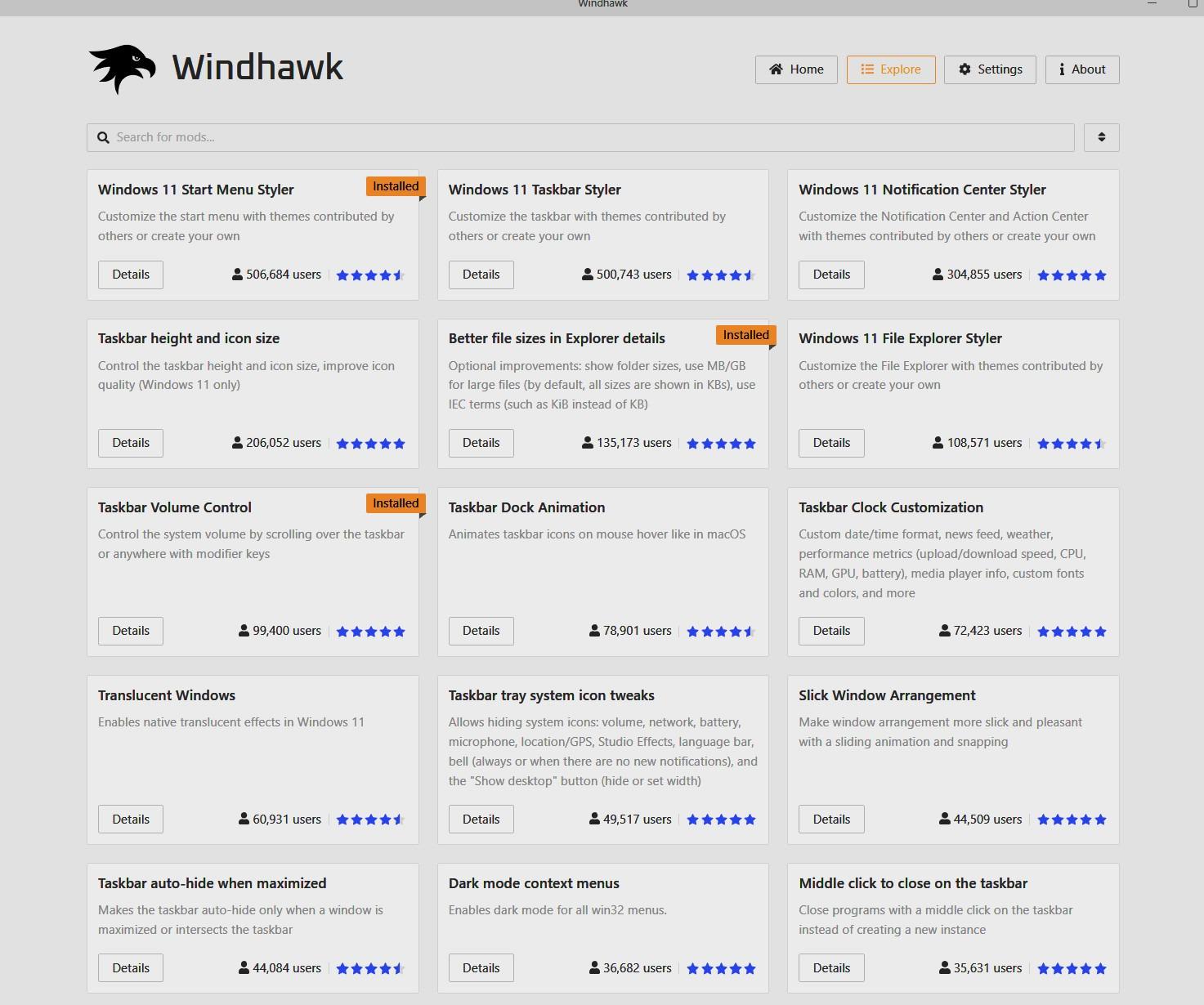
windhawk is amazing. but sometime it is hard using it with an always on dark mode.
Is there a plan to get a non dark mode soon ?
r/Windhawk • u/wh-updates • Oct 16 '26

Mawaqit Prayer Clock 0.6.9
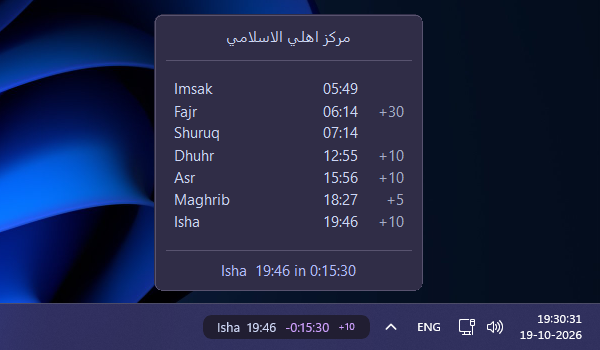
Mawaqit prayer clock with live countdown, prayer schedule popup, and customizable themes.
Upcoming prayer name, scheduled time, and live countdown
Clickable prayer-schedule popup with optional auto-close timer
13 appearance themes, including Windows / System, Traditional Islamic, Catppuccin Mocha, Emberveil, Dracula, Nord, Gruvbox Dark, Tokyo Night, Solarized Dark and Light, and Custom
Independent custom colors for the pill and popup
Visibility switches for the prayer label, countdown, and popup
Five selectable taskbar positions, including experimental dynamic centering
Native XAML taskbar integration with reserved layout space for anchored positions
Automatic or manual clock height, four-sided margins and padding, tray gap, corner radius, and font size
Background schedule updates through native WinHTTP, with configurable refresh interval
Live settings updates without restarting Explorer
This mod intentionally uses Mawaqit’s published mosque-specific prayer times rather than locally calculated astronomical times, preserving mosque-specific adjustments.
This mod connects to https://mawaqit.net over HTTPS to retrieve the public prayer schedule for the mosque identifier configured in Settings. The request is an HTTP GET for https://mawaqit.net/<language>/<mosque-identifier>; no account or authentication is required. The server can observe the request and normal connection information such as your IP address.
The schedule is stored in Windhawk's mod-specific storage. A valid cached schedule is reused when Explorer restarts, until the configured refresh interval expires (24 hours by default; adjustable from 1 to 168 hours). The mod also requests a fresh schedule when the mosque or refresh interval changes. If a download fails, it retries after one hour. An empty, expired, mismatched, or unusable cache causes a download at startup. The mod reads schedule data from the public Mawaqit webpage, so changes to that page can interrupt updates.
Mawaqit Prayer Clock supports multiple appearance themes to match your Windows 11 desktop.
| Windows System Default | Traditional Islamic |
|---|---|
| Windows | Traditional |
| Catppuccin Mocha | Emberveil |
|---|---|
| Catppuccin | Emberveil |
See how Mawaqit Prayer Clock integrates into a fully customized Windows 11 desktop. Desktop
Choose a mosque identifier or Mawaqit URL in Settings. Select an appearance theme and customize the widget as desired. Custom color settings only apply when the Custom theme is selected. Set popup auto-close to 0 to keep the popup open until dismissed.
For installation instructions, additional screenshots, troubleshooting, and release information, visit:
Windows 11 only. Taskbar XAML integration adapted from Windhawk’s taskbar-folder-menus (MIT).
MIT License.
This is an unofficial community project and is not affiliated with or endorsed by Mawaqit.
r/Windhawk • u/wh-bot • Jun 29 '25
Fix removing all client edges of enabled apps, including child controls
Fix Brave being invisible
Add an option to force enable or disable the window client edge in enabled apps
Add an option to hide Steam's tool windows
Add support for Qt apps
r/Windhawk • u/tweet23_8 • Dec 15 '25
Noticed that windhawk received a new update alert on the current windhawk application v1.6.1. Downloaded the new windhawk from its website. Windows Defender protected your PC warning shows up. (Likely false positive). Has anyone rlse received this warning on their new Windhawk version 1.7.3.
r/Windhawk • u/Awkward_Aardvark6677 • Oct 03 '26

Not very familiar with this software and only been using it for a couple of days now, since upgrading to Windows 11.
Trying to achieve solid borders on all windows (including things like games and browsers) proving quite difficult.
In Windows 10 could easily download a custom Aero theme for Windows, and it would create solid borders on everything, but i know this is fairly different in Windows 11.
------------
So i installed the Bring Back the Borders Windhawk mod which works but creates translucent borders which are see-through to the background on the Windows desktop.
Been messing around for 2-3 days now using multiple different software's as well like Openglass and DWMblurglass but can't find a fix. Also had some issues when using these software's, getting some messages that DWM.exe stopped working or Windows file explorer stopped responding, don't have those issues currently though.
On Windhawk tried other mods too like Window Border Customizer but no matter which setting i'm changing it doesn't seem to do anything even with DWM.exe added to advanced settings.
An example of what the border's look like here - https://postimg.cc/G8XT3Zd2
Will try to attach picture also.
Wasn't expecting it give me so many issues, feeling like going back to Windows 10 but some software i have is incompatible now.
Will probably add some more details later, if anyone knows an easy fix. Clarifying wanting more solid borders on all windows more similar to Windows 7 style
(or Windows 10 with the aero theme)
Thanks if anyone willing to help.