r/WidescreenGaming • u/Trowawaycausebanned4 • Oct 31 '16
What kind of Set up upgrades do you need to run a triple monitor set up?
0
Upvotes
New graphics card and processor?
Thanks
r/WidescreenGaming • u/Magic_Helmet • Dec 21 '13
I know there's a bunch of games that can me modded by wide screen fixer and other programs like that, but was curious about what games you guys have played in Surround that already have the proper resolution/settings built in?
I've only tried a few, but Killing Floor is badass in surround and I didn't have to change any settings for it to work.
r/WidescreenGaming • u/Strill • Aug 03 '15
The whole purpose of having two side monitors is to have a peripheral vision, which doesn't require detail, and yet everything I've read indicates that you have to run the side monitors at the same resolution as the primary monitor.
This makes no sense. Isn't there any way to run the side monitors in low quality and the primary monitor in high quality?
r/WidescreenGaming • u/danpetrovic • Oct 28 '15

r/WidescreenGaming • u/G-STORY • Apr 22 '20

r/WidescreenGaming • u/Magic_Helmet • Dec 20 '13
Guys, I recently bought an extra monitor/TV to use an accessory display. After a lot of tinkering and frustration, I finally got it working properly! Check it out . . . http://i.imgur.com/9U9d1OJ.jpg
If you haven't played Killing Floor, pick it up. It's only $10 on Steam right now!!
r/WidescreenGaming • u/TheTHS1984 • Jul 26 '25
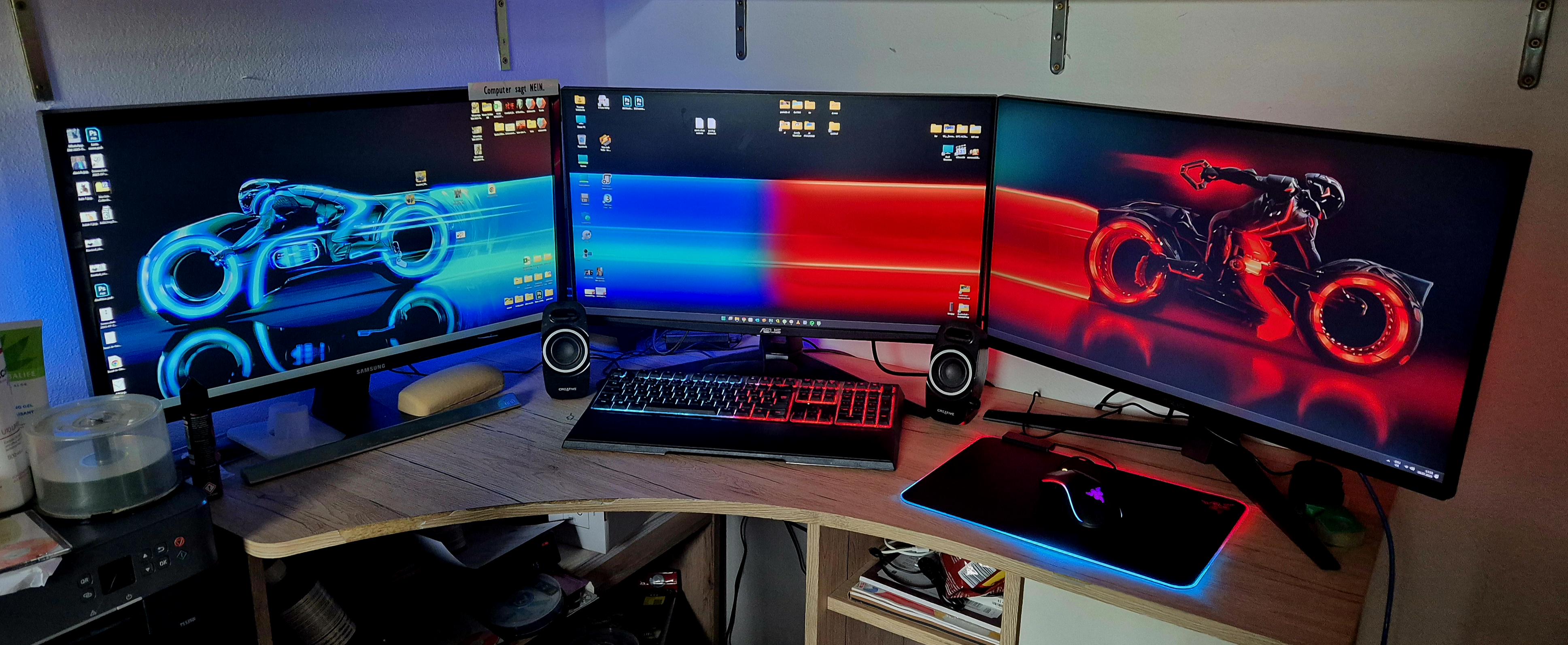
Finally upgraded to 48 to 9. 3 times 28 inch 4k. I love it, it makes working and gaming a blast. Even better, the DIY backlight made with an arduino did cost me about 60 euro. Im not a curved fan.
In action color demo: https://youtu.be/Ejwyrsky8jo?si=akGoLu3xroA51PyU
In action gameplay: https://youtu.be/GaiMoxlJuz0?si=I9mVOLAhCH9jg02v
DIY backlight (german): https://blog.jonasmenk.de/2018/04/26/diy-ambilight-fuer-den-pc-monitor/
I am just sad there is no good videoplayer that fills out the black side bars with blurred edges like youtube when watching movies.
I tried to write something myself but failed.
r/WidescreenGaming • u/chrisshotya2021 • Jan 23 '21

r/WidescreenGaming • u/Prima_Giedi • Dec 28 '13

r/WidescreenGaming • u/GarthokNarfler • Aug 24 '15
Can it be done? I'm using Zandronum currently
r/WidescreenGaming • u/dannylenwinn • Feb 17 '22

r/WidescreenGaming • u/Daviduzzo1988 • Feb 14 '25
Hi guys! I am going to buy a new monitor ONLY for gaming. I have a laptop Lenovo Legion 5, GPU is an RTX3070, processor AMD Ryzen 7 5800H, 3.2GHz, 16MB RAM.
First question: would the two monitors work on my laptop? I am not saying I want to run all games in Ultra settings..but at least being able to enjoy a good quality and use the 175 Hz refresh rate of the monitor.
Second question: is the G8 still full of bugs? I’ve seen many people complaining on Reddit, but they were all 1-2 years old posts..did thing improve? I’m a bit concerned about using a normal hdmi or being able to use an usb-c. My laptop has normal hdmi and I think it has an usb-c (if I saw correctly).
third question: quality speaking they are very similar, aren’t they?
I really like the design of the G8 but the bugs scare me and I’m afraid I wouldn’t be able to connect my laptop.
Thank you a lot guys for the advice in advance!!
r/WidescreenGaming • u/SteveH_ • Feb 11 '25

r/WidescreenGaming • u/00007777 • Jun 28 '23
Hello,
Whenever i open a game it "flickers" between the screens i have, it resizes to window, and resides resolution for some reason, this keeps happening, even after i forcefully close the game.
I have a laptop, to which i connected, via display port, the monitor that i use as "1" and a second monitor, via HDMI.
All 3 monitors are on at all times, but the problem only arises when i launch a game.
this wasnt happening before, when i only had two monitors.
-i have already updated the GPU drivers.
-i have already tried in windowed fullscreen, fullscreen, and any option i can find in the games.
-I have already set up, in Nvidia settings "use multimonitor" option.
-i have already tried different games
can anybody help me?
r/WidescreenGaming • u/NeilChill • Jul 08 '15

r/WidescreenGaming • u/B1ackMagix • May 31 '12

r/WidescreenGaming • u/Laundr • Sep 02 '16
I currently have a mixed monitor setup of 4:3+1080p+4:3 and I get triple screen gaming by launching games as a window and stretching it across the 3 screens.
Of course, I'm not getting bezel or angle correction, and that's really something I miss for stuff like iRacing.
(I know of SoftTH, but that's only DX9 for now, and on my 1070 that's a huge performace hit).
So I was wondering: would a setup of 2 1080p side monitors (e.g. these LG 24MP68VQ) and 1 1440p centre monitor (e.g. this BenQ BL2420PT) work with nVidia surround?
I'm thinking it would, if I downscale the middle monitor to 1080p (which I wouldn't mind that much; the extra screen estate of the middle monitor interests me more for productivity than gaming reasons).
Can anyone confirm?
r/WidescreenGaming • u/[deleted] • Oct 17 '13
I just picked up the lovely Asus VG248QE and I'm of the mind to update my secondary monitors to widescreen now aswell but a thought occured to me while playing in eyefinity in current setup. Three 24'' widescreens might strech outside my effective field of view and be useless so might high quality non-widescreens be a better choice? Or would it be too difficult to get them to match up?
r/WidescreenGaming • u/Magic_Helmet • Oct 20 '13

r/WidescreenGaming • u/Yordlecide • Jun 18 '12
For me many games did not play nice without some work with my setup. I hope that as more people adopt widescreen gaming that support will grow.
Games that worked well out of the box for me: Deus Ex: HR, Dirt 2, Dirt 3, Battlefield 3, Witcher 2, L4D2
Games that worked well after some tweaking: COD:Any
Games that did not work well even with tweaking: Skyrim (those menus really made me want to rage), Dragon Age, League of Legends, Diablo 3, Bloody Good Time.
What is your experience with games in eyefinity/surround?


