r/UsabilityPorn • • Jun 28 '18

Welcome! [Why this sub exists]

151 Upvotes

r/UnixPorn has inspired a lot of creativity in the *nix community.

However, there is one problem.

A lot of the setups are too "riced-out" and unappealing for long-term desktop use.

This subreddit is an attempt to form a community around the love of practical, cozy, and solid desktop experiences.

DEFAULTS AND MINIMALLY-CONFIGURED SETUPS WELCOME! Let's create something special!

Rules:

  1. Screenshots of desktops must have at least one window open. You may include a screenshot of your blank desktop if necessary as an additional image in the album.

  2. Image links should either be from Imgur or reddit's built-in image service. Please don't use the Imgur album link unless you are posting an album.

  3. Text posts are allowed as long as they are relevant to creating a functional *nix setup. Try to post to support forums and desktop-specific subreddits instead whenever possible.

  4. Follow the reddiquette

  5. Right now only *nix (Linux, BSD (That includes Mac OS)) operating systems are allowed. This is open for discussion though.

  6. Moderators can be wrong. Don't hesitate to message the mods if your post has been wrongfully deleted.

Content Ideas:

  • Screenshots of a unique workflow for a specific task

    • ex. A desktop optimized for pen testing that has easy access to all of your tools.

    • ex. A desktop that you use graphic design with an easy-to-access color picker widget and Krita opened

  • Screenshots with beautiful software that ties in nice with your desktop

  • Regular screenshots of your every-day setup!

  • A short screencast of how you implement a given environment (DE, tilling windows manager, terminal multiplexer or even just your text editor) This idea came from u/piotr_wonsz

  • A photograph of your rig running Linux (Must have screen clearly visible and not glared out).

    • Ex. Raspberry Pi running a Nextcloud server and your Laptop right next to it with the Nextcloud page loaded on your web browser

    • Ex. Two project computers of yours comunicating through a socket application you wrote - I plan to do this, patent pending, patent pending, patent pending!

    • Ex. Your music production setup with MIDI devices hooked up to your computer and Bitwig Studio for Linux on your screen.

  • An album of a desktop environment with different GTK/Qt themes applied

UPDATE: I am now moderating this community as u/dougie-io.


r/UsabilityPorn • • 13h ago

[mangowm] my first rice

9 Upvotes

first rice. started from a bare mango config and kept going until it felt like one desktop instead of a pile of widgets. It's my first one, so roast it or steal it, both welcome


r/UsabilityPorn • • 1d ago

Dolphin-NG: A file manager where the work happens on the files: one-click actions, progress on the file itself, and one queue for everything (... and much more)

Thumbnail
gallery
17 Upvotes

This is Dolphin NG, a fork of KDE's file manager that I'm working on. The idea: most of what we do with files is a small job (convert, resize, extract, transcribe, send somewhere), and for each one we open a program, wait, then go looking for the result. I wanted the file manager to do those jobs itself, and to show them.

What's in the pictures:

  1. Quick actions on the file. Hover with the mouse over a file and the actions that make sense for its type appear on it: an image can be resized or converted, a video converted or cut, an archive extracted, an audio file transcribed into text. One click, no dialog. You can add your own, each one is just a command. While a job runs, the file shows it, and the result appears next to its source, joined to it.

  2. One queue for everything. A button in the title bar shows what is running. It opens a page with all the jobs: quick actions, copies, moves, deletions, downloads. Running ones on top, then the history by day. It is the same list in every window. Jobs can run together or one at a time.

  3. A file remembers where it came from. Select a result and it says which file it was made from and by which action ("To MP4, from Conference recording.mkv"), also days later.

It is free software, for KDE Plasma 6, with packages for Fedora and Kubuntu (and a generic installer for other distros): https://github.com/Morzilla/dolphin-ng

I'd like to hear what you think of the idea, more than of the look: would you use a file manager like this, and what is missing? Any kind of help or suggestions would be much appreciated, thanks!

Edit: I forgot the [KDE] tag in the title and Reddit does not let me change it. Mods, if it is a problem I will repost it with the tag.


r/UsabilityPorn • • 1d ago

[GNOME] simple Gentoo rice which just works and is beautiful

15 Upvotes

I'ma be honest: not much of my rice has changed throughtout the year, but I like it that way...

If y'all wanna know the extensions, here they are:

Dash to Panel - bottom panel (no shit sherlock)

Space Bar - Workspace Indicator

Pop Shell (modded 2 lines to get animations) - auto tiling

V-Shell - all the fancy overview shi

AppIndicator and KStatusNotifierItem Support - System Tray

User Themes - Loading custom GNOME Shell themes (I made mine)

I also got my own debloated kernel config, which made the RAM usage go from 1.14GB down to 800MB and linux-zen kernel patches.

Rate it from 0 to 10, gng


r/UsabilityPorn • • 3d ago

[OC] [KDE] Darkly is a theme for the whole desktop, not just the file manager and the terminal. And contrary to popular belief it works with most color schemes

Thumbnail
gallery
26 Upvotes

r/UsabilityPorn • • 4d ago

Mac app that puts a 3D cat and living themes in your menu bar

3 Upvotes

I built a Mac app that turns the menu bar into living light, with a 3D cat that lives up there

The menu bar is the one strip of the screen I look at all day, and it's always flat gray. So I built Brimlight: it draws animated themes under your menus, and every menu and icon stays readable and clickable.

What it does

• 41 animated themes: gradients, pixel-art sunsets, a night city, light waves, a sky that follows the real sun where you live.

• A 3D cat lives in the empty part of the bar. It hunts your cursor, chases a ball of yarn and naps when you step away.

• Music mode: play anything and the bar becomes an equalizer, and the cat dances.

• Edge decorations: neon, garlands, fairy lights, sakura, icicles. On notched MacBooks they hug the notch.

• Peek into the notch: see what's playing, pause or skip, pet the cat, switch themes.

The hardest parts

• Keeping menus readable over any theme and any wallpaper.

• Making it light: about 4–5% CPU on a 2019 Intel MacBook Pro, fewer frames on battery, pauses in Low Power Mode.

• No Screen Recording permission, no account, no ads.

Pricing: free forever with the cat, 6 themes and music mode. Pro is a one-time $6.99 (no subscription).

https://getbrimlight.com

I'd love honest feedback: what would make you keep it running every day? And which theme or pet should come next?


r/UsabilityPorn • • 5d ago

DragonflyBSD // neuswc nosferatu wm

Thumbnail
gallery
12 Upvotes

# So that’s actually my friend rice , but they asked me to upload it here I guess?

• Window Manager: [nosferatu](https://git.ohmu.pw/ohmu/nosferatu/) custom made wm forked from tohu
• Font: [Xony Fixed](https://git.ohmu.pw/ohmu/sony-fixed-cyr-ttf/) cool font , nothing else :)
• Terminal: St-Wl


r/UsabilityPorn • • 6d ago

Linux Mint XFCE on an old Mac

Thumbnail
gallery
41 Upvotes

r/UsabilityPorn • • 11d ago

[Mangowm] arch linux rice

20 Upvotes

ive spent the past month configuring mangowm to look like feel mine ram usage is great cpu is nice and battery last surprisingly long on this old refurbished microslop surface


r/UsabilityPorn • • 12d ago

[GNOME] Retiring my laptop of 5 years for this ThinkPad

Post image
27 Upvotes

I got this Walmart Gateway laptop 5 years ago, and it was a decent budget laptop. It has a Ryzen 5 3450U, and I upgraded it to 16 GB of RAM. The only problem I had is that its build quality is absolutely terrible. The chassis is cracking around the hinge, and the microSD card slot no longer holds onto the card for whatever reason. I finally came to terms with the fact that that laptop's structural integrity was on its last legs and bought this ThinkPad from around the same time for a bit over $300. I still have the Gateway around for Windows if I ever need that though.


r/UsabilityPorn • • 12d ago

[Openbox/ORW] Remote control over ssh :)

35 Upvotes

r/UsabilityPorn • • 13d ago

[KDE Plasma] ZelixOS nordic rice.

6 Upvotes

I think its nice.


r/UsabilityPorn • • 13d ago

​[BSPWM] Minimal & Fast Arch Linux Workflow

Post image
4 Upvotes

My Linux desktop setup — tuned for a fast, clean, keyboard-driven workflow.

Dotfiles → Zulqarnain-cc34/dotfiles

  • OS: Arch Linux (x86_64)

  • WM: bspwm (binary space partitioning) + sxhkd hotkeys

  • Compositor: picom

  • Bar: Polybar (custom modules)

  • Shell: Zsh (lazy-loaded, no framework)

  • Terminal: kitty (primary) / Alacritty (secondary)

  • Font: JetBrains Mono / Nerd Fonts

  • Theme / Colors: Custom color files (Tokyo Night based)

  • Required: BSPWM, SXHKD, Polybar, Rofi


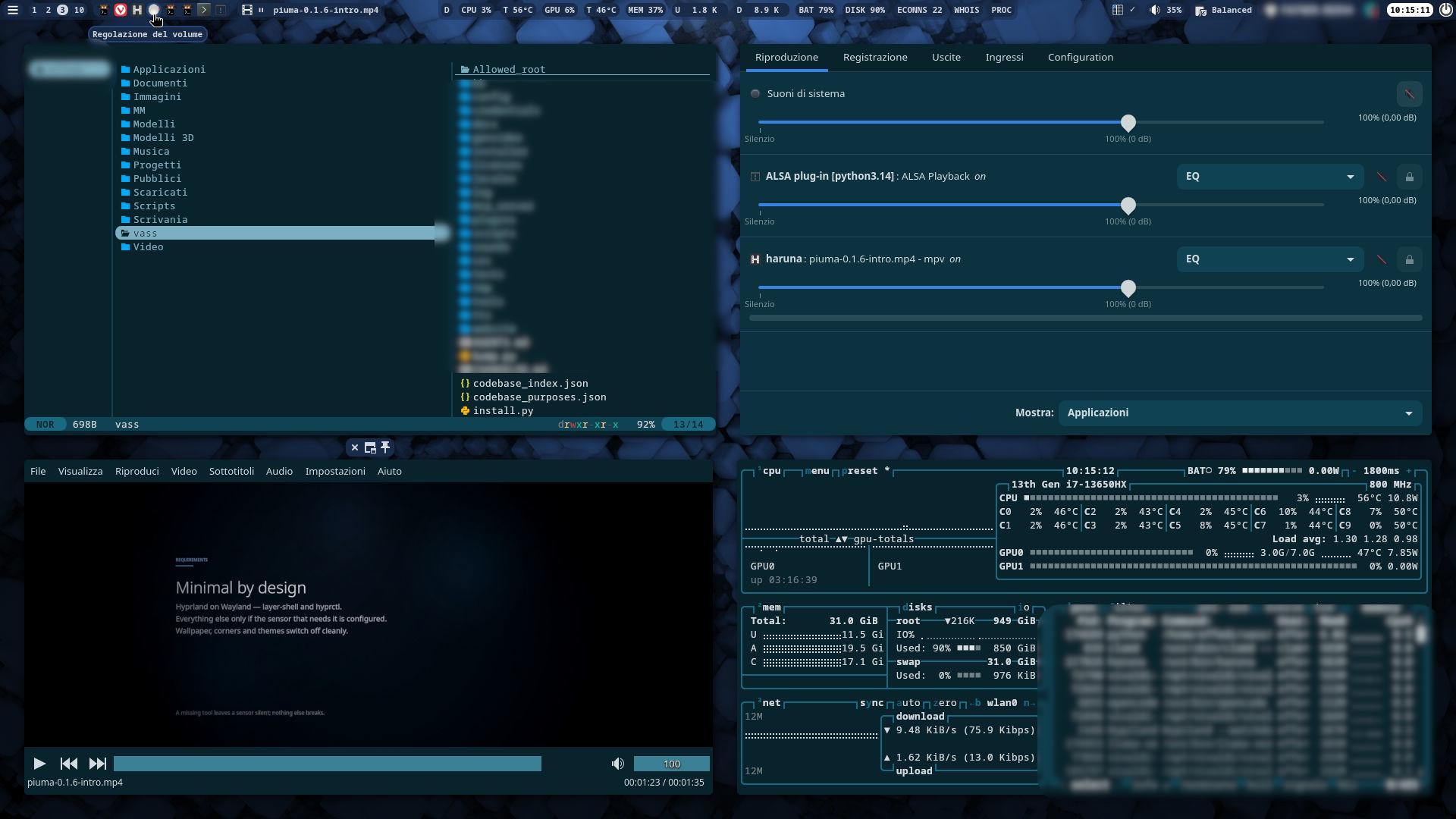
r/UsabilityPorn • • 15d ago

This is my desktop with my own status bar. Still developing it but already usable if you are interested.

Post image
18 Upvotes
Piuma was born from a simple need: a lightweight panel that shows what the machine is doing without turning into a desktop environment of its own, without the need of opening configuration files to make it work (the bar comes with a configuration utility), without the need of many other utilities (wallpaper manager , screensaver, etc ).
https://github.com/logicheneurali/piuma

r/UsabilityPorn • • 16d ago

[niri] activity watch custom heatmap

Post image
6 Upvotes

Not sure if this post belongs here. Please remove if not.

I started using activity watch a few weeks ago. aw-server-rust runs on my home server, and i have aw-watchers running on my laptop and desktop piping activity data back to the server. These are tracking data on my personal devices only, and only on my home network/tailnet.

I wanted a heatmap showing me my activity levels across machines throughout the day. Couldn't find exactly what I wanted, so I built it.

My work hours are 8 to 5 Monday through Friday, and my kid goes down at 8PM. Before work and after bedtime is my free time, with activity tracked in green. Work hours activity is yellow and activity after work and before the kid's bedtime is red. Work hours don't tally for weekend days. Instead, I count that as kid time.

It helps me see at a glance how my device activity stacks up against my other obligations. My goal with visualizing this data is to get a better understanding of where my attention is directed. If my kid is up and I'm home, I want to be spending time with him. This visualization allows me to detect patterns of directing more attention toward projects and network maintenance rather than the child.

Same goes for work but the work data is a bit misleading. I use my laptop to listen to music, which is tracked, and on my lunch break, so it looks busier than it really is. Still, I'm pretty happy with where it's at as of now!


r/UsabilityPorn • • 19d ago

[Sway] Ubuntu 26.04 (My First Rice!!)

Thumbnail
gallery
51 Upvotes

My first Linux rice!! Im pleased with how it turned out!

Specs (specs of my T430):

i5 3320M

Intel HD Graphics 4000

8gb ddr3 ram

120GB SSD (i believe)

This is my first time customizing my system myself. I picked Ubuntu as someone said Ubuntu was good so i decided to try it out. Ive used Debian before but it was always basic Debian + Xfce. This time i made my own customization!

Im currently thinking of adding waybar but i feel like it takes away from the minimalism.

Im open for feedback!!


r/UsabilityPorn • • 20d ago

[Sway] Tired of distractions

Thumbnail
gallery
19 Upvotes

My daily driver with no distractions. The waybar only gets my attention when it needs to (e.g., if the battery is low, if the Bluetooth is on but nothing connected or if the battery is charging and greater than 90%).

Dotfiles: github.com/danielrouco/dotfiles


r/UsabilityPorn • • 20d ago

[GNOME] + CachyOS. I love it.

Post image
36 Upvotes

r/UsabilityPorn • • 20d ago

[UmbrieL] fedora btw

Thumbnail
gallery
16 Upvotes

Equalizer effect : quickSoundWave
wallpaper selector : quickpaper
Fastfetch : ffthemes
Term : foot
lyrics in the term : lyrics
Wallpapers : repo
Dotfiles : here


r/UsabilityPorn • • 21d ago

[AeroSpace] A Gruvbox dream for a dev

Thumbnail
gallery
15 Upvotes

Window Manager: AeroSpace + JankyBorders

Bar: StableBar with its Gruvbox theme

Terminal: Ghostty (macOS glass), JetBrains Mono

Colors: Gruvbox Dark Hard

Editor: Neovim (retrobox)

Monitor: btop

Fetch: fastfetch

Browser: Zen with a homemade start page

Bar font: American Typewriter, workspace icons from sketchybar-app-font

Wallpaper: my-neighbor-totoro-sunflowers from D3Ext/aesthetic-wallpapers

The bar's my own project. It's free and open source, and I build it with the help of a friend and AI coding agents. Repo's here if you want the theme: https://github.com/Seb-GRAF/StableBar


r/UsabilityPorn • • 22d ago

[KDE] Chimera Linux w/ musl libc, BTRFS & Luks encryption

Thumbnail
gallery
32 Upvotes

My daily driver i use. I plan to experiment with Wayland_fyi soon but for a while this is my desktop :3


r/UsabilityPorn • • 22d ago

[Umbriel][Noctalia v5] I am loving the layouts per workspace.

Thumbnail
gallery
16 Upvotes

Sorry, I messed up on my first post. So here it is again.


r/UsabilityPorn • • 23d ago

[KDE Plasma] Daily driving on Debian Sid

Post image
69 Upvotes

OS: Debian Sid
DE: KDE Plasma
Colour Scheme: Breeze Dark
Icons: Oxygen

Debian Sid has been surprisingly stable.


r/UsabilityPorn • • 26d ago

[GNOME] Debian 7.9 Customization

Post image
104 Upvotes

Running old Debian and GNOME on my 2009 (ewaste) laptop. (Very basic and default, i know but gotta love old Debian (works like a charm too!) :P)