r/UnihertzJelly2 • • Aug 23 '23

Guide/Tutorial Jelly Star - Rooted!

60 Upvotes

I received my Jelly Star yesterday and of course I needed to have it rooted.
Since I also wrote the original guide on rooting the Jelly 2 I wanted to share my updated guide for the Star as well. It's pretty similar, but if you follow the Jelly 2 guide you'll get in a bootloop.

Why do I need root?

If you don't know what root is then you probably don't need it.
For me personally there are two reasons:

  • AdAway, for complete ad blocking

  • AccA (Advanced Charging Controller), to limit charging to 80%

NOTE: DO THIS AT YOUR OWN RISK
NOTE: THIS PROCESS WILL WIPE YOUR DEVICE
NOTE: OTA UPDATES WON'T WORK WHEN YOU'RE ROOTED
I don't give any warranty in case something goes wrong but from my experience it's really easy to recover from a brick/bootloop or faulty flash.
During my testing I got in several bootloops, with the right recovery tools you can return to factory state (and unroot) in no time. See the last part of this post for that.
The phone uses the MediaTek MT6789 Helio G99 chip and perhaps the guide can be useful for other devices running on the same chip.

Things you'll need:

- Original Jelly Star firmware suitable for your country, which can be found on Unihertzs Google Drive.

- A PC with ADB and fastboot installed (Use Google if you need help to set this up)

During the making of this guide there was only one firmware available for EU > 2023072513_g58v89c2k_dfl_eea.zip
Please check if your device is also running this version, the build number of this image is "Jelly_Star_EEA_20230627" (You can see this in Settings>About Phone)
During testing I messed up a few times and I had to do a recovery so I restored/reflashed it with that firmware. I believe the Jelly Star has an older firmware fresh out of the box, I don't know for sure if it works when your current version differs from the downloaded firmware. If you want to be completely safe you can restore the phone using the downloaded firmware and the tool listed at the bottom of this post

I'll indicate in every step on which device it needs to be executed: PC is your PC, JS is the Jelly Star itself

  • JS: Remove the SD card if you have one insterted, it might cause conflicts according to the findings of /u/Clarice01

  • PC: From the firmware zip, get the files boot.img and vbmeta.img. Copy the boot.img to the Jelly Star. Store the vbmeta.img somewhere on your PC

  • JS: Go to Settings>About Phone and tap the build number several times. You'll get a notification "You're now a developer" and this unlocks developer options

  • JS: Go to Settings>System>Developer options and enable both "OEM Unlocking" and "USB debugging"

  • JS: Install the latest Magisk app (Magisk-v26.1.apk at the time of writing), you can get it from the official github page

  • JS: Open Magisk and select "Install" in the Magisk part. Click "Select and Patch a file" and navigate to the boot.img you copied earlier. Click "LET'S GO!". The script will end in an "-All done!" message

  • PC: Copy the patched boot.img back to your PC, it's in the Download folder called something like "magisk_patched****.img". To make things easier I just put in in the same folder as the vbmeta.img and renamed the patched boot file to "magisk_patched.img"

Now we've got all the files we need ready. But we need to unlock the bootloader first using fastboot

  • PC: Connect the Jelly Star to your PC using a USB cable and open CMD (or Powershell)

  • PC: enter the command:

adb devices
  • JS: A prompt about debugging will be shown, Accept it and check "Always allow" to be safe

  • PC: enter the command:

adb reboot bootloader
  • JS: The phone will reboot into the bootloader, it will show the boot screen with the Unihertz logo and stay on that screen.

  • PC: enter the command:

fastboot devices

Your phone should be listed there as a serial number with "fastboot" next to it

  • PC: enter the command:

fastboot flashing unlock
  • JS: A huge warning will appear, we just have to press the "volume up" button to accept it
    For some reason you only have 5 seconds to do this. If you miss the prompt, just repeat the above "fastboot flashing unlock" command and try again

  • JS: You'll see a message the unlock was successful

Now that the bootloader is unlocked we can start flashing!

  • PC: In CMD navigate to the folder where you have the patched boot and vbmeta files and enter the command:

fastboot flash vbmeta vbmeta.img

With the Jelly 2 we had to include verity/verification commands. Don't do that here since it'll result in a bootloop.

  • PC: Once you see that flashing of the vbmeta went okay, enter the command:

fastboot flash boot magisk_patched.img

If you renamed the patched boot file to something else you of course use that name

  • PC: This one should also result in an "OKAY" message. Lastly we enter the command:

fastboot reboot

If everything went fine the phone will reboot as normal, from now on the boot screen will always have a message about being rooted. (unless you completely revert, then this message will also disappear)

  • JS: You'll have to go through the setup again since everything was wiped. Once you're done download and install the Magisk app again from the official github page

  • JS: Open the Magisk app, and it'll prompt you that you need to reboot to fix some stuff (not sure what, but this step is needed). So choose to reboot the phone

And that's it, once the Jelly Star reboots you'll be fully rooted!

This was before I installed AdAway, hence the ad on the bottom :)

Recover / unbrick / unroot

If you mess up it might result in a bootloop, just like what happened to me several times... The phone will reboot twice and then show a warning something is wrong and you get the options to try again or do a factory reset. Both options won't fix anything. Luckily it's quite easy to completely revert to factory settings, you can also use this method to easily unroot again.
Note again that this will fully wipe the phone

For the factory reset you can follow the same steps as for the Jelly 2, which you can find it here. I used "SP Flash Tool V6.2316" which worked great with the Jelly Star
Install the drivers and follow the steps under "Flashing the Stock Rom" NEVER EVER CHOOSE "FORMAT ALL" IN SP FLASH TOOL, as this will wipe your IMEI number and Google Key

Let me know if you have any questions or certain steps are unclear!

I got red text in the top right!

Something went wrong, luckily for you I also ran into the same issue. I made a guide to fix that over here


r/UnihertzJelly2 • • Sep 26 '26

I turned my Jelly into an iPod šŸŽµ

46 Upvotes

Been playing around with my Jelly and turned it into an iPod-style music player.

I really like how it looks and feels, so I wanted to share it. What do you guys think?


r/UnihertzJelly2 • • Aug 22 '23

Jelly Star Review So Far

Thumbnail
gallery
40 Upvotes

Photo 1: Lil phone lookin real good. Heavier and thicker than the Jelly 2, which I really like. It makes it feel more sturdy/higher quality. Fingerprint scanner is fast! Bluetooth is working great and I haven’t had disconnections like I did with the 2. Maps also has been flawless so far, which is very nice.

Photo 2: The screen is brighter than the Jelly 2 and holds up really well in the sunlight! Direct sun is still a bit of a challenge, but its for sure not a deal breaker.

Photo 3: Camera quality still lacking, but WAY better than the 2. I really like film photography, so I have a little film imitation app I like to use on my phone for when I am not carrying around an actual camera/don’t want to get film developed. I have some examples.

Photo 4: I use a film-imitation app and I think the Jelly Star camera imitates pretty well. This is taken with 1998 cam using KD Ultramax 400 film imitation.

Photo 5: Lower light photo, using the same film imitation. I think the KD film looks the best on the Jelly Star, whereas on my Pixel 6 it was the FJ Color 200 that looked the most true-to-actual-film. This app uses a longer shutter than the default camera which will cause some blurring effects like you’ll see in this picture! But that is part of the film imitation and adds to the vintage look.

Photo 6-9: I LOVE how Android 13 looks on the tiny screen. Widgets work really well and everything has been smooth. I have not had any issues with the UI yet. Battery life is lasting me all day so far. I have the LEDs on the back turned off and that helps a lot.


r/UnihertzJelly2 • • Jan 09 '21

Jelly 2 Experience/Review

37 Upvotes

(added 3 month update at the bottom)

Hi everyone,

I haven’t seen many recent thorough reviews for the Jelly 2 so I wanted to share my thoughts in case anyone is looking for more insight on whether to get it. This is half review and half justifying why the few negatives are worth it to me. Different pros and cons will apply differently to everyone, so keep in mind your own needs as well. I'm posting this on an alt account because it's a fairly niche device and I prefer keeping my main account anonymous. I've just typed this out quickly for now and will possibly clean it up a bit later on.

Most tech site reviews seem to always compare phones to the standard flagship phone at the time, which is pretty unfair and kinda pointless now that basically anything will fill the same purpose these days. I want to discuss the Jelly 2's qualities objectively and with its purpose in mind (it's a small phone that does phone things but smaller), so no points off for not having a 12" screen you can emulate console games on.

I always consider small size a priority because I prefer being able to actually reach the whole screen comfortably with one thumb while holding it, and it fits in pockets much better (it actually fits snugly in the coin pocket in my pants). New phones at 5ā€+ now being considered small is honestly disappointing, because I still remember when over 4ā€ was a bit on the large size. If you’re really considering a 3ā€ phone I probably don’t need to go on about that.

That said, it’s the smallest phone I’ve ever used, I wouldn’t want it to be any smaller, but it’s probably my favourite phone too.

Overall, the Jelly 2 is a cute little phone that doesn’t feel like it sacrifices quality to achieve its size. It feels like any other high-quality modern phone you might use, but small.

Changes and customization

First, the main things I've changed about the phone for useability and aesthetic. I would consider some of this very important for useability, and why I am slightly hesitant to recommend the phone to random people:

- Made the text smaller (yes really) - the default text size is ā€˜large’ so I set it to normal to fit on the screen slightly better. On normal it seems most comparable to a size 9.5pt font. I have good vision, but if you don’t then the text might be one of the potential dealbreakers for something this small. Changing icon label text to not be single-line also makes it more readable, because otherwise labels just get cut off.

- Changed the keyboard – the default Gboard is probably fine but I’ve used Swiftkey forever and still prefer it for a few reasons.

- Installed Nova launcher – another personal preference, I set it up nearly the same as the default launcher but the customization and having an app drawer are nice. I saw someone say it didn’t work as well as the default but I haven’t found that to be the case.

- Tweaked the app blocker – probably a must for most people because it also blocks app notifications, I did have it off for a bit but I found it handy to automatically stop certain apps once you close them.

- Rooted the phone to try to remove a couple things I didn’t want. It was a bit of work but straightforward.

Form factor

Jelly 2 fits very cleanly and comfortably in my hand. There are small bezels but most of the face is screen, as one would expect these days. The whole screen and all the buttons are reachable without shuffling it around at all. I was initially a bit concerned because this is also the thickest phone I’ve ever used by measurements, but in-person it’s not noticeable and just makes it more sturdy and holdable. Holding a thin phone after feels weird and fragile. I also use the case that came with it, it fits very nicely and has nice grip to it, and isn’t too chunky like some cases. The case only protrudes past the screen at the top and bottom, so the screen cannot touch a flat surface but theoretically you could hit the side edge of it on the corner of something if you’re unlucky.

Screen

Firstly I took the included screen protector off because I don’t like the feel of them and I’m not one to drop or scratch my phone. It came with a second one in case you want to replace it or put it back on later. It doesn’t quite fit the whole glass face though so there is a bit of an edge to the screen protector.

Visually the screen is as good quality as any other phone I’ve looked at. The resolution is obviously smaller so things like screenshots and snapchats will be lower resolution than a larger phone. Small text is still perfectly clear, so the only real effect of a lower resolution is not using as much battery. The main downside of a tiny screen is if you look at a lot of pictures or videos. You can always zoom in, but that doesn’t make the screen bigger.

While the size isn't really a problem in general, you can't read as much of things like notifications at once with the width of the screen. Things like text messages are fine because they just roll over to the next line.

Keyboard

Typing is surprisingly a non-issue for me, even though I have large thumbs. Without much practice, I don’t miss keys any more than with my 4.3ā€ phone, plus swipe and autocorrect usually make up for it anyway. Generally though the touch screen feels very precise. If you consciously try to get better at typing on a touch screen (I have for a while) the keyboard probably won’t give you too much trouble. I also use the built-in web messages to type longer messages on my computer anyway, which I did with my last phone already.

Battery

I seem to have at least 40-50% after a full day of moderate use, though not doing anything I’d expect to be too heavy on the battery. Especially if you still have the app optimizations on, it uses quite little battery in idle. No complaints about how quickly it charges either.

Camera

Relatively lower quality compared to big phones that focus on photos and software tricks to make them look nicer. Otherwise it isn’t bad enough to be noticeable unless you compare side-by-side. It’s definitely good enough to snap a quick picture, even of some text you want to save to zoom in on later. I have a small standalone camera for actually taking pictures because I’ve never been satisfied with phone cameras anyway, so the quality is a bit of a non-issue for me.

Speakers

Surprisingly loud and clear, both the top speaker and loudspeaker. I’m not much of an audiophile so all I can say is it’s definitely good enough, though obviously not as full as my desktop speakers.

Misc features

- The standalone control buttons are nice and don’t take up space by being on the screen. I suppose the space could just be more screen, but it would just be a longer rectangle and I noticed it’s nice to not have to swipe up from the bottom to get the controls to show up in fullscreen apps.

- 3.5mm audio jack of course, which is very convenient and always works instantly.

- Bluetooth works perfectly fine when I've used it with speakers or a smartwatch.

- Infrared blaster, which is a great addition that I missed a bit on my last phone. Even if you don’t use it all the time, it’s amazing to have when you do run into a situation where it’s useful. I use Lean Remote because of the privacy concerns with the included one. Using the IR blaster for an LED light setup makes it clear that it is much more powerful than the flat plastic LED remote.

- Fingerprint scanner, apparently it isn’t great right now but I never use them anyway because they’re never as consistent as putting in a swipe password.

- Custom button, this is an interesting bonus because sometimes it can be a lot of work to customize the hardware buttons on a phone. You can set one-press, two-press, and long-press functions. I just use it as a camera button, and long-press to toggle the LED flashlight. The screen seems to need to be on to use the button.(This is patched in the latest update)

Other misc negatives

- The wifi antenna is possibly slightly weaker than some phones, occasionally it disconnects when far from the router (apparently is an issue with which wifi channel it is using). I have a range extender anyway because I have other devices that have trouble at long range, so it’s another non-issue for me. The wifi works fine in general, though I haven’t used the wifi much outside of my own house.

- The USB-C port is on the right side of the phone, at the bottom. The included cable has a right angle so it doesn’t stick completely straight out, but it is a bit in the way if you use it while charging (though the included cable is a bit short to be doing that anyway). There is an obvious space challenge for relocating the port; the bottom already has the loudspeaker and mic (and a screw), and the top has the 3.5mm jack, IR blaster, and a ā€˜sub mic’ in the middle (I couldn’t find what this does). I don’t know how the inside of the phone is laid out, but I think it would be worth finding a new place for the charging port, either on the top or bottom, or even the left side might be better (sorry left-handed people).

- For me at least, the power button jiggles slightly in its socket, though the protective case fixes this. Either way not an issue, but felt it was worth a mention.

- Some people have mentioned there is some echo for phone calls, though I haven't found it to be a huge issue.

Dealbreakers

To summarize, this phone might not be a good choice if you:

- need large text/screen for visibility.

- watch a lot of videos on a phone.

- already have a lot of trouble typing on a touch screen.

- need to take "professional quality" looking photos with just your phone.

- play serious games on your phone. I do have chess on it though and it's definitely fine for that.

- do things with high battery drain on a phone for most of the day.

- need a phone you can hit someone over the head with.

Final thoughts

I've been using the Jelly 2 as my only phone for almost two weeks and it's basically perfect for me, I have no real complaints about it. I will try to remember to update after using it a while longer. It reminds me a lot of having a 3.5" smart phone about 9 years ago, except it's actually good now. Unihertz did a nice job with this thing. I do think something up to about 3.7", maybe 4" max, would be more accessible to a general audience, though most companies have stopped making smaller phones altogether presumably because most people prefer big shiny ones. That said, I'm completely used to the size already, and my old 4.6" phone feels unnecessarily big and wastes a lot of screen space.

Please let me know if you have any other questions or suggestions for edits, I'm happy to discuss.

3 Month update

Coming up on 3 months of using this as my only phone, I've finally gotten around to adding an update (though maybe 3 months is a good amount of time anyway.) Overall I am still very happy with this phone, I've sprinkled in a few small edits above, but here are just some extra thoughts to mention after using it for a while:

- I have noticed the phone slows down slightly after being on for over 1-2 weeks straight, this isn't really unexpected and just needs a restart (which is quick, and you should be doing anyway). I only point this out because my old phones would make it a bit longer before noticeable slowdown, so it may just be due to the comparatively more lightweight processor. Or maybe more junk builds up in the background, who knows, but it does run perfectly smoothly most of the time.

- I seemingly have issues receiving MMS from people who send it via the carrier (vs through the messenger). I've had issues with MMS on every phone I've ever had though so I can't necessarily point to the jelly being the problem.

- I still haven't used the fingerprint sensor even once, my swipe password is fine and works every time so sorry if that's a key feature for you.

- The camera isn't even as bad as I originally felt, possibly I am just used to it but the photos are by no means terrible unless you really need to blow them up really big. If you are considering a flagship phone just because you want to take good photos, for the price difference you can get a high quality compact point+shoot camera and have the best of both. With a real camera, you can get much better quality and zoom in way further (key point for me) than with a phone with a comparatively tiny sensor on the back.

- The app blocker feature is very useful to keep things like social media apps completely shut down unless you are actually using them, you just need to customize it sometimes for new apps.

- I haven't had any issues using Jelly2 with a smartwatch (you may need to unblock the watch app, though that might also be done by default now)

- The only time the battery has been an issue is if I use the phone all day and/or have a long video call on it. I would recommend having a longer USB-C cable to more easily use it while plugged in if you need to.

- Typing is only sometimes difficult if I am eg. half asleep and keep hitting keys with the wrong part of my thumb(s), and/or if the swipe keyboard is not cooperating. Otherwise I have no issues if I pay attention to hitting the right keys. I'm not sure how big of a phone you need to make typing arbitrarily easy (I've had the same trouble on any phone), but it's probably around 5"+ and so not worth it.

- I haven't found any issues using any specific apps, though I am not doing anything 'intense' either.

- I personally feel that any negatives at this point are justified to myself as any device will have a certain amount of negatives and tradeoffs, and I have no major issues (besides never having MMS working perfectly in my life). This is my own opinion and outlook, definitely be aware of any dealbreakers for yourself.

- Finally, everyone else loves this phone. You will get lots of fun comments because most peoples' phones are quite literally twice as big as this. The only reason I don't openly recommend it to people is because it is slightly niche and takes a certain amount of customization for an optimal experience, which I don't necessarily know if I can suggest to strangers in the 'mass market'. But if you have done your research then you should know yourself whether this is a good phone for you or not.


r/UnihertzJelly2 • • Mar 02 '24

Long-term Review, Tweaks and Launcher Customization

36 Upvotes

TLDR; This is a long-term review of the Jelly Star. I'm hoping this can inform others who are in a similar position to me, and need a "digital detox" phone to kick the habit of endless scrolling. I have some minor gripes, but all told, I'm extremely happy with my Jelly Star. It helped me kick a years-long social media habit.

For as long as I've had a smartphone, I would scroll about 5-7 hours per day. I've bought a few other devices with the hope that I could limit my use, each of which had usability issues.

  • OnePlus 7 Pro: Had a "ZenMode" feature that can lock you out of the device for a set period of time. But, I found that I would just lose track of time while scrolling away, so that by the time I remembered to use that feature, I'd already wasted so much time.

  • iPhone 13 mini: I bought this thinking the small screen would make it less immersive to use. The iPhone Mini 13 *did* achieve that to a certain extent; the smaller screen allowed me to break away more easily, but I was still using the device far more than I wanted to.

  • A "Dumb Phone": Not having access to a decent camera for Scanning Documents, Maps, WhatsApp and my Banking Apps made travel, communication and daily transactions.

I bought the Jelly Star on a whim. At first, I was scared that none of my apps would work on the small screen. But, for $200 I thought: " If my apps don't work properly, maybe I can just use the jelly Star as an MP3 player / music storage device, since it has an audio jack and a ton of storage." At $200, the Jelly Star was a "secondary device" I could take a chance on.

The gamble worked much better than expected. I've been daily driving the Jelly Star as my only device for two months now. Here's my experience:

Positives:

  • Size impact on phone usage: This is the biggest plus by far. My Phone usage dropped from 5-7 hours per day on my One Plus 7 Pro to less than 1 hour per day on the Jelly Star. I've used the additional time to better myself with online classes. I do have Instagram and other social media apps installed, but the screen size just makes them unappealing to use. It's possible to view content in a pinch (like if someone sends you a link) but the Jelly Star doesn't he suck you into a 45-minute scrolling session.

  • Size impact on Camera usage: the camera on this phone is ok. But, the device's small size, and the quick-start camera shortcut on the power button has made me more likely to take photos during the day. Instead of fumbling for a massive slab in my pocket, I can keep the Jelly Star in my shirt or jacket pocket and snap a pic quickly. I now have a separate camera that I take on vacations, but I use my Jelly Star for a personal, Polaroid-quality photo journal.

  • Size impact on entertainment: I still use the Jelly Star for entertainment, but instead of video content, it's now mostly audio. I'm listening to my personal flac audio library, the radio, spotify, pandora, podcasts, and youtube audio through the LibreTube app. In contrast with newsfeeds, tiktoks or reels, I can be productive while listening to audio content. I haven't used a phone in this way since the feature-phone era (does anyone remember the LG Chocolate?)

  • Every app I use on the jelly star works. I was worried that the screen size might make some apps render weirdly, or that I might have trouble navigating the apps, but that's not the case.

  • The battery life is really great. I charge my phone once per day before bed, but there's usually 30% left in the battery then.

Things I've Gotten Used To:

  • At first, the phone felt so small I was scared I'd lose or drop it. I used the Jelly star with the included lanyard because of this fear. Gradually, I found I didn't need the lanyard and that it was fine.

  • The thickness of the phone was really noticeable at first. But now, I find that kind of comfortable to hold in the hand; it's like holding a smoothed river stone. Also, even though the phone is a little thicker, I can now fit both my airpods and my phone in the same pocket.

  • The clear TPU case that comes in the box felt really slippery at first, but over time I suppose it was roughed up by the inside of my pocket, and that's no longer an issue.

Negatives:

  • -'m not a fan of the substantial chin on the top and bottom of the phone. I'd prefer an edge-to-edge screen, from an aesthetic point of view, and also from a usability point of view (Android gestures would be easier to use.) This is my biggest gripe honestly.

  • One of the SIM card slots doubles as an SD card slot. I wish I didn't have to choose between storage expansion and using my second sim.

  • It's annoying that the lights on the body of the phone cannot be activated by the custom-action button on the side; only the camera LED can. It's true that you can use a widget provided by Unihertz for this purpose, but that widget can't be used on all launchers. Also, RGB LEDs would be cool.

  • The camera could be better.

  • Very few aftermarket cases or accessories. I think the jelly star would make a good cycling companion to use with Strava, because it's about the size of a cycling computer. But, there's no bicycle attachment. Kind of a loss, because they could easily use the same case as used in the Jelly Star Jogging Arm Band, and just make a bicycle attachment on the bottom.

  • If the phone could be just a little thinner (without sacrificing battery life) that would be great.

Considering everything. I'm now a huge fan of this device form factor – something between an apple watch and a conventional smart phone. I'm excited to see what Unihertz has in store for the Jelly line next.

Tweaks

This is how my phone looks now:

Launcher:

The stock android launcher for this phone is just bad imo. After seeing this post , I tried Olauncher for a little while, but I found Olauncher's limit on the number of apps you can put on the home page too restrictive. I then saw a picture of the Palm pvg100, and I loved the Apple Watch-like aesthetic of its launcher, which works great for small screens. I found a look-alike launcher called Honey Launcher, and after tweaking the way the icons fade and their size, and installing the Borealis Icon Pack, I was able to settle on a launcher that I am happy with.

Keyboard:

I'm using Gboard, but I had to increase the size of the keyboard to its maximum height, and use swipe. I find it extremely easy to message people and type short notes on this phone. I don't feel the need to use dictation for input.

System Fonts:

You need to increase the font size on the device, and in your browser of choice to make it usable.

Screen Temperature:

The display on the Jelly Star is cool-toned and bluish. I found this annoying, so I leave "night light" mode on constantly. On phones with normal displays, night light would probably have an amber or sepia-tone effect, but on this phone it just cancels out the natural blueness of the display. After turning on this feature, I don't have any complaints about display coloration.


r/UnihertzJelly2 • • Feb 23 '23

My favorite photos, shot with GCam on Jelly 2

Thumbnail
gallery
33 Upvotes

r/UnihertzJelly2 • • May 26 '24

Daily set

Post image
30 Upvotes

šŸ–¤šŸ–¤šŸ–¤


r/UnihertzJelly2 • • Mar 29 '21

Android 11 GSI on Jelly 2

28 Upvotes

Edit: GSIs seem to improve the usability of the fingerprint scanner as tested by me and u/bittweaker. If you have been struggling with Jelly 2's fingerprint sensor, maybe you can try out the GSI and report below if it did help or not.

I thought I have seen posts on this subreddit about the status of GSIs (Generic System Images) on Jelly 2, and how that would improve the lifecycle of the device by a lot. So I figured I should test it out after I purchased my Jelly 2, and post the results here.

What I used was phhusson's Android 11 GSI (available here). I am happy to report that basically everything is working as expected, as with most other Unihertz devices released after Android 10 (i.e. Atom L, Atom XL, possibly Titan after 10 upgrade). One deal-breaker right now is that in-call audio is broken, but I have already debugged and figured out the issue, and submitted a patch to work around the issue, which has been merged by phhusson and will be present in the next build of phhusson's Android 11 GSI (probably in the beginning of April). My current custom build of phh GSI has that patch included, and that's what I am using on my Jelly 2, but I am debating if I should release this build because the patch will be included in the next update of phh's GSI anyway.

For our device (Jelly 2), you'd want the arm64 + ab version of the GSI. The flashing process is very straightforward: just reboot into recovery, wipe all data, and then "Enter fastboot" and use the fastboot command to flash the GSI system image into the system partition. (Of course, you need to unlock the bootloader first, and you might need to disable verification by `fastboot flash --disable-verity --disable-verification vbmeta vbmeta.img`, using `vbmeta.img` from the official ROM)

In the future, as long as I am still using this device, I expect that I will be testing, debugging and fixing newer GSIs (higher Android versions) on Jelly 2 and Atom L (another Unihertz device I own), but there is no guarantee and I may get bored with the device at any time. As a long-time Android ROM developer, one thing I would really like to see Unihertz do though is to release the kernel source code, so that the kernel can also be updated with newer LTS patches as a community effort. I understand why this might be difficult for small vendors basing their work on MTK BSP, but there should be no technical problem in doing so, and many larger vendors (e.g. Xiaomi) using MTK chipsets have been releasing the kernel source code for a while. It will really extend the lifetime of the device, while providing more opportunities for customization beyond what a GSI can do.


r/UnihertzJelly2 • • Jan 31 '24

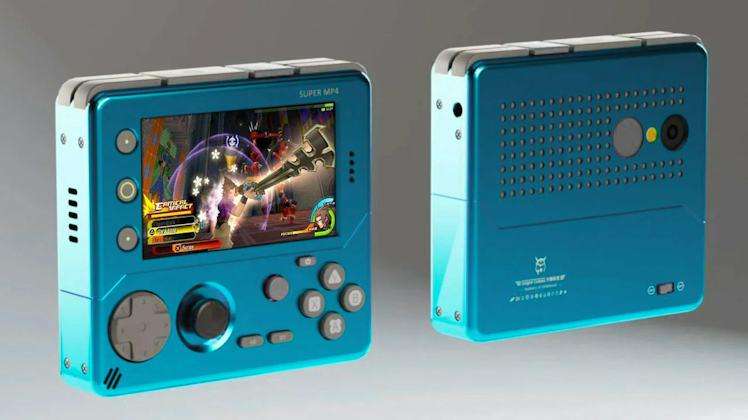
Gaming Console Case for Jelly Star

Post image
24 Upvotes

Any one else looking forward for this? Source: https://www.inverse.com/tech/phone-case-android-retro-gaming-handheld


r/UnihertzJelly2 • • Jul 30 '24

Report: Replacement Parts Compatibility The Replacement Jelly 2E Battery works just fine in the OG Jelly 2.

Post image
22 Upvotes

r/UnihertzJelly2 • • Jun 12 '23

Detention center guard says it the phone he sees most in prison.

22 Upvotes

I deliver pizza and use my jelly to collect signatures for orders. The other day my customer signs, then flips my phone over to see if it's from unihertz and laughs. He said I know this phone, and asked if wanted to know how. I said sure, not ready for where this was going at all. He told me he worked at the detention center and knew the phone as the kind most likely to find smuggled in. It took me a second to realize what he was hinting at and then I laughed, looked at my phone, and said, I don't need to talk to anyone that badly. He tipped well and I had a great start to my day.


r/UnihertzJelly2 • • Aug 08 '25

Bedazzled Unihertz Jelly Star

Post image
20 Upvotes

r/UnihertzJelly2 • • Apr 08 '23

Yes, it can run Genshin

20 Upvotes

Perks of having a low resolution on a tiny screen :D (It will kill your battery tho, so you prob still don't want to do it)


r/UnihertzJelly2 • • Jan 25 '23

Jelly2 on top of Mt Wilson.

Post image
20 Upvotes

r/UnihertzJelly2 • • Dec 28 '22

Slowly been turning this into my primary phone

Post image
20 Upvotes

r/UnihertzJelly2 • • Apr 06 '23

Discussion Just received my Jelly 2 today and I LOVE IT, and if you have your reservations, read this

19 Upvotes

I was honestly so hesitant to pull the trigger on it since I'm on AT&T and most reports say "bad, stay away if on ATT, no worky" but luckily I'm so used to abusing Amazon return policy that I said hell, why not. AND IT WORKS. Data and calling seem to be working great as of right now (my sim card was activated with a different phone's IMEI, so that may be the only reason it was plug & play for me)

I didn't come to this phone to stop using my phone per se, because, honestly, I'm the type of person that can watch an entire movie with half my screen blocked and my phone flat on the desk while I'm working. However, I did have a major gripe with EVERY phone manufacturer that just settles at 6.67" these days. So sick of it, even my Zenfone 9 was still too big for me. (I'm 5'6 M, decently sized hands, I just like small things) Coming from a Surface Duo 1 as well, this phone isn't any more buggy than that was, so far at least, so anyone being steered away for technical issues need not fear. It's not so much that it's buggy, the little guy just takes it's time frequently.

TLDR; If you hate big phones, and love smaller things, you're gonna LOVE it. While it does have it's compromises, I come from flagships, and I love it. AT&T DOES work, with some caveats. If you're on the fence, try it out (AMZN IF UR IN THE USA BC RETURN POLICY)

Edit: Try to be open minded and hold your downvotes on comments! I don't want reddit auto-hiding questions and concerns that I may have replied to c:


r/UnihertzJelly2 • • Jun 24 '24

New 5G Jelly announcement!

Post image
18 Upvotes

Hey all! I came across this announcement on their website! Seems like there's gonna be a 5G Jelly phone on the market :)


r/UnihertzJelly2 • • Aug 14 '23

Shot on Jelly 2 šŸ‡®šŸ‡Ŗ

Post image
18 Upvotes

r/UnihertzJelly2 • • Oct 30 '22

Unihertz has announced a successor to the Jelly 2: The Jelly 2E

18 Upvotes

Edit 2: The Jelly 2E is now available for pre-order and the full specs are available here. Additional details are now available and I'll bold anything I add into the body of the post.

Here is their announcement page. Here is their Facebook group.

Edit for clarity: The Jelly 2E appears to be identical to the Jelly 2 in most aspects, including screen size & shape.

Pricing:

  • $139.99 Early Bird price (you have to sign up via the website)

  • $159.99 Presale price (I assume via Kickstarter, as with their other phones)

  • $169.99 Regular price

Unfortunately, a lot of the released details are a mixed bag compared to the original Jelly 2. The most notable thing to me is no 5G.

Downgrades:

  • No NFC

  • CPU - Helio A20 Quad-core (downgraded from the P60 Octo-core)

  • Memory - 4GB Ram (down from 6GB) & 64GB internal storage (down from 128GB)

  • Not available in Japan

  • No charger included, just a USB-C cable

  • Connectivity - The network bands have been greatly reduced. Bands: GSM (Band 2/3/5/8), WCDMA (Band 1/2/4/5/8), LTE-FDD (Band 1/2/3/4/5/7/8/12/17/18/19/20/25/26), LTE-TDD (Band 34/38/39/40/41)

  • No USB OTG

  • No LED notifications light

Upgrades:

  • Android 12

  • Improved GPS - adds Galileo to GPS, GLONASS, and Beidou, which the Jelly 2 already had. Here is an explanation. This should be a big upgrade.

  • Bluetooth 4.2 - upgraded from 4.1

  • Compass sensor

  • Improved SAR Values (RF levels that your body is exposed to)

Unknown:

  • LTE bands - They list Global LTE Support for both. So I'm guessing the same bands will be available, but it's possible they have changed LTE chipsets. This is distinctly worse. See Downgrades section

  • Battery life - The new processor may use less power, for longer battery life, but they didn't say anything about that.

  • Camera - Looks like the same camera, but no info was given.

That's what I got from looking over their new page. Please let me know if you notice anything interesting that I missed.


r/UnihertzJelly2 • • Jan 28 '21

That moment when your daily carry is compact enough that you don't feel like you need a bandolier. Thanks, Jelly 2!

Post image
18 Upvotes

r/UnihertzJelly2 • • Dec 03 '20

Jelly 2 Root

18 Upvotes

Hi there!

I spent the last few days messing around with the phone trying to get root access.This morning I finally succeeded and thought it would be nice to share the needed steps.

It took quite some trial and error but in the end it's quite easy to do.

Things you'll need:

  1. Original boot.img (you can get it from the firmware available on Unihertz's Google Drive)

  2. An empty vbmeta.img (you can create it yourself, I found one using Google because I'm lazy)

The steps needed to root:

  • Patch the boot.img using the latest beta of Magisk Manager (Canary)

  • Unlock the bootloader

  • Boot the phone into fastboot (If you just unlocked the bootloader you should still be there)

  • Flash the patched boot.img

  • Flash the empty vbmeta.img, using the following command: fastboot --disable-verity --disable-verification flash vbmeta vbmeta.img

  • You're done!

If you screw up, restoring the phone is quite easy. I'm really surprised I didn't fully brick the phone during all the messing around I did. I could always restore everything within a few seconds.

If you want more detailed steps, I posted them on the Unihertz forum

Hope I can help someone with this information, I really like the phone but just needed to have root access to make it perfect.


r/UnihertzJelly2 • • Nov 02 '23

The new colorway looks kinda nice. Wish it was an option at launch. Oh well.

Post image
17 Upvotes

r/UnihertzJelly2 • • Feb 23 '23

Photo taken with Gcam on Jelly 2

Post image
17 Upvotes

r/UnihertzJelly2 • • Mar 17 '22

Comparison to OG iPhone The Jelly 2 is only a half inch smaller than the first iPhone was.

17 Upvotes

When people tell me I am crazy for having a phone this small, I remind them we were all happy with this size once. Jelly 2 be like those wide leg jeans all the kids are wearing. We're all just ahead of the curve with it.


r/UnihertzJelly2 • • Aug 08 '21

Jelly 2 photo.

Post image
17 Upvotes