✅ Throttlestop Guidehere (PDF version here) — seems long at first, but it's actually half the length due to it being written in two different languages, just work through it one screen at a time.
✅ Liquid Metal Repaste Guidehere — includes common temperature questions and testing. In particular FAQ 3 is worth reading if you're struggling with high temperatures.
✅ CPU Throttling vs. Game Performancehere — understanding FPS, CPU/GPU usage explained.
Hello good sir, I also have the same Cpu as you, but when I put my Under volt and copied it set as -155.3, My laptop BSODs, and it seems that I cant run cinebench when I have thise settings from the 9.6 throttlestop undervolting guide. Please help. I have 14900hx and 4070 on a legion 5 pro
Good sir, I have tried your suggestion and this happened on my cinebench, I copied everything. and I got this error, and I always get the "HOT" "BD PROCHOT" in the limits. I'm a newbie in undervolting, any guidance would be a big help! Thank you
That error means your UV is unstable. Try reducing the P-cache and E-Cache by 10mV, until the error no longer shows. The impact of doing this on ur temp is should be minimal, but improves ur stability.
Reading HOT and BDPROCHOT, this is further down in the guide. I explain what they are and what you can do. Beyond those, there isn't much else to do, most laptops will thermal throttle running R23.
Also bottom right corner if you don't tick Save Voltage Immediately, ur UV won't apply til u reopen TS.
Thanks for the guide! I have a legion 7i pro with the same cpu as you but also with rtx 4080. Wondering if you also have any guidance on GPU undervolting/over locking guide so settings work seamlessly together?
question regarding the pl1 and pl2 settings. My MSR was on default 190 and was wondering if I should also set my MMIO to similar? It sounds a bit high, meaning the cpu will need a lot more power or should I input 175W? I didn’t quite understand that section
Hi, please take a look at my setup and results, am I on the right track (continuing to reduce mV)? my rig is Legion 7i 2024, 14900hx, 4070. Thanks a lot.
- Your Intel GPU Offset does nothing unless you apply the same value to iGPU Unslice. You won't be able to know if it's stable though until you actually game on the iGPU. Typically the gains are tiny and not recommended to UV. - You haven't copied the green settings in my guide, there's good reason for that. - Your main undervolts are on the right track. I also see you're testing using FAQ 3 from my LM guide for thermal throttling. If after UV you're still getting a big value, you need to LM repaste. 37% in just 15 minutes is quite bad.
No matter what I seem to do, I'm getting POWER throttled while running Cinebench. Thermal throttling kicks in a little (to be expected) but the power throttle is happening often. Even setting Group 7 below 48 still reaches a power throttle.
I've watched your video of your near-perfect Cinebench run and my cores cannot hold that clock.
Here is a picture of my settings while running Cinebench. Any ideas? Thanks in advance.
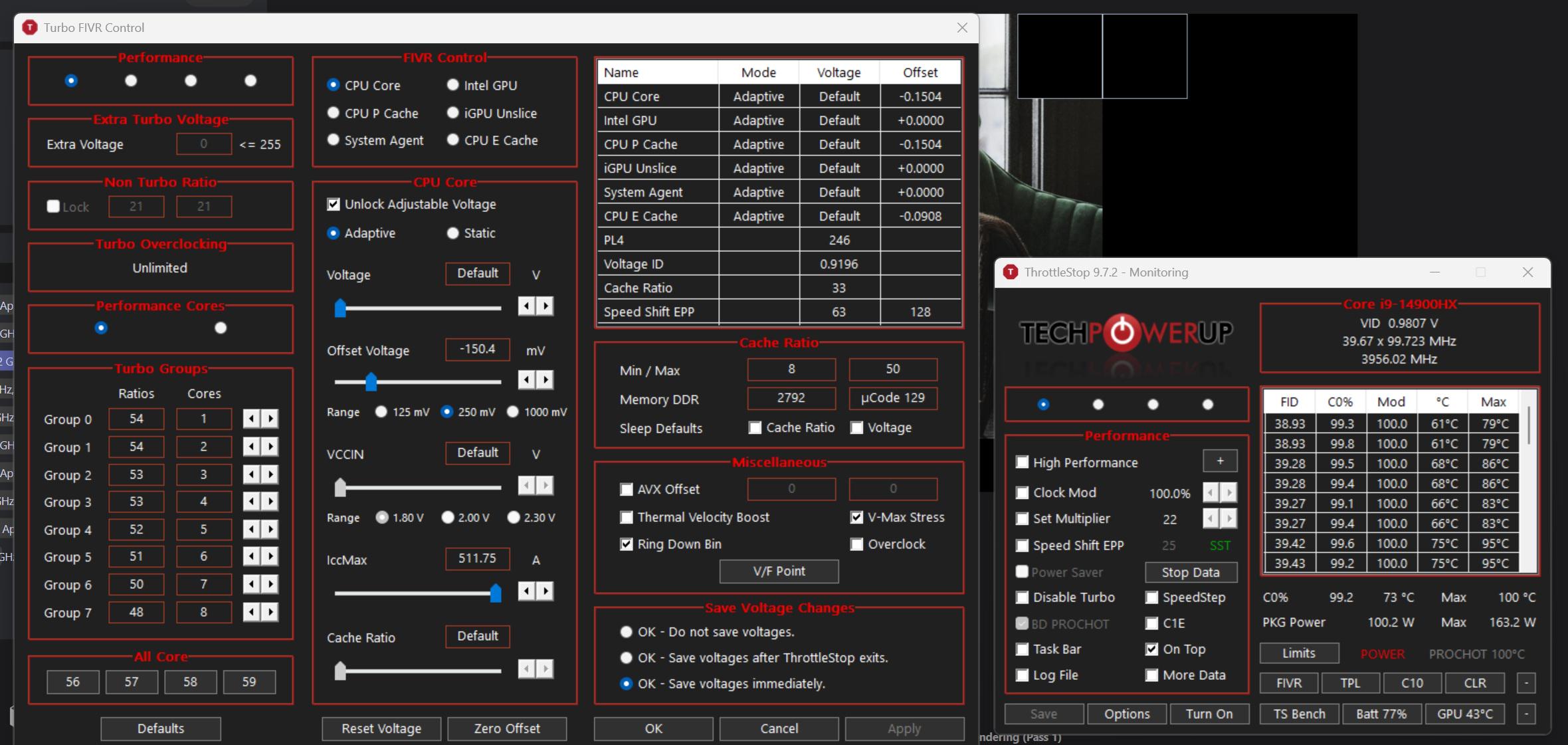
Your screenshot shows there Power Limit is being limited to 160W. Did you adjust your TPL screen setting? Make PL1 and PL2 higher, set them to something like 999 to reach max allowed power.
PL1 and PL2 are at 999 in the provided screenshot.
I max out at 167w. Then it power throttles.
I've been playing around with other settings outside of throttlestop to figure out why. Legion Vantage software is showing 167w max.
Legion toolkit allows me to use advanced settings to increase this to whatever I want. So I did 190. Still power throttled in the 160's.
The power brick is a 230w and everything I've come across seems I should be able to pull 190w safely.
Edit: I'm really wondering if Lenovo limited max wattage in their latest bios update? But if it's a throttlestop configuration maybe I'm missing something.
Hey, I was trying to follow your guide but for some reason my FIVR settings are locked. I did everything it says in the guide (enable overclocking in bios, turn off core integrity, disable vt, disable win features, delete .ini) but still no luck :(
Hey, thank you very much for all this info. I have the G834JY model with the 13980HX do you have any suggestion when it comes to undervolting that model? Thanks again!
Thank you so much for this guide. Make a understand a lot about how things work in general and helped me with my first ever undervolt.
You mentioned in your guide to always set the p core and P cache undervolt the same or it won't work, but I have seen people (on YouTube vids + reddit) more often with an aggressive p core uv than p cache and have a stable overall system in gaming, cinebench etc. So I was wondering if I misread something. Thanks again I'm super new to all this (:
With the new CPUs you can set the P-core to more (here more means more negative) than the P-cache, sure. I have my P-core 5mV more than P-cache. I think for older CPUs the lower of the two takes precedence. So for simplicity's sake in the guide I just said to make them the same.
I simply activated the hidden option through the regedit. Set up max processor frequency less to prevent a throttling and switch off eCores. Idk how many scores I have now in CPU synthetic tests, but have not more than 85 °C while any game I play
Yes. I have improved my guide significantly over the past week. Follow along and you'll be in a good place. Feel free to post back with some Cinebench R23 results!
Because you're using Throttlestop 9.7, so you have VF Point options instead, which is slightly more complicated. I might post a link detailing the changes later.
Thank you for all the info and guidance however I wont to be clear and ask. Using this v/f point curve like on picture you are basically adding positive offset when freq is 800mhz on one ore more P cores, on top of global undervolt appliet in FIVR? Also this offset is valid for all P cores that reach specific Mhz level? This v/f point (mhz) can not be changed? Sure I assume same applied .for E core/ cache?
Here is my 10 min run score. Managed -170mV core and cache with all cores locked to 4.9GHz, mV boost @ 800mhz is set to 105. Been running like this for 2 months without a crash so seems to be stable.
Hello, the V/F points and their MHz values seem to be missing for me, why could that be the case? I have an i7-11800H, and it should support V/F Points since I read online that they were introduced in Comet Lake (10th Gen)
Left picture is the input I make before pressing apply, and the right picture is what appears when I press apply. The mV values on the right picture reset back to the ones on the left on its own after 3 seconds or so. People in the ThrottleStop forums told me that my CPU doesn't seem to support V/F points, even though I read online that they were introduced on 10th Gen, so maybe the manufacturer is to blame
Hey,very useful guide,i was looking through your guides and saw the FAQ 3 on how to detect how often the cores thermal throttle and i've noticed my P-core 4 thermal throttling pretty much all the time(as shown in the picture) while my other cores rarely throttle and only in the long run they do so,also the temps on P-core 4 are at about 96 degrees while other cores sit at around 85-92 degrees. what do you think is the issue? Is it simply bad liquid metal application as my laptop is relatively new and has ASUS's stock LM application or could it be related to something else?
I have a question, you mention "CPU Core and P Cache need to be similar values or the same, or it won't work", for a 14900hx, what is the furthest you'd go in difference between the P-Cache and Core undervolt? 5mv? 30mv?
If I use intel XTU, do i still need to worry about this.
I think P-core and P-cache should be within 100mV of each other, but that's just from my testing because an official documented answer doesn't exist. But I am certain this value changes with CPU models (so for earlier CPU they need to be much closer). Unclewebb doesn't know the answer either, so if you ask him he might say 150mV 😂
For 14900HX I personally have -155mV P-core and -150mV P-cache. Has been extremely stable.
E-cache matters very very little, I think at -150mV it introduced instability without providing any real benefit, so I just kept it at -80mV.
Hey I'm not too good with computer stuff but somehow found my way here. I've been having problems with my rog strix G16 where I keep getting clock and synthetic watchdog timeout bsods while playing games (Expedition 33 so far). Would applying these settings help?
I've only had the laptop for about a year but I've been having a really bad experience with laptop performance in general :/
I'll try but the game crashes every 5mins so I'm not too sure how accurate the results will be. Should I keep turning the game on whenever it crashes and measure for 30mins?
From the images you PM'ed me it appears to be thermal throttling hard just 5 min into the gaming. So at this point it's worth repasting the LM to see if it fixes the BSODs. If you can't do that yourself or find the issues are still there after a repaste, might be best to take it to an official service center to get checked.
Hi friend, I completely disabled virtualization and all Windows settings related to it. I also turned off memory integrity, but FIVR still doesn't work
For MSI laptops you need to go into the Advanced BIOS and enable the overclocking menu. There should be some Youtube videos on how to do that, it's fairly easy.
Hi there, I also have a i9-14900HX (Legion Pro 5i). I live in a warm climate with no luxury of cool temperatures (ambient 27-34C) so I only can rely on my laptop cooling pad (Llano V12). I have managed to undervolt to -110mV whilst following all your settings at 175W PL1/PL2, but it is just too hot for the laptop so it thermal throttles too often.
Because of this, I lowered the PL1/PL2 limits to around 120W and 150W respectively to achieve a reasonable result (Cinebench 29927 score) but it is still quite hot at 88-90C average / 13% core thermal throttling during the 10 minute cinebench R23 test. Do you think this makes sense or am I doing something wrong here? Great to get some advice as I am still learning about undervolting and this is rather exciting for me. Thank you.
The numbers look alright. As usual it's hard to gauge because there lots of factors that can affect the temperature: laptop cooling design/cooling pad, ambient temp, fan speed/elevation, clock speed/power limit, undervolting/overclocking.
In the FIVR panel part, you show the mV Boost @ 800 Mhz, with "if your cpu core undervolt is -60, put 60 here."
Does that mean I have to undervolt in BIOS first, and put that number into that spot, or do I just do it all in that panel? Also mine says 4100MhZ, not 800, so what difference would that make? (Sorry I'm very ignorant and new to this)
No you don't need to UV inside the BIOS, you can simply use only Throttlestop.
If yours say 4100MHz, then that means your Voltage column in the top right table isn't showing Default, and that means some sort of voltage protection is going on. You will need to go through this part of the guide again.
I appreciate it. I took my laptop to a repair shop the other day to get it repasted. It turns out my laptop had been running so hot that it apparently burned out one of the RAM ports, so I'm only running 16gb now, but the repaste definitely seemed to help.
My bios does have the undervolt protection turned on as well.
Attempting to under volt my legion 7i using this guide, but running into issues with Cinebench crashing my lab top a few seconds into tests even with small under volts of -60mv like suggested. I’ve tried everything I can think of and thats listed in the guide, any ideas on what I could be doing wrong? I have the same CPU model as the guide (i9-14900HX). https://imgur.com/a/w7eK9xM
Hello valour ive been using throttlestop and followed your guide, it worked perfectly fine and still does, but last month i had an issue, when I used the v/f tuning curve idle power draw would become 1.4-2w at 60z, but for some reason that doesnt happen at all now, Idle power is 5.4-6w now regardless of the refresh rate, and i should also mention i unchecked all the v/f tuning curve setting once and got the same result so its basically not working at all, please help it would be much appreciated
My guess would be that it has to do with GPU modes. For example if you set to discrete mode and let only your GPU be solely responsible for the display of all programs, then the power draw of the CPU would be lower. On the other hand if you use standard mode and your CPU has to output some of the display, there will be a higher power draw.
For reference I'm using standard myself and I also have a 5~6W power draw.
Hello there ! first of all thank you for your guide it was very helpful to me.. i recently bought a scar 2023 with the 13980HX and 4080...it is a monster of a laptop... this is my first 3 days attempt for untervolting
why the slider of offset voltage only goes until -125 and not more?
is changinge the PROCHOT from 95 ro 100 good ? i see max temps of 104 in some cases?
E cache is also -120 is it doing something? any suggestions? for sure i have to change the LM ...and i been thinking to put thermal paste so it will not make a corrosion to the matal...what is your suggestion about that? also you have some pads to suggest ? thank you again for your posts
Because you didn't click the yellow dot called Range 250 mV in the middle of this image.
It allows the CPU to throttle only at 100C instead of at 95C. I personally think that's good. But if you're hitting 104C then it's time to repaste the LM (questions about pad etc., look through the guide above).
E-cache of -120 is fine, its effect isn't very obvious.
Amazing guide! However when I have these values in TS and start running Cinebench, I instantly get the HOT message and start going to 97/98/99/100 degrees.
I wanted to undervolt to lower the temps. Am I doing something wrong? Pls help me.
You're getting lower temps because you are throttling the turbo groups. If running Cinebench on default turbo group instantly causes HOT in Throttlestop, then the laptop needs a repaste. Don't do it yourself. You don't need to return the laptop either, because a new one will probably have the same issue. What you should do is ask Asus to do it, preferably at an official Asus service center.
Acer is known for locking many options and not providing a way to unlock them in the BIOS. And there's really nothing the average user can do about it, which is why I never buy Acer.
prochot is 95 by default because variance can go from 95 to 100 if you set to 100 it means CPU will get up to 105 for short period until throttle acts idk what long term effect of it. undervolt it's too way aggressive and incorrectly guided. cinebench is NOT enough for testing stability. bsod can happen in cinebench or after 5 hours, 1 week because of low voltage. I highly recommend less than 100mv undervolt , stability and no headache is better in my opinion. or if do heavy testings (24 hour stress) cooling pad and auto settings you will get a similar score.
Throttlestop author literally said his guide is first class.. and his quote is from the author of OCCT do u even know what that is bro and u think its from him? Guess some ppl really can't read smh
I've never seen CPU temps go over 100 in 3 months of using PROCHOT 100, even while running stuff like Prime95. 100C isn't some magic number, just like 95C isn't either. If exceeding them briefly actually causes real damage, then Intel wouldn't have designed them to do this.
My guide states for i9-HX processors to start at -80mV and work your way down, and start with smaller values if CPU is not HX-series. My guide also says if you encounter BSOD during your use, then increase it by 10mV, it's just trial and error. If you actually read my guide you would've known that.
I'm using -160mV myself because it's stable on my system, under my workloads and my games. There are reasons why it's stable: including my P-Core Turbo Group ratios being tuned for it, using mV Boost @ 800MHz, and having excellent cooling. If you leave Turbo Group ratios at the default 58-58-52-52-52-52-52-52 then it obviously it won't be stable.
Rather than claiming it's "incorrectly guided", maybe you should think about why your i9-14900HX isn't stable at over -100mV when others can be.
cinebench is NOT enough for testing stability
From the author of OCCT, currently one of the best stability testing software out there: There's no such thing as a stable component. There are unstable components, on which we found an error, and components on which we didn't find an error yet, which may be stable or unstable.
I'm not saying that the whole CPU will get 100C. prochot act per core. you need full details of each core to see if reaches 100C. I did that test that's what I'm speaking in my case even setting prochot at 97 it reached 102 peak. I know what you wrote in the guide that's why I'm giving my opinion don't be stupid, above 100 is exaggerated for any CPU séries. cpu need power if don't have power? ... u know. so you say your CPU is stable because it's limited to a lower turbo ratio? weird statement. "rather claiming...." dude seriously? it depends on the chip there is people that cannot undervolt more than 50mv in a hx series cpu and e core and cache don't get much power from undervolting.its stupid exchanging stability for 3 watts that will not give even 1 fps in games. "there's no thing about stable component" Really??? from more you speak the less I think you have technical knowledge. Tell this to my computer that is turned on for more than 12 days without any bsod or issues. you don't know nothing have you been in a CPU factory? at least watched some videos? they do heavy stress tests not cinetrash!!! there is a specific reason on why Intel put lots of voltage in their CPU. I will list two:
margin for Intel boost (that's why your default turbo ratio fails when u do undervolt which is stupid u sacrificing performance on low demanding apps) 2)stability in all core frequencies
soc quality which can varies some soc need more voltage others not. it's silicon lottery and that's the only thing that let you to undervolt a certain point without losing stability, but not above 100mv lmao.
you are just copying what YouTubers say without learning what each thing actually do. you cannot say hey guys follow my stupid guide blindly and complain when someone bring real content in the table.
btw cinetrash cannot always test stability of a CPU after voltage changes! I had a Ryzen 9 5950x with bsods ranging from 1-2 weeks and cinebench didn't got any bsods and I swear I ran so many times! just increased voltage a bit and there u go stable as a rock never saw a bsod after.
do you want undervolt? fine but don't be aggressive and don't touch other settings, test for a whole full week if get bsod lower a bit. and there u go. no headache.
It's runs okay when I play Arma 3 reforged. The fans been running between 5 and almost 6 thousand rpms for each one. My GPU get kinda hot when I game but the cpu seems to be doing a lot better then when I first started using my MSI, i7, 10 gen, RTX 2070. I'm worried I'm gonna ruin my laptop if I keep playing on it like this. Help please,. Regards, Joshua
Longer hardware life? Your CPU is over 14 years old. How much longer do you want it to last? Your laptop has already reached the End of Life stage.
Your CPU temperature is normal. Older CPUs have very few adjustments available. Continue using your laptop as is. Nothing is broken so nothing needs to be fixed or improved.
Hey legend, thanks so much for your guide! I'm stuck on the final step though... What should I set as the maximum processor frequency within the power options. Any recommended value, or should I leave it as zero? My laptop is a Lenovo Legion Pro 7i, i9 13900HX CPU, 4090 GPU. Cheers.
Hello. As I see that this is the most recent post about throttlestop, I want to make the most of my old Legion Y540 i7 9750HF, RTX 2060 6 Gb, 16 ram. I read most of the topics regarding my laptop but none seem to be as elaborate as this even though is not specifically for my legion. Next week I,ll repaste with arctic mx-4 or thermal grizzy kryo( i don’t know if I should use liquid metal or not) and I’ll ask more then. I’ll come back with more questions hope I could get some help.
Hi! So, I am new to undervolting/overclocking laptop CPU's, and I was wondering what would be the more recommended settings for my MSI Pulse GL66 (that is sort of on it's last leg due to MSI not caring about proper cooling...) I have an i7-11800H, and my settings are shown here. (Yes, it's always this hot and it's honestly a nightmare. I'll admit the CPU took some damage when the fans suddenly died when I was in the middle of a Warzone match last year, and then it's sorta been a downward spiral. And since I cannot afford a proper rig yet, I'm trying to do everything I can to extend this things lifespan and make gaming a little more enjoyable?)
- Tick 'Unlock adjustable voltage' for both - Set 'voltage offset' sliders to -50mv for Core and Cache. - Test stability using programs or games (I used Spiderman 2 PC with mixed settings). - If stable (no bsods or freezes for at least 10+ minutes), try lowering further steps -10mv until instability occurs.
I'm using dell g15 5511 with the same CPU. My stable undervolt so far is -70mv. Temps dropped around 5-8c. Also, disable virtualization from windows or else UV will not work. Hope this helps.
I’m currently using a Zephyrus G16 (2024) with an Intel i7 and RTX 4070. I’ve noticed that my CPU temperature reaches 95–98°C while playing Apex Legends. I’ve already repasted the CPU, but the temps haven’t improved. Do you happen to have a tutorial specific to my laptop model, or could someone assist me with this issue? I’d really appreciate any help or guidance. Thank you, and I hope to hear from you soon.
Hello. This for the first time I have a high-end gaming laptop and I never did overclocking/undervolting so I am kinda anxious about starting this, but I heard that I should undervolt my cpu
Laptop is legion i7 with ultra 9 275HX and 5070ti. How would you recommend me to proceed with setting up my machine or undervolting the cpu?
Hey! No idea why, but I can't see the checkboxes even though they are there. I can click on them, and they work. I just don't see them.
Also, why are all of these settings greyed out? I also can't modify the MMIO... I can modify the voltages, (even though the checkbox isn't there, I can check it and change the undervolt)
If I could get some assistance achieving this goal I'd greatly appreciate it because I've been beating my head against the wall with this issue for awhile lol.
First, I'd suggest leaving the multiplier at 40x in FIVR; it's more consistent. I say this because I had the same CPU, and it prefers a similar frequency across all cores. In TPL, I wouldn't enable clamp for either core and would set PL1 to 70 and PL2 to 100. Sync MIMO should definitely be enabled. Setting that ridiculous multiplier you have only contributes to thermal throttling because that CPU doesn't perform like newer models. Remember, Cinebench is a synthetic benchmark, and to accurately assess performance and temperature, it's best to play any game for at least two hours to observe its behavior. I would try working with mV values of 250, not 125 as you have it set in FIVR. Sorry for the delay in responding.
Great guide OP. Thanks a lot. I have an issue btw. I cannot select the e-cores radio button in the Turbo ratio limit settings (in the FIVR window) on a series H mobile intel processor (intel ultra 5 135H). Is it due to lack of support on ThrottleStop for such processors?
ive been looking through guides but im honestly still not 100 percent sure what to do. im wanting to undervolt my cpu to reduce the temps a bit. can anyone please tell me what settings i should change?
ive got acer nitro v16 i7 14650HX with 4050 and it has only 135w charger can someone help me here to use throttlestop properly? what changes should i do and what things i shouldnt touch
Hey all, I've been spending days with ChatGPT and I'm not unfamiliar with ThrottleStop, Intel Extreme Tuner, nor working in the BIOS. I have an RTX 4060TI 16GB with an i7-8700. My motherboard is an ASUS ROG Z390-E Gaming.
So, before I reapplied thermal paste two weeks ago -- my machine would never broach 75 degrees, even in like Borderlands 4 or Black Myth: Wu Kong, it just ran so beautifully and I took screenshots of all my BIOS settings. Glorious. After re-applying my thermal paste, it's not out of control.. but it was. To make this boring post shorter and wrap it up, can anyone help me with good settings for Throttlestop? It is undervolted a bit.. and I'd be happy to share my settings from BIOS and ThrottleStop. But I dislike it when I'm idling at like 40 degrees and opening Chrome bounces it to 55 briefly. And I dislike seeing 80 degrees or even 75 in WoW or Diablo 4 or Borderlands. I just don't know what happened and could use some help.
so i bought a new msi sword 17 hx b14v with 14650hx and found this guide while trying to undervolt.
I tried to follow most of the guide steps (not aiming for ultimate performance) to get a bit cooler and less stressed system. I made following settings in throttlestop and they are stable (occt/3dmark) so far :There are some things i was wondering about:
i didnt use the prochot offset set to 0, because i think this is just a max performance setting !? i dont want to run the cpu on 100 degrees (prolly to scared)
is IccMax really be safe to maxout. Probally my bad english but doesnt it give the cpu more voltage then provided by design?
My CPU Clock seems to be staying high even on an "idle" system. Is this to be changed in TPL settings or a powerplan / MSI Settings thing ? Adjusting windows powerplan does nothing. TPL settings are unchanged because im not sure was has to be set for PL1 / PL2 stuff.
System always seems to have some workload for no reason. Taskmanager and TS show literally no usage but clock stays high.
If someone can have a look and say if this makes sense would be nice. Thx in adavance
Hi! Thanks for the guide. I have an MSI Raider GE78 14v with the same tester and a 4070. One question: what are your temperatures like? So far, I've only lowered the voltages (-80, -50, -50) and the temperature has dropped significantly. I haven't touched anything else yet. If I increase the ICC (default 74), the temperature does rise. What advice do you have? I don't want to damage my system.
To bad the ThrottleStop is abandonware at this point, as in: the ThrottleStop.sys driver has a critical vulnerability since 6 August 2025 - when the vulnerability was reported: https://www.cve.org/cverecord?id=CVE-2025-7771 and still no update in sight as of 12 February 2026. :\
Hey, can someone please help me out? I followed the entire guide but ended up with a worse score than with the BIOS -80 mV undervolt on my ROG G18 14900HX: • BIOS -80 mV undervolt: 30,500 • ThrottleStop -150 mV: 28,500
After doing undervolting with TS, should we set CPU overclocking toggle on in legion space software to get the optimal performance because temperature are in control ?
I've written a version that works with virtualization enabled and is independent of the operating system. It runs before the hypervisor in Ring -1 alongside the EFI firmware; you just need to select the appropriate offsets, which are very easy to find:
I just got the Lenovo Legion Pro 7 2025 (16IAX10) with Core Ultra 9 275HX and RTX 5070 Ti. I’ve been reading that Intel locked undervolting on 12th gen and newer H-series, but I’ve also seen some mentions of BIOS unlocking methods.
Is CPU undervolting completely impossible on Core Ultra 9 275HX, or is there any workaround?
Un favor saben porque mi Alienware m18 R2 esta capado y siempre me mantiene los E-core del I9 14900hx en 1.6 y de ahi no suben solo los P-core, probe tanto con cinebench R23 y el 2024 me pasa igual
Incluso hice undervoting a -80.2 V y pasa igual mi info
I have a i9 13900HX and rtx 5070ti laptop what would my settings be? Sorry for just blatantly asking someone to do it for me. Im not good with throttlestop.
I have made few extra resherche after i folloew the guide bc i still had some trouble. But they are still here... so I ' m asking for help.
my curent situation is that my computer keeps crashing after a certain period of time during gaming and I suspect it's coming from overheating. In my situation right now, I can't apply new liquid metal, so that leads me to the only solution: trying to undervolt to reduce temperatures.
For two days now, I have read and followed multiple guides to try experimenting on ThrottleStop, but I made things worse, and I cannot achieve my goal. The difficulty comes from the language barrier (I'm relatively bad at English) and I don't really understand what I'm doing sometimes.
Here is my specs : 13th Gen Intel® Core™ i9-13980HX Processor 2.2 GHz (36M Cache, up to 5.6 GHz, 24 cores: 8 P-cores and 16 E-cores)
edit : I forgot to mention that i made a terrible score after running cb23 with a score of 22 800 on 30 min test. and when i do the cyberpunk benchmark, it crash right at the begening
Hola amigo si deseas que te ayude escribe a discord, buscame como zumeikadom me escribes y te ayudo sin ningun problema, veo varios puntos a mejorar en tu configuracion de undervolting
My settings in the video isn't accurate (at that point I hadn't found out that setting the EPP outside of High Performance probably does more harm than good), so just follow what it says on the guide.
It wouldn't really have any effect on gaming whether it's ticked with 0 or 25, or unticked. It would probably only matter if you ticked it and put a really high number like 255.
In addition, on ASUS mobos like what i have, there is an option called "undervolt protection" usually found under "Extreme Tweaker > Tweakers Paradise". this was the last thing i did before i was able to undervolt.
 2




6
u/dc_IV i9-13900HX with E31 Dec 15 '24
Wow, this is an amazing write up! I hope u/unclewebb sees it too!