r/Tape16 • u/Ohmymaimail • 1d ago
Rack view button x machine builder
1
Upvotes
i just can´t find it. does anyone know where it is ?
r/Tape16 • u/Realistic-Show-9115 • 4d ago

Happy Friday everyone! We’ve added more visual customisation to the machine builder and channel strips with analog VU meters and Gain Reduction meters too. Sends in T24 also receive the ability to record automation via their faders or return faders which was quite a frequent request so that wish has been granted. Then a whole lotta bug fixes as usual!
Wishing everyone a great weekend :)
r/Tape16 • u/jeffhixsoncreative • 7d ago

Hi JB (et al),
Lusting for those VU Meter Styles!!
I, of course have PRE-RELEASE set to "ON" and I know I've found the pre-releases online before.
Is there a 0.9.55x release out there or am I going to keep playing with this Tinker-Toy set until Friday?
I can wait of course but it won't be patiently!
Thank you,
Jeff
PS. How do you find the time? It just keeps getting beyond better and better!!
r/Tape16 • u/Realistic-Show-9115 • 13d ago
Rip in with some tape degradation + headphone mixes which are tucked away in AUDIO I/O
full changelog is over at:
r/Tape16 • u/ImpossibleRush5352 • 16d ago
ahoy yall, wondering if anyone has figured out how to do this yet. I've created a channel strip for a plugin I like and I'd like to use it across all of my channels, but I don't see CHANNEL STRIP or Import Strip in the Calibration menu. I'm on 9.540.0. am I missing something?
r/Tape16 • u/whispercampaign • 18d ago
Can’t quite figure it out. I just want a simple wet bus.
r/Tape16 • u/Ill-Chicken-9968 • 18d ago
I'm loving the customisation in Tape 16!
Would it be possible to have a second screen which is also customisable? Also to bring the VU meters from Tape 24 into Tape 16?
Thanks
r/Tape16 • u/FrodeFender • 19d ago

Soon releasing a 3 pack bundle with themes based on 3 iconic 16 tracks reel to reel tape recorders. All based on the real tape recorders from Fostex, Tascam and TEAC with accurate color and graphics realism, as much as the theme editor allows... I'm waiting for some bug fixes to be done to the theme editor where the logo and tape head has some ugly overlay bugs. Was to be fixed next week...
Any ideas, feedback or design requests are more than welcome!
Frode Fender
🧢🤙🏻✨
#tape16 #reel #daw #themes #skins #tape #recorder
r/Tape16 • u/Useful_Succotash2543 • 19d ago
it would be handy to have more than one output per track to route to another track (with a 100% wet delay, for example) so that i can be able to listen to both at the same time having different pannings. or maybe being able to return the sends to specific tracks.
r/Tape16 • u/BrrBurr • 19d ago
To devices, like a keystep pro that has multiple channels? Controlling 4 devices on separate tracks via.midi channel assign?
r/Tape16 • u/LikeShrekButGayer • 19d ago
i would really like to fully abandon my other DAW to move to Tape 16 fulltime, but i have some old plugins with no VST3 version that im too attached to for me to let go completely!
for many past version of T16 it had a note that VST2 was on the roadmap, but in the recent update i see thats gone
r/Tape16 • u/autechre89 • 19d ago

i usually do all of my mixing on an analog console, then print the mix onto an external recorder instead of back into the daw or rendering it to a file.. so i got rid of all of the mixing elements (solo/mute, faders, sends and busses, ect.) and stripped Tape 16 down to what you'd expect to find on a reel to reel recorder while keeping all the plugin and routing stuff
honestly, this is exactly what i was hoping we'd be able to do with this DAW when it got announced, so this update is a real game changer for me
r/Tape16 • u/RaidenJames99 • 26d ago
Drop your most wanted features for Tape 24 and let's discuss!
>Some of mine are:
Link two Tape 24 pages (like two Reaper tabs) for 48 tracks/strips
A section, included plugin, or community mod to alter global channel behavior (per channel type) on the console side of things, similar to The Analog Molecule/The Hot Summer in Reaper (console thermodynamics sim)
Pan knob option instead of fader
>Honorable mentions:
Bus, master strips
Native screen or file sharing capability (like Studio One)?
More community themes and custom strip sharing for layouts/ presets/etc!
Does the pan knob write automation? What about the channel strip?
r/Tape16 • u/Realistic-Show-9115 • 27d ago
UNIVERSAL
- Factory Presets for most plugins now working
- Reduced RAM usage further
- Send buttons now flash
- UI repainting work for better FPS + performance
- Allowed removal of default shortcuts
- Patched Audio Device naming bug
- Tape Loop MIDI Learn fixed on buttons
T16
- Added Legacy Reels Theme
T24
- Added option for sends on Channel Strips
- More custom channel strip knobs + resizable.
- Fixed controller Input Mapping for Bus 3 + 4
- Fixed channel strip showing 'not installed' bug
- GR meter lag fix on some plugins
- Patched automation bug where wireless headphones can force change sample rate therefore resampling automation
r/Tape16 • u/Apprehensive_Shop604 • 27d ago

A new piece in Tape16
r/Tape16 • u/Saltynoiserecords • 27d ago
Hi - I've successfully mapped almost everything in Tape 16 to my Melbourne Instruments ROTOCONTROL and its al feeling great.
The only thing I can't figure out is mapping the navigation - next and previous channel. I can't work out why everything else works fine but no matter what I try can not map these controls to anything. Figuring this out would be massively helpful in having a 'selected track' channel strip setup - has anyone encountered this or might know what I could be doing wrong...
r/Tape16 • u/zuldar • Oct 23 '26
Is there a good suite of basic effects?
r/Tape16 • u/Realistic-Show-9115 • Oct 21 '26

Bringing forth some wonderful QOL additions + bug fixes to the latest update of TAPE 16/24. Check final slide for how to get the pre-release. (MacOS + Windows only)
Pretty much all of these changes are from user feedback, so thanks everyone for the bug reports and feature requests over the past few weeks.
Over the next month or so we'll be starting to introduce more optional limitations (less tracks, generation loss, type of tape, etc) to TAPE-16, where you can set your own custom parameters and lock them in for your projects so you stick to them. Again completely optional but made to be fun + challenging if you want it.
Have a great rest of the week + weekend!
r/Tape16 • u/Any-Coat-7382 • Oct 20 '26
I'm having trouble understanding how to midi learn in Tape16. I use Worlde 9 fader(like korgs). I click the worlde under port routing under Midi I/O in tape16, go to calibration, click midi learn, tells me to 'select', I move track 1 fader, nothing else is indicated so i move fader one on my controller and nothing happens. I know Tape16 recognizes my controller, it shows up in Midi I/O. I'm sure I'm doing something wrong. No one else seems to have this problem, so anyone who may have a suggestion or two please feel free. I use the controller all the time and it works. Thanks guys. I'm running the newest version of Tape16 on Windows 10.
r/Tape16 • u/Warm_Bat_825 • Oct 20 '26
Hello, I'm trying to sync Tape 16 and Logic Pro in MTC, with Logic acting as a slave, but can't make it work. All the settings are correct on both sides I think. Any tips ?
r/Tape16 • u/RaidenJames99 • Oct 17 '26
Dropping a quick comment before I happily purchase TAPE 24.
JB, hats off, truly.
Reaper users are currently struggling with custom channel strip scripts, with the open-source groundbreaking StripLink on the verge of its 2.0 update, and the AI-coded version, called StripTease, offering more flexibility as well as more bugs.
TAPE 24 now offers a happy middleground natively right in the DAW?! By Jingo, it's too good to be true!
Now anyone looking for analog workflow in the box, whether it be analog whole process workflow, or tracking in another DAW and importing stems for analog mixing/mastering, it's all possible with this masterfully crafted DAW.
The vast customization capabilities, the brutal efficiency of resources and screen real estate, your interaction with the community, constant and meaningful leaps in improvement across the board, not to mention the low price and the extra goodies like the remote. It's all there in a package that doesn't distract the user and encourages "mixing with your ears" and "conscious decision-making" on both the part of the musician as well as the engineer.
This project can only get better because you've set a strong foundation on which to build. Thank you!
r/Tape16 • u/16Shells • Oct 17 '26
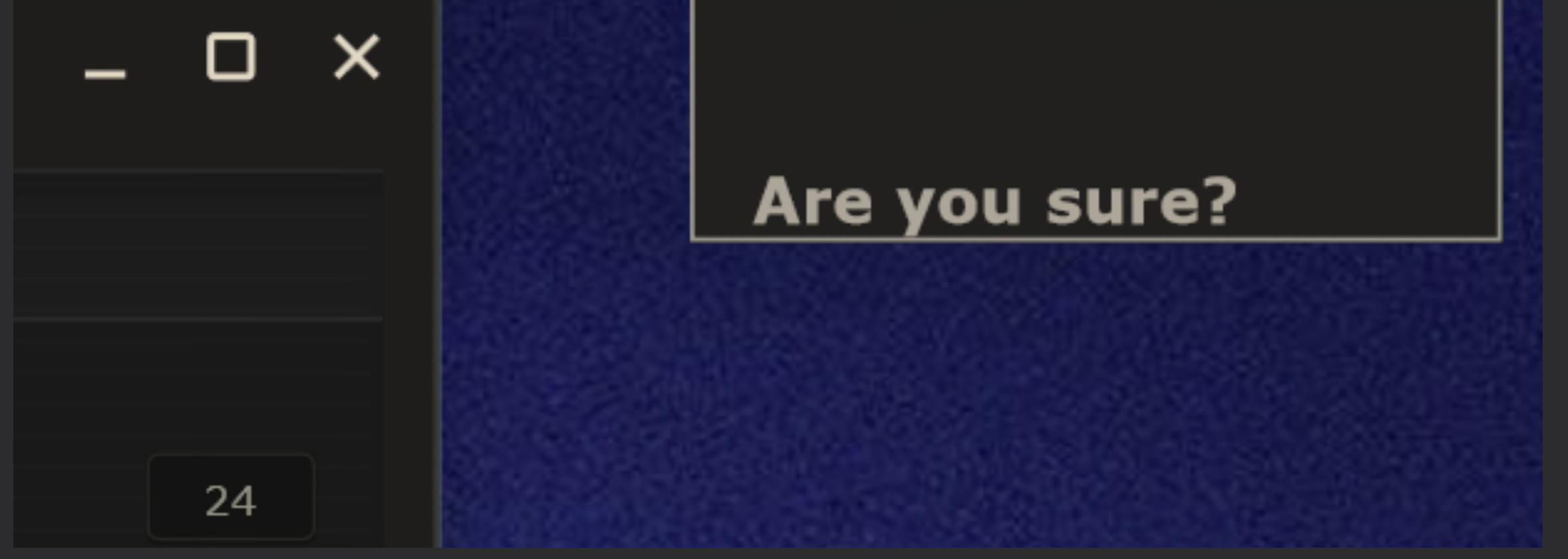
don’t know if this bug was noticed by anyone else but in windows, if you run tape 24 in windowed mode if you try to close the app the button to close is off screen/out of the window so you have to go full screen to shut it down. even in full screen mode the button is a little wonky but it’s clickable.
r/Tape16 • u/amishbeetfarmer • Oct 17 '26
When you make a custom channel strip for another plugin, is there any way to open that plugin to change settings that I couldn't get to fit on the channel strip? For example, I could get the compressor and EQ parameters for the UAD API Vision plugin, but couldn't fit the preamp, gate/expander, etc., but still want to access those controls.
I see that I can open it from inside the edit window, but is there an easier way?
