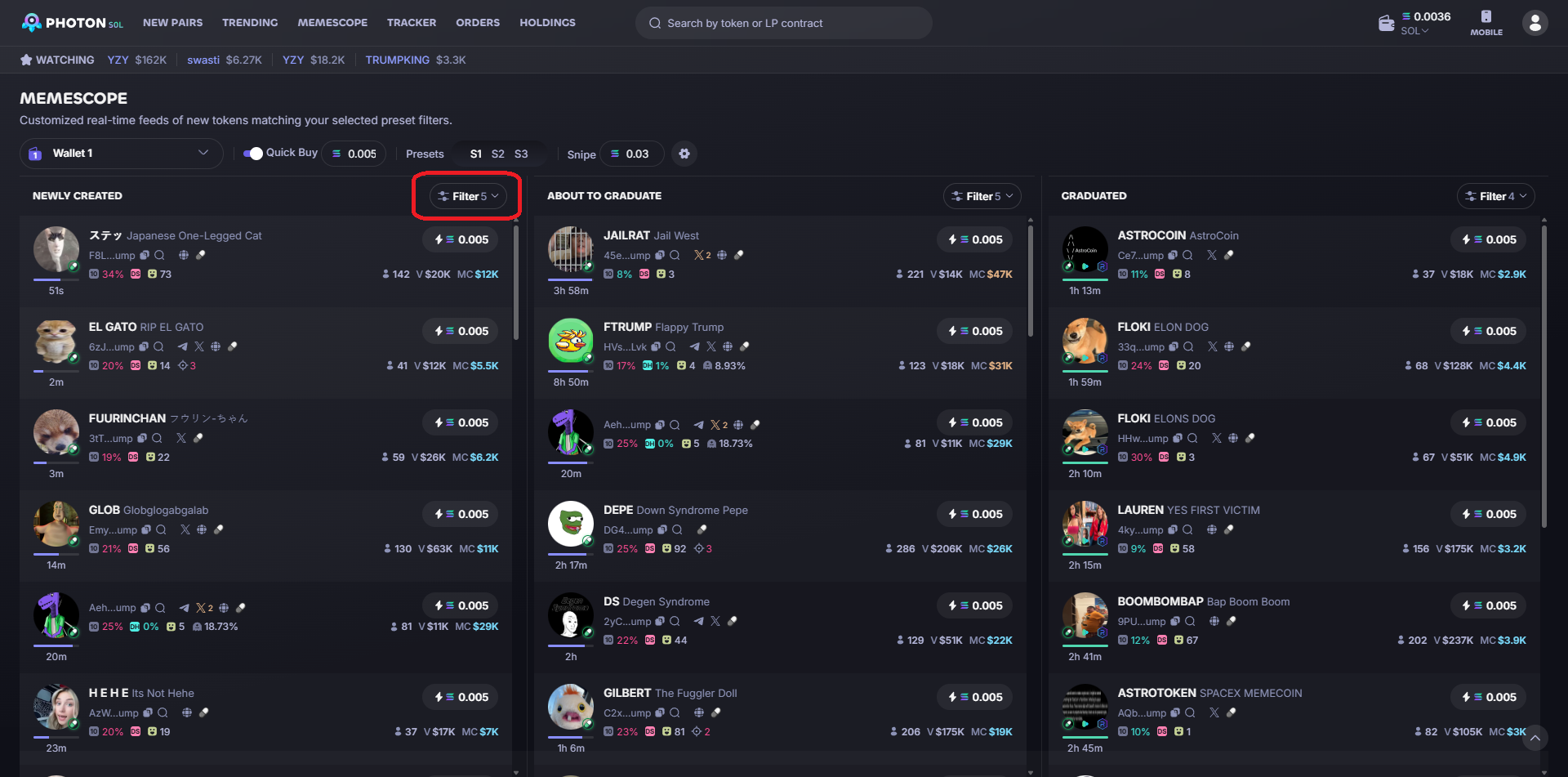
If you’re looking to trade meme coins on multiple blockchains, using Photon Trading web platform can be a game-changer. Photon is the number 1 web/mobile platform to trade meme coins. Supports trading on Solana, Ethereum, Base, Tron, and Blast.
This guide will walk you through the process of how to use Photon to trade meme coins effectively and secure.
Photon offers amazing trading features that make it ideal for both new and experienced traders. Here’s how you can get started:
You go to Photon Sol and connect your phantom wallet, you will be prompted to Photon trading wallet creation screen:
You generate your wallet, and you can get started !
Please note: Your private key will only be shown once! So make sure you copy it somewhere.
Setting Up Filters
To effectively trade meme coins, it’s crucial to set up the right filters. Here’s how:
Quick Buy Options: Enable quick buy for rapid purchases. For example, at the top you can set the value you want to buy (let's say $10), after that on the right part of the screen you can instantly buy any token you see appears on the new pairs screen.
Filters Buttons
In the top right corner, you have the filters button (filters are the most important part before you start trading meme coins). Here you have from security filters to market cap, liquidity, by volume, by sell etc.
Liquidity Filters: Set minimum liquidity requirements to avoid low-liquidity tokens. A good starting point is around $1,000.
Security Filters: Filter out tokens without proper security features like mint authority and LP burned status.
Market Cap Filters: Adjust market cap filters to target smaller, potentially high-growth tokens. For example, you might want to look for tokens with a total market cap of around $20,000.
Note: Play around with these filters to find good coins, your strategy may be different.
Trading on Solana
To snipe meme coins on Solana using Photon the Solana chain is selected by default, but is better to check it before you get stared here you have an image where you can select the chain:
After you selected the token you want to trade on photon, let's take a look on the chart page.
Chart Page
On the chart page you have all the tools you need to make a successful, secure and fast trade. Why I'm saying that ? Let's see !
First, you have the information bubbles represented in real time on your chart.
- to explain in the most simple way, the green bubbles represent something positive happened as the dev bought the coin, and he's still invested in it or a sniper bought from the coin. The red bubbles represent something negative, as the dev just sold he's bag or a sniper sold.
Down below, you have images which represent the situations, as you can see you have all necessary information about what happened in real time.
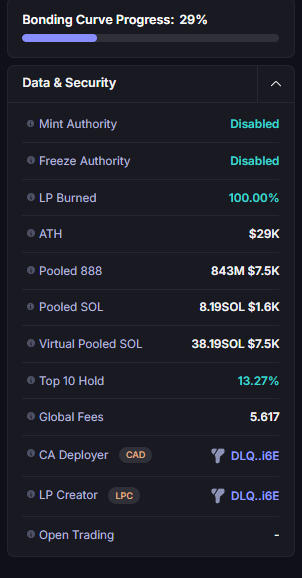
Scrolling down on the chart page, you can find Data & Security
Using this part of the Photon product can save you time and a lot of mistakes that can cost you money. Here you can find :
- Mint Authority
- Freeze Authority
- LP Burned
- Pooled Bro (Bro is the name of the token)
- Pooled SOL
- Top 10 Holders
- Deployed
If we Scroll up, we can find the token details, here you can verify the profile of the token (that's not important in this guide, to verify profile the devs can send the details to photon team so they can mark it as a safe and legit traded token on the platform)
Next you can see the total volume of the token you want to buy from 5m to 24h, the total of the buys and sells + number of transactions and makers.
And you have the buy and sell panel - Scrolling down, we go more into depth about this most important part of trading on photon.
Buy & Sell, Limit Order and Advanced Settings
Let's take every part of the image one by one.
Let's get started :
-In the first image: you have the buy function to select how much of would you have to buy the coin you choose from 0.07 to 10 sols, or you can pick your own value.
- In the second image: you can select from what wallet you want to trade (YES, PHOTON HAVE MULTI-WALLET FUNCTION, IS EXCELLENT !)
- In the third image: situation, you can choose the % you want to sell your token or pick your own value.
- In the fourth image: represents the Auto Sell function - you as a trade can set your own stop loss by MC set the amount you want to sell in % and an expiration time in hrs. In the take profit tab is the same as on stop loss, but here you can choose at what point you want to take profit from your investment and what % you want.
- Last image: you have the Advanced Settings, here you can set your slippage %, the smart-mev protection, set the speed of the trading - priority fee and the bribery Amount.
In the next days there will be new in depth guides aboutphoton. We're going to go in detail how to set up every part for a perfect trade
Here you have everything that you need to see all the details of what is happening with the coin you brought. You can see in real time the transactions, your personal holding the top traders, the holders of the coin, bubble maps with graphics of the in-depth tradings and the dev token. As I said up, Into the next guide we go more in detail about how to use this tabs and maximize your knowledge in Photon.
Memescope
The Memescope feature helps you track and trade Pump.Fun tokens.
New Creations: See the newest tokens created on Pump, Moonshot, Memelive.
About To Graduate: Tokens that almost reached Raydium.
Graduated Tokens: Track tokens that have successfully launched and graduated to platforms like Raydium.
Filter Options: Use filters to refine your search and focus on the most promising tokens.
Conclusion
Photon is a powerful tool and the best one for trading meme coins across multiple blockchains. Its advanced features, like quick buy options, limit orders, and comprehensive filters, make it a valuable asset for any crypto trader.
And an honest opinion, in the end we all want to hit that meme coin that will moon and make us money, we all know that. But, getting there is luck or just knowledge of what you are doing. Taking your time and learning a tool can save you from a lot of headaches and losing money.Photon is fast, secure and give you everything that you need to focus on just 1 screen and do your job until the end. If you have any trouble from: connecting your wallet, to make a buy or a sell, you can all the time join the photon telegram lounge, to communicate your problem. The support is online all the time and everyone is there to help you with your problem.
Crypto is not just random trading. It is knowledge and a little bit of luck, but the most important part is the community you have and the people that are willing to help on your mission, and Photon delivers that.
Welcome back to another guide of Pump.fun strategy posts!
In this guide, we’ll explore a new trading strategy for Pump.fun tokens that focuses on minimizing risk while maximizing rewards. This approach leverages smarter filter settings, allowing you to enter trades at the best moment—right after the developer has sold their tokens but before the newly created Pump.fun token is close to About to Graduate.
At this stage, the developer no longer holds a significant percentage of the supply to dump on you, and demand is surging as traders rush in, anticipating the token's graduation.
Let’s dive in! But first, a quick introduction to Pump.fun for new users to provide context and explain what this is all about.
If you already know what isPump.funjust skip to the next part !
What is Pump.fun?
Pump.fun, launched in January 2024 by a pseudonymous figure named Alon, is a user-friendly platform that allows anyone to create and launch tokens in just minutes, without needing any coding skills. It gained rapid popularity for its simplicity, attracting over 50,000 active users by September and generating more than $100 million in revenue.
The platform focuses on memecoins, allowing users to create, trade, and engage in a fun, social environment. Its success lies in enabling creativity and collaboration, offering a space where users can easily experiment with token creation without facing the usual technical hurdles of blockchain development.
Pump.fun has become a go-to platform for people who want to explore the world of cryptocurrency in a more accessible, enjoyable way. Its ease of use, combined with a lively community, has driven its quick rise in popularity in the crypto space.
How Does it Work?
Pump.fun operates using a bonding curve model for each token issued. This model increases the token price as more buyers invest, encouraging early investments. Early investors benefit the most, as they can profit from the token’s appreciation as demand grows.
The bonding curve helps tokens rapidly gain value, aiming for a significant market cap as quickly as possible. Once a token reaches a market cap of $69,000, it gets listed on Raydium, a popular Solana-based automated market maker (AMM). At this stage, $12,000 worth of the token supply is burned, reducing the circulating supply and supporting further price increases.
Pump.fun enforces a fair launch for all tokens on the platform. There are no vesting schedules, pre-sales, or special allocations to favored investors, ensuring a level playing field. This fair system, combined with the bonding curve and token burning, promotes a healthy and transparent token ecosystem where everyone has equal opportunities to participate and profit.
Step 1 - Using the right memescope and set up the settings
When it comes to catching quick pump plays with minimal risk, one solid strategy is looking for tokens where the developer holds zero tokens. This lowers the chances of the dev dumping on holders and makes it easier to track what the community is doing. The goal is simple: watch the holders, see if they stay in, and check if new buyers are stepping in to wait until About to Graduate happens if is close and the volume is there.
Since these plays are already at the bottom, there's not much room for them to go lower—making it one of the lowest-risk setups you can find. Once a token pops up on the radar with the right filters, it’s all about checking the numbers and deciding if it's worth jumping in.
Go on -https://photon-sol.tinyastro.io/ - The signup process is really fast, just don't forget you save your private key when you are generating a wallet.
After you set up everything, go on memescope page :
On memescope page we can see 3 different columns, Photon-Solthat categorizes pump fun meme coins into three stages:
Newly created
Approaching bonding (around $100,000 market cap)
Graduated (fully bonded, often gaining more attention).
Click on filter at the NEWLY CREATED - And add the image down below settings:
Right now, we're keeping an eye on this token under some key conditions. The main thing? The dev holds zero tokens and the top 10 % holders icon is on green color. That’s a big plus because it means there’s less chance of a rug pull or sudden dump from a single large holder.
What We’re Watching
Checking if current holders are sticking around.
Looking for new buyers to see if interest is growing.
The risk is super low since the token is already at a low valuation. Since it’s a pump play, the downside is pretty limited.
Quick Stats
Pump Progress: 99%
Total Holders: 35
Dev Holdings: 1%
Market Cap: $4,000
This one popped up through our filters, so this will take a bit, at some hours the tokens are not popping this will take some time.
As an example of this tokens :
Top 10 holders % is in green the dev sold, and the last icon represent the traders are using platforms to trade the token and still holding.
Step 2 - Buy in fast Settings
On the memescope page, you have a quick buy button that you can toggle on to use it. This is a huge help to snipe / get in fast when a new token is pop up.
BUT BEFORE YOU NEED TO MAKE YOUR SETTINGS TO ENSURE THAT YOU ARE NOT SELLING ON LOST
Make your presets / settings for your quick buy
In the top right corner you have your profile - hover it and go to settings
Here you have the settings for your preset 1 :
The settings are different from person to person, depends on how much you want to invest. Because this tokens are not at a big lunch, I recommend sitting on 15% slippage and play around with PRIORITY FEE and BRIBERY AMOUNT. If you have any trouble with the settings or questions, please join the telegram community ofPHOTON-SOL- there are supports 24/7, and they can help you with your problems.
Step 3 - Watch and watch....until you find something
After you are spending some time watching for something good - and you are start buying, as an example this WIS that I found.
This is how a chart looks like - I entered late because I wasn't paying enough attention. The dev sold - everything is on green the Pump.fun is migrating the token and life is good.
What to understand, there can be situation of group of people to pump tokens like this, and you still can get dump really easy. If you are getting in at the moment DEV sold, and they are waiting until the Pump.fun migration is starting you are already a 30%-50% on plus, just sell. Don't wait and be greedy, make your gains step by step, don't force this !
Managing Risk and Don't forget :
Start Small: Begin with minimal investments and scale up as you gain experience.
Accept Losses: Losses are part of the learning process, especially in the meme coin market. Focus on overall profitability rather than individual trades.
Avoid FOMO: Check the token before, and watch the chart - if you are getting in on quick buy, please be careful and sell on decent % and don't force it.
Conclusion
This approach is all about minimizing risk while maximizing potential gains in pump plays. By focusing on tokens where the developer holds zero tokens, we reduce the chances of sudden dumps and can better track what real holders are doing. Watching for new buyers and holder retention helps gauge momentum, while the low valuation keeps the downside limited.
Of course, no strategy is foolproof, and timing is everything. But with the right filters and careful monitoring, this method gives a solid edge in spotting opportunities with the least amount of risk possible. Always do your own research, trust the data, and move smart!
PHOTON-SOLis a powerful tool and the best one for trading meme coins across multiple blockchains. Its advanced features, like quick buy options, limit orders, and comprehensive filters, make it a valuable asset for any crypto trader.
And an honest opinion, in the end we all want to hit that meme coin that will moon and make us money, we all know that. But, getting there is luck or just knowledge of what you are doing. Taking your time and learning a tool can save you from a lot of headaches and losing money.Photon is fast, secure and give you everything that you need to focus on just 1 screen and do your job until the end. If you have any trouble from: connecting your wallet, to make a buy or a sell, you can all the time join the photon telegram lounge, to communicate your problem. The support is online all the time and everyone is there to help you with your problem.
Crypto is not just random trading. It is knowledge and a little bit of luck, but the most important part is the community you have and the people that are willing to help on your mission, and Photon delivers that.
Hey everyone, welcome back to another pump.fun strategy breakdown!
Today I'm sharing a game-changing approach that's been working incredibly well - it's all about timing your entries perfectly to catch maximum upside while dodging the biggest risks. We're talking about jumping in right after developers dump their bags but before tokens hit that sweet spot where they're about to graduate.
Here's why this timing is pure gold: the dev can't rug you anymore since they already sold, but you're still early enough to ride the graduation wave when FOMO kicks in and everyone starts piling in.
This strategy is beautifully simple - you only need one tool to execute it flawlessly.
Before we jump into the meat of this strategy, let me quickly break down pump.fun for anyone who's new to this space.
Already familiar with pump.fun? Feel free to skip ahead to the strategy section!
How Does Pump.fun it Work?
Pump.fun uses this clever thing called a bonding curve - basically, as more people buy a token, the price automatically goes up. It's like a built-in hype machine that rewards the early birds who get in first.
Here's the beautiful part: the earlier you are, the cheaper you get in. As demand builds and more people pile in, your tokens become worth more. It's designed to create this snowball effect where tokens can pump rapidly toward that magic number everyone's chasing.
The real game-changer happens when a token hits $69,000 market cap - that's when it "graduates" to Raydium (which is like the big leagues for Solana tokens). When this happens, they actually burn $12,000 worth of tokens, which reduces the supply and can send prices even higher.
But here's what I love most about pump.fun - it's completely fair. No insider bullshit, no pre-sales for VCs, no team allocations. Everyone starts at the exact same price when a token launches.
This means you're not getting dumped on by some team that got tokens for free, and you're not competing against institutional investors who got in at a discount. It's just pure market dynamics - whoever believes in a token first gets the best price.
That's why this platform has been such a game-changer. Finally, retail traders like us can get in on the ground floor without getting screwed by the traditional tokenomics games.
Step 1 - The Filters Settings
Alright, here's the filter setup that's been absolutely crushing it for me. We're specifically hunting for tokens where the developer has ZERO tokens left.
Why is this so powerful? Simple - no dev means no rug pull risk. You're not going to get dumped on by some anonymous creator who's been waiting to cash out on retail. It's literally one of the safest setups in the entire memecoin space.
Here's the strategy broken down:
Target: Dev wallet = 0% holdings
Watch: Community holder behavior
Track: New buyer momentum
Wait: For "About to Graduate" status with strong volume
This is what I call "bottom fishing with intelligence." Since these tokens are already at rock bottom prices, there's minimal downside risk. You're essentially buying the dip after the worst-case scenario (dev dump) already happened.
Pro tip: Sign up takes literally 30 seconds, but DO NOT lose your private key when generating the wallet. Write it down somewhere safe.
Once you're set up, head straight to the memescope page :
On memescope page we can see 3 different columns, Photon-Solthat categorizes pump fun meme coins into three stages:
Newly created
Approaching bonding (around $100,000 market cap)
Graduated (fully bonded, often gaining more attention).
Click on filter at the NEWLY CREATED - And add the image down below settings:
Right now, we're keeping an eye on this token under some key conditions. The main thing? The dev holds zero tokens and the top 10 % holders icon is on green color. That’s a big plus because it means there’s less chance of a rug pull or sudden dump from a single large holder.
What We’re Watching
Checking if current holders are sticking around.
Looking for new buyers to see if interest is growing.
The risk is super low since the token is already at a low valuation. Since it’s a pump play, the downside is pretty limited.
Quick Stats
Pump Progress: 99%
Total Holders: 35
Dev Holdings: 1%
Market Cap: $4,000
This one popped up through our filters, so this will take a bit, at some hours the tokens are not popping this will take some time.
As an example of this tokens :
Top 10 holders % is in green the dev sold, and the last icon represent the traders are using platforms to trade the token and still holding.
Step 2 - Buy in fast Settings
On the memescope page, you have a quick buy button that you can toggle on to use it. This is a huge help to snipe / get in fast when a new token is pop up.
BUT BEFORE YOU NEED TO MAKE YOUR SETTINGS TO ENSURE THAT YOU ARE NOT SELLING ON LOST
Make your presets / settings for your quick buy
In the top right corner you have your profile - hover it and go to settings
Here you have the settings for your preset 1 :
The settings are different from person to person, depends on how much you want to invest. Because this tokens are not at a big lunch, I recommend sitting on 15% slippage and play around with PRIORITY FEE and BRIBERY AMOUNT. If you have any trouble with the settings or questions, please join the telegram community ofPHOTON-SOL- there are supports 24/7, and they can help you with your problems.
Step 3 - Watch and watch....until you find something
After you are spending some time watching for something good - and you are start buying, as an example this WIS that I found.
This is how a chart looks like - I entered late because I wasn't paying enough attention. The dev sold - everything is on green the Pump.fun is migrating the token and life is good.
What to understand, there can be situation of group of people to pump tokens like this, and you still can get dump really easy. If you are getting in at the moment DEV sold, and they are waiting until the Pump.fun migration is starting you are already a 30%-50% on plus, just sell. Don't wait and be greedy, make your gains step by step, don't force this !
Managing Risk and Don't forget :
Start Small: Begin with minimal investments and scale up as you gain experience.
Accept Losses: Losses are part of the learning process, especially in the meme coin market. Focus on overall profitability rather than individual trades.
Avoid FOMO: Check the token before, and watch the chart - if you are getting in on quick buy, please be careful and sell on decent % and don't force it.
Conclusion
This approach is all about minimizing risk while maximizing potential gains in pump plays. By focusing on tokens where the developer holds zero tokens, we reduce the chances of sudden dumps and can better track what real holders are doing. Watching for new buyers and holder retention helps gauge momentum, while the low valuation keeps the downside limited.
Of course, no strategy is foolproof, and timing is everything. But with the right filters and careful monitoring, this method gives a solid edge in spotting opportunities with the least amount of risk possible. Always do your own research, trust the data, and move smart!
PHOTON-SOLis a powerful tool and the best one for trading meme coins across multiple blockchains. Its advanced features, like quick buy options, limit orders, and comprehensive filters, make it a valuable asset for any crypto trader.
And an honest opinion, in the end we all want to hit that meme coin that will moon and make us money, we all know that. But, getting there is luck or just knowledge of what you are doing. Taking your time and learning a tool can save you from a lot of headaches and losing money.Photon is fast, secure and give you everything that you need to focus on just 1 screen and do your job until the end. If you have any trouble from: connecting your wallet, to make a buy or a sell, you can all the time join the photon telegram lounge, to communicate your problem. The support is online all the time and everyone is there to help you with your problem.
Crypto is not just random trading. It is knowledge and a little bit of luck, but the most important part is the community you have and the people that are willing to help on your mission, and Photon delivers that.
Tired of Watching Meme Coins Moon Without You? You’re not the only one. I used to ask myself all the time: How do people find winning wallets early? Is it even possible to copy trade Solana whales without blowing up my bag?
Here’s the good news: It’s not only possible — it’s way easier than you think. I’ll walk you through how to track top-performing Solana whale wallets for smarter copy trading.
First, What Are Solana Whale Wallets?
Before we dive into the tracking side, here’s a quick definition: Solana whale wallets are addresses holding large amounts of SOL or Solana meme coins. They have the power to move markets. When they make moves, prices follow — and if you’re tracking them, you can ride those waves instead of getting left behind.
Step 1: Use the Right Tools
Open these up — they’re your edge:
DEX Screener – Perfect for spotting trending coins before they explode.
Gatekept.io – Your secret weapon to uncover wallets consistently killing it across meme coins.
PHOTON-SOL - The best tool for tracking wallets and trade them instantly
No fluff, no filler — just real strategies to help you win.
Step 2: Spotting Hot Meme Coins First
Head to DEX Screener. Your aim? Find 3 meme coins that recently popped off. Look for coins with solid gains — think $2M, $7M, even $25M market caps quickly.
Click on a coin with big recent pumps.
Grab the contract address (easy to copy from DEX Screener).
Repeat for three recent winners.
You’ve got your ammo, now let’s track down the whale.
We copy the contract address and then — Go in navigation bar to tracker > Wallet Tracker > Press +Add Button.
After that, you can create your tracking wallets page, where you'll find all the information about the wallets you're monitoring—helping you successfully copy their trades
How to Use Wallet Tracker Effectively:
Add Successful Wallets:
Start by adding wallets of known successful traders
Look for wallets that consistently show up in the "Top Traders" section of various tokens
You can also track wallets of influencers who have a good track record
Monitor New Buys:
Pay special attention to new purchases by successful wallets
Multiple successful wallets buying the same token is a strong signal
Look for early entries into new projects
Track Selling Patterns:
Watch for sudden selling activity from tracked wallets
If multiple successful traders start selling a token you hold, consider taking profits
Combine with Memescope:
Use Wallet Tracker alongside Memescope for powerful validation
When you find a promising token in Memescope, check if any successful wallets are also buying it
This combined approach significantly improves your odds of finding winning trades
Step 5: Settings and General Information about Trading on Photon-Sol
Before every trade, it is important to set up your settings. You can get to the settings page by clicking on your avatar icon in the top right corner.
Quick buy/Quick Sell This is where you'll be able to have full control over your trading experience For Buying and Selling, you have full control over the following settings:
Slippage: how much more/less tokens you'll receive from a trade due to price volatility
Example of slippage: Suppose you wanted to buy a $XYZ at US$10.00. You place your order, but when it's confirmed, you realize that it got filled at a higher price of US$10.50.
This scenario is an example of negative slippage because you bought in at a higher price than you wanted to, which decreases your total buying power.
Conversely, positive slippage occurs when you place a buy order at US$10.00 but the order is confirmed at a price of US$9.50. The lower price thereby increases your purchasing power.
Priority Fee: This is the additional fee made to have your transaction completed faster. This fee is better known as a tip because it provides an economic incentive for Solana validators to confirm your transaction before others
Bribe: This fee goes directly to the JITO validators to incentivize them to pick up and confirm your transactions.
Trading Presets: You can set up to 3 different trading profiles (S1/S2/S3) to adjust your smart-mev protection, priority, bribe and slippage settings Once set up, from the buy menu on any token page, you'll be able to click on S1/S2/S3 to instantly switch between any one of your 3 trading presets, depending on the situation.
For Auto-Buy - you can specify the % change in market cap for S1/S2/S3
For Auto-Sell - you can specify the % change in market cap & the % of holdings you'd like to sell for S1/S2/S3
Set up your limit order / stop loss
limit orders on Photon to help our users automate their trading and better time their trades. Let’s dive right into it.
There are 3 types of orders: Buy dip, stop loss and take profit.
Let’s take a look at Buy dip first. For limit orders, there are 3 ways to set your target market cap:
The first is MC drop by % - use this if you have a target market cap in mind that you want to buy in at. You’ll also see that the market cap and the price numbers here are also updating in real-time.
The next option is to state an exact market cap - we’ll trigger the order for you the moment when the market cap is equal to or less than your stated number
And third, you can use our target line. This one is a game-changer for all of the chart lovers out there. You can now execute your buy dip orders by visually selecting the target on the screen, allowing you to execute strategies based on resistance points and other metrics. All you have to do is drag, set and create order. Expiration Date: you can also specify when the order should expire if it doesn't execute within a certain time frame. Choose from 24/28/72 hour time intervals
After you click on Create Order, you’ll see all the detailed info show up under the new Orders tab as an active order.
As with everything on Photon, you can adjust the priority fee and bribe for all limit orders. Make sure to set a sufficiently high Priority + Bribe amount - these 2 play a key role in being included in the block (if you set it too low, your limit order may not get in as early as possible)
Stop Loss
Moving on now to the limit sell orders:
Stop Loss - again, you’ll have the 3 ways of setting the target price and market cap. Next, you’ll need to specify what percentage of your holdings you’d like to sell. Adjust your settings, then you’re done.
Take Profit - select your target price/market cap, sell amount and done.
Managing Risk and Don't forget :
Start Small: Begin with minimal investments and scale up as you gain experience.
Accept Losses: Losses are part of the learning process, especially in the meme coin market. Focus on overall profitability rather than individual trades.
Avoid FOMO: Check the token before, and watch the chart - if you are getting in on quick buy, please be careful and sell on decent % and don't force it.
PHOTON-SOLis a powerful tool and the best one for trading meme coins across multiple blockchains. Its advanced features, like quick buy options, limit orders, and comprehensive filters, make it a valuable asset for any crypto trader.
And an honest opinion, in the end we all want to hit that meme coin that will moon and make us money, we all know that. But, getting there is luck or just knowledge of what you are doing. Taking your time and learning a tool can save you from a lot of headaches and losing money.Photon is fast, secure and give you everything that you need to focus on just 1 screen and do your job until the end. If you have any trouble from: connecting your wallet, to make a buy or a sell, you can all the time join the photon telegram lounge, to communicate your problem. The support is online all the time and everyone is there to help you with your problem.
Crypto is not just random trading. It is knowledge and a little bit of luck, but the most important part is the community you have and the people that are willing to help on your mission, and Photon delivers that.
Maybe you’ve gotten tired of analyzing every trending crypto coin day by day and not making much profit.
It can be a significant time-waster to look at the charts all day, worrying about when to buy and sell a coin. Even when we get a good position, much of the time, it still goes to zero.
Without inside knowledge, it is pretty hard to find a very good project early.
This article will be about a method you can use to possibly get into new crypto coins as early as possible or get good trades frequently without any extra insider knowledge.
First here are the links we used on this guide for trading:
As you might have guessed from the title, the method is copying other wallets that may have insider knowledge. Many of the wallets we will be discussing have made huge profits on small investments just by investing early in the right coins.
PROMO—join now trojan on solana and receive 15% reduction on fees for life + New Cashback function:https://t.me/solana_trojanbot
Let’s look at some tools you can use to find profitable wallets.
DexScreener
The most basic tool is DexScreener. DexScreener is a website that monitors all the new and hot crypto coins.
Here we can see all the hottest crypto coins from every chain.
From here, we are going to select, for example, the Popcat coin, which has significantly grown in the past few days.
If we click on the coin, we will see a chart and a list at the bottom of the screen containing the latest transactions. There, we need to click on the “Holders” button.
We can see that lots of holders have a significant amount of the coin. Let’s find one who bought very early and invested a small amount of money compared to their current positions.
We can see that this wallet bought very early when Popcat’s price was less than half a cent (currently at $0.79, which is a 341x increase if we look at this best buy). This wallet has made about $14 million from an initial investment of a couple of thousand dollars, and they still have not sold their position. Additionally, this wallet has repeated these successful trades on many other coins.
One of their more recent success stories was on a coin called ‘hehe’, which is currently sitting at a $9.4 million market cap. The wallet bought in extremely early, around an $80k market cap.
The most basic thing to do is to look at Solscan. We just click on the wallet address on DexScreener, and it will take us to solscan.io:
Under DefiActivities, you can look at the most recent trades of the user. (I am saying ‘most recent’ because, for some reason, Solscan’s ‘DefiActivities’ does not display older transactions).
PROMO—join now trojan on solana and receive 15% reduction on fees for life + New Cashback function:https://t.me/solana_trojanbot
Let’s look at some more sophisticated and interesting tools.
Advanced Tools
To determine if the wallet we want to copy-trade is worth copying, we have to analyze the profits it is making.
GMGN.AI
GMGN.ai is a new platform that functions as a web wallet, allowing you to buy and sell coins. It also has AI capabilities for analyzing trading activity, wallet addresses, and coins on the blockchain.
To find wallets, you just have to select a crypto coin on GMGN.ai — the more popular, the better.
GMGN analyzes each of the wallets that traded this coin and categorizes them into categories such as KOL, Insiders, Whale, SmartMoney, and Snipers.
You can use these indicators to find wallets you like and that have the desired trading style. For example, selecting the top holders can be a great starting point.
Step 2: PnL Analysis
You have selected a wallet from the categories you liked.
Just paste the wallet address into the search box, and GMGN will generate a PnL and position analysis for each token the wallet has bought.
From there, you will see what other trades the wallet made and how much profit they made or lost on each coin, along with a summary of trades for the past 7 and 30 days, respectively. On the right, you can see that GMGN generates a distribution scale, which splits the number trades into success ranges based on how much profit or loss they made.
This is a great way to determine if the wallet has made profits recently and to see the success rate of the wallet. Keep in mind that the PnL analysis only takes in account the last 30 or 7 days.
Through telegram (alternative)
Another great option for PnL and trade analysis is the Zelfiguru Solana Telegram bot. Which you can acess here:
When you have selected a wallet you like, you can follow the wallet by clicking on the “Follow” button inside GMGN.
When you follow a wallet, you will see all the trading activity the wallet has made.
Additionally, GMGN offers a telegram bot, that you can set up to get notified about each trade the wallets you follow have made:
As an extra feature, if you want to replicate that same trade, you can use their Telegram sniper bot to buy the coin by clicking on the “Quick Buy” button.
Step 4: Copy trade
Once you have found a wallet and you have made sure that the wallet is reliable and consistently making profits.
The final step is to follow each action the wallet takes. We are going to buy when the wallet buys and sell a percentage of the coin whenever the wallet sells.
We are going to use the Trojan bot to copy trade as it offers lots of extra features for copy trading.
(it uses the link above you will get 15% discount on fees for life + cashback promo per trade)
When you open the bot for the first time, you will be greeted with this screen. (First, you will have to send Solana to the bot’s wallet address, which you will find at the top of the first message.)
Once we have some solana, we are going to set up the copy trading. Click on “Copy Trade”.
From there we have to click on “New”. We will be greeted with the following menu:
Here click on the “Tag”, and input a name you want to give your wallet, it can be anything.
Once that’s done, click on the “Target Wallet” button and paste in the wallet address you want to copy.
You can then adjust the “Buy Percentage”, which you can specify either in percentage (%) or in fixed SOL amounts, for example 0.5 SOL. (That will be 0.5 SOL/trade)
Additionally, you can disable automatically copying sells and set up additional criteria in “Advanced Features” such as minimum andmaximum marketcap for coins that you are willing to copy trade. You can also disable copying pump.fun trades, as they are enabled by default.
Once you have configured everything, just click on “Add”, and your copy trading bot will now listen for trades on the wallet you just set up.
Now that you know how to setup copy trading, let’s look at some interesting wallets which have made huge profits and were very early in projects that have exploded.
Disclaimer: Keep in mind that this is not financial advice. Follow these steps completely at your own risk, and ALWAYS invest money you are willing to lose. Really, only invest money you are willing to lose, speaking from experience.
Interesting Wallets to Look Up
8CGJPWdM7xZX5E2ZE7qw5TiNUgpLyUeXJAnHr5goezeD— turned $682 into $5.3 million
DVMnHHwq9SNxj4Bhd8mim1AacXfPemu6WsK8ox7Vexhg — turned $464 into $11.8 million last season
9qwZtGC9B1isBzj3gyHtM57ffiyY2jvGUt2XP28hHHmS — very early in $WIF
7Chh6t175ceh1LETpvqo297e6m8MpiaYysfLqE4hMUj4 — very early in $mini
EECqB6uKRixjVGpYBHiCf4CvX1EAJ4XCSQSrkr8ALWmC — $64 to $123k from $michi
Downsides and Dangers of Copy Trading
You will always buy after the wallet you are copy-trading and sell after the wallet sells, so you can be used as exit liquidity when the wallet decides to sell, this is more dangerous on small market cap projects.
The wallets can and will obviously make bad trades and you will lose money alongside them.
The wallets can invest into rugs, where you can basically lose all your money.
Lots of wallets will deliberately dump on copy traders to make some quick profits.
Copy-trading can come with many other disadvantage that is why it is advised that only you follow reputable wallets that are longer-term holders and to invest only money you are willing to lose.
Conclusion
We have explored how to find profitable wallets and copy-trade on solana.
By copy-trading we can trade completely automatically
Copy-trading has its own advantages and definitely has the possibility to make some money.
Also, as it has great possibility of making money, it has similarly big possibility of losing money.
It is crucial to copy-trade only wallets you trust and to invest only money you are not afraid to lose.
Welcome to the ultimate beginner's guide to trading memecoins on Pump Fun, the go-to platform for Solana-based memecoin trading. Whether you're a complete newbie or someone looking to refine your strategy, this guide will walk you through everything you need to know to trade safely, securely, and profitably in 2025.
Memecoins are a unique subset of cryptocurrencies, often driven by community engagement and cultural relevance rather than traditional utility. Pump.fun, a Solana-based memecoin generator, provides an accessible platform for creating and trading these tokens. However, identifying a promising memecoin requires careful evaluation to avoid scams or poor investments. Here’s a guide to finding a good memecoin on Pump.fun.
What is important to understand before trading on Pump Fun?
Understand the Platform Pump fun allows users to create and trade memecoins instantly by connecting a Solana wallet. Its integration with Solana ensures low fees and fast transactions.
Evaluate the Coin’s Appeal Successful memecoins have clear themes, often based on humor, pop culture, or trends. Some on Pump fun are “celebcoins,” gaining traction from celebrity fanbases.
Analyze the Team Check if the creators are transparent. While anonymity is common, coins backed by known developers or influencers may be more trustworthy.
Examine Tokenomics Look for fair supply limits and distribution. Avoid coins where most tokens are concentrated with the creators, as they may be pump-and-dump schemes.
Assess Community Engagement An active community on Discord, Telegram, or Twitter is a strong indicator of a coin’s potential success.
Check Market Metrics Use platforms like Raydium to assess liquidity and trading volume, ensuring genuine interest in the token.
Beware of Red Flags Avoid coins with unclear intentions, exaggerated claims, or no clear roadmap.
Let's break down a bit pump view
recently if you are checking pump fun almost every coins are rugs. I found out it will be obvious to look for some tools to find some track records of devs and whether the dev is serious about the token. One website particularly I found ispumpview.xyz
this gives an insight of a token on pumpfun
Dexscreener Enhanced token profile - paid or not paid. It cost $299 to get an enhanced token profile. Most serious devs will pay the money before the token reaches raydium. So I check for tokens who are pre-paid. For example, you can check any token whether it's paid or not paid and dev token launch history on this tool
here at the top you can search for the token you are looking for or you can scroll down and see the list of newly launched tokens
you can click and view details of any token from this list like the one shown below
it also show if the dev is an active rugger by the list of all tokens he launched
This Tool can be a key to understand what is a rug or not on pump fun, but you need a good tool to snipe fast the next 100x coin.
Here comes in game Photon-Sol -
Photon-Sol:Trading platforms that offer advanced tracking and filtering features, such as holder distribution and wallet connections.
Memescope: A tool within Photon-Solthat categorizes pump fun meme coins into three stages:
Newly created
Approaching bonding (around $100,000 market cap)
Graduated (fully bonded, often gaining more attention).
(In other guide I used different settings that were much riskier, in these guides the settings are much safer, and you will get fewer rugs on your screen)
Begin by navigating to Photon-Sol and filtering tokens by their creation time. Focus on emerging projects with low market caps that are gaining momentum. Once you spot an intriguing project, take a close look at its bonding progress.
Tokens approaching a $100,000 market cap are typically on the brink of being fully bonded, which tends to draw more attention and may signal their transition into “real” meme coins.
Use this filters at NEWLY CREATED TOKENS:
You will get less recommendation token per second, but the tones will be much safer and there will be less chance to get rugged by the dev.
Identifying Red Flags
Starting from the left to right:
Top 10 Holders %: This value should be shown in green.
Dev Holding %: This percentage also needs to appear in green.
Brought via Trading Bot/Platform: Make sure these tokens are still held.
Insiders Holding %: Aim for around 30% or lower—lower is better.
Snipers: A lower number here indicates a safer position for you!
Trading Settings and setup stop loss
Entering Trades
Set your slippage tolerance between 15% and 20% to account for rapid price changes.
Bribery Amount - used/sent for both Fast & Secure Transaction, if the amount is bigger the faster you are to get in and out.
Always buy and sell manually to maintain control over your trades.
Auto Sell
Stop Loss - again, you’ll have the 3 ways of setting the target price and market cap. Next, you’ll need to specify what percentage of your holdings you’d like to sell. Adjust your settings, then you’re done.
Take Profit - select your target price/market cap, sell amount and done.
Managing Risk and Don't forget :
Start Small: Begin with minimal investments and scale up as you gain experience.
Accept Losses: Losses are part of the learning process, especially in the meme coin market. Focus on overall profitability rather than individual trades.
Avoid FOMO: Never chase a coin that’s already skyrocketed. Wait for pullbacks and confirm higher lows before entering.
Conclusion
Learning how to snipe pump fun meme coins requires patience, practice, and the right tools. The majority of these coins won’t succeed, but using these settings and checking the token before buying can save you from rugs. Photon-sol is the best tool in the game that can help you to have all the needed information on one screen before you start trading.
Don't forget - Use the filters settings set Stop Loss all the time so you can manage your losings when it is needed.
PHOTON-SOLis a powerful tool and the best one for trading meme coins across multiple blockchains. Its advanced features, like quick buy options, limit orders, and comprehensive filters, make it a valuable asset for any crypto trader.
And an honest opinion, in the end we all want to hit that meme coin that will moon and make us money, we all know that. But, getting there is luck or just knowledge of what you are doing. Taking your time and learning a tool can save you from a lot of headaches and losing money.Photon is fast, secure and give you everything that you need to focus on just 1 screen and do your job until the end. If you have any trouble from: connecting your wallet, to make a buy or a sell, you can all the time join the photon telegram lounge, to communicate your problem. The support is online all the time and everyone is there to help you with your problem.
Crypto is not just random trading. It is knowledge and a little bit of luck, but the most important part is the community you have and the people that are willing to help on your mission, and Photon delivers that.
If you've been fascinated by the explosive profits in meme coins but don't know how to get started without getting scammed, you're in the right spot. This guide will show you how to effectively catch pump fun meme coins early while steering clear of common traps like rug pulls. Whether you're just starting out or already have some experience, this step-by-step walkthrough covers all the essential tools, tactics, and strategies you'll need.
Pump.fun meme coins are usually small-cap tokens that get launched on platforms like Pump.fun. These coins frequently blow up and create buzz through social media campaigns or grassroots community marketing.
Some take off for a short run, making traders fast money, while others tank just as quickly often because of scams or weak foundations. Getting a solid grasp on how these coins operate and what makes them move is essential before you start trading.
Before diving in, you’ll need a few tools to help you assess and trade these coins effectively. Here are the top recommendations:
Photon-Sol:Trading platforms that offer advanced tracking and filtering features, such as holder distribution and wallet connections.
Memescope: A tool within Photon-Solthat categorizes meme coins into three stages:
Newly created
Approaching bonding (around $100,000 market cap)
Graduated (fully bonded, often gaining more attention).
Step 1: Spotting Meme Coin Launches
Start by heading to Photon-Sol and filtering coins by creation time. Look for tokens with low market caps that are gaining traction. Once you find an interesting project, examine its bonding progress.
Coins nearing $100,000 in market cap are typically on the verge of being fully bonded, attracting more eyes and potentially becoming “real” meme coins.
Use this filters:
memescope got a new update:
- Refreshed UI + new search bars per feed, - Customizable data points for all tokens, - Big Quick buy button, - Socials + website filter, - Quick toggle between 3 presets per feed, - Sound noti’s for each feed, - Blacklist devs, - Additional token filters for data + audit results, - Link preview for Youtube/Tiktok/Instagram, - Ability to save chart indicators and apply it across all tokens, - Added up to 6 options for % to sell, - Direct links to LaunchCoin and LetsBonk from Memescope and token page, - Addition of Average Sell Price and reorganized your own trade indicators under My Trades, - Ability to hover over image on Memescope and token page to see enlarged version, - Added Migration indicator on token pages
Step 2: Analyzing Holder Distribution
Holder distribution is a key indicator of a coin’s legitimacy. Use the bubblemap functionality on PHOTON-SOL to examine the percentage of tokens held by top wallets / Dev, by clicking on the token you are deciding to buy and the bubblemap tabs under the chart.
Avoid coins where a single wallet (excluding liquidity pools) holds a disproportionate share, as this increases the likelihood of a rug pull.
Step 3: Identifying Red Flags
Stay alert for the following warning signs:
Sniper Buys: When multiple wallets purchase large amounts simultaneously during a launch, it’s often a coordinated scam.
Snap Function
With this feature, you can pin the wallets you're tracking to your screen and monitor their activity in real time. You'll get instant notifications about who bought what, along with detailed information on each wallet. And you can track posts on X of popular personalities.
Step 5: Trading Strategies
Entering Trades
Set your slippage tolerance between 15% and 20% to account for rapid price changes.
Bribery Amount - used/sent for both Fast & Secure Transaction, if the amount is bigger the faster you are to get in and out.
Always buy and sell manually to maintain control over your trades.
Exiting Trades
Take profits at key resistance levels, such as previous highs or round-number targets.
Leave a “moon bag” (a small portion of your holdings) if the coin shows strong upward momentum.
Step 6: Managing Risk
Start Small: Begin with minimal investments and scale up as you gain experience.
Accept Losses: Losses are part of the learning process, especially in the meme coin market. Focus on overall profitability rather than individual trades.
Avoid FOMO: Never chase a coin that’s already skyrocketed. Wait for pullbacks and confirm higher lows before entering.
Photon-Sol latest updates:
MEMESCOPE 2.0 – Available now
Trade how you want w/ the ALL NEW fully-customizable memescope page
Refreshed UI + new search bars Customize all data points that matter to you Big Quick buy button Socials + website filter Quick toggle between 3 presets per feed
Conclusion
PHOTON-SOL is a powerful tool, but only if you know how to use it. By setting up the right filters, automating your trades, and using features like wallet tracking and MEV protection and MEMESCOPE, you can trade meme coins with confidence.
PHOTON-SOLis a powerful tool and the best one for trading meme coins across multiple blockchains. Its advanced features, like quick buy options, limit orders, and comprehensive filters, make it a valuable asset for any crypto trader.
And an honest opinion, in the end we all want to hit that meme coin that will moon and make us money, we all know that. But, getting there is luck or just knowledge of what you are doing. Taking your time and learning a tool can save you from a lot of headaches and losing money.Photon is fast, secure and give you everything that you need to focus on just 1 screen and do your job until the end. If you have any trouble from: connecting your wallet, to make a buy or a sell, you can all the time join the photon telegram lounge, to communicate your problem. The support is online all the time and everyone is there to help you with your problem.
Crypto is not just random trading. It is knowledge and a little bit of luck, but the most important part is the community you have and the people that are willing to help on your mission, and Photon delivers that.
Photon-Sol has been a dominant player on the trading bot scene for a while now. Although,Photon-Sol has seen a huge growth in both users and trading volume , as can be seen from Dune Analytics data below.
In this article I will explain the most important features on Photon-Sol, how to use it and list answers to the most frequently asked questions that traders have on Photon-sol.
Here are listed some of the key features (not all features) that set Photon-Sol apart, specially from other Solana focused trading bots.
This is what Photon-Sol themselves say about their key-features:
🚀 Fastest Indexing 🔒 Realtime Security Data 💰 Smart-Mev Protection 🔒 My Holdings Page 💼 Multi-Wallet Management 📈 Live Pairs Feed 📈 Trending Page 💰 Limit Buy/Sell Orders 💰 DCA Orders 💰 MemeScope ( Pump.fun ) 📲 Mobile Traders - Buy/Sell 📲 Mobile Login
However, some of these are more relevant than others to make a good trade, so below I have listed, what is important to focus on.
Trade on web + trade on mobile
Photon-sol has a unique approach to their user experience, where you have all the necessary tools on web format to create a profit trade, but in the same time you can log in on photon-sol using mobile phone. The web platform is integrated well with mobile format, so you as a trader can do trades while you are moving away from your computer.
Memescope - Pump.fun support
I have written a separate tutorial about memescope here :
To understand Photon-Sol makes trading new Pump.fun coins really effortless: Not only does it show you all newly created tokens at pump.fun:
But you also have a simplified view where you can see newly created tokens, about to graduate (close to migrating to Raydium pool), and Graduated (migrated to Raydium pool).
On Memescope, you have all the essential data to make informed trading decisions before buying. With category-specific filters, a quick-buy feature for fast trade execution, and intuitive UX icons that provide real-time insights into the token, you can trade efficiently and confidently.
Starting from the left to the right:
Top 10 holders % needs to be green color
Dev Holding % needs to be green color
Brought via trading bot/platform & still holding
Insiders Holding % - Needs to be around 30% , under just better
Snipers - Lower number much safer for you !
In-depth filters to protect yourself before trading tokens:
(I recommend using these settings - helps you a lot to pick tokens that are lower chances to be a rugpull from the start)
User experience, filtering and UI
Photon-Sol offers the best user experience of any bot I’ve used. When spending hours analyzing different tickers, icons, social channels, and charts, a well-designed UI quickly becomes essential. Photon-Sol’s interface is built to minimize noise, making it easier to focus on what matters. One of the best ways to achieve this is by using filters:
These filters will help you to focus on tokens that fill your own checklist, be it traded volume, number of socials or transaction count. User experience and good way to filter information is definitely underestimated features in Telegram trading bots, and in this regard Photon-Sol is on its own level compared to any other bot on the market.
Speed
I've heard from many of you about struggling with copy trading on Solana – trust me, I get it! While copy trading sounds great in theory, those preset strategies aren't always the money-makers they claim to be. That's why I use Photon-sol trading platform, and it's been a game-changer for speed and security.
Here's the thing about traditional Telegram-based trading bots on Solana: they're slow.
Every time you set up a trade, the bot has to ping through Telegram's servers, connect to your wallet, and finally execute on-chain. Those precious seconds? They're costing you real profits in the fast-paced Solana DeFi space.
That's where Photon-sol web-based platform shines. By connecting directly to Solana's high-speed network and integrating with DEXs like Raydium and Orca, you're getting near-instant trade execution. No more waiting for Telegram notifications or missing opportunities because of API delays.
Plus, with their secure wallet integration system, you don't have to worry about sketchy permission requests or exposed private keys.
Quick comparison that shocked me:
Regular Telegram bots: 3–5 seconds per trade
Photon-sol's direct execution: Sub-second trades
Standard copy trading: Limited to predefined strategies
Photon-sol: Full control over your trading strategy
Remember: in the world of Solana DeFi trading, speed equals profit. Every millisecond matters when you're trying to catch those juicy arbitrage opportunities between Jupiter and Raydium!
Quick Buy Preset Settings
On Photon-Sol, you can quickly buy any token from the trending tokens, new pairs, or the Memescope tab. To access your trade settings, click on your profile icon at the top right and navigate to the settings page. There, you can configure your trade preferences before making any purchases.
I highly recommend setting up your preferences before you start trading. If you need any help configuring your settings, join the Photon-Sol Telegram channel—support is available 24/7 to assist you with any questions. Link - https://t.me/photonlounge
Multi-chain support
On the main page in right at the top of the tokens table list, you can change your chain you want to trade, you can trade on chains like:
➡️ETH ➡️SOL ➡️TRON ➡️BASE ➡️BLAST
Charts - Trading Information - Data & Security
After you've found a token that you'd like to learn more about from the New Pairs page, Memescope or Trending Page, you can click into it, and you'll see a new page with several areas:
Volume intervals: You're able to see the volume across multiple intervals, from 5 minutes to 24 hours. You’re also able to see the ratio of buys to sells, buy to sell volume and the ratio of buyers to sellers
Quick Buy/Quick Sell: this allows you to monitor the charts while always having access to the Quick buy and Quick sell menus.
On buy you can :
Buying the Dip
Instant Buy: When enabled, the default buy amount is set based on your last transaction.
Custom Amount: Choose the amount of SOL you want to spend or enter a custom value.
Wallet Selection: Switch between different wallets.
Trade Settings: Adjust speed, slippage, priority fee, and bribery settings.
Selling Options
When selling, you can:
Select the percentage of your holdings to sell.
Enter a custom amount manually.
Recommended Settings for Auto sell
These are my recommended settings, but be sure to test and adjust them to fit your strategy:
Stop Loss: Set it 30%-40% below your entry price to minimize losses.
Take Profit: Target 1.5x-2x your buy amount—don’t get greedy.
Bribery Fee: If your transaction isn’t processing, slightly increase this (around 0.01) to prioritize your order.
Change in P/L
When you buy any token through Photon, we'll keep track of your investment for you. You'll be able to see: invested, remaining, sold and the change in P&L (profit and loss).
Invested: the exact amount of ETH you put in when you purchased the token
Remaining: your current token holdings after deducting all dev tax + Photon fees
Sold: what you got back in ETH after selling & deducting all dev tax + Photon fees
Change in P&L calculation: [(Remaining + Sold)-Invested]/Invested
Data & Security:
We help you identify different aspects of the token that may be potential red flags. For example, if the Mint authority is enabled or if the LP has not been burned, these are usually red flags for tokens that traders would avoid. We currently provide several factors for your analysis that we feel are important when deciding whether to buy into a token or not.
Mint Authority - If the contract owner has the ability to mint new tokens
LP Burned - % of the liquidity pool (LP) that has been burned. If the LP burned is less than 50%, the text will be in red
Top 10 Holders - % of the total supply owned by the top 10 holders. If the % is higher than 15%, the text will be in red
Deployer - wallet address of the deployer
Open Trading - time when trading was opened
PLEASE NOTE: The Data & Security information is constantly being updated, please make sure to always review the information as it may have changed from the last time you looked at it.
Transactions - Holdings - Top Traders - Holders - BubbleMap - Orders - Dev Token:
Here, you have everything you need to track the details of your purchased coin. You can view:
Real-time transactions
Your personal holdings
Top traders and coin holders
Bubble maps with in-depth trading visuals
Developer token insights
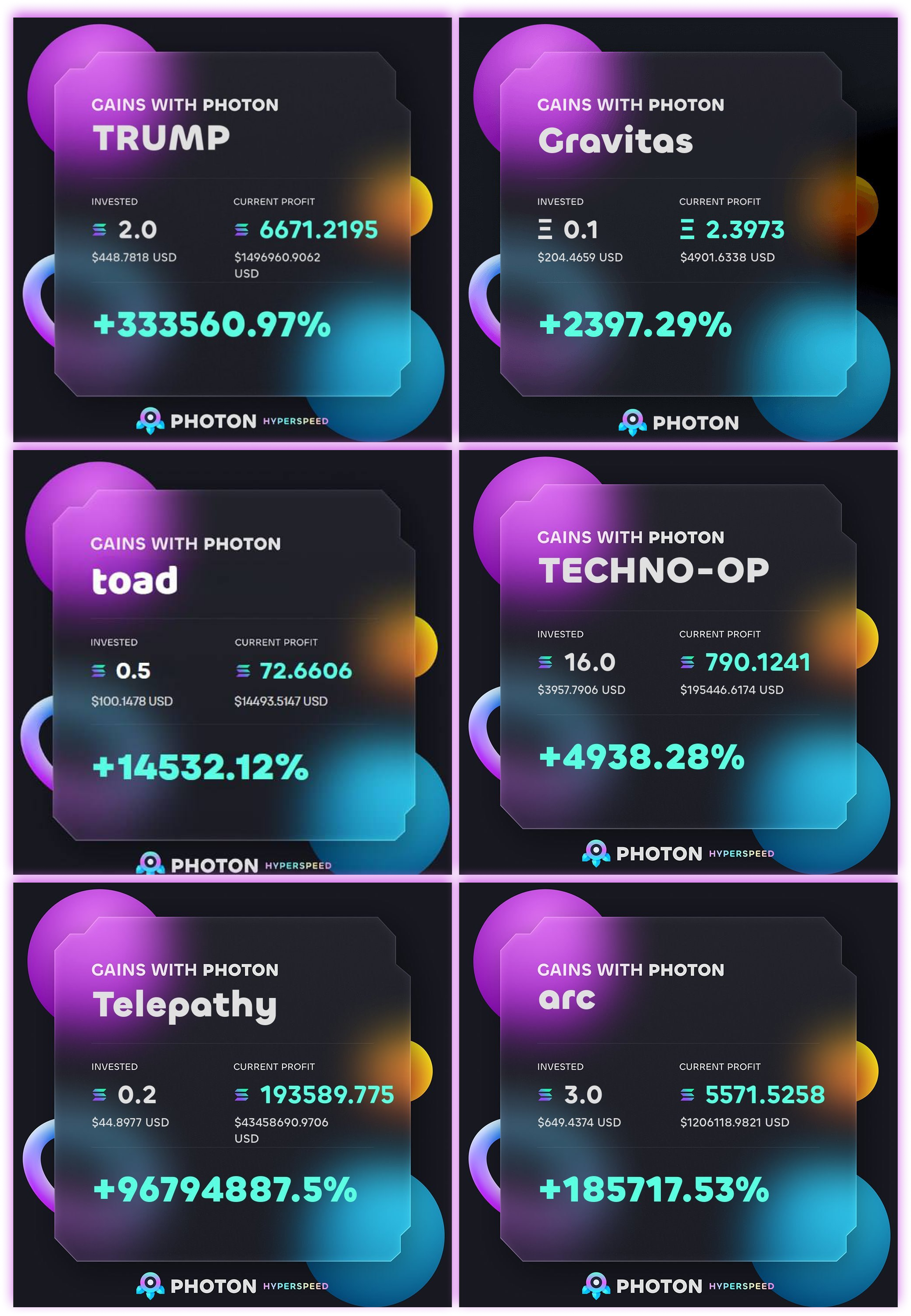
Top profits on Photon-Sol
Just an example of top profits made on photon-sol:
Conclusion
This guide provides a general overview of the platform, including how it works, its features, and what you can do with it. Now that you're familiar with the basics, you can start maximizing its potential to improve your success in trading meme coins.
Photonis a powerful tool and the best one for trading meme coins across multiple blockchains. Its advanced features, like quick buy options, limit orders, and comprehensive filters, make it a valuable asset for any crypto trader.
And an honest opinion, in the end we all want to hit that meme coin that will moon and make us money, we all know that. But, getting there is luck or just knowledge of what you are doing. Taking your time and learning a tool can save you from a lot of headaches and losing money.Photon is fast, secure and give you everything that you need to focus on just 1 screen and do your job until the end. If you have any trouble from: connecting your wallet, to make a buy or a sell, you can all the time join the photon telegram lounge, to communicate your problem. The support is online all the time and everyone is there to help you with your problem.
Crypto is not just random trading. It is knowledge and a little bit of luck, but the most important part is the community you have and the people that are willing to help on your mission, and Photon delivers that.
You’re not alone. Every week, many coins explode in value, and most people only hear about them when it’s too late. Here’s the good news: spotting these gems early isn’t rocket science. You just need the right approach and tools.
Let’s break it down.
Why Meme Coins?
Meme coins like ai16z and Zerebro turned early investors into millionaires. The appeal is simple: low entry costs, high reward potential, and community-driven hype.
Now, the goal isn’t to gamble blindly. It’s to identify coins with real narratives, strong communities, and momentum before they hit the mainstream.
Step 1: Use Photon-Sol Trending Page and Other Trackers
Look for coins that are gaining traction fast or being talked about repeatedly across multiple channels.
Step 3: Verify the Hype
It’s easy to fall for a flashy coin with tons of buzz. But here’s how you filter out the scams:
Check the Holders: Use Photon-Sol to analyze the top holders.
Avoid coins where one wallet holds over 50% of the supply.
Look for a healthy distribution among wallets
Check the Data & Security - And Take in consideration the issues
Community Sentiment:
Are people excited about the project?
Is the team transparent and active?
Red Flags:
Promises of unrealistic returns.
Anonymous teams without verified track records.
Step 4: Photon-sol - Always the biggest gains in the space
Photon Sol — the number 1 Solana trading platforms. Built for degenerates, grinders, and anyone who sweats over slippage, this isn’t another clunky Telegram bot. Photon’s web-based interface is so fast, it’ll make Trojan and MaestroSniperBot look like they’re stuck in 2017.
Why Photon Sol Stands Out
⚡ Web App Speed: No Telegram bot lag. Instant trades, instant rage-quits.
🖱️ One-Click Snipe/Sell: Literally point, click, and pray. Perfect for when your hands shake during a 100x chase.
📊 Live Pairs & Token Analytics: Spot new launches and rug pulls in first seconds.
🔒 Phantom Wallet Integration: Your keys, your coins. No sketchy third-party access.
How It Works (For Degens in a Hurry)
Connect your Phantom wallet.
Set slippage/fee priority
Trade, sell, repeat.
But Wait, Is It Actually Faster? Short answer: Yes. Photon’s architecture cuts out the middleman. No Telegram API delays, no waiting for bot replies. Just raw, unfiltered speed. Missed a moon? Blame your reflexes, not the platform.
Photon Sol isn’t just another trading platform — it’s the speed demon of Solana trading. Designed for crypto traders who live and die by milliseconds, this tool delivers unprecedented speed for sniping, buying, and selling tokens.
Whether you’re a battle-tested degen or a crypto rookie, Photon Sol strips away complexity, turning lightning-fast trades into a point-and-click experience. No more missed opportunities or agonizing lag.
Some examples of biggest wins in the space - Using Photon-Sol
Step 5: Photon-sol - Get Started
Visit https://photon-sol.tinyastro.io/ and connect your Phantom wallet. After connecting and logging into Photon for the first time, you’ll see the welcome screen. Click the “Generate” button to create a new trading wallet. For security, Photon reveals your private key ONLY ONCE during setup—use the slider to uncover it. WARNING: Save this private key immediately in a secure location (e.g., password manager, offline storage) before clicking “Continue.”
Settings - Photon-Sol
Quick buy/Quick Sell This is where you'll be able to have full control over your trading experience For Buying and Selling, you have full control over the following settings:
Slippage: how much more/less tokens you'll receive from a trade due to price volatility
Example of slippage: Suppose you wanted to buy a $XYZ at US$10.00. You place your order, but when it's confirmed, you realize that it got filled at a higher price of US$10.50.
This scenario is an example of negative slippage because you bought in at a higher price than you wanted to, which decreases your total buying power.
Conversely, positive slippage occurs when you place a buy order at US$10.00 but the order is confirmed at a price of US$9.50. The lower price thereby increases your purchasing power.
Priority Fee: This is the additional fee made to have your transaction completed faster. This fee is better known as a tip because it provides an economic incentive for Solana validators to confirm your transaction before others Bribe: This fee goes directly to the JITO validators to incentivize them to pick up and confirm your transactions.
Trading Presets: You can set up to 3 different trading profiles (S1/S2/S3) to adjust your smart-mev protection, priority, bribe and slippage settings Once set up, from the buy menu on any token page, you'll be able to click on S1/S2/S3 to instantly switch between any one of your 3 trading presets, depending on the situation.
For Auto-Buy - you can specify the % change in market cap for S1/S2/S3
For Auto-Sell - you can specify the % change in market cap & the % of holdings you'd like to sell for S1/S2/S3
Start Trading
Start trading with photon-sol is the easiest thing to do. After you created your wallet, made your settings and add your funds. You Just need to start trading. On the trade page - you have a huge chart and everything you need for a successful trade.
📊 Live Chart Dominance: A massive, uncluttered chart for plotting your next 1000x or catastrophic rug pull.
🔥 Real-Time Transactions: Watch buys/sells pop off like a live feed of degenerates chasing pumps.
💰 “You’re Holding”: Track your bags in real time—no more refreshing Dexscreener like a nervous rookie.
🏆 Top Traders List: See which whales/degens are riding the same token wave as you. Copy their moves (or avoid their mistakes).
🎯 Holder Stats: Instantly check what % of holders are diamond-handing vs. paperhanding. Spoiler: It’s mostly paperhands.
⏳ Limit Orders: Set Buy Dips, Stop Losses, and Take Profits without sweating over math. Let Photon’s automation do the work.
🕵️ Dev Token Data: Peek at the dev’s wallet. Are they holding? Dumping? This feature alone could save your portfolio.
🗺️ Bubblemap: An interactive map showing token holder distribution. Spot rugs before they yank the floor.
Photon Sol = Trading for geniuses, why would you make your life harder when this platform gives you everything on one screen? Just → Connect wallet, set orders, and let the platform handle the rest.
On the right side you have everything you need - Buy - Sell and Data and Security
Photon helps users automate trading and time their trades with three order types: Buy Dip, Stop Loss, and Take Profit. Let’s break them down.
Buy Dip Orders Set your target market cap using three methods:
MC Drop by %: Enter a percentage drop to trigger your buy order. Market cap and price update in real-time.
Exact Market Cap: Specify a fixed number—your order triggers when the token’s MC hits or drops below it.
Target Line (Chart-Based): Drag a line on the chart to set your buy target visually, ideal for strategies based on resistance levels.
Expiration Date: Choose 24, 48, or 72 hours for the order to auto-cancel if not filled.
After clicking “Create Order”, details populate under the Orders tab, showing:
Token, amount, condition
Initial vs. target price/MC
Trigger time, status, slippage, priority fee
Key Notes:
If you set Stop Loss and Take Profit orders both selling 100% of tokens, the system auto-cancels the remaining order once one executes.
Priority Fee + Bribe: Set these high enough to ensure your order is included early in the block (low fees = delayed execution).
Stop Loss Orders Configure using the same three methods (MC drop %, exact MC, or chart target line). Specify the % of holdings to sell, adjust settings, and finalize.
Take Profit Orders Set your target price/MC, choose the sell amount (partial or full), and confirm.
Pro Tip: Photon lets you tweak priority fees and bribes for all limit orders—critical for beating bots and sniping entries/exits. Don’t cheap out here if you want your orders to land first.
DCA Orders
You can access DCA from any token page. Just click on the Orders tab, and choose DCA from the drop-down menu.
To set up a Buy or Sell DCA order, you just need to fill in a few fields:
the amount you wish to spend (in SOL)/sell (in %)
how many minutes/hours in between each order
the total # of orders you wish to have
target range for the market cap (MIN/MAX)
time to expiration for the order (24/48/72hrs)
You can also specify the priority and bribe amounts to use for each DCA order.
Similar to limit orders, you can manage all of your DCA orders in the same tab (click on the Orders tab, and choose DCA).
You'll be able to see your order details and also the status of the order and the created at time. If necessary, you can also click on the garbage icon to delete a DCA order.
Additional Feauters: Photon-sol - MemeScope - Trade Crypto on Mobile
Memescope
The goal of Memescope is to give our traders even more flexibility in creating a fully-customized feed of all the metrics that they care about when deciding which tokens to buy into. Currently available are dashboards that show Pump.fun and Moonshot tokens. You can fully adjust all of the following filters to zero in on the things you care about:
Top 10 holders
Tokens with at least 1 social
By progress to 100% bonding (prior to graduating/migrating to Raydium)
Holders count
Dev holding %
Current liquidity
Volume
Market cap
Transactions + Buys + Sells
Due to the nature of the fast-moving feed, we also have the hover-to-pause feature so you can select the token you'd like to buy and use the Quick buy button to enter a trade.
You do have an option to use Photon thorugh your phone. You can scan QR code and open your account with a security code
If speed is what you are after and you don’t mind higher fees, use Photon. Even if I don’t trade with Photon I usually use it just look at the charts because it is so much faster than Dexscreener. UI is also intuitive and easy to use. I highly recommend Photon Sol for all the degens out there.
If you have any trouble connecting photon-sol on your mobile please write in the Photon community chat - The support is always open to help Link ->https://t.me/photonlounge
Conclusion
Finding the next 1000x meme coin early is all about combining good sources of alpha with smart tools for execution. By tracking insiders calls, and using the right trading tool.
PHOTON-SOLis a powerful tool and the best one for trading meme coins across multiple blockchains. Its advanced features, like quick buy options, limit orders, and comprehensive filters, make it a valuable asset for any crypto trader.
And an honest opinion, in the end we all want to hit that meme coin that will moon and make us money, we all know that. But, getting there is luck or just knowledge of what you are doing. Taking your time and learning a tool can save you from a lot of headaches and losing money.Photon is fast, secure and give you everything that you need to focus on just 1 screen and do your job until the end. If you have any trouble from: connecting your wallet, to make a buy or a sell, you can all the time join the photon telegram lounge, to communicate your problem. The support is online all the time and everyone is there to help you with your problem.
Crypto is not just random trading. It is knowledge and a little bit of luck, but the most important part is the community you have and the people that are willing to help on your mission, and Photon delivers that.
Are you tired of missing early opportunities and getting rugged on Solana memecoins? The PHOTON-SOL Memescope feature is your secret weapon for finding promising tokens BEFORE they pump. This step-by-step guide will show you exactly how to use this powerful tool to spot potential 100x gems while avoiding costly rugpulls.
The goal of Memescope is to give our traders even more flexibility in creating a fully-customized feed of all the metrics that they care about when deciding which tokens to buy into.
Currently available are dashboards that show Pump.fun and Moonshot and Memelive tokens. You can fully adjust all of the following filters to zero in on the things you care about:
Top 10 holders
Tokens with at least 1 social
By progress to 100% bonding (prior to graduating/migrating to Raydium)
Holders count
Dev holding %
Current liquidity
Volume
Market cap
Transactions + Buys + Sells
Due to the nature of the fast-moving feed, we also have the hover-to-pause feature so you can select the token you'd like to buy and use the Quick buy button to enter a trade and the new update with snipe function.
Memescope is a real-time feed of new tokens on Solana that match your selected preset filters. As shown in the interface: "Customized real-time feeds of new tokens matching your selected preset filters."
The Three Key Sections of Memescope
Memescope divides tokens into three lifecycle stages:
NEWLY CREATED - Brand new tokens that have just launched
ABOUT TO GRADUATE - Tokens gaining momentum and liquidity and are close to be added on Raydium platform
GRADUATED - Established tokens with proven trading volume and liquidity and listed on Raydium
Each section helps you target tokens at different growth stages depending on your risk tolerance
Step-by-Step Guide to Using Memescope
Step 1: Navigate to the Memescope Tab
Open PHOTON-SOL and click on the "MEMESCOPE" tab in the top navigation bar.
Step 2: Set Up Your Wallet
Select your Solana wallet by clicking "Wallet 1" in the top left of the Memescope interface. This is necessary to execute trades directly from the platform. Is preselected already, this situation is when you have multiple wallets on photon-sol.
Step 3: Understand the Key Metrics
For each token displayed, pay attention to these critical indicators:
Token Name & Symbol - The project name and trading ticker
Holders - More holders typically means more stability
Volume (V) - Trading activity; higher is better
Market Cap (MC) - Total value of all tokens
Age - How long the token has existed
Social Links - Twitter/Telegram presence
Percentage Numbers - Show liquidity ratios and holder distribution
Step 4: Configure Your Filters
Using the key metrics at step 3 we can filter the tokens on the interface based on what type of token you want to trade ( Newly created, about to graduate, graduated). Click the "Filter" button next to each section heading to customize:
In this guide focus on newly created tokens :
Right now, we're tracking this token under a few key conditions. The main highlight? The dev’s wallet holds no significant amount, and the top 10% holders indicator is green. That’s a strong signal, reducing the risk of a rug pull or a sudden dump by a major holder.
What We’re Watching
Monitoring if current holders are staying in.
Checking for new buyers to gauge growing interest.
The risk is minimal since the token is already at a low valuation. Being a pump play, the downside is relatively limited.
Quick Stats
- Pump Progress: 99% - Total Holders: 30 - Dev Holdings: 1% - Market Cap: $5,000
PRO TIP: For beginners, start with stricter filters (higher liquidity %, more holders) until you gain experience.
Step 5: Set Up Quick Buy or snipe
PHOTON-SOL have a new function of sniping, which this is huge for the community, the snipe function can help the users to get in faster and target higher profits ! You can set you
Configure your quick buy amounts:
Look for the "Quick Buy" section near the top
Set your preferred SOL amounts for S1, S2, and S3 buttons
These presets allow for instant purchases when you spot an opportunity
Snipe Function
The Snipe function is a more advanced trading tool designed for faster execution snipe when coins while they are migrating:
Setting Up Snipe:
- Set your desired amount of SOL next to the Snipe button (e.g., 0.03 SOL)
- Click the gear icon to access advanced settings
Configuring Snipe Settings:
- Slippage %: Set to accommodate volatility (e.g., 30% for new tokens)
- Smart-Mev Protection: Enable this to prevent front-running
- Priority Fee: Set higher for faster transaction execution
- Bribery Amount: Additional fee to prioritize your transaction
Using Snipe:
Set up Sniper's to snipe coins while they are migrating
Your transaction will execute with your preset parameters
This gives you an edge by executing trades faster than manual methods
These functions are critical for capitalizing on early opportunities in fast-moving memecoin markets where seconds can make the difference between catching a 100x gem or missing it entirely.
This strategy aims to minimize risk while maximizing potential gains in pump plays. By targeting tokens where the developer holds no tokens, the likelihood of sudden dumps decreases, making it easier to track genuine holder activity. Monitoring new buyers and holder retention provides insight into momentum, while a low valuation helps limit potential losses.
Using the Wallet Tracker Feature
Another powerful tool on PHOTON-SOL is the Wallet Tracker feature, which can be accessed by clicking the "TRACKER" tab in the top navigation bar.
What is Wallet Tracker?
The Wallet Tracker allows you to monitor the trading activities of successful traders, whales, and influencers on Solana. By tracking what the most profitable traders are buying and selling, you can:
Discover New Opportunities: See what tokens successful traders are accumulating before they become widely known
Validate Your Trades: Confirm if your potential buy is also being purchased by successful traders
Get Early Warning Signs: Notice when whales start selling a token you hold
Learn Trading Patterns: Study the entry and exit strategies of profitable traders
How to Use Wallet Tracker Effectively:
Add Successful Wallets:
Start by adding wallets of known successful traders
Look for wallets that consistently show up in the "Top Traders" section of various tokens
You can also track wallets of influencers who have a good track record
Monitor New Buys:
Pay special attention to new purchases by successful wallets
Multiple successful wallets buying the same token is a strong signal
Look for early entries into new projects
Track Selling Patterns:
Watch for sudden selling activity from tracked wallets
If multiple successful traders start selling a token you hold, consider taking profits
Combine with Memescope:
Use Wallet Tracker alongside Memescope for powerful validation
When you find a promising token in Memescope, check if any successful wallets are also buying it
This combined approach significantly improves your odds of finding winning trades
Remember that even successful traders don't win every trade. Use this feature as one tool in your overall trading strategy, not as the sole decision-maker for your trades.
Conclusion: Winning Consistently with Memescope
The Memescope and Wallet Tracker functions on PHOTON-SOL represent a significant advantage for serious Solana memecoin traders. When used correctly with the strategies outlined in this guide, these tools can transform your trading from guesswork to a systematic approach with measurable results.
Key Strategy Summary
This strategy aims to minimize risk while maximizing potential gains in pump plays. By targeting tokens where the developer holds zero tokens and the top 10% holders icon is green, the likelihood of sudden dumps decreases significantly, making it easier to track genuine holder activity. Monitoring new buyers and holder retention provides insight into momentum, while a low valuation helps limit potential losses.
When evaluating potential plays, always check:
Developer Holdings: Ideally zero or very low percentage
Holder Distribution: Green indicator for top 10% holders
Current Holders: Are they increasing or decreasing?
New Buyer Activity: Consistent new wallet additions indicate growing interest
Market Cap: Lower valuations provide limited downside with significant upside potential
Pump Progress: Where is the token in its lifecycle?
Combining All Tools for Maximum Effectiveness
For optimal results, integrate all aspects of PHOTON-SOL:
Memescope Filtering: Use the filters outlined in this guide to identify potential opportunities
Chart Analysis: Confirm with proper technical analysis using RSI and volume indicators
Wallet Tracker: Validate your findings by checking if successful traders are also buying
Quick Buy/Snipe: Execute effectively when you find a promising token
Risk Management: Always use stop-losses and proper position sizing
While no trading strategy guarantees success 100% of the time, using these tools properly can significantly shift the odds in your favor. Remember that it's not about finding every 100x gem, but about finding enough winners while avoiding catastrophic losses.
PHOTON-SOL is a powerful tool and the best one for trading meme coins across multiple blockchains. Its advanced features, like quick buy options, limit orders, and comprehensive filters, make it a valuable asset for any crypto trader.
And an honest opinion, in the end we all want to hit that meme coin that will moon and make us money, we all know that. But, getting there is luck or just knowledge of what you are doing. Taking your time and learning a tool can save you from a lot of headaches and losing money. Photon is fast, secure and give you everything that you need to focus on just 1 screen and do your job until the end. If you have any trouble from: connecting your wallet, to make a buy or a sell, you can all the time join the photon telegram lounge, to communicate your problem. The support is online all the time and everyone is there to help you with your problem.
Crypto is not just random trading. It is knowledge and a little bit of luck, but the most important part is the community you have and the people that are willing to help on your mission, and Photon delivers that.
Are you tired of analyzing countless memecoin charts only to see minimal returns? Looking to maximize your profits on Solana using Photon trading bot? This comprehensive guide combines optimal trading settings with powerful filtering strategies and effective limit order techniques to help you find winning trades consistently, enter at the perfect price, and lock in profits at the right time.
Why Proper Bot Settings, Filters & Limit Orders Are Critical for Memecoin Success
The memecoin market moves incredibly fast. Without the right tools, settings, filters, and limit order strategies, you'll either miss opportunities, invest in scams, enter at poor prices, or fail to lock in profits at peak times. This complete guide solves these problems by showing you exactly how to configure your Photon trading bot, filter for the most promising tokens, and set up automated buy and sell orders to optimize your entries and secure your gains.
Part 1: Optimal Trading Settings for Different Scenarios
Understanding Core Settings
By going on top right corner at profile icon - press settings into the drop down :
Before diving into specific scenarios, let's break down what each setting actually does:
Slippage
Definition: The difference between your expected trade price and the actual execution price
Function: Determines the maximum price variance you're willing to accept
Impact: Higher slippage increases likelihood of transaction completion but may result in worse prices
MEV Protection
Definition: Protection against Maximal Extractable Value bots that could sandwich your transactions
Trade-off: Slower transactions but protection from front-running
When enabled: Your transactions take longer to process
When disabled: Faster transactions but risk of being sandwiched by bots
Priority Fee
Definition: Fee that determines how quickly your transaction gets processed
Important Fee Consideration: When trading with just 1 SOL, remember you'll pay approximately 0.02 SOL per transaction (buy AND sell), plus the Photon bot fee. These fees can significantly impact profitability with small capital.
Scenario 2: Higher Capital Trading on High-Volume Tokens
Benefit: You're more likely to get your desired entry point, or the transaction will simply fail rather than executing at an unfavorable price.
Scenario 3: Trading with MEV Protection
For traders prioritizing protection over speed
Slippage: Higher than 5% (suggested)
MEV Protection: ON
Priority Fee: Increased
Bribery Fee: Increased
Note: This configuration sacrifices execution speed for protection against sandwich attacks.
Part 2: Mastering Limit Orders on Photon
Setting proper entry and exit strategies is crucial for consistent profits. Photon offers powerful limit order capabilities for both buying and selling.
Lower Fee Setting: Slightly slower execution but still filled at desired price with 5% slippage, MEV off, 0.02 priority, 0.03 bribery
Why These Filters Matter for Consistent Profits
Using proper filters provides multiple benefits:
Scam Avoidance: Eliminates obvious rug pulls and honeypots
Reduced Overtrading: Focuses your attention on quality opportunities
Better Visibility: Ensures you don't miss promising tokens among the noise
Market Validation: Shows tokens that already have some traction/interest
Risk Management: Helps avoid tokens with concentrated ownership
Conclusion: Your Path to Consistent Memecoin Trading Profits
There is no one-size-fits-all configuration for memecoin trading. The optimal settings depend on:
Your available trading capital
Token volatility and volume
Your risk tolerance
How many transactions you typically make
Your preferred trading style
Your entry and exit strategy preferences
Experiment with these recommended configurations and adjust according to your personal trading preferences. Remember that the right combination of Photon bot settings, filters, and automated limit orders can make the difference between capturing profitable opportunities and actually securing those gains.
This three-pronged approach of optimized trading settings, strategic filtering, and automated limit orders is how successful traders are consistently finding and locking in 2-10x opportunities in the Solana memecoin market while minimizing their exposure to scams and rugpulls.
PHOTON-SOL is a powerful tool and the best one for trading meme coins across multiple blockchains. Its advanced features, like quick buy options, limit orders, and comprehensive filters, make it a valuable asset for any crypto trader.
And an honest opinion, in the end we all want to hit that meme coin that will moon and make us money, we all know that. But, getting there is luck or just knowledge of what you are doing. Taking your time and learning a tool can save you from a lot of headaches and losing money. Photon is fast, secure and give you everything that you need to focus on just 1 screen and do your job until the end. If you have any trouble from: connecting your wallet, to make a buy or a sell, you can all the time join the photon telegram lounge, to communicate your problem. The support is online all the time and everyone is there to help you with your problem.
Crypto is not just random trading. It is knowledge and a little bit of luck, but the most important part is the community you have and the people that are willing to help on your mission, and Photon delivers that.
Tired of watching memecoins moon without you? You're not alone. I used to constantly ask myself: How do people find winning wallets early? Is it even possible to copy trade Solana whales without losing my entire bag?
Here's the good news: It's not only possible—it's way easier than you think. I'll walk you through exactly how to track top-performing Solana whale wallets for smarter copy trading.
Before diving into tracking strategies, let's define what we're hunting: Solana whale wallets are addresses holding large amounts of SOL or Solana memecoins. They have the power to move markets.
When whales make moves, prices follow. If you're tracking them properly, you can ride those waves instead of getting left behind watching from the sidelines.
Step 1: Set Up Your Essential Tools
You need two platforms open—these are your competitive edge:
Birdeye.so – The most comprehensive Solana analytics platform for discovering trending tokens before they explode. Birdeye provides real-time data, advanced charts, and detailed token analytics that DEX aggregators simply can't match.
Why Birdeye.so?
Real-time price tracking across all Solana DEXs
Advanced token analytics and holder distribution
Comprehensive market data and trading volume
Clean interface with professional-grade charts
Instant access to contract addresses
Trending sections showing what's moving NOW
Photon-Sol – The fastest trading platform for Solana with built-in wallet tracking that lets you monitor successful traders and execute trades instantly.
These two platforms combined give you discovery (Birdeye) and execution (Photon-Sol) in one streamlined workflow.
Navigate toBirdeye.soand open the Trending section.
Your goal: Find 3 memecoins that recently pumped. Look for tokens with explosive gains—$2M, $7M, even $25M market caps achieved quickly.
What to Look For on Birdeye:
Recent Price Action: Check the charts for sharp upward movements in the last 24-48 hours. Birdeye's advanced charting shows you exactly when momentum started building.
Volume Surge: High trading volume confirms genuine interest, not just a few wallets manipulating price. Birdeye displays 24h volume prominently for quick assessment.
Market Cap Growth: Tokens that went from $500K to $5M+ in days show real momentum. Birdeye's historical data lets you track this progression clearly.
Holder Distribution: Use Birdeye's holder analytics to verify the token isn't controlled by one or two wallets. Healthy distribution = less rug risk.
Analyze the chart—look for consistent upward movement
Copy the contract address (Birdeye makes this easy—one click)
Repeat for 2-3 more recent winners
Pro Tip: Birdeye's "New Pairs" section shows freshly launched tokens. Check this alongside Trending to catch opportunities at different lifecycle stages.
Step 3: Identifying Whale Wallets from Birdeye Data
Once you've found promising tokens on Birdeye, it's time to identify the wallets that got in early and profited.
On Birdeye's Token Page:
Check Top Holders: Birdeye shows top holder addresses and their percentage of supply. Look for wallets that:
Got in early (check transaction history)
Hold substantial amounts but not suspicious percentages (2-8% is ideal)
Haven't sold yet (diamond hands often indicate confidence)
Made multiple successful entries/exits
Copy Successful Wallet Addresses: When you find a wallet that clearly profited from early entry, copy that wallet address. You'll track it in Photon-Sol next.
This is where you'll monitor all the wallets you're following. The Wallet Tracker page shows you comprehensive information about each tracked wallet, helping you successfully copy their trades.
What You'll See:
Real-time buy/sell activity from tracked wallets
Token holdings across all tracked addresses
Entry and exit prices
Profit/loss for each position
Transaction timing and amounts
How to Use Wallet Tracker Effectively
Strategy 1: Add Proven Successful Wallets
Start by adding wallet addresses of traders who've demonstrated consistent success:
From Birdeye Analysis: Use those wallet addresses you copied from tokens that pumped. If a wallet profited 50x+ on a memecoin, they deserve tracking.
FromPHOTON-SOLTop Traders: When viewing any token on Photon-Sol, check the "Top Traders" section. These wallets are currently winning on that specific token—track them to see if they're consistently profitable across multiple plays.
From Influencer Disclosure: Some successful traders share their wallet addresses publicly. If an influencer has a verified track record, add their wallet to your tracker.
Strategy 2: Monitor New Buys in Real-Time
This is where the magic happens. Pay close attention to new purchases by your tracked wallets.
Strong Buy Signals:
Multiple tracked wallets buying the same token = extremely strong signal
Early entries into new projects = potential to catch pumps from the beginning
Consistent buying patterns = the wallet has conviction, not just gambling
How to Act: When you see a tracked wallet buy something new:
Pull up that token on Birdeye.so for quick analysis
Check holder distribution and liquidity
If fundamentals look good + successful wallet bought = high-conviction entry
Strategy 3: Track Selling Patterns for Exit Signals
Knowing when to sell is harder than knowing when to buy. Your tracked wallets solve this.
Exit Warning Signs:
Sudden selling from a tracked wallet = time to reassess your position
Multiple successful traders exiting the same token = strong sell signal
Partial sells at specific price levels = learn their profit-taking strategy
Example: You're holding a token that's up 5x. You notice 3 of your 5 tracked successful wallets just sold 50% of their positions. This is your signal to take profits, even if you want to hold longer.
Strategy 4: Combine Wallet Tracker with Memescope
This combination is incredibly powerful for validation.
The Workflow:
Scan Memescope for tokens meeting your filters (zero-dev, healthy distribution, etc.)
Check tracked wallets to see if any successful traders are also buying it
When you find a promising token in Memescope AND see that 2-3 of your tracked successful wallets are also accumulating it, your odds of success increase dramatically.
Why This System Works
You're not guessing anymore. You're following proven winners whose track records are verifiable on-chain.
You're not late. Photon-Sol's real-time tracking means you see their moves within seconds, not hours or days later.
You're not emotional. When tracked wallets exit, you exit. Their discipline becomes your discipline.
You have confirmation.Birdeye.so + Photon-Sol Wallet Tracker + Memescope filters = triple verification before risking capital.
Most traders are flying blind. You now have x-ray vision into what successful wallets are doing in real-time.
PHOTON-SOLis a powerful tool and the best one for trading meme coins across multiple blockchains. Its advanced features, like quick buy options, limit orders, and comprehensive filters, make it a valuable asset for any crypto trader.
And an honest opinion, in the end we all want to hit that meme coin that will moon and make us money, we all know that. But, getting there is luck or just knowledge of what you are doing. Taking your time and learning a tool can save you from a lot of headaches and losing money.Photon is fast, secure and give you everything that you need to focus on just 1 screen and do your job until the end. If you have any trouble from: connecting your wallet, to make a buy or a sell, you can all the time join the photon telegram lounge, to communicate your problem. The support is online all the time and everyone is there to help you with your problem.
Crypto is not just random trading. It is knowledge and a little bit of luck, but the most important part is the community you have and the people that are willing to help on your mission, and Photon delivers that.
If you’ve been watching meme coins explode across the crypto space and wondering how people are cashing in daily you’re in the right place.
This guide breaks down a realistic, step-by-step strategy to help you start making money every single day by trading meme coins even if you’re starting with a small bankroll.
Meme coins are no longer just jokes, they’ve become one of the most highly volatile and profitable niches in crypto, with massive daily movements that skilled traders capitalize on. With the right approach, you don’t need a big investment to grow your portfolio fast.
Whether you’re a complete beginner or someone looking to upgrade your trading system, this tutorial covers everything you need to know from identifying hot tokens early to managing risk like a pro.
Get ready to dive into a practical blueprint for turning meme coin hype into consistent profits.
Step 1: Set Up Your Trading Tools
First things first, you need the right tools to make your trading efficient and profitable. The core tool we’ll use is photon-sol platform.
This platform allows you to perform trades quickly, safe and secure and integrates all the tools you need for a successful trade, saving you time and effort.
Secondly, we’ll use SolSqueezer and Zelfiguru to analyze meme coins and find successful traders.
How to Set Up Photon-sol:
You go to Photon Sol and connect your phantom wallet, you will be prompted to Photon trading wallet creation screen:
You generate your wallet, and you can get started !
Please note: Your private key will only be shown once! So make sure you copy it somewhere.
Step 2: Find Profitable Meme Coins to Trade
Now that your trading bot is set up, it’s time to identify meme coins with high potential. To do this, we’ll use a website called DEX Screener combined with other Telegram bots called SolSqueezer and Zelfiguru.
These tools allow you to analyze meme coins and find the best traders to copy trade.
Steps to Find Good Coins:
Go to DEX Screener and select the Solana tab to filter meme coins that are traded on Solana (if you are trading Solana meme coins).
2. Add custom filters such as $10,000 Market Cap, Pair Age 4 hours Max, 5M Volume around $15,000 — $20,000.
Here are other DEX Screener filters that you can use:
3. Look for coins with a significant 24-hour price increase and reasonable liquidity. Coins with high price spikes but low liquidity are riskier, as traders may not be able to pull out profits.
Once you find a coin that looks promising, copy its contract address and plug it into the SolSqueezer bot. This will allow you to analyze the top traders in that coin’s market and decide whether it’s worth copy trading.
After finding the top traders we’ll be using Zelfiguru to analyze each wallet to see if it’s profitable or not to copy trade.
Step 3: Track Wallet on Photon-Sol
We copy the wallet address and then Go in navigation bar to tracker > Wallet Tracker > Press +Add Button.
By clicking on the + button on the sidebar you can start adding wallets to track :
After that, you can create your tracking wallets page, where you'll find all the information about the wallets you're monitoring—helping you successfully copy their trades
Step 4: The Wallet You Track Started Trading - How to Trade Safe
So, you just spotted a wallet making moves on a fresh token, tempting, right? But before you jump in, you need to do one thing first:
At a glance, you’ll notice real-time info bubbles displayed directly on the chart:
🟢 Green bubbles = DB - Dev Bought — These appear when the dev is buying, holding, or when a sniper (early buyer) jumps in. It’s a sign that confidence is high and momentum might follow.
🔴 Red bubbles = DS - Dev Sold— These show up when the dev sells their bag or a sniper exits, often signaling a possible dump or loss of confidence.
⏺️ The Icon ( you can pick one for the wallets you track ) - The Wallet You Tack - Bought
Right on the chart, you’ll also see visual indicators that clearly explain these actions, so you’re never guessing. Everything is happening in real time, and every signal tells a story.
Scrolling down on the chart page, you can find Data & Security
Using this part of the Photon product can save you time and a lot of mistakes that can cost you money. Here you can find :
- Mint Authority
- Freeze Authority
- LP Burned
- Pooled PVPLESS (PVPLESS is the name of the token)
- Pooled SOL
- Top 10 Holders
- Global Fees
- CA Deployed
- LP Creator
Step 5: Buy & Sell, Limit Order and Advanced Settings
Let's take every part of the image one by one.
-In the first image: you have the buy function to select how much of would you have to buy the coin you choose from 0.07 to 10 sols, or you can pick your own value.
- In the second image: you can select from what wallet you want to trade (YES, PHOTON HAVE MULTI-WALLET FUNCTION, IS EXCELLENT !)
- In the third image: situation, you can choose the % you want to sell your token or pick your own value.
- In the fourth image: represents the Auto Sell function - you as a trade can set your own stop loss by MC set the amount you want to sell in % and an expiration time in hrs. In the take profit tab is the same as on stop loss, but here you can choose at what point you want to take profit from your investment and what % you want.
- Last image: you have the Advanced Settings, here you can set your slippage %, the smart-mev protection, set the speed of the trading - priority fee and the bribery Amount.
In the next days there will be new in depth guides aboutphoton. We're going to go in detail how to set up every part for a perfect trade
Here you have everything that you need to see all the details of what is happening with the coin you brought. You can see in real time the transactions, your personal holding the top traders, the holders of the coin, bubble maps with graphics of the in-depth trading's and the dev token. As I said up, Into the next guide we go more in detail about how to use this tabs and maximize your knowledge in Photon.
PHOTON-SOLis a powerful tool and the best one for trading meme coins across multiple blockchains. Its advanced features, like quick buy options, limit orders, and comprehensive filters, make it a valuable asset for any crypto trader.
And an honest opinion, in the end we all want to hit that meme coin that will moon and make us money, we all know that. But, getting there is luck or just knowledge of what you are doing. Taking your time and learning a tool can save you from a lot of headaches and losing money.Photon is fast, secure and give you everything that you need to focus on just 1 screen and do your job until the end. If you have any trouble from: connecting your wallet, to make a buy or a sell, you can all the time join the photon telegram lounge, to communicate your problem. The support is online all the time and everyone is there to help you with your problem.
Crypto is not just random trading. It is knowledge and a little bit of luck, but the most important part is the community you have and the people that are willing to help on your mission, and Photon delivers that.
That’s how you confirm it’s actually the dev, not just a random sniper.
Then look at what happens next:
If you see a big buy (e.g. 3–5 SOL) right after creating the token, that’s your green flag.
This is how you know your bot can pick it up instantly too.
Step 3: Monitoring the wallet and start copy trading manually
Now we gonna use Photon-Sol, for tracking the wallet and manually copy trading
We copy the contract address and then — Go in navigation bar to tracker > Wallet Tracker > Press +Add Button.
After that, you can create your tracking wallets page, where you'll find all the information about the wallets you're monitoring—helping you successfully copy their trades.
Step 4: How to Use Wallet Tracker Effectively
Add Successful Wallets:
Start by adding wallets of known successful traders
Look for wallets that consistently show up in the "Top Traders" section of various tokens
You can also track wallets of influencers who have a good track record
Monitor New Buys:
Pay special attention to new purchases by successful wallets
Multiple successful wallets buying the same token is a strong signal
Look for early entries into new projects
Track Selling Patterns:
Watch for sudden selling activity from tracked wallets
If multiple successful traders start selling a token you hold, consider taking profits
Combine with Memescope:
Use Wallet Tracker alongside Memescope for powerful validation
When you find a promising token in Memescope, check if any successful wallets are also buying it
This combined approach significantly improves your odds of finding winning trades
Step 5: Start Copy Trading Manually
Why Photon for copy trading ? A quick, informal breakdown before we dive in:
Once you’ve found a wallet that consistently prints gains, the smart move is to track it closely. While some traders rely on Telegram bots or built-in copy trading platforms, we’re skipping those for one simple reason: speed and control.
Photon-Sol gives you the fastest wallet tracking out there—letting you react to profitable trades in real-time.
Why not just use Telegram-based copy bots? They're too slow. Every trade has to pass through Telegram’s servers before hitting the blockchain. By the time your order is placed, the wallet you’re copying might already be taking profits.
With PHOTON-SOL, you stay in full control. You decide what to buy or sell—no delays, no relying on laggy bots.
Here's the difference:
🐢 Telegram bots: 3–5 seconds per trade
⚡ PHOTON-SOL: Sub-second execution
🧱 Standard copy trading: Pre-set strategies only
🧠 PHOTON-SOL: Full freedom to trade how you want
Whether you're a new or experienced trader, it's always better to stay in control of your trades. Automating this part can increase the risk of losing money.
Let's keep going :
After you find the profitable wallets you want to copy trade you need a way to get notifications in real time about the trade and what the trader is buying and selling . Here comes in the new Photon-Sol feature called SNAP.
By going on photon-sol page down in left there is an icon press it :
Will open this sidebar :
With this feature, you can pin the wallets you're tracking to your screen and monitor their activity in real time. You'll get instant notifications about who bought what, along with detailed information on each wallet.
When you see a new notification coming in you can just press on it to open the trading page of the token:
Here you can see at what price the wallet you track has brought the token.
From here, you can quickly jump in and buy the new token—but don’t forget to configure your settings before making the trade.
These are the settings to tweak:
Buy: Start small, around 10–20% of the trader’s position size.
Slippage: Set between 20–50% depending on volatility.
Gas fees: Use at least 0.02 SOL for priority execution.
Market cap filters:
— Minimum: 10,000.
— Maximum: 500,000 (for meme coins).
Take profit: Auto-sell at 300–500% to secure gains.
Stop-loss: If the wallet misses an exit, cut your losses at 30%.
Step 6: Common Mistakes to Avoid
Blindly trusting a high win rate.
A 90% win rate doesn’t mean much if the wallet only trades tiny tokens with no liquidity.
2. Skipping research.
Always check the wallet’s history. Are their profits coming from consistent trades or one lucky bet?
3. Ignoring slippage.
High-volatility tokens can burn you if your slippage settings aren’t dialed in.
4. Over investing.
Never put more than you can afford to lose. Start small, scale up once you see results.
PHOTON-SOLis a powerful tool and the best one for trading meme coins across multiple blockchains. Its advanced features, like quick buy options, limit orders, and comprehensive filters, make it a valuable asset for any crypto trader.
And an honest opinion, in the end we all want to hit that meme coin that will moon and make us money, we all know that. But, getting there is luck or just knowledge of what you are doing. Taking your time and learning a tool can save you from a lot of headaches and losing money.Photon is fast, secure and give you everything that you need to focus on just 1 screen and do your job until the end. If you have any trouble from: connecting your wallet, to make a buy or a sell, you can all the time join the photon telegram lounge, to communicate your problem. The support is online all the time and everyone is there to help you with your problem.
Crypto is not just random trading. It is knowledge and a little bit of luck, but the most important part is the community you have and the people that are willing to help on your mission, and Photon delivers that.
I want to say thanks to everyone who supports me. These guides are just honest work to help everyone for free to learn and make money using crypto bots. By doing this for free, I try to balance my work life with my free time to write this guide and articles, set up images and so on.
If you really enjoy my work, and you found it helpful, you can support / donate here:
In the fast-paced world of Solana meme coins, finding the next 100X gem before it trends requires both strategy and powerful tools. By tracking whale wallets and analyzing trending metrics, you can identify promising opportunities early using Photon Sol and other tricks for fast and guaranteed win.
Are you curious about how some investors seem to strike it rich overnight with crypto investments? Well, it’s not always just luck. In many cases, it’s about doing your research and keeping an eye on the right information. Today, we’re going to show you a simple way to track the movements of big players in the Solana crypto ecosystem using different tools.
First things first, head over to Solscanand sign in with your email or connect your Solana wallet.
Once you’re in, you can start tracking wallets, researching new coins, finding smart contracts, and monitoring decentralized exchanges.
Step 2: Exploring the Leaderboard
One of the key features of Solscan is the leaderboard, where you can find a list of all tokens in the Solana ecosystem.
Choose one of the most popular meme coins.
You can sort tokens by various metrics like symbol, holders, price, 24-hour change, and market cap.
Pay attention to tokens with a significant percentage of supply held by a small number of wallets, as this could indicate potential insider trading.
Step 3: Analyzing Wallets on Solscan
Dive deeper into individual wallets to see their holdings, transaction history, and token distribution.
Look for wallets holding a large percentage of a token’s total supply, as this could be a red flag indicating insider trading.
Track the transactions of these wallets over time to stay updated on their activities.
Step 4: Finding Successful Wallets to Track
Method 1: Social Media Investigation
You can’t find a trending coin without the right tools. DEX Screener andPhoton-soltrending page are goldmines. Here’s how:
Set Filters on DEX Screener:
Minimum Market Cap: $300,000
Maximum Age: 50 hours (the newer, the better)
Minimum Volume: $2,000,000 in 24 hours
2. Sort by Volume and Liquidity:
High volume means attention.
Solid liquidity ensures the coin isn’t a rug pull waiting to happen.
3. Bookmark Coins With Momentum:
Check their charts for healthy price action. Look for higher highs and higher lows within the first few days.
Hunt for Narratives
Narratives are the heartbeat of meme coin pumps. AI, gaming, and charity coins are just a few that have taken off recently.
Real Example: “SPORE”
This AI-driven coin launched with a story about “AI evolving itself.” The concept sounded futuristic and edgy, so it grabbed attention fast. Within 24 hours, it hit $50 million in volume.
Step 5: Photon-sol is the key of success - X tracker / Wallet Tracker
Photon Sol makes tracking successful traders super easy. You can watch what the best wallets are buying, get notifications when whales make moves, and jump on good trades before everyone else finds out about them.
And the best part? Photon Sol handles everything in one place from spotting good wallets to executing trades quickly. It's exactly what you need if you want to step up your trading game.
Go on photon-sol:
At top navigation bar you have X Tracker click on it:
You can search, filter and add special X accounts on your list to track them on the platform.
After you've found all the good wallets you want to follow, it's super easy to track them on Photon-sol alongside Twitter accounts.
Just head over to Photon-sol and look at the navigation bar at the top. Click on "Tracker" and then select "Wallet Tracker" from the dropdown menu.
From there, you can paste in the wallet addresses you've collected and start getting alerts whenever they make moves.:
Here you have your own dedicated dashboard with all the tools you need to track live a wallet, from search to tags to filters and all the data you need, press the add button:
And add all the information's you need and save your wallet :
Step 7: What's next ? Let's trade !
After you find the profitable wallets you want to copy trade you need a way to get notifications in real time about the trade and what the whale is buying and selling . Let's use the SNAP feature for this.
By going on photon-sol page down in left there is an icon press it :
Will open this sidebar :
With this feature, you can pin the wallets you're tracking to your screen and monitor their activity in real time. You'll get instant notifications about who bought what, along with detailed information on each wallet.
When you see a new notification coming in you can just press on it to open the trading page of the token:
Here you can see at what price the wallet you track has brought the token.
From here, you can quickly jump in and buy the new token, but don’t forget to configure your settings before making the trade.
Step 8: Optimal Trading Settings for Different Scenarios
Understanding Core Settings
By going on top right corner at profile icon - press settings into the drop down :
Before diving into specific scenarios, let's break down what each setting actually does:
Slippage
Definition: The difference between your expected trade price and the actual execution price
Function: Determines the maximum price variance you're willing to accept
Impact: Higher slippage increases likelihood of transaction completion but may result in worse prices
MEV Protection
Definition: Protection against Maximal Extractable Value bots that could sandwich your transactions
Trade-off: Slower transactions but protection from front-running
When enabled: Your transactions take longer to process
When disabled: Faster transactions but risk of being sandwiched by bots
Priority Fee
Definition: Fee that determines how quickly your transaction gets processed
Important Fee Consideration: When trading with just 1 SOL, remember you'll pay approximately 0.02 SOL per transaction (buy AND sell), plus the Photon bot fee. These fees can significantly impact profitability with small capital.
Scenario 2: Higher Capital Trading on High-Volume Tokens
Benefit: You're more likely to get your desired entry point, or the transaction will simply fail rather than executing at an unfavorable price.
Scenario 3: Trading with MEV Protection
For traders prioritizing protection over speed
Slippage: Higher than 5% (suggested)
MEV Protection: ON
Priority Fee: Increased
Bribery Fee: Increased
Note: This configuration sacrifices execution speed for protection against sandwich attacks.
Short Conclusion
No strategy is foolproof, and timing is everything. But with the right wallets and careful monitoring the trader, this method gives a solid edge in spotting opportunities with the least amount of risk possible. Always do your own research, trust the data, and move smart!
PHOTON-SOLis a powerful tool and the best one for trading meme coins across multiple blockchains. Its advanced features, like quick buy options, limit orders, and comprehensive filters, make it a valuable asset for any crypto trader.
And an honest opinion, in the end we all want to hit that meme coin that will moon and make us money, we all know that. But, getting there is luck or just knowledge of what you are doing. Taking your time and learning a tool can save you from a lot of headaches and losing money.Photon is fast, secure and give you everything that you need to focus on just 1 screen and do your job until the end. If you have any trouble from: connecting your wallet, to make a buy or a sell, you can all the time join the photon telegram lounge, to communicate your problem. The support is online all the time and everyone is there to help you with your problem.
Latest Photon-Sol Updates
HYPERSPEED 3.0 - trade even faster with access to the fastest nodes in the world
Our Node Accelerator allows you to trade faster than any custom RPC
Blazing fast execution speed Access Tier-1 enterprise-grade nodes w/ every trade No need to spend $50k-100k on RPCs
AVAILABLE NOW:
Bridge - instantly swap between 6 chains on the FASTEST multi-chain platform (powered by u/deBridgeFinance)
Are you tired of getting rugged on meme coins? Sick of watching coins pump after you sell? Trading Solana meme coins can feel like a wild roller coaster, but when done right, it’s a game-changer. Let’s break it down step-by-step, with zero fluff and all the tools you need to trade like a pro.
Why Trade Solana Meme Coins?
Solana is fast, cheap, and a meme coin playground. But with great opportunities come great risks — bundlers, insider dumps, and outright scams are everywhere.
Here’s why meme coins thrive on Solana:
Speed: Transactions are nearly instant.
Low Fees: Trade without worrying about gas wars.
Hype: The Solana community loves meme coins.
But how do you sift through hundreds of coins to find the winners?
Before touching a meme coin, get your head in the game.
Only trade with money you can afford to lose.
Expect losses, but aim for those big wins that make it all worth it.
Stick to a risk management strategy. Never risk more than 1–2% of your portfolio per trade.
Trading meme coins is about patience and persistence. Don’t chase losses or over trade. That’s how you stay in the game.
Trading without the right tools? That’s like fishing without a net.
Here are the must-haves:
Photon-sol
Photon-Sol gives you the fastest wallet tracking out there—letting you react to profitable trades in real-time.
Why not just use Telegram-based copy bots? They're too slow. Every trade has to pass through Telegram’s servers before hitting the blockchain. By the time your order is placed, the wallet you’re copying might already be taking profits.
WithPHOTON-SOL, you stay in full control. You decide what to buy or sell—no delays, no relying on laggy bots.
Here's the difference:
🐢 Telegram bots: 3–5 seconds per trade
⚡ PHOTON-SOL: Sub-second execution
🧱 Standard copy trading: Pre-set strategies only
🧠 PHOTON-SOL: Full freedom to trade how you want
Whether you're a new or experienced trader, it's always better to stay in control of your trades. Automating this part can increase the risk of losing money.
Zelfiguru
Zelfiguru is a tool that simplifies the entire process.
Here’s how you use it:
Join Zelfiguru: Tools like the Zelfiguru come with subscription access to find the top wallets.
You get access to daily profitable wallets you can copy trade, saving you a lot of time compared to doing it manually.
2. Filter for profitable wallets:
Set ROI above 80%.
Look for a win rate of 50% or higher.
Exclude wallets focused on low-market-cap meme coins (under 10k).
3. Check wallets manually:
Focus on consistent performers with multiple Unique Tokens rather than one-hit wonders.
Avoid those with low Average Trade Time as they are mostly snipers.
Filter by Alpha Wallets to find the top traders.
To find coins worth trading, you need a clear checklist. Here’s what to look for:
A. Filters for Finding Hidden Gems on PHOTON-SOL platform:
Super Degen Level (Ultra-Low Caps)
Min Liquidity: $5K
Pair Age: 1H — 72H (3 days)
Max FDV: $500K
Min 1H Volume: $20K
Buy Signal: Focus on tokens with rapid growth in 1H volume, even with low liquidity. A sudden spike in trading activity can indicate early interest.
2. New Low Caps (Degen Level)
Min Liquidity: $20K
Pair Age: 1H — 120H (5 days)
FDV: $500K — $3M
Min 24H Volume: $1M
Min 1H Volume: $100K
Buy Signal: Look for steady increases in 1H and 24H volume, growing liquidity, and a low FDV-to-liquidity ratio.
B. Volume and Market Cap
Volume > $250,000: Coins with strong demand.
Market Cap > $120,000: Avoid coins too small to attract buyers.
Check the ratio:
Healthy coins grow volume and market cap together.
If volume skyrockets but market cap stays flat, it’s a red flag.
Go on - https://photon-sol.tinyastro.io/ - The signup process is really fast, just don't forget you save your private key when you are generating a wallet.
After you set up everything, go on memescope page :
On memescope page we can see 3 different columns, Photon-Solthat categorizes pump fun meme coins into three stages:
Newly created
Approaching bonding (around $100,000 market cap)
Graduated (fully bonded, often gaining more attention).
Click on filter at the NEWLY CREATED - And add the image down below settings:
Right now, we're keeping an eye on this token under some key conditions. The main thing? The dev holds zero tokens and the top 10 % holders icon is on green color. That’s a big plus because it means there’s less chance of a rug pull or sudden dump from a single large holder.
What We’re Watching
Checking if current holders are sticking around.
Looking for new buyers to see if interest is growing.
The risk is super low since the token is already at a low valuation. Since it’s a pump play, the downside is pretty limited.
Quick Stats
Pump Progress: 99%
Total Holders: 35
Dev Holdings: 1%
Market Cap: $4,000
This one popped up through our filters, so this will take a bit, at some hours the tokens are not popping this will take some time.
As an example of this tokens :
Top 10 holders % is in green the dev sold, and the last icon represent the traders are using platforms to trade the token and still holding.
On the memescope page, you have a quick buy button that you can toggle on to use it. This is a huge help to snipe / get in fast when a new token is pop up.
BUT BEFORE YOU NEED TO MAKE YOUR SETTINGS TO ENSURE THAT YOU ARE NOT SELLING ON LOST
Make your presets / settings for your quick buy
In the top right corner you have your profile - hover it and go to settings
There you will have the settings for your preset 1 :
Before diving into specific scenarios, let's break down what each setting actually does:
Slippage
Definition: The difference between your expected trade price and the actual execution price
Function: Determines the maximum price variance you're willing to accept
Impact: Higher slippage increases likelihood of transaction completion but may result in worse prices
MEV Protection
Definition: Protection against Maximal Extractable Value bots that could sandwich your transactions
Trade-off: Slower transactions but protection from front-running
When enabled: Your transactions take longer to process
When disabled: Faster transactions but risk of being sandwiched by bots
Priority Fee
Definition: Fee that determines how quickly your transaction gets processed
Important Fee Consideration: When trading with just 1 SOL, remember you'll pay approximately 0.02 SOL per transaction (buy AND sell), plus the Photon bot fee. These fees can significantly impact profitability with small capital.
Scenario 2: Higher Capital Trading on High-Volume Tokens
Benefit: You're more likely to get your desired entry point, or the transaction will simply fail rather than executing at an unfavorable price.
Scenario 3: Trading with MEV Protection
For traders prioritizing protection over speed
Slippage: Higher than 5% (suggested)
MEV Protection: ON
Priority Fee: Increased
Bribery Fee: Increased
Note: This configuration sacrifices execution speed for protection against sandwich attacks.
Managing Risk and Don't forget :
Start Small: Begin with minimal investments and scale up as you gain experience.
Accept Losses: Losses are part of the learning process, especially in the meme coin market. Focus on overall profitability rather than individual trades.
Avoid FOMO: Check the token before, and watch the chart - if you are getting in on quick buy, please be careful and sell on decent % and don't force it.
•Deep analysis of Top 80 wallets •Magic Nodes – see more wallet connections & uncover more bundlers + sniping bots
On launch, all @boopdotfun tokens are tradeable on Photon
Conclusion
This approach is all about minimizing risk while maximizing potential gains in pump plays. By focusing on tokens where the developer holds zero tokens, we reduce the chances of sudden dumps and can better track what real holders are doing. Watching for new buyers and holder retention helps gauge momentum, while the low valuation keeps the downside limited.
Of course, no strategy is foolproof, and timing is everything. But with the right filters and careful monitoring, this method gives a solid edge in spotting opportunities with the least amount of risk possible. Always do your own research, trust the data, and move smart!
PHOTON-SOLis a powerful tool and the best one for trading meme coins across multiple blockchains. Its advanced features, like quick buy options, limit orders, and comprehensive filters, make it a valuable asset for any crypto trader.
And an honest opinion, in the end we all want to hit that meme coin that will moon and make us money, we all know that. But, getting there is luck or just knowledge of what you are doing. Taking your time and learning a tool can save you from a lot of headaches and losing money.Photon is fast, secure and give you everything that you need to focus on just 1 screen and do your job until the end. If you have any trouble from: connecting your wallet, to make a buy or a sell, you can all the time join the photon telegram lounge, to communicate your problem. The support is online all the time and everyone is there to help you with your problem.
Crypto is not just random trading. It is knowledge and a little bit of luck, but the most important part is the community you have and the people that are willing to help on your mission, and Photon delivers that.
The explosive profits in BNB memecoins are real—Test Token hit $500M market cap, and countless others deliver 10x-100x returns to early buyers. But here's the problem: most traders either get in too late or get rugged by scams.
This guide shows you how to catch BNB memecoins early using PHOTON Memescope while avoiding the traps that wipe out amateur traders. Whether you're completely new or already trading, you'll learn the exact system for spotting opportunities before the crowd arrives.
By the time a memecoin is trending on Twitter, you're already late. The early buyers who made 100x are taking profits, and you're providing their exit liquidity. The real money is made by identifying tokens before they go viral.
That's where Memescope changes everything. Instead of manually hunting through DEXs or relying on random tips, you get a systematic approach to finding BNB memecoins at their most profitable stages.
Essential Tools You Need
PHOTONPlatform Your primary trading interface with advanced tracking, filtering, and instant execution. Photon aggregates BNB Chain DEXs and provides the speed necessary for early entries.
Memescope Feature Photon's real-time discovery engine that categorizes BNB memecoins into three critical stages:
Newly Created: Just launched tokens (highest risk, highest reward)
Approaching Bonding: Tokens nearing major milestones around $100K market cap
Graduated: Fully bonded tokens on major DEXs with established liquidity
Bubblemap Integration Visual representation of token holder distribution, showing exactly who owns what percentage. Critical for identifying potential rug pulls before you buy.
Snap Function Pin wallets to your screen and monitor their activity in real-time. Track what successful traders are buying and get instant notifications about their moves.
Step 1: Setting Up Memescope for Maximum Effectiveness
Navigate to Memescope in PHOTON and you'll see the updated interface with powerful new features. The recent update transformed Memescope into a comprehensive discovery system.
Configure Your Filters:
The new customizable data points let you create three different preset configurations per feed. Set up presets for different strategies:
Preset 1: Ultra-early plays (Newly Created with strict safety filters)
Preset 3: Established movers (Graduated with strong momentum)
Social and Website Filters: Use the new socials + website filter to eliminate tokens with no social presence. Legitimate projects build communities; scams launch and disappear. Filter for tokens with:
Active Twitter accounts
Telegram groups with real engagement
Actual websites (not just placeholder pages)
Step 2: Spotting Launches in the Sweet Spot
Understanding the Bonding Progression:
BNB memecoins typically follow a lifecycle from launch to major DEX listing. The most profitable entry point isn't at launch (too risky) or after graduation (too late)—it's when tokens approach the $100K market cap bonding milestone.
Why $100K Matters: Tokens nearing this threshold have proven themselves. They survived the initial launch chaos, attracted genuine buyers, and show real community interest. Yet they haven't hit mainstream attention—giving you both reduced risk and substantial upside potential.
Using the Approaching Bonding Category:
Filter Memescope to show tokens between $50K-$100K market cap. These are your primary targets. Look for:
Steady holder growth (not sudden spikes)
Consistent volume increases
Active social engagement
Clean holder distribution on Bubblemap
The Migration Indicator: The new migration indicator on token pages shows when tokens are transitioning to major DEXs. This is often when FOMO kicks in as new buyers discover the project. Position yourself before migration for maximum gains.
Step 3: Analyzing Holder Distribution with Bubblemap
Before buying any token, click through to its page and examine the Bubblemap under the chart. This visual representation shows exactly how tokens are distributed across wallets.
Red Flags in Distribution:
Single Large Holder: If one wallet (excluding liquidity pools) holds more than 5-10% of supply, that's a rug pull waiting to happen. They can dump and crash the price instantly.
Cluster of Connected Wallets: Multiple wallets with similar holding percentages that bought at the same time often indicate a single person controlling multiple wallets. They'll coordinate dumps.
Developer Concentration: Check what percentage the developer holds. Anything above 5% should make you cautious. Above 10% and you should probably skip the token entirely.
Healthy Distribution Patterns:
Distributed Holdings: Tokens with 100+ holders and no single wallet exceeding 3-5% show healthy community interest. These are less likely to experience catastrophic dumps.
Growing Small Holders: Increasing numbers of small holders indicate organic growth and genuine community building. This is what you want to see.
Step 4: Identifying and Avoiding Scams
Sniper Buy Detection:
Watch for coordinated buying at launch. When 5-10 wallets purchase large amounts within seconds of token creation, it's usually a coordinated scam. These wallets will dump on retail buyers.
Use Memescope's real-time feed to observe buying patterns. Organic launches show gradual accumulation by diverse wallets, not synchronized bulk purchases.
The Developer Sell Signal:
Enable "Show Dev Trades" on token pages. If the developer starts selling significant portions, that's your immediate exit signal. Don't rationalize staying in—developers dumping is the strongest rug pull indicator.
Additional Warning Signs:
Recycled Social Profiles: Stolen images, copied content, or generic descriptions signal scams. Legitimate projects create original content and build authentic social presence.
Impossible Promises: Projects claiming guaranteed returns or making unrealistic promises are lying. Memecoins are speculative—anyone promising certainty is scamming.
Anonymous Teams Refusing Verification: While many memecoin teams are anonymous initially, complete refusal to provide any verification or transparency is suspicious.
Step 5: Using the Snap Function for Smart Money Tracking
The Snap function is your window into how successful traders operate. Pin wallets of consistently profitable BNB memecoin traders to your screen and watch their moves in real-time.
Finding Wallets to Track:
Check the Holdings pages of top performers on Photon. Look for wallets with:
High win rates (above 60%)
Consistent profitability over weeks, not just one lucky trade
Trading volume that matches your own capital level
Focus on BNB Chain memecoins specifically
Real-Time Monitoring:
Once wallets are pinned, you'll see instant notifications when they buy or sell. This gives you copycat opportunities with minimal delay. However, don't blindly copy—use their trades as signals to investigate tokens yourself.
X Platform Integration:
Track popular crypto personalities on X (Twitter) through the Snap function. When influencers mention tokens, prices often move quickly. Getting these alerts in real-time gives you a few precious seconds to act before the crowd.
Step 6: Executing Trades with Precision
Entry Strategy:
Slippage Configuration: Set slippage between 15-20% for new or volatile BNB memecoins. Lower slippage causes failed transactions; higher slippage gives poor fills. Find the balance.
Bribery Amount: The bribery amount feature pays validators for transaction priority. Use 0.01-0.02 BNB for critical trades where speed matters. Faster execution often means better entry prices.
Manual Control: Always buy and sell manually rather than relying on automation for your first positions. Manual trading keeps you engaged and helps you learn market dynamics.
The Big Quick Buy Button: Memescope's new large Quick Buy button lets you execute trades directly from the discovery feed. When you spot the perfect opportunity, you can act within seconds without switching screens.
Exit Strategy:
Profit-Taking at Resistance: Sell portions at previous highs or psychological round numbers ($100K, $250K, $500K market caps). These levels often see resistance where prices stall.
The Moon Bag Approach: Always leave a small position (5-10% of your original buy) in case the token continues pumping. This "moon bag" captures unexpected upside while securing most profits.
Graduated Token Exits: For tokens that reach the Graduated category, set trailing stops. These established tokens often have sustainable runs, and trailing stops let you ride momentum while protecting gains.
Step 8: Risk Management for Early Entries
Start Microscopically Small:
Your first trades should use amounts you'd be comfortable losing in a casino—because early memecoin trading has similar risk profiles. Start with 0.05-0.1 BNB positions until you develop pattern recognition.
Accept Losses as Tuition:
Most early memecoin trades will lose money initially. That's not failure—it's education. Focus on your overall win rate and average returns, not individual trade outcomes.
Avoid FOMO at All Costs:
When a token already pumped 500%, resist the urge to chase. Wait for pullbacks, confirm higher lows, or move to the next opportunity. Chasing pumps is the fastest way to lose money.
The 2x Recovery Rule:
When any position hits 2x gains, sell enough to recover your initial investment. Now you're trading with house money, reducing emotional stress and improving decision quality.
Position Sizing by Stage:
Newly Created: 2-3% of trading capital maximum
Approaching Bonding: 5-8% of trading capital
Graduated: Up to 10-15% of trading capital
Risk decreases as tokens progress through stages, so adjust position sizes accordingly.
Building Your Daily Memescope Routine
Morning Scan (10 minutes): Review overnight activity in the Approaching Bonding category. Check which tokens progressed toward graduation and identify new entries worth monitoring.
Active Monitoring (Throughout day): Keep Memescope open with sound notifications enabled. When interesting tokens appear matching your filters, investigate immediately. Early bird gets the worm in memecoin trading.
Evening Review (15 minutes): Analyze your trades from the day. Which signals worked? Which failed? Update your blacklist with any developers who rugged. Refine your filters based on what you learned.
Weekly Optimization: Review your saved presets and adjust filters based on the week's performance. Markets evolve—your filters should too.
Why Photon's Memescope Dominates for BNB Memecoins
Traditional memecoin discovery involves manually refreshing DEXs, joining dozens of Telegram groups, and hoping you catch launches before they pump. It's exhausting, inefficient, and usually unsuccessful.
Memescope systematizes the entire process. You set your criteria once, and opportunities meeting those standards flow to you automatically. Instead of hunting, you're filtering. Instead of guessing, you're using data.
The recent updates transformed Memescope from a useful tool into a comprehensive intelligence system. Customizable data points, social filters, and real-time notifications—everything you need to find BNB memecoins early is built into one interface.
Final Thoughts: The Realistic Approach
Early memecoin trading isn't a guaranteed path to wealth—it's a high-risk, high-reward activity that requires skill, discipline, and emotional control. Most tokens fail. Many are scams. Even legitimate projects can lose 90% of value.
But for traders who learn the system, manage risk properly, and stay disciplined, the opportunities are substantial. Photon's Memescope gives you the tools—you provide the strategy and discipline.
Start small, use the filters intelligently, avoid obvious scams, and take profits systematically. Scale up only after proving consistent profitability over weeks of trading.
The BNB memecoin market is volatile, chaotic, and occasionally very profitable. Memescope helps you navigate the chaos with systematic intelligence rather than blind luck.
PHOTON-SOLis a powerful tool and the best one for trading meme coins across multiple blockchains. Its advanced features, like quick buy options, limit orders, and comprehensive filters, make it a valuable asset for any crypto trader.
And an honest opinion, in the end we all want to hit that meme coin that will moon and make us money, we all know that. But, getting there is luck or just knowledge of what you are doing. Taking your time and learning a tool can save you from a lot of headaches and losing money.Photon is fast, secure and give you everything that you need to focus on just 1 screen and do your job until the end. If you have any trouble from: connecting your wallet, to make a buy or a sell, you can all the time join the photon telegram lounge, to communicate your problem. The support is online all the time and everyone is there to help you with your problem.
Crypto is not just random trading. It is knowledge and a little bit of luck, but the most important part is the community you have and the people that are willing to help on your mission, and Photon delivers that.
If you’re looking to trade meme coins on multiple blockchains, using Photon Trading web platform can be a game-changer. Photon is the number 1 web/mobile platform to trade meme coins. Supports trading on Solana, Ethereum, Base, Tron, and Blast.
This guide will walk you through the process of how to use Photon to trade meme coins effectively and secure.
PHOTON-SOLis a powerful tool and the best one for trading meme coins across multiple blockchains. Its advanced features, like quick buy options, limit orders, and comprehensive filters, make it a valuable asset for any crypto trader.
And an honest opinion, in the end we all want to hit that meme coin that will moon and make us money, we all know that. But, getting there is luck or just knowledge of what you are doing. Taking your time and learning a tool can save you from a lot of headaches and losing money.Photon is fast, secure and give you everything that you need to focus on just 1 screen and do your job until the end. If you have any trouble from: connecting your wallet, to make a buy or a sell, you can all the time join the photon telegram lounge, to communicate your problem. The support is online all the time and everyone is there to help you with your problem.
Crypto is not just random trading. It is knowledge and a little bit of luck, but the most important part is the community you have and the people that are willing to help on your mission, and Photon delivers that.
Here's what most memecoin traders never figure out: the biggest profits come from following the right people, not finding the right tokens.
While you're analyzing charts on three-hour-old launches, some wallets are consistently pulling 1000x gains. Wouldn't it be smarter to just copy their moves?
That's exactly what PHOTON-SOL Wallet Tracker and X Monitor make possible. These aren't just features—they're your intelligence system for turning smart money movements and social signals into profits.
Traditional memecoin research is backwards. You find a token, then convince yourself it'll pump. But successful trading is about pattern recognition, not project analysis.
Wallets hitting massive gains aren't getting lucky—they're seeing opportunities first. Whether it's better information, superior market psychology understanding, or just reading social signals better, you can leverage their edge by tracking their behavior systematically.
Wallet Tracker: Your Smart Money Radar
Real-Time Transaction Monitoring
See purchases and sales from any tracked wallet instantly. When they buy something new, you know immediately. When they start taking profits, you're ahead of the market.
This real-time intelligence creates copycat opportunities with minimal delay.
Portfolio Analysis and Performance
The platform shows PNL, win rates, and hold. You're not just seeing what wallets trade—you're understanding how they trade.
Launch Behavior Patterns
Analyze wallet behavior at token launches and catch recurring patterns. Some buy immediately post-launch, others wait for specific signals, some focus on graduation plays.
Tracking these patterns lets you anticipate their moves and potentially front-run their entries.
X Monitor: Social Intelligence System
Influencer Tracking
Follow specific accounts that consistently influence memecoin markets—prominent traders, developers, community leaders whose tweets move prices.
When they mention new tokens, you see it immediately without refreshing Twitter constantly.
Real-Time Integration
The Twitter Monitor snaps to your screen side, staying visible while trading. Social signals often precede price movements in memecoins, so having real-time Twitter data alongside trading is strategically crucial.
The X Monitor helps you identify where tokens are in this cycle, informing your timing.
Finding Wallets to Track: The Birdeye Connection
Before you can track successful wallets, you need to find them. This is where Birdseye becomes invaluable—it's essentially your wallet discovery engine.
Using Birdseye for Wallet Discovery
Birdseye shows you the top performing wallets across different timeframes and strategies. You can filter by:
Highest PNL performers (1D, 7D, 30D)
Most successful memecoin traders specifically
Wallets with the best win rates
High-volume traders vs. patient accumulators
The key is looking beyond just raw profits. A wallet with 90% win rate but smaller gains might be more reliable to follow than one with massive profits but only 30% win rate.
Cross-Platform Verification
Once you identify promising wallets on Birdeye, import them into PHOTON-SOL Wallet Tracker for real-time monitoring. This combination gives you both discovery (Birdeye) and execution intelligence (Photon-Sol).
Check their recent trading history—are they still active? Have their strategies changed? Are they focusing on the same types of tokens you're interested in?
Start with 5-10 wallets across different strategies:
2-3 high-volume scalpers for quick opportunities
2-3 patient accumulators for longer-term plays
2-3 narrative-focused traders in your preferred sectors
1-2 contrarian players who might catch reversals
Strategic Wallet Categories
High-Volume Scalpers Make dozens of daily trades for quick 2-5x gains. Great for learning fast execution and identifying immediate pump potential. Requires constant attention and fast execution.
Patient Accumulators Build positions over days/weeks, focusing on community development or catalysts. Easier to copy, often better risk-adjusted returns.
Thesis-Driven Traders Focus on specific narratives (AI, gaming, political). If you agree with their thesis, they provide focused opportunities in preferred market segments.
Advanced Analysis Techniques
Cross-Platform Correlation Combine Wallet Tracker with X Monitor. Wallets that buy tokens before they trend on Twitter often have superior information sources.
Exit Strategy Study How do successful wallets take profits? All at once, scaling out, or holding core positions? Their exit strategies are often more valuable than entry points.
Risk Assessment Watch position sizing. Wallets risking small amounts on speculation while taking larger positions on safer plays show good risk management worth copying.
Integration Strategies
The Confirmation Play When a tracked wallet buys a token AND it gains social traction on X, you have dual confirmation something significant is developing.
The Anticipation Strategy Sometimes social signals precede wallet activity, sometimes it's reversed. Monitor both to identify which signal typically leads for different opportunities.
Common Mistakes to Avoid
Over-Reliance on Single Sources Diversify your intelligence sources. Don't follow one wallet or account too closely—it creates concentration risk.
Delayed Reactions Intelligence tools are about speed. See a signal but wait too long? You're usually too late. Develop rapid decision-making systems.
Ignoring Context Bull market winners might be bear market losers. Consider broader market context when interpreting signals.
Signal Overload Focus on highest-quality signals, ignore noise. Better to act decisively on strong signals than hesitate on weak ones.
Building Your Intelligence System
Daily Routine
Check tracked wallets for overnight activity
Review X Monitor for social developments
Identify tokens gaining early momentum
Weekly Optimization
Review tracked wallet performance
Add new successful wallets, remove underperformers
Analyze which social signals predicted profitable trades
Signal Validation Process Develop systematic evaluation: check fundamentals, assess social momentum, analyze market conditions, confirm technical patterns before trading.
The Psychology Factor
Avoid Confirmation Bias Develop systematic signal interpretation to reduce emotional decision-making. Don't see patterns that don't exist.
Prevent Information Overload Too much information is as harmful as too little. Focus on highest-quality sources.
Maintain Independent Thinking Use intelligence to identify opportunities, but keep your analytical framework for evaluating them.
Conclusion
PHOTON-SOL Wallet Tracker and X Monitor transform memecoin trading from speculation into intelligence gathering. You're following proven patterns and acting on real-time social intelligence instead of guessing.
The most successful users don't blindly copy—they use intelligence to identify opportunities, then apply their own analysis and risk management.
Master these tools, develop systematic signal interpretation, maintain execution discipline. Superior intelligence plus systematic trading creates sustainable competitive advantages in chaotic memecoin markets.
Remember: intelligence tools provide better information but don't guarantee success. Use them as part of comprehensive trading approaches including proper risk management, diversification, and continuous learning.
PHOTON-SOLis a powerful tool and the best one for trading meme coins across multiple blockchains. Its advanced features, like quick buy options, limit orders, and comprehensive filters, make it a valuable asset for any crypto trader.
And an honest opinion, in the end we all want to hit that meme coin that will moon and make us money, we all know that. But, getting there is luck or just knowledge of what you are doing. Taking your time and learning a tool can save you from a lot of headaches and losing money.Photon is fast, secure and give you everything that you need to focus on just 1 screen and do your job until the end. If you have any trouble from: connecting your wallet, to make a buy or a sell, you can all the time join the photon telegram lounge, to communicate your problem. The support is online all the time and everyone is there to help you with your problem.
Crypto is not just random trading. It is knowledge and a little bit of luck, but the most important part is the community you have and the people that are willing to help on your mission, and Photon delivers that.
I want to say thanks to everyone who supports me. These guides are just honest work to help everyone for free to learn and make money using crypto bots. By doing this for free, I try to balance my work life with my free time to write this guide and articles, set up images and so on.
If you really enjoy my work, and you found it helpful, you can support / donate here:
You can now buy X-mode tokens directly on Photon - no more switching platforms or missing early entries. Quick Buy works seamlessly with X-mode launches.
🔍 Platform-Specific Filters
Separate filters for Four.Meme and X-mode tokens are now available on:
Memescope - Filter your discovery feed by platform
Trending - See what's hot on each launchpad
New Pairs - Track launches by specific platform
Perfect for specializing your strategy on one ecosystem or avoiding the noise when hunting opportunities.
📊 Tax Display Added
Token tax percentages now show on both Memescope feed and Token pages (Data & Security tab).
Why this matters:
Spot high-tax scam tokens instantly
Calculate real profit potential (10% tax = need 10%+ gain to break even)
See if taxes are modifiable by devs (major red flag)
No more buying tokens with hidden 20% sell taxes that kill your profits.
PHOTON-SOLis a powerful tool and the best one for trading meme coins across multiple blockchains. Its advanced features, like quick buy options, limit orders, and comprehensive filters, make it a valuable asset for any crypto trader.
And an honest opinion, in the end we all want to hit that meme coin that will moon and make us money, we all know that. But, getting there is luck or just knowledge of what you are doing. Taking your time and learning a tool can save you from a lot of headaches and losing money.Photon is fast, secure and give you everything that you need to focus on just 1 screen and do your job until the end. If you have any trouble from: connecting your wallet, to make a buy or a sell, you can all the time join the photon telegram lounge, to communicate your problem. The support is online all the time and everyone is there to help you with your problem.
Crypto is not just random trading. It is knowledge and a little bit of luck, but the most important part is the community you have and the people that are willing to help on your mission, and Photon delivers that.
Let's be honest—memecoin trading can feel like trying to catch lightning in a bottle. One minute you're riding high on a 1000x pump, the next you're watching your portfolio evaporate faster than morning dew. But here's the thing: with the right platform and strategy, you can actually tilt the odds in your favor.
Enter Photon-Sol, arguably the slickest memecoin trading platform on Solana right now. If you've been struggling with slow trades, missed opportunities, or just feeling overwhelmed by the chaos of memecoin markets, this guide might just change your game entirely.
Why Photon-Sol is Different (And Why That Matters)
You know what drives most traders crazy? Speed. Or rather, the lack of it.
Traditional DEXs can be painfully slow when you're trying to snipe a fresh launch or exit a position before it tanks. Photon-Sol changes that equation completely. Built specifically for the fast-paced world of Solana memecoins, it's designed with one thing in mind: getting you in and out of positions lightning-fast.
The platform connects directly to Solana's network with minimal latency, which means when you see an opportunity, you can actually capitalize on it. No more watching helplessly as prices move while your transaction sits in limbo.
But speed isn't everything—though it helps a lot. What really sets Photon-Sol apart is its intuitive interface that doesn't make you feel like you need a computer science degree to place a trade.
Getting Started: Your First Steps on Photon-Sol
Setting up your account is refreshingly straightforward. You'll need a Solana-compatible wallet (Phantom works great). Connect your wallet, and you're basically ready to go - do not forget to save your private key!
Here's where beginners often trip up: funding your account. You'll need SOL for transaction fees—always keep at least 0.1 SOL in your wallet for gas. Trust me on this one; running out of SOL mid-trade is like running out of gas on the highway during rush hour.
The platform's dashboard might look overwhelming at first glance, but spend five minutes clicking around and you'll start seeing the logic. Price charts dominate the center, with your portfolio and trading interface cleanly arranged on the sides.
One thing I really appreciate? The platform shows you real-time data without that annoying lag you get on some other platforms. When memecoin prices are moving like pinballs, every second counts.
Lightning-Fast Market Entry
This is where Photon-Sol's sub-0.3 second execution speed becomes your secret weapon. When a new memecoin launches, you literally have seconds—not minutes—before the price either rockets or crashes. The sniper strategy is all about being among the first to buy, often within the initial handful of transactions.
Here's how to do it right: Use Photon-Sol New Pairs page to monitor tokens launched in the past 24 hours. This feed updates in real-time, showing you fresh launches as they happen. But speed alone isn't enough—you need to be selective.
Look at the smart contract audit results that Photon-Sol provides instantly. If you see red flags like honeypot warnings or suspicious token distributions, skip it entirely. The platform's automated auditing saves you from the most obvious traps, but you still need to think fast.
The Memescope Discovery
Photon-Sol's Memescope feature is basically a crystal ball for memecoin hunters. It shows you tokens that are about to graduate from platforms like Pump.fun and Moonshot—giving you advance notice on coins that might be ready for their next growth phase.
The magic is in the filters. You can set criteria for holder count, trading volume, market cap, and social presence. I typically filter for tokens with at least 100 holders and some social media buzz, but not so much that I'm late to the party.
Memescope also highlights projects that have just graduated or are about to graduate from memecoin launchpads. These transitions often create price movements as tokens gain more liquidity and exposure.
The Automated Position Management Approach
Here's where most traders struggle: knowing when to exit. Photon-Sol stop-loss and limit orders take the emotion out of this decision. Set your exit strategy before you enter the trade, not when you're watching your position move against you.
The platform's dollar-cost averaging (DCA) feature is perfect for building positions in tokens you believe have long-term potential. Instead of buying everything at once, you can set up automated purchases over time, smoothing out price volatility.
For swing trading, use the DCA feature in reverse—set up automated sells to take profits gradually as prices rise. This way, you capture gains without trying to time the perfect exit.
The platform's stop-loss orders are your insurance policy against catastrophic losses. Set them at levels you've decided on beforehand—maybe 20-30% below your entry price for volatile memecoins.
The beauty of automation is that it removes emotion from the equation. Your stop-loss will execute even if you're sleeping, working, or just too emotionally attached to sell manually.
The Portfolio Diversification Game
Photon-Sol Holdings page makes managing multiple positions almost enjoyable. You can see your entire portfolio at a glance—balances, amounts invested, and real-time profit/loss calculations for each token.
The key insight here: spread your risk across multiple promising tokens rather than betting everything on one "sure thing." The Holdings page helps you rebalance quickly when one position grows too large relative to your total portfolio.
Risk Management: The Features That Save Your Account
Red flags to watch for: tokens where you can buy but not sell (honeypots), projects where developers hold massive percentages, or contracts with unusual tax structures. The audit results appear right in the trading interface—no excuses for skipping this step.
MEV Protection: Invisible but Crucial
Photon-Sol includes MEV (Maximal Extractable Value) protection, which prevents front-running bots from stealing your profits. You might not notice this feature working, but it's constantly protecting you from predatory trading strategies that can eat into your gains.
This is especially important when you're sniping new launches or making large trades. Without MEV protection, other traders can see your transaction coming and profit at your expense.
Quick Buy/Sell Configuration
Set up your quick buy buttons with predetermined amounts—maybe 0.1 SOL, 0.5 SOL, and 1 SOL options. This lets you size positions appropriately without doing math under pressure.
Your slippage settings matter more than you might think. Too low, and your trades fail when prices move quickly. Too high, and you'll get terrible fills. Start with 30% for new tokens and adjust based on experience.
Common Mistakes (And How to Avoid Them)
Chasing Pumps
We've all done it. You see a token up 500% and think "I need to get in on this!" By the time you buy, you're often the exit liquidity for earlier traders. Instead, look for tokens that haven't pumped yet but show strong fundamentals or community growth.
Ignoring Transaction Fees
Solana's fees are low, but they add up when you're making lots of trades. Factor transaction costs into your profit calculations, especially on smaller positions. Sometimes the best trade is no trade at all.
Emotional Trading
Fear and greed are portfolio killers in the memecoin space. Set your rules when you're thinking clearly, then follow them even when emotions are running high. Photon-Sol preset order types can help automate this process.
Building Your Daily Trading Routine
Successful memecoin trading isn't just about picking winners—it's about developing consistent habits that compound over time.
Start your day by checking overnight developments. Did any of your positions move significantly? Are there new launches worth investigating? Photon-Sol mobile interface makes this morning routine pretty painless.
Set aside specific times for active trading. Trying to monitor positions all day is exhausting and often counterproductive. Pick your spots, make your moves, then step away.
Keep a trading journal. I know it sounds boring, but tracking what works and what doesn't is incredibly valuable. Photon-Sol transaction history makes this easier, but you still need to analyze patterns in your own decision-making.
The Reality Check: What to Expect
Here's some straight talk: most memecoin traders lose money. The market is ruthless, information moves fast, and there's a lot of noise to cut through.
But the ones who succeed aren't necessarily smarter or luckier—they're more disciplined. They have systems, they manage risk properly, and they don't let emotions drive their decisions.
Photon-Sol gives you the tools, but tools alone don't make you profitable. Expect to lose money while you're learning. Budget for it. Consider it tuition for the most expensive school you'll never attend.
Start small, really small. Get comfortable with the platform's features using amounts you can afford to lose completely. Once you've developed some consistency, then you can think about scaling up.
Conclusion
Photon-Sol is a powerful tool and the best one for trading meme coins across multiple blockchains. Its advanced features, like quick buy options, limit orders, and comprehensive filters, make it a valuable asset for any crypto trader.
And an honest opinion, in the end we all want to hit that meme coin that will moon and make us money, we all know that. But, getting there is luck or just knowledge of what you are doing. Taking your time and learning a tool can save you from a lot of headaches and losing money. Photon is fast, secure and give you everything that you need to focus on just 1 screen and do your job until the end. If you have any trouble from: connecting your wallet, to make a buy or a sell, you can all the time join the photon telegram lounge, to communicate your problem. The support is online all the time and everyone is there to help you with your problem.
Crypto is not just random trading. It is knowledge and a little bit of luck, but the most important part is the community you have and the people that are willing to help on your mission, and Photon delivers that.
I want to say thanks to everyone who supports me. These guides are just honest work to help everyone for free to learn and make money using crypto bots. By doing this for free, I try to balance my work life with my free time to write this guide and articles, set up images and so on.
If you really enjoy my work, and you found it helpful, you can support / donate here:
If you're trading Solana memecoins but keep missing the big wins—or worse, getting rugged by scams—you're probably using PHOTON-SOL wrong.
Most traders skip the advanced filters and settings that separate consistent winners from beginners who lose their SOL chasing pumps. This guide changes that.
I'll show you exactly how to configure Photon-Sol's filters, quick buy settings, and auto-sells to boost your win rate and avoid the traps that kill most memecoin traders.
Photon-Sol isn't just another trading bot—it's a complete intelligence system built for the chaos of memecoin markets.
What makes it #1:
Precise filters that cut through thousands of launches to find real opportunities
Multi-wallet support for position management
Clipboard copy/quick buy for instant execution
Wallet tracking to spot insider movements
Automated stop-loss and take-profit protection
Recent Big Wins on Photon-Sol:
These weren't luck—they were the result of proper filter configuration and disciplined execution. Without the right settings, you're gambling instead of trading.
Why Filters Are Your Secret Weapon
Here's the brutal truth: most memecoins fail within hours of launch. Without filters, you waste time on dead projects and expose yourself to obvious scams.
Photon-Sol filters help you:
Spot red flags instantly (dev dumps, insider manipulation)
Identify coins with genuine momentum
Cut research time from hours to minutes
Focus only on opportunities with real potential
If you're clicking on random tokens hoping to get lucky, you're doing it wrong. Let's fix your setup.
Essential Filters for "Newly Created" Tokens
Navigate to Memescope in the top navigation bar. The "Newly Created" section shows the freshest launches—both hidden gems and elaborate scams.
Optimal Filter Configuration:
Market Cap: Minimum $9,000
Eliminates coins with zero traction
Shows projects that attracted at least some initial interest
Filters out the thousands of dead-on-arrival launches
Transactions (TXNS): Minimum 15
Coins with under 15 transactions are likely bots or dead
Real projects show immediate organic activity
This single filter eliminates 70%+ of scam launches
Holder Count: Minimum 5
If only the dev and a couple wallets are holding, run
Legitimate projects attract diverse holders quickly
Concentrated holdings = rug pull waiting to happen
Volume: Minimum $2,000
No volume means no liquidity
You might be able to buy but good luck selling
Volume indicates real trading activity, not just wash trading
Age: Maximum 10 minutes ( in audit tab )
Catch coins in their earliest momentum phase
After 10 minutes, you've often missed the initial pump
Fresh coins with good metrics deserve investigation
Why This Works: These filters create a baseline that eliminates 90% of scams while highlighting coins with genuine early momentum. You're not looking at every launch—you're seeing only launches worth investigating.
Advanced Filters for "About to Graduate" Tokens
The "About to Graduate" section shows tokens approaching the $69K market cap threshold for Raydium graduation. This is the sweet spot for explosive gains.
Winning Filter Setup:
Market Cap: Minimum $15,000
Below $15K often means the project stalled after initial launch
This range shows sustained momentum, not just launch hype
Filters out most rug pulls that die under $10K
Age: Maximum 25 minutes
You want tokens with recent momentum, not hours-old pumps
Fresh graduation candidates often see FOMO buying
Older tokens in this range might be grinding sideways
Bot Holders: Minimum 10
Legitimate projects attract Trojan, PHOTON-SOL , and other bot users
Bot holder count indicates experienced traders are interested
Low bot holders might mean only retail is buying (bad sign)
Insider Holders: Maximum 25%
High insider percentage = coordinated dump incoming
Below 25% shows healthier distribution
Check this metric religiously—it saves you from rugs
Pro Tip: Combine these filters with manual chart analysis. Look for steady upward momentum, not violent spikes and dumps. Graduating tokens with consistent volume increases are your best bets.
Setting Up Quick Buy for Maximum Speed
Speed matters enormously in memecoin trading. The Quick Buy feature lets you execute trades in seconds, not minutes.
Configuration Steps:
Toggle Quick Buy ON in your settings
Set Buy Amount: Start with 0.5 SOL per trade
Small enough to limit risk on individual plays
Large enough to make meaningful profits on winners
Scale up once you're profitable consistently
Configure Slippage (Critical):
Low Volume Tokens: 0.5-1% slippage
Medium Volume: 5-10% slippage
Trending/High Volume: 10-15% slippage
Where to Adjust: Profile (top right corner) → Settings → Quick Buy tab
Slippage Strategy: Too low = failed transactions when prices move fast Too high = terrible fills that kill your edge Adjust based on the specific token's liquidity
Clipboard Buy Feature: Enable clipboard monitoring so you can copy a token address from anywhere and PHOTON-SOL will offer to buy instantly. Configure your three presets (S1/S2/S3) with different amounts for varying conviction levels.
Configuring Auto-Sell for Protection and Profits
Manual selling during volatile memecoin action leads to emotional decisions and mistakes. Auto-sell removes emotion from the equation.
Gives the token room to breathe during normal volatility
Automatically exits you from rugs before they drain you completely
Take Profit: 1.5-2x Your Buy Amount
Captures solid gains without getting greedy
Allows you to take profits before dumps
Can set multiple take profit levels (25% at 1.5x, 50% at 2x, 25% at 3x)
Bribery Fee: 0.01 SOL (Adjust as Needed)
Pays validators to prioritize your transactions
Increase during high congestion
Essential for guaranteed execution on hot tokens
Slippage for Sells: Keep it consistent with your buy slippage or slightly higher. Failed sell transactions during dumps cost you real money.
Scam Detection: Red Flags You Can't Ignore
Even with perfect filters, manual verification is crucial before buying anything.
Immediate Disqualifiers:
Dev Holdings Above 5%:
Devs holding significant supply will dump
They created tokens for free; you're paying market price
Once they start selling, prices crater
Insider Holdings Above 25%:
Coordinated wallets controlling large percentages
Indicates pump group or insider manipulation
They'll exit together, leaving you holding bags
Heavy Sniping Activity at Launch:
Multiple large buys within seconds of creation
Often insiders front-running their own launch
By the time you buy, they're already planning the dump
Where to Check:PHOTON-SOL shows holder distribution and wallet analysis right in the token interface. Use it before every trade.
Finding Coins Ready to Explode
The "About to Graduate" section is your hunting ground for legitimate opportunities.
What to Look For:
Steady Chart Growth:
Consistent upward trajectory, not random spikes
Volume increasing alongside price
Multiple higher lows (shows support building)
Growing Volume:
Each consolidation period should have higher volume than the last
Volume precedes price—when you see volume increasing during consolidation, a move is coming
Dead volume means dead coin
Diverse Holder Base:
Check that holders aren't all using the same bot
Multiple different wallets and platforms = organic interest
Same-bot holders clustered together = coordinated manipulation
Approaching Graduation Threshold:
Tokens at 70-85% bonding progress often pump on anticipation
FOMO kicks in as traders realize it's about to graduate
Post-graduation pumps are common as Raydium liquidity attracts new buyers
Beginner Strategy: Start Small, Scale Smart
If you're new to Photon-Sol or memecoin trading, follow this progression:
Week 1-2: Paper Trading
Use minimal amounts ($20-50 per trade)
Focus on learning the interface and filters
Track your theoretical wins/losses without real risk
Week 3-4: Small Real Trades
Graduate to 0.1-0.25 SOL per position
Set stop losses on EVERY trade
Only trade tokens that meet ALL your filter criteria
Month 2+: Scale Based on Results
If you're profitable, slowly increase position sizes
If you're losing, reduce size and refine your strategy
Never increase size to "recover" losses—that's how you blow up
Critical Rules:
Start small and be patient
Stick to coins with strong momentum and low insider activity
Set stop losses religiously—memecoins move fast both ways
Use filters on every single trade, no exceptions
Why This System Works
Memecoin trading combines timing, analysis, and yes, some luck. But these filters and settings dramatically reduce the luck factor by:
Eliminating Low-Quality Opportunities: Your filters prevent you from even seeing 90% of launches—the ones that fail immediately or turn out to be rugs.
Highlighting Real Potential: The coins that pass your filters have demonstrated actual interest, reasonable holder distribution, and genuine momentum.
Protecting Capital: Auto stop-losses and take-profits remove emotional decision-making during volatile price action. You're protected on the downside and forced to take profits on the upside.
Following this system won't make you rich overnight, but it will dramatically improve your win rate over time.
Multi-Wallet Strategy for Advanced Traders
Once you're consistently profitable, Photon-Sol's multi-wallet feature becomes incredibly powerful.
Why Use Multiple Wallets:
Separate risk capital from core holdings
Test different strategies simultaneously
Scale positions across wallets without single-wallet exposure
Avoid getting flagged as a whale by spreading buys
Setup: Generate additional wallets in Photon-Sol's wallet management section. Fund each with specific amounts for different strategies (sniping vs. graduation plays vs. swing trades).
The Honest Truth About Memecoin Trading
Let's be real: we all want to hit that 1000x memecoin that makes life-changing money. But getting there isn't pure luck—it's the combination of:
Knowledge: Understanding how to use tools like Photon-Sol properly Discipline: Following your filters and rules even when emotions say otherwise Risk Management: Protecting capital so you survive long enough to catch the big winners Community: Learning from others and staying updated on platform changes
Photon delivers on all these fronts. The platform is fast, secure, and gives you everything needed on one screen. But the tool is only as good as the person using it.
PHOTON-SOL is a powerful tool and the best one for trading meme coins across multiple blockchains. Its advanced features, like quick buy options, limit orders, and comprehensive filters, make it a valuable asset for any crypto trader.
And an honest opinion, in the end we all want to hit that meme coin that will moon and make us money, we all know that. But, getting there is luck or just knowledge of what you are doing. Taking your time and learning a tool can save you from a lot of headaches and losing money. Photon is fast, secure and give you everything that you need to focus on just 1 screen and do your job until the end. If you have any trouble from: connecting your wallet, to make a buy or a sell, you can all the time join the photon telegram lounge, to communicate your problem. The support is online all the time and everyone is there to help you with your problem.
Crypto is not just random trading. It is knowledge and a little bit of luck, but the most important part is the community you have and the people that are willing to help on your mission, and Photon delivers that.
----------------------------------------------------------------------------------------------------- If you find the guides helpful, you can support me here
Hello, I want to say thanks to everyone who supports me. These guides are just honest work to help everyone for free to learn and make money using crypto bots. By doing this for free, I try to balance my work life with my free time to write this guide and articles, set up images and so on.
If you really enjoy my work, and you found it helpful, you can support / donate here:
SOL: AFRCe9EvjgNzb3EgFuuuJVU7tcypMdRojXT1i7K6RekE
ETHER: 0x4e5f8b27c2603f2ca2d55435183f95d2705cfac9
Thanks and see you in the next post !
Don't forget if you have any question, or you need help just DM, I usually answer fast !
Let me tell you something that took me months to figure out—most memecoin traders are doing it completely wrong. They're either chasing pumps that already happened or getting rugged by developers who dump their bags the second retail shows up.
But what if I told you there's a systematic way to find tokens right after the worst-case scenario already happened? A method where the rug risk is essentially zero, but you're still early enough to catch massive upside?
That's exactly what Photon-Sol Memescope tool makes possible, and when you combine it with properly configured limit orders, you've got yourself a legitimate edge in this chaotic market.
Here's what most people don't understand about pump.fun tokens: the real opportunity isn't at launch—it's right after developers sell their bags but before graduation. This sweet spot is where Memescope absolutely dominates.
Traditional memecoin hunting involves refreshing pump.fun constantly, hoping to catch launches before they moon. It's exhausting, inefficient, and frankly, pretty random. Memescope flips this approach on its head by letting you filter for specific conditions that indicate opportunity with minimal risk.
Think of it as having x-ray vision into the memecoin market. Instead of guessing which tokens might be worth your time, you're working with real data that tells you exactly when conditions are optimal for entry.
The Three-Stage Memescope System
Photon-Sol Memescope organizes tokens into three distinct categories, each representing different phases of a token's lifecycle:
Graduated - Tokens that have successfully migrated to Raydium
The magic happens when you understand what each stage means for your trading strategy. Most traders focus exclusively on newly created tokens, but that's where the highest risk lives. Smart money knows to look for specific patterns across all three stages.
The Zero-Dev Strategy: Your Risk Management Foundation
Here's the filter setup that's been consistently profitable: targeting tokens where developers hold exactly 0% of the supply.
Why is this so powerful? Simple math. When the dev wallet shows zero tokens, they literally cannot rug pull you. They already sold everything they had, which means you're buying after the worst-case scenario already played out.
This creates an asymmetric risk profile that's almost unheard of in memecoin trading. Your downside is the current price (since it already crashed when the dev sold), but your upside remains unlimited if the community decides to pump it toward graduation.
Setting Up Your Memescope Filters:
Navigate to the Newly Created section and configure these parameters:
Dev Holdings: 1%
Top 10 Holders: Green indicator (shows healthy distribution)
Holder Count: Minimum 20-35 active wallets
Market Cap**:** $4,000
Trading Activity: Look for continued buying after dev dump
The green top 10 holders indicator is crucial—it means no single wallet controls a dangerous percentage of the supply. When this shows green alongside zero dev holdings, you're looking at one of the safest setups in the entire memecoin space.
Understanding Market Psychology Through Memescope Data
What makes Memescope incredibly powerful isn't just the filtering—it's the behavioral insights you gain from watching token progression in real-time.
When a token appears in your zero-dev filters, you're seeing something fascinating: a community that decided to keep buying even after the developer abandoned ship. These are conviction buyers, not momentum chasers, and that distinction matters enormously.
Watch the holder retention patterns. Tokens that maintain or grow their holder count post-dev-dump are showing genuine community interest. This isn't speculative froth—it's organic demand that often leads to sustained price appreciation.
The approaching bonding section becomes your early warning system. When zero-dev tokens start climbing toward that $69,000 graduation threshold, you're witnessing the market validating your thesis in real-time.
Limit Orders: Your Automation Advantage
Here's where most traders leave money on the table: they treat memecoin trading like a video game, manually executing every buy and sell. This approach is exhausting and leads to emotional decision-making at the worst possible moments.
Photon-Sol limit order system lets you automate your strategy, removing emotion from the equation entirely. But configuration is everything—set them wrong, and you'll miss opportunities or take unnecessary losses.
Essential Limit Order Configurations:
Start with your preset amounts. Configure quick buy buttons for 0.1 SOL, 0.5 SOL, and 1 SOL positions. This removes the need to calculate position sizes when opportunities appear, letting you focus on analysis rather than arithmetic.
Slippage settings are more nuanced than most guides suggest. For zero-dev tokens in the newly created category, 15% slippage usually works well. These tokens often have lower liquidity, so you need enough buffer to ensure execution without overpaying dramatically.
Priority fees deserve careful consideration. Higher fees get you faster execution, which matters when you're competing with other traders for the same opportunities.
The Bribery Amount Strategy:
This is where things get interesting. Photon-Sol bribery feature lets you pay validators directly for transaction prioritization. For zero-dev opportunities, small bribery amounts often provide the speed advantage you need without eating into profits significantly.
Think of it as insurance for your execution. When you've identified a genuinely good opportunity through Memescope, paying a small premium for guaranteed fast execution makes financial sense.
Advanced Memescope Monitoring Techniques
The real skill in using Memescope effectively comes from pattern recognition and timing. You're not just looking for tokens that meet your filters—you're looking for tokens that meet your filters at the right moment in their lifecycle.
The Graduation Play:
This is where serious money gets made. Set up alerts for zero-dev tokens that are approaching the bonding curve completion. As tokens near graduation, FOMO typically kicks in as traders realize the community-driven pump is legitimate.
Your Memescope dashboard becomes a command center for tracking multiple potential graduation plays simultaneously. Watch for volume spikes, holder growth, and social momentum building around tokens in your watchlist.
The key insight: graduation isn't just a technical milestone—it's a psychological trigger that attracts new buyers who missed the initial community-driven pump.
Volume Analysis Through Memescope:
Pay attention to trading volume patterns in relation to holder count. Healthy tokens show consistent volume from diverse wallets, while manipulated tokens often show high volume concentrated in just a few addresses.
Memescope's real-time data helps you distinguish between genuine community interest and artificial pump schemes. When volume increases alongside holder growth, you're seeing organic demand. When volume spikes without proportional holder increases, be cautious.
Risk Management Through Automated Orders
Here's where limit orders become your portfolio's best friend: they enforce discipline when emotions are running high.
Set stop-losses at levels you've determined during calm analysis, not during the heat of trading. For zero-dev plays, stops at 20-30% below entry often provide good protection while allowing for natural volatility.
But here's the advanced technique: use trailing stops for tokens that start showing graduation momentum. As prices climb toward the bonding curve, your stops automatically adjust upward, locking in profits while maintaining upside exposure.
The Partial Profit System:
Configure multiple limit sell orders at different price levels. Maybe you sell 25% of your position at 2x, another 25% at 5x, and let the remainder ride toward graduation.
This systematic approach removes the emotional burden of timing perfect exits while ensuring you capture profits as opportunities develop. Memescope helps you identify the opportunities; limit orders help you maximize them consistently.
Reading Memescope Signals Like a Pro
The most profitable Memescope users don't just filter for zero-dev tokens—they understand the subtle signals that indicate which filtered tokens have the highest probability of success.
Holder Velocity Matters:
Watch how quickly new holders are accumulating. Rapid holder growth often precedes price appreciation, giving you advance warning of developing momentum.
Slow, steady holder accumulation often indicates stronger hands and more sustainable price action than explosive but short-lived holder spikes.
The Community Resilience Test:
The strongest signal in Memescope data is what happens after minor price drops. Do holders panic and sell, or do they buy the dip? Tokens that show buying support during minor corrections often have the community strength needed for graduation runs.
This behavioral analysis is impossible without Memescope's real-time holder tracking. You're seeing market psychology in action, which gives you incredible insights into likely price direction.
Timing Your Entries and Exits
Perfect timing is impossible, but good timing is learnable. Memescope provides the data; your job is interpreting it correctly.
The Patient Entry:
Just because a token appears in your zero-dev filters doesn't mean you should buy immediately. Watch for signs of stabilization after the dev dump—holder count stabilizing, volume normalizing, and price finding a floor.
The best entries often come 6-12 hours after a token first appears in your filters, once the initial panic selling subsides and genuine community interest becomes apparent.
The Strategic Exit:
Use Memescope's approaching bonding data to time your exits. As tokens near graduation, volume typically increases and new buyers enter. This is when your limit sell orders start executing, capturing profits from the graduation FOMO.
Don't try to time the perfect top. Your systematic limit order approach ensures you capture significant upside while avoiding the inevitable post-graduation cooloff period.
Common Mistakes That Kill Profits
Filter Obsession:
Many traders become so focused on finding perfect filter matches that they miss obvious opportunities. Memescope is a tool for finding prospects, not making decisions. You still need to analyze each opportunity individually.
Overcomplication:
Keep your limit order setups simple and consistent. Complex strategies often fail because they're too difficult to execute properly under pressure. Simple systems executed consistently outperform complex systems executed poorly.
Ignoring Market Context:
Even the best Memescope opportunities can fail during broader market downturns. Consider overall crypto sentiment when sizing your positions and setting your expectations.
Building Your Daily Memescope Routine
Successful Memescope trading requires consistent habits and systematic execution. Here's a routine that works:
Start each session by reviewing your existing positions in the Holdings dashboard. Check for any overnight developments or approaching graduation milestones.
Spend 10-15 minutes scanning Memescope filters for new zero-dev opportunities. Don't force trades—some days produce no viable opportunities, and that's perfectly normal.
Set up your limit orders for any new positions, including both profit-taking and stop-loss levels. This systematic approach removes emotional decision-making from your trading.
Review your completed trades weekly, analyzing what worked and what didn't. Memescope provides excellent data for this kind of performance analysis.
The Psychology of Zero-Dev Trading
Understanding why zero-dev opportunities work psychologically gives you an edge in identifying the best prospects.
When developers dump their tokens, it creates a psychological bottom. Remaining buyers aren't speculating on developer promises—they're betting on community-driven value creation. This shift from speculation to conviction often leads to more sustainable price appreciation.
Communities that survive dev abandonment tend to be stronger and more committed than communities dependent on developer marketing. You're essentially investing in proven community resilience rather than unproven developer promises.
Maximizing Photon-Sol's Integration
Memescope works best when combined with Photon-Sol other features. The Holdings dashboard helps you track multiple zero-dev positions simultaneously, while the quick buy integration lets you capitalize on opportunities as they develop.
The platform's MEV protection becomes especially valuable when executing limit orders on developing opportunities. You're competing with sophisticated traders and bots, so every execution advantage matters.
Don't overlook the social features—Photon-Sol community often discusses developing opportunities and shares insights about tokens appearing in Memescope filters.
Looking Forward: The Evolution of Memescope Trading
The zero-dev strategy works because it exploits a specific inefficiency in how most traders approach memecoin markets. As more traders adopt similar approaches, the opportunities may become more competitive.
Stay adaptable in your filtering criteria and be ready to adjust your strategy as market conditions change. The principles—low risk, high potential reward, systematic execution—remain constant, but the specific parameters may need refinement over time.
Photon-Sol continues adding features to Memescope, so stay current with platform updates. New filtering options and data points often reveal fresh opportunities for systematic profit extraction.
Final Thoughts: The Systematic Advantage
Memescope and limit orders transform memecoin trading from gambling into systematic opportunity capture. You're no longer hoping to get lucky—you're using data and automation to consistently find and exploit specific market inefficiencies.
The zero-dev strategy won't work every time, and no approach guarantees profits in volatile markets. But it does provide a systematic method for finding asymmetric risk-reward opportunities that most traders miss entirely.
Master these tools, develop consistent habits around their use, and you'll find that successful memecoin trading becomes much more achievable and far less stressful. The opportunities are there—Memescope helps you find them, and limit orders help you profit from them systematically.
PHOTON-SOLis a powerful tool and the best one for trading meme coins across multiple blockchains. Its advanced features, like quick buy options, limit orders, and comprehensive filters, make it a valuable asset for any crypto trader.
And an honest opinion, in the end we all want to hit that meme coin that will moon and make us money, we all know that. But, getting there is luck or just knowledge of what you are doing. Taking your time and learning a tool can save you from a lot of headaches and losing money.Photon is fast, secure and give you everything that you need to focus on just 1 screen and do your job until the end. If you have any trouble from: connecting your wallet, to make a buy or a sell, you can all the time join the photon telegram lounge, to communicate your problem. The support is online all the time and everyone is there to help you with your problem.
Crypto is not just random trading. It is knowledge and a little bit of luck, but the most important part is the community you have and the people that are willing to help on your mission, and Photon delivers that.
Photon Trading might be exactly what you need. It’s one of the top web and mobile platforms built for meme coin trading, supporting Solana, Ethereum, Base, Tron, and Blast.
In this guide, I’ll break down how you can start trading meme coins on Photon-Sol safely and effectively, plus how to take advantage of its features to maximize your experience.
Photon comes packed with powerful trading features, making it a great choice for both beginners and experienced traders. Getting started is simple:
Head over to Photon SOL.
Connect your Phantom wallet.
You’ll then be guided to the Photon trading wallet setup screen where you can create your account in just a few clicks.
⚠️ Important: Your private key will only be displayed once, so be sure to copy and store it in a safe place.
Step 2: Functions - filters, DEXes, quick buy, presets and multi wallets.
If you want to trade meme coins effectively, setting up filters is essential. Here’s what to do:
Filters :
Liquidity Filters – Avoid getting stuck in low-liquidity tokens. A good starting point is setting the minimum liquidity around $1,000.
Security Filters – Exclude tokens that don’t meet security standards, like those missing mint authority lock or LP burned status.
Market Cap Filters – Target smaller, high-potential tokens. For example, you can look for coins with a total market cap around $20,000.
Other functions:
DEX Selection – Trade across 14 different DEXes directly within Photon-Sol.
Quick Buy Options – Save time by enabling quick buy. You can set a default purchase amount (say $10) at the top of the screen, then instantly buy any new token that shows up in the New Pairs section with just one click.
Presets – Create up to 3 custom presets with different filter settings for various trading strategies.
Multi-Wallet Support – Manage multiple wallets in Photon-Sol and quickly switch between them when trading.
Note: Play around with these filters to find good coins, your strategy may be different.
Step 3: Choose Your Blockchain
Before you start trading, make sure you’ve selected the correct chain.
Trading on Solana – By default, Photon-Sol automatically selects the Solana chain, since it’s the most popular for meme coin trading. Still, it’s always a good idea to double-check before getting started.
On the trading screen, you’ll see the option to pick your chain—just confirm Solana (or switch to another blockchain if needed) before you begin.
Step 4: Memescope Page
What is Memescope?
Memescope is designed to give traders maximum flexibility by letting you build a fully customized feed of the metrics that matter most when deciding which meme coins to buy.
Currently, Memescope supports dashboards that track Pump.fun, Moonshot, and Memelive tokens. You can fine-tune filters to zero in on exactly what you care about, including:
Top 10 holders
Tokens with at least one social link
Progress toward 100% bonding (before migrating to Raydium)
Holder count
Developer wallet %
Current liquidity
Trading volume
Market cap
Transactions, buys, and sells
and much more.
Because the feed moves quickly, Memescope includes a hover-to-pause feature so you can stop the feed, select a token, and instantly trade using the Quick Buy button. The latest update even adds a sniping function for faster entries.
The Three Stages of Memescope Tokens
Memescope organizes tokens into three lifecycle stages so you can trade based on your risk tolerance:
Newly Created – Freshly launched tokens entering the market.
About to Graduate – Tokens gaining traction, liquidity, and close to being listed on Raydium.
Graduated – Established tokens with stronger liquidity, higher volume, and officially listed on Raydium.
This structure makes it easier to target tokens at different growth phases whether you’re looking for high-risk early plays or more established opportunities.
Step 5: Snap Function
With this feature, you can pin the wallets you're tracking to your screen and monitor their activity in real time. You'll get instant notifications about who bought what, along with detailed information on each wallet. And you can track posts on X of popular personalities.
Step 6: Wallet Tracker
Next, let’s look at how to track wallets and copy trades manually with Photon-Sol.
Copy the contract address of the wallet you want to follow.
In the navigation bar, go to Tracker > Wallet Tracker > +Add.
From there, you can create your Wallet Tracking dashboard, where you’ll see all the key details of the wallets you’re monitoring.
This makes it much easier to analyze trades and even copy their moves directly—giving you an edge when following experienced traders.
Add Successful Wallets:
Start by adding wallets of known successful traders
Look for wallets that consistently show up in the "Top Traders" section of various tokens
You can also track wallets of influencers who have a good track record
Monitor New Buys:
Pay special attention to new purchases by successful wallets
Multiple successful wallets buying the same token is a strong signal
Look for early entries into new projects
Track Selling Patterns:
Watch for sudden selling activity from tracked wallets
If multiple successful traders start selling a token you hold, consider taking profits
Combine with Memescope:
Use Wallet Tracker alongside Memescope for powerful validation
When you find a promising token in Memescope, check if any successful wallets are also buying it
This combined approach significantly improves your odds of finding winning trades
Step 7: Chart Page
The Chart Page in Photon-Sol gives you everything you need to trade quickly, securely, and with confidence. Here’s why it’s so useful:
Real-Time Info Bubbles – On the chart, you’ll see live bubbles that show what’s happening with the token.
Green bubbles = positive signals, like when the dev buys more of the coin or a sniper jumps in.
Red bubbles = negative signals, such as the dev selling their bag or a sniper exiting the trade.
This real-time visualization makes it easy to understand the market at a glance.
Below the chart, you’ll also find visual indicators that show exactly what just happened giving you all the context you need to make smarter, faster trading decisions.
This part of the Photon platform can save you a lot of time and costly mistakes by showing you the key details about any token before you trade. Here’s what you’ll find:
Mint Authority
Freeze Authority
LP Burned status
ATH
Pooled [ name of the token ]
Pooled Sol
Virtual Pooled Sol
Top 10 hold
Global Fees
CA Deployer
LP Creator
Open Trading
If you scroll up, you’ll also see the token profile section. While this isn’t the focus of our guide, it’s worth noting that developers can submit token details to the Photon-Sol team so the token can be marked as safe and legit on the platform.
Next, Photon shows you the trading metrics you need to analyze a token:
Total volume (5m, 1h, 24h)
Buys vs. sells
Transaction count
Active market makers
Finally, at the bottom, you’ll find the Buy and Sell panel arguably the most important part of trading on Photon. We’ll go deeper into that in the next section.
Step 7: Buy & Sell, Limit Order and Advanced Settings
Let’s go through each part of the interface step by step:
Buy Function – In the first panel, you can choose how much you want to invest in a token. The range goes from 0.07 SOL to 10 SOL, or you can manually enter your own custom amount.
Wallet Selector – The second panel lets you pick which wallet you want to trade from. (Yes—Photon supports multi-wallet trading, which is a huge advantage!)
Sell Options – In the third panel, you can choose the percentage of your tokens you’d like to sell, or simply input your own custom value.
Auto-Sell Function – The fourth panel allows you to automate risk management:
Stop Loss – Set a sell trigger based on market cap or percentage, plus add an expiration time in hours.
Take Profit – Works the same way as stop loss, but instead you define the profit target where you’d like to secure gains.
Advanced Settings – The last panel includes pro-level tools:
Adjust slippage %
Enable Smart-MEV protection
Control trade speed with priority fees
Set a bribery amount for faster transaction execution
With these features combined, Photon-Sol gives you a highly customizable trading setup that can adapt to any strategy.
This section gives you a complete overview of everything happening with the coin you bought. In real time, you can track:
Recent transactions
Your personal holdings
Top traders and holders
Bubble maps and in-depth trading graphics
Developer token movements
These tools give you a detailed understanding of the market and help you make informed trading decisions. In the next guide, we’ll dive deeper into how to use these tabs effectively to maximize your knowledge and strategy on Photon.
Photon-Sol offers so many powerful features, making it one of the best platforms to trade meme coins right now. It’s fast, secure, feature-rich, and completely free!
We’ll continue with a more in-depth guide covering additional features in the next installment. Stay tuned, and happy trading!
Conclusion
Photon-Solis a powerful tool and the best one for trading meme coins across multiple blockchains. Its advanced features, like quick buy options, limit orders, and comprehensive filters, make it a valuable asset for any crypto trader.
And an honest opinion, in the end we all want to hit that meme coin that will moon and make us money, we all know that. But, getting there is luck or just knowledge of what you are doing. Taking your time and learning a tool can save you from a lot of headaches and losing money.Photon is fast, secure and give you everything that you need to focus on just 1 screen and do your job until the end. If you have any trouble from: connecting your wallet, to make a buy or a sell, you can all the time join the photon telegram lounge, to communicate your problem. The support is online all the time and everyone is there to help you with your problem.
Crypto is not just random trading. It is knowledge and a little bit of luck, but the most important part is the community you have and the people that are willing to help on your mission, and Photon delivers that.
I want to say thanks to everyone who supports me. These guides are just honest work to help everyone for free to learn and make money using crypto bots. By doing this for free, I try to balance my work life with my free time to write this guide and articles, set up images and so on.
If you really enjoy my work, and you found it helpful, you can support / donate here:
Photonjust rolled out a powerful update to its token discovery platform, making it significantly easier to filter out scams, reduce noise, and automate safer decisions when hunting meme coins or early token plays. Here's how to take full advantage of each new feature:
1.Brand-New Search with additional criteria to help you filter out scams and noise
Photonnow includes additional filters beyond basic liquidity or age metrics. These filters are tailored to spot low-quality or dangerous tokens, giving you a cleaner feed of potentially legit projects.
Look for the new filter options like:
Dexes - all the solana dexes in one place
Sort By - Age, price, pooled sol, volume , txrs
Audit - mint auth, freeze auth, lp burned, lp > $1,000, top 10 holders
Combine these to block out common rug-pull setups.
✅ Use case: Avoid projects that don’t burn LP or still have mint authority enabled, help you dodge scams.
2.Originator Toggle
This toggle helps filter out tokens launched by repeat scammers or suspicious wallets, on originator you can see the top candidate for what the REAL/OG token should be
How it works:
In search function you have a toggle that can be turned on to reduce the noise and scams and see the originator of the token.
✅ Use case: Prevent falling into traps laid by known bad actors who keep launching tokens under different names.
3.Auto-Warning for Tokens with Pooled SOL < 5
If a token’s liquidity pool has less than 5 SOL, you’ll now automatically receive a warning. Low pooled SOL often indicates:
Little to no buyer interest
Poor launch
Rug potential
What it does:
Highlights or flags such tokens in the search list
Alerts you before you act
✅ Use case: Avoid wasting time (and gas/SOL) on dead or micro-liquid tokens.
4. Buy Amount Presets Per Column on Memescope
You can now set different buy amounts for each column in Memescope, instead of a global amount.
What it enables:
Create multi-strategy presets:
High-confidence tokens: bigger buy size
Riskier tokens: smaller test amounts
Allows faster one-click trading with pre-defined amounts for each category
✅ Use case: Trade with more precision and reduce manual input errors.
Final Thoughts
This update massively boosts Photon’s usability for active snipers and cautious traders alike. It helps you:
Automate early risk filtering
Customize your trade amounts smartly
Save time by ignoring dead or scammy tokens
And ultimately make faster, better decisions
If you’re using PhotonMemescope daily, these features give you an edge — especially in Solana’s fast-moving meme/token environment.