r/SamsungDex • u/No-Depth-6791 • 1h ago
Discussion Tried Samsung Dex today

2
Upvotes
r/SamsungDex • u/Spirited-Wash-7546 • 19h ago

I've wanted to completely ditch the traditional Windows/Mac laptop for years, and I finally got there.
My Samsung Tab S11 Ultra (16GB RAM / 1TB storage) has become my main computer. Along with my S25 Ultra, a 27" 4k display and a few peripherals, it's now my entire setup for work and play. And honestly, I couldn't be happier with it.
But there's always been one thing missing: making Android Desktop / Samsung DeX work the way I think it should.
I've spent a lot of time tweaking my workflow, using Key Mapper and various shortcuts to get things running efficiently. Then, about a month ago, I connected with a developer working on an app called 4Zones after one of my posts about the shortcomings of DeX.
We've been working together on it ever since, and the results are seriously impressive.
4Zones is exactly the sort of functionality I've wanted to see in Samsung DeX for years.
If you're using DeX on a Galaxy phone or running Android Desktop on a tablet with an external display, I highly recommend giving it a look.
It takes a little time to understand, configure and tailor it to your own workflow, but once everything clicks, it makes a huge difference.
I'm running my Tab S11 Ultra with a 27" 4k display with USB C PD.
It's great to see independent developers pushing Android desktop computing forward. This is one app I genuinely think deserves more attention.
Give 4Zones a try:
https://play.google.com/store/apps/details?id=uk.mrbiz.fourzones&hl=en_GB
Happy computing!
-B
r/SamsungDex • u/ravmIT • 21h ago

Hey guys,
I was looking for a lapdock and I settled on Favpista's 14in because it claimed to have a 10800mAH battery which is larger than the others I found.
When the box arrived it was the Dopesplay brand which didn't really bother me as it looked the same as the model in the pics on their site.
But what does bother me is their claim of battery was false. The includes manual says it is only 5000mAH. Plus this same Dopesplay model is available for much cheaper on Aliexpress. So yeah I feel like I got played.
I bought it from here
r/SamsungDex • u/FunDistribution9483 • 23h ago
Hey guys, would like to share something with you all.
r/SamsungDex • u/mr-bizzy • 1d ago
Samsung DeX keeps 5 windows open on one desktop before it minimises the oldest. 4Zones lets you set that from 1 to 15 ("Windows per desktop"), and its new layout editor lets you design layouts of up to 15 zones: split, merge and name them, and give every zone its own snap key. The number is a setting on your phone, not in 4Zones: it stays as you leave it if 4Zones is uninstalled. Tested on a Galaxy S25.
https://play.google.com/store/apps/details?id=uk.mr_biz.fourzones
In the video, the window is snapped from a tablet using 4Keys, which puts your keys on an Elgato Stream Deck XL, in a browser, or on the phone's own screen. 4Keys is coming to open testing on Google Play soon. If you'd like to be a tester, please DM me.
Got a different deck? 4Keys drives the Stream Deck XL today. If you own another Elgato Stream Deck or a Ulanzi deck and would like it supported, DM me with the model: I'll add you to internal testing, and your deck can help shape what 4Keys supports next.
r/SamsungDex • u/Responsible-Set-384 • 1d ago
Hola a todos. Quiero estudiar Derecho a distancia, pero trabajo en una zona rural, lejos de la ciudad y sin universidad cerca. Tengo un Samsung Galaxy S26 y estoy entre armar un setup para DeX o comprar una laptop usada barata, aunque las laptops igual son caras y los equipos usados suelen ser un dolor de cabeza si te toca uno con fallas. ¿Qué me recomiendan? Saludos.
r/SamsungDex • u/Comfortable-Yard-402 • 1d ago
Assunto: Falha no reconhecimento de periféricos em jogos no Samsung DeX após atualização One UI 9.0
Após atualizar meu Galaxy S23 para a One UI 9.0, alguns jogos passaram a apresentar problemas de reconhecimento de periféricos no Samsung DeX.
O cursor do mouse aparece normalmente, porém os cliques não são reconhecidos. Além disso, o joystick conectado também não é reconhecido dentro dos jogos.
O problema foi identificado nos seguintes jogos:
Fortnite
Rainbow Six Siege
Solicito que a Samsung investigue uma possível falha de compatibilidade ou de reconhecimento de dispositivos de entrada no Samsung DeX após a atualização da One UI 9.0.
Aparelho: Galaxy S23
Sistema: One UI 9.0
Recurso afetado: Samsung DeX
Problema: Mouse e joystick não são reconhecidos corretamente dentro de determinados jogos.
r/SamsungDex • u/Livid-Breath-7292 • 2d ago

I was looking to turn my s10 into a mini pc via Dex. I have the cooling, usb c hub and all the other peripherals ready, just one small issue. I plan on using it with the mother board out of the housing in my own custom case, but the phone refuses to charge without the wireless coil connected as it can't read it's temperature. And for the coil to be attached and it's pads to be in contact with the motherboard, it must be screwed into the housing which I really don't want. Does anyone have any ideas on a work around? The best I could think of was a small clamp or something similar to a clothes peg to hold it on its contacts
r/SamsungDex • u/Pitiful_Exchange_767 • 1d ago
So, I got myself some new stuff, they are amazing, but now my battery drains.
Any idea?
I had a new monitor and cabled led keyboard, everything is under the same USB hub I was using before but for some reason now the phone battery drains while with old setup it was always full. It is charging but is doing +1 -1 -1 +1 ...
Fold 8 Ultra, phone is plugged from like 3h and 23.4°C
Previous setup were top tier stuff 18y ago, new:
Monitor MSI PRO MP275QA E14
Keyboard EMPIRE GAMING STARDUST
Hub is a MEDIACOM MD-C312 + another super basic hub with 3x USBA wich house the keyboard and a MSI led mouse.
While I write it did a totaly random +3%, is it joking on me? What can I check?
Thank you!
r/SamsungDex • u/FrankRJones • 2d ago

Disclosure: I’m the developer of DOTKey, a fully gesture-driven Android keyboard.
I’ve been trying it with my Galaxy S23 running DeX and XREAL glasses. The glasses give me a large display, while DOTKey lets me type on the phone without looking down or carrying a physical keyboard. The photos show the complete hardware setup.
For those who use DeX with display glasses, how do you handle typing? Would a gesture-based keyboard like this be useful? And if you use DeX with a regular monitor, would being able to leave the physical keyboard behind matter to you?
I’d also be glad to hear from anyone who has already tried DOTKey with this kind of setup—what worked well, and what didn’t?
r/SamsungDex • u/SpecialUsers • 3d ago
Hey everyone, dev here. Whenever I dock my phone into DeX with a mouse and keyboard, file management is the first thing that breaks the desktop illusion - most Android file managers are stretched phone apps that trigger touch long-press on left-click, lack rubber-band selection, or make side-by-side file moves painful.
I built File Manager - Explorer from scratch in Kotlin + Jetpack Compose specifically around mouse, trackpad, and keyboard input (note: the demo clip was captured in Android's desktop windowing mode so I could automate clean cursor recording, and it runs the exact same way in Samsung DeX):
- Real mouse & trackpad handling: click-and-drag on empty space draws a rubber-band (marquee) selection box, context menus open strictly on physical right-click with cascading submenus, and left-click hold never triggers touch long-press.
- Side-by-side Dual Pane & multi-tabs: split vertically or horizontally, drag-and-drop files across panes, tabs, and the sidebar, and undo accidental tab closes.
- Instant QuickLook preview: hit Spacebar (or hold Space to peek) to preview high-res photos, play HD video & audio, inspect PDFs/EPUBs/Hex, and step through a folder with arrow keys without opening external apps.
- Flash bootable Linux ISOs to USB (no root): right-click a hybrid .iso/.img (even compressed .xz, .zst, or .gz) and write it straight to a USB-C flash drive over USB Host API with optional SHA-256 verification.
- Security, network & theming: built-in AES-256-GCM Encrypted Vault (password/biometrics), SMBv2/v3, SFTP, FTP, WebDAV + local SMB & QR Wi-Fi servers, 9 archive formats (7z, zip, tar.zst, tar.xz), dark mode, and frosted Acrylic wallpapers with adjustable blur.
It is 100% free on Google Play - zero ads, zero trackers, and no subscriptions or IAPs:
https://play.google.com/store/apps/details?id=com.fluentfiles.filemanager.explorer
If you test it on your DeX monitor or lapdock and spot any mouse/keyboard quirks, let me know in the comments and I will get them fixed.
r/SamsungDex • u/uaos • 3d ago

I been wait to see if it will come to be true, A Samsung DeX laptop of some kind. A few days ago I dug deep with Gemini and learn it maybe true. Gemini answers brought up the same code name Origin, same hardware facts and designation of the (X1E-80-100). What I also learned that the One UI 9.5 beta in some devices show a gray out button for app streaming, mean point toward a future laptop device like we see in the now Googlebook. One reason for me to wait, I already have S26U, Tab A11+, and Galaxy Watch. I can answer cell call on watch or Tab A11+. Share not just storage but also the clipboard from my S26U to A11+ and vice versa. Samsung seem to want to do an Apple thing but with Android. One thing Gemini brought up is current Ready For with Googlebook, app casting - Continue On - Rambler and Magic Point, you still can't answer your phone on a Googlebook! But with Samsung's One UI that is baked in, that's why when my cell phone rings I can answer not just on my watch but my Tab A11+, so Gemini believes the same with Origin, answer cell calls. Android's circle thing works with my Tab A11+ and S26 Ultra but not on DeX! So maybe on the Origin (DeXBook)? I just saying I am waiting, and if all is true, for me it will be a better experience than the Googlebook for me, being already a Samsung fan person.
r/SamsungDex • u/fprates_es • 3d ago
Guys,
I need to replace my current device.
My use is only photography, emails, calendar and I intend to use DeX mode with a Samsung M8 monitor that I recently acquired to work with Google Workspace.
Would an S25 ultra 12GB/512GB handle this multitasking or do I get a 16GB/1TB S26 Ultra right away?
Thanks!
r/SamsungDex • u/Lost-Blackberry-6266 • 4d ago

As you know, the Dex interface has changed in this version of android, and thats really sad to me.
Trying to bring back some of the old desktop experience, i installed this launcher github.com/jovanovski/windowslauncher
Sadly, i was not able to find a solution for the double taskbar bellow the desktop, any tips?
r/SamsungDex
•
u/B_e_S_h_O
•
4d ago


When Samsung dropped DeX for PC, the usual answer was scrcpy, which needs USB debugging. I didn't want to leave developer options and USB debugging switched on, so I built something that doesn't need them: PhoneDeck, a free, open-source Windows app. (I'm the author.)
How it works
Your PC pairs with the phone over Bluetooth as a keyboard, mouse, touchscreen and pen. To the phone it's just a Bluetooth keyboard and mouse, so:
nothing to install on the phone
no developer options or USB debugging
it works in the work profile and even on the lock screen
You see DeX on the PC one of two ways (pick on the Home page):
Wireless: cast DeX to Windows' built-in Wireless Display app. No extra hardware.
Capture card: USB-C video into a cheap USB capture card. Less delay, and work apps that refuse to show on a cast screen show up, because the phone just sees a monitor.
What you get
Ctrl+Alt+Q moves your PC's keyboard and mouse to the phone and back
Multi-finger touch on touchscreen PCs (pinch, two-finger scroll), and the pen with pressure
A small bar with Split screen, Recents, Home and Back
Tested on: Galaxy S26 Ultra and S22 Ultra, with a Surface Pro 11 (Snapdragon) and a Surface Go 3 (Intel). Your PC's Bluetooth needs to support the "LE peripheral" role, and the app tells you if it doesn't.
Honest limitations
The builds aren't signed yet, so Windows warns the first time.
With Wireless Display, don't minimise the window (Windows ends the cast). The app has a button to send it behind other windows instead.
No clipboard, file transfer or audio routing like scrcpy has; it's input plus DeX's own screen.
Update: v1.7.0 is out. https://github.com/BeShO-ShO/PhoneDeck/releases/latest
Keyboard and mouse only mode, for DeX on a separate monitor.
Start DeX from the PC: choosing Wireless can trigger a Samsung routine that starts DeX and casts (phone must be unlocked).
A simpler app, and exiting no longer pops up Windows' Wireless Display.
Download and source: https://github.com/BeShO-ShO/PhoneDeck
I'd love to hear whether it works with your phone and PC, especially non-Ultra Galaxies and non-Surface laptops.
r/SamsungDex • u/Original-Pass-5386 • 4d ago
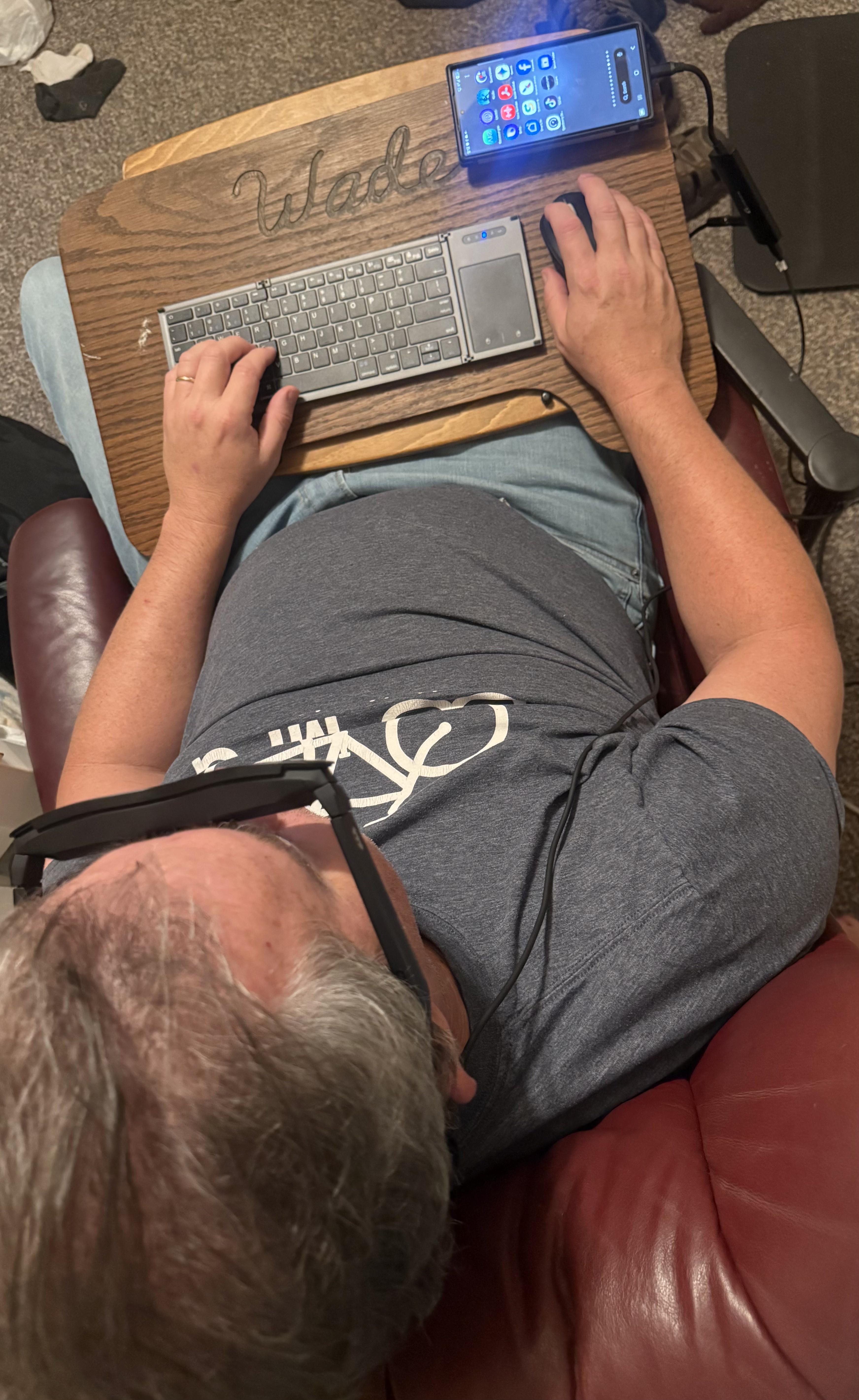
Because I like ultra portable setups this is my new arrangement. Using RayNeo glasses with (sometimes without) a docking device https://a.co/d/0e0hmu9W
Foldable keyboard with tackpad and separate mouse.
Doing a lot of field work soon. Map editing by remoting into a virtual desktop for GIS and video editing. Just need my lapdesk and ready to roll! Samsung galaxy s23 ultra. Adding a 100 watt usb-c power supply and battery backup to the mix soon.
r/SamsungDex • u/Mammoth-Hat-6815 • 4d ago
Oh my god, samsung dex has litterally saved me, as someone with a crappy pc and a lot of interest in gaming, i can just connect dex to my pc or just use mouse and keyboard directy on my tablet (using scrcpy) to play games, and honestly it works so well that I had to make a appreciation post, ive owned samsung devices for so long now without knowing you can make a literal pc out of them, and the perfomace is so good, now I feel like i was only using 10% of my device before finding this out
One of the questions that I have is whenever I leave games open in other tabs, they turn off like they do with normal mode whch is okay, but how do I keep all apps always alive and not turn off when I am doing something else on another tab
r/SamsungDex • u/No-Profession-7969 • 4d ago
Just wanted to thank the dev for HzUnlock and recommend it to anyone using DeX on an external monitor.
I tested it on my Samsung Galaxy S25 Ultra with a Rayneo air 4 pro, connected through usb c. Before, DeX was stuck at 60 Hz. With HzUnlock it runs at 120Hz and everything feels way smoother: moving windows, scrolling, the cursor, all of it.
Setup was easy: install Shizuku, start it with wireless debugging (no root needed), open HzUnlock, allow it in Shizuku and turn it on. The phone's own screen keeps working normally; it only changes the refresh rate on the DeX monitor.
Download (GitHub releases): https://github.com/npfp222/HzUnlock/releases
Original post from the dev: https://www.reddit.com/r/SamsungDex/s/FwtKPGF6VR
Great work, and thanks for making it free and open source!
r/SamsungDex • u/uaos • 4d ago

Ever since I found Breadstick Linux and run it on my Samsung DeX I have been searching for third party apps that will run. I don't develope, I just a user so I need easy download and install; example OnlyOffice, easy download ARM of OnlyOffice, in that directery open terminal and run "sudo apt install onlyoffice-desktopeditors_arm64.deb". that the most you get out of me, so I glad if it breaks you can open Breadstick and delete the Linux and start all over.
So, this is what I have found and installed atleast once:
- OnlyOffice easy install and see and uses third part fonts : https://www.onlyoffice.com/download-desktop
- WordCraft, the ArtCraft launcher downloaded something but didn't launch it so downloaded the aarch64.deb from github : https://github.com/orgs/storytold/repositories?type=all
- Zotero : https://github.com/retorquere/zotero-pkg ; Follow instructions from github user:
“wget -qO- https://raw.githubusercontent.com/retorquere/zotero-pkg/master/install.sh | sudo bash
sudo apt update
sudo apt install zotero”
- Obsidian : https://github.com/obsidianmd/obsidian-releases/releases
- PriveNotes : https://docs.google.com/document/d/1YgPjeWG9ksEAs3fr9O5IoRub9H1qAFzHi9i7bErt0N4/edit?tab=t.hl98i8avmg5a
I know the repository offers LibreOffice, Calligra Suite and more (~2,000 apprs), but I am more interested in third party applications. Any suggestion are welcomed, and it not just for me, you may help someone else looking for the perfect program that can run on thier Breadstick Linux setup. Thank you in advance, have a nice day.
r/SamsungDex • u/Arthouthere • 4d ago

I'm looking for the perfect Notes app for my use case and it's the second time their behaviour on Dex stops me on my tracks. The apps are Amplenote and NotesNook.
They work perfectly fine on my phone (Samsung Galaxy fold 5, folded and unfolded) and also on Dex using a browser, but when I open them in Dex as Apps they show like in the screenshots, using only a tiny space in the top left corner, regardless how I resize them.
I have seen this happening only on these two apps so far and I wonder if anybody knows of some setting that might help.
r/SamsungDex • u/ConversationRude5320 • 5d ago
I'm looking to run DeX on my office screens from my S26 Ultra. They are providing two monitors, a mouse and keyboard. Do I need anything other than an adapter like the Anker USB C Hub, 7in1 multi port adapter?
r/SamsungDex • u/OwenMorgan104 • 5d ago

