r/SATNA_PROJECT • • Sep 15 '26 Bravo Mindblown Heartwarming

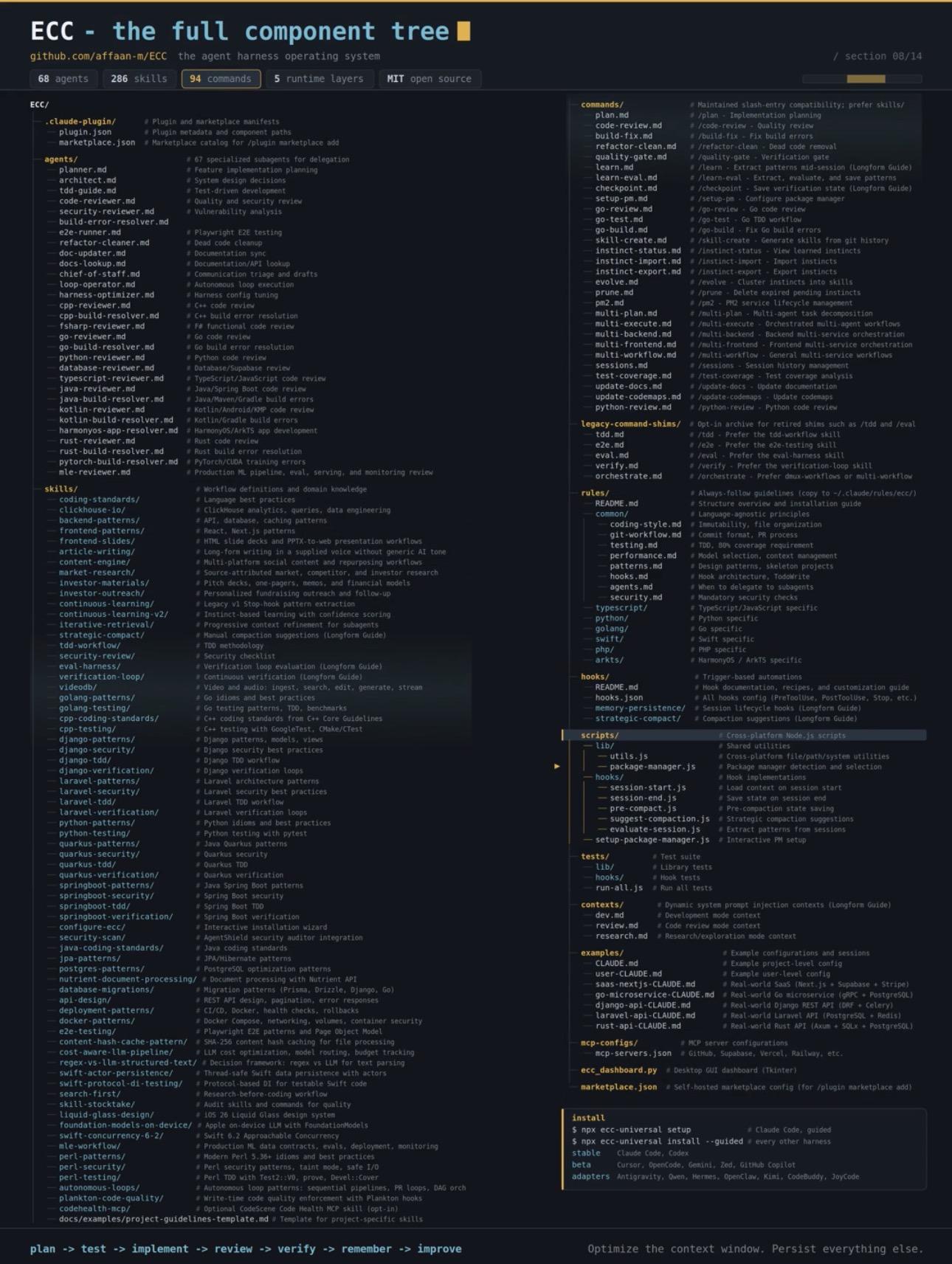
Anthropic hackathon winner just open-sourced his entire Claude Code setup 🔥

Post image
2.4k Upvotes

The creator behind the Anthropic × Forum Ventures hackathon-winning project released his full Claude Code workflow for free.

Agents, skills, hooks, commands, rules, MCP configs — a seriously useful resource if you build with Claude Code, Cursor, Codex, or AI coding agents.

GitHub:
https://github.com/affaan-m/everything-claude-code

I share more free AI tools, open-source projects, automation resources, and useful dev finds in my Discord:

Join here:
Click here to join the server

Tip: Read through the configs before installing anything into your own environment.


r/SATNA_PROJECT • • Oct 16 '26 Bravo

Paste this Prompt in Opus 5.5 and reverse Engineer anything in minutes from internet

Post image
1.3k Upvotes

🔍 Understand how software features work—with Claude + REA

Got an app feature you want to understand? This prompt gives Claude a structured workflow to investigate it with REA, gather evidence, and build an original implementation for your own project.

🛠️ What it covers:

  • Trace a feature from the UI to its underlying logic.

  • Separate proven behavior from assumptions.

  • Write original code based on the findings.

  • Test the rebuild against observed behavior.

🚀 Get started:

  1. Connect REA to your coding agent:

npx rea-agents setup
  1. Restart your agent.

  2. Paste the prompt from the attached image.

  3. Specify the app and the exact feature you want to investigate.

💬 Example request:

Understand how [feature] works in [app], show me the evidence,
and build a similar feature for my project.

⚠️ Only analyze software you own or are authorized to examine. The prompt is designed for evidence-backed investigation—not bypassing licensing, authentication, or paywalls.

Join Discord


r/SATNA_PROJECT • • Oct 13 '26

Claude Code has an opusplan mode: Opus plans, Sonnet builds. Here’s the setup.

1.3k Upvotes

You don’t need your most expensive model doing every part of a coding task.

Claude Code has a built-in option for splitting the work: opusplan.

Start it like this:

claude --model opusplan

In Plan Mode, Claude Code uses Opus. When you leave Plan Mode and move into execution, it switches to Sonnet. That behavior is documented—not a prompt hack.

The workflow

  • Opus: investigate the problem, weigh tradeoffs, and design the change.

  • Sonnet: implement the approved plan.

  • Haiku subagents: handle focused supporting tasks, such as repository searches, test runs, and documentation lookups.

The first two are handled by opusplan. The Haiku workers are an additional configuration you create—not something the flag automatically sets up. Custom subagents support model: haiku and their own tool restrictions.

When I’d return to planning

A useful rule for this setup:

  1. Before a new feature.

  2. Before a design decision with meaningful tradeoffs.

  3. When the first attempted bug fix fails.

The point is to reconsider the approach before generating another pile of edits.

Copy-paste setup prompt

Help me configure Claude Code around this workflow:
Opus plans, Sonnet implements, and Haiku handles focused
supporting tasks.

1. Inspect my existing configuration. Propose setting the
   default model to opusplan and effort to high, verifying
   the supported setting names first.

2. Propose three project-level subagents in .claude/agents/,
   each with model: haiku:
   - search: maps the repository; read-only tools.
   - tests: runs approved test commands and reports failures;
     does not edit source files.
   - docs: retrieves relevant API documentation; no file edits.

3. Give each subagent a clear description so Claude knows
   when to delegate to it. Restrict tools to its actual needs.

4. Propose adding this workflow rule to CLAUDE.md:
   "Use Plan Mode before new features, significant design
   tradeoffs, and bugs that survive the first attempted fix."

5. Preserve unrelated settings. Explain permission changes
   and any limitations.

Show every proposed change as a diff first.
Do not edit files or run test commands until I approve.

Project-level subagents live in .claude/agents/; their descriptions guide delegation, and their frontmatter controls the model and available tools.

Two caveats worth knowing

  • Model aliases depend on your provider and Claude Code version. The current documentation lists Opus 5.5, Sonnet 5.5, and Haiku 5.5 for the Anthropic API, but other providers may resolve the aliases differently.

  • Subagents still consume usage. Routing focused work to Haiku can help control costs, but it doesn’t guarantee a cheaper session or better code.

Docs: https://code.claude.com/docs/en/model-config
Subagents: https://code.claude.com/docs/en/sub-agents

Has anyone compared this setup with Sonnet-only on the same task—cost, completion time, and fixes required?

Want more exclusive content? Get Satna Project Premium—join our Discord and DM an admin or mod for access.

Discord: [ https://discord.gg/hSA8Ur6GRH ]


r/SATNA_PROJECT • • Sep 13 '26 Bravo Heartwarming

10 open-source GitHub projects that can replace—or seriously reduce—your paid AI/software subscriptions

Post image
1.2k Upvotes

I went down a GitHub rabbit hole and found a bunch of projects that are far more capable than the usual “weekend demo” repos.

They won’t all be plug-and-play replacements for paid products—some require self-hosting, APIs, GPUs, or technical setup—but if you build things, run a community, work with content, research, or automation, these are worth bookmarking.

1. TradingAgents

AI multi-agent quantitative trading research framework
https://github.com/TauricResearch/TradingAgents

A multi-agent framework designed for quantitative financial analysis and trading research. Useful for experimenting with research workflows—not a license to blindly run real-money trades.

2. LibreChat

Self-hosted AI chat interface for multiple models
https://github.com/danny-avila/LibreChat

A polished ChatGPT-style interface that can connect to providers and models such as OpenAI, Anthropic/Claude, Google/Gemini, local models, and more.

If you’re tired of jumping between AI chat tabs, this is one of the most practical projects on the list.

3. HyperFrames / HeyGen

Open-source video-generation project
https://github.com/heygen-com/hyperframes

An open-source project from HeyGen focused on AI video-generation workflows.

4. Fincepter Terminal

Open-source Bloomberg Terminal-style finance platform
https://github.com/Fincepter-Corporation/fincepter

A finance-focused terminal/platform aiming to provide market and research tooling in an open-source ecosystem.

5. MoneyPrinterTurbo

AI one-click short-video generation
https://github.com/harry0703/MoneyPrinterTurbo

Creates short-form videos from a topic or script using automated workflows—useful for Shorts, Reels, TikToks, faceless explainers, and content experiments.

6. Agentic Inbox

Open-source AI email assistant by Cloudflare
https://github.com/cloudflare/agents/tree/main/demos/agentic-inbox

An example AI inbox assistant built around agent workflows. Interesting if you want to experiment with email triage, summarization, drafting, and automation.

7. VoxCPM

Open-source AI voice-cloning / speech-generation model
https://github.com/OpenBMB/VoxCPM

A voice-generation project from OpenBMB. Use it responsibly: only clone voices you own or have explicit permission to use.

8. Flowsint

Open-source OSINT investigation and intelligence-analysis tool
https://github.com/reconurge/flowsint

A visual workspace for organizing OSINT research, entities, relationships, notes, and investigative workflows.

Useful for legitimate research, threat intelligence, due diligence, journalism, and learning OSINT—not doxxing or targeting people.

9. agent-skills

Claude Code skills library
https://github.com/addyosmani/agent-skills

A collection of reusable skills and workflow patterns for Claude Code and agentic coding setups.

10. Nango

Open-source API integration platform
https://github.com/NangoHQ/nango

A developer platform for building, managing, and maintaining integrations with third-party APIs—especially useful when you’re tired of rebuilding OAuth flows, sync logic, and API connectors from scratch.

The actual takeaway

Stop treating GitHub as just a place to find code snippets.

A lot of “AI tools” and SaaS products are really packaged workflows built on models, APIs, automation, and integrations. If you’re willing to learn a little Docker, environment-variable management, and self-hosting, GitHub has alternatives that can save money and give you more control over your data and workflows.

What open-source project has genuinely replaced a paid subscription for you?

Want more deep-dive collections on open-source tools, AI, cybersecurity, automation, and useful GitHub projects?

Join my Discord server [https://discord.gg/qnzwqxyXFh ] more amazing content like this.


r/SATNA_PROJECT • • 29d ago Bravo

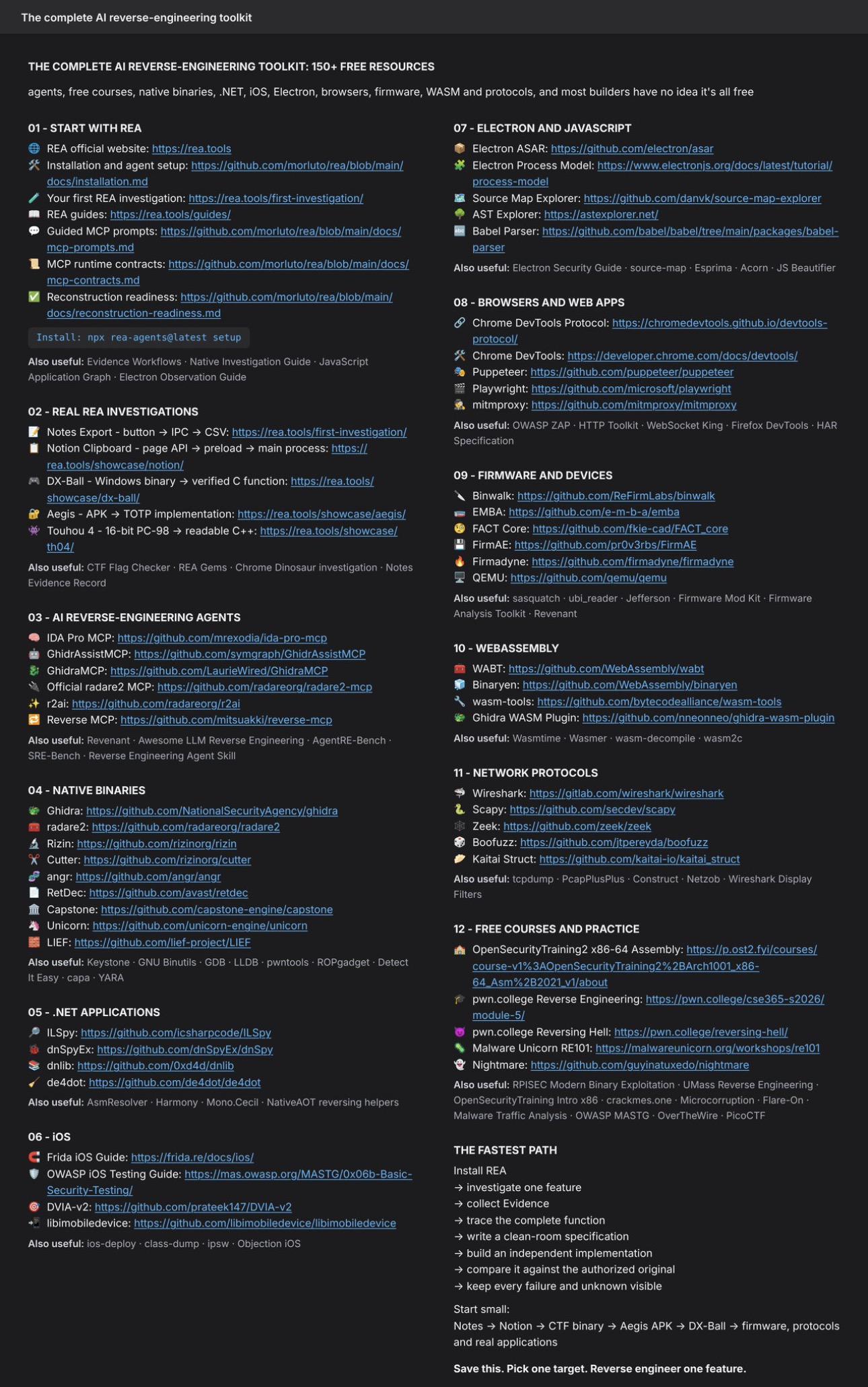
The AI reverse-engineering toolkit: free tools, agents, courses, and practice labs — organized by what you’re trying to understand

Post image
1.1k Upvotes

You don’t need another folder of 150 bookmarks.

You need to know which tool to open when you’re staring at a Windows binary, an Electron app, a firmware image, or an undocumented protocol.

This is a reverse-engineering resource map organized by target—not a random list of repos.

AI agents are part of it. So are disassemblers, debuggers, protocol analyzers, and free courses that teach you how to check the agent’s work.

The rule that ties everything together: evidence.

A convincing explanation is not the same as a verified reconstruction.

01 — Start with REA: connect your agent to the investigation

REA connects coding agents to tools for inspecting native binaries, JavaScript/Electron applications, .NET assemblies, websites, and runtime behavior. Results include supporting evidence and limitations.

Start here:

Setup:

npx rea-agents@latest setup

Review the proposed changes, approve the setup, and restart your agent.

Two important caveats:

  • REA is open source; commercial analysis engines such as IDA Pro and Hopper still require their own licenses.

  • REA analyzes targets locally, but tool results go to your agent. Your model provider’s data policy still matters.

02 — Follow a real investigation before inventing your own workflow

Start with one feature, not “explain this entire application.”

  • Notes export — follow a button through the preload bridge and IPC handler to the CSV writer. Then predict an edge case and test it.

  • Notion clipboard — follow a clipboard API through Electron’s process boundaries.

  • DX-Ball — follow a native sound calculation from original instructions to a checked reconstruction.

  • Aegis — explore an APK investigation focused on TOTP behavior.

The Notes exercise is a particularly good first step: the app is small, the trace is concrete, and you can check the CSV formatter’s behavior directly.

Also worth exploring: CTF Flag Checker, REA Gems, Chrome Dinosaur, and the Notes Evidence Record.

03 — AI reverse-engineering agents and MCP bridges

For connecting an agent to an analysis environment:

Also explore: Revenant, Awesome LLM Reverse Engineering, AgentRE-Bench, SRE-Bench, and Reverse Engineering Agent Skill.

Think of the agent as an investigator’s assistant—not the final authority on what a binary does.

04 — Native binaries

The core toolkit:

Keep these nearby too:

Keystone ¡ GNU Binutils ¡ GDB ¡ LLDB ¡ pwntools ¡ ROPgadget ¡ Detect It Easy ¡ capa ¡ YARA

05 — .NET applications

Start here:

Also explore:

AsmResolver ¡ Harmony ¡ Mono.Cecil ¡ NativeAOT reversing helpers

06 — iOS

Documentation, practice targets, and device tooling:

Also explore:

ios-deploy ¡ class-dump ¡ ipsw ¡ Objection

07 — Electron and JavaScript

For packaged apps, bundles, source maps, and syntax trees:

Also explore:

Electron Security Guide ¡ source-map ¡ Esprima ¡ Acorn ¡ JS Beautifier

A useful first investigation: pick one UI action and trace it across the renderer, preload bridge, main process, and final side effect—the same structure used in REA’s Notes walkthrough.

08 — Browsers and web applications

For observing what the application actually does:

Also explore:

OWASP ZAP ¡ HTTP Toolkit ¡ WebSocket King ¡ Firefox DevTools ¡ HAR Specification

09 — Firmware and devices

Start with:

Also explore:

sasquatch ¡ ubi_reader ¡ Jefferson ¡ Firmware Mod Kit ¡ Firmware Analysis Toolkit ¡ Revenant

10 — WebAssembly

The starting toolkit:

Also explore:

Wasmtime ¡ Wasmer ¡ wasm-decompile ¡ wasm2c

11 — Network protocols

For captures, packet inspection, scripting, and protocol testing:

Also explore:

tcpdump ¡ PcapPlusPlus ¡ Construct ¡ Netzob ¡ Wireshark Display Filters

12 — Free courses and practice

Tools give you output. Practice teaches you what to trust.

Start here:

Keep this practice list:

RPISEC Modern Binary Exploitation ¡ UMass Reverse Engineering ¡ OpenSecurityTraining Intro x86 ¡ crackmes.one ¡ Microcorruption ¡ Flare-On ¡ Malware Traffic Analysis ¡ OWASP MASTG ¡ OverTheWire ¡ picoCTF

The learning path I’d use

Not “install everything.”

Not “ask the AI to explain a million-line codebase.”

One target. One feature. One testable question.

Choose software you own or are authorized to examine
    ↓
Identify one observable behavior
    ↓
Collect evidence
    ↓
Trace the relevant implementation
    ↓
Write a behavior specification
    ↓
Build an independent implementation
    ↓
Compare outputs against the authorized original
    ↓
Record mismatches, failures, and unknowns

A sensible progression:

Notes export → Electron clipboard behavior → a practice CTF binary → an APK feature → a native calculation → firmware or protocols.

For a first prompt, try:

Investigate this one feature. Show the relevant files, functions, calls, or instructions. Separate verified facts from hypotheses. Predict an edge case, test it where authorized, and report what remains unknown.

Keep the scope lawful and authorized. That is also REA’s stated intended use: research, education, interoperability, preservation, and analysis of software you own or have permission to examine.

The useful milestone isn’t “I installed 20 tools.”

It’s “I can explain one feature, point to the evidence, and reproduce its behavior.”

What’s the one reverse-engineering resource you’d add to this list—and what did it help you understand?

Join Discord


r/SATNA_PROJECT • • 11d ago

Someone just open-sourced a full 49-Agent "Game Studio" setup for Claude Code — build full games from scratch 🎮🔥

Post image
1.1k Upvotes

If you've experimented with building mini-games using Claude Code, you've probably run into the same problems: things work great initially, but as the project grows, context gets messy, physics bugs creep in, and the codebase slowly turns into spaghetti.

I recently came across an interesting open-source project called Claude-Code-Game-Studios, and it's taking a pretty different approach to AI-assisted game development.

Instead of asking Claude to handle everything through one giant prompt, it organizes the workflow into a structured game development environment with 49 specialized AI subagents and 75 slash commands.

Here's what caught my attention:

🎮 49 Specialized Game Development Agents

- Dedicated agents for gameplay programming, engine architecture, AI pathfinding, shaders, UI/HUD design, narrative, audio, and QA.

- Each agent has a specific responsibility, helping keep different parts of the project organized.

⚡One-Command Game Prototyping

- Use /brainstorm when you need game ideas.

- Run /prototype [your idea] to generate a playable vertical slice.

- /start helps kick off the development workflow.

🛠️ Support for Multiple Game Engines

- Godot 4.7

- Unity

- Web-based games

The setup includes engine-specific coding standards, delta-time physics practices, and scene/resource protections.

🔍 Automated Quality Checks

- 15 automated validation hooks.

- Path-scoped rules to help prevent architectural mistakes and keep unrelated systems from interfering with each other.

📚 Production-Ready Templates

- 62 templates covering Game Design Documents (GDDs), sprint planning, architecture decisions, combat systems, economy balancing, and more.

GitHub Repository:

🔗 https://github.com/Donchitos/Claude-Code-Game-Studios

Quick Setup:

Clone the repository and launch Claude Code:

bash
git clone https://github.com/Donchitos/Claude-Code-Game-Studios.git
cd Claude-Code-Game-Studios
claude

Then try /start or /prototype and describe the game you want to build.

One more thing: The Markdown-based skills, agent definitions, and prompts could also be adapted for other AI coding environments like OpenCode, Cursor, or local model setups.

Curious to hear your thoughts:

Have you tried building an actual playable game using Claude Code or other AI coding agents?

Which engine has given you the best results: Godot, Unity, or something web-based?

Share your projects, experiences, or ideas in the comments!

---

💬 I also share free AI tools, open-source projects, game development resources, and automation workflows in our community Discord.

👉 Join here: https://discord.gg/9aXT4EZv3Y


r/SATNA_PROJECT • • 29d ago Bravo

20 GitHub tools for Claude Code worth bookmarking — start with 3, not all 20

991 Upvotes

Claude Code rabbit holes usually end the same way: 40 open tabs, six overlapping plugins, and no idea whether your setup actually got better.

Here’s a more useful starting point: 20 projects grouped by the problem they solve, with direct GitHub links.

Not another “$29,077 worth of tools for FREE” pitch. Just a shortlist for finding the pieces your workflow is missing.

TL;DR: Start with one tool for memory, one for context efficiency, and one for your actual work. Run the same task before and after. Keep what earns its place.

🧠 Stop rebuilding context every session

  1. claude-mem Captures session activity, compresses it into summaries, and brings relevant context into future sessions. For the “we already figured this out yesterday” problem.

  2. planning-with-files Keeps plans and progress in Markdown files rather than relying entirely on the chat. Useful when a task needs to survive /clear, compaction, or an interrupted session.

🛠️ Give your agent a more structured workflow

  1. Everything Claude Code A broad collection of agents, skills, commands, hooks, and configuration. Worth exploring when you want a workflow toolkit rather than another isolated prompt.

  2. agent-skills — Addy Osmani Engineering skills organized around the work of shipping software: specifying, planning, building, verifying, reviewing, and releasing.

  3. Ruflo Multi-agent orchestration for workflows involving Claude Code and Codex, including shared-memory coordination.

  4. agents — wshobson A large collection of specialized agents, skills, and commands packaged into installable plugins. Think “pick the relevant specialist,” not “install the entire catalogue.”

🗺️ Understand the codebase before changing it

  1. Graphify Turns code and supporting project material into a queryable knowledge graph. Important privacy distinction: code parsing happens locally, but semantic processing of documents and other media can use your assistant’s model or a configured API key. “Everything stays local” is too broad a claim.

  2. Understand-Anything Builds an interactive knowledge graph you can explore, search, and ask questions about. A different starting point from opening an unfamiliar repository and grepping your way through it.

📉 Stop spending context on terminal noise

  1. ponytail Pushes your agent toward the “laziest senior developer” mindset: less unnecessary code, less overengineering, more restraint. The interesting idea is the approach—not treating a repo’s benchmark as a guaranteed result.

  2. rtk A Rust CLI proxy designed to reduce the volume of common development-command output sent to the model.

  3. headroom Compresses tool outputs, logs, files, and structured data before they reach the LLM. Offers library, proxy, and MCP-server approaches.

  4. context-mode Sandboxes tool output to reduce how much raw output enters the context window. Relevant when verbose commands are drowning out the task itself.

🎨 Give the frontend something beyond default AI aesthetics

  1. UI UX Pro Max A UI/UX design-intelligence skill covering styles, palettes, typography, and interface guidance. Useful as a source of design decisions—not just “make it modern.”

  2. taste-skill Frontend guidance aimed at less generic, more deliberate visual output. For when the page technically works but still looks like every other AI-generated landing page.

  3. video-shotcraft Creates cinematic product videos with Remotion, real page screenshots, camera moves, beat-synced cuts, and sound design. Particularly interesting if you’ve built the product but still need to show it off.

🔎 Connect the workflow to the work you actually do

  1. Agent-Reach A CLI for accessing sources such as YouTube, GitHub, Reddit, and the web from an agent workflow.

  2. cc-switch A desktop app for switching providers and managing MCP configuration, skills, and prompts in one place.

  3. pm-skills Product-management skills and workflows spanning discovery, strategy, execution, launch, and growth.

  4. claude-skills A cross-functional collection covering engineering, marketing, product, finance, compliance, and leadership workflows.

  5. career-ops A job-search workflow for finding roles, scoring fit against your CV, tailoring application materials, and tracking applications. It helps prepare the application; you still press Submit.

Where I’d start

Rather than installing the biggest bundles first, build a small test setup:

  • Memory: claude-mem or planning-with-files.

  • Context efficiency: rtk, headroom, or context-mode.

  • Your actual work: one engineering, design, product, research, or career tool.

Then give the setup the same representative task you ran without it.

Compare the result:

  • Did it finish correctly?

  • Did you need fewer corrections?

  • Did it use fewer tokens?

  • Was it faster overall?

  • Did it create extra setup or maintenance work?

A bigger setup isn’t the goal. A better result is.

What’s one Claude Code add-on that genuinely earned its place in your workflow—and what did it improve?

Join Discord


r/SATNA_PROJECT • • 7d ago Helpful Bravo Popcorn

Your AI agent might not need a better model. It might need a better harness. Here are 8 free repos to study.

915 Upvotes

An agent writes the code, skips verification, loses context halfway through, and confidently says “done.”

Your first instinct: switch models.

But what if the problem is everything around the model?

That’s harness engineering: designing the environment, context, state, tools, verification and controls that help an agent work reliably. Not a guarantee that it works every time—a way to make its behavior more predictable and its failures easier to catch.

If you want to understand that layer, these eight public repos are worth exploring.

1. Learn Harness Engineering — build it, don’t just read about it

A project-based course focused on making coding agents such as Codex and Claude Code more reliable.

The exercises cover agent-readable workspaces, continuity across sessions, runtime feedback, independent review and automated loops.

Start here if you want a guided learning path.

https://github.com/walkinglabs/learn-harness-engineering

2. 12-Factor Agents — learn the production principles

HumanLayer’s collection of principles for building reliable LLM applications.

Think of it as the design-principles entry on this list—not another agent framework to install.

Start here if you want to examine the architecture before adding more moving parts.

https://github.com/humanlayer/12-factor-agents

3. AGENTS.md — stop repeating your repo instructions

An open format for giving compatible coding agents a predictable place to find project context.

Use it for environment setup, test commands, conventions and contribution instructions. The project describes it as a “README for agents.”

Useful distinction: it provides guidance. It is not a security boundary or a promise that every agent supports it.

https://github.com/agentsmd/agents.md

4. Spec Kit — define the work before generating the code

GitHub’s toolkit provides structured processes, reusable templates and documented outcomes for agent-assisted development.

It supports a specification-first workflow, with tooling to set up the project structure and agent integrations.

Worth exploring when “build this feature” leaves too much room for interpretation.

https://github.com/github/spec-kit

5. Deep Agents — inspect an actual harness

LangChain’s open-source, batteries-included agent harness.

It’s an opinionated implementation that you can extend, override or replace piece by piece—not just an article describing what a harness should do.

Start here if you learn best by examining a working implementation.

https://github.com/langchain-ai/deepagents

6. Mini SWE Agent — understand the loop without a giant framework

A minimal software-engineering agent with an agent class of roughly 100 lines of Python.

Important caveat: that count is for the agent class, not the entire repository. The environment, model integrations and run scripts add more code.

Its deliberately simple design uses Bash actions and a linear message history, making the execution flow easier to inspect.

https://github.com/SWE-agent/mini-swe-agent

7. Awesome AI Anatomy — compare how other agents are built

Independent architecture teardowns covering projects such as OpenHands, Cline, Codex CLI and Claude Code.

The repo includes diagrams and comparisons of context management, tools, memory, orchestration and security.

One caveat: this is third-party analysis, not official documentation. For proprietary products, the author says the analysis uses publicly available packages, source maps and documentation. Verify consequential claims against the underlying material.

https://github.com/NeuZhou/awesome-ai-anatomy

8. Harbor — measure whether your changes helped

A framework for evaluating and optimizing agents against benchmark tasks.

It supports agents including Claude Code, Codex and Mini SWE Agent, with parallel execution options for larger experiments.

Because “it seemed better on my last prompt” is not much of an evaluation strategy.

https://github.com/harbor-framework/harbor

Don’t install eight things. Run one experiment.

A practical way to use this list:

  1. Pick a small task with clear acceptance criteria.

  2. Run it with your current setup.

  3. Add one improvement: clearer instructions, persistent state or an automated check.

  4. Run it again.

  5. Compare correctness, time, cost and the human intervention required.

Keep the model fixed while you test the setup. Otherwise, you won’t know which change helped.

Also: free repositories do not mean free execution. Check model, compute and hosting requirements before running the examples.

The model matters.

But so does what it can see, what it can do, what it remembers—and how you check its work.

You can rent access to a model. The workflow around it is something you can build, inspect and improve.

Join discord


r/SATNA_PROJECT • • Sep 07 '26 Bravo

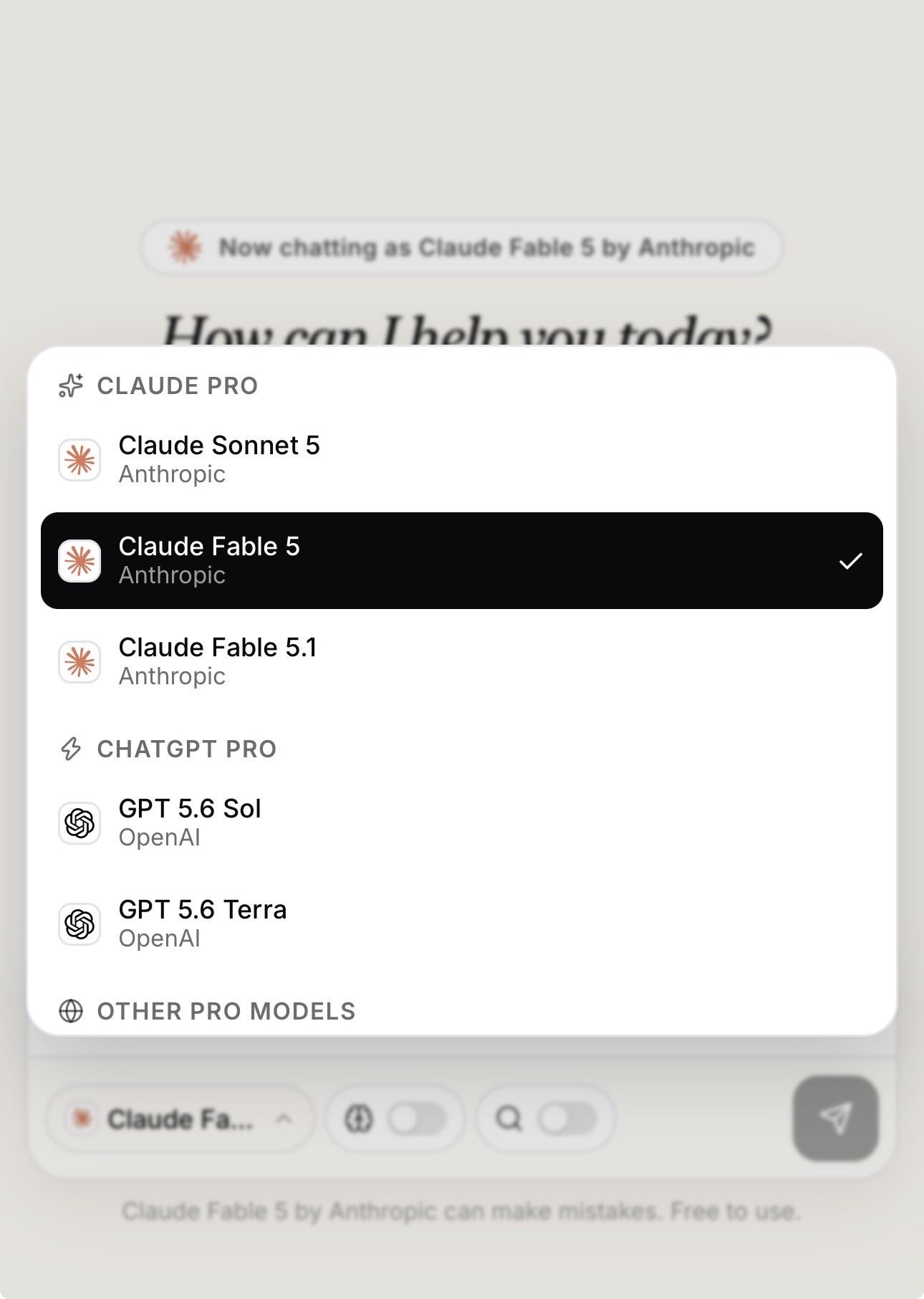
How to access ALL claude models for FREE (No credit card / No limit hacks) 🚀

Post image
881 Upvotes

If you're tired of hitting the tight usage caps on Claude or don't want to pay $20/month for Claude Pro, I found a clean workaround that gives you full access to all Claude models completely for free.
I’m sharing the step-by-step method and direct access links.
How to get it:
1 Upvote this post so more people in the community can see it.
2 Comment "LINK" below.
I’ll DM you the invite link to our community Discord. Once you're in, head straight to the #ai-revolution channel—the direct links, setup guide, and tools are pinned right at the top.
Let's beat the paywalls together! 🤖✨


r/SATNA_PROJECT • • Oct 11 '26

5 GitHub repos worth checking before you build another AI agent from scratch

Post image
878 Upvotes

Before you write another giant system prompt, check these out.

These five repos cover specialist agents, reusable skills, coding plugins, and working applications. Two are official Anthropic projects; the others are community-built. They solve different problems, so here’s what each is actually useful for.

1. agency-agents — pick specialists like you’re assembling a team

https://github.com/msitarzewski/agency-agents

Organized into departments: engineering, design, marketing, sales, product, testing, security, support, and more.

Each agent definition includes its role, workflows, deliverables, and success criteria. There are also specialist divisions for finance, healthcare, and game development, plus integrations for Claude Code, Cursor, Codex, and other tools.

Useful when you want a focused reviewer or specialist instead of asking one generic agent to do everything.

2. wshobson/agents — install the coding workflows you actually need

https://github.com/wshobson/agents

202 agents, 184 skills, and 105 commands, with a catalog of 94 plugins.

Covers language-specific development, debugging, code review, testing, infrastructure, and security. You can install individual plugins rather than load the entire collection.

Useful when you already use an AI coding tool and want to add targeted capabilities. It supports Claude Code and several other coding tools, although capabilities vary by integration.

3. knowledge-work-plugins — Anthropic’s plugins for work beyond coding

https://github.com/anthropics/knowledge-work-plugins

Official plugins for sales, customer support, product management, marketing, legal, finance, and data.

Built for Claude Cowork and also compatible with Claude Code. They bundle workflows, skills, commands, and tool connections around specific job functions.

Useful when your goal is “help me handle this workflow,” not “help me write this function.”

4. claude-quickstarts — actual applications you can run and take apart

https://github.com/anthropics/claude-quickstarts

Official examples include:

  • A daily brief that reads Slack and GitHub.

  • Scheduled Sentry triage.

  • Slack and Linear agents.

  • A customer-support agent.

  • A financial-data analyst.

  • Browser automation and autonomous coding examples.

This is where I’d start if the goal is to learn how an agent application fits together. You get implementation examples and setup instructions—not just a role description. The projects require a Claude API key, and some examples explicitly aren’t production code.

5. agent-skills — give your coding agent a process, not just a task

https://github.com/addyosmani/agent-skills

25 engineering skills covering requirements interviews, specs, planning, test-driven development, browser testing, code review, security, and CI/CD.

The interesting part is the structure: steps, checkpoints, and evidence requirements. The workflows tell the agent what to verify before it declares the task finished.

Useful when you want more disciplined development rather than another “you are a senior engineer” prompt.

The distinction that matters

These aren’t five interchangeable libraries of autonomous bots.

Some provide specialist instructions. Some package skills and commands. Others provide application code. Pick based on what you’re missing: a role, a workflow, or an implementation.

My starting point would be one quickstart—not the whole collection. Run it, inspect its tool calls, and adapt it to one narrow use case.

Which agent or skill repo have you actually kept using after the initial hype?

Join Discord


r/SATNA_PROJECT • • 22d ago Bravo

12 open-source reverse-engineering tools worth knowing—and the MCP bridges connecting them to AI agents

810 Upvotes

The interesting development in reverse engineering isn’t just that powerful tools are freely available. It’s that AI agents can now interact with some of them through MCP integrations: inspecting decompiled code, querying analysis results, and working with debugger sessions.

That makes it useful to separate the ecosystem into three layers:

  • Core analysis and extraction tools.

  • Debugging and binary-inspection tools.

  • Integrations that expose those capabilities to agents.

Here are 12 projects organized by what they actually do, with complete GitHub links.

1. Core analysis and extraction

01 → Ghidra

The NSA’s open-source software reverse-engineering framework. Includes disassembly, decompilation, graphing, and scripting, with both interactive and automated analysis modes.

https://github.com/NationalSecurityAgency/ghidra

02 → Apktool

For inspecting and modifying Android APKs. It decodes resources into a nearly original form and can rebuild the package after changes.

The distinction matters: decoding resources is not the same as recovering an app’s original source code.

https://github.com/iBotPeaches/Apktool

03 → Binwalk

Identifies—and can optionally extract—files and data embedded inside other files. Particularly useful for firmware analysis. Version 3 was rewritten in Rust.

https://github.com/ReFirmLabs/binwalk

04 → unblob

Recursively extracts supported archives, compression streams, and filesystems from binary blobs. Useful for unpacking nested firmware contents and separating recognizable structures from unknown chunks.

https://github.com/onekey-sec/unblob

2. Debugging and binary inspection

05 → pwntools

A Python framework for CTFs and exploit-development research. Built for rapid prototyping and scripting repetitive interactions in controlled security-testing environments.

https://github.com/Gallopsled/pwntools

06 → pwndbg

Enhances GDB and LLDB with features aimed at low-level debugging and reverse engineering.

One caveat: the project describes its LLDB support as experimental/early-stage, so don’t assume identical behavior across both debuggers.

https://github.com/pwndbg/pwndbg

07 → LIEF

A library for parsing, inspecting, and modifying executable formats, including ELF, PE, and Mach-O. Offers APIs for C++, Python, and Rust.

https://github.com/lief-project/LIEF

08 → Detect It Easy

A cross-platform file-identification and static-inspection tool. Combines format parsing, signatures, and scriptable analysis to help identify file types, toolchains, packers, and other structural clues.

Its findings are leads for investigation—not proof that a file is malicious or safe.

https://github.com/horsicq/Detect-It-Easy

3. Where AI agents connect

MCP—Model Context Protocol—provides the connection layer in these projects. The underlying reverse-engineering tools still perform the analysis; the integration lets an agent access their capabilities.

09 → ghidra-mcp

A Ghidra integration exposing more than 200 MCP tools for AI-assisted reverse engineering. Includes GUI and headless workflows, batch operations, and deployment options.

https://github.com/bethington/ghidra-mcp

10 → jadx-ai-mcp

A JADX plugin for connecting decompiled Android application context to MCP-compatible assistants such as Claude. The project works with a companion MCP server.

Plugin:
https://github.com/zinja-coder/jadx-ai-mcp

Companion server:
https://github.com/zinja-coder/jadx-mcp-server

11 → radare2-mcp

An MCP server for using radare2 with AI assistants. Supports binary analysis and connections to local or remote radare2/iaito sessions through r2pipe.

https://github.com/radareorg/radare2-mcp

12 → mcp-windbg

Connects MCP clients to Windows debugging workflows, including crash-dump analysis, user-mode remote debugging, and kernel debugging.

It is an independent community project, not an official Microsoft integration.

https://github.com/svnscha/mcp-windbg

The useful takeaway

These projects occupy different layers: extraction tools unpack contents, analysis frameworks expose program structure, debuggers inspect runtime state, and MCP bridges make selected operations accessible to agents. They complement one another rather than replace one another.

The keyword is verification. An agent-generated explanation should be something you check against the underlying evidence—not a substitute for that evidence.

Use these tools only on software and systems you own or are authorized to analyze, and keep unfamiliar binaries in an isolated analysis environment.

For people already using AI-assisted reverse engineering: where has it genuinely saved time—initial triage, understanding functions, or debugging—and where do you still prefer working manually?

Join DIscord


r/SATNA_PROJECT • • Sep 18 '26 Bravo

15 GitHub projects with 1.2M+ combined stars that can form a real agent stack

Post image
779 Upvotes

Hey everyone! If you are trying to build your own autonomous AI employees or real agent workflows, managing the stack can get overwhelming.

I put together a compilation of 15 powerful, open-source GitHub projects (totaling over 1.2 million combined stars) that cover everything from memory and web data to monitoring, sandboxes, and video.

The typical loop for a real agent stack looks like this:

Define the job ➔ Collect the evidence ➔ Parse the docs ➔ Save the memory ➔ Compress the context ➔ Run the code safely ➔ Watch what changes ➔ Ship the output

Here is the complete open-source stack to build your own business with AI employees:

The Real Agent Stack

  1. hermes-agent – The agent that grows with you by NousResearch.

  2. OpenSpec – Spec-driven development (SDD) for AI coding assistants.

  3. caveman – Ultra-minimalist context compression and agent skills.

  4. Scrapling – Undetectable, smart web scraping framework for AI ingestion.

  5. Docling – Get your documents ready for GenAI with advanced PDF understanding.

  6. PageIndex – Intelligent vector and page-level indexing for large documents.

  7. mem0 – Universal memory layer for personalized AI applications.

  8. headroom – Context window optimization and management toolkit.

  9. Daytona – Secure, fast development environments and sandboxes for AI code execution.

  10. TrendRadar – Real-time trend tracking and intelligence gathering.

  11. Fabric – An open-source framework for augmenting humans using AI.

  12. spec-kit – Toolkit for managing software specifications seamlessly.

  13. hyperframes – Video frame generation and manipulation framework.

  14. OpenMontage – Open-source video editing and timeline automation.

  15. AI Engineering Hub – Curated architectures, pipelines, and patterns for production AI.

Why this matters:

Instead of relying on monolithic wrappers, you can wire these open-source tools together to create a modular, resilient agent architecture.

Which of these are you already using in your stack, and what's missing? Let's discuss in the comments! 👇

Jin Discord


r/SATNA_PROJECT • • Oct 09 '26

The Claude Code Resource Bible: 54 links covering MCP servers, skills, agents, and automation

Post image
770 Upvotes

One useful Claude Code resource is easy to bookmark. Finding it again among 30 tabs, saved posts, and GitHub stars is another story.

Here’s a resource map with 54 links, grouped by category—from documentation and learning guides to MCP servers, reusable skills, agent frameworks, and infrastructure.

Not all of these are Claude Code-specific. The collection also includes broader coding-agent tools and integrations.

Start here

Official resources

Documentation, partner information, certification access, and the MCP server repository.

Directories + collections

For when you know what you need but don’t know which project to look at.

MCP servers

Resources for exploring browser, database, deployment, and workspace integrations.

Articles + guides

Reading material on CLI tools, MCP setup, and parallel-agent workflows.

Skills + extensions

A collection covering workflows, browser control, interfaces, configuration, and recurring tasks.

Terminals + parallel-agent workspaces

Projects to explore when one terminal session isn’t enough.

Agent frameworks

Resources for exploring coordination, research loops, and agent-powered applications.

Automation + infrastructure

Workflow automation, office tools, browser tooling, monitoring, and hosting resources.

A quick caveat

This is a discovery list, not a claim that every project is official, current, free, or compatible with your setup. The links were transcribed from the resource sheet and haven’t all been independently verified.

The total is 54 links, including the “Start Here” guide—not 54 tools.

Save this for the next time you’re looking for a specific capability, rather than another random tool to install.

Which resource here has actually earned a permanent place in your workflow?

Join Discord


r/SATNA_PROJECT • • 13d ago Bravo Heartwarming

Obsidian’s CEO published skills for AI agents. Here are 6 free repos to check before building your vault setup from scratch.

664 Upvotes

Your AI agent can write code, but you’re still explaining how a wikilink works.

Meanwhile, kepano—Obsidian’s CEO—has a public repo of agent skills for Obsidian Markdown, Bases, Canvas and the CLI. Actual instructions for working with the app’s formats and tools, rather than treating your vault like a folder of generic text files.

That’s the starting point. These six repos from kepano and the Obsidian team cover the rest: capturing sources, cleaning web pages, structuring notes, importing old material and building custom tools.

1. Obsidian Skills — teach the agent how Obsidian works

Skills covering:

  • Obsidian Markdown, including wikilinks, embeds, callouts and properties.

  • Bases for working with structured collections of notes.

  • Canvas for visual layouts and connections.

  • The Obsidian CLI for interacting with your vault.

Start here if your problem is: “The agent understands Markdown, but keeps getting Obsidian-specific details wrong.”

https://github.com/kepano/obsidian-skills

2. Defuddle — extract the article, not the surrounding clutter

Defuddle takes a URL or HTML and extracts the main content as cleaned HTML or Markdown.

It removes clutter such as comments, sidebars, headers and footers. There’s also a CLI, so it can fit into an agent’s terminal workflow.

Less navigation-menu soup. More actual source material.

https://github.com/kepano/defuddle

3. Obsidian Web Clipper — get useful pages into your vault

The official browser extension lets you highlight and capture web content, then save it as Markdown in your vault. Templates let you control how those captures are structured.

This handles the part before “ask the agent”: getting the material into your notes in the first place.

https://github.com/obsidianmd/obsidian-clipper

4. Clipper Templates — stop formatting every saved page manually

Kepano’s template collection includes options for sites such as:

  • arXiv.

  • Wikipedia.

  • Goodreads.

  • YouTube.

  • IMDb.

  • Google Maps.

There are also generic recipe and product templates. Import the ones that match what you actually save instead of starting each capture format from zero.

https://github.com/kepano/clipper-templates

5. Obsidian Importer — bring your old notes with you

The official Importer converts material from other apps into Markdown you can use in Obsidian.

Supported sources include Notion, Evernote, Apple Notes, OneNote and Google Keep, among others.

Your old research doesn’t have to stay stranded in the note-taking app you used three systems ago.

https://github.com/obsidianmd/obsidian-importer

6. Obsidian Developer Docs — build the missing piece

The official documentation for building Obsidian plugins and themes, including TypeScript plugin development and CSS-based customization. The documentation itself is available as an Obsidian vault.

This is the reference to reach for when your workflow needs something the existing tools don’t provide—not another guessed API call.

https://github.com/obsidianmd/obsidian-developer-docs

Where to start

You don’t need all six.

  • Want the agent to handle Obsidian formats better? Start with Skills.

  • Save lots of research? Look at Web Clipper and the templates.

  • Need clean web content in a terminal workflow? Look at Defuddle.

  • Moving from another notes app? Check Importer’s supported formats.

  • Building a custom integration? Use the Developer Docs.

One important distinction: these aren’t six plug-and-play AI integrations. Skills provide instructions; the other repos solve specific capture, migration and development problems. You still need to configure your agent’s access—and back up your vault before allowing bulk edits.

Your vault already has a structure.

Give the agent the instructions to work with it, not another opportunity to guess.

Checkout Satns Project Exclusive

Join Discord


r/SATNA_PROJECT • • Oct 09 '26

20 GitHub repos that turn AI coding agents into a motion-design toolkit

664 Upvotes

AI coding agents aren’t just for building websites.

This collection brings together 20 GitHub repos for motion-design workflows, video rendering, and web animation.

The idea:

An agent writes the code. A skill guides the motion. An engine renders the output.

Some repos help with timing, typography, and camera movement. Others provide the rendering tools. Not every repo produces video—some focus on web animation or Lottie.

Motion-design skills and workflows

  1. claude-motion

  2. claude-motion-design

  3. motion-graphics-skills

  4. claude-remotion-skill

  5. klik-anim-skill-creation

  6. hyperframes-motion-reel-skill

  7. product-launch-motion

  8. animate

  9. motion-design-skills

  10. hyperframes-student-kit

Rendering and animation foundations

  1. HyperFrames

  2. Remotion

  3. Remotion agent skills

  4. GSAP

More skills, libraries, and discovery resources

  1. LottieFiles motion-design-skill

  2. awesome-motion-design-agent-skills

  3. motion-graphics

  4. motion-dev-animations-skill

  5. Motion

  6. lottie-web

One workflow to try

HyperFrames lets coding agents create HTML-based compositions and render them into MP4s. Its documented workflow includes planning, animation, media, previewing, and rendering.

An example prompt:

Create a 10-second product intro with a fade-in title, a background video, and subtle background music.

Check each repo’s README, dependencies, and license before installing. Start with one workflow rather than stacking everything together.

Bookmark this for the next time you need a product intro, launch animation, or motion-design experiment.

Join Discord


r/SATNA_PROJECT • • Oct 20 '26

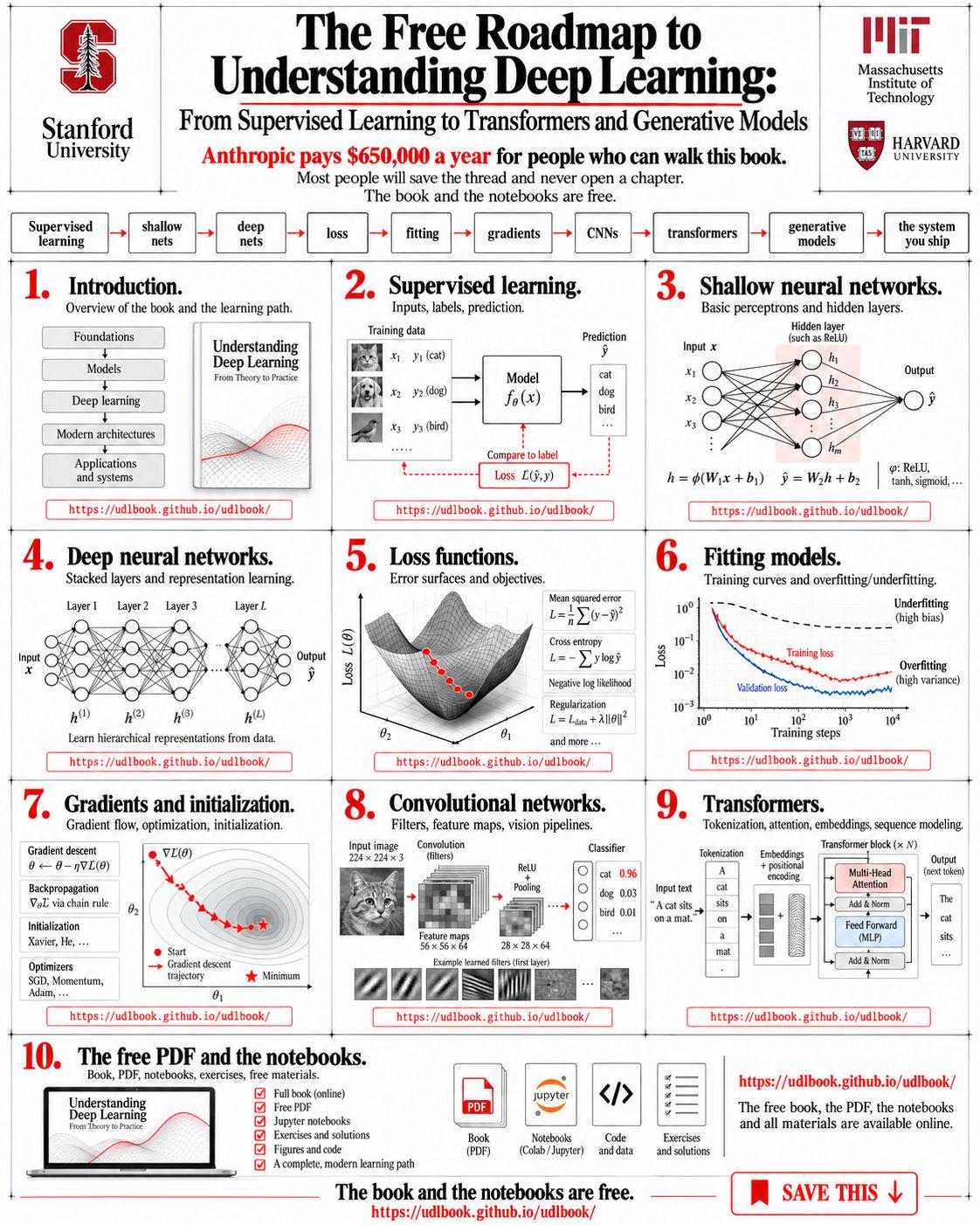
A free deep learning textbook + 68 Python notebooks, from neural network basics to transformers and diffusion models

Post image
596 Upvotes

If your AI learning is scattered across tutorials, bookmarks, and half-finished courses, here’s a resource to work through in order.

Understanding Deep Learning by Simon J. D. Prince has a freely available PDF and 68 Python notebook exercises covering the text, with links to open the notebooks in Colab.

📖 Get the book and notebooks here

What’s inside

Here’s a simplified roadmap—not the book’s chapter numbering:

  1. Introduction and supervised learning.

  2. Shallow and deep neural networks.

  3. Loss functions and fitting models.

  4. Gradients, backpropagation, and initialization.

  5. Measuring performance and regularization.

  6. Convolutional and residual networks.

  7. Transformers, self-attention, and tokenization.

  8. Graph neural networks.

  9. Generative models: GANs, normalizing flows, variational autoencoders, and diffusion.

  10. Deep reinforcement learning, why deep learning works, and ethics.

The notebooks are the part to pay attention to

The exercises include missing code for you to complete, with topics ranging from gradient descent and Adam to multi-head attention and diffusion models.

That gives you a way to move between reading the explanation and working through the implementation.

How I’d use it

  • Read one chapter.

  • Attempt its notebooks before looking for solutions.

  • Write a short explanation of what you learned.

  • Change something in the code and predict what will happen.

  • Check your prediction against the result.

Challenge: Before saving another resource, open this one and finish the first supervised-learning notebook.

No salary promises. Just a free book, practical exercises, and a clear place to start.

Join Discord


r/SATNA_PROJECT • • Sep 25 '26 Bravo

This Free Open-Source “Second Brain” Setup Is Basically a Personal Research OS

507 Upvotes

A second-brain article reportedly reached millions of views, and the creator put the full setup into a public GitHub repository: the guide, starter vault, agent workflows, scripts, and learning tracks.

It is not another generic note-taking template. It is a system for building a self-organizing knowledge base with Obsidian, Markdown files, and Claude Code—where AI helps ingest, link, organize, audit, and retrieve what you save.

The repo

GitHub:
https://github.com/undefined-ui/second-brain-os

The project is open source under the MIT License and describes itself as “an AI second brain that maintains itself,” including a guide, starter vault, agent skills, and scripts for a self-organizing Obsidian knowledge base.

What’s included

The guide

  • A structured second-brain guide covering the foundations, implementation, and troubleshooting.

  • Additional learning tracks for people who want to go deeper into AI-agent and knowledge-system design.

  • Build-oriented material designed to move from theory into a working personal research system.

The AI workflow layer

Inside the .claude/ setup, the repository includes:

  • 18 agent skills, each scoped to a particular workflow.

  • 72 slash commands for tasks such as ingesting PDFs, YouTube content, voice notes, and backfilling existing material.

  • 6 subagents: curator, linker, researcher, reviewer, ingestor, and graph analyst.

  • Read-only agent roles, which help reduce the risk of an AI agent silently rewriting your vault.

The important part is that the AI is not just asked to “summarize this.” The system gives it defined responsibilities: process incoming material, identify relationships, maintain links, review information, and analyze the structure of the vault.

The scripts

The repository includes lightweight Python tooling for practical vault maintenance, including:

  • Knowledge-graph exports

  • Broken-link checks

  • Vault statistics

  • Chat conversion

  • Site generation

These tools help you inspect and maintain your notes without requiring a complicated hosted database or an expensive SaaS stack.

The starter vault

The vault follows a clear separation between raw source material and curated knowledge:

raw/   → Original captured material; preserved after ingestion
wiki/  → Structured, linked pages maintained by the system
log.md → A one-line record for each run, creating an audit trail

It also uses a CLAUDE.md configuration with page contracts and linking rules, so the agent has guardrails for how pages should be created and maintained.

That matters because most AI note systems become messy when the model has no consistent structure to follow.

The learning tracks

The project includes curated paths and resources around topics such as:

  • Knowledge graphs

  • Jev engineering

  • Agent harnesses

  • Loop engineering

  • Evaluation engineering

It also includes a resource directory covering tools, Obsidian plugins, repositories, skills, papers, and articles for extending the setup.

Why this is valuable

Most people collect information endlessly but do not build a system that turns it into something reusable.

You save a GitHub repo.
You bookmark a thread.
You download a PDF.
You watch a useful video.
Then it disappears into a folder, browser tab, Notion page, or chat history.

This setup is designed to make your research compound:

Capture → Ingest → Extract → Link → Review → Retrieve → Build

The core philosophy is simple:

A note is only useful when it connects to something else.

Instead of treating your vault as storage, it treats it as an evolving map of what you know—and gives the AI defined workflows to keep that map useful.

Who should try it

This is especially useful if you regularly collect:

  • AI tools, prompts, workflows, and research

  • Cybersecurity resources and technical documentation

  • GitHub repositories and open-source projects

  • Content ideas, hooks, scripts, and source material

  • Business research, product ideas, and competitor analysis

  • PDFs, videos, articles, Discord discussions, and chat exports

If you are new, start with the second-brain guide and copy the starter vault.

If you already work with Claude Code, Obsidian, AI agents, knowledge graphs, or personal RAG systems, skip straight to the tracks and agent workflow layer.

A consultant could easily charge a large amount to set up a personal research and knowledge-management system like this.

This one is sitting in a public repository for free.

Link again:
https://github.com/undefined-ui/second-brain-os

Join Discord


r/SATNA_PROJECT • • Oct 02 '26 Bravo

10 Open-Source Repos That Turn an LLM Into an Autonomous System

469 Upvotes

A powerful model alone is just an inference engine. The real leap happens when you surround it with the systems it needs to reason, remember, use tools, execute actions, recover from failures, and improve over time.

Here are 10 open-source projects that help build that stack.

Build the control layer

1. LangGraph
GitHub: langchain-ai/langgraph
Stateful orchestration for long-running, controllable agent workflows.

Useful when your agent needs branching logic, checkpoints, human approval steps, retries, or multi-step execution instead of a single prompt-response loop.

2. PydanticAI
GitHub: pydantic/pydantic-ai
Typed AI agents with validation and structured outputs.

Great for making agent outputs predictable enough to plug into APIs, databases, internal tools, or downstream automation.

3. Mastra
GitHub: mastra-ai/mastra
An application framework for agents, workflows, RAG, memory, and tool use.

A good option if you want a more batteries-included way to ship an AI product rather than wiring every component together manually.

4. Agno
GitHub: agno-agi/agno
A framework for building multi-agent systems.

Useful when one agent should research, another should write, another should review, and a coordinator should combine their work.

Give the system context and memory

5. Cognee
GitHub: topoteretes/cognee
Turns raw data into a contextual knowledge layer for AI systems.

Instead of repeatedly stuffing documents into prompts, Cognee aims to help agents retrieve relevant relationships, facts, and context from your data.

6. Graphiti
GitHub: getzep/graphiti
A temporal knowledge graph for agent memory.

This matters when facts change over time. For example, an agent should know that a customer’s current plan replaced their previous plan, rather than treating both as equally true forever.

Give it a computer

7. Browser Use
GitHub: browser-use/browser-use
Lets AI agents interact with websites through a browser.

Useful for workflows involving dashboards, forms, research, web apps, repetitive admin tasks, and browser-based testing.

8. E2B
GitHub: e2b-dev/E2B
Secure, isolated sandboxes for AI-generated code and execution.

If an agent needs to run Python, manipulate files, test code, or perform tool-heavy tasks, isolation is not optional. E2B provides an execution environment without giving the model uncontrolled access to your own machine or server.

Keep it reliable

9. Langfuse
GitHub: langfuse/langfuse
Tracing, prompt management, evaluations, and observability for LLM applications.

If an agent fails, you need more than “something went wrong.” You need to see the prompts, model calls, tool usage, latency, cost, outputs, and failure point.

10. DeepEval
GitHub: confident-ai/deepeval
Testing and evaluation tooling for LLM applications.

Treat agent behavior like software behavior: define expected outcomes, run regression tests, measure quality, and catch failures before users do.

The architecture shift

The emerging pattern looks like this:

Model
  ↓
Context retrieval
  ↓
Planner / workflow engine
  ↓
Memory
  ↓
Tools
  ↓
Execution environment
  ↓
Tracing + evaluation
  ↓
Retry, correction, or human approval

Or more simply:

model → context → planner → memory → tools → execution → eval → retry

The most interesting open-source AI projects are no longer focused on making “another chatbot.”

They are building the missing layers around the model:

  • Orchestration so it can complete multi-step work

  • Memory so it can retain useful context

  • Tools so it can affect the outside world

  • Sandboxes so it can execute safely

  • Observability so developers can understand failures

  • Evaluation so quality does not collapse as complexity grows

A model becomes much more useful when it stops being the whole product and becomes one component in a reliable system.

For builders: the goal is not to use all 10 repos. Pick the minimum stack your use case actually needs. A practical starting point might be:

LangGraph + PydanticAI + Browser Use + E2B + Langfuse

Then add a memory layer such as Cognee or Graphiti only when persistent, changing context genuinely matters.

Join Discord: https://discord.gg/hSA8Ur6GRH


r/SATNA_PROJECT • • Sep 22 '26

CLAUDE + OBSIDIAN + KARPATHY’S LLM WIKI = A WIKI THAT MAINTAINS ITSELF

432 Upvotes

Run this once and your research stops evaporating into chat history, bookmarks, and scattered notes.

Sources go in. A living, linked wiki comes out. Then a maintenance loop keeps it useful as the vault grows.

Karpathy’s core idea is simple: instead of asking an LLM to rediscover answers from raw RAG chunks every time, let it incrementally build and maintain a persistent Markdown wiki between you and your sources. The knowledge is compiled, cross-linked, cited, and updated—not re-derived from scratch for every question.

The architecture

Three layers. One owner each.

  • The schema → CLAUDE.md You and the agent co-evolve the rules: folder structure, page formats, citation style, ingest workflow, and what “done” means.

  • The wiki → Markdown files The agent owns this layer. It creates summaries, entity pages, comparisons, topic maps, and synthesis pages. You browse, question, and steer it.

  • Raw sources → immutable and read-only Articles, PDFs, transcripts, screenshots, repo docs, notes. These remain your source of truth; the agent reads them but does not rewrite them.

The loop

1. Ingest
Drop a source into raw/. The agent reads it, writes a source summary, updates relevant concept/entity pages, adds cross-links, refreshes the index, and appends a one-line entry to the log.

One source can improve 10–15 connected pages instead of becoming another isolated note.

2. Query
Ask a question against the wiki. The agent finds the relevant pages, synthesizes an answer with citations, then files that useful analysis back into the vault as a new page.

Your best questions become durable research assets—not disposable chat output.

3. Lint
Run a health check periodically:

  • Contradictions between pages

  • Claims superseded by newer sources

  • Orphan pages with no inbound links

  • Dead links and missing cross-references

  • Concepts mentioned repeatedly but lacking a dedicated page

  • Data gaps worth researching next

That is how the knowledge base stays coherent instead of becoming “a folder full of AI notes.”

Why this beats default RAG

Most RAG workflows make the model retrieve raw chunks and reconstruct the answer every time you ask a question.

That works—but it has no memory of the synthesis it already performed.

This approach creates a maintained intermediate layer:

Raw sources → LLM-maintained wiki → answers

The result is a knowledge base that compounds:

  • The links are already built.

  • Contradictions are already flagged.

  • Topic summaries already incorporate prior reading.

  • Research questions and analyses get preserved.

  • Your next query starts from structured understanding, not from zero.

Karpathy’s framing is excellent:

“Obsidian is the IDE; the LLM is the programmer; the wiki is the codebase.”

Month one: it can save you from repeatedly summarizing the same material.

Month six: you have a navigable, sourced map of your field—built from every article, paper, transcript, repo, and analysis you chose to feed it.

The stack

  • Obsidian — local Markdown vault, links, graph view, and open file formats https://obsidian.md/ Obsidian stores notes locally, supports internal linking and graph visualization, and keeps your data in open formats.

  • Claude Code — the agent that reads sources, updates the wiki, and runs ingest/query/lint workflows https://claude.com/claude-code

  • Karpathy’s “LLM Wiki” gist — the original pattern and implementation guidance https://gist.github.com/karpathy/442a6bf555914893e9891c11519de94f It is intentionally a conceptual blueprint rather than a finished application: copy it into your preferred coding agent and adapt the workflow to your domain.

Open-source starter vault

Want a ready-made implementation instead of building from scratch?

Karpathy LLM Wiki – Starter Vault
https://github.com/joshpocock/karpathy-obsidian-vault

It is a public GitHub repository with:

  • A root CLAUDE.md schema

  • raw/ for untouched source material

  • wiki/ with an index, log, and example pages

  • output/ for query results and lint reports

  • A simple workflow: drop material into raw/, start Claude Code, and run compile

For solo research, competitive analysis, cybersecurity learning, AI tooling, content research, or a business knowledge base, this is one of the most practical “AI second brain” patterns right now.

The human curates sources and asks better questions. The LLM does the bookkeeping.


r/SATNA_PROJECT • • 14d ago

10 public GitHub repos that give AI agents more than a chat box: Blender, design, video, browsers and Google Workspace

431 Upvotes

Holy f*ck, some of the most interesting AI tools aren’t new chat apps.

They’re public GitHub repos that let agents do things outside the conversation.

Build a Blender scene. Critique a UI. Render a video from HTML. Navigate a website. Work with your spreadsheets.

The interesting part isn’t “run five agents and become a company.”

It’s workflows: giving an agent the tools, instructions and feedback it needs to handle a specific job.

Here are 10 repos worth knowing, grouped by what they actually do.

3D: from reference image to scene

1. Dream Loop — give the agent a visual target and a critic

Instead of “make this look better,” the workflow is:

  • Generate a target image.

  • Build toward it.

  • Have a separate critic compare the result with the target.

  • Iterate using that feedback.

It combines image generation, visual inspection and optional Blender work into a build-and-review loop. You’ll need a compatible agent with image generation and vision—not just the skill file.

https://github.com/achimala/dream-loop

2. Blender Skills — reusable instructions for the 3D pipeline

A collection of agent skills covering modeling, UVs, materials, baking, rigging, animation, rendering, export and asset checks.

It supports tools including Claude Code, Codex and Cursor. Blender is still required; the skills teach the agent workflows rather than replacing the application.

https://github.com/EL4CTEO/blender-skills

3. TRELLIS.2 — turn an image into a textured 3D asset

Microsoft’s image-to-3D model generates geometry and physically based rendering materials, including base color, roughness, metallic properties and opacity.

The catch matters: the documented local setup requires Linux and an NVIDIA GPU with at least 24 GB of memory. This is not a lightweight “install it on any laptop” tool.

https://github.com/microsoft/TRELLIS.2

Design and video: make, inspect, iterate

4. OpenDesign — a local-first design workspace for agents

An open-source workspace for creating and refining prototypes, websites, dashboards, presentations and other visual artifacts with coding agents.

It brings previews, design systems and agent integrations into one place. Local-first doesn’t mean every AI request stays local: cloud-model requests still go to the corresponding provider.

https://github.com/nexu-io/open-design

5. Impeccable — stop prompting “make it pop”

Impeccable gives coding agents more specific design commands:

  • critique for reviewing usability and design.

  • audit for technical checks.

  • polish for a finishing pass.

  • bolder, quieter and other commands for steering the result.

It also includes deterministic checks for recurring design problems. Think “a more useful design vocabulary and review process,” not “instant taste.”

https://github.com/pbakaus/impeccable

6. HyperFrames — write HTML, render video

An open-source framework from HeyGen that turns HTML, CSS, media and seekable animations into MP4 videos.

It includes agent skills and a CLI for planning, previewing, checking and rendering compositions. Particularly interesting for code-driven motion graphics, product explainers and repeatable video templates.

https://github.com/heygen-com/hyperframes

Execution and context: help the agent work systematically

7. Superpowers — give your coding agent a process

A skills framework built around:

  • Clarifying requirements before implementation.

  • Writing a plan.

  • Test-driven development.

  • Systematic debugging.

  • Reviewing and verifying the work.

It won’t magically turn a model into a senior engineer. It gives the agent a structured development workflow instead of letting it immediately start editing files.

https://github.com/obra/superpowers

8. Graphify — map the project instead of repeatedly rereading it

Graphify turns code and supporting material into a queryable knowledge graph.

That can include documentation, SQL schemas, configs and PDFs—not just source files. Code parsing runs locally; semantic processing of documents and media can use your assistant or a configured model backend.

https://github.com/Graphify-Labs/graphify

Browser and office work: connect agents to the tools you use

9. Browser Use — let an agent operate a browser

An open-source browser-agent library with CLI and hosted options.

It lets agents navigate pages and interact with websites for tasks such as finding information and filling forms. You can use a local browser or hosted infrastructure; model inference and cloud services can carry separate costs.

https://github.com/browser-use/browser-use

10. Google Workspace CLI — Drive, Gmail, Sheets and more from the terminal

One CLI for Google Workspace APIs, with structured JSON output and agent skills.

It covers services including Drive, Gmail, Calendar, Sheets and Docs. Authentication and permissions still need setup.

Important distinction: despite living in the googleworkspace GitHub organization, the README explicitly says it is not an officially supported Google product.

https://github.com/googleworkspace/cli

Don’t install all 10. Pick one bottleneck.

If your problem is repetitive Blender work, start there.

If it’s generic-looking interfaces, investigate the design tools.

If it’s constantly re-explaining a codebase, look at the context tools.

And before giving any of them access to client files, browser sessions or Workspace accounts, inspect the installation steps, permissions and data flow.

The goal isn’t to collect the most agents.

It’s to finish one real task with less repetitive work—and an output you can actually verify.

Checkout our satna project exclusive

Join Discord


r/SATNA_PROJECT • • 7d ago

Before you spend hours hunting for research tools, bookmark OSINT4ALL—a categorized directory of online investigation resources

Post image
400 Upvotes

The internet has a tool for almost everything.

Finding the right one usually means opening 30 tabs, following three outdated lists and forgetting what you were looking for.

OSINT4ALL is worth bookmarking for exactly that problem: it collects online research and investigation resources into a categorized directory. There’s also a GitHub-hosted version that identifies itself as a version of the same board.

Main directory:
https://start.me/p/L1rEYQ/osint4all

Alternative version:
https://osint4all.github.io/

What’s inside?

The GitHub-hosted version includes resources for:

  • Web archives: Wayback Machine and archive.is.

  • Website and link analysis: URL decoding, link extraction and phishing-checking tools.

  • Research workflows: downloaders, comment exporters and other utilities.

  • Privacy and security: resources such as Security Planner and PRISM Break.

  • Further learning: collections from Bellingcat, IntelTechniques, Nixintel and other OSINT resource lists.

It’s less “one tool that does everything” and more “a reference shelf for finding the tool you actually need.”

How I’d use it without disappearing down a rabbit hole

Don’t start by opening every category.

Start with one question:

  • Can I find an archived version of this page?

  • What evidence supports this claim?

  • Can I extract the relevant links from this source?

  • Which tool fits this research task?

Then pick a resource, check its limitations and verify the result against another source.

A bigger toolbox isn’t automatically a better investigation.

A few caveats

This is a directory—not an endorsement of every linked service.

Some resources may be outdated, paid or require an account. Don’t upload confidential files or sensitive personal information to an unfamiliar tool, and keep your research lawful and respectful of privacy.

I couldn’t load the original start.me board directly, so the examples above come from its GitHub-hosted version; the two may not be perfectly synchronized.

Bookmark the directory. Pick tools when you have a question.

Collecting 200 tools is easy. Knowing what you’re trying to verify is the useful part.

Join Discord


r/SATNA_PROJECT • • 14d ago Bravo

Stop teaching Claude how Obsidian works from scratch. These 5 public repos already do the heavy lifting.

380 Upvotes

It’s kind of wild to hand-write a giant “here’s how my Obsidian vault works” prompt when there’s already a public repo of Obsidian-specific agent skills.

Wikilinks. Properties. Bases. Canvas. Even the Obsidian CLI.

Not just “write some Markdown and hope it works.” Actual instructions for working with Obsidian’s formats and tools.

And that’s only one piece. Here are five repos that cover different parts of a Claude + Obsidian workflow:

1. Obsidian Skills — teach the agent the format

Kepano’s collection gives compatible agents instructions for:

  • Obsidian Markdown: wikilinks, embeds, callouts and properties.

  • Bases: views, filters, formulas and summaries.

  • Canvas: nodes, connections and groups.

  • The Obsidian CLI: interacting with your vault.

This is the one to look at when your problem is: “Claude can write Markdown, but I need it to write Obsidian.”

https://github.com/kepano/obsidian-skills

2. Defuddle — give it the article, not the entire website

Defuddle extracts a page’s main content and returns cleaned HTML or Markdown, removing clutter such as sidebars, headers, footers and comments. It also has a CLI.

The appeal is pretty simple: your article-summarizing workflow probably doesn’t need three navigation menus and a footer full of legal links.

https://github.com/kepano/defuddle

3. Obsidian Web Clipper — get useful things into your vault

The official browser extension lets you highlight and capture web content, saving it as Markdown you can keep and read offline. It also supports templates for structuring what you save.

For a research workflow, this handles the “get the source material into my notes” part.

https://github.com/obsidianmd/obsidian-clipper

4. Obsidian Help — stop making the agent guess the documentation

Obsidian’s official help documentation is public on GitHub. The language folders are themselves standalone vaults, and the repo includes an AGENTS.md file.

When you need reference material for an Obsidian-specific task, the actual docs are a better starting point than another improvised explainer.

https://github.com/obsidianmd/obsidian-help

5. Obsidian Importer — bring your old notes with you

Importer converts notes from other apps and formats into plain-text Markdown in your vault.

Supported sources include Notion, Evernote, Apple Notes, OneNote, Google Keep and more. It’s available through Obsidian’s Community Plugins.

Your old notes don’t have to stay stranded in the app you used three productivity systems ago.

https://github.com/obsidianmd/obsidian-importer

The useful distinction

These aren’t five interchangeable “Claude plugins.”

They solve different problems:

  • Skills → instructions for the agent.

  • Defuddle → cleaner web content.

  • Web Clipper → capture into your vault.

  • Help → official reference material.

  • Importer → migration from other apps.

You still need to connect the pieces to your workflow. Installing one won’t magically give Claude access to your vault or make every output correct.

But before spending a weekend rebuilding one of these pieces yourself, check whether the repo already does the job.

Checkout the satna project exclusive

Join Discord


r/SATNA_PROJECT • • Sep 14 '26

10 open-source GitHub projects that feel too useful to be free

373 Upvotes

GitHub is hiding some ridiculously useful projects—privacy-friendly tools, self-hosted services, offline apps, file sharing, web monitoring, and more.

I pulled together 10 repositories worth bookmarking. Use them responsibly, respect platform terms and copyright, and only download or archive content you’re allowed to access.

1. Cobalt — clean media downloader

github.com/imputnet/cobalt

A clean, open-source downloader for supported social-media links. It aims to avoid the usual pop-ups, account requirements, and sketchy downloader-site experience. Great if you want a self-hosted, privacy-conscious tool—but make sure you have permission to save the content.

2. SearXNG — private metasearch

github.com/searxng/searxng

A self-hostable, privacy-respecting metasearch engine that can combine results from many search services. No ads, and you control the instance and its settings.

3. Reactive Resume — self-hosted resumes

github.com/AmruthPillai/Reactive-Resume

Build, host, and manage professional resumes with a modern open-source tool. Useful for people who want more control over their resume data and don’t want to depend on a paid resume builder.

4. changedetection.io — webpage change alerts

github.com/dgtlmoon/changedetection.io

Monitor a webpage and get notified when it changes. Useful for tracking price drops, job listings, event tickets, release pages, documentation updates, or competitor-site changes.

5. Sway — developer-friendly note workspace

github.com/Suwayomi/Suwayomi-Server

The screenshot cuts off this repository name, but the visible link points to the Suwayomi project. It is a self-hosted manga/comic server and reader ecosystem designed around managing your own library and clients.

6. LibreTranslate — offline/self-hosted translation

github.com/LibreTranslate/LibreTranslate

An open-source translation API and service you can run yourself. It is useful when you want more control over translations, privacy, or local deployments instead of relying entirely on a third-party cloud API.

7. gallery-dl — bulk media archiving

github.com/mikf/gallery-dl

A command-line tool for downloading image galleries and media from many supported sites, often preserving metadata. Best for backing up your own work or content you are explicitly permitted to archive.

8. ArchiveBox — personal web archive

github.com/ArchiveBox/ArchiveBox

Save webpages for the long term. ArchiveBox can preserve pages, screenshots, PDFs, videos, and other snapshots so you retain a personal copy if the original changes or disappears.

9. LocalSend — cross-platform file sharing

github.com/localsend/localsend

Think AirDrop, but across Windows, macOS, Linux, Android, and iOS. LocalSend transfers files over your local network without requiring an account, cloud upload, or external server.

10. Vaultwarden — lightweight Bitwarden-compatible server

github.com/dani-garcia/vaultwarden

A lightweight, Bitwarden-compatible password-manager server that you can self-host. It is popular for users who want control of their password vault while continuing to use Bitwarden client apps.

Best picks to try first

  • For privacy: SearXNG, LibreTranslate, Vaultwarden

  • For productivity: changedetection.io, Reactive Resume, ArchiveBox

  • For local sharing: LocalSend

  • For developers and self-hosting fans: all of the above

What’s the most underrated GitHub project you use that more people should know about?

Join the community

For more GitHub finds, AI tools, cybersecurity resources, Python projects, and self-hosting discussions:

Join our Discord server


r/SATNA_PROJECT • • Sep 14 '26 Bravo Popcorn Mindblown

50 websites that can turn a “quick visit” into hours of exploring 🌍

369 Upvotes

The internet is much bigger than the same handful of apps we visit every day. Here are 50 genuinely interesting sites for maps, live data, space, history, art, books, science, music, and random rabbit holes.

Live Earth, maps & exploration

  1. zoom.earth — Live satellite views

  2. flightradar24.com — Track planes worldwide

  3. marinetraffic.com — Track ships in real time

  4. windy.com — Live weather and storms

  5. lightningmaps.org — Live lightning strikes

  6. earthquake.usgs.gov — Recent earthquakes

  7. submarinecablemap.com — Explore internet cables

  8. globalforestwatch.org — Monitor global forests

  9. worldometers.info — Live world statistics

  10. internetlivestats.com — Live internet statistics

  11. thetruesize.com — Compare country sizes

  12. oldmapsonline.org — Explore historical maps

  13. davidrumsey.com — Historical map archive

  14. openstreetmap.org — Community-built world map

  15. window-swap.com — Windows around the world

  16. virtualvacation.us — Virtual city walks

  17. mapcrunch.com — Random places worldwide

  18. atlasobscura.com — Strange places around the world

Interactive & space

  1. neal.fun — Fun interactive experiments

  2. htwins.net/scale2 — From atom to universe

  3. eyes.nasa.gov — Explore space in 3D

  4. stellarium-web.org — Interactive sky map

  5. apod.nasa.gov — NASA’s daily space image

  6. images.nasa.gov — NASA image archive

  7. pudding.cool — Interactive data stories

Data & global trends

  1. ourworldindata.org — Global data and insights

  2. gapminder.org — Understand global trends

  3. informationisbeautiful.net — Data visualizations

  4. data.worldbank.org — World Bank data

  5. data.tuik.gov.tr — Turkey’s official statistics

Books, history & culture

  1. archive.org — Massive digital archive

  2. gutenberg.org — Free classic books

  3. openlibrary.org — Explore millions of books

  4. loc.gov — Library of Congress archive

  5. europeana.eu — Europe’s cultural archive

  6. dp.la — Digital Public Library of America

  7. artsandculture.google.com — Virtual museums

  8. rijksmuseum.nl — High-resolution artworks

  9. wikiart.org — Online art collection

  10. publicdomainreview.org — Historical treasures

  11. openculture.com — Free culture and education

  12. metmuseum.org — Explore the Met collection

Music, science & random knowledge

  1. musicmap.info — Explore music genres

  2. radiooooo.com — Music by country and decade

  3. listen.hatnote.com — Wikipedia edits as audio

  4. Wikipedia Random — Random knowledge

  5. timeanddate.com — Time and astronomy tools

  6. sciencedaily.com — Latest science news

  7. arxiv.org — Free research papers

  8. observablehq.com — Interactive data visualizations

Which one did you open first—and which rabbit hole kept you there the longest?

If you enjoy useful websites, AI tools, cybersecurity resources, Python projects, and tech discussions, join our Discord community:
Join the Discord server


r/SATNA_PROJECT • • Oct 23 '26

How to build a 100% Free & Local AI Coding Setup on your machine (No subscriptions, zero token caps) 🛠️🔥

Post image
353 Upvotes

If you are building AI applications, handling client code, or managing sensitive business data, relying on proprietary cloud endpoints (OpenAI, Anthropic, Google) comes with data logging concerns, token price inflation, and constant rate-limits.

Over the past few months, the local AI ecosystem on GitHub has matured to the point where you can run a 100% offline, production-grade AI stack directly on your own consumer hardware or private server.

Here are 5 essential open-source repositories to build a private local AI pipeline:

1. Open WebUI – The Self-Hosted ChatGPT/Claude Alternative

* Replaces: Paid web interfaces & cloud subscription dashboards.

* Why it’s essential: A feature-packed, self-hosted web interface that runs offline. It connects directly to local runtimes (Ollama/vLLM), features multi-model chats, full document RAG, user permission management, and custom web search integration.

* GitHub: https://github.com/open-webui/open-webui

2. Open-Design – The Open-Source Claude Design Alternative

* Replaces: Paid AI UI/UX design tools & visual mockup wrappers.

* Why it’s essential: A local-first desktop app that turns your coding agents into a full design engine. It generates landing pages, dashboards, slide decks, and UI prototypes directly into real exportable files (HTML/PDF/PPTX) using your own local or BYOK models.

* GitHub: https://github.com/nexu-io/open-design

3. claude-mem – Persistent Local Memory for Coding Agents

* Replaces: Messy manual context prompts &

session memory limits.

* Why it’s essential: Captures everything your local agent does during coding sessions, automatically compresses context using local AI, and injects relevant memory back into future sessions across tools like OpenCode, Cursor, and Codex.

* GitHub: https://github.com/thedotmack/claude-mem

4. OmniRoute – Unified Local AI Gateway & Router

* Replaces: Complex custom proxy code & fragmented API keys.

* Why it’s essential: A lightweight local gateway that acts as a single unified proxy endpoint. It intelligently routes requests across local Ollama instances, vLLM endpoints, or cheap API fallbacks with automatic failovers and token load balancing.

* GitHub: https://github.com/omniroute/omniroute

5. RAGFlow – Enterprise-Grade Local Deep Document RAG

* Replaces: Complex vector database setups & paid document indexing APIs.

* Why it’s essential: Basic RAG tools fail on complex PDFs, multi-column tables, and financial charts. RAGFlow provides deep-doc parsing out of the box with citation tracking, running completely on local vector stores.

* GitHub: https://github.com/infiniflow/ragflow

So, Are you running your AI workflows completely local/self-hosted yet or still relying on cloud?

💬 I share more free AI tools, open-source projects, self-hosting guides, and dev resources in our community Discord server:

👉 Join here: https://discord.gg/V2ZNzwdtkP