r/RatatuiRust • • 14d ago

Showcase πŸ¦€ datarig | A Terminal-based Database Workspace

Thumbnail
gallery
60 Upvotes

Hi everyone! I’m a backend engineer based in South Korea, and I’ve been working on an open-source database workspace called datarig, built in Rust.

I’ve always liked tools such as DataGrip, but found them rather heavy and sluggish at times. I started building datarig for my own day-to-day work, aiming for speed and efficiency without compromising on features or usability.

✨ Key Features
- PostgreSQL / MySQL support, SSH tunnelling and TLS
- Full keyboard and mouse support, including scrolling, clicking and dragging
- Vim-style SQL editor, autocompletion and schema explorer
- Efficient handling of large datasets with pagination and disk spilling
- EXPLAIN ANALYZE with multiple execution plan visualisations
- Real-time database performance monitoring
- SQL risk analysis and transaction safety
- Data editing and CSV / Excel / Parquet export
- CI-enforced performance budgets and regression testing

datarig is still pre-1.0, but I’m actively developing and improving it. I also plan to support more database engines, including SQLite, Redis and others.

More importantly, my long-term vision is to build a database workspace where developers and AI agents can work together, rather than just another database client.

I’d love to see datarig grow into a fast, reliable and capable open-source tool with the help of the community.

Any feedback, suggestions or contributions would be very much appreciated!

πŸ”— https://github.com/DokaDev/datarig


r/RatatuiRust • • 10d ago

Showcase Live performance for Android apps in your terminal!

Post image
55 Upvotes

r/RatatuiRust • • Sep 19 '26

Showcase Nine Ratatui TUIs later, here's what I'd tell you

33 Upvotes

I've been building system diagnostic TUIs in Ratatui for a while. Rather than dump a project list, here are the lessons I'd hand to someone starting out.

Separate your data from your layout early. The temptation is to build a screen, then another screen, then discover they need the same numbers. Model the state once and treat each layout as a view over it. It's what lets you offer a full tabbed interface, a cramped 80x24 version and a dense wide version from one codebase, and switch between them at runtime without restarting anything.

Decide what your theme layer is allowed to defer. Terminal palettes are a courtesy to the user, and they're also a constraint. Anything that encodes meaning in colour, a heat ramp, a severity gradient, a magnitude scale, needs real colour values. Anything decorative can defer. Get that boundary explicit or you'll ship a build where the user's theme quietly flattens the one thing a view exists to show.

Only redraw when something changed. Polling for input and redrawing unconditionally is the default shape of every Ratatui tutorial, and it's fine right up until a view gets expensive. Then you're burning a core re-rendering identical data. Track dirty state, and cache anything derived from your model against a revision number so scrolling and filtering reuse it instead of rebuilding it.

Terminal size is a feature, not an afterthought. Decide what happens below your target dimensions and make the degradation deliberate. If a layout silently drops panels when it's short, that's a decision users should understand, not a surprise. Test the small sizes as seriously as the large ones.

Render into TestBackend. You can render real state into an off-screen buffer, assert on its contents and time it, with no terminal involved. It catches layout regressions that unit tests miss and gives you a place to benchmark draw cost. Badly underused in this ecosystem.

Build a shared chrome and stop relitigating it. Pick your borders, focus model, key bindings and status conventions once. Reuse them across everything. Users move between your tools without relearning, and you stop making the same layout decisions from scratch on each project.

The projects, most to least mature:

- netwatch β€” network diagnostics, ten tabs, TLS decryption, packet decode

https://github.com/matthart1983/netwatch Β· cargo install netwatch-tui

- syswatch β€” host diagnostics, twelve tabs, session scrubber

https://github.com/matthart1983/syswatch Β· cargo install syswatch

- diskwatch β€” read-only disk diagnostics

https://github.com/matthart1983/diskwatch Β· cargo install diskwatch

- essh β€” SSH client with the same chrome

https://github.com/matthart1983/essh Β· cargo install essh

- netscan β€” nmap workflow with differential scanning

https://github.com/matthart1983/netscan Β· cargo install netscan-tui

- kernwatch β€” kernel observability, flame graphs in the terminal. Newest and roughest.

https://github.com/matthart1983/kernwatch (binaries on the releases page, not

- logwatch β€” log introspection, live templating, novel-pattern detection

https://github.com/matthart1983/logwatch

- soundwatch β€” audio diagnostics in ten tabs

https://github.com/matthart1983/soundwatch

Note the crate names differ from the repo names for two of them: netwatch-tui and netscan-tui

Happy to go into detail on any of it.


r/RatatuiRust • • 8d ago

Showcase Ratclone a keyboard-driven terminal UI for rclone

Post image
31 Upvotes

A keyboard-driven terminal UI for rclone, with Vim keys. Browse your accounts and the local disk, copy and move between them, rename and delete, and keep transfers running in the background β€” even after you quit.

https://github.com/SyscallBrain/ratclone


r/RatatuiRust • • 14d ago

Meme Well, it's how it is...

Post image
29 Upvotes

r/RatatuiRust • • 7d ago

Showcase venti - a terminal multiplexer built with ratatui

28 Upvotes

hey! i've been working on venti, a linux terminal multiplexer written in rust with ratatui.

the goal is to build a keyboard-driven terminal workspace that makes managing multiple sessions, panes and workspaces feel natural, without adding unnecessary complexity.

what it currently supports

  • persistent sessions using unix domain sockets

  • dwindle tiling and monocle layouts

  • floating panes with mouse-based movement and resizing

  • multiple workspaces

  • four keybinding profiles: beginner, hypr, vim and dev

  • vim-like copy mode and scrollback search

  • a command palette and live settings editor

  • 15 built-in themes

  • mouse support and interface animations

  • configurable keybindings and application settings

a little about the implementation

venti uses ratatui for its interface, crossterm for terminal interaction, portable-pty for managing terminal sessions, and unix domain sockets for communication between clients and the persistent session server.

one area i've been exploring is terminal graphics support. venti has experimental support for kitty, sixel and iterm2 graphics protocols. this part is still a work in progress, particularly when panes are resized, moved or rearranged. i'd rather be clear about that than present it as finished.

the project is linux-only at the moment, and is still actively developing. there's plenty left to improve.

i'd genuinely appreciate feedback, especially from people familiar with ratatui, terminal emulators or terminal multiplexer internals. i'm interested in hearing what feels right, what feels awkward, and what could be designed better.

demo: https://youtu.be/GsD61wQLam0

source: https://github.com/programmersd21/venti

thanks for taking a look!


r/RatatuiRust • • Sep 23 '26

Showcase Tiny touchscreen drawing app w/ embedded Ratatui

28 Upvotes

r/RatatuiRust • • Oct 16 '26

Showcase edamame - a TUI Markdown editor

Post image
24 Upvotes

I made edamame, a Markdown editor built on ratatui. GitHub: https://github.com/mijowi/edamame

Here's why it stands out:

  • Rendered editing: No split screen edit/preview - the line the cursor is on shows raw Markdown while the rest of the document is formatted

  • Mouse support and inline image display

  • Mermaid diagrams and LaTeX math rendered as images (pure Rust, no extra install)

  • First class tables: Rendered with borders and auto-sized columns, one-key add/move/delete rows and columns

  • Diff mode: Use it as a git difftool or review changes made externally, e.g. by an agent

  • Command palette makes everything easily accessible

  • Syntax highlighting, HTML export, 27 built-in themes, Vim mode

It works best in modern terminals like foot, Ghostty, iTerm2, kitty, and WezTerm. Some features, like image display, are not supported in other terminals.


r/RatatuiRust • • 2d ago

Showcase scribe - offline speech-to-text in the terminal

22 Upvotes

i've been building scribe, a rust-based terminal application for transcribing audio locally.

πŸŽ‚ today's actually my birthday, so i thought it'd be a nice occasion to share something i've spent quite a bit of time building.

it uses whisper.cpp for cpu-based inference and supports local audio files as well as urls.

✨ features

  • πŸ“΄ fully offline transcription after downloading a model

  • 🧠 multiple whisper models, including quantized variants

  • πŸ“ live transcription with word timestamps

  • ⏯️ pause, resume and cancel

  • πŸ”— youtube and other supported media urls

  • 🎨 22 built-in themes

  • πŸ“„ exports to txt, srt, vtt, markdown and json

  • ⚑ standalone cli mode

πŸ€– a note on ai: i did use ai assistance throughout development, mainly for debugging, reviewing and helping with parts of the implementation. most of the development, architectural decisions, feature implementation, testing and iteration were done by me. ai was a tool in the process, not a replacement for building the project myself.

πŸ¦€ built with rust.

πŸ”— https://github.com/programmersd21/scribe

⭐ if you find it useful or interesting, consider leaving a star on github. it helps the project reach more people.

feedback, suggestions and criticism are all welcome!


r/RatatuiRust • • Oct 20 '26

Library Fenth is a zero-dependency theming library with 11 built-in themes

20 Upvotes

r/RatatuiRust • • 11d ago

Discussion Maybe the tui deserves more credit.

Thumbnail
gallery
19 Upvotes

Someone put a spell on me this week. I finally got home for a few days and had some time to code, then the machine I was working on died. Spent a day recovering data. Now I'm back on my old 2015 MacBook Air running Omarchy. Still does the job. πŸ˜…

I'm working on sdrtop using Rust and Ratatui, and have come to really appreciate what a powerful tool a terminal can be.

We often associate terminals with running commands, building and compiling code or administering a system, but they offer so much more.

Using Ratatui we can build fully featured applications with dynamic data, graphics, tables, views and fully keyboard driven controls all in a terminal.

It really does fit well with my project sdrtop. Radio is all about watching things that are constantly changing, so having a clean interface that shows my metrics, signal activity and useful information is great.

I also love how the same app can be used on an old laptop, via SSH and tmux or on my little cyberdeck.

There's no need for a bulky desktop environment.

Whilst the retro feel is a nice touch, Ratatui has really made me appreciate how powerful a terminal can be as an application platform.

There is still a lot to cook! πŸ‘¨πŸ½β€πŸ³πŸ


r/RatatuiRust • • 9d ago

Showcase when your terminal feels like hyprland in 2026...

18 Upvotes

r/RatatuiRust • • 27d ago

Showcase db9s – a k9s-style TUI for Postgres, MongoDB, Redis and RabbitMQ

16 Upvotes

I wanted k9s, but for databases, so I built db9s: one keyboard-driven TUI to browse, query and edit Postgres, MongoDB, Redis and RabbitMQ, with the same screens and keys for every backend.

Features

  • Split pane: highlight a table / collection / key / queue and its rows preview on the right

  • e inline edit, field by field, with a movable cursor; E opens the row in $EDITOR and shows a diff before saving

  • / raw query: SQL, Mongo filters/pipelines, any Redis command, or publish to a queue

  • Connections added, edited and tested from inside the TUI, saved to a TOML config

  • Footer always shows the keys available in the current context

How it's built with ratatui (0.29 + crossterm)

  • Layout: header / body / footer, body split 33/67 with Layout; focus shown by switching Block border colors (BorderType::Thick)

  • Rows are cards: a vertical Layout of fixed-height Paragraphs, windowed around the selected index so it scrolls

  • Popups (forms, confirmations, diff) are Clear + a rounded Block over a centered Rect

  • Text input is a small hand-rolled widget: a char-indexed cursor rendered as a REVERSED span, so no extra dependency

  • $EDITOR integration: leave the alternate screen, drop raw mode, run the editor in spawn_blocking, then restore and terminal.clear()

  • Connecting never freezes the UI: attempts run in tokio::spawn with a timeout and are polled every tick of the event loop

  • Palette ported from mongotui's lipgloss theme (ANSI 256 indexed colors)

  • Each backend implements one DataSource trait, so the UI code has no backend-specific branches; the README GIF is scripted with vhs

Install: cargo install db9s, or prebuilt binaries for Linux, macOS and Windows on the releases page.

Feedback on the UX and the ratatui side is very welcome. MySQL, SQLite and Kafka are next on the list.

https://github.com/damien-mathieu1/db9s


r/RatatuiRust • • 8d ago

tmail: a terminal email client with a workspace instead of a plain inbox.

15 Upvotes

I've been using aerc for a while, but I honestly hated its ugly UI, so I decided to build Tmail, a faster, cleaner, and more modern terminal email client.

Built with Rust/Ratatui on top of Rataflow, it visualizes email threads as node-based graphs, with messages as cards and replies as edges. It also supports IMAP/SMTP, Maildir, PGP/S-MIME, Lua scripting, and more.

My favorite features are rendering HTML emails directly in the terminal, Markdown-to-HTML conversion, and the node-based reply system.

I didn't originally plan to vibe-code it and i designed the ui without ai help, but I ended up using Opus 5.5 to get something usable as quickly as possible. (cuz i made this for myself lol)

https://github.com/tuna4ll/tmail


r/RatatuiRust • • Oct 24 '26

Showcase sdrtop

Thumbnail
gallery
15 Upvotes

hi r/ratatuiRust πŸ‘‹ πŸ“Ÿ

I found a slightly ridiculous use for my Rust TUI project: saying hi to the Ratatui community through a pager in terminal: the plastic box with a tiny dot-matrix screen that doctors and plumbers carried before phones.

I'm building sdrtop, a terminal-based SDR bench tool. It started as a way to understand radio signals beyond just looking at a spectrum or listening to audio. Now it has custom digital decoders, Wi-Fi frame analysis, Bluetooth hopping visualizations, and a POCSAG pager decoder.

And of course, once I had the pager decoder working, I had to do this.

Somewhere between writing Rust and staring at radio signals, this seemed like a perfectly reasonable idea.

Ratatui made the terminal side possible. Radio did the message. πŸ˜„

repo: https://github.com/musithang/sdrtop


r/RatatuiRust • • Sep 22 '26

Meme it's a trap

Post image
15 Upvotes

r/RatatuiRust • • 16d ago

Showcase edamame: a terminal Markdown editor

Post image
13 Upvotes

r/RatatuiRust • • Sep 18 '26

Showcase Rust 6502 - A MOS 6502 emulator

13 Upvotes

So I built Rust 6502 who is a MOS 6502 emulator built in Rust with Ratatui

Here is some image and the github Repo:

https://github.com/wirenux/Rust-6502

(Go leave a star... pls ?)


r/RatatuiRust • • Oct 09 '26

Pomodoro Time Chamber

Post image
11 Upvotes

r/RatatuiRust • • 3d ago

Showcase Building a local-first TUI aggregator in Rust: Ratatui, SQLx/SQLite and an SSRF-safe HTTP client

10 Upvotes

r/RatatuiRust • • 5d ago

Discussion Lessons learned building a terminal multiplexer with Ratatui!!

10 Upvotes

After spending some time building a custom terminal multiplexer in Rust, I wanted to share a quick breakdown of the architectural bottlenecks I ran into and how Ratatui fit into the picture.

If you're thinking about building a TUI that hosts other terminal programs (or just complex multi-pane layouts), these were the biggest takeaways:

1. Decoupling PTY Parsing from the Render Loop

Early on, it's tempting to read from a PTY and immediately trigger a frame draw. That breaks down fast when a child process dumps massive output (like cat on a huge file or a noisy build log).

  • The fix: Separate the byte-stream parser (like vt100 or alacritty_terminal) from Ratatui's render loop. Let background threads ingest PTY stdout into an in-memory terminal grid, and only notify the UI thread that a pane is "dirty." Ratatui then just reads the current grid state on its own tick/event cadence without blocking the child process.

2. Recursive Layout Trees for Dynamic Splits

Ratatui’s Layout solver works cleanly when you model your workspace as a binary tree:

  • Branch nodes hold a split direction (Horizontal/Vertical) and a percentage/ratio.

  • Leaf nodes hold the active PTY state and scrollback buffer.

Walking the tree recursively during draw() to compute Rect bounds means resizing, closing, or swapping panes doesn't require manual coordinate mathβ€”you just mutate the tree and let Ratatui recalculate the geometry on the next frame.

3. Terminal State & Panic Hygiene

When you are intercepting raw keystrokes (especially prefix keys or Ctrl+C) and running in the alternate screen, a single unhandled panic will leave the host terminal completely mangled. Setting up a custom std::panic::set_hook that explicitly disables raw mode and leaves the alternate screen before printing the backtrace is mandatory for staying sane while debugging.

4. Handling Resize Propagation (SIGWINCH / TIOCSWINSZ)

A subtle edge case with multiplexers is double-resizing:

  1. The host terminal resizes -> Ratatui recalculates pane Rects.

  2. You have to diff the new Rect dimensions (minus borders/padding) against each pane's previous dimensions, and only send a resize ioctl to the underlying PTY if the actual character grid size changed. Sending redundant resize signals causes flickering in nested TUIs like Vim or htop.

For anyone else building heavy layout-driven apps or PTY wrappers in Ratatuiβ€”how are you handling ANSI escape sequence parsing or custom keybind routing?


r/RatatuiRust • • 12d ago

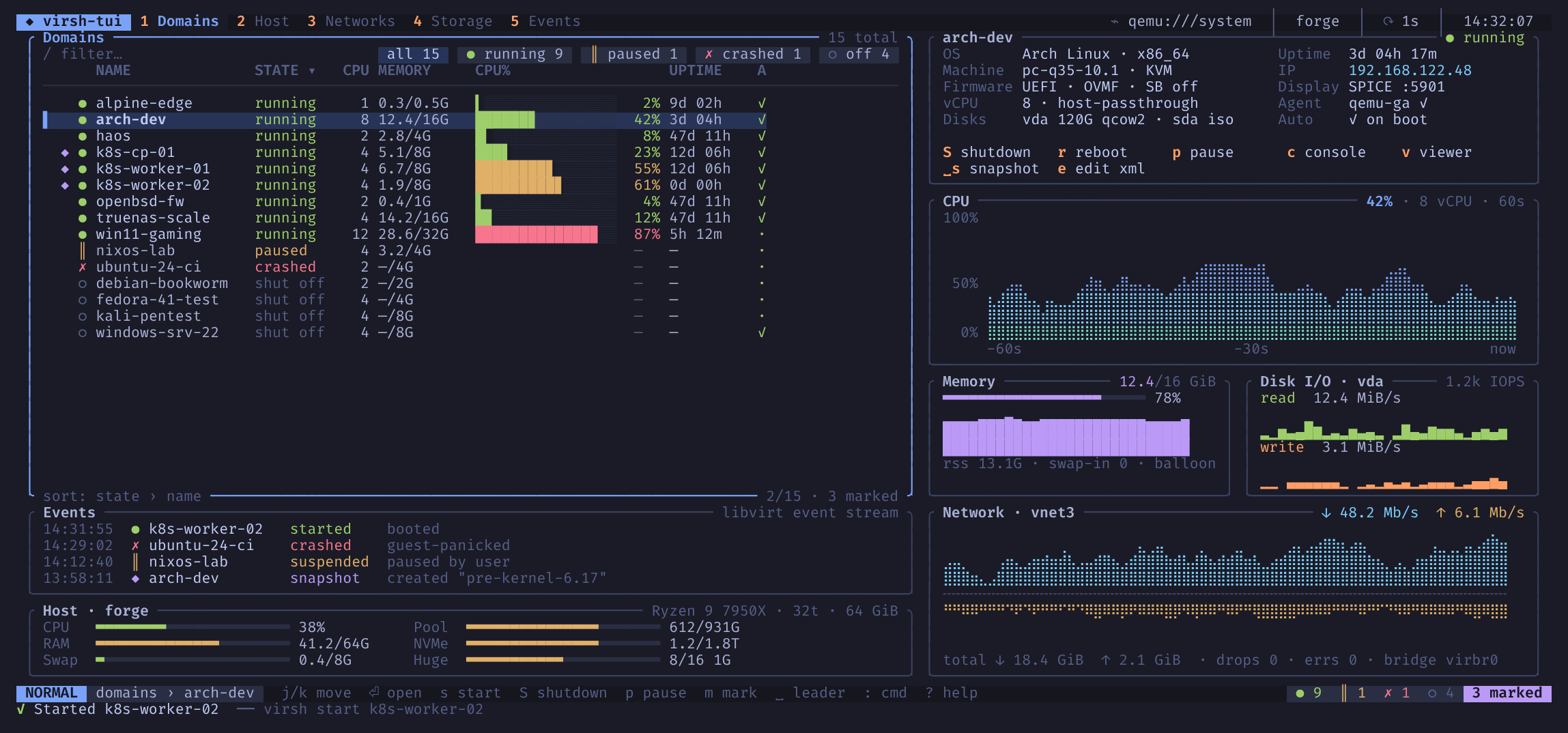
Showcase virsh-tui – a keyboard-driven TUI for libvirt/KVM, with vim keys and live graphs

10 Upvotes

https://syscallbrain.github.io/virsh-tui/images/dashboard.png

I manage my VMs with virsh and kept bouncing between virsh list --all, virsh domstats and virt-manager, so I wrote a terminal UI for it in Rust with ratatui.

Every action is a plain virsh (or virt-install) command. virsh-tui shows you the command before it runs and again after, so you know what it did and can paste it into a script later. It has the same permissions virsh has and works with qemu:///system, qemu:///session and remote hosts over qemu+ssh://.

What it does right now:

  • Domain list with filtering, sorting, marks and bulk actions

  • Start, ACPI shutdown (it waits until the guest is really off), destroy, reboot, pause, managed save, autostart

  • Per-domain monitor with vCPU, memory/balloon, disk and NIC rates, and 60 s / 5 min / 1 h history

  • A hardware editor that shows you the XML diff and the exact commands before you apply with :w

  • Snapshot tree, a host view (hugepages, KSM, pools), networks with DHCP leases, storage pools and volumes with backing chains

  • A new-domain wizard that builds the virt-install command for you

  • A : command line with Tab completion for virsh flags; anything it doesn't know goes straight to virsh

  • --dry-run prints what each key would run, and --demo lets you try it with no libvirt at all (the screenshot is from demo mode)

Linux only. Install with cargo install --locked --git https://github.com/SyscallBrain/virsh-tui (needs Rust 1.88+).

GitHub: https://github.com/SyscallBrain/virsh-tui Docs: https://syscallbrain.github.io/virsh-tui/

It's still 0.1, so bug reports and "it can't do X" comments are very welcome.


r/RatatuiRust • • 13d ago

Showcase ytmtui - a lightning-fast yt music tui (rust + mpv) [early post]

Thumbnail gallery
10 Upvotes

r/RatatuiRust • • 8d ago

Showcase Advent of Code TUI

Thumbnail
gallery
9 Upvotes

Hey so having tried Advent of Code last year, I though I would make a TUI for it. It saves your submissions via a Session cookie.

As for programming language, you can add any language you want in the config file or change it in the UI itself

It allows you to view, solve and submit advent of code problems. It also allows you to view previous year's problems.

https://github.com/craftty-org/aoc-tui


r/RatatuiRust • • 8d ago

Tutorial Getting started with TachyonFX: Adding animations to Ratatui applications

9 Upvotes

Ratatui is great for building terminal interfaces, but sometimes a static interface isn't enough. Transitions, fades and other small animations can make a TUI feel much more responsive.

That's where TachyonFX comes in.

TachyonFX is an effects and animation library built for Ratatui. It provides a collection of effects that can be composed, sequenced and applied directly to Ratatui's rendering buffer.

In this tutorial, we'll build a small application and learn how to integrate TachyonFX into a Ratatui render loop.

1. Setting up the project

Create a new Rust project:

cargo new ratatui-effects
cd ratatui-effects

Add the dependencies:

cargo add [email protected]

2. Understanding how TachyonFX works

Before writing code, there are three important things to understand:

  • Effects are stateful. Create an effect once and keep it around while it runs.

  • Effects transform rendered content. Render your widgets first, then process effects.

  • Effects need time information. Each frame, pass the elapsed time since the previous frame.

The general rendering flow looks like this:

  1. Calculate the elapsed time.

  2. Render your Ratatui widgets.

  3. Process the active TachyonFX effects.

  4. Draw the next frame.

3. Your first animation

Replace src/main.rs with:

use std::{
    io,
    time::Instant,
};

use ratatui::{
    crossterm::event::{self, Event, KeyCode},
    prelude::*,
    widgets::Paragraph,
};

use tachyonfx::{
    fx,
    EffectManager,
    Interpolation,
};

fn main() -> io::Result<()> {
    let mut terminal = ratatui::init();

    let mut effects: EffectManager<()> = EffectManager::default();

    let effect = fx::fade_to(
        Color::Cyan,
        Color::Gray,
        (1_000, Interpolation::SineIn),
    );

    effects.add_effect(effect);

    let mut last_frame = Instant::now();

    loop {
        let elapsed = last_frame.elapsed();
        last_frame = Instant::now();

        terminal.draw(|frame| {
            let area = frame.area();

            let paragraph = Paragraph::new(
                "Hello, TachyonFX!"
            )
            .alignment(Alignment::Center);

            frame.render_widget(paragraph, area);

            effects.process_effects(
                elapsed.into(),
                frame.buffer_mut(),
                area,
            );
        })?;

        if event::poll(std::time::Duration::from_millis(16))? {
            if let Event::Key(key) = event::read()? {
                if key.code == KeyCode::Char('q') {
                    break;
                }
            }
        }
    }

    ratatui::restore();

    Ok(())
}

Run it:

cargo run

You should see the text rendered in your terminal with a color transition.

Press q to exit.

4. Combining multiple effects

One of the most useful features of TachyonFX is effect composition.

You don't have to implement every animation manually. You can combine existing effects.

There are two particularly useful composition functions.

Parallel

Runs multiple effects at the same time.

let effect = fx::parallel(&[
    fx::fade_from_fg(Color::Red, 500),
    fx::coalesce(800),
]);

Sequence

Runs effects one after another.

let effect = fx::sequence(&[
    fx::fade_from_fg(Color::Black, 300),
    fx::coalesce(500),
]);

These are useful when building transitions between different screens or revealing content gradually.

5. Exploring other effects

TachyonFX includes considerably more than simple fades.

Some interesting effects to explore:

EffectPurpose
dissolveGradually dissolves content
coalesceGradually materializes content
slide_inSlides content into view
sweep_inReveals content using a sweep
evolveTransforms characters over time
explodeCreates a particle-like dispersion
hsl_shiftAnimates colors through HSL
glitchApplies glitch-style visual effects

It also supports spatial patterns such as radial, diagonal, checkerboard and spiral patterns.

You can explore interactive effect examples through TachyonFX FTL.

6. A few things to keep in mind

When integrating TachyonFX into a real application:

  • Don't recreate effects inside your render loop.

  • Keep track of elapsed time between frames.

  • Apply effects after rendering the widgets they should affect.

  • Use effect composition instead of manually implementing complex transitions.

  • Avoid unnecessary animations that make terminal interfaces harder to read.

7. Useful resources

That's the basic idea behind using TachyonFX with Ratatui.

There's a lot more to explore, especially effect composition, custom effects, cell filtering and spatial patterns.

If you've used TachyonFX in your own Ratatui projects, I'd be interested to hear how you've integrated it and what effects you've found useful.